 MC-269081
Some Realms icons are rendered behind the button in the main menu, instead of not being rendered at all
The bug
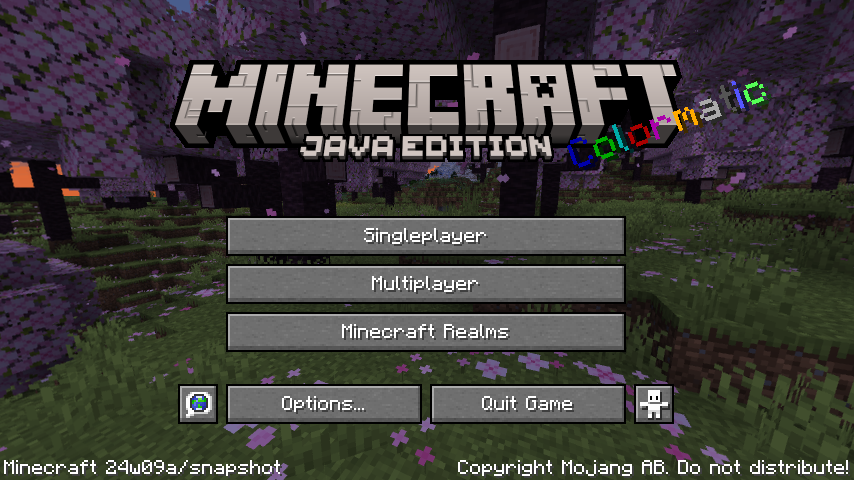
In some cases, icons relating to Realms are rendered behind the third button on the main menu, perhaps to hide them. If a transparent or translucent texture is created for buttons, these icons can be seen again.
How to reproduce
- Download and apply the attached resource pack
- Look at the main menu
Expected results
If there were no icons on the realms button beforehand before applying the resource pack, there should still not be any visible.
Actual results
There are. In my case it's gui/sprites/icon/news.png, gui/sprites/icon/trial_available.png and gui/sprites/icon/unseen_notification.png.
Linked Issues
discovered while testing1


 Normal
Created Issue:
Some Realms icons are rendered behind the button in the main menu, instead of not being rendered at all
Discovered while testing
MC-192307.The bug
In some cases, icons relating to Realms are rendered behind the third button on the main menu, perhaps to hide them. If a transparent or translucent texture is created for buttons, these icons can be seen again.
How to reproduce
- Download and apply the attached resource pack
- Look at the main menu
Expected results
If there were no icons on the realms button beforehand before applying the resource pack, there should still not be any visible.
Actual results
There are. In my case it's gui/sprites/icon/news.png, gui/sprites/icon/trial_available.png and gui/sprites/icon/unseen_notification.png.
Attachments3
![[Mod] turbo](../../../data/avatars/users/92867.png)
discovered while testing
Discovered while testing
MC-192307.The bug
In some cases, icons relating to Realms are rendered behind the third button on the main menu, perhaps to hide them. If a transparent or translucent texture is created for buttons, these icons can be seen again.
How to reproduce
- Download and apply the attached resource pack
- Look at the main menu
Expected results
If there were no icons on the realms button beforehand before applying the resource pack, there should still not be any visible.
Actual results
There are. In my case it's gui/sprites/icon/news.png, gui/sprites/icon/trial_available.png and gui/sprites/icon/unseen_notification.png.
![[Mojang] Triage Team](../../../data/avatars/users/89842.png)
![[Mojang] eowyn36](../../../data/avatars/users/18935.svg) [Mojang] eowyn36
[Mojang] eowyn36![[Bot] Piston](../../../data/avatars/users/31202.png)
Noticed this while testing MC-192307, MC-269081, MC-269152 and MC-269154.
The bug
When loading the main menu, the language and accessibility icons instantly appear at full intensity, in contrast to the buttons they're overlaid on top of and the text on other buttons.
How to reproduce
- Start the game
- Look very closely
Expected results
The accessibility icons would fade in like everything else.
Actual results
They don't.