 MC-3929
Stair Texture Problems
When placing stairs, the way it draws the texture is wrong. This is more evident on corner stairs.
The top half of the texture using normal stairs and the bottom half using upsidedown stairs, have the texture shifted out of phase with the other half by half a block, with gives a very unpesent line in the center of the block and means the texture does not match the block it is supposed to be a stair of.
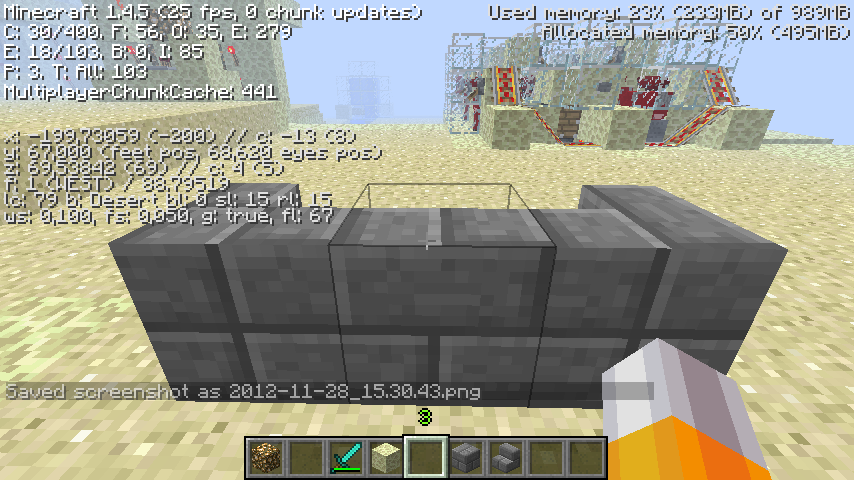
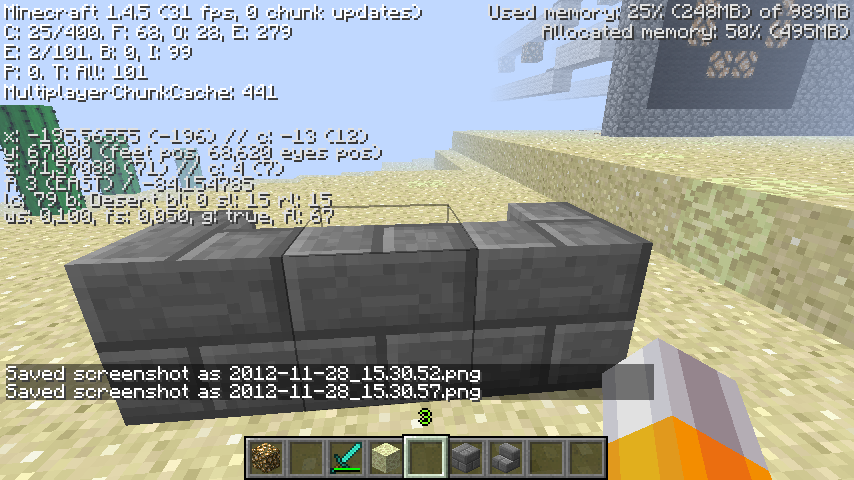
In the attatched picture the highlighted block is a corner stair with the top half of the texture shifted.
Linked Issues





Created Issue:
Stair Texture Problems
When placing stairs, the way it draws the texture is wrong. This is more evident on corner stairs.
The top half of the texture using normal stairs and the bottom half using upsidedown stairs, have the texture shifted out of phase with the other half by half a block, with gives a very unpesent line in the center of the block and means the texture does not match the block it is supposed to be a stair of.
In the attatched picture the highlighted block is a corner stair with the top half of the texture shifted.
Attachments1
is duplicated by
it is because of the stairs use stone brick texture but there are 3 types of stone brick so minecraftpe picks a random one each direction it is facing i hope this helped you
Unable to reproduce. Can you attach a screenshot to show how the stairs are laid out? Are you using any mods/high def texture packs?
Reproduced by arranging stairs in a "sofa" fashion. Issue occurs only if stairs are facing south or west.
Just a question; why does the position of things in minecraft effect so many things. Have the minecraft team tried to find what causes it cause it is pretty common. Is there a code in minecraft that would cause such a thing?
There is also a texture difference on normal stairs based on direction, see
MC-4328.West is the right side of the image
Seems to be fixed in 1.7.4, I can't reproduce it.