 Piotr Kuczynski
- wiphand
- wiphand
- Europe/Stockholm
- Yes
- No
 MC-494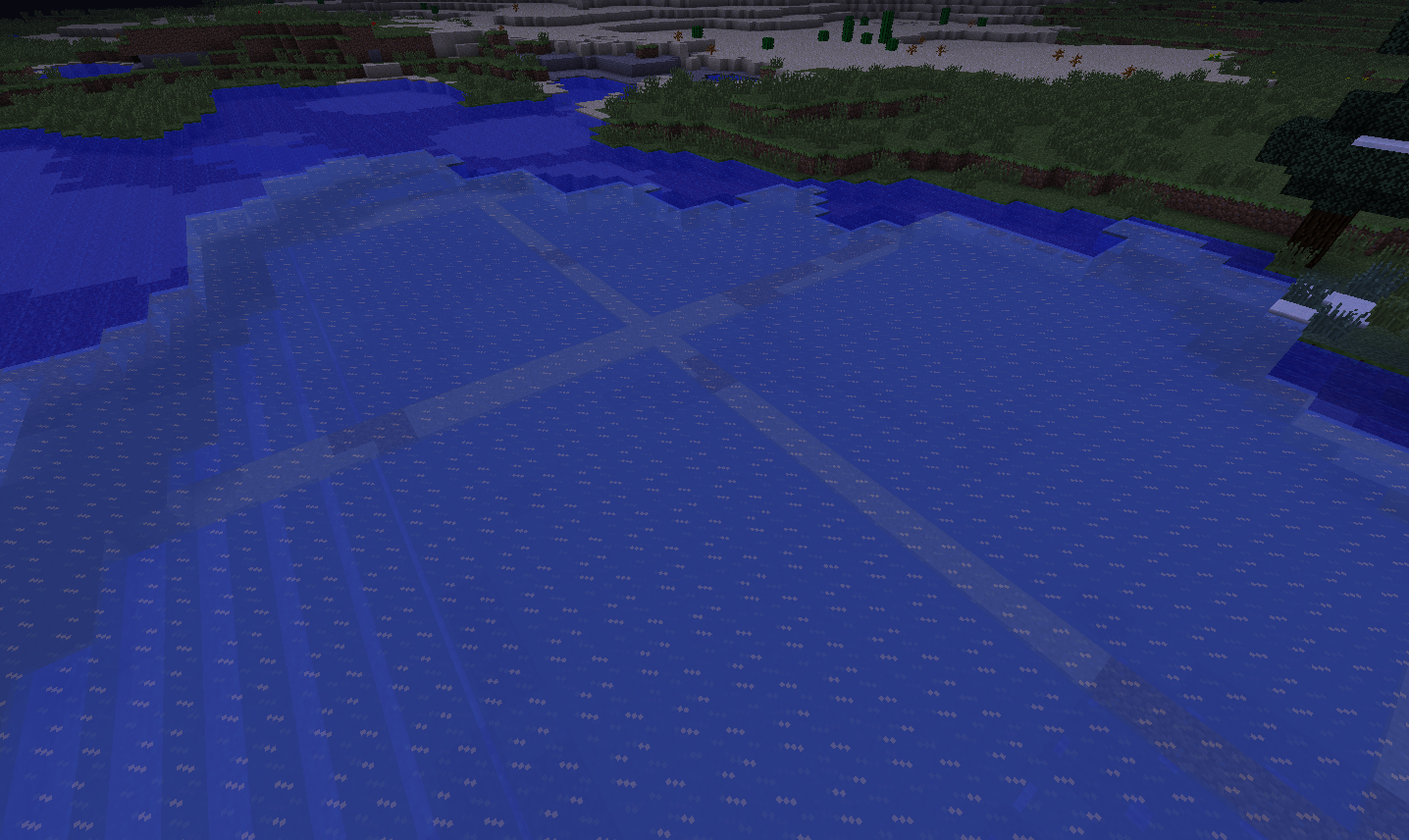

when you go to a snowy biome you can see lines in the ice that show the chunk borders. It happened in the past versions too.
Mac mountain lion. Jar version of minecraft. No modding
Mac mountain lion. Jar version of minecraft. No modding. Fast graphics
when you go to a snowy biome you can see lines in the ice that show the chunk borders. It happened in the past versions too. From what people told me it happens only on Fast graphic settings
when you go to a snowy biome you can see lines in the ice that show the chunk borders. It happened in the past versions too.
From what people told me it happens only on Fast graphic settingswhen you go to a snowy biome you can see lines in the ice that show the chunk borders. It happened in the past versions too. It happens only on Fast graphic settings. I have checked this.
crash-2013-03-17_15.14.05-client.txt
i re-downloaded everything a few times and this also happened with 1.5 as well as 1.5.1
It did the same for me but now it started working again so try to login now.
It also happened on different macs but i did not see it on windows so it might only be a mac thing.
It is kind of use full but it doesn't look to nice.
fast. that's maybe why i didn't see it on big computers cause you use fancy. It's still a weird bug tho'.
They were talking about fixing it in 1.4.* but they pushed trying to fix it in the next update. I also heard that if they fix it the way they know how to it would slow minecraft considerably.
I think that it could be because of the block update rule unless all the tests had exactly the same layout. With this layout i can't see any possible block update but i will try to recreate it.
This is not a bug. In 1.4.* they changed that items now go upwards if they are in a solid block. If you have a piller 3 by 3 and whatever you put upwards. Then if you put the items IN a center block it will now go upwards not to the nearest hole.
Just a question; why does the position of things in minecraft effect so many things. Have the minecraft team tried to find what causes it cause it is pretty common. Is there a code in minecraft that would cause such a thing?
have you looked if you are on chunk borders because maybe that's what causes it.
PS
?Activatation Bug? Activation not Activitation
Yes i'm hundred percent bout that and unfortunately i don't have an answer for this.
I have the same place where the crash is but the error log is different. i am on a mac and without mods on the newest snapshot. I attached the error log
thank you, but i tried to revert to Java 6 and i followed what apple said to do but it did not work, does anybody know how to do this? Well i have done some research around and i found out that Apple has disabled java 6 entirely in the newest update and it is no longer possible to revert. So should i start a new "bug" for this case so that mac users are gonna be able to play minecraft?
The newest apple update has disabled java 6 completely i believe so i am forced to use Java 7. But then i get the exact crash log. I asked on a diff. thread about it and a Mod told me its a problem with java 7 for me to downgrade but i cannot. I have played mine craft on Java 7 before the 1.5 update so it has to be something that was changed in the update though it doesn't make sense that it worked for me but not for you.
yes but does the search tool search screenshots and what is in the description and comments?
I wrote that in the newest Mac update it is not possible to use java six at least from what research i did but thank you very much for the patch. So i should use a nightly patch? If so which one?
Since apple has disabled the ability to use java 6 i don't believe that this is an invalid problem
my problem is that i upgraded to java seven earlier and now after the update i cannot revert back the way that apple said in the past with a post on their website because it just doesn't work. When i tried to get the new minecraft 1.5 it just crashes, i didn't update my java 7 before that so it has to be something with the update. Now i've messed around with getting new versions of java and now no minecraft whatsoever works on my laptop so i am a bit annoyed that apple did not give information on this whatsoever. edit: and David does your MC work?
I have also found out that apple is starting to transfer the control over java for macs back to oracle so it is possible that java 6 will stop being developed so this problem will either have to be resolved by oracle or Mojang but i don't know which ones fault it is, or maybe both.
Eike: not only the demo, any minecraft as far as i know.
When i updated to Mac version 10.8.3 only minecraft 1.5 did not work but previous versions worked. Then i started messing around and i made a clean java 7 install and now i cannot revert at all. I tried what apple said and i could not find any java 1.6 downloads that would work. Its starting to be really annoying cause i have this bug for so long and i don't think anybody is trying to fix it since nobody changed this issue from resolved. I love minecraft but this is forcing me not to play it. Could you possibly make a dropbox of your java 6 so that i can install it cause then at least i can play the older versions.
21 duplicates of this bug and nobody seems to care anymore. One comment from Grum that doesn't work and thats it.
yeah but nobody seems to care about that version even though there are 21 duplicates of it
thank you and yes i have tried but i will try again. And again i will say it is not possible to downgrade at least for me and i have done a lot of research and unless somebody could possibly make a download of java 1.6 for mac i don't think its possible anymore. Plus it was turned off because of security issues so not very safe to do so though i am prepared to do it. Thank you and can't wait till 1.6
no i do not have the JavaVM.framework there from what i can see. I also know that there are at least 4 "Libraries" on a mac so maybe my settings are to a different Library though that wouldn't make sense.
Edit: ok never mind i found it in the other Library i thought that system as in the hard drive but i found it. everything is there though i noticed that when i double click 1.6.0 in the versions folder it says it can't find original so maybe that.
no, i do not have the java folder.
you have the same error?
yeah, exactly the same thing for me but after i left it for a while it showed a crash report so could you try to get one too?
i'm going to re install mac from scratch and see if that fixes it, hope it will.
Ok, well that fixed it though i did not update to mac version 1.8.3 and i am doing that now, hope it won't destroy it.
Edit, tested with 1.8.3 and it worked, i don't know what the problem was but reinstalling from scratch worked, not the most efficient way though