 MC-41798
Dark borders and outlines with mip-mapping
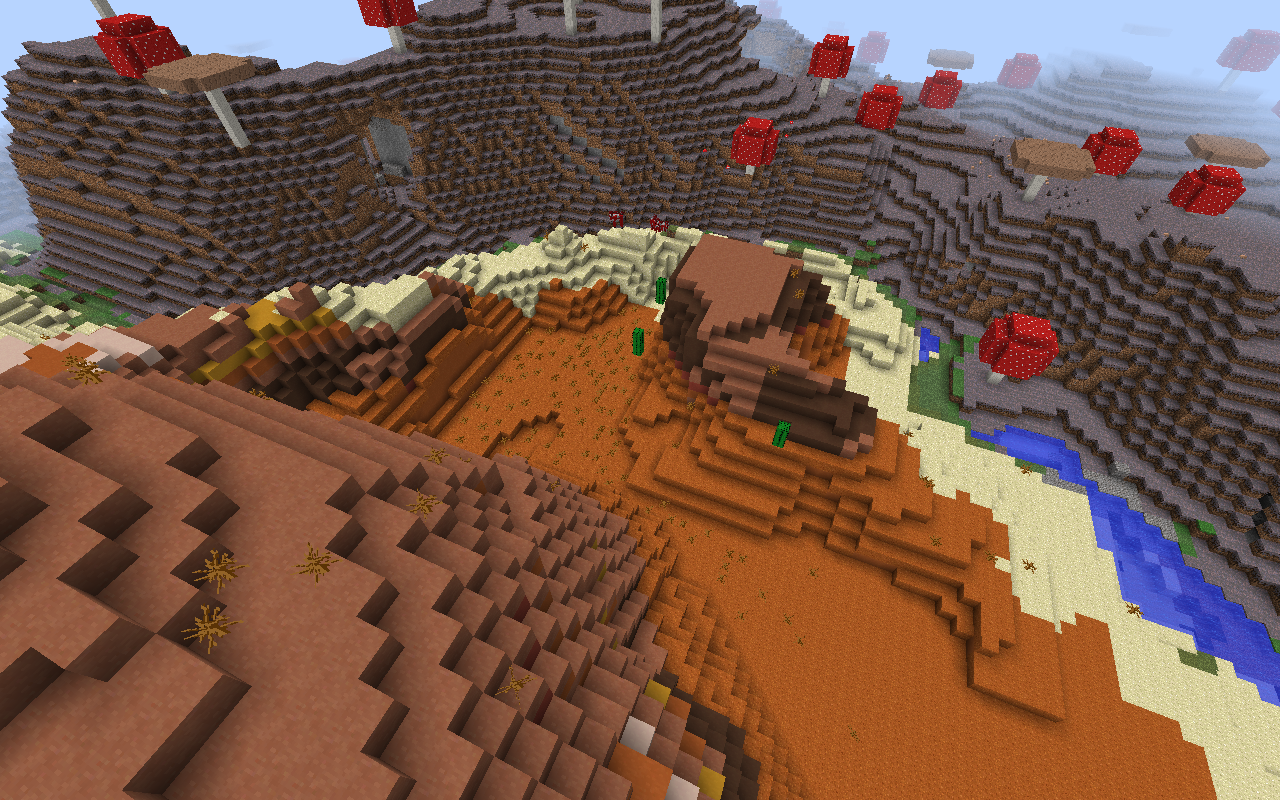
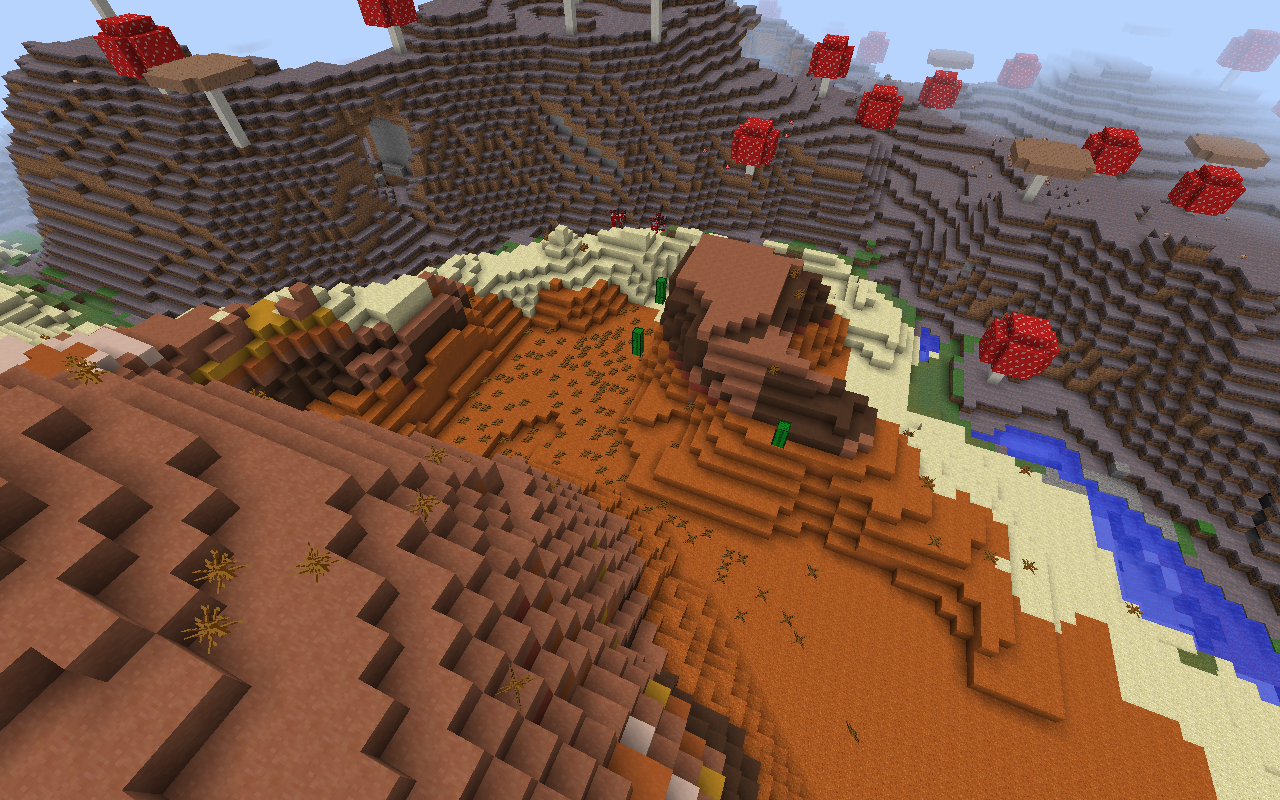
When using mip-mapping, blocks like dead bush and tall grass have a dark outline around them, making them visually unattractive at a distance. This also has a minor effect on cactus.
The anti-alias used in the image preview nullifies the effect slightly, you may have to try for yourself.
This may be cause of mip-mapping however, it looks very bad mip-mapping is supposed to smooth textures out at low angles and long distances. Mip-mapping does not do this to other 3D games I play.
Environment
Java 1.7.0_45
OS X 10.9
nVidia GeForce 320m integrated graphics, 256 shared VM
Attachments2

Created Issue:
Dark borders and outlines with mip-mapping
When using mip-mapping, blocks like dead bush and tall grass have a dark outline around them, making them visually unattractive at a distance. This also has a minor effect on cactus.
Environment
Java 1.7.0_45
OS X 10.9
nVidia GeForce 320m integrated graphics, 256 shared VM
Attachments2
When using mip-mapping, blocks like dead bush and tall grass have a dark outline around them, making them visually unattractive at a distance. This also has a minor effect on cactus.
The anti-alias used in the image preview nullifies the effect slightly, you may have to try for yourself.
When using mip-mapping, blocks like dead bush and tall grass have a dark outline around them, making them visually unattractive at a distance. This also has a minor effect on cactus.
The anti-alias used in the image preview nullifies the effect slightly, you may have to try for yourself.
This may be cause of mip-mapping however, it looks very bad and mip-mapping does not do this to other 3D programs I use.
When using mip-mapping, blocks like dead bush and tall grass have a dark outline around them, making them visually unattractive at a distance. This also has a minor effect on cactus.
The anti-alias used in the image preview nullifies the effect slightly, you may have to try for yourself.
This may be cause of mip-mapping however, it looks very bad and mip-mapping does not do this to other 3D
programs Iuse.When using mip-mapping, blocks like dead bush and tall grass have a dark outline around them, making them visually unattractive at a distance. This also has a minor effect on cactus.
The anti-alias used in the image preview nullifies the effect slightly, you may have to try for yourself.
This may be cause of mip-mapping however, it looks very bad and mip-mapping does not do this to other 3D games I play.
When using mip-mapping, blocks like dead bush and tall grass have a dark outline around them, making them visually unattractive at a distance. This also has a minor effect on cactus.
The anti-alias used in the image preview nullifies the effect slightly, you may have to try for yourself.
This may be cause of mip-mapping however, it looks very bad
and mip-mapping does not do this to other 3D games I play.When using mip-mapping, blocks like dead bush and tall grass have a dark outline around them, making them visually unattractive at a distance. This also has a minor effect on cactus.
The anti-alias used in the image preview nullifies the effect slightly, you may have to try for yourself.
This may be cause of mip-mapping however, it looks very bad mip-mapping is supposed to smooth textures out at low angles and long distances. Mip-mapping does not do this to other 3D games I play.


This ticket is incomplete without the requested information, no response has been received within a reasonable time and we are assuming this is no longer an issue. If you are still experiencing this issue, we can reopen it at your request.


I don't see a problem with it, it's hardly noticeable. Even if it is a bug, it's not a very significant one. Thank you for bringing it to our (the moderators, not my) attention, though.
It looks terrible on textures like ladders and rails too, they go all dark at the mip-maped area.
Is this still a concern in the current Minecraft version? If so, please update the affected versions in order to best aid Mojang ensuring bugs are still valid in the latest releases/pre-releases. If this has been done, we can reopen the issue.
Keep in mind that the "Resolved"-Status on this ticket just means "Answered", and that we are waiting for further information on whether this issue still exists or not. We will reopen it as soon as the requested information has been delivered.
Problem resolved/fixed, in current version.