 MC-48220
Constantly re-destroying a block with a command block eventually leads to server freezing
Set /gamerule logAdminCommands false
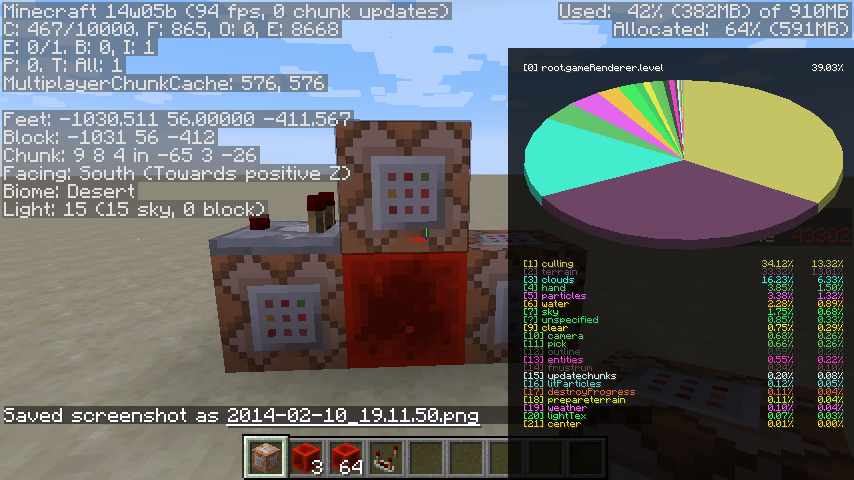
Using the "/setblock ~ ~1 ~ redstone_block 0 destroy" command in a command block, whenever the command block triggers, it will destroy and replace a redstone block powering it, causing it to trigger again, and creating a very fast clock that is very useful to power other command blocks, and that works great in 1.7.4. In these snapshots (and possibly others), after about 45 minutes of running this clock continuously (during which time the block is replaced 42.7 thousand times), the server will begin to intermittently freeze. In singleplayer, you are still able to move around (sometimes with severe lag, other times with no lag), but the clock stops, as do any mobs and other redstone circuits. Every few moments, all (or most) of the ticks that were supposed to happen while the server was frozen will happen at once, and then the server will freeze again. Attempting to place a block and then another block on top of it results in the second block disappearing the next time ticks happen, and also can lead to difficulty moving. CPU usage is at maximum; there is no significant increase in use of memory. Upon exiting the world, the main menu UI is less responsive, and closing the game takes several seconds, during which time Windows labels the process as (not responding). Attached is a video of my first encounter with the bug; I have also tested an empty world containing only this clock with no scoreboard incrementing or other redstone running and encountered the same behavior.
Suspected cause: Even when commandBlockOutput is disabled, running this command still adds a
[Server thread/INFO]: [@: Block placed]
entry to the log file every time. Eventually, this fills up the log file with so many entries that the server begins to freeze because of writing to the log file (although it actually seems to freeze whenever Java does garbage collection, but only once latest.log has grown to 4.5-6.5 MB) This explains the behavior I've found of it persisting when exiting and reopening the world (same log file) but going away if you restart Minecraft entirely (new log file). This suggests a more serious, general bug where simply running too many commands, by any means, or otherwise filling up latest.log, will cause the server to begin freezing.
Environment
Windows 7, Java 7


Created Issue:
Constantly re-destroying a block with a command block eventually leads to server freezing
Using the "/setblock ~ ~1 ~ redstone_block 0 destroy" command in a command block, whenever the command block triggers, it will destroy and replace a redstone block powering it, causing it to trigger again, and creating a very fast clock that is very useful to power other command blocks, and that works great in 1.7.4. In these snapshots (and possibly others), after about 45 minutes of running this clock continuously (during which time the block is replaced 42.7 thousand times), the server will begin to intermittently freeze. In singleplayer, you are still able to move around (sometimes with severe lag, other times with no lag), but the clock stops, as do any mobs and other redstone circuits. Every few moments, all (or most) of the ticks that were supposed to happen while the server was frozen will happen at once, and then the server will freeze again. Attempting to place a block and then another block on top of it results in the second block disappearing the next time ticks happen, and also can lead to difficulty moving. CPU usage is at maximum; there is no significant increase in use of memory. Upon exiting the world, the main menu UI is less responsive, and closing the game takes several seconds, during which time Windows labels the process as (not responding). Attached is a video of my first encounter with the bug; I have also tested an empty world containing only this clock with no scoreboard incrementing or other redstone running and encountered the same behavior.
Environment
Windows 7, Java 7
Attachments4
Using the "/setblock ~ ~1 ~ redstone_block 0 destroy" command in a command block, whenever the command block triggers, it will destroy and replace a redstone block powering it, causing it to trigger again, and creating a very fast clock that is very useful to power other command blocks, and that works great in 1.7.4. In these snapshots (and possibly others), after about 45 minutes of running this clock continuously (during which time the block is replaced 42.7 thousand times), the server will begin to intermittently freeze. In singleplayer, you are still able to move around (sometimes with severe lag, other times with no lag), but the clock stops, as do any mobs and other redstone circuits. Every few moments, all (or most) of the ticks that were supposed to happen while the server was frozen will happen at once, and then the server will freeze again. Attempting to place a block and then another block on top of it results in the second block disappearing the next time ticks happen, and also can lead to difficulty moving. CPU usage is at maximum; there is no significant increase in use of memory. Upon exiting the world, the main menu UI is less responsive, and closing the game takes several seconds, during which time Windows labels the process as (not responding). Attached is a video of my first encounter with the bug; I have also tested an empty world containing only this clock with no scoreboard incrementing or other redstone running and encountered the same behavior.
Using the "/setblock ~ ~1 ~ redstone_block 0 destroy" command in a command block, whenever the command block triggers, it will destroy and replace a redstone block powering it, causing it to trigger again, and creating a very fast clock that is very useful to power other command blocks, and that works great in 1.7.4. In these snapshots (and possibly others), after about 45 minutes of running this clock continuously (during which time the block is replaced 42.7 thousand times), the server will begin to intermittently freeze. In singleplayer, you are still able to move around (sometimes with severe lag, other times with no lag), but the clock stops, as do any mobs and other redstone circuits. Every few moments, all (or most) of the ticks that were supposed to happen while the server was frozen will happen at once, and then the server will freeze again. Attempting to place a block and then another block on top of it results in the second block disappearing the next time ticks happen, and also can lead to difficulty moving. CPU usage is at maximum; there is no significant increase in use of memory. Upon exiting the world, the main menu UI is less responsive, and closing the game takes several seconds, during which time Windows labels the process as (not responding). Attached is a video of my first encounter with the bug; I have also tested an empty world containing only this clock with no scoreboard incrementing or other redstone running and encountered the same behavior.
Suspected cause: Even when
Using the "/setblock ~ ~1 ~ redstone_block 0 destroy" command in a command block, whenever the command block triggers, it will destroy and replace a redstone block powering it, causing it to trigger again, and creating a very fast clock that is very useful to power other command blocks, and that works great in 1.7.4. In these snapshots (and possibly others), after about 45 minutes of running this clock continuously (during which time the block is replaced 42.7 thousand times), the server will begin to intermittently freeze. In singleplayer, you are still able to move around (sometimes with severe lag, other times with no lag), but the clock stops, as do any mobs and other redstone circuits. Every few moments, all (or most) of the ticks that were supposed to happen while the server was frozen will happen at once, and then the server will freeze again. Attempting to place a block and then another block on top of it results in the second block disappearing the next time ticks happen, and also can lead to difficulty moving. CPU usage is at maximum; there is no significant increase in use of memory. Upon exiting the world, the main menu UI is less responsive, and closing the game takes several seconds, during which time Windows labels the process as (not responding). Attached is a video of my first encounter with the bug; I have also tested an empty world containing only this clock with no scoreboard incrementing or other redstone running and encountered the same behavior.
Suspected cause: Even whenUsing the "/setblock ~ ~1 ~ redstone_block 0 destroy" command in a command block, whenever the command block triggers, it will destroy and replace a redstone block powering it, causing it to trigger again, and creating a very fast clock that is very useful to power other command blocks, and that works great in 1.7.4. In these snapshots (and possibly others), after about 45 minutes of running this clock continuously (during which time the block is replaced 42.7 thousand times), the server will begin to intermittently freeze. In singleplayer, you are still able to move around (sometimes with severe lag, other times with no lag), but the clock stops, as do any mobs and other redstone circuits. Every few moments, all (or most) of the ticks that were supposed to happen while the server was frozen will happen at once, and then the server will freeze again. Attempting to place a block and then another block on top of it results in the second block disappearing the next time ticks happen, and also can lead to difficulty moving. CPU usage is at maximum; there is no significant increase in use of memory. Upon exiting the world, the main menu UI is less responsive, and closing the game takes several seconds, during which time Windows labels the process as (not responding). Attached is a video of my first encounter with the bug; I have also tested an empty world containing only this clock with no scoreboard incrementing or other redstone running and encountered the same behavior.
Suspected cause: Even when commandBlockOutput is disabled, running this command still adds a [Server thread/INFO] : [@: Block placed] entry to the log file every time.
Using the "/setblock ~ ~1 ~ redstone_block 0 destroy" command in a command block, whenever the command block triggers, it will destroy and replace a redstone block powering it, causing it to trigger again, and creating a very fast clock that is very useful to power other command blocks, and that works great in 1.7.4. In these snapshots (and possibly others), after about 45 minutes of running this clock continuously (during which time the block is replaced 42.7 thousand times), the server will begin to intermittently freeze. In singleplayer, you are still able to move around (sometimes with severe lag, other times with no lag), but the clock stops, as do any mobs and other redstone circuits. Every few moments, all (or most) of the ticks that were supposed to happen while the server was frozen will happen at once, and then the server will freeze again. Attempting to place a block and then another block on top of it results in the second block disappearing the next time ticks happen, and also can lead to difficulty moving. CPU usage is at maximum; there is no significant increase in use of memory. Upon exiting the world, the main menu UI is less responsive, and closing the game takes several seconds, during which time Windows labels the process as (not responding). Attached is a video of my first encounter with the bug; I have also tested an empty world containing only this clock with no scoreboard incrementing or other redstone running and encountered the same behavior.
Suspected cause: Even when commandBlockOutput is disabled, running this command still adds a [Server thread/INFO] : [@: Block placed] entry to the log file every time.Using the "/setblock ~ ~1 ~ redstone_block 0 destroy" command in a command block, whenever the command block triggers, it will destroy and replace a redstone block powering it, causing it to trigger again, and creating a very fast clock that is very useful to power other command blocks, and that works great in 1.7.4. In these snapshots (and possibly others), after about 45 minutes of running this clock continuously (during which time the block is replaced 42.7 thousand times), the server will begin to intermittently freeze. In singleplayer, you are still able to move around (sometimes with severe lag, other times with no lag), but the clock stops, as do any mobs and other redstone circuits. Every few moments, all (or most) of the ticks that were supposed to happen while the server was frozen will happen at once, and then the server will freeze again. Attempting to place a block and then another block on top of it results in the second block disappearing the next time ticks happen, and also can lead to difficulty moving. CPU usage is at maximum; there is no significant increase in use of memory. Upon exiting the world, the main menu UI is less responsive, and closing the game takes several seconds, during which time Windows labels the process as (not responding). Attached is a video of my first encounter with the bug; I have also tested an empty world containing only this clock with no scoreboard incrementing or other redstone running and encountered the same behavior.
Suspected cause: Even when commandBlockOutput is disabled, running this command still adds a [Server thread/INFO] : [@: Block placed] entry to the log file every time. Eventually, this fills up the log file with so many entries that the server begins to freeze while writing the log file. This explains the behavior I've found of
Using the "/setblock ~ ~1 ~ redstone_block 0 destroy" command in a command block, whenever the command block triggers, it will destroy and replace a redstone block powering it, causing it to trigger again, and creating a very fast clock that is very useful to power other command blocks, and that works great in 1.7.4. In these snapshots (and possibly others), after about 45 minutes of running this clock continuously (during which time the block is replaced 42.7 thousand times), the server will begin to intermittently freeze. In singleplayer, you are still able to move around (sometimes with severe lag, other times with no lag), but the clock stops, as do any mobs and other redstone circuits. Every few moments, all (or most) of the ticks that were supposed to happen while the server was frozen will happen at once, and then the server will freeze again. Attempting to place a block and then another block on top of it results in the second block disappearing the next time ticks happen, and also can lead to difficulty moving. CPU usage is at maximum; there is no significant increase in use of memory. Upon exiting the world, the main menu UI is less responsive, and closing the game takes several seconds, during which time Windows labels the process as (not responding). Attached is a video of my first encounter with the bug; I have also tested an empty world containing only this clock with no scoreboard incrementing or other redstone running and encountered the same behavior.
Suspected cause: Even when commandBlockOutput is disabled, running this command still adds a [Server thread/INFO] : [@: Block placed] entry to the log file every time. Eventually, this fills up the log file with so many entries that the server begins to freezewhilewriting the log file. This explains the behavior I've found ofUsing the "/setblock ~ ~1 ~ redstone_block 0 destroy" command in a command block, whenever the command block triggers, it will destroy and replace a redstone block powering it, causing it to trigger again, and creating a very fast clock that is very useful to power other command blocks, and that works great in 1.7.4. In these snapshots (and possibly others), after about 45 minutes of running this clock continuously (during which time the block is replaced 42.7 thousand times), the server will begin to intermittently freeze. In singleplayer, you are still able to move around (sometimes with severe lag, other times with no lag), but the clock stops, as do any mobs and other redstone circuits. Every few moments, all (or most) of the ticks that were supposed to happen while the server was frozen will happen at once, and then the server will freeze again. Attempting to place a block and then another block on top of it results in the second block disappearing the next time ticks happen, and also can lead to difficulty moving. CPU usage is at maximum; there is no significant increase in use of memory. Upon exiting the world, the main menu UI is less responsive, and closing the game takes several seconds, during which time Windows labels the process as (not responding). Attached is a video of my first encounter with the bug; I have also tested an empty world containing only this clock with no scoreboard incrementing or other redstone running and encountered the same behavior.
Suspected cause: Even when commandBlockOutput is disabled, running this command still adds a [Server thread/INFO] : [@: Block placed] entry to the log file every time. Eventually, this fills up the log file with so many entries that the server begins to freeze because of writing to the log file (although it actually seems to freeze whenever Java does garbage collection, but only once latest.log has grown to 4.5-6.5 MB) This explains the behavior I've found of it persisting when exiting and reopening the world (same log file) but going away if you restart Minecraft entirely (new log file).
Using the "/setblock ~ ~1 ~ redstone_block 0 destroy" command in a command block, whenever the command block triggers, it will destroy and replace a redstone block powering it, causing it to trigger again, and creating a very fast clock that is very useful to power other command blocks, and that works great in 1.7.4. In these snapshots (and possibly others), after about 45 minutes of running this clock continuously (during which time the block is replaced 42.7 thousand times), the server will begin to intermittently freeze. In singleplayer, you are still able to move around (sometimes with severe lag, other times with no lag), but the clock stops, as do any mobs and other redstone circuits. Every few moments, all (or most) of the ticks that were supposed to happen while the server was frozen will happen at once, and then the server will freeze again. Attempting to place a block and then another block on top of it results in the second block disappearing the next time ticks happen, and also can lead to difficulty moving. CPU usage is at maximum; there is no significant increase in use of memory. Upon exiting the world, the main menu UI is less responsive, and closing the game takes several seconds, during which time Windows labels the process as (not responding). Attached is a video of my first encounter with the bug; I have also tested an empty world containing only this clock with no scoreboard incrementing or other redstone running and encountered the same behavior.
Suspected cause: Even when commandBlockOutput is disabled, running this command still adds a [Server thread/INFO] : [@: Block placed] entry to the log file every time. Eventually, this fills up the log file with so many entries that the server begins to freeze because of writing to the log file (although it actually seems to freeze whenever Java does garbage collection, but only once latest.log has grown to 4.5-6.5 MB) This explains the behavior I've found of it persisting when exiting and reopening the world (same log file) but going away if you restart Minecraft entirely (new log file). This suggests a more serious, general bug where simply running too many commands, by any means, or otherwise filling up latest.log, will cause the server to begin freezing.
Using the "/setblock ~ ~1 ~ redstone_block 0 destroy" command in a command block, whenever the command block triggers, it will destroy and replace a redstone block powering it, causing it to trigger again, and creating a very fast clock that is very useful to power other command blocks, and that works great in 1.7.4. In these snapshots (and possibly others), after about 45 minutes of running this clock continuously (during which time the block is replaced 42.7 thousand times), the server will begin to intermittently freeze. In singleplayer, you are still able to move around (sometimes with severe lag, other times with no lag), but the clock stops, as do any mobs and other redstone circuits. Every few moments, all (or most) of the ticks that were supposed to happen while the server was frozen will happen at once, and then the server will freeze again. Attempting to place a block and then another block on top of it results in the second block disappearing the next time ticks happen, and also can lead to difficulty moving. CPU usage is at maximum; there is no significant increase in use of memory. Upon exiting the world, the main menu UI is less responsive, and closing the game takes several seconds, during which time Windows labels the process as (not responding). Attached is a video of my first encounter with the bug; I have also tested an empty world containing only this clock with no scoreboard incrementing or other redstone running and encountered the same behavior.
Suspected cause: Even when commandBlockOutput is disabled, running this command still adds a [Server thread/INFO] : [@: Block placed] entry to the log file every time. Eventually, this fills up the log file with so many entries that the server begins to freeze because of writing to the log file (although it actually seems to freeze whenever Java does garbage collection, but only once latest.log has grown to 4.5-6.5 MB) This explains the behavior I've found of it persisting when exiting and reopening the world (same log file) but going away if you restart Minecraft entirely (new log file). This suggests a more serious, general bug where simply running too many commands, by any means, or otherwise filling up latest.log, will cause the server to begin freezing.
WORKAROUND: Set /gamerule logAdminCommands false

Using the "/setblock ~ ~1 ~ redstone_block 0 destroy" command in a command block, whenever the command block triggers, it will destroy and replace a redstone block powering it, causing it to trigger again, and creating a very fast clock that is very useful to power other command blocks, and that works great in 1.7.4. In these snapshots (and possibly others), after about 45 minutes of running this clock continuously (during which time the block is replaced 42.7 thousand times), the server will begin to intermittently freeze. In singleplayer, you are still able to move around (sometimes with severe lag, other times with no lag), but the clock stops, as do any mobs and other redstone circuits. Every few moments, all (or most) of the ticks that were supposed to happen while the server was frozen will happen at once, and then the server will freeze again. Attempting to place a block and then another block on top of it results in the second block disappearing the next time ticks happen, and also can lead to difficulty moving. CPU usage is at maximum; there is no significant increase in use of memory. Upon exiting the world, the main menu UI is less responsive, and closing the game takes several seconds, during which time Windows labels the process as (not responding). Attached is a video of my first encounter with the bug; I have also tested an empty world containing only this clock with no scoreboard incrementing or other redstone running and encountered the same behavior.
Suspected cause: Even when commandBlockOutput is disabled, running this command still adds a [Server thread/INFO] : [@: Block placed]entry to the log file every time. Eventually, this fills up the log file with so many entries that the server begins to freeze because of writing tothe log file (although it actually seems to freeze whenever Java does garbage collection, but only once latest.log hasgrown to 4.5-6.5 MB) This explains the behavior I've found of it persisting when exiting and reopening the world (same log file) but going away if you restartMinecraft entirely (new log file). This suggests a more serious, general bug where simply running too many commands, by any means, or otherwise filling up latest.log, will cause the server to begin freezing.
WORKAROUND: Set /gamerule logAdminCommands falseWORKAROUNDSet /gamerule logAdminCommands false
Using the "/setblock ~ ~1 ~ redstone_block 0 destroy" command in a command block, whenever the command block triggers, it will destroy and replace a redstone block powering it, causing it to trigger again, and creating a very fast clock that is very useful to power other command blocks, and that works great in 1.7.4. In these snapshots (and possibly others), after about 45 minutes of running this clock continuously (during which time the block is replaced 42.7 thousand times), the server will begin to intermittently freeze. In singleplayer, you are still able to move around (sometimes with severe lag, other times with no lag), but the clock stops, as do any mobs and other redstone circuits. Every few moments, all (or most) of the ticks that were supposed to happen while the server was frozen will happen at once, and then the server will freeze again. Attempting to place a block and then another block on top of it results in the second block disappearing the next time ticks happen, and also can lead to difficulty moving. CPU usage is at maximum; there is no significant increase in use of memory. Upon exiting the world, the main menu UI is less responsive, and closing the game takes several seconds, during which time Windows labels the process as (not responding). Attached is a video of my first encounter with the bug; I have also tested an empty world containing only this clock with no scoreboard incrementing or other redstone running and encountered the same behavior.
Suspected cause: Even when commandBlockOutput is disabled, running this command still adds a[Server thread/INFO]: [@: Block placed]entry to the log file every time. Eventually, this fills up the log file with so many entries that the server begins to freeze because of writing to the log file (although it actually seems to freeze whenever Java does garbage collection, but only once latest.log has grown to 4.5-6.5 MB) This explains the behavior I've found of it persisting when exiting and reopening the world (same log file) but going away if you restart Minecraft entirely (new log file). This suggests a more serious, general bug where simply running too many commands, by any means, or otherwise filling up latest.log, will cause the server to begin freezing.

14w05b is outdated, use 14w06b
@Kumasasa I tested it individually, with no scoreboard, on 14w06b, and got the same behavior.
Its because your memory is being used up.
@Fluffy89502 No; as the video and screenshots show, I have plenty of memory remaining (about 50% is allocated when I open the world, and it climbs to only 60% allocated.)
Retested in 14w07a; still occurs, but took more time to do so, about 1 hour (this may be just random)
confirmed in 14w11b
There's a command in one of the latest snapshots to make commandblocks stop logging. Not the one that makes it stop saying "block placed" aloud, but a newer one that stops the log from logging it. Of course that doesn't solve the underlying problem, it's just a workaround.
Is this still a concern in the current Minecraft version 14w21b / Launcher version 1.4.4 or later? If so, please update the affected versions in order to best aid Mojang ensuring bugs are still valid in the latest releases/pre-releases.
Confirmed in 14w21b
Tried with /gamerule logAdminCommands false and did not encounter the problem
Is this still a concern in the current Minecraft version 1.8.1 Prerelease 3 or later? If so, please update the affected versions in order to best aid Mojang ensuring bugs are still valid in the latest releases/pre-releases.
Seems to be fixed in 1.8.1.
Resolving it as such, thanks.