 MC-62583
Destroying the last block model in a chunk causes ghost blocks
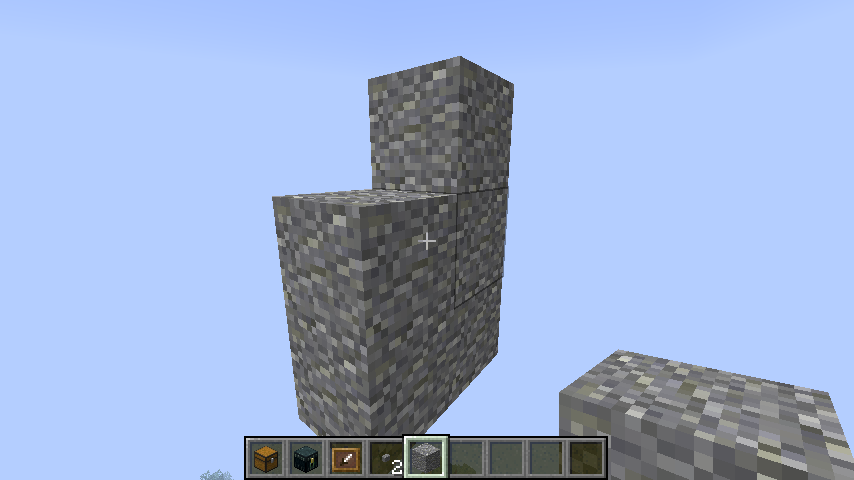
If you destroy the final block model in a 16 3 chunk, it becomes a ghost block until you either add a block model back into the chunk or use F3 + A.
Block models are all blocks except chests, ender chests, signs, and barriers.
Steps to reproduce:
- Fly into the air until you are at least 16 blocks above all terrain
- Use the command /setblock ~ ~ ~ stone
- Break the stone block, notice it still renders
- Press F3 + A, notice it disappears
Environment
Windows 7, NVIDIA graphics card
Linked Issues
Attachments1

Created Issue:
Destorying the last block model in a chunk causes ghost blocks
If you destroy the final block model in a 16 3 chunk, it becomes a ghost block until you either add a block model back into the chunk or use F3 + A.
Block models are all blocks except chests, ender chests, signs, and barriers.
Environment
Windows 7, NVIDIA graphics card
Attachments1
If you destroy the final block model in a 16 3 chunk, it becomes a ghost block until you either add a block model back into the chunk or use F3 + A.
Block models are all blocks except chests, ender chests, signs, and barriers.
Steps to reproduce:
- Fly into the air until you are at least 16 blocks above all terrain
- Use the command /setblock ~ ~ ~ stone
- Break the stone block, notice it still renders
- Press F3 + A, notice it disappears

duplicates
Destorying the last block model in a chunk causes ghost blocksDestroying the last block model in a chunk causes ghost blocks
As MC-62582 is marked as a duplicate of this one, I will mention it here.
Chests, signs, and ender chests do not render if they are in a 16 3 chunk with no block models
Block models are any block except chests, signs, ender chests, and barriers
And from MC-62583, a more consistent way to reproduce the ghost blocks is to destroy the last block in a 16 3 chunk
Dupe of
MC-62166Related to, but not the same, as it is very consistent, and only on the emptying of a chunk.