 MCD-2586
Crash to Desktop during Stage loading screen Windows 10 Store Version
Game worked great from release (May 26) till Thursday (May 28).
I was playing my offline character. Cousin gets home from work, time to play my online character. Without shutting down the game. I left my offline game. Took me to character select screen. Waited for my cousin to create a game. Saw his game I joined. During the load screen. Cube spinning bottom left corner. I crashed to desktop (CtD). No error message. Log back in. At the character select screen choose my cousins online game. At loading screen spinning cube bottom left corner... CtD no error message. I can always get to character select screen but it always crash to desktop on loading into the world. He is what I have done and it still CtD.
1.Uninstall / reinstall - Still CtD
2. Create New character play offline - Still CtD
3. Create New Character play online - Still CtD
4. Format Hard drive reinstalled Windows 10 Pro and MCD - Still CtD.
5. Tried wireless internet, LAN , other peoples house internet- Still CtD
Now the interesting part.
Cousin can still play. I log into character select choose his online game. He gets booted and gets "Can not verify owner" Crash.
He shuts the game down restarts. Logs in with no problem and creates a online game. Again, I join it - It crashes his game and he gets "Can not verify owner" Crash.
We invite another friend of ours. So now we doing 3 man. I of course still this whole time can't get past the character select screen - still no CtD message. Cousin makes another online game. Our 3rd buddy logs into cousins online game. They have no problems. I try to join - cousin's game world crashes and 'Can not verify owner" Now the third buddy. He is still in the game he didnt create or host. playing like normal.
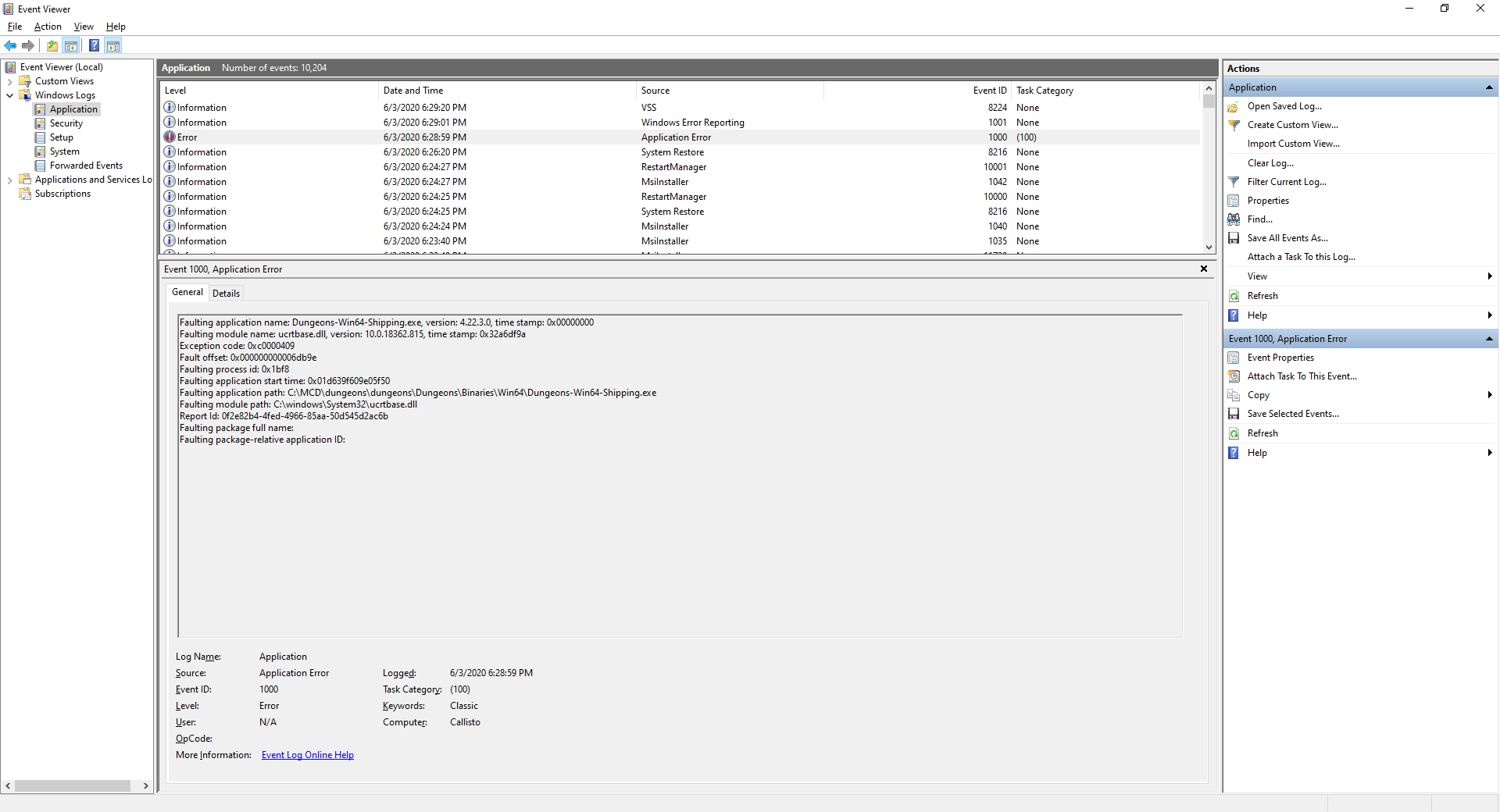
If I try to join a game and click on whoever is in the multiplayer game to join. That person gets kicked and they get "Can not verify owner". As of today it is still doing it. I hope this brings some insight and help. Here are some Event Viewer Messages and a file created by windows. I hope this helps.
Faulting application name: Dungeons.exe, version: 0.0.0.0, time stamp: 0x00000000
Faulting module name: ucrtbase.dll, version: 10.0.18362.815, time stamp: 0x32a6df9a
Exception code: 0xc0000409
Fault offset: 0x000000000006db9e
Faulting process id: 0x3660
Faulting application start time: 0x01d636ef6483299c
Faulting application path: C:\Program Files\WindowsApps\Microsoft.Lovika_1.1.1.0_x64__8wekyb3d8bbwe\Dungeons\Binaries\Win64\Dungeons.exe
Faulting module path: C:\Windows\System32\ucrtbase.dll
Report Id: 04379014-54f2-486b-a5aa-f9010024e5cc
Faulting package full name: Microsoft.Lovika_1.1.1.0_x64__8wekyb3d8bbwe
Faulting package-relative application ID: Game
Fault bucket 1746204718440579257, type 5
Event Name: MoBEX
Response: Not available
Cab Id: 0
Problem signature:
P1: Microsoft.Lovika_1.1.1.0_x64__8wekyb3d8bbwe
P2: praid:Game
P3: 0.0.0.0
P4: 00000000
P5: ucrtbase.dll
P6: 10.0.18362.815
P7: 32a6df9a
P8: 000000000006db9e
P9: c0000409
P10: 0000000000000007
Attached files:
\\?\C:\ProgramData\Microsoft\Windows\WER\Temp\WER1648.tmp.mdmp
\\?\C:\ProgramData\Microsoft\Windows\WER\Temp\WER182D.tmp.WERInternalMetadata.xml
\\?\C:\ProgramData\Microsoft\Windows\WER\Temp\WER183E.tmp.xml
\\?\C:\ProgramData\Microsoft\Windows\WER\Temp\WER184B.tmp.csv
\\?\C:\ProgramData\Microsoft\Windows\WER\Temp\WER186C.tmp.txt
These files may be available here:
\\?\C:\ProgramData\Microsoft\Windows\WER\ReportArchive\AppCrash_Microsoft.Lovika_99a51ccdbbb15994d640abca4b915040b2446c_2fd48e88_dd7aca57-d503-42b5-b137-c96e8b94f634
Analysis symbol:
Rechecking for solution: 0
Report Id: 04379014-54f2-486b-a5aa-f9010024e5cc
Report Status: 268435456
Hashed bucket: 810d628c75b61734083bc3f08bc300b9
Cab Guid: 0




- Invalid
 Christopher Cline
- 3
- 3
- Unconfirmed
- Windows
- Windows 10 Pro 1909 Build:18363.836
- Version #19500
Created Issue:
Crash to Desktop during Stage loading screen Windows 10 Store Version
Game worked great from release (May 26) till Thursday (May 28).
I was playing my offline character. Cousin gets home from work, time to play my online character. Without shutting down the game. I left my offline game. Took me to character select screen. Waited for my cousin to create a game. Saw his game I joined. During the load screen. Cube spinning bottom left corner. I crashed to desktop (CtD). No error message. Log back in. At the character select screen choose my cousins online game. At loading screen spinning cube bottom left corner... CtD no error message. I can always get to character select screen but it always crash to desktop on loading into the world. He is what I have done and it still CtD.
1.Uninstall / reinstall - Still CtD
2. Create New character play offline - Still CtD
3. Create New Character play online - Still CtD
4. Format Hard drive reinstalled Windows 10 Pro and MCD - Still CtD.
5. Tried wireless internet, LAN , other peoples house internet- Still CtD
Now the interesting part.
Cousin can still play. I log into character select choose his online game. He gets booted and gets "Can not verify owner" Crash.
He shuts the game down restarts. Logs in with no problem and creates a online game. Again, I join it - It crashes his game and he gets "Can not verify owner" Crash.
We invite another friend of ours. So now we doing 3 man. I of course still this whole time can't get past the character select screen - still no CtD message. Cousin makes another online game. Our 3rd buddy logs into cousins online game. They have no problems. I try to join - cousin's game world crashes and 'Can not verify owner" Now the third buddy. He is still in the game he didnt create or host. playing like normal.
If I try to join a game and click on whoever is in the multiplayer game to join. That person gets kicked and they get "Can not verify owner". As of today it is still doing it. I hope this brings some insight and help. Here are some Event Viewer Messages and a file created by windows. I hope this helps.
Faulting application name: Dungeons.exe, version: 0.0.0.0, time stamp: 0x00000000
Faulting module name: ucrtbase.dll, version: 10.0.18362.815, time stamp: 0x32a6df9a
Exception code: 0xc0000409
Fault offset: 0x000000000006db9e
Faulting process id: 0x3660
Faulting application start time: 0x01d636ef6483299c
Faulting application path: C:\Program Files\WindowsApps\Microsoft.Lovika_1.1.1.0_x64__8wekyb3d8bbwe\Dungeons\Binaries\Win64\Dungeons.exe
Faulting module path: C:\Windows\System32\ucrtbase.dll
Report Id: 04379014-54f2-486b-a5aa-f9010024e5cc
Faulting package full name: Microsoft.Lovika_1.1.1.0_x64__8wekyb3d8bbwe
Faulting package-relative application ID: Game
Fault bucket 1746204718440579257, type 5
Event Name: MoBEX
Response: Not available
Cab Id: 0Problem signature:
P1: Microsoft.Lovika_1.1.1.0_x64__8wekyb3d8bbwe
P2: praid:Game
P3: 0.0.0.0
P4: 00000000
P5: ucrtbase.dll
P6: 10.0.18362.815
P7: 32a6df9a
P8: 000000000006db9e
P9: c0000409
P10: 0000000000000007Attached files:
\\?\C:\ProgramData\Microsoft\Windows\WER\Temp\WER1648.tmp.mdmp
\\?\C:\ProgramData\Microsoft\Windows\WER\Temp\WER182D.tmp.WERInternalMetadata.xml
\\?\C:\ProgramData\Microsoft\Windows\WER\Temp\WER183E.tmp.xml
\\?\C:\ProgramData\Microsoft\Windows\WER\Temp\WER184B.tmp.csv
\\?\C:\ProgramData\Microsoft\Windows\WER\Temp\WER186C.tmp.txtThese files may be available here:
\\?\C:\ProgramData\Microsoft\Windows\WER\ReportArchive\AppCrash_Microsoft.Lovika_99a51ccdbbb15994d640abca4b915040b2446c_2fd48e88_dd7aca57-d503-42b5-b137-c96e8b94f634Analysis symbol:
Rechecking for solution: 0
Report Id: 04379014-54f2-486b-a5aa-f9010024e5cc
Report Status: 268435456
Hashed bucket: 810d628c75b61734083bc3f08bc300b9
Cab Guid: 0
Attachments1
- Unresolved
- Open
- Unconfirmed
- Windows
- Windows 10 Pro 1909 Build:18363.836
- Version #19500
![[Mojang] Mega_Spud (Jay Wells)](../../../data/avatars/users/92696.png)
duplicates
duplicates
![[Mod] LateLag](../../../data/avatars/users/92884.png)
so after reinstalling 2 versions of the game, both hero Editions.. and reaching out to the Community help i was told to post my issue here....
So lets start at the beginning.
Day One: Purchased the game, played for a few hours, game crashed, couldn't verify ownership.
Solved(Due to Xbox outage that day)Day three or four: Playing with sister, and streaming, game suddenly crashes, no error message, no reason, just crashes. Uninstalled, reinstalled, still CtD
Today: still CtD, but seems to only be when there is an internet connection, if pc is completely offline, the game works fine, but the second an internet connection happens, CtD, no error, no warning, will not work period. Can not play it with an internet connection at all
Also today Reached out to the McD Community help, i did the whole sfc scannow bit and it was after that i discovered i could play offline offline, but not with anyone.... images of everything are following
launcher_log.txt
The SFC Scannow results:
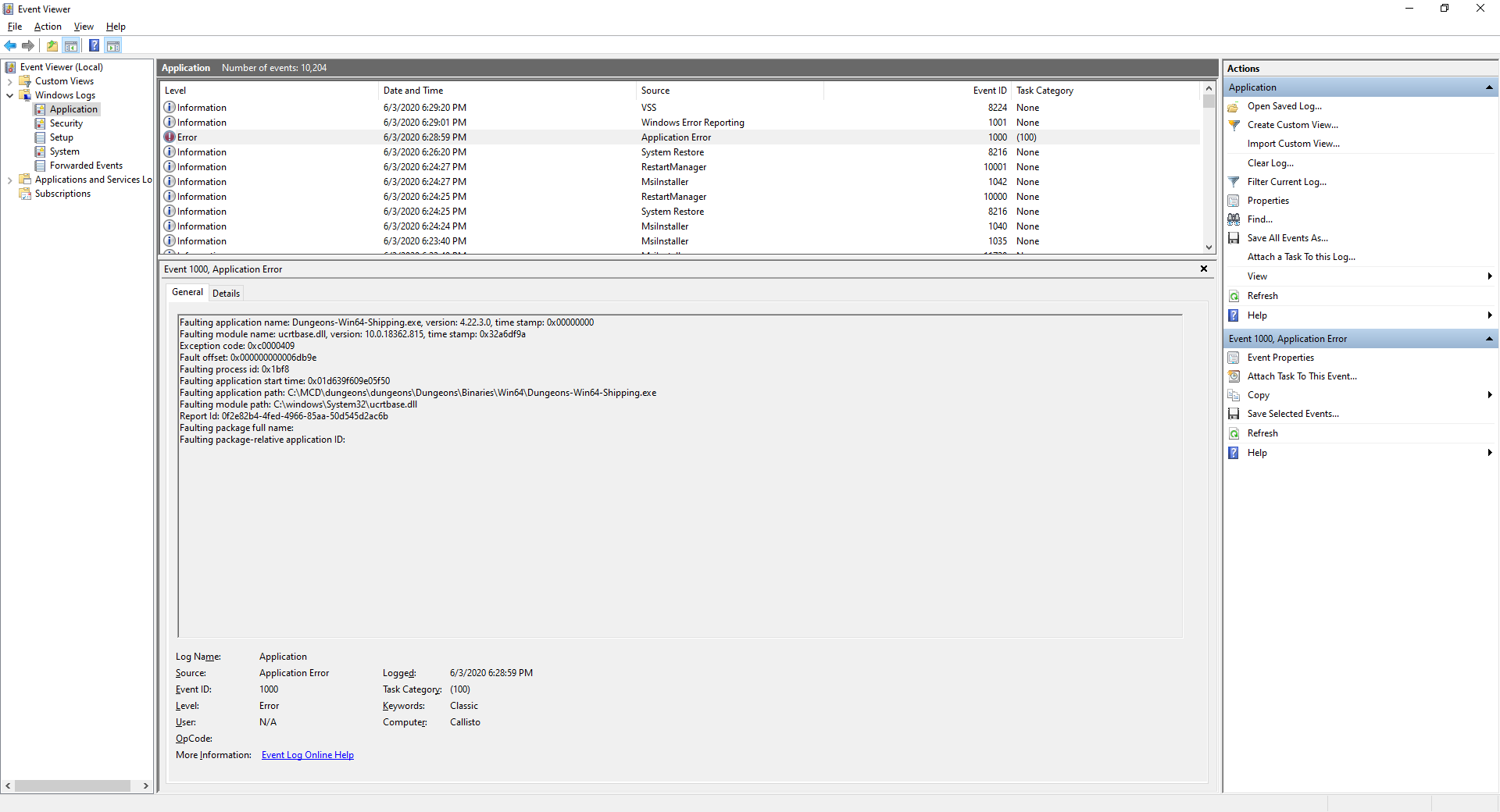
and heres the Event Viewer images
Same issue here. I just got hit with the crash today and couldn't figure out why. restarted and reinstalled multiple times, even tried deleting a backup character and creating a new one, still doesn't seem to work.
Thank you for your report!
However, this issue is Invalid.
This is a technical support issue; this site is for bug reports only. We do not have the resources to provide you with technical support.
Please contact the Community Support.
Quick Links:
📓 Issue Guidelines – 💬 Community Support – 📧 Customer Support – ✍️ Feedback and Suggestions – 📖 Game Wiki – 📖 FAQs