![[Mod] SPGoding](../../../data/avatars/users/44622.png) [Mod] SPGoding
[Mod] SPGoding
- SPGoding
- spgoding
- America/Chicago
- Yes
- No
 MC-125968
![[Mojang] slicedlime](../../../data/assets/gravatar/slicedlime.jpeg)
 MCPE-54162
![[Mojang] Matthew Gatland](../../../data/avatars/users/43046.png)
 Low
Low WEB-1649
![[Mojang] Web Team](../../../data/avatars/users/10122.svg)

 MCD-109
![[Mojang] elvendorke](../../../data/avatars/users/81677.png)










 MCL-12556





'/execute if score @p test matches 1.. run say hi'doesn't work.What I expected to happen was...:
If my score of test is larger than 1, I will say "hi".What actually happened was...:
It thorws an error. But when I typed'..1'(not'1..'), it works well.Steps to Reproduce:
1. Type'/execute if score matches 1.. run say hi'`/execute if score @p test matches 1.. run say hi` doesn't work.
What I expected to happen was...:
If my score of test is larger than 1, I will say "hi".What actually happened was...:
It thorws an error. But when I typed `..1`(not `1..`), it works well.Steps to Reproduce:
1. Type `/execute if score matches 1.. run say hi`
When the target entity is too far from the player in /spectate command, the player can just fly away at clientside.
Steps to Reproduce:
1. Change your game mode to spectator: /gamemode spectator
2. Summon an entity, like armor stand: /summon minecraft:armor_stand ~ ~ ~ {Tags: ["target"]}
3. Make the current chunk forceloaded in case the entity despawns: /forceload add ~ ~
4. Fly away, or use command: /tp ~123 ~ ~
5. Use spectate command: /spectate @e[limit=1,tag=target]
6.You can fly to anywhere freely at clientside.
- You can find that you don't move at serverside by executing /data get entity @s Pos
When the target entity is too far from the player in /spectate command, the player can just fly away at clientside.
Steps to Reproduce:
1. Change your game mode to spectator: /gamemode spectator
2. Summon an entity, like an armor stand: /summon minecraft:armor_stand ~ ~ ~ {Tags: ["target"]}
3. Make the current chunk forceloaded in case the entity despawns: /forceload add ~ ~
4. Fly away, or use command: /tp ~1234 ~ ~
5. Use spectate command: /spectate @e[limit=1,tag=target]
6.
- You can find that you don't move at serverside by executing /data get entity @s Pos
Windows 10, JRE 1.8.0_221
/spectate commanddoesn't spectateclient-sidewhen the target is too farWhen the target in /specate command is too far, the player's movement is not restricted at client-side
When the target in /specate command is too far, the player's movementisnot restricted at client-sideWhen the target in /specate command is too far, the player's movement will not be restricted at client-side
When the target entity is too far from the player in /spectate command, the player can just fly away at clientside.
Steps to Reproduce:
1. Change your game mode to spectator: /gamemode spectator
2. Summon an entity, like an armor stand: /summon minecraft:armor_stand ~ ~ ~ {Tags: ["target"]}
3. Make the current chunk forceloaded in case the entity despawns: /forceload add ~ ~
4. Fly away, or use command: /tp ~1234 ~ ~
5. Use spectate command: /spectate @e[limit=1,tag=target]
6.
- You can find that you don't move at serverside by executing /data get entity @s Pos
Steps to Reproduce:
1. Change your game mode to spectator: /gamemode spectator
2. Summon an entity, like an armor stand: /summon minecraft:armor_stand ~ ~ ~ {Tags: ["target"]}
3. Make the current chunk forceloaded in case the entity despawns: /forceload add ~ ~
4. Fly away, or use command: /tp ~1234 ~ ~
5. Use spectate command: /spectate @e[limit=1,tag=target]
6.
- You can find that you don't move at serverside by executing /data get entity @s Pos
To Reproduce
- Change your game mode to spectator.
gamemode spectator
- Summon an entity, like an armor stand.
summon minecraft:armor_stand ~ ~ ~ {Tags: ["target"]}
- Make the current chunk forceloaded in case the entity despawns.
forceload add ~ ~
- Fly away, or use command.
tp ~1234 ~ ~
- Use spectate command.
spectate @e[limit=1,tag=target]
- You can find that you don't move at serverside by executing
/data get entity @s Pos
To Reproduce
- Change your game mode to spectator.
gamemode spectator
- Summon an entity, like an armor stand.
summon minecraft:armor_stand ~ ~ ~ {Tags: ["target"]}
- Make the current chunk forceloaded in case the entity despawns.
forceload add ~ ~
- Fly away, or use command.
tp ~1234 ~ ~
- Use spectate command.
spectate @e[limit=1,tag=target]
- You can find that you don't move at serverside by executing
/data get entity @s PosTo Reproduce
- Change your game mode to spectator.
- Summon an entity, like an armor stand.
summon minecraft:armor_stand ~ ~ ~ {Tags: ["target"]}- Make the current chunk forceloaded in case the entity despawns.
- Fly away, or use command.
- Use spectate command.
- You can find that you don't move at serverside by executing
To Reproduce
- Change your game mode to spectator.
- Summon an entity, like an armor stand.
/summon minecraft:armor_stand ~ ~ ~ {Tags: ["target"]}- Make the current chunk forceloaded in case the entity despawns.
- Fly away, or use command.
- Use spectate command.
- You can find that you don't move at serverside by executing
Duplicate of
MC-163110.
See
MC-159469.
Duplicates MC-154881.
Relates to
MC-9553.Reproduce steps
1. Create a team: /team add test
2. Summon an invisible entity belonging to this team: /summon minecraft:armor_stand ~ ~ ~ {NoGravity: 1b, Team: test, Invisible: 1b}
3. Join the team: /team join test
4. Put transparent blocks behind the entity OR move the camera to make the entity in front of cloud OR whatever.Affects:
- Specially rendered or transparent blocks
- Clouds
- Breaking animations
- Beacon beam
- Nether portal
This also affect players in spectator mode.
Relates to
MC-9553.Reproduce steps
1. Create a team: /team add test
2. Summon an invisible entity belonging to this team: /summon minecraft:armor_stand ~ ~ ~ {NoGravity: 1b, Team: test, Invisible: 1b}
3. Join the team: /team join test
4. Put transparent blocks behind the entity OR move the camera to make the entity in front of cloud OR whatever.Affects:
- Specially rendered or transparent blocks
- Clouds
- Breaking animations
- Beacon beam
- Nether portal
This also affect players in spectator mode.
Relates to
MC-9553.Reproduce steps
1. Create a team: /team add test
2. Summon an invisible entity belonging to this team: /summon minecraft:armor_stand ~ ~ ~ {NoGravity: 1b, Team: test, Invisible: 1b}
3. Join the team: /team join test
4. Put transparent blocks behind the entity OR move the camera to make the entity in front of cloud OR whatever.Affects:
- Specially rendered or transparent blocks
- Clouds
- Breaking animations
- Beacon beam
- Nether portal
This also affect players in spectator mode.
Relates to
MC-9553.Reproduce steps
1. Create a team: /team add test
2. Summon an invisible entity belonging to this team: /summon minecraft:armor_stand ~ ~ ~ {NoGravity: 1b, Team: test, Invisible: 1b}
3. Join the team: /team join test
4. Put transparent blocks behind the entity OR move the camera to make the entity in front of cloud OR whatever.Affects:
- Specially rendered or transparent blocks
- Clouds
- Breaking animations
- Beacon beam
- Nether portal
This also affect players in spectator mode.
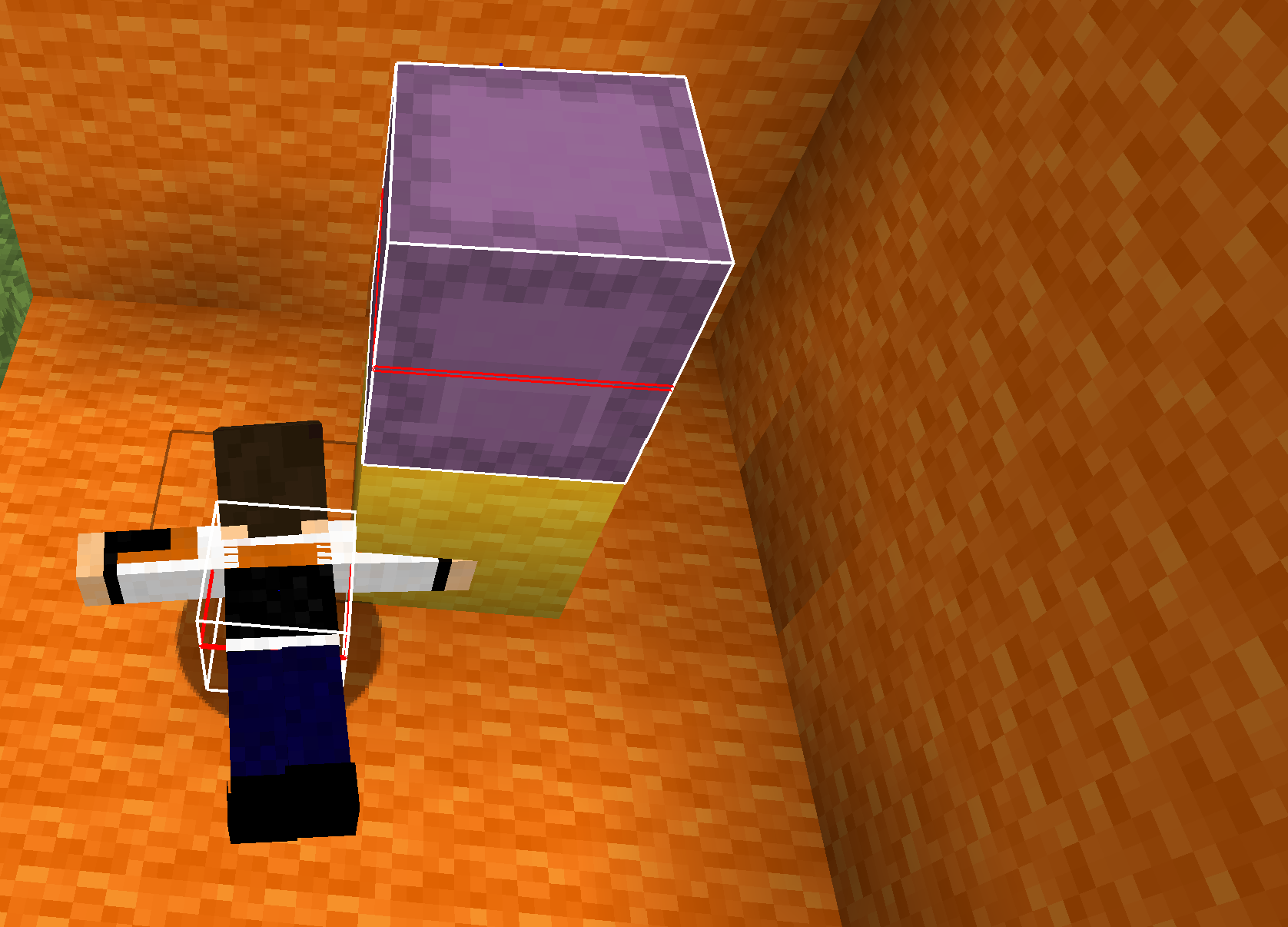
Breaking Animation.png
Relates to
MC-9553.Reproduce steps
1. Create a team: /team add test
2. Summon an invisible entity belonging to this team: /summon minecraft:armor_stand ~ ~ ~ {NoGravity: 1b, Team: test, Invisible: 1b}
3. Join the team: /team join test
4. Put transparent blocks behind the entity OR move the camera to make the entity in front of cloud OR whatever.Affects:
- Specially rendered or transparent blocks (except for regular glass)
- Clouds
- Breaking animations
- Beacon beam
- Nether portal
- Particles
- Campfire smoke
- Water
This also affect players in spectator mode.
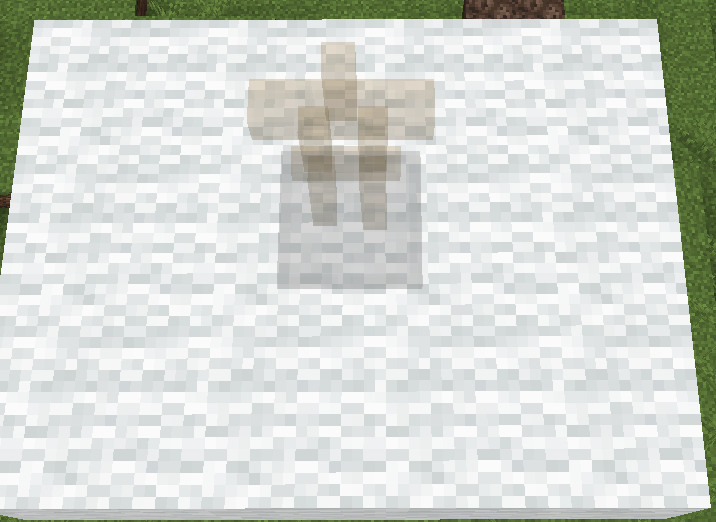
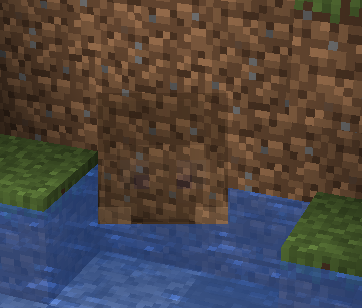
Semi-transparent entities are renderedin front ofclouds, transparent blocks, breaking animations, etc.Semi-transparent entities are rendered behind clouds, transparent blocks, breaking animations, etc.
Fixed in 1.15-pre1.
Duplicates
MC-161976.
Relates to
MC-163982. See also my comment there.Reproduce steps
1. Create a team: /team add test
2. Summon an invisible entity belonging to this team: /summon minecraft:armor_stand ~ ~ ~ {NoGravity: 1b, Team: test, Invisible: 1b}
3. Join the team: /team join test
4. Put transparent blocks behind the entity OR move the camera to make the entity in front of cloud OR whatever.Affects:
- Specially rendered or transparent blocks (except for regular glass)
- Clouds
- Breaking animations
- Beacon beam
- Nether portal
- Particles
- Campfire smoke
- Water
This also affect players in spectator mode.
Clouds, transparent blocks, etc. are not rendered if they arebehind semi-transparent entitiesClouds and many things do not render behind semi-transparent entities
Clouds, transparent blocks, and other semi-transparent textures do not render behind semi-transparent entities
Relates to
MC-163982. See also my comment there.Reproduce steps
1. Create a team: /team add test
2. Summon an invisible entity belonging to this team: /summon minecraft:armor_stand ~ ~ ~ {NoGravity: 1b, Team: test, Invisible: 1b}
3. Join the team: /team join test
4. Put transparent blocks behind the entity OR move the camera to make the entity in front of cloud OR whatever.Affects:
- Specially rendered or transparent blocks (except for regular glass)
- Clouds
- Breaking animations
- Beacon beam
- Nether portal
- Particles
- Campfire smoke
- Water
This also affect players in spectator mode.
Relates to
MC-163982. See also my comment there.Reproduce steps
- Create a team.
team add test- Summon an invisible entity belonging to this team:
/summon minecraft:armor_stand ~ ~ ~ {NoGravity: 1b, Team: test, Invisible: 1b}- Join the team:
/team join test- Put transparent blocks behind the entity OR move the camera to make the entity in front of cloud OR whatever.
Affects:
- Specially rendered or transparent blocks (except for regular glass)
- Clouds
- Breaking animations
- Beacon beam
- Nether portal
- Particles
- Campfire smoke
- Water
This also affect players in spectator mode.
Relates to
MC-163982. See also my comment there.Reproduce steps
- Create a team.
/team add test- Summon an invisible entity belonging to this team:
/summon minecraft:armor_stand ~ ~ ~ {NoGravity: 1b, Team: test, Invisible: 1b}- Join the team:
/team join test- Put transparent blocks behind the entity OR move the camera to make the entity in front of cloud OR whatever.
Affects:
- Specially rendered or transparent blocks (except for regular glass)
- Clouds
- Breaking animations
- Beacon beam
- Nether portal
- Particles
- Campfire smoke
- Water
This also affect players in spectator mode.
Duplicates
MC-166386.
Duplicates
MC-166386.
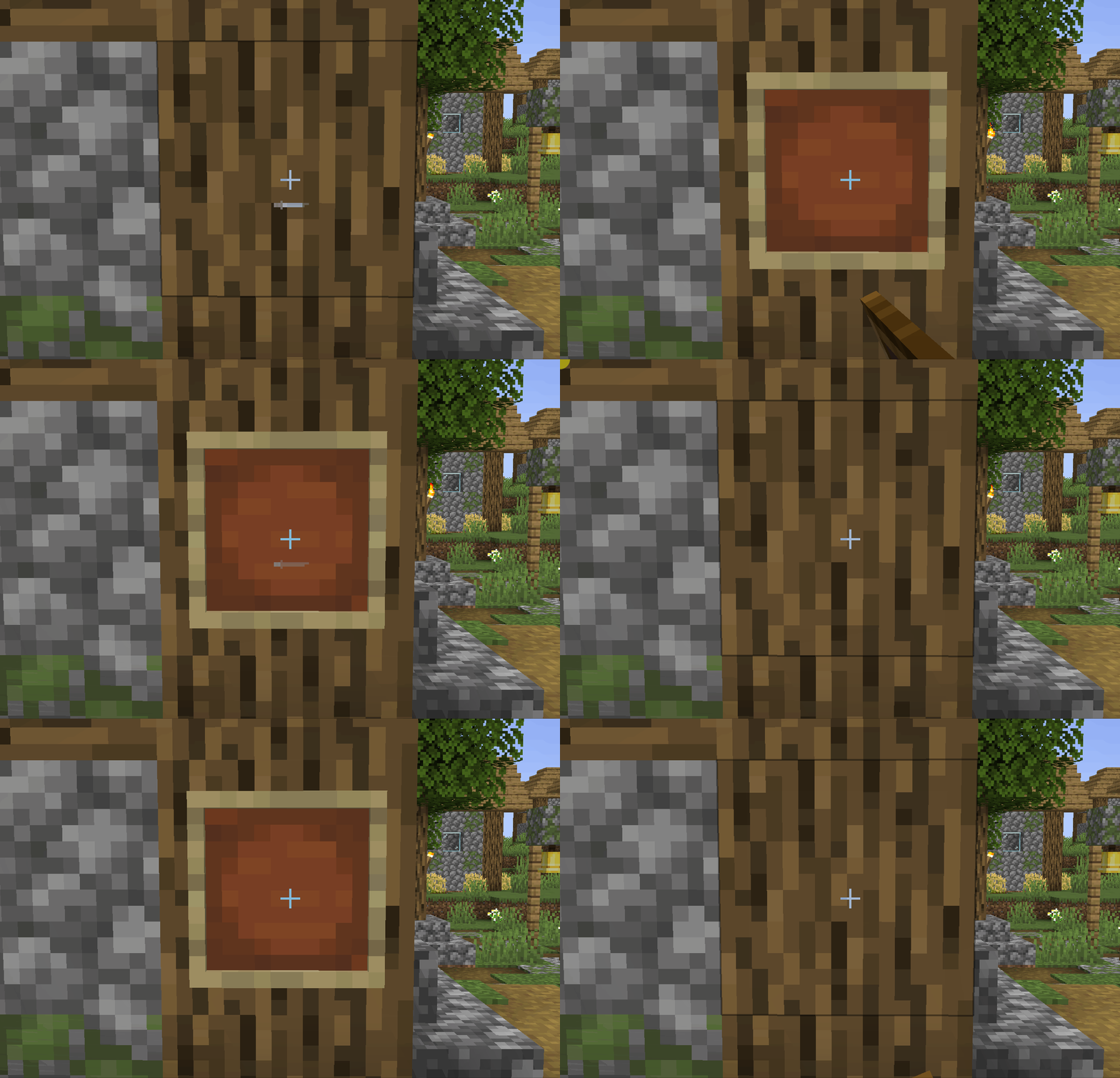
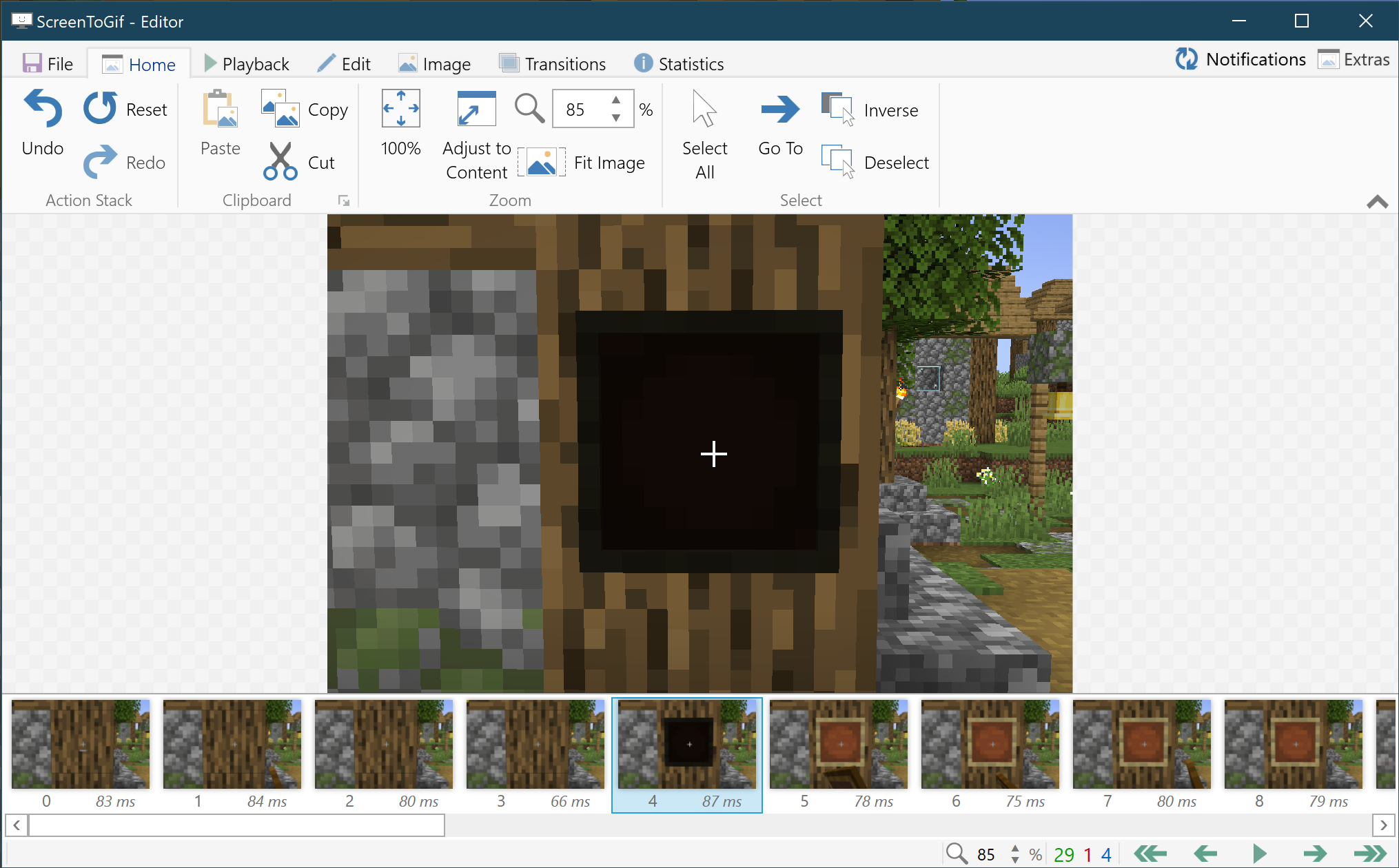
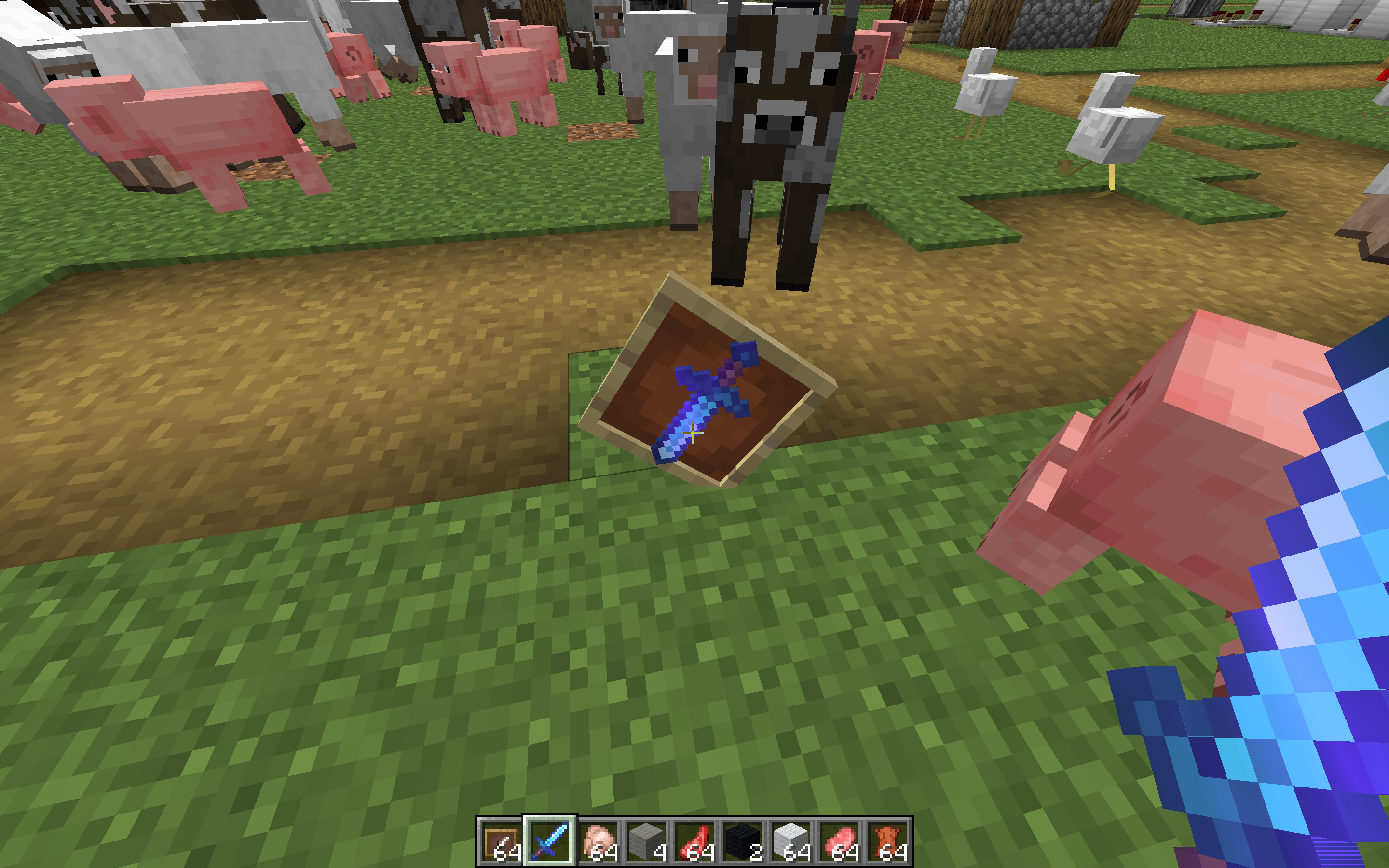
Item framesturn black for a instant when being placedItem frame turns black for an instant when being placed
The Bug
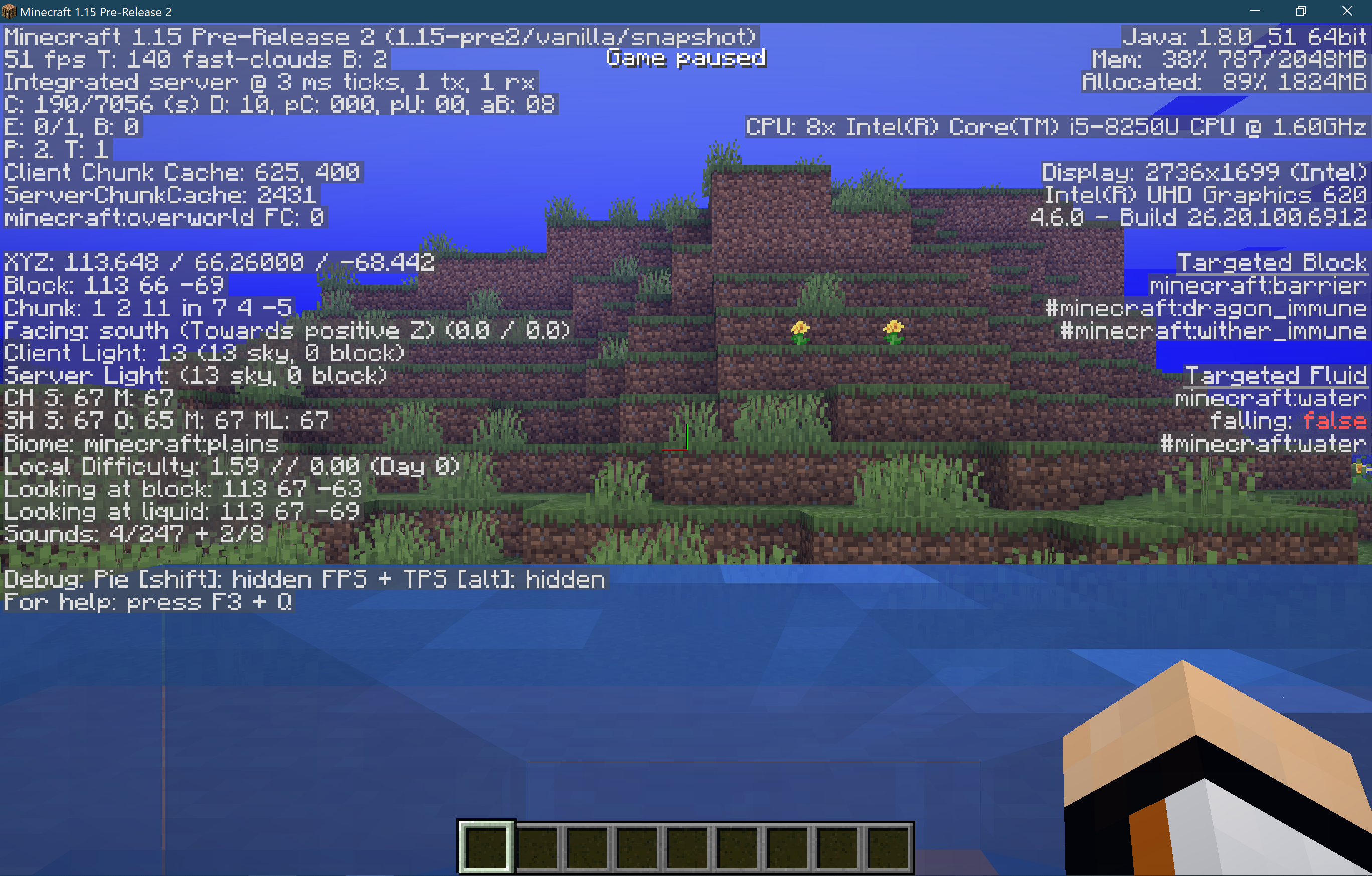
When the player is in the swim or not swimming mode, when the player's view is on the water surface, the color of the environment will be the same as that of the water.
Reproduce Steps
Reproduce steps by Aspharon can be found in this comment
The Bug
When the player is in the swim or not swimming mode, when the player's view is on the water surface, the color of the environment will be the same as that of the water.
Reproduce Steps
Reproduce steps by Aspharon can be found in this comment.
The Bug
When the player is in the swim or not swimming mode, when the player's view is on the water surface, the color of the environment will be the same as that of the water.
Reproduce Steps
Reproduce steps by Aspharon can be found in this comment.
Torchcan't be placed on a redstone ore blockfrom the offhand, only the main hand.Blocks in offhand can't be placed on any side of a redstone ore block
I was unable to place a
torchontheside of a redstone ore block with the off hand, but could do it with the main hand. Tested this several times.I was unable to place any block on any side of a redstone ore block with the off hand, but could do it with the main hand. Tested this several times.
relates to
relates to
relates to
relates to
Advancement titles that are longer than roughly 30 characters don't render the later characters in the advancement menu, but do render them in the chat announcement and toast.
It was expected there'd be a much higher limit, like with the description, or none at all.
To reproduce:
simply create an advancement with a title or change an advancent's title to be 40 characters.
Observer missing characters in the menu.Screenshot note: yes, it may be dutch, but that's irrelevant to the report.
Advancement titles that are longer than roughly 30 characters don't render the later characters in the advancement menu, but do render them in the chat announcement and toast.
It was expected there'd be a much higher limit, like with the description, or none at all.
To reproduce:
- Simply create an advancement with a title or change an advancent's title to be 40 characters.
- Alternatively, download and enable the attached data pack.
- Press L to observer missing characters in the menu.
Screenshot note: yes, it may be dutch, but that's irrelevant to the report.
Falling blocks and minecarts displaying a block do not render inside faces of transparent models like they do in normal block form. For example, slime blocks and honey blocks do not render the inside cube's faces when viewed. Likely related to
MC-164111Reproduce Commands
summon minecraft:falling_block ~ ~ ~ {NoGravity: 1b, BlockState:
{Name: "minecraft:slime_block"}, Time: 1}
{Name: "minecraft:slime_block"}
summon minecraft:minecart ~ ~ ~ {NoGravity: 1b, CustomDisplayTile: 1b, DisplayState:}
Falling blocks and minecarts displaying a block do not render inside faces of transparent models like they do in normal block form. For example, slime blocks and honey blocks do not render the inside cube's faces when viewed. Likely related to
MC-164111Reproduce Commands
summon minecraft:falling_block ~ ~ ~ {NoGravity: 1b, BlockState:
{Name: "minecraft:slime_block"}, Time: 1}
{Name: "minecraft:slime_block"}
summon minecraft:minecart ~ ~ ~ {NoGravity: 1b, CustomDisplayTile: 1b, DisplayState:}
Falling blocks and minecarts displaying a block do not render inside faces of transparent models like they do in normal block form. For example, slime blocks and honey blocks do not render the inside cube's faces when viewed. Likely related to
MC-164111Reproduce Commands
summon minecraft:falling_block ~ ~ ~ {NoGravity: 1b, BlockState: {Name: "minecraft:slime_block"}, Time: 1} summon minecraft:minecart ~ ~ ~ {NoGravity: 1b, CustomDisplayTile: 1b, DisplayState: {Name: "minecraft:slime_block"}}
Thank you for your report!
However, this issue is a duplicate ofMC-163143.If you would like to add a vote and any extra information to the main ticket it would be appreciated.
If you haven't already, you might like to make use of the search feature to see if the issue has already been mentioned.
Quick Links:
📓 Issue Guidelines – 💬 Community Support – 📧 Customer Support – 📖 Game Wiki
Thank you for your report!
However, this issue is a duplicate ofMC-123029.That ticket has already been resolved, which means this is not considered a bug and won't be fixed. Please do not leave a comment on the linked ticket.
If you haven't already, you might like to make use of the search feature to see if the issue has already been mentioned.
Quick Links:
📓 Issue Guidelines – 💬 Community Support – 📧 Customer Support – 📖 Game Wiki

The bug
Dispensers play the dispensing failed sound when they equip a mob head but it not affect wither skeleton head.
How to reproduce
- Activate subtitles
- Put a single wither skeleton head in a dispenser
- Stand in front of the dispenser and activate it
-> It will play the sound when an item was successfully dispensed and show the subtitle "Dispensed item"
- Put only a single mob head except wither skeleton head in the dispenser
- Stand in front of the dispenser and activate it
-> It will play the sound when an item was not successfully dispensed and show the subtitle "Dispenser failed"
Code Analysis
Code analysis by [Mod] SPGoding can be found in this comment.

The Bug
Int array tags are called TAG_Int instead of TAG_Int_Array in e.g. error messages.
Step to reproduce
/data modify storage _ _ set value [[I;], 0b]
Can't insert TAG_Byte into list of TAG_Int (expected: Can't insert TAG_Byte into list of TAG_Int_Array)
Code Analysis
Code analysis by [Mod] SPGoding can be found in this comment.
![[Mod] NeunEinser](../../../data/avatars/users/39263.png)
The default offset by 0.5 is an intended feature.
Does [Mod] SPGoding's comment explain your problem or is there still a bug here?

[Mod] SPGoding Thanks for attaching an example pack.
The Bug
The Merry X-Mas Splash Text is not showing despite it still being in the time frame of December 24-26.
Code Analysis
See code analysis by [Mod] SPGoding in this comment
Note
This post was made on December 26 2019

The bug
Some mobs don't properly interact with the new crimson/warped doors:
- Villagers/vindicators can't open the crimson/warped doors like they normally do to other doors.
- Zombies/vindicators can't break crimson/warped doors, like they normally do to other doors in sieges and raids.
Notes: For personal testing of this issue, replace all existing doors in a village with the crimson/warped doors and observe how villagers, vindicators and zombie behave.
Results
- Villagers are stuck inside/outside of their own houses.
- Vindicators are unable to break/open these doors, during a raid.
- Zombies with the CanBreakDoors tag are unable to break/open these doors.
Code Analysis
Code analysis by [Mod] SPGoding can be found in this comment

[Mod] SPGoding is right, it's a feature, not a bug.
Like mentioned by [Mod] SPGoding, this is a feature request NOT a bug. If you want a bell you have to trade with an toolsmith/armorer/weaponsmith villager in order to get a bell or find a village and take their bells.
The bug can also be reproduced with the following advancement below:
{
"criteria": {
"flint_and_steel": {
"trigger": "player_interacted_with_entity",
"conditions": {
"item": {
"item": "flint_and_steel"
},
"entity": [
{
"condition": "entity_properties",
"entity": "this",
"predicate": {
"type": "creeper"
}
}
]
}
}
}
}
Give yourself a broken Flint and Steel with the following command:
/give @s flint_and_steel{Damage:512}
When the item is used on a Creeper, the advancement trigger would not activate since it checks the item after it is used as mentioned by [Mod] SPGoding above.
[Mod] SPGoding while it might seems like a duplicate of MC-194396 these are talking about two separate structure types of the ruined portal and two separate blocks. While MC-194396 talks about the giant portals and Stone Brick Slabs this one talks about normal portal and stone slabs. It's a situation like village structures, you don't group them all together you have separate post for the structures and a few might be fixed but not all. Same goes with this. One report might be fixed while the other just stays unfixed. I personally think this should be reconsidered to be reopened due to the fact that it talks about a different variety of ruined portal then MC-194396. If you do decide to reopen this and if more normal sized ruined portals with this issue is found I'll be glad to add them to this report.
![[Helper] pine1needle](../../../data/avatars/users/41329.png)
Previously, there was a policy that obvious bugs that only occur in snapshots did not need to be private. The policy was explained in this message from the Mojira discord by [Mod] SPGoding and also in this message by [Mod] violine1101. Has that policy changed?
@SPGoding What additional information do you require? [Mod] SPGoding
![[Mod] Avoma](../../../data/avatars/users/86198.png)
Hi [Mod] SPGoding, sorry for the late response.
I generated a world using the appropriate seed provided above by the reporter in 1.16.5, and ran the "/locate mansion" command to find that it was successfully executed. I then upgraded this world to 1.17.1 and ran the same command again, only to experience identical results. To conclude, the "/locate" command functioned correctly even after upgrading from 1.16.5 to 1.17.1. 
Thanks for [Mod] SPGoding's resolving!😊
When an angered Warden is serialized, "Not a string" appears as an error message in the chat.
To Reproduce
- Use spawn eggs to spawn a Warden and a couple of Zoglins.
- When they start to fight, trigger the serialization of Warden by saving the world, pausing the game, or using the /data get command
- -> "Not a string" appears in the log. If you use the /data get command, you will find that there's no anger field in the data.
- When all the Zoglins are killed, trigger the serialization again
- -> The message does not appear. If you use the /data get command, you will find that the anger field is correctly serialized.
Code Analysis
Code analysis by [Mod] SPGoding can be found in this comment.
[Mod] SPGoding, I see. Thanks for this info. Can confirm in 1.19.
EndeavourOS on Linux 5.15 kernel. Still have this issue. I find it a little upsetting that official devs have resorted to recommending that we just use a different launcher :/ but i guess project managers will only assign bugs to devs that help the company earn money.
Reply from [Mod] SPGoding:
No developers have recommended to just use a different launcher. Users with [Mod] in their name are just regular players. We mentioned MultiMC in the comments to hopefully help the developers locate the cause of the issue. As the ticket is still open it's highly likely the developers will work on it – we just don't know when  .
.
My apologies! I misinterpreted that. And yeah, no I have nothing against devs but I do feel like the companies behind big products and games will not let their devs work on issues unless they feel they'll have monetary gain from it, so i do worry about that a bit.
Can confirm for 19w35a. And can confirm for what Teodor Arrhénborg has said: jumping onto land is not nececary, just jumping for a while and then standin still on the boat also does it.
Can confirm for 19w35a.
I can reproduce this by:
1. /scoreboard objectives add test dummy
2. /scoreboard objectives setdisplay sidebar test
3. /summon minecraft:bee ~ ~ ~ {Tags: ["test"]}
4. /scoreboard players set @e[tag=test] test 1
5. Put a flower and bee hive.
6. /weather rain
7. /weather clear
MC-159383.Duplicate of
MC-161346andMC-161282.Confirmed for 19w41a
Confirmed for 19w41a.
Oh, I suddenly understand the current syntax. Both syntaxes make sense, so please just close this issue. Sorry for this, my bad.
Duplicates
MC-163079Duplicates MC-113871
Duplicates
MC-163001andMC-163009.Duplicate of
MC-163001.Duplicate of
MC-163001.Duplicate of
MC-163045.Duplicate of
MC-162808.It seems like a duplicate of
MC-163403.Duplicate of
MC-161917.Duplicate of
MC-163001.Duplicate of
MC-163008.The problem with zombie duplicates
MC-163008.Creepers are always that size iirc.
Duplicate of MC-140727.
Duplicate of
MC-146510, which works as intended.Duplicates
MC-163001andMC-163009.Duplicates
MC-160901.You should achieve any advancement at first, or there will be nothing in the menu. (duplicates
MC-115297)Duplicates
MC-163079.Duplicates
MC-162808.Duplicates
MC-159462, which is fixed in 19w35a.Duplicates
MC-163102.Duplicates
MC-163008.Duplicates
MC-157208.Duplicates
MC-162024.This is intended. See
MC-127094.Duplicates
MC-163001andMC-163008.IMO this is covered in
MC-159462, which is fixed in 19w35a. I can't reproduce this in 19w41a and confirmMC-161207again when testing this bug.Also affects milk buckets.
Duplicates
MC-163008andMC-163009.Duplicates MC-143776.
Duplicates
MC-163102.Duplicates
MC-151275.Duplicates
MC-163089orMC-163184, I'm not sure.Duplicates MC-154881.
The trident will drop as an item entity whilte it's returning to the player if the player dies as a fix of
MC-125254. How long did you spend to get back to the location of death, since item entities will despawn after 5 minutes?Duplicates
MC-163045.Duplicates
MC-163027.This is covered in
MC-163403.Duplicates
MC-101247, which is fixed in 19w38a.Duplicates
MC-160706, though the image and description is clearer.Duplicates
MC-160901.Confirmed in 19w41a. Also affects baby zombie.
The fact that blocks placed diagonally to the north-west direction stop the sapling from growing is intended, and that the other three directions aren't is a bug. So this is actually a duplicate of MC-118980.
Relates to
MC-123468and MC-112975. Might relates toMC-109121.Duplicates
MC-11211.Duplicates
MC-86622, which is working as intended. The anination is used to indicate the progress of attack recharging.Using 19w41a's official mappings.
Both predicates in entity selectors and in execute commands fallback to LootItemCondition.FALSE. (See net/minecraft/commands/arguments/selector/options/EntitySelectorOptions#bootstrap and net/minecraft/server/commands/ExecuteCommand#checkCustomPredicate).
However advancements argument in entity selectors checks whether the advancement doesn't equal null instead of using a fallback, so it will always return false if the specific advancement doesn't exist.
imo removing the fallback and checking if customPredicate != null && ... will fix this bug.
Duplicates
MC-162534.That bug is fixed in a future version which is not released yet, as what is stated in the ticket (Fix Version/s: Future Version - 1.15+)
Duplicates
MC-125880, which is fixed in 19w37a.Emily, that seems to be another issue which is tracked in MC-140727.
Duplicates
MC-161874.Duplicates
MC-159365which is working as intended......Hello? This was fixed in 19w35a.
Confirmed for 19w42a. Also please someone update the reproduce commands because CustomName requires a JSON text now.
Seems to relate to
MC-163411.The problem with chunk borders duplicates
MC-163079. If you also want to report the issue about water flowing please open a new ticket and provide the seed and coordinate where this hapens.Affects dragon_head, creeper_head, zombie_head, player_head and skeleton_skull. Does not affect wither_skeleton_skull.
I can confirm this in 19w42a too. It seems that it's always gray on top regardless of the viewing angle now. I tried to change my Graphics settings to both Fancy and Fast but cannot resolve it. Relates to
MC-163102.Confirmed for 19w42a.
Confirmed for 19w42a. The walking animation is actually played but too slow, and the issue also affects horses. So maybe someone can change the summary to horses or donkeys' legs move too slow, unless they are ridden.
Cannot reproduce this.
Failed to reproduce in 19w42a.
Yes.
Duplicates
MC-157626.Covered in
MC-125351.return "TAG_Int"; is written in net/minecraft/nbt/IntArrayTag/TYPE#getPrettyName() instead of return "TAG_Int_Array";.
Relates to
MC-163168.Duplicates
MC-67566which works as intended, though I think adding it to both Brewing and Foodstuffs would make more sense.Discovered while testing
MC-163964.Confirmed in 19w42a.
NeunEinser, not really since the fix of
MC-107550. e.g. Unbreaking Ⅲ appears in both Tools and Combat category.Oh I get it, thanks for your explanation. (
Mojira should provide a feature to add reactions to a comment so I can just add a thumb up to your comment without updating this ticket
emm, seems that I treat here as a discussion area, my bad)Duplicates
MC-164020.See
MC-164035. Maybe there are something to do with your graphic card?Duplicates
MC-162013.The code for Items.WITHER_SKELETON_SKULL and Blocks.CARVED_PUMPKIN in net/minecraft/core/dispenser/DispenseItemBehavior is changed from
to
to fix
MC-114106in 19w42a.However, this is not changed for other heads/skull items.
Duplicates
MC-163079.Duplicates
MC-136865.It would definitely be handy if we can use block/item/entity type tags in objective criteria. And this is definitely a feature request, not a bug report.
Duplicates
MC-161898.Duplicates
MC-161899andMC-161917.Seems like a duplicate of
MC-69032.Duplicates
MC-136865.The glowing effect seems to only affect visible part now.

Duplicates
MC-161849.Duplicates
MC-164056.Seems like a duplicate of MC-143776.
Did you put the soul sand or magma block in flowing water? Then this is a duplicate of
MC-133124which works as intended.Or did you accidentally mark 1.14.4 as the affected version? Then this is a duplicate of
MC-161917.Or did you set the Particles to Minimal in Video Settings?
Or I can't guess out what's wrong then, perhaps this is an rare bug after all.
Pelle Reinke, that is tracked in
MC-161917.The VBOs option was removed in 18w44a. VBOs are always enabled now.
Duplicates MC-19676.
Duplicates MC-19676.
Duplicates
MC-161896.Confirmed. This doesn't exist in 1.14.4.
Duplicates
MCL-12347Duplicates
MC-157436.Duplicates
MC-161841.Duplicates
MC-161841.Duplicates
MC-156005which was fixed in 19w41a.Duplicates
MC-157494which was fixed in 19w37a.The behavior that they drop iron swords when being killed with looting is a bug (
MC-2958) which was fixed in 19w37a. So this works as intended.Duplicates
MC-162338.The x and z coordinates will be center-corrected (which is a helpful feature in some cases but a bit confusing in other cases), that means 0 0 0 will be treated as 0.5 0 0.5. You have to change all 0 in x and z coordinates to 0.0:
summon area_effect_cloud 0.0 0 0.0 {CustomName:"{\"text\":\"0\"}",Duration:1,Tags:[test_e]} summon area_effect_cloud 0.1 0 0.0 {CustomName:"{\"text\":\"1\"}",Duration:1,Tags:[test_e]} summon area_effect_cloud 0.2 0 0.0 {CustomName:"{\"text\":\"2\"}",Duration:1,Tags:[test_e]} summon area_effect_cloud 0.3 0 0.0 {CustomName:"{\"text\":\"3\"}",Duration:1,Tags:[test_e]} summon area_effect_cloud 0.4 0 0.0 {CustomName:"{\"text\":\"4\"}",Duration:1,Tags:[test_e]} execute positioned 0.0 0 0.0 run say @e[tag=test_e,limit=1,sort=furthest] execute positioned 0.0 0 0.0 run kill @e[tag=test_e,limit=1,sort=furthest] execute positioned 0.0 0 0.0 run say @e[tag=test_e,limit=1,sort=furthest]Everything works as your intention now.
What command exactly did you use?
What is /gamerule randomTickSpeed set to?
See
MC-161073.Duplicates
MC-108.The bottom piston will still behave like this if you remove the piston above of it, and this is intended. See
MC-108.Is there any sheep around you? Then see
MC-91163.Nicholas George, the "minecart rolls" issue is tracked in
MC-37557.Duplicates
MC-153698.Confirmed for 19w44a.
See
MC-147612.Duplicates
MC-163959.Duplicates
MC-83051.DuplicatesMC-31090. Set PersistenceRequired: 1b if you don't want it to despawn.Oh my bad, not even looking at that command
Duplicates
MC-161874.Duplicates
MC-161976.See
MC-164154.Duplicates
MC-163064.Stella C,
MC-162013is related to but not the same bug asMC-163064.Duplicates
MC-145748.Confirmed for 19w44a.
Confrimed for 19w44a.
Confirmed for 19w44a.
Confirmed for 19w44a.
Confirmed for 19w44a. Could someone update the commands in the first step? I just added some single quotes to make CustomName become JSON text.
/summon armor_stand ~ ~ ~ {CustomName:'"center"',NoGravity:1b} /execute at @e[type=armor_stand,name=center] run summon armor_stand ~1 ~ ~1 {CustomName:'"positive"',NoGravity:1b} /execute at @e[type=armor_stand,name=center] run summon armor_stand ~-1 ~ ~-1 {CustomName:'"negative"',NoGravity:1b}Duplicates MC-113871.
Duplicates
MC-163144.Duplicates
MC-1297.Duplicates
MC-164163.Duplicates
MC-163064.Duplicates
MC-69032.Duplicates
MC-161849.Where are the two bells placed, since MC-143776 is a thing?
Duplicates
MC-164143.Duplicates
MC-161874.Duplicates
MC-163144.Duplicates
MC-162519.Duplicates
MC-163079.Duplicates
MC-163064.Duplicates
MC-163870.Duplicates
MC-160457.See
MC-161896.Duplicates
MC-161849.Duplicates
MC-160457.See MC-143776.
See
MC-163953.I think this is intended. The game will first generate a bunch of items according to the given source and then give those items to specific targets after you execute the command. You can try using /execute as @a run loot give @s loot <name> to give players different items iirc.
Confirmed for 19w46a.
Confirmed for 19w46a.
Confirmed for 19w46a.
Confirmed for 19w46a.
See also
MC-47941.Duplicates
MC-161917.Duplicates
MC-161900.Duplicates
MC-165133.Duplicates MC-143776.
Duplicates
MC-107529.See
MC-102040.Duplicates
MC-165225.Relates to
MC-165225I guess.Duplicates
MC-143982.Duplicates
MC-165605.FIXED IN 1.15-PRE1.Sorry my bad.Prior to 1.15-pre1, all the things listed are rendered in front of semi-transparent entities, as claimed in the summary.
In 1.15-pre1, they are not being rendered any more if they are behind semi-transparent entities. I just opened a new ticket for this:
MC-165958.Confirmed for 1.15-pre1.
Still in 1.15-pre1.
Confirmed for 1.15-pre1.
Confirmed for 1.15-pre1.
Confirmed for 1.15-pre1.
Confirmed for 1.15-pre1.
Torches can not be placed on sides of leaves anymore in 1.15-pre1. I'm not sure whether it's changed in a older version though.
Confirmed for 1.15-pre1.
Confirmed for 1.15-pre1.
Confirmed for 1.15-pre1.
Duplicates
MC-3311.Confirmed for 1.15-pre2.
Confirmed for 1.15-pre2.
Confirmed for 1.15-pre2.
Confirmed for 1.15-pre2.
Confirmed for 1.15-pre2.
Confirmed for 1.15-pre2.
Confirmed for 1.15-pre2.
Duplicates MC-60792.
Oh sorry, this duplicates
MC-154543, I just found that. I used the wrong spelling to search...Duplicates
MC-166376.I think this is intended. Actually you can't put any block on any side of the redstone ore block with your offhand, because your empty mainhand can always interact with the ore block even if it's already lit (
MC-163863). I updated the summary and description to reflect this, hope you will be fine with this.Confirmed for 1.15-pre2.
Confirmed for 1.15-pre2.
Duplicates
MC-166376.Can reproduce in 19w02a.
Cannot reproduce in 19w03a.
So this is fixed in 19w03a.
Update: only the repro with daylight sensor is fixed in 19w03a. There are still other ways to reproduce this.
Thank you for your report!
We're already tracking this issue at
MC-166386, so I will resolve and link this ticket as a duplicate.If you would like to add a vote and any extra information to the main ticket it would be appreciated.
If you haven't already, you might like to make use of the search feature to see if the issue has already been mentioned.
Quick Links:
📓 Issue Guidelines – 💬 Community Support – 📧 Customer Support – 📖 Game Wiki
Thank you for your report!
We're already tracking this issue at
MC-166386, so I will resolve and link this ticket as a duplicate.If you would like to add a vote and any extra information to the main ticket it would be appreciated.
If you haven't already, you might like to make use of the search feature to see if the issue has already been mentioned.
Quick Links:
📓 Issue Guidelines – 💬 Community Support – 📧 Customer Support – 📖 Game Wiki
Thank you for your report!
We're already tracking this issue at
MC-166386, so I will resolve and link this ticket as a duplicate.If you would like to add a vote and any extra information to the main ticket it would be appreciated.
If you haven't already, you might like to make use of the search feature to see if the issue has already been mentioned.
Quick Links:
📓 Issue Guidelines – 💬 Community Support – 📧 Customer Support – 📖 Game Wiki