 MCL-1059
Java Double Instance - Causing MAJOR Lag
Please note: this bug is random, it does happen but I can't seem to find exactly what triggers it.
What I expected to happen was...:
The Launcher To Open Minecraft Normally
What actually happened was...:
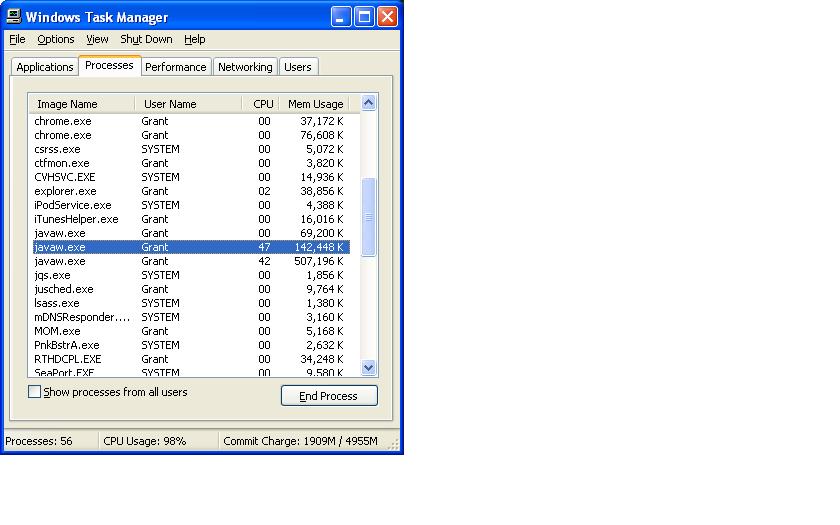
After closing the launcher I got a major lag spike when I pressed ctrl + alt + del and i selected "processes" I saw two instances of javaw.exe (Minecraft's Process). I restarted my computer and tryed again the first time I played the game it was fine but when I closed it and re-opened Minecraft later, the same thing happened again.
Steps to Reproduce:
1. Open The New Launcher.
2. Press Ctrl + Alt + Del on your key board and Choose Task Manager
3. In Task Manager Choose The Processes Tab And Sort By Name, Scroll Down Until You See javaw.exe*
4. Press Play in the new launcer and run the game normally (make sure you close the launcher after opening the game).
5. Exit Minecraft,
6. Open the launcher again and press play.
7. if you look in the Task Manager Window you should see more than 1 of the process javaw.exe*
- - javaw.exe is Minecraft's Process
Environment
Windows XP Home Premium, Java 7
Linked Issues
Attachments1

Created Issue:
Java Double Instance - Causing MAJOR Lag
Please note: this bug is random, it does happen but I can't seem to find exactly what triggers it.
What I expected to happen was...:
The Launcher To Open Minecraft NormallyWhat actually happened was...:
After closing the launcher I got a major lag spike when I pressed ctrl + alt + del and i selected "processes" I saw two instances of javaw.exe (Minecraft's Process). I restarted my computer and tryed again the first time I played the game it was fine but when I closed it and re-opened Minecraft later, the same thing happened again.Steps to Reproduce:
1. Open The New Launcher.
2. Press Ctrl + Alt + Del on your key board and Choose Task Manager
3. In Task Manager Choose The Processes Tab And Sort By Name, Scroll Down Until You See javaw.exe*
4. Press Play in the new launcer and run the game normally (make sure you close the launcher after opening the game).
5. Exit Minecraft,
6. Open the launcher again and press play.
7. if you look in the Task Manager Window you should see more than 1 of the process javaw.exe*
- - javaw.exe is Minecraft's Process
Environment
Windows XP Home Premium, Java 7
Attachments1
- Unresolved
- Open
- Minecraft Launcher - Public
- Unconfirmed
- 1.0.8

relates to
duplicates
relates to
![[Mod] Michael Wobst](../../../data/avatars/users/37868.png)
This has happened to me with several java instances on Ubuntu 13.04. I have ended up with 13 instances of java clogging up my system.
Same experience on Ubuntu 13.04.
java version "1.7.0_25"
Is this still a concern in the current Minecraft / Launcher version? If so, please update the affected versions in order to best aid Mojang ensuring bugs are still valid in the latest releases/pre-releases.
I no longer appear to be experiencing the issue with the 1.1.1 version of the MC Launcher. Will keep an eye on it. Thanks!
I still have this issue (Launcher 1.3.11) i use Win 7 64 Bit and Java 8 Update 5.
(And yes my Launcher visibility is set to "Close Launcher when game starts".)
Same here!
Can a Mod please update the affected Version to 1.4.4? Thank you.
Can a Mod please update the affected Version to 1.4.7? Thank you.
Can a Mod please update the affected Version to 1.5? Thank you.
Caused by
MCL-2334