 MCL-11270
Unable to Login To Launcher
Attempting to login with the Launcher fails with the console reading SaveToBuffer failed. Additionally, if the user was already signed and then performed the launcher update the launcher would proceed to advance past the login screen only to say the user has no connection. This issue has persisted since the move to the new launcher versions.
Environment
- Ubuntu 18.04.1 LTS Linux
- Kernel: 4.15.0-46-generic
- openjdk version "1.8.0_212"
- Core i5 8400 with a RTX 2080




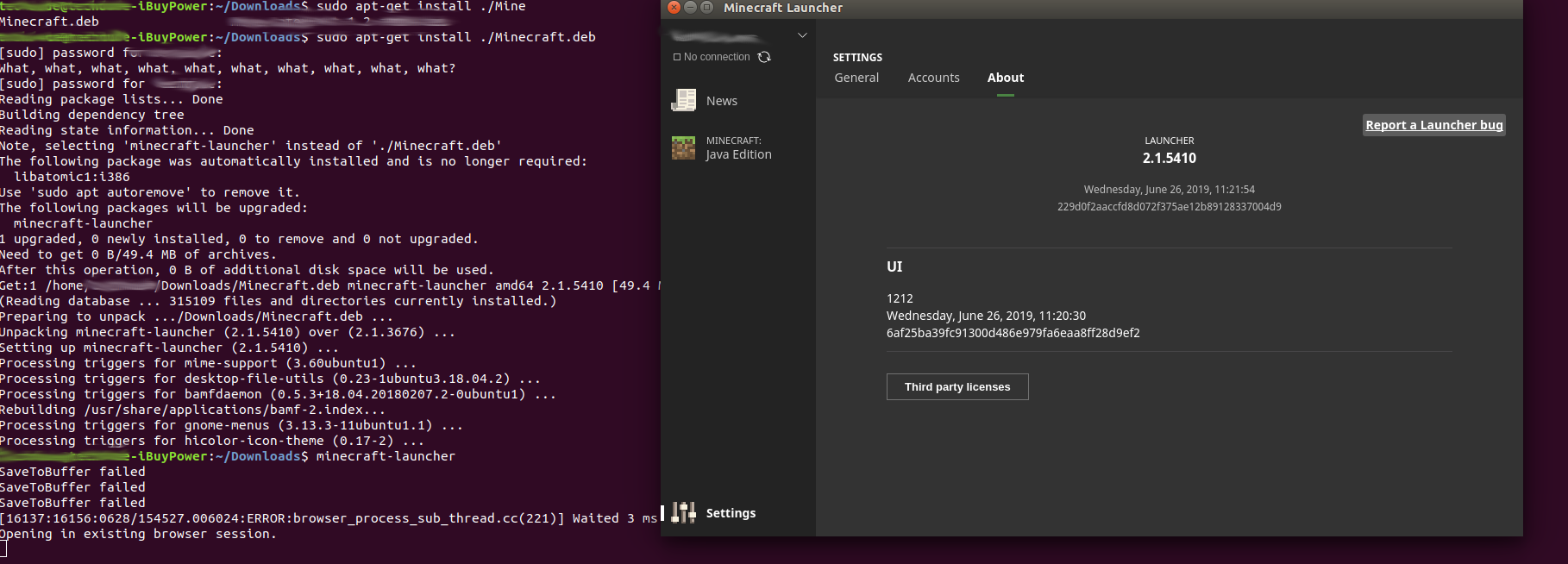
Created Issue:
Unable to Login To Launcher
Attempting to login with the Launcher fails with the console reading SaveToBuffer failed. Additionally, if the user was already signed and then performed the launcher update the launcher would proceed to advance past the login screen only to say the user has no connection.
Environment
- Ubuntu 18.04.1 LTS
- 4.15.0-46-generic
- openjdk version "1.8.0_212"
- Core i5 8400 with a RTX 2080
Attachments1
Untitled.png
- Unresolved
- Open
- Unconfirmed
- Launcher Core Launcher Bootstrap
- launcher-bug
- 2.1.5410-2.1.5411
- Ubuntu 18.04.1 LTS
- Kernel: 4.15.0-46-generic
- openjdk version "1.8.0_212"
- Core i5 8400 with a RTX 2080
- Ubuntu 18.04.1 LTS Linux
- Kernel: 4.15.0-46-generic
- openjdk version "1.8.0_212"
- Core i5 8400 with a RTX 2080
![[Mod] violine1101](../../../data/avatars/users/92858.png)
![[Bot] Arisa](../../../data/assets/gravatar/mustek2.png)
Attempting to login with the Launcher fails with the console reading SaveToBuffer failed. Additionally, if the user was already signed and then performed the launcher update the launcher would proceed to advance past the login screen only to say the user has no connection. This issue has persisted since the move to the new launcher versions.
![[Mojang] Petr Mrázek](../../../data/avatars/users/26709.png) [Mojang] Petr Mrázek
[Mojang] Petr Mrázek[^minecraft-launcher-libcurl-fixed.deb]


Please attach the launcher_log.txt file here.
I am having this issues and I even re downloaded the client and installed it from the site to be sure as well.
I added the launcher log, mine is the one with the underscore before the other text.
I was unable to upload it unless I changed the name.
As a matter of fact all the entry windows in the Edit Installation dialog are too small.
I define a Game directory for each major Release and the path just to .minecraft is longer than the dialog will allow you to see without scrolling.
Same for Java executable and JVM arguments.
It would help if they were on separate lines like they were in the old launcher and also if the dialog box would expand horizontally with the launcher window.
Alan McClure, that's completely unrelated to this issue.
Alan I am not entirely sure how your post relates to this issue specifically, could you explain what you mean about the Edit Installation dialog box? Is that an option in the Launcher on Linux?
I think he meant to comment on that on
MCL-11253but accidentally commented it hereI used to have this issue recently and what I did to fix this issue is by re-logging my account on the new minecraft launcher. This should fix the constant "no connection" error every time you try to refresh it. Have you tried re-logging (log out and log back in minecraft launcher)?
Lostic I tried that but on Linux even with a fresh install with no added accounts and no launcher_profiles.json file it still refuses to log in with the console reading still "SaveToBuffer failed"
I updated my _launcherlog.txt file that shows the error.
i have literaly the same problem. i found that if you change password it lets you log in once but then it fails agin
I can confirm that I see this same behavior.
I was originally logged in from the previous version of the launcher and had the "No connection" message and only the "Play Offline" option. I logged out and now am unable to log back in with the message "Sorry! Make sure you are online and try again", with the "SaveToBuffer failed" message in the console.
I don't know if this is helpful or not, but I used wireshark to capture network traffic during the period of time that I clicked the "LOG IN" button on the Add account modal on the Accounts setting tab. It appears as though a TCP connection was established to authserver.mojang.com and then immediately closed without sending any data. No other related network traffic was captured.
What is the wireshare capture after you changed the password and logged in again?
Specs: Fedora Linux 27, 4Gb memory, 64-bit E8400 (Core/2 Quad core), ATI Radeon 3450.
In addition to the other respondents,
I haven't been brave enough to log my user out in the Launcher, as I'm not sure I'd get back on. I also haven't been able to pin down why the message is only happening occasionally for me.
Regards, BrickViking
The wireshark capture is the same after changing the password. Logging in after password reset does not work for me.
According to the logs, this is your system is rejecting the server's SSL certificate. This could indicate some form of error in your installation of libcurl, or something similar.
Could you try downloading this file with curl, and see if that works?
curl https://launchermeta.mojang.com/mc/game/version_manifest.json
I can run curl correctly and download the file (When I pipe it to version_manifest.json via ">". Otherwise it just prints to stdout). I made sure it was in the .minecraft directory but the error persisted.
That curl command is also runs successfully for me.
I assume that if it were a system problem that it would also have surfaced with the old launcher. This problem only started with the most recent launcher.
Count me in among those with this issue. The previous launcher worked and curl downloads the file, but the new launcher won't allow me to log in, giving the SaveToBuffer failed message, even after removing the .minecraft folder entirely.
Any way to get this issue escalated? It is a show-stopper. It prevents installation of any version of MC. If some version of MC was not already installed using a previous version of the launcher, there is literally no way to play on Linux. Even if there is an existing version of MC installed, there is no way to play online and no way to install a newer version of MC.
We've done some improvement to linux users in the new Beta version. If you're willing to test out the beta you can find download links here (Article is old, but links are still valid):
https://www.minecraft.net/en-us/article/try-new-minecraft-launcher-beta
Still not working. Downloaded the .deb from the link provided to the beta launcher.
Info about my machine:
Marc, thank you for the update.
Unfortunately, I installed the 2.1.7658 version of the launcher from the beta page and the behavior is the same. (I tried both the .deb file and the .tar.gz file.)
What output do you get when you run:
curl -v https://launchermeta.mojang.com/v1/products/launcher/6f083b80d5e6fabbc4236f81d0d8f8a350c665a9/linux.json
And yes, install the package if it's missing first.
Running on the previously installed Beta package and getting this:
That looks sane...
What about these:
LD_DEBUG=libs minecraft-launcher 2>&1 | grep libcurl
strace -f minecraft-launcher 2>&1 | grep cert
In both instances, I tried unsuccessfully to log in.
$ LD_DEBUG=libs minecraft-launcher 2>&1 | grep libcurl 29327: find library=libcurl.so [0]; searching 29327: trying file=./tls/haswell/x86_64/libcurl.so 29327: trying file=./tls/haswell/libcurl.so 29327: trying file=./tls/x86_64/libcurl.so 29327: trying file=./tls/libcurl.so 29327: trying file=./haswell/x86_64/libcurl.so 29327: trying file=./haswell/libcurl.so 29327: trying file=./x86_64/libcurl.so 29327: trying file=./libcurl.so 29327: trying file=/opt/minecraft-launcher/libcurl.so 29327: trying file=./tls/haswell/x86_64/libcurl.so 29327: trying file=./tls/haswell/libcurl.so 29327: trying file=./tls/x86_64/libcurl.so 29327: trying file=./tls/libcurl.so 29327: trying file=./haswell/x86_64/libcurl.so 29327: trying file=./haswell/libcurl.so 29327: trying file=./x86_64/libcurl.so 29327: trying file=./libcurl.so 29327: trying file=/opt/minecraft-launcher/libcurl.so 29327: trying file=/lib/x86_64-linux-gnu/tls/haswell/x86_64/libcurl.so 29327: trying file=/lib/x86_64-linux-gnu/tls/haswell/libcurl.so 29327: trying file=/lib/x86_64-linux-gnu/tls/x86_64/libcurl.so 29327: trying file=/lib/x86_64-linux-gnu/tls/libcurl.so 29327: trying file=/lib/x86_64-linux-gnu/haswell/x86_64/libcurl.so 29327: trying file=/lib/x86_64-linux-gnu/haswell/libcurl.so 29327: trying file=/lib/x86_64-linux-gnu/x86_64/libcurl.so 29327: trying file=/lib/x86_64-linux-gnu/libcurl.so 29327: trying file=/usr/lib/x86_64-linux-gnu/tls/haswell/x86_64/libcurl.so 29327: trying file=/usr/lib/x86_64-linux-gnu/tls/haswell/libcurl.so 29327: trying file=/usr/lib/x86_64-linux-gnu/tls/x86_64/libcurl.so 29327: trying file=/usr/lib/x86_64-linux-gnu/tls/libcurl.so 29327: trying file=/usr/lib/x86_64-linux-gnu/haswell/x86_64/libcurl.so 29327: trying file=/usr/lib/x86_64-linux-gnu/haswell/libcurl.so 29327: trying file=/usr/lib/x86_64-linux-gnu/x86_64/libcurl.so 29327: trying file=/usr/lib/x86_64-linux-gnu/libcurl.so 29327: calling init: /usr/lib/x86_64-linux-gnu/libcurl.so 29333: find library=libcurl.so [0]; searching 29333: trying file=./tls/haswell/x86_64/libcurl.so 29333: trying file=./tls/haswell/libcurl.so 29333: trying file=./tls/x86_64/libcurl.so 29333: trying file=./tls/libcurl.so 29333: trying file=./haswell/x86_64/libcurl.so 29333: trying file=./haswell/libcurl.so 29333: trying file=./x86_64/libcurl.so 29333: trying file=./libcurl.so 29333: trying file=/opt/minecraft-launcher/libcurl.so 29333: trying file=./tls/haswell/x86_64/libcurl.so 29333: trying file=./tls/haswell/libcurl.so 29333: trying file=./tls/x86_64/libcurl.so 29333: trying file=./tls/libcurl.so 29333: trying file=./haswell/x86_64/libcurl.so 29333: trying file=./haswell/libcurl.so 29333: trying file=./x86_64/libcurl.so 29333: trying file=./libcurl.so 29333: trying file=/opt/minecraft-launcher/libcurl.so 29333: trying file=/lib/x86_64-linux-gnu/tls/haswell/x86_64/libcurl.so 29333: trying file=/lib/x86_64-linux-gnu/tls/haswell/libcurl.so 29333: trying file=/lib/x86_64-linux-gnu/tls/x86_64/libcurl.so 29333: trying file=/lib/x86_64-linux-gnu/tls/libcurl.so 29333: trying file=/lib/x86_64-linux-gnu/haswell/x86_64/libcurl.so 29333: trying file=/lib/x86_64-linux-gnu/haswell/libcurl.so 29333: trying file=/lib/x86_64-linux-gnu/x86_64/libcurl.so 29333: trying file=/lib/x86_64-linux-gnu/libcurl.so 29333: trying file=/usr/lib/x86_64-linux-gnu/tls/haswell/x86_64/libcurl.so 29333: trying file=/usr/lib/x86_64-linux-gnu/tls/haswell/libcurl.so 29333: trying file=/usr/lib/x86_64-linux-gnu/tls/x86_64/libcurl.so 29333: trying file=/usr/lib/x86_64-linux-gnu/tls/libcurl.so 29333: trying file=/usr/lib/x86_64-linux-gnu/haswell/x86_64/libcurl.so 29333: trying file=/usr/lib/x86_64-linux-gnu/haswell/libcurl.so 29333: trying file=/usr/lib/x86_64-linux-gnu/x86_64/libcurl.so 29333: trying file=/usr/lib/x86_64-linux-gnu/libcurl.so 29333: calling init: /usr/lib/x86_64-linux-gnu/libcurl.so 29351: find library=libcurl.so [0]; searching 29351: trying file=./tls/haswell/x86_64/libcurl.so 29351: trying file=./tls/haswell/libcurl.so 29351: trying file=./tls/x86_64/libcurl.so 29351: trying file=./tls/libcurl.so 29351: trying file=./haswell/x86_64/libcurl.so 29351: trying file=./haswell/libcurl.so 29351: trying file=./x86_64/libcurl.so 29351: trying file=./libcurl.so 29351: trying file=/opt/minecraft-launcher/libcurl.so 29351: trying file=./tls/haswell/x86_64/libcurl.so 29351: trying file=./tls/haswell/libcurl.so 29351: trying file=./tls/x86_64/libcurl.so 29351: trying file=./tls/libcurl.so 29351: trying file=./haswell/x86_64/libcurl.so 29351: trying file=./haswell/libcurl.so 29351: trying file=./x86_64/libcurl.so 29351: trying file=./libcurl.so 29351: trying file=/opt/minecraft-launcher/libcurl.so 29351: trying file=/lib/x86_64-linux-gnu/tls/haswell/x86_64/libcurl.so 29351: trying file=/lib/x86_64-linux-gnu/tls/haswell/libcurl.so 29351: trying file=/lib/x86_64-linux-gnu/tls/x86_64/libcurl.so 29351: trying file=/lib/x86_64-linux-gnu/tls/libcurl.so 29351: trying file=/lib/x86_64-linux-gnu/haswell/x86_64/libcurl.so 29351: trying file=/lib/x86_64-linux-gnu/haswell/libcurl.so 29351: trying file=/lib/x86_64-linux-gnu/x86_64/libcurl.so 29351: trying file=/lib/x86_64-linux-gnu/libcurl.so 29351: trying file=/usr/lib/x86_64-linux-gnu/tls/haswell/x86_64/libcurl.so 29351: trying file=/usr/lib/x86_64-linux-gnu/tls/haswell/libcurl.so 29351: trying file=/usr/lib/x86_64-linux-gnu/tls/x86_64/libcurl.so 29351: trying file=/usr/lib/x86_64-linux-gnu/tls/libcurl.so 29351: trying file=/usr/lib/x86_64-linux-gnu/haswell/x86_64/libcurl.so 29351: trying file=/usr/lib/x86_64-linux-gnu/haswell/libcurl.so 29351: trying file=/usr/lib/x86_64-linux-gnu/x86_64/libcurl.so 29351: trying file=/usr/lib/x86_64-linux-gnu/libcurl.so 29351: calling init: /usr/lib/x86_64-linux-gnu/libcurl.so 29327: calling fini: /usr/lib/x86_64-linux-gnu/libcurl.so [0]Hmm, please attach the whole strace from just starting and closing the launcher.
strace -f minecraft-launcher > strace.log 2>&1
Also, what does the /etc/ssl/certs/ca-certificates.crt file look like? It should exist and contain a whole bunch of base64 encoded data.
Can you share the file too, if it exists?
strace.log.tar.gz
ca-certificates.crt
I installed the same distro and cannot reproduce the issue. One discrepancy is that on your system, it is loading /usr/lib/x86_64-linux-gnu/libcurl.so instead of /usr/lib/x86_64-linux-gnu/libcurl.so.4
So, let's find out where that comes from:
dpkg -S /usr/lib/x86_64-linux-gnu/libcurl.so
And what it depends on:
readelf -d /usr/lib/x86_64-linux-gnu/libcurl.so
ldd /usr/lib/x86_64-linux-gnu/libcurl.so
$ ldd /usr/lib/x86_64-linux-gnu/libcurl.so linux-vdso.so.1 (0x00007ffcafffe000) libnghttp2.so.14 => /usr/lib/x86_64-linux-gnu/libnghttp2.so.14 (0x00007ff4a8256000) libidn2.so.0 => /usr/lib/x86_64-linux-gnu/libidn2.so.0 (0x00007ff4a8039000) librtmp.so.1 => /usr/lib/x86_64-linux-gnu/librtmp.so.1 (0x00007ff4a7e1d000) libpsl.so.5 => /usr/lib/x86_64-linux-gnu/libpsl.so.5 (0x00007ff4a7c0f000) libnss3.so => /usr/lib/x86_64-linux-gnu/libnss3.so (0x00007ff4a78cb000) libssl3.so => /usr/lib/x86_64-linux-gnu/libssl3.so (0x00007ff4a767a000) libnspr4.so => /usr/lib/x86_64-linux-gnu/libnspr4.so (0x00007ff4a743d000) libgssapi_krb5.so.2 => /usr/lib/x86_64-linux-gnu/libgssapi_krb5.so.2 (0x00007ff4a71f2000) libldap_r-2.4.so.2 => /usr/lib/x86_64-linux-gnu/libldap_r-2.4.so.2 (0x00007ff4a6fa0000) liblber-2.4.so.2 => /usr/lib/x86_64-linux-gnu/liblber-2.4.so.2 (0x00007ff4a6d92000) libz.so.1 => /lib/x86_64-linux-gnu/libz.so.1 (0x00007ff4a6b75000) libpthread.so.0 => /lib/x86_64-linux-gnu/libpthread.so.0 (0x00007ff4a6956000) libc.so.6 => /lib/x86_64-linux-gnu/libc.so.6 (0x00007ff4a6565000) libunistring.so.2 => /usr/lib/x86_64-linux-gnu/libunistring.so.2 (0x00007ff4a61e7000) libgnutls.so.30 => /usr/lib/x86_64-linux-gnu/libgnutls.so.30 (0x00007ff4a5e82000) libhogweed.so.4 => /usr/lib/x86_64-linux-gnu/libhogweed.so.4 (0x00007ff4a5c4e000) libnettle.so.6 => /usr/lib/x86_64-linux-gnu/libnettle.so.6 (0x00007ff4a5a18000) libgmp.so.10 => /usr/lib/x86_64-linux-gnu/libgmp.so.10 (0x00007ff4a5797000) libnssutil3.so => /usr/lib/x86_64-linux-gnu/libnssutil3.so (0x00007ff4a5568000) libplc4.so => /usr/lib/x86_64-linux-gnu/libplc4.so (0x00007ff4a5363000) libplds4.so => /usr/lib/x86_64-linux-gnu/libplds4.so (0x00007ff4a515f000) libdl.so.2 => /lib/x86_64-linux-gnu/libdl.so.2 (0x00007ff4a4f5b000) librt.so.1 => /lib/x86_64-linux-gnu/librt.so.1 (0x00007ff4a4d53000) libkrb5.so.3 => /usr/lib/x86_64-linux-gnu/libkrb5.so.3 (0x00007ff4a4a7d000) libk5crypto.so.3 => /usr/lib/x86_64-linux-gnu/libk5crypto.so.3 (0x00007ff4a484b000) libcom_err.so.2 => /lib/x86_64-linux-gnu/libcom_err.so.2 (0x00007ff4a4647000) libkrb5support.so.0 => /usr/lib/x86_64-linux-gnu/libkrb5support.so.0 (0x00007ff4a443c000) libresolv.so.2 => /lib/x86_64-linux-gnu/libresolv.so.2 (0x00007ff4a4221000) libsasl2.so.2 => /usr/lib/x86_64-linux-gnu/libsasl2.so.2 (0x00007ff4a4006000) libgssapi.so.3 => /usr/lib/x86_64-linux-gnu/libgssapi.so.3 (0x00007ff4a3dc5000) /lib64/ld-linux-x86-64.so.2 (0x00007ff4a86fc000) libp11-kit.so.0 => /usr/lib/x86_64-linux-gnu/libp11-kit.so.0 (0x00007ff4a3a96000) libtasn1.so.6 => /usr/lib/x86_64-linux-gnu/libtasn1.so.6 (0x00007ff4a3883000) libkeyutils.so.1 => /lib/x86_64-linux-gnu/libkeyutils.so.1 (0x00007ff4a367f000) libheimntlm.so.0 => /usr/lib/x86_64-linux-gnu/libheimntlm.so.0 (0x00007ff4a3476000) libkrb5.so.26 => /usr/lib/x86_64-linux-gnu/libkrb5.so.26 (0x00007ff4a31e9000) libasn1.so.8 => /usr/lib/x86_64-linux-gnu/libasn1.so.8 (0x00007ff4a2f47000) libhcrypto.so.4 => /usr/lib/x86_64-linux-gnu/libhcrypto.so.4 (0x00007ff4a2d11000) libroken.so.18 => /usr/lib/x86_64-linux-gnu/libroken.so.18 (0x00007ff4a2afb000) libffi.so.6 => /usr/lib/x86_64-linux-gnu/libffi.so.6 (0x00007ff4a28f3000) libwind.so.0 => /usr/lib/x86_64-linux-gnu/libwind.so.0 (0x00007ff4a26ca000) libheimbase.so.1 => /usr/lib/x86_64-linux-gnu/libheimbase.so.1 (0x00007ff4a24bb000) libhx509.so.5 => /usr/lib/x86_64-linux-gnu/libhx509.so.5 (0x00007ff4a2271000) libsqlite3.so.0 => /usr/lib/x86_64-linux-gnu/libsqlite3.so.0 (0x00007ff4a1f68000) libcrypt.so.1 => /lib/x86_64-linux-gnu/libcrypt.so.1 (0x00007ff4a1d30000) libm.so.6 => /lib/x86_64-linux-gnu/libm.so.6 (0x00007ff4a1992000)Removing libcurl4-nss-dev and libcurl3-nss should fix the problem.
The root of the issue seems to be that the nss-based libcurl is using outdated certificates baked into libnssckbi.so. This doesn't work.
Now it seems to work! Tested login, downloading latest stable (1.14.4) and played on a server. Ran this on my Linux Mint 19.2 Tina (Ubuntu 18.04, Bionic Beaver):
I can confirm that removing libcurl4-nss-dev and libcurl3-nss resolves the issue.
My guess would be that the reason you could not replicate this problem on a fresh install of the distro is that these packages are probably an artifact of upgrading from a previous version of the distro.
Unfortunately, there are probably many people in this situation. It would be ideal if you could update the launcher to handle the case when these packages are installed.
Yeah. We just need to be more specific about the libcurl we want from the system.
Shouldn't be too hard to fix
Can you test with this one?
https://drive.google.com/file/d/19itcfEdP7tGY40gGI37M3FyhgGe3pBNq/view?usp=sharing
Ran this:
Worked great: started the launcher and logged in.
Confirmed that version 2.1.7698 from "libcurl-fixed" runs properly when libcurl4-nss-dev and libcurl3-nss are installed. I can log in and play online.
Many thanks for the work on this!
I will check that version of the launcher when I get home, but I am optimistic given the others success getting it working! Thank you for helping to fix this issue! I appreciate it.
I can verify that the "libcurl-fixed" version is also working for me! Will this fix be implemented into the regular launcher deb file in new releases?
Nonetheless, thank you Petr Mrázek for helping to fix the issue!
Red flag
I ran into this issue after I updated to the latest release.
ATTEMPT TO "PATCH" [failed attempt]
I downloaded the .deb (https://drive.google.com/file/d/19itcfEdP7tGY40gGI37M3FyhgGe3pBNq/view?usp=sharing) comment-585996
Reinstalled the packages comment-585999
LAUNCHER LOG
Launcher log paste: https://hastebin.app/raw/5db7f15a4798f8001c0daabc
Log is pasted on an external site in order to keep reply length under 20 000 characters
ENV INFO
I'm on Ubuntu 18.04 (5.0.0-32-generic #34~18.04.2-Ubuntu)
Java 11 in use
@Aljaz S. No, you ran into mods being broken and abusing Java internals. That has nothing to do with this issue.
You will have to use Java 8 with modded and old versions. Anything above 8 will not work.