 MCL-19899
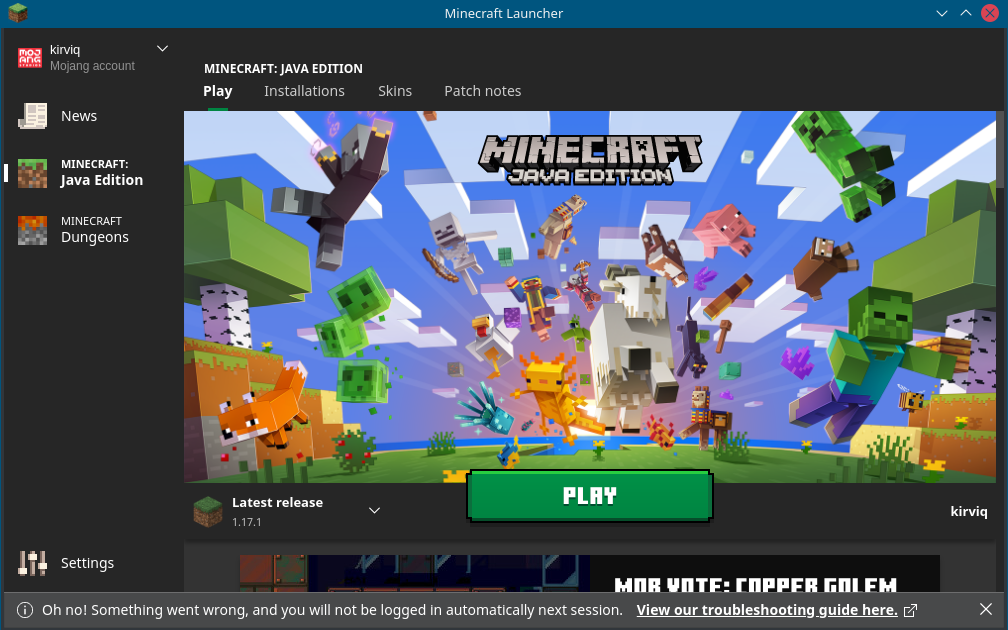
Oh no! Something went wrong and you will not be logged in automatically next session.
Steps:
- I start the launcher
- realize it's a new version
- enter username and password
- check "keep me logged in"
- hit login
Outcome:
- I'm logged in
- It tells me "Oh no! Something went wrong and you will not be logged in automatically next session."
I ignored it for a few days, but the error still exists.
And to mock me further, clicking on the "View our troubleshooting guide" link leads to a 404 page. (https://help.minecraft.net/hc/de/articles/4408668374925)
Environment
Java version: openjdk version "11.0.11" 2021-04-20
OS: Arch Linux
Linked Issues
Attachments1

Created Issue:
Oh no! Something went wrong and you will not be logged in automatically next session.
Steps:
- I start the launcher
- realize it's a new version
- enter username and password
- check "keep me logged in"
- hit login
Outcome:
- I'm logged in
- It tells me "Oh no! Something went wrong and you will not be logged in automatically next session."
I ignored it for a few days, but the error still exists.
And to mock me further, clicking on the "View our troubleshooting guide" link leads to a 404 page.
Environment
Java version: openjdk version "11.0.11" 2021-04-20
OS: Arch Linux
Attachments1
Steps:
- I start the launcher
- realize it's a new version
- enter username and password
- check "keep me logged in"
- hit login
Outcome:
- I'm logged in
- It tells me "Oh no! Something went wrong and you will not be logged in automatically next session."
I ignored it for a few days, but the error still exists.
And to mock me further, clicking on the "View our troubleshooting guide" link leads to a 404 page.
Steps:
- I start the launcher
- realize it's a new version
- enter username and password
- check "keep me logged in"
- hit login
Outcome:
- I'm logged in
- It tells me "Oh no! Something went wrong and you will not be logged in automatically next session."
I ignored it for a few days, but the error still exists.
And to mock me further, clicking on the "View our troubleshooting guide" link leads to a 404 page. (https://help.minecraft.net/hc/de/articles/4408668374925)
duplicates
In MCL-19899 I complained that the launcher is unable to save the login password. This was closed with a reference to MCL-18924 which hints at installing a supported password manager. So I installed gnome-keyring. Now when I start minecraft I have to enter the password for gnome-keyring, which makes sense, and then I still have to enter my minecraft password. Which does not make sense.
So following that advice made it even worse.
Duplicates
MCL-18924I think that's a newer article. It loads the English version for me.
https://help.minecraft.net/hc/en-us/articles/4408668374925
Thank you for your report!
We're tracking this issue in
MCL-18924, so this ticket is being resolved and linked as a duplicate.That ticket has already been resolved as Fixed. Please check the Fix Version/s field in that ticket to see in which version this behavior was or will be fixed.
If you haven't already, you might like to make use of the search feature to see if the issue has already been mentioned.
Quick Links:
📓 Bug Tracker Guidelines – 💬 Community Support – 📧 Mojang Support
📓 Project Summary – ✍️ Feedback and Suggestions – 📖 Game Wiki
– I am a bot. This action was performed automatically! The ticket was resolved by one of our moderators, and I left this message to give more information to you.
Are you sure it's a duplicate? The linked issue says as fix version "2.2.5516 (Linux)" which is the version I am using.