 MCL-22182
Launcher not displaying as opened at macOS
Steps to Reproduce:
Note! This seems to be only one of multiple different ways to produce this issue.
- Open the launcher
- Start the game
- Waiting 'til the launcher closes to run the game
- Again open the launcher, before the Minecraft instance pops up
- Now you're having the bugged state of the launcher
Observed Results:
For macOS, sometimes, the launcher is not registered to be open/launched (often/mostly after the game has crashed). Then the icon doesn't show, that the program is open, the icon does not push the open launcher window to the front and shortcuts like [command] + [q] won't work properly.
The launcher is in between the state of open and not open. This leads to major problems in using the system properly, while the launcher is open.
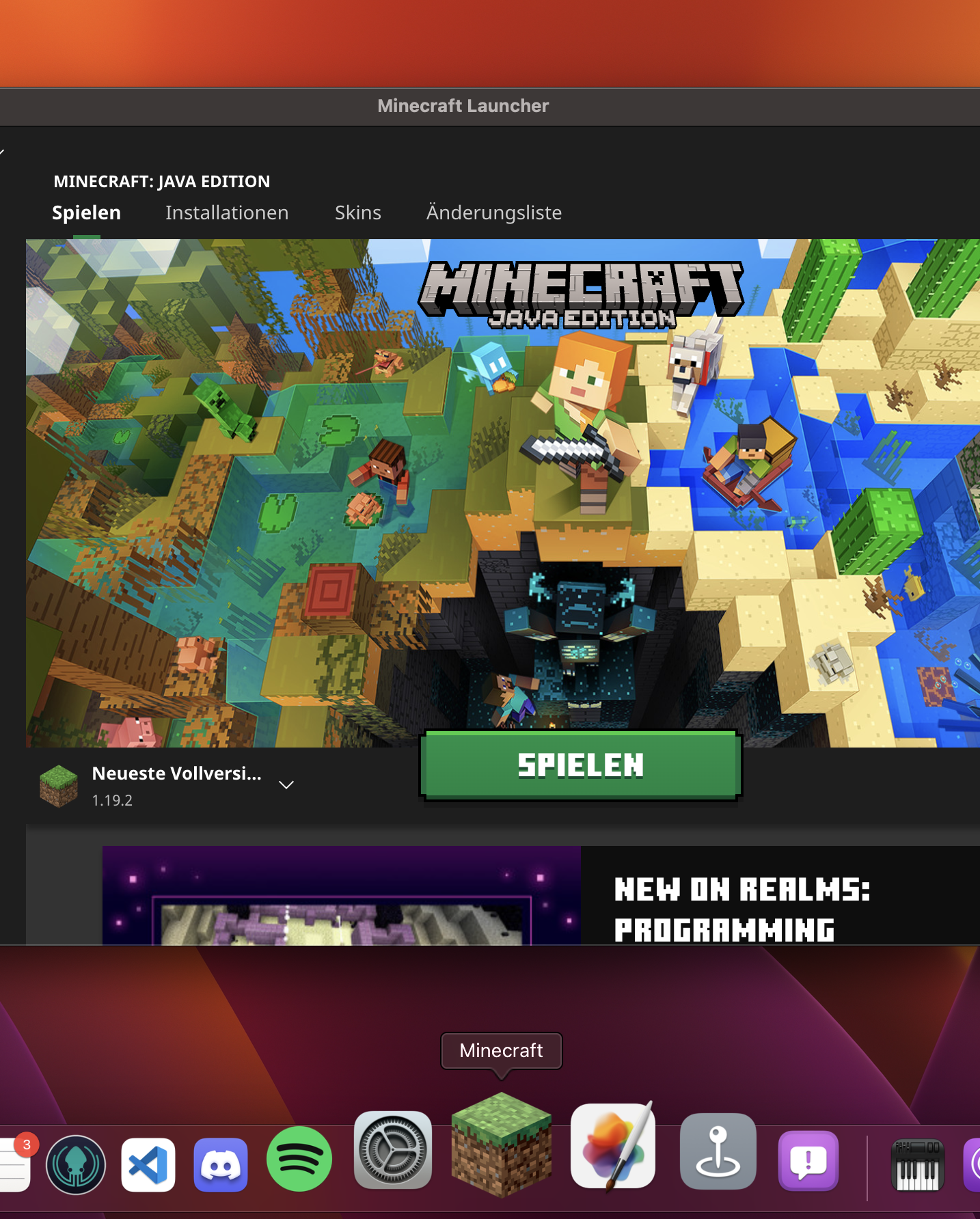
Screen-Capture of bug caught on camera.mov
Expected Results:
Launcher not being in an buggy state
Environment
System: macOS Version 13.0 Beta (22A5321d)
Chip: Apple Silicon (M1 Series)
Linked Issues

Created Issue:
Launcher not displaying as opened at macOS
For macOS, sometimes, the launcher is not registered to be open/launched (often/mostly after the game has crashed). Then the icon doesn't show, that the program is open, the icon does not push the open launcher window to the front and shortcuts like [command] + [q] won't work properly.
The launcher is in between the state of open and not open. This leads to major problems in using the system properly, while the launcher is open.
Environment
System: macOS Version 13.0 Beta (22A5321d)
Chip: Apple Silicon (M1 Series)
Attachments1
![[Bot] Arisa](../../../data/avatars/users/43007.png)
For macOS, sometimes, the launcher is not registered to be open/launched (often/mostly after the game has crashed). Then the icon doesn't show, that the program is open, the icon does not push the open launcher window to the front and shortcuts like [command] + [q] won't work properly.
The launcher is in between the state of open and not open. This leads to major problems in using the system properly, while the launcher is open.
For macOS, sometimes, the launcher is not registered to be open/launched (often/mostly after the game has crashed). Then the icon doesn't show, that the program is open, the icon does not push the open launcher window to the front and shortcuts like [command] + [q] won't work properly.
The launcher is in between the state of open and not open. This leads to major problems in using the system properly, while the launcher is open.
Steps to Reproduce:
# Open the launcherNote! This seems to be only one of multiple different ways to produce this issue.
- Start the game
- Waiting 'til the launcher closes to run the game
- Again open the launcher, before the Minecraft instance pops up
- Now you're having the bugged state of the launcher
Observed Results:
For macOS, sometimes, the launcher is not registered to be open/launched (often/mostly after the game has crashed). Then the icon doesn't show, that the program is open, the icon does not push the open launcher window to the front and shortcuts like [command] + [q] won't work properly.
The launcher is in between the state of open and not open. This leads to major problems in using the system properly, while the launcher is open.
[!thumbnail](Launcher not working properly on macOS.png
Expected Results:
Launcher not being in an buggy state
Steps to Reproduce:
# Open the launcherNote! This seems to be only one of multiple different ways to produce this issue.
- Start the game
- Waiting 'til the launcher closes to run the game
- Again open the launcher, before the Minecraft instance pops up
- Now you're having the bugged state of the launcher
Observed Results:
For macOS, sometimes, the launcher is not registered to be open/launched (often/mostly after the game has crashed). Then the icon doesn't show, that the program is open, the icon does not push the open launcher window to the front and shortcuts like [command] + [q] won't work properly.
The launcher is in between the state of open and not open. This leads to major problems in using the system properly, while the launcher is open.
[!thumbnail](Launcher not working properly on macOS.png
Expected Results:
Launcher not being in an buggy state
Steps to Reproduce:
Note! This seems to be only one of multiple different ways to produce this issue.
- Open the launcher
- Start the game
- Waiting 'til the launcher closes to run the game
- Again open the launcher, before the Minecraft instance pops up
- Now you're having the bugged state of the launcher
Observed Results:
For macOS, sometimes, the launcher is not registered to be open/launched (often/mostly after the game has crashed). Then the icon doesn't show, that the program is open, the icon does not push the open launcher window to the front and shortcuts like [command] + [q] won't work properly.
The launcher is in between the state of open and not open. This leads to major problems in using the system properly, while the launcher is open.
Screen-Capture of bug caught on camera.mov
Expected Results:
Launcher not being in an buggy state
Steps to Reproduce:
Note! This seems to be only one of multiple different ways to produce this issue.
- Open the launcher
- Start the game
- Waiting 'til the launcher closes to run the game
- Again open the launcher, before the Minecraft instance pops up
- Now you're having the bugged state of the launcher
Observed Results:
For macOS, sometimes, the launcher is not registered to be open/launched (often/mostly after the game has crashed). Then the icon doesn't show, that the program is open, the icon does not push the open launcher window to the front and shortcuts like [command] + [q] won't work properly.
The launcher is in between the state of open and not open. This leads to major problems in using the system properly, while the launcher is open.
Screen-Capture of bug caught on camera.mov
Expected Results:
Launcher not being in an buggy state
Steps to Reproduce:
# Open the launcherNote! This seems to be only one of multiple different ways to produce this issue.
- Start the game
- Waiting 'til the launcher closes to run the game
- Again open the launcher, before the Minecraft instance pops up
- Now you're having the bugged state of the launcher
Observed Results:
For macOS, sometimes, the launcher is not registered to be open/launched (often/mostly after the game has crashed). Then the icon doesn't show, that the program is open, the icon does not push the open launcher window to the front and shortcuts like [command] + [q] won't work properly.
The launcher is in between the state of open and not open. This leads to major problems in using the system properly, while the launcher is open.
Screen-Capture of bug caught on camera.mov
Expected Results:
Launcher not being in an buggy state
Steps to Reproduce:
# Open the launcherNote! This seems to be only one of multiple different ways to produce this issue.
- Start the game
- Waiting 'til the launcher closes to run the game
- Again open the launcher, before the Minecraft instance pops up
- Now you're having the bugged state of the launcher
Observed Results:
For macOS, sometimes, the launcher is not registered to be open/launched (often/mostly after the game has crashed). Then the icon doesn't show, that the program is open, the icon does not push the open launcher window to the front and shortcuts like [command] + [q] won't work properly.
The launcher is in between the state of open and not open. This leads to major problems in using the system properly, while the launcher is open.
Screen-Capture of bug caught on camera.mov
Expected Results:
Launcher not being in an buggy state
Steps to Reproduce:
Note! This seems to be only one of multiple different ways to produce this issue.
- Open the launcher
- Start the game
- Waiting 'til the launcher closes to run the game
- Again open the launcher, before the Minecraft instance pops up
- Now you're having the bugged state of the launcher
Observed Results:
For macOS, sometimes, the launcher is not registered to be open/launched (often/mostly after the game has crashed). Then the icon doesn't show, that the program is open, the icon does not push the open launcher window to the front and shortcuts like [command] + [q] won't work properly.
The launcher is in between the state of open and not open. This leads to major problems in using the system properly, while the launcher is open.
Screen-Capture of bug caught on camera.mov
Expected Results:
Launcher not being in an buggy state
duplicates
Thank you for your report!
However, this issue has been temporarily closed as Awaiting Response
Could you please provide more details or/and media files. As such we have no repro of this issue.
Please also upload launcher_log file and crash report from .minecraft folder.
Also, just a reminder, to make your bug report as effective as possible, please try and include the following steps to reproduce the problem:
Steps to Reproduce:
Observed Results:
(Briefly describe what happens)
Expected Results:
(Briefly describe what should happen)
If your ticket does not look like the example given here, then it's likely to be closed as incomplete.
This ticket will automatically reopen when you reply.
Quick Links:
📓 Issue Guidelines – 💬 Mojang Support – 📧 Suggestions – 📖 Minecraft Wiki
I have no steps to reproduce, it currently seems to follow no specific schema and is not affected by crashes.
It may affect only Apple Silicon devices, because of the architecture switch, which is currently not 100% adopted on the launcher
Caught the bug: Screen-Capture of bug caught on camera.mov
Found a way, to reproduce the issue, but it seems to be only one of the multiple ways to create this issue:
Thank you for your report!
We're tracking this issue in
MCL-15564, so this ticket is being resolved and linked as a duplicate.If you would like to add a vote and any extra information to the main ticket it would be appreciated.
If you haven't already, you might like to make use of the search feature to see if the issue has already been mentioned.
Quick Links:
📓 Bug Tracker Guidelines – 💬 Community Support – 📧 Mojang Support
📓 Project Summary – ✍️ Feedback and Suggestions – 📖 Game Wiki
– I am a bot. This action was performed automatically! The ticket was resolved by one of our moderators, and I left this message to give more information to you.