OS X: Exception in thread "main" java.lang.NoClassDefFoundError: net/minecraft/client/main/Main
Upgraded to 0.9 Dev Launcher after using 0.8.whateverTheLastVersionWas. Minecraft does not launch. Edited default profile to force it to use a version of Minecraft that I know had been downloaded by the previous version of Dev Launcher, and that shows a status of "Up to date" in the Version Selection area of the GUI. Still will not launch. Service status shows "Online, no problems" for both Multiplayer and Login. Attempting to run Minecraft results in...
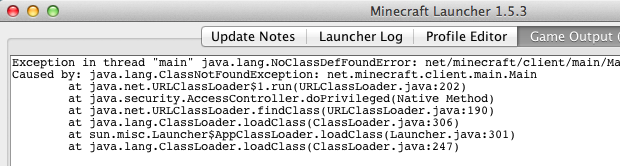
Client> Exception in thread "main" java.lang.NoClassDefFoundError: net/minecraft/client/main/Main
Client> Caused by: java.lang.ClassNotFoundException: net.minecraft.client.main.Main
Client> 	at java.net.URLClassLoader$1.run(URLClassLoader.java:202)
Client> 	at java.security.AccessController.doPrivileged(Native Method)
Client> 	at java.net.URLClassLoader.findClass(URLClassLoader.java:190)
Client> 	at java.lang.ClassLoader.loadClass(ClassLoader.java:306)
Client> 	at sun.misc.Launcher$AppClassLoader.loadClass(Launcher.java:301)
Client> 	at java.lang.ClassLoader.loadClass(ClassLoader.java:247)
Game ended with bad state (exit code 1)
Environment
Mac OS X 10.8.4
Apple Java version 1.6.0_45
Linked Issues
is duplicated by10
 MCL-411Minecraft Launcher Doesn't Open Minecraft After 0.9 UpdateDuplicateMCL-413Unable to play with dev launcher 0.9DuplicateMCL-422New launcher wont open game on MacDuplicateMCL-423Minecraft Dev LauncherDuplicateMCL-431Unable to launch gameDuplicateMCL-432Minecraft wont open for macDuplicateMCL-444launcher as of yesterday will not launch minecraft, mac.DuplicateMCL-976a serious problemDuplicateMCL-1144Optifine modded 1.6.2 jar, closes client with bad class state (Exit Code 1)DuplicateMCL-2063Minecraft Wont Launch Duplicate

Created Issue:
Dev Launcher does not launch Minecraft. (You had ONE JOB, Launcher!)
When Dev Launcher 0.9 opens, the drop-down for Version Selection only shows "(Default)" and does not update with a list of available versions. Service status shows "Online, no problems" for both Multiplayer and Login. Attempting to run Minecraft results in...
Client> Exception in thread "main" java.lang.NoClassDefFoundError: net/minecraft/client/main/Main
Client> Caused by: java.lang.ClassNotFoundException: net.minecraft.client.main.Main
Client> 	at java.net.URLClassLoader$1.run(URLClassLoader.java:202)
Client> 	at java.security.AccessController.doPrivileged(Native Method)
Client> 	at java.net.URLClassLoader.findClass(URLClassLoader.java:190)
Client> 	at java.lang.ClassLoader.loadClass(ClassLoader.java:306)
Client> 	at sun.misc.Launcher$AppClassLoader.loadClass(Launcher.java:301)
Client> 	at java.lang.ClassLoader.loadClass(ClassLoader.java:247)
Game ended with bad state (exit code 1)Probably because it's trying to launch nothing, since you cannot select a version of Minecraft to run. In that way, I guess it really isn't a bug after all...
Environment
Mac OS X 10.8.4
Apple Java version 1.6.0_45
Attachments1

Dev Launcher does not launch Minecraft. (You had ONE JOB, Launcher!)OS X: Exception in thread "main" java.lang.NoClassDefFoundError: net/minecraft/client/main/Main
When Dev Launcher 0.9 opens, the drop-down for Version Selection only shows "(Default)" and does not update with a list of available versions. Service status shows "Online, no problems" for both Multiplayer and Login. Attempting to run Minecraft results in...
Client> Exception in thread "main" java.lang.NoClassDefFoundError: net/minecraft/client/main/Main
Client> Caused by: java.lang.ClassNotFoundException: net.minecraft.client.main.Main
Client> 	at java.net.URLClassLoader$1.run(URLClassLoader.java:202)
Client> 	at java.security.AccessController.doPrivileged(Native Method)
Client> 	at java.net.URLClassLoader.findClass(URLClassLoader.java:190)
Client> 	at java.lang.ClassLoader.loadClass(ClassLoader.java:306)
Client> 	at sun.misc.Launcher$AppClassLoader.loadClass(Launcher.java:301)
Client> 	at java.lang.ClassLoader.loadClass(ClassLoader.java:247)
Game ended with bad state (exit code 1)Probably because it's trying to launch nothing, since you cannot select a version of Minecraft to run. In that way, I guess it really isn't a bug after all...
When Dev Launcher 0.9 opens, the drop-down for Version Selection only shows "(Default)" and does not update with a list of available versions. Service status shows "Online, no problems" for both Multiplayer and Login. Attempting to run Minecraft results in...
Client> Exception in thread "main" java.lang.NoClassDefFoundError: net/minecraft/client/main/Main Client> Caused by: java.lang.ClassNotFoundException: net.minecraft.client.main.Main Client> at java.net.URLClassLoader$1.run(URLClassLoader.java:202) Client> at java.security.AccessController.doPrivileged(Native Method) Client> at java.net.URLClassLoader.findClass(URLClassLoader.java:190) Client> at java.lang.ClassLoader.loadClass(ClassLoader.java:306) Client> at sun.misc.Launcher$AppClassLoader.loadClass(Launcher.java:301) Client> at java.lang.ClassLoader.loadClass(ClassLoader.java:247) Game ended with bad state (exit code 1)Probably because it's trying to launch nothing, since you cannot select a version of Minecraft to run. In that way, I guess it really isn't a bug after all...
is duplicated by
When Dev Launcher 0.9 opens, the drop-down for Version Selection only shows "(Default)" and does not update with a list of available versions. Service status shows "Online, no problems" for both Multiplayer and Login. Attempting to run Minecraft results in...Client> Exception in thread "main" java.lang.NoClassDefFoundError: net/minecraft/client/main/Main Client> Caused by: java.lang.ClassNotFoundException: net.minecraft.client.main.Main Client> at java.net.URLClassLoader$1.run(URLClassLoader.java:202) Client> at java.security.AccessController.doPrivileged(Native Method) Client> at java.net.URLClassLoader.findClass(URLClassLoader.java:190) Client> at java.lang.ClassLoader.loadClass(ClassLoader.java:306) Client> at sun.misc.Launcher$AppClassLoader.loadClass(Launcher.java:301) Client> at java.lang.ClassLoader.loadClass(ClassLoader.java:247) Game ended with bad state (exit code 1)Probably because it's trying to launch nothing, since you cannot select a version of Minecraft to run. In that way, I guess it really isn't a bug after all.
..Upgraded to 0.9 Dev Launcher after using 0.8.whateverTheLastVersionWas. Minecraft does not launch. Edited default profile to use a version of Minecraft that I know had been downloaded by the previous version of Dev Launcher. Still will not launch. Service status shows "Online, no problems" for both Multiplayer and Login. Attempting to run Minecraft results in...
Client> Exception in thread "main" java.lang.NoClassDefFoundError: net/minecraft/client/main/Main Client> Caused by: java.lang.ClassNotFoundException: net.minecraft.client.main.Main Client> at java.net.URLClassLoader$1.run(URLClassLoader.java:202) Client> at java.security.AccessController.doPrivileged(Native Method) Client> at java.net.URLClassLoader.findClass(URLClassLoader.java:190) Client> at java.lang.ClassLoader.loadClass(ClassLoader.java:306) Client> at sun.misc.Launcher$AppClassLoader.loadClass(Launcher.java:301) Client> at java.lang.ClassLoader.loadClass(ClassLoader.java:247) Game ended with bad state (exit code 1)Probably because it's trying to launch nothing, since you cannot select a version of Minecraft to run. In that way, I guess it really isn't a bug after all.
Upgraded to 0.9 Dev Launcher after using 0.8.whateverTheLastVersionWas. Minecraft does not launch. Edited default profile to use a version of Minecraft that I know had been downloaded by the previous version of Dev Launcher. Still will not launch. Service status shows "Online, no problems" for both Multiplayer and Login. Attempting to run Minecraft results in...
Client> Exception in thread "main" java.lang.NoClassDefFoundError: net/minecraft/client/main/Main Client> Caused by: java.lang.ClassNotFoundException: net.minecraft.client.main.Main Client> at java.net.URLClassLoader$1.run(URLClassLoader.java:202) Client> at java.security.AccessController.doPrivileged(Native Method) Client> at java.net.URLClassLoader.findClass(URLClassLoader.java:190) Client> at java.lang.ClassLoader.loadClass(ClassLoader.java:306) Client> at sun.misc.Launcher$AppClassLoader.loadClass(Launcher.java:301) Client> at java.lang.ClassLoader.loadClass(ClassLoader.java:247) Game ended with bad state (exit code 1)Probably because it's trying to launch nothing, since you cannot select a version of Minecraft to run. In that way, I guess it really isn't a bug after all.
Upgraded to 0.9 Dev Launcher after using 0.8.whateverTheLastVersionWas. Minecraft does not launch. Edited default profile to force it to use a version of Minecraft that I know had been downloaded by the previous version of Dev Launcher, and that shows a status of "Up to date" in the Version Selection area of the GUI. Still will not launch. Service status shows "Online, no problems" for both Multiplayer and Login. Attempting to run Minecraft results in...
Client> Exception in thread "main" java.lang.NoClassDefFoundError: net/minecraft/client/main/Main Client> Caused by: java.lang.ClassNotFoundException: net.minecraft.client.main.Main Client> at java.net.URLClassLoader$1.run(URLClassLoader.java:202) Client> at java.security.AccessController.doPrivileged(Native Method) Client> at java.net.URLClassLoader.findClass(URLClassLoader.java:190) Client> at java.lang.ClassLoader.loadClass(ClassLoader.java:306) Client> at sun.misc.Launcher$AppClassLoader.loadClass(Launcher.java:301) Client> at java.lang.ClassLoader.loadClass(ClassLoader.java:247) Game ended with bad state (exit code 1)
is duplicated by
is duplicated by
is duplicated by
is duplicated by
is duplicated by
same problem but on windows 8
and lethman your solution did not work for me
Same, I have the exact same issue.

This ticket has been marked as a duplicate of MCL-412, in favor of the better description/information provided.
Duplicate of MCL-412, please use the search function to see if your bug has already been submitted.
Duplicate of MCL-412, please use the search function to see if your bug has already been submitted.
Duplicate of MCL-412, please use the search function to see if your bug has already been submitted.
Duplicate of MCL-412, please use the search function to see if your bug has already been submitted.
You can select the version of minecraft from the Profiles tab now. The drop down on the main screen is for selecting the profiles.
That said, I have the same not launching issue (see
MCL-413) on Mac.Thanks. Updated to reflect that.
Cant launch either :/
I am experiencing the same issue it will not launcher the latest snapshot
The 0.9.1 update resolved this issue for me! Thanks, Grum!
Fixed! Thanks!
I had this bug in Launcher 0.9.2.
An easy fix:
"mainClass": "net/minecraft/client/main/Main"
to
"mainClass": "net.minecraft.client.Minecraft"
I am experiencing this bug in Launcher v1.5.3 in OS X v10.9.5.