Cant install Minecraft For Windows 10 from Microsoft Store
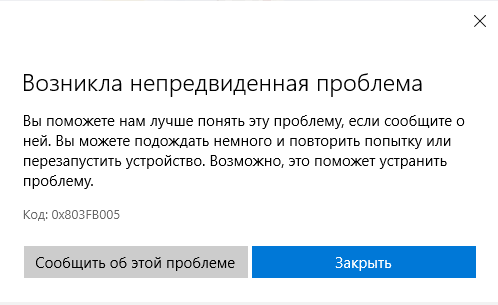
Hello, I'm again with one problem - I wanted to download Minecraft For Windows 10 from the Microsoft Store, but I can't download it in the usual way through the page with the game, the button is gray and does not respond to clicks, looking at the system requirements Minecraft writes to me at the top of the window : "To install the game - update the device. Minimum: DirectX 11, Recommended: Not specified, Yours: API DirectX 12, component level 12", the game was downloaded and launched before, before contacting you
I even contacted support for Xbox and Windows - because in twitter your employees sent me to Xbox and Windows support, they shook me and sent me to you, we tried to fix it - but it didn't help
everything is straight, I don't know what to do right, no one has a similar problem on the forums
Linked Issues
is duplicated by5
 MCPE-106691Get Error Code: 0x803FB005 when try to reinstall 1.16.100 after being unable to update from 1.16.40DuplicateMCPE-107582Cannot download 1.16.100 from Microsoft StoreDuplicateMCPE-108319Unable to download from Microsoft Store. Error 0x803FB005DuplicateMCPE-110504Minecraf does not updateDuplicateMCPE-112371This isn't really a bug, but my minecraft STILL won't update to 1.16.100. So please fix this.Duplicate
Attachments12







Created Issue:
Cant install Minecraft For Windows 10 from Microsoft Store
Hello, I'm again with one problem - I wanted to download Minecraft For Windows 10 from the Microsoft Store, but I can't download it in the usual way through the page with the game, the button is gray and does not respond to clicks, looking at the system requirements Minecraft writes to me at the top of the window : "To install the game - update the device. Minimum: DirectX 11, Recommended: Not specified, Yours: API DirectX 12, component level 12", the game was downloaded and launched before, before contacting you
I even contacted support for Xbox and Windows - because in twitter your employees sent me to Xbox and Windows support, they shook me and sent me to you, we tried to fix it - but it didn't help
everything is straight, I don't know what to do right, no one has a similar problem on the forums
Attachments2
- Unresolved
- Open
- Unconfirmed
- Windows
- Windows 10 1909
- 1.16.100
![[Mojang] Mega_Spud (Jay Wells)](../../../data/avatars/users/92696.png)
![[Bot] Arisa](../../../data/avatars/users/43007.png)
is duplicated by
is duplicated by
is duplicated by
I bought the cheapest GT710 gpu i found to "future proof" one of my kids computers for a couple of years. Sadly can't change GPU in the other one.
Here are some duplicate issues:
MCPE-108319
Thank you for your report!
We're tracking this issue in MCPE-107625, so this ticket is being resolved and linked as a duplicate.
If you would like to add a vote and any extra information to the main ticket it would be appreciated.
Quick Links:
📓 Bug Tracker Guidelines – 💬 Community Support – 📧 Mojang Support
📓 Project Summary – ✍️ Feedback and Suggestions – 📖 Game Wiki – 📖 FAQs
Thank you for your report!
We're tracking this issue in MCPE-107625, so this ticket is being resolved and linked as a duplicate.
If you would like to add a vote and any extra information to the main ticket it would be appreciated.
If you haven't already, you might like to make use of the search feature to see if the issue has already been mentioned.
Quick Links:
📓 Bug Tracker Guidelines – 💬 Community Support – 📧 Mojang Support
📓 Project Summary – ✍️ Feedback and Suggestions – 📖 Game Wiki
– I am a bot. This action was performed automatically! Please report any issues on Discord or Reddit
Thank you for your report!
We're tracking this issue in MCPE-107625, so this ticket is being resolved and linked as a duplicate.
If you would like to add a vote and any extra information to the main ticket it would be appreciated.
If you haven't already, you might like to make use of the search feature to see if the issue has already been mentioned.
Quick Links:
📓 Bug Tracker Guidelines – 💬 Community Support – 📧 Mojang Support
📓 Project Summary – ✍️ Feedback and Suggestions – 📖 Game Wiki
– I am a bot. This action was performed automatically! Please report any issues on Discord or Reddit
Does MCPE-107625 describe your issue? If not, please clarify the Description section above using this format:
Steps to Reproduce:
1. (be complete and exact so someone else can repeat)
2.
3.
Observed Results:
(briefly describe what actually happens, including any message(s) shown)
Expected Results:
(briefly describe what should happen)
(attach screenshot to help explain the issue)
This ticket has been temporarily closed as Awaiting Response. It will automatically reopen when you add information. Please follow the format shown and include all sections (steps, observed, expected). Tickets that do not contain enough information may be closed as Incomplete.
the same issue - tried to update to play on realm would not work so removed it from PC, now it will not let me install - so now can not play at all. A normal bug is when you can play the game with some minor irritations. This bug, cant install a purchased game at all. So no longer a bug but rather a fatal error.
If possible, could you please include details about your system (RAM, CPU, GPU spec).
If you like you can run dxdiag and copy the relevant information from there. (Win+R → dxdiag) - be sure to remove any personal information, just the PC specs would be useful.
i had the same issue, i deleted minecraft as a try to update to the newer version, and i couldnt download it again. Here are my pc detalis if it is necesary. I have also directx12.
Exact same problem here.
same issue as above.
windows store error Code: 0x803FB005
question: checked DXdiag, is the DX features not compatible? had this running fine with 1.16.040 but after deciding to do complete reinstall of windows this issue persisted.
------------------
System Information
------------------
Time of this report: 11/26/2020, 10:51:05
Machine name: XXXXXXXX
Machine Id: XXXXXXXX
Operating System: Windows 10 Pro 64-bit (10.0, Build 18363) (18362.19h1_release.190318-1202)
Language: English (Regional Setting: English)
System Manufacturer: Dell Inc.
System Model: Latitude E6420
BIOS: A19 (type: UEFI)
Processor: Intel(R) Core(TM) i7-2640M CPU @ 2.80GHz (4 CPUs), ~2.8GHz
Memory: 8192MB RAM
Available OS Memory: 8072MB RAM
Page File: 2929MB used, 7062MB available
Windows Dir: C:\Windows
DirectX Version: DirectX 12
DX Setup Parameters: Not found
User DPI Setting: 96 DPI (100 percent)
System DPI Setting: 96 DPI (100 percent)
DWM DPI Scaling: Disabled
Miracast: Not Available
Microsoft Graphics Hybrid: Not Supported
DirectX Database Version: Unknown
DxDiag Version: 10.00.18362.0387 64bit Unicode
i've attempted all mentioned in this link:
https://answers.microsoft.com/en-us/windows/forum/games_windows_10/cant-install-purchased-minecraft-on-windows-10/a7f14f44-2d6d-4617-bc7c-bd30ef8d0b53
Try pressing Win+R, then type "wsreset", press enter and wait.
Hello, i have a same isue.
It is very unhappy situation, because i uninstall older version at first..Now i am not able to install Minecraft.
So is it really necessary to check directX version for this build???
I found that some people install this build with newest gpu, after installation switch to older gpu and everithing works great...(this way is not possible for people like me - using notebook )
Meybe just a warning, that with older version of DirectX can be problem with graphics ..stability ..etc..
But not this......
BR Marty
Hello from Germany. I have the same problem. The install-button on windows store is hidden, since I deinstalled Minecraft. To play multiplayer, a Minecraft-update was required. A newer version was available, but I only knew that from the friend, i wanted to play with. There was no update for me, therefore I tried to install Minecraft new.
Supposedly, the problem is because the DirectX is not up to date.
I have DirectX12 an *11 is minimum required. crazy ... Unable to embed resource: 1.png of type image/png
Here my PC requirements:
{9F5E6492-633E-43BE-A71F-523731D30C15}------------------
System Information
------------------
Time of this report: 11/20/2020, 12:08:45
Machine name: MR_KILLAURA
Machine Id:
Operating System: Windows 10 Pro 64-bit (10.0, Build 18363) (18362.19h1_release.190318-1202)
Language: Russian (Regional Setting: Russian)
System Manufacturer: SAMSUNG ELECTRONICS CO., LTD.
System Model: 300E4Z/300E5Z/300E7Z
BIOS: Phoenix SecureCore-Tiano(tm) NB Version 2.1 03QB (type: BIOS)
Processor: Intel(R) Celeron(R) CPU B800 @ 1.50GHz (2 CPUs), ~1.5GHz
Memory: 4096MB RAM
Available OS Memory: 4010MB RAM
Page File: 2554MB used, 4911MB available
Windows Dir: C:\Windows
DirectX Version: DirectX 12
DX Setup Parameters: Not found
User DPI Setting: 96 DPI (100 percent)
System DPI Setting: 96 DPI (100 percent)
DWM DPI Scaling: Disabled
Miracast: Not Available
Microsoft Graphics Hybrid: Not Supported
DirectX Database Version: Unknown
DxDiag Version: 10.00.18362.0387 64bit Unicode
Im also cant replace GPU because im playing in Minecraft from laptop
bernaBernardo Gomes Negri, "Try pressing Win+R, then type "wsreset", press enter and wait." - I still have this error,
Yesterday I even specially installed Windows 20H2, it did not help either, wsreset did not help, it does not help
It seems to happen when computer graphics card doesn't support DirectX 11 features - so ones for which support was discontinued recently. Windows Store should probably install previous version (1.16.40) in such case, but it doesn't seem to do that.
totally forgot about this announcement:
https://mspoweruser.com/minecraft-gear-vr-windows-10-mobile-support/
direct X 10 support was going to be ended.
the laptop that the issue is happening on is the one my kid uses. it's a hand-me-down PC.
at the very least let us download v1.16.04 that still supported direct X 10.
some people here have directx12 and still unable to download minecraft, so the problem is not with directx10 i guess
Version of DirectX you have and DirectX features that your graphics card supports are two different things. You can have DirectX 12 installed, but still have graphics card that doesn't support DirectX 11.
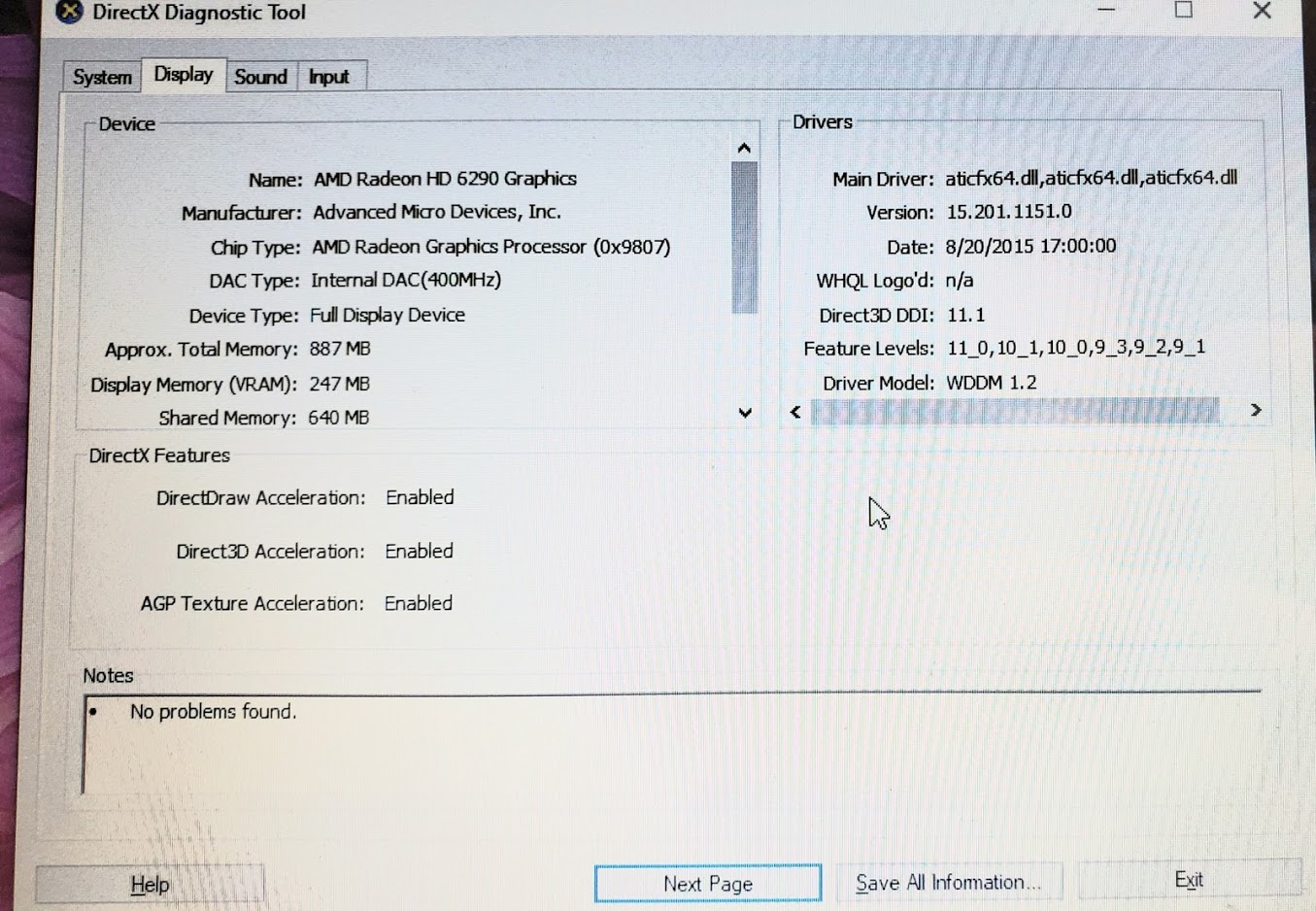
To check DirectX feature set supported run dxdiag and look for line "Feature Levels". If highest value there is 10_1 (or lower), then your graphics card doesn't support DirectX 11. All dxdiag reports attached to this case indicate such graphics cards.
Does that mean: I'm buying Minecraft because it meets the system requirements and with an update they get higher so that Minecraft becomes unplayable for a lot of paying people?
My computer has DirectX 12 and I was unable to update Minecraft to the newest version and now I'm unable to download Minecraft at all.
Dylan Houdeshell, +
Duplicate issue
MCPE-106691For those using affected devices, run DxDiag and on the Display tab, locate the DirectX Feature levels, If you see one (or multiple) that match the below feature levels, then it is compatible with newer versions (see my picture for an example of one that shows 11_0), if you do not, then this looks like it is normal
Feature levels:
12_1 12_0 11_1 11_0
This is a copy and paste from here
Thank you for your report!
However, this issue has been temporarily closed as Awaiting Response
Is this still an issue in the latest version? If so, please make sure the ticket description contains the following information:
If your ticket does not look like the example given here, then it's likely to be closed as incomplete.
This ticket will automatically reopen when you reply.
Quick Links:
📓 Issue Guidelines – 💬 Mojang Support – 📧 Suggestions – 📖 Minecraft Wiki
Cleaning up old tickets: This ticket had been set to 'Awaiting Response', but has not received a response from the reporter (~3 months+) so is being closed as Incomplete. If you feel this is still a valid issue then please comment, or create a new ticket following the Issue Guidelines which includes steps to reproduce the problem.
For any account or purchasing related issues, please contact Minecraft Customer Support directly, as we cannot assist with those here at the bug tracker.
Quick Links:
📓 Issue Guidelines – 💬 Mojang Support – 📧 Suggestions – 📖 Minecraft Wiki