Too many pillagers and golems can spawn at outpost.
Steps to reproduce
- Set render distance to 8 and turn on the autosave icon in video settings.
- Create a world with seed 74407, simulation distance 6, and coordinates enabled.
- /tp 620 100 736
- Make a pillar to mark your location so that it is visible while flying.
- Fly westward for about 50-100 blocks (-X), then back toward your pillar.
- While the autosave icon is on (showing that autosave is happening), fly past your pillar heading eastward (+X) until you arrive at the outpost.
Expected result
Outpost generates one iron golem in each cage, and one squadron of pillagers.
Observed result
Outpost generates more than one iron golem and more than one squadron of pillagers. See How to duplicate structure mobs.mp4 .
.
Description:
It seems that too many mobs are spawning at some outposts I had:
6 pillager captains
about 30 regular pillagers
8 iron golems ( 2 cages had 4 each)
I’m not too sure how to reproduce this one as it doesn’t always happen I’m using an xbox series x and playing multiplayer.
Linked Issues
is duplicated by3
relates to5
 MCPE-23416No chests in desert or jungle templeFixedMCPE-182745Mansions can over-spawn illagers and allaysConfirmedMCPE-11908Some Trees' Leaves/Logs get cut off at chunk borders prior to world generationConfirmedMCPE-48622Corridor chests sometimes won’t generate in StrongholdFixedMCPE-97295Nether Fortresses Not Generating Blaze SpawnersFixed
![[Mod] GoldenHelmet](../../../data/avatars/users/18951.svg)


Created Issue:
Too many pillagers/ mobs spawn at outpost.
Description:
It seems that too many mobs are spawning at some outposts I had:
6 pillager captains
about 30 regular pillagers
8 iron golems ( 2 cages had 4 each)
I’m not too sure how to reproduce this one as it doesn’t always happen I’m using an xbox series x and playing multiplayer.
Attachments1
FullSizeRender.mov
Description:
It seems that too many mobs are spawning at some outposts I had:
6 pillager captains
about 30 regular pillagers
8 iron golems ( 2 cages had 4 each)
I’m not too sure how to reproduce this one as it doesn’t always happen I’m using an xbox series x and playing multiplayer.
Too many pillagers/ mobsspawn at outpost.Too many pillagers and golems can spawn at outpost.
Description:
It seems that too many mobs are spawning at some outposts I had:
6 pillager captains
about 30 regular pillagers
8 iron golems ( 2 cages had 4 each)
I’m not too sure how to reproduce this one as it doesn’t always happen I’m using an xbox series x and playing multiplayer.
Steps to reproduce
- Set render distance to 8 and turn on the autosave icon in video settings.
- Create a world with seed 74407 and coordinates enabled.
- /tp 620 100 736
- Make a pillar to mark your location so that it is visible while flying.
- Fly westward for about 50-100 blocks (-X), then back toward your pillar.
- While the autosave icon is on (showing that autosave is happening), fly past your pillar heading eastward (+X) until you arrive at the outpost.
Expected result
Outpost generates one iron golem in each cage, and one squadron of pillagers.
Observed result
Outpost generates more than one iron golem and more than one squadron of pillagers. How to duplicate structure mobs.mp4
Description:
It seems that too many mobs are spawning at some outposts I had:
6 pillager captains
about 30 regular pillagers
8 iron golems ( 2 cages had 4 each)
I’m not too sure how to reproduce this one as it doesn’t always happen I’m using an xbox series x and playing multiplayer.
Steps to reproduce
- Set render distance to 8 and turn on the autosave icon in video settings.
- Create a world with seed 74407 and coordinates enabled.
- /tp 620 100 736
- Make a pillar to mark your location so that it is visible while flying.
- Fly westward for about 50-100 blocks (-X), then back toward your pillar.
- While the autosave icon is on (showing that autosave is happening), fly past your pillar heading eastward (+X) until you arrive at the outpost.
Expected result
Outpost generates one iron golem in each cage, and one squadron of pillagers.
Observed result
Outpost generates more than one iron golem and more than one squadron of pillagers. How to duplicate structure mobs.mp4
Description:
It seems that too many mobs are spawning at some outposts I had:
6 pillager captains
about 30 regular pillagers
8 iron golems ( 2 cages had 4 each)
I’m not too sure how to reproduce this one as it doesn’t always happen I’m using an xbox series x and playing multiplayer.
Steps to reproduce
- Set render distance to 8 and turn on the autosave icon in video settings.
- Create a world with seed 74407 and coordinates enabled.
- /tp 620 100 736
- Make a pillar to mark your location so that it is visible while flying.
- Fly westward for about 50-100 blocks (-X), then back toward your pillar.
- While the autosave icon is on (showing that autosave is happening), fly past your pillar heading eastward (+X) until you arrive at the outpost.
Expected result
Outpost generates one iron golem in each cage, and one squadron of pillagers.
Observed result
Outpost generates more than one iron golem and more than one squadron of pillagers. See How to duplicate structure mobs.mp4
Description:
It seems that too many mobs are spawning at some outposts I had:
6 pillager captains
about 30 regular pillagers
8 iron golems ( 2 cages had 4 each)
I’m not too sure how to reproduce this one as it doesn’t always happen I’m using an xbox series x and playing multiplayer.
Steps to reproduce
- Set render distance to 8 and turn on the autosave icon in video settings.
- Create a world with seed 74407, simulation distance 6, and coordinates enabled.
- /tp 620 100 736
- Make a pillar to mark your location so that it is visible while flying.
- Fly westward for about 50-100 blocks (-X), then back toward your pillar.
- While the autosave icon is on (showing that autosave is happening), fly past your pillar heading eastward (+X) until you arrive at the outpost.
Expected result
Outpost generates one iron golem in each cage, and one squadron of pillagers.
Observed result
Outpost generates more than one iron golem and more than one squadron of pillagers. See How to duplicate structure mobs.mp4
Description:
It seems that too many mobs are spawning at some outposts I had:
6 pillager captains
about 30 regular pillagers
8 iron golems ( 2 cages had 4 each)
I’m not too sure how to reproduce this one as it doesn’t always happen I’m using an xbox series x and playing multiplayer.
relates to
relates to
relates to
relates to
![[Bot] Arisa](../../../data/avatars/users/43007.png)
relates to
relates to
![[MCQA] v-magwar](../../../data/avatars/users/18935.svg)
is duplicated by
![[Mod] OcelotOnesie](../../../data/avatars/users/43220.png)
is duplicated by
is duplicated by
Too many pillagers and golems can spawn at outpost.
Too many pillagers and golems can spawn at outpost.
relates to

The reproduction of this bug is equivalent to the reproduction of MCPE-141499. There are three general steps to trigger either bug:
- Player comes within render distance + 2 chunks of the structure, but not within simulation distance. This triggers the chunk to generate because it contains tile entities.
- Player moves away so that the chunk is no longer rendered.
- During autosaving, the player comes within simulation distance of the chunk.
I am not 100% sure that step (2) is necessary, but I think it is. My theory is that because the chunk was outside of render distance in step (2), it only loads block data when it comes back into render distance in step (3), and then gets ticked before it can load entity data because the game is busy saving other chunks.
The following more precise steps work in 1.17.30 without the Caves & Cliffs experimental generation. In future versions or with the experimental toggle enabled, you will need to use a different seed and location.
Steps to reproduce
- Set render distance to 8 and turn on the autosave icon in video settings.
- Create a world with seed 1968687984, simulation distance 6, and coordinates enabled.
- After you spawn, move forward across the river until you get to about Z = 85. Make a pillar there to mark your location so that it is visible while flying.
- Fly around to the north of the pillar (-Z direction) until the auto-save icon appears. (You may need to at Z < 80 until the icon appears to trigger the bug.)
- While the autosave icon is on (showing that autosave is happening), fly past your pillar heading south (+Z) until you arrive at the desert temple (X: 640, Z: 256).
- Enter the desert temple and go down to the treasure room.
Expected result
There are chests in the desert temple.
Observed result
No chests in the desert temple. Demo: https://youtu.be/elJ2t-H_3ro
Entered a desert temple, everything there but there were no chests.
The process to reproduce this is the same as MCPE-23416, MCPE-97295, and MCPE-141499. To get a missing chest specifically use these steps:
- Set render distance to 8 and turn on the auto-save icon.
- Create a world using the "Stronghold Below" seed with simulation distance 4 or 6.
- /tp 1126 70 -15
- Move to 32 < Z < 47, then quickly back to Z < 0, and wait.
- Once the auto-save icon appears, /tp 1126 27 201.
Expected result
Chests at Z = 202 and Z = 209.
Observed result
One or both chests are missing.
Missing chest.mp4
This is hard to reproduce because it will happen at random times.
Steps to reproduce
- 1 enter a stronghold
- 2 search for corridor chests ( if none of them is missing, then try the same seed a few time.)
Observed result:
Sometimes a corridor chest is missing, resulting in an empty chest holder and missing loot.
Expected result
All chest should generate
Seed:
-27149278 (Stronghold Below)
Coords:
1126 27 201

Update from [Mod] GoldenHelmet:
The reproduction of this bug is equivalent to the reproduction of MCPE-141499 and MCPE-23416.
- Player comes within render distance + 2 chunks of the structure, but not within simulation distance. This triggers the chunk to generate because it contains tile entities.
- Player moves away so that the chunk is no longer within render distance + 2 chunks.
- During autosaving, the player comes within simulation distance of the chunk.
I am not 100% sure that step (2) is necessary, but I think it is. My theory is that because the chunk was outside of render distance in step (2), it only loads block data when it comes back into render distance in step (3), and then gets ticked before it can load entity data because the game is busy saving other chunks.
The following more precise steps work in 1.17.32 without the Caves & Cliffs experimental generation. In future versions or with the experimental toggle enabled, you will need to use a different seed and location.
Steps to reproduce
- Set render distance to 8 and turn on the autosave icon in video settings.
- Create a world with seed 1212557532, simulation distance 6, and coordinates enabled.
- After you spawn, /tp 800 ~ ~, make a nether portal, and enter the nether.
- In the nether, /tp 95 ~ 216
- Fly east to X = 115 and flying around the area, never going to X < 115 until the auto-save icon appears.
- When the auto-save icon comes on (showing that autosave is happening), due west (-X), staying near Z = 216, until you get to X = -60.
- /tp -60 78 216.
Expected result
There is a blaze spawner.
Observed result
No blaze spawner.
I came across two rooms that should've generated blaze spawners, but they weren't there. That was the closest one to spawn (-80 ~ 192). The second fortress (736 ~ -320) luckily had a single spawner room with a spawner. The coordinates of each of the spawners is in the images, and here's the seed; 1212557532. Also sorry about the poor image quality.
Following the reproduction process I identified for MCPE-23416, MCPE-97295, and MCPE-141499, I discovered that a similar process can cause the generation of terrain features to be cut off at chunk borders. When a terrain feature such as a tree crosses a chunk border and only one of the two chunks has come within a player's simulation distance, the part of the feature in the neighboring chunk can fail to generate if the player moves in such a way that the never-simulated chunk is unrendered and then comes within simulation distance of the player during auto-saving.
Steps to reproduce
- Set render distance to 8 and turn on the auto-save icon.
- Create a world with creative mode, seed 1686104715, simulation distance 6, with coordinates on.
- Move to 130, -12 without going any farther north than Z = -12. Notice the red mushroom tree in the distance.
- Move to 130, 100 and wait.
- When the auto-save icon appears, fly straight north to the red mushroom tree you saw in step (3).
Expected result
You arrive at a complete mushroom tree.
Observed result
You arrive at a slice of the mushroom tree cut off at the Z = -112 to -113 chunk border. How to cut off generation at a chunk line .mp4
If you don't get it, try again--I reproduced this 3 times in 7 or 8 tries. I think the key may be simulating the mushroom tree chunk ASAP once auto-saving starts.
Following the reproduction process I identified for MCPE-23416, MCPE-97295, and MCPE-141499, I discovered that a similar process can cause the generation of terrain features to be cut off at chunk borders. When a terrain feature such as a tree crosses a chunk border and only one of the two chunks has come within a player's simulation distance, the part of the feature in the neighboring chunk can fail to generate if the player moves in such a way that the never-simulated chunk is unrendered and then comes within simulation distance of the player during auto-saving.
Steps to reproduce
- Set render distance to 8 and turn on the auto-save icon.
- Create a world with creative mode, seed 1686104715, simulation distance 6, with coordinates on.
- Move to 130, -12 without going any farther north than Z = -12. Notice the red mushroom tree in the distance.
- Move to 130, 100 and wait.
- When the auto-save icon appears, fly straight north to the red mushroom tree you saw in step (3).
Expected result
You arrive at a complete mushroom tree.
Observed result
You arrive at a slice of the mushroom tree cut off at the Z = -112 to -113 chunk border. See https://bugs.mojang.com/secure/attachment/445159/How%20to%20cut%20off%20generation%20at%20a%20chunk%20line%20.mp4
If you don't get it, try again--I reproduced this 3 times in 7 or 8 tries. I think the key may be simulating the mushroom tree chunk ASAP once auto-saving starts.
Thank you for your report!
We're tracking this issue in MCPE-141499, so this ticket is being resolved and linked as a duplicate.
If you would like to add a vote and any extra information to the main ticket it would be appreciated.
If you haven't already, you might like to make use of the search feature to see if the issue has already been mentioned.
Quick Links:
📓 Bug Tracker Guidelines – 💬 Community Support – 📧 Mojang Support
📓 Project Summary – ✍️ Feedback and Suggestions – 📖 Game Wiki
Thank you for your report!
We're tracking this issue in MCPE-141499, so this ticket is being resolved and linked as a duplicate.
If you would like to add a vote and any extra information to the main ticket it would be appreciated.
If you haven't already, you might like to make use of the search feature to see if the issue has already been mentioned.
Quick Links:
📓 Bug Tracker Guidelines – 💬 Community Support – 📧 Mojang Support
📓 Project Summary – ✍️ Feedback and Suggestions – 📖 Game Wiki
Thank you for your report!
We're tracking this issue in MCPE-141499, so this ticket is being resolved and linked as a duplicate.
If you would like to add a vote and any extra information to the main ticket it would be appreciated.
If you haven't already, you might like to make use of the search feature to see if the issue has already been mentioned.
Quick Links:
📓 Bug Tracker Guidelines – 💬 Community Support – 📧 Mojang Support
📓 Project Summary – ✍️ Feedback and Suggestions – 📖 Game Wiki
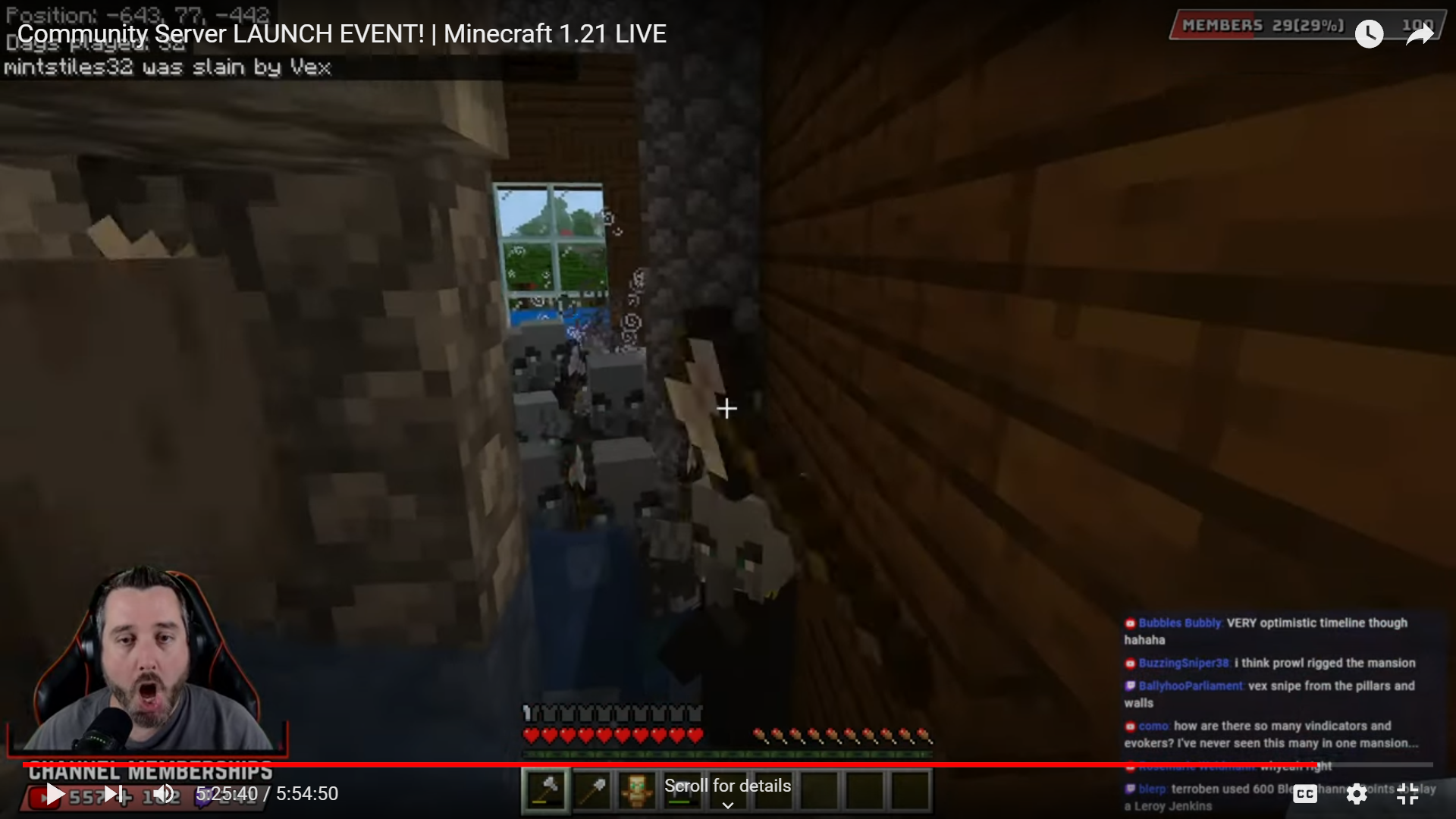
Same as MCPE-141499, but for mansions. The steps below are sufficient to double most of the illager spawns in a single-player world. In a multiplayer world the over-spawning can be massive, as encountered in this livestream, where dozens of illagers spawned. (Watch from 4:48:02 to the end.)
Steps to reproduce (updated 1/13/2025)
- Import the attached test world.
- /tp -7000 120 -10920
- Check the scoreboard counts.
- Delete the world from Minecraft and then import a fresh copy of the test world.
- Set render distance to 14 and turn on the autosave icon in video settings.
- /tp -7000 120 -10720
- Face north (-Z direction) until you can see the woodland mansion render.
- Fly in the +Z direction to about Z = -10600.
- Wait or fly back and forth a short distance on the X axis until the autosave icon appears.
- When the autosave icon appears, sprint-fly in the -Z direction until directly above the woodland mansion. If the autosave icon disappears before you stop over the mansion go back to step (4).
- Check the scoreboard counts.
Expected result
There scoreboards in step (3) and step (11) should match, showing 1 evoker, 18 vindicators, and 7 allays.
Observed result
There are many more evokers, vincdators and allays in the mansion. In the repro video linked below there are 2 evokers, 40 vindicators, and 14 allays, and you can see that the 2 evokers spawned in the same room.
https://youtu.be/J9yh5VmWJ1c
Please give the world seed and any other details you have such as local world/server/reams, sequence of events, and direction how you approached the outpost from.
Seed: 74407 (Was randomly generated by imputing "KIE" into the seed
World was created today 17/09/2021 using an Xbox Series X
Difficulty: Normal
Online Multiplayer (Me (On Xbox Series X) and one other player (On Xbox One))
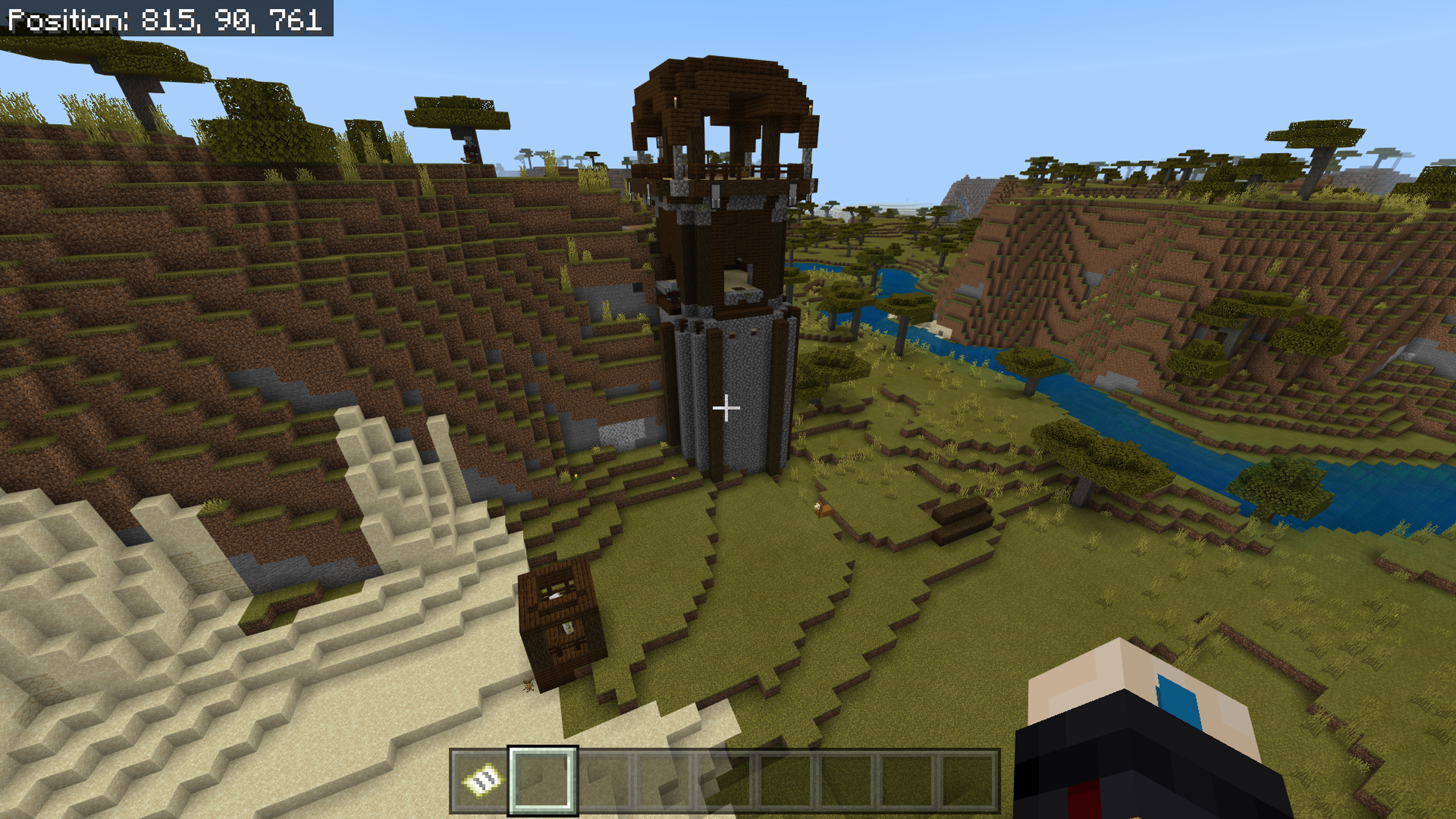
Outpost location: 815, 90, 761
Travelled from 1221, 89, 566 -> past a village -> the outpost
I went back to the outpost on creative by myself and it was normal and this has only ever happened to me whilst playing online multiplayer and has happened on other worlds and at different outposts on this seed.
I also tested it on a LAN connection and it had a normal amount of mobs.
Just added a video of me walking up to the outpost where you can see the mobs load in about 11 Pillagers and a cage of the iron golems are visible, a lot of the Pillagers spawned on the other side the second iron golems cage is also on that side.
I have seen this occur on Switch in the past, but not sure about the repro. Possibly could be triggered by approaching an outpost that generates across multiple chunks from different directions, where only part of the outpost comes within simulation distance the first time.
Another possible trigger could be approaching an outpost during an auto-save.
UPDATE: autosave is the trigger, in conjunction with the chunk generation at the edge of render distance triggered by tile entities.
Turns out the steps to reproduce
MCPE-23416andMCPE-97295are equivalent.