Shadows flash when blocks are broken and placed
Alot of the time when breaking or placing blocks a flash of shadow happens. It does not matter what type of pickaxe or enchantments. This happens no matter what. It also doesn't seem to matter you have a light source close by or far away it seems to happen when no light source is placed near by.
Steps to Reproduce:
- Place or break a block during night or day.
- placed torches/light source near by
- removed torches/light sources
Observed Results:
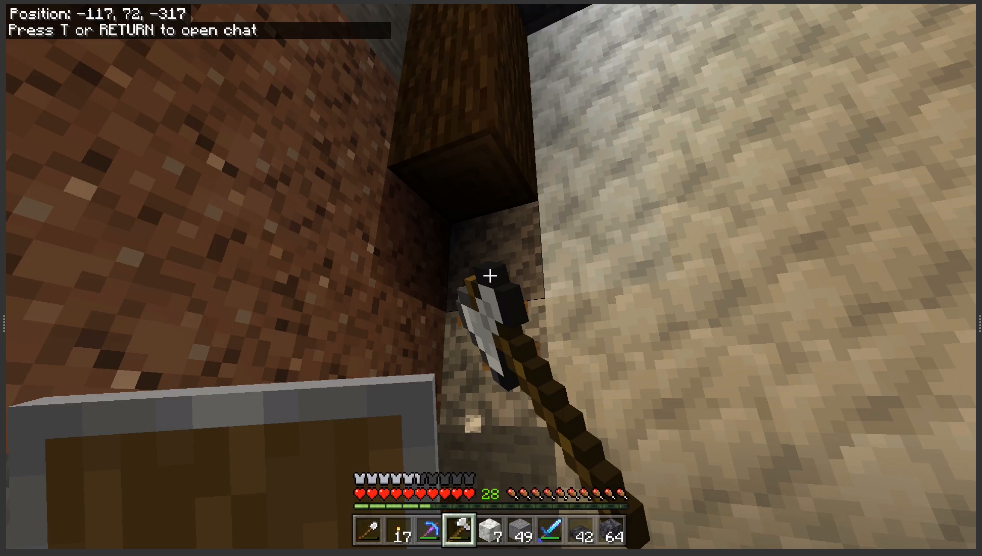
When you place a block there is a flash of shadow, it is very brief, but very noticeable. Could be dangerous for anyone effected by flashing lights. Light source distance doesn't seem to matter. It also happens with torches, lanterns, lava, all light sources i've used so far. It also happens with natural lighting.
Expected Results:
Place blocks without any shadow flashing.
Notes:
I have attached images, If video is needed i'm able to take video of the issue. 1st image is before, 2nd is as it happens, 3rd image is after it is done.
Originally reported for Windows. Also occurs on PlayStation (1.18.2) per MCPE-152066.
Linked Issues
is duplicated by12
 MCPE-144949Fantom shadow in breaking blocksDuplicateMCPE-152066Shadows quickly appearingDuplicateMCPE-154070Glitchy shadows when placing and breaking blocks in dark areas DuplicateMCPE-161979Shadows flicker for a single frame when placing/breaking blocksDuplicateMCPE-169487Graphical Issue (updating light levels) When Mining/Placing Blocks.DuplicateMCPE-171029Lighting glitch causing black splotches to appear all over the screen ( Potential epilepsy trigger)DuplicateMCPE-171352lighting glitches when placing or breaking moss blocksDuplicateMCPE-171442Light/Shadow Flashing when MiningDuplicateMCPE-178146Visual glitch - Blackouts in image when mining smooth sandstone next to a light emitting blockDuplicateMCPE-183798Mining blocks may cause the screen to flickerDuplicateMCPE-188625Lighting flickersDuplicateMCPE-188949screen flashingDuplicate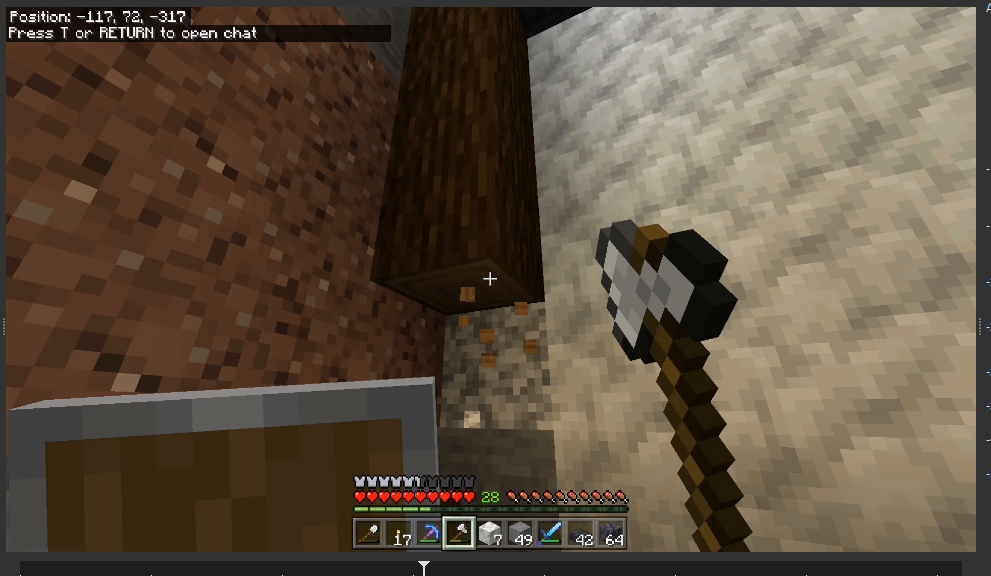


- Unresolved
 sharleen
- 26
- 15
- Confirmed
- 729698
- Multiple
- windows 10
1.18.20.28 Preview - 1.21.44 Hotfix
1.18.20.28 Preview 1.18.20.27 Beta 1.18.20.26 Preview 1.18.20.25 Beta 1.18.20.24 Preview 1.18.20.23 Beta 1.18.10.21 Beta 1.18.10.20 Beta 1.18.0.27 Beta 1.18.0.21 Beta 1.17.34 1.18.0.25 Beta 1.17.41 Hotfix 1.18.0 1.18.1 Hotfix 1.18.2 Hotfix 1.18.11 Hotfix 1.18.10 1.18.30.21 Preview 1.18.30.20 Beta 1.18.12 Hotfix 1.19.22 Hotfix 1.19.73 1.20.0 1.20.51 Hotfix 1.21.1 Hotfix 1.21.44 Hotfix
Created Issue:
Shadow flash when blocks broken and placed
Alot of the time when breaking or placing blocks a flash of shadow happens. It does not matter what type of pickaxe or enchantments. This happens no matter what. It also doesn't seem to matter you have a light source close by or far away it seems to happen when no light source is placed near by.
Steps to Reproduce:
- Place or break a block during night or day.
- placed torches/light source near by
- removed torches/light sources
Observed Results:
When you place a block there is a flash of shadow, it is very brief, but very noticeable. Could be dangerous for anyone effected by flashing lights. Light source distance doesn't seem to matter. It also happens with torches, lanterns, lava, all light sources i've used so far. It also happens with natural lighting.Expected Results:
Place blocks without any shadow flashing.Notes:
I have atatched images, If video is needed i'm able to take video of the issue. 1st image is before, 2nd is as it happens, 3rd image is after it is done.
Attachments3
- Unresolved
- Open
- Unconfirmed
- Windows
- windows 10
- 1.17.34
![[MCQA] Bartłomiej Słodkowski](../../../data/avatars/users/18941.svg)
Alot of the time when breaking or placing blocks a flash of shadow happens. It does not matter what type of pickaxe or enchantments. This happens no matter what. It also doesn't seem to matter you have a light source close by or far away it seems to happen when no light source is placed near by.
Steps to Reproduce:
- Place or break a block during night or day.
- placed torches/light source near by
- removed torches/light sources
Observed Results:
When you place a block there is a flash of shadow, it is very brief, but very noticeable. Could be dangerous for anyone effected by flashing lights. Light source distance doesn't seem to matter. It also happens with torches, lanterns, lava, all light sources i've used so far. It also happens with natural lighting.Expected Results:
Place blocks without any shadow flashing.Notes:
I have atatched images, If video is needed i'm able to take video of the issue. 1st image is before, 2nd is as it happens, 3rd image is after it is done.
Alot of the time when breaking or placing blocks a flash of shadow happens. It does not matter what type of pickaxe or enchantments. This happens no matter what. It also doesn't seem to matter you have a light source close by or far away it seems to happen when no light source is placed near by.
Steps to Reproduce:
- Place or break a block during night or day.
- placed torches/light source near by
- removed torches/light sources
Observed Results:
When you place a block there is a flash of shadow, it is very brief, but very noticeable. Could be dangerous for anyone effected by flashing lights. Light source distance doesn't seem to matter. It also happens with torches, lanterns, lava, all light sources i've used so far. It also happens with natural lighting.Expected Results:
Place blocks without any shadow flashing.Notes:
I have attached images, If video is needed i'm able to take video of the issue. 1st image is before, 2nd is as it happens, 3rd image is after it is done.Originally reported for Windows. Also occurs on PlayStation (1.18.2) per
MCPE-152066.
is duplicated by
![[MCQA] v-magwar](../../../data/avatars/users/18935.svg)
is duplicated by
![[Bot] Arisa](../../../data/avatars/users/43007.png)
![[Mod] OcelotOnesie](../../../data/avatars/users/43220.png)
is duplicated by
is duplicated by
relates to
is duplicated by
Shadows flash when blocks are broken and placed
is duplicated by
is duplicated by
is duplicated by
is duplicated by
is duplicated by
is duplicated by
is duplicated by
Thank you for your report!
We're tracking this issue in MCPE-144374, so this ticket is being resolved and linked as a duplicate.
If you would like to add a vote and any extra information to the main ticket it would be appreciated. Note, I have already attached your video to the mentioned report.
If you haven't already, you might like to make use of the search feature to see if the issue has already been mentioned.
Quick Links:
📓 Bug Tracker Guidelines – 💬 Community Support – 📧 Mojang Support
📓 Project Summary – ✍️ Feedback and Suggestions – 📖 Game Wiki
Issue with flashing when placing/breaking blocks is tracked as MCPE-144374.
Thank you for your report!
We're tracking this issue in MCPE-144374, so this ticket is being resolved and linked as a duplicate.
If you would like to add a vote and any extra information to the main ticket it would be appreciated.
If you haven't already, you might like to make use of the search feature to see if the issue has already been mentioned.
Quick Links:
📓 Bug Tracker Guidelines – 📧 Mojang Support
📓 Project Summary – ✍️ Feedback and Suggestions – 📖 Game Wiki
Thank you for your report!
We're tracking this issue in MCPE-144374, so this ticket is being resolved and linked as a duplicate.
If you would like to add a vote and any extra information to the main ticket it would be appreciated.
If you haven't already, you might like to make use of the search feature to see if the issue has already been mentioned.
Quick Links:
📓 Bug Tracker Guidelines – 💬 Community Support – 📧 Mojang Support
📓 Project Summary – ✍️ Feedback and Suggestions – 📖 Game Wiki
![[Mod] EVGENSYPERPRO](../../../data/avatars/users/92853.png)
Thank you for your report!
We're tracking this issue in MCPE-144374, so this ticket is being resolved and linked as a duplicate.
If you would like to add a vote and any extra information to the main ticket it would be appreciated.
If you haven't already, you might like to make use of the search feature to see if the issue has already been mentioned.
Quick Links:
📓 Bug Tracker Guidelines – 💬 Community Support – 📧 Mojang Support
📓 Project Summary – ✍️ Feedback and Suggestions – 📖 Game Wiki
Thank you for your report!
We're tracking this issue in MCPE-144374, so this ticket is being resolved and linked as a duplicate.
If you would like to add a vote and any extra information to the main ticket it would be appreciated.
If you haven't already, you might like to make use of the search feature to see if the issue has already been mentioned.
Quick Links:
📓 Bug Tracker Guidelines – 💬 Community Support – 📧 Mojang Support
📓 Project Summary – ✍️ Feedback and Suggestions – 📖 Game Wiki
– I am a bot. This action was performed automatically! The ticket was resolved by one of our moderators, and I left this message to give more information to you.
When you place a block in an area that’s not completely lit up random black splotches will pop up all over the screen and it happens after breaking every block. It also accounts when placing blocks, also every time. With Efficiency 5 and Haste on a Netherrite pick its easily fast enough flashing to trigger epilepsy and it’s forcing me to mine very slowly because I’m worried about having a seizure please patch quickly.
its not MCPE-144374, that lighting glitch is around the specific block, this will turn the entire screen black. and its not glitched over the area where you place the block its randomly all over the screen and can make the whole screen go black or a portion.
Thank you for your report!
We're tracking this issue in MCPE-144374, so this ticket is being resolved and linked as a duplicate.
If you would like to add a vote and any extra information to the main ticket it would be appreciated.
If you haven't already, you might like to make use of the search feature to see if the issue has already been mentioned.
Quick Links:
📓 Bug Tracker Guidelines – 💬 Community Support – 📧 Mojang Support
📓 Project Summary – ✍️ Feedback and Suggestions – 📖 Game Wiki
Thank you for your report!
We're tracking this issue in MCPE-144374, so this ticket is being resolved and linked as a duplicate.
If you would like to add a vote and any extra information to the main ticket it would be appreciated.
If you haven't already, you might like to make use of the search feature to see if the issue has already been mentioned.
Quick Links:
📓 Bug Tracker Guidelines – 💬 Community Support – 📧 Mojang Support
📓 Project Summary – ✍️ Feedback and Suggestions – 📖 Game Wiki
– I am a bot. This action was performed automatically! The ticket was resolved by one of our moderators, and I left this message to give more information to you.
Thank you for your report!
We're tracking this issue in MCPE-144374, so this ticket is being resolved and linked as a duplicate.
If you would like to add a vote and any extra information to the main ticket it would be appreciated.
If you haven't already, you might like to make use of the search feature to see if the issue has already been mentioned.
Quick Links:
📓 Bug Tracker Guidelines – 💬 Community Support – 📧 Mojang Support
📓 Project Summary – ✍️ Feedback and Suggestions – 📖 Game Wiki
Thank you for your report!
We're tracking this issue in MCPE-144374, so this ticket is being resolved and linked as a duplicate.
If you would like to add a vote and any extra information to the main ticket it would be appreciated.
If you haven't already, you might like to make use of the search feature to see if the issue has already been mentioned.
Quick Links:
📓 Bug Tracker Guidelines – 💬 Community Support – 📧 Mojang Support (Technical Issues) – 📧 Microsoft Support (Account Issues)
📓 Project Summary – ✍️ Feedback and Suggestions – 📖 Game Wiki
– I am a bot. This action was performed automatically! The ticket was resolved by one of our moderators, and I left this message to give more information to you.
Thank you for your report!
We're tracking this issue in MCPE-144374, so this ticket is being resolved and linked as a duplicate.
If you would like to add a vote and any extra information to the main ticket it would be appreciated.
If you haven't already, you might like to make use of the search feature to see if the issue has already been mentioned.
Quick Links:
📓 Bug Tracker Guidelines – 💬 Community Support – 📧 Mojang Support (Technical Issues) – 📧 Microsoft Support (Account Issues)
📓 Project Summary – ✍️ Feedback and Suggestions – 📖 Game Wiki
– I am a bot. This action was performed automatically! The ticket was resolved by one of our moderators, and I left this message to give more information to you.
Thank you for your report!
We're tracking this issue in MCPE-144374, so this ticket is being resolved and linked as a duplicate.
If you would like to add a vote and any extra information to the main ticket it would be appreciated.
If you haven't already, you might like to make use of the search feature to see if the issue has already been mentioned.
Quick Links:
📓 Bug Tracker Guidelines – 💬 Community Support – 📧 Mojang Support (Technical Issues) – 📧 Microsoft Support (Account Issues)
📓 Project Summary – ✍️ Feedback and Suggestions – 📖 Game Wiki
– I am a bot. This action was performed automatically! The ticket was resolved by one of our moderators, and I left this message to give more information to you.
Thank you for your report!
We're tracking this issue in MCPE-144374, so this ticket is being resolved and linked as a duplicate.
If you would like to add a vote and any extra information to the main ticket it would be appreciated.
If you haven't already, you might like to make use of the search feature to see if the issue has already been mentioned.
Quick Links:
📓 Bug Tracker Guidelines – 💬 Community Support – 📧 Mojang Support (Technical Issues) – 📧 Microsoft Support (Account Issues)
📓 Project Summary – ✍️ Feedback and Suggestions – 📖 Game Wiki
– I am a bot. This action was performed automatically! The ticket was resolved by one of our moderators, and I left this message to give more information to you.
Thank you for your report!
However, this issue has been temporarily closed as Awaiting Response.
Is this still an issue in the latest version? If yes, can you please add it to the affected versions (or mention it if you are not the reporter)?
This ticket will automatically reopen when you reply.
Quick Links:
📓 Issue Guidelines – 💬 Mojang Support – 📧 Suggestions – 📖 Minecraft Wiki
Attached video copied from
MCPE-152066- reported for PlayStation.This is still an issue
still affects 1.19.40.02, and 1.19.50.21
affects 1.19.50.22
Affects 1.20.0
Wish this would get resolved its not game breaking but it is very annoying and comes and goes its not always happening. Still an issue as of 1.20.10
甚至影响 1.21.1!
Still an issue in v1.21.2 in Windows 11 Pro 23H2 on Steam Deck with everything updated. I've tried reinstalling, differente monitors, different drivers, full-screen mode, window mode, playing around with video settings, limited fps, Hzs...