 MCPE-151948
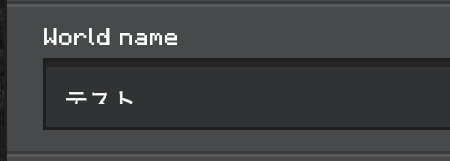
Korean, Japanese, and Chinese text characters get cut on the bottom in the text box of the new UI
If you input any Chinese or Korean text in the text box in the new Create New World UI, the bottom part of the text gets cut, causing it to not show/render the character properly.

![[Helper] lillybeacon](../../../data/avatars/users/93893.png)

Created Issue:
Korean and Chinese text gets cut on the bottom in the text box on the new UI
If you input any Chinese or Korean text in the text box in the new Create New World UI, the bottom part of the text gets cut, causing it to not show/render the character properly.
Changed Summary:
Korean and Chinese text character gets cut on the bottom in the text box on the new UI
Changed Summary:
Korean and Chinese text character gets cut on the bottom in the text box onthe new UIKorean and Chinese text character gets cut on the bottom in the text box of the new UI
Changed Summary:
Korean, Japanese, and Chinese text character gets cut on the bottom in the text box of the new UI
Added Attachments:
![[Mod] OcelotOnesie](../../../data/avatars/users/43220.png)
Changed Summary:
Korean, Japanese, and Chinese text character getscut on the bottom in the text box of the new UIKorean, Japanese, and Chinese text characters get cut on the bottom in the text box of the new UI

Added ADO: 707968
Added Affects Versions: 1.18.20.23 Beta
Added Affects Versions: 1.18.20.25 Beta
Added Fixed Versions: 1.18.20.27 Beta 1.18.20.28 Preview
![[Mod] tryashtar](../../../data/avatars/users/41963.png)