 MCPE-168684
Coloured wool blocks lost their colours after update
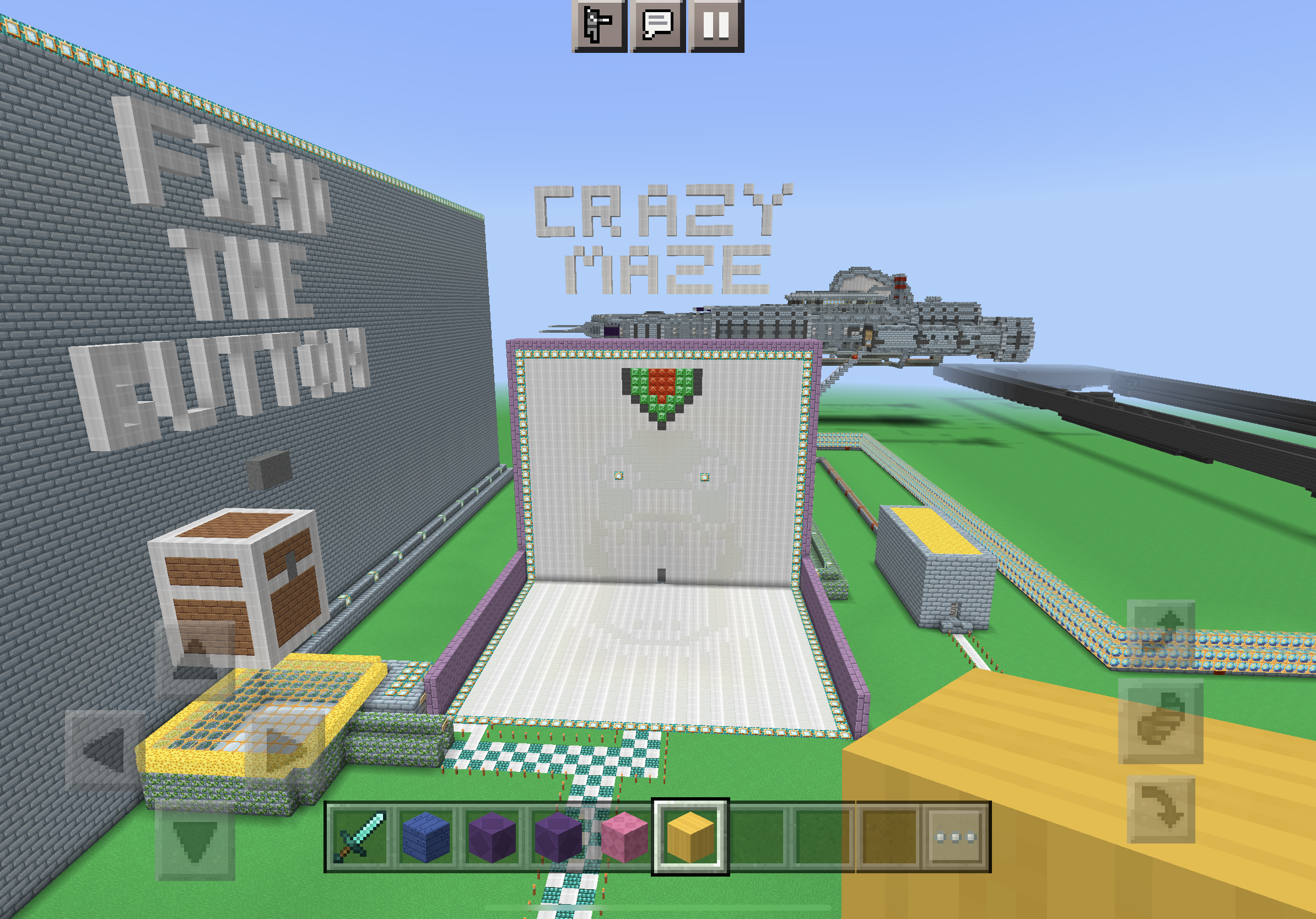
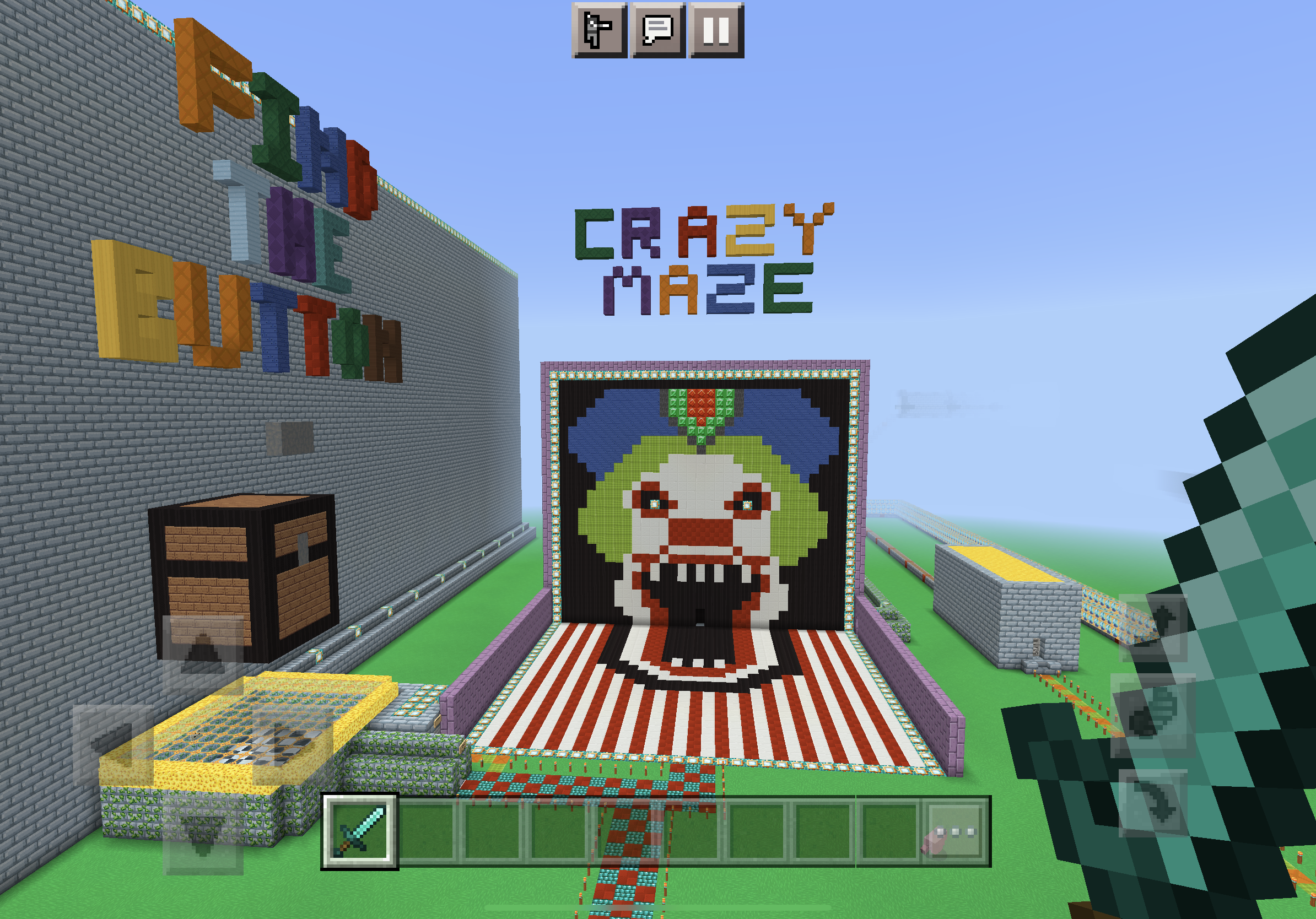
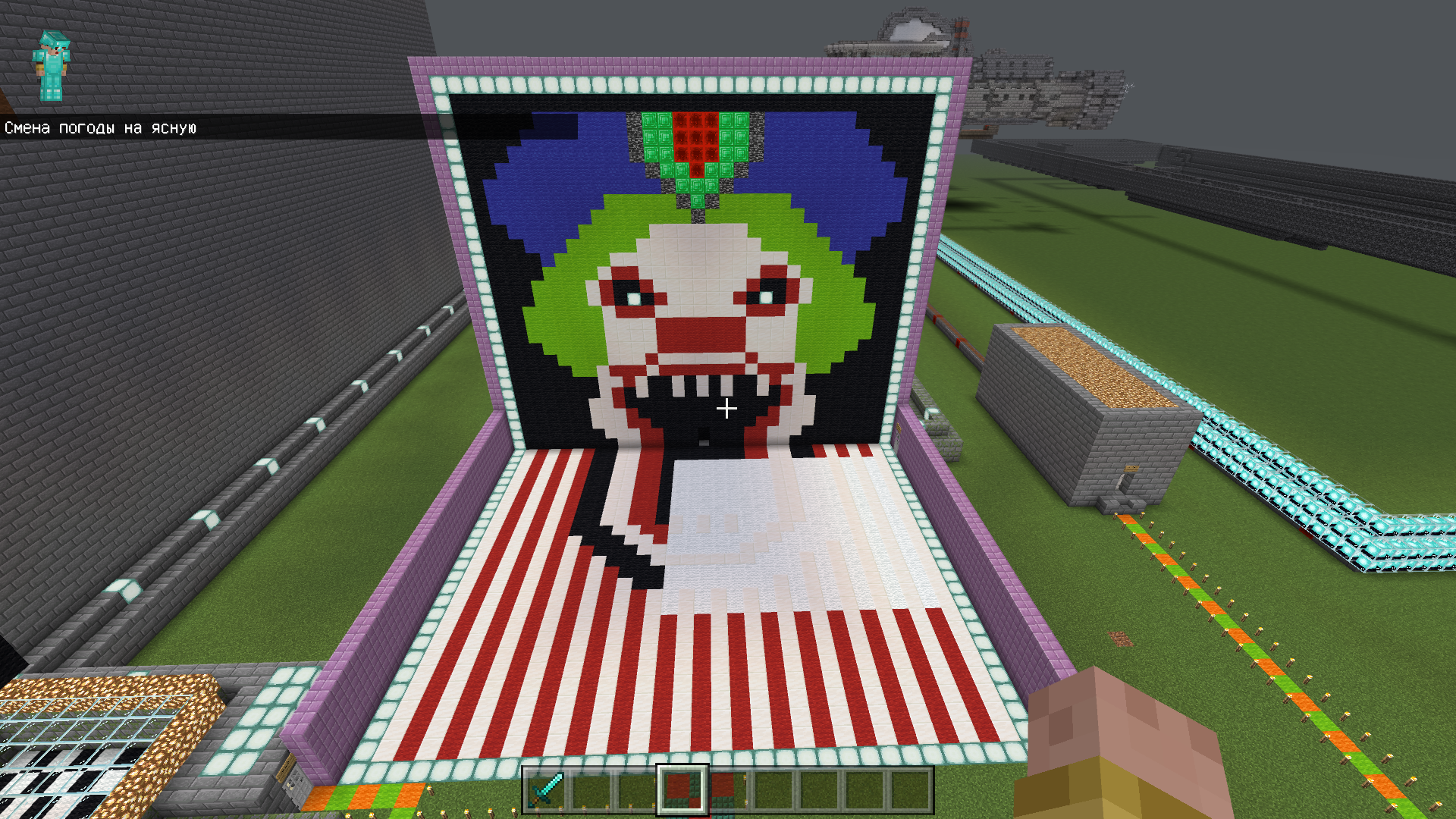
After updating Minecraft PE on my iPad, my old Map which I've only just put on a new YouTube Channel, the coloured wool blocks seem to have lost their colours, and are now white blocks. I haven't got a clue why this happened, as I've had this map for years. I confirmed this also on Minecraft PE on an Android Tablet, and same thing happens after update, so I can only think it may be a bug.
I’ve side loaded an older version of Minecraft PE on my iPad v1.19.41, and when I use my map with this version, it has all the colour blocks as it should. So, I have confirmed that it’s something to do with the new update.
It seems like all the coloured wool blocks, have been dyed to white.
I have five screenshots, two of my Map before it happened, and one after the update…
link to my map if you want to try…
https://www.dropbox.com/s/sd971h91ymivgs7/Minigames%20Central.mcworld?dl=0
Steps to reproduce ([Mod] EVGENSYPERPRO):
- Import the world Minigames Central.mcworld
 .
. - Open in version 1.19.71+.
- Look at the wool blocks in the world.
Observed results:
All wool blocks in the world have become white.
Expected results:
Blocks of wool should not turn white.
Notes:
The problem is not present in versions 1.19.63 and below.
When updating the world from version 1.19.63 to 1.19.71, only some wool blocks become white (in some chunks).
Linked Issues
Attachments7





![[Mod] EVGENSYPERPRO](../../../data/avatars/users/92853.png)
Created Issue:
Coloured wool blocks lost their colours after update
After updating Minecraft PE on my iPad, my old Map which I've only just put on a new YouTube Channel, the coloured wool blocks seem to have lost their colours, and are now white blocks. I haven't got a clue why this happened, as I've had this map for years. I confirmed this also on Minecraft PE on an Android Tablet, and same thing happens after update, so I can only think it may be a bug.
I have two screenshots, one of my Map before it happened, and one after...
Environment
Bedrock Edition. iOS & Android versions.
Attachments3
 BDS-18204
After updating Minecraft PE on my iPad, my old Map which I've only just put on a new YouTube Channel, the coloured wool blocks seem to have lost their colours, and are now white blocks. I haven't got a clue why this happened, as I've had this map for years. I confirmed this also on Minecraft PE on an Android Tablet, and same thing happens after update, so I can only think it may be a bug.
I have t
woscreenshots, one of my Map before it happened, and one after...
After updating Minecraft PE on my iPad, my old Map which I've only just put on a new YouTube Channel, the coloured wool blocks seem to have lost their colours, and are now white blocks. I haven't got a clue why this happened, as I've had this map for years. I confirmed this also on Minecraft PE on an Android Tablet, and same thing happens after update, so I can only think it may be a bug.
I have three screenshots, one of my Map before it happened, and one after...
The Middle picture shows how it used to look, and the other two, was after the update.
After updating Minecraft PE on my iPad, my old Map which I've only just put on a new YouTube Channel, the coloured wool blocks seem to have lost their colours, and are now white blocks. I haven't got a clue why this happened, as I've had this map for years. I confirmed this also on Minecraft PE on an Android Tablet, and same thing happens after update, so I can only think it may be a bug.
I have
threescreenshots,oneof my Map before it happened, and one after...The Middle picture shows how it used to look, and the other two, was after the update.
After updating Minecraft PE on my iPad, my old Map which I've only just put on a new YouTube Channel, the coloured wool blocks seem to have lost their colours, and are now white blocks. I haven't got a clue why this happened, as I've had this map for years. I confirmed this also on Minecraft PE on an Android Tablet, and same thing happens after update, so I can only think it may be a bug.
I have four screenshots, two of my Map before it happened, and one after the update…
After updating Minecraft PE on my iPad, my old Map which I've only just put on a new YouTube Channel, the coloured wool blocks seem to have lost their colours, and are now white blocks. I haven't got a clue why this happened, as I've had this map for years. I confirmed this also on Minecraft PE on an Android Tablet, and same thing happens after update, so I can only think it may be a bug.
I have four screenshots, two of my Map before it happened, and one after the update…
link to my map if you want to try…
https://www.dropbox.com/s/sd971h91ymivgs7/Minigames%20Central.mcworld?dl=0
After updating Minecraft PE on my iPad, my old Map which I've only just put on a new YouTube Channel, the coloured wool blocks seem to have lost their colours, and are now white blocks. I haven't got a clue why this happened, as I've had this map for years. I confirmed this also on Minecraft PE on an Android Tablet, and same thing happens after update, so I can only think it may be a bug.
I
have four screenshots, two ofmyMapbefore it happened, and one afterthe update…
link to my map if you want to try…
https://www.dropbox.com/s/sd971h91ymivgs7/Minigames%20Central.mcworld?dl=0
After updating Minecraft PE on my iPad, my old Map which I've only just put on a new YouTube Channel, the coloured wool blocks seem to have lost their colours, and are now white blocks. I haven't got a clue why this happened, as I've had this map for years. I confirmed this also on Minecraft PE on an Android Tablet, and same thing happens after update, so I can only think it may be a bug.
I’ve side loaded an older version of Minecraft PE on my iPad v1.19.41, and when I use my map with this version, it has all the colour blocks s it should. So, I have confirmed that it’s something to do with the new update.
I have four screenshots, two of my Map before it happened, and one after the update…
link to my map if you want to try…
https://www.dropbox.com/s/sd971h91ymivgs7/Minigames%20Central.mcworld?dl=0
After updating Minecraft PE on my iPad, my old Map which I've only just put on a new YouTube Channel, the coloured wool blocks seem to have lost their colours, and are now white blocks. I haven't got a clue why this happened, as I've had this map for years. I confirmed this also on Minecraft PE on an Android Tablet, and same thing happens after update, so I can only think it may be a bug.
I’ve side loaded an older version of Minecraft PE on my iPad v1.19.41, and when I use my map with this version, it has all the colour blocks s it should. So, I have confirmed that it’s something to do with the new update.
I have f
ourscreenshots, two of my Map before it happened, and one after the update…
link to my map if you want to try…
https://www.dropbox.com/s/sd971h91ymivgs7/Minigames%20Central.mcworld?dl=0
After updating Minecraft PE on my iPad, my old Map which I've only just put on a new YouTube Channel, the coloured wool blocks seem to have lost their colours, and are now white blocks. I haven't got a clue why this happened, as I've had this map for years. I confirmed this also on Minecraft PE on an Android Tablet, and same thing happens after update, so I can only think it may be a bug.
I’ve side loaded an older version of Minecraft PE on my iPad v1.19.41, and when I use my map with this version, it has all the colour blocks s it should. So, I have confirmed that it’s something to do with the new update.
I have five screenshots, two of my Map before it happened, and one after the update…
link to my map if you want to try…
https://www.dropbox.com/s/sd971h91ymivgs7/Minigames%20Central.mcworld?dl=0
After updating Minecraft PE on my iPad, my old Map which I've only just put on a new YouTube Channel, the coloured wool blocks seem to have lost their colours, and are now white blocks. I haven't got a clue why this happened, as I've had this map for years. I confirmed this also on Minecraft PE on an Android Tablet, and same thing happens after update, so I can only think it may be a bug.
I’ve side loaded an older version of Minecraft PE on my iPad v1.19.41, and when I use my map with this version, it has all the colour blocks s it should. So, I have confirmed that it’s something to do with the new update.
I
have five screenshots, two of my Map before it happened, and one after the update…
link to my map if you want to try…
https://www.dropbox.com/s/sd971h91ymivgs7/Minigames%20Central.mcworld?dl=0
After updating Minecraft PE on my iPad, my old Map which I've only just put on a new YouTube Channel, the coloured wool blocks seem to have lost their colours, and are now white blocks. I haven't got a clue why this happened, as I've had this map for years. I confirmed this also on Minecraft PE on an Android Tablet, and same thing happens after update, so I can only think it may be a bug.
I’ve side loaded an older version of Minecraft PE on my iPad v1.19.41, and when I use my map with this version, it has all the colour blocks s it should. So, I have confirmed that it’s something to do with the new update.
It seems like all the coloured wool blocks, have been dyed to white.
I have five screenshots, two of my Map before it happened, and one after the update…
link to my map if you want to try…
https://www.dropbox.com/s/sd971h91ymivgs7/Minigames%20Central.mcworld?dl=0
After updating Minecraft PE on my iPad, my old Map which I've only just put on a new YouTube Channel, the coloured wool blocks seem to have lost their colours, and are now white blocks. I haven't got a clue why this happened, as I've had this map for years. I confirmed this also on Minecraft PE on an Android Tablet, and same thing happens after update, so I can only think it may be a bug.
I’ve side loaded an older version of Minecraft PE on my iPad v1.19.41, and when I use my map with this version, it has all the colour blocks s it should. So, I have confirmed that it’s something to do with the new update.
It seems like all the coloured wool blocks, have been dyed to white.
I have five screenshots, two of my Map before it happened, and one after the update…
link to my map if you want to try…
https://www.dropbox.com/s/sd971h91ymivgs7/Minigames%20Central.mcworld?dl=0
After updating Minecraft PE on my iPad, my old Map which I've only just put on a new YouTube Channel, the coloured wool blocks seem to have lost their colours, and are now white blocks. I haven't got a clue why this happened, as I've had this map for years. I confirmed this also on Minecraft PE on an Android Tablet, and same thing happens after update, so I can only think it may be a bug.
I’ve side loaded an older version of Minecraft PE on my iPad v1.19.41, and when I use my map with this version, it has all the colour blocks s it should. So, I have confirmed that it’s something to do with the new update.
It seems like all the coloured wool blocks, have been dyed to white.
I have five screenshots, two of my Map before it happened, and one after the update…
link to my map if you want to try…
https://www.dropbox.com/s/sd971h91ymivgs7/Minigames%20Central.mcworld?dl=0Steps to reproduce ([Mod] EVGENSYPERPRO):
- Import the world Minigames Central.mcworld
- Open in version 1.19.71+.
- Look at the wool blocks in the world.
Observed results:
All wool blocks in the world have become white.Expected results:
Blocks of wool should not turn white.{*}Notes:
{*}The problem is not present in versions 1.19.63 and below.
When updating the world from version 1.19.63 to 1.19.71, only some wool blocks become white (in some chunks).
After updating Minecraft PE on my iPad, my old Map which I've only just put on a new YouTube Channel, the coloured wool blocks seem to have lost their colours, and are now white blocks. I haven't got a clue why this happened, as I've had this map for years. I confirmed this also on Minecraft PE on an Android Tablet, and same thing happens after update, so I can only think it may be a bug.
I’ve side loaded an older version of Minecraft PE on my iPad v1.19.41, and when I use my map with this version, it has all the colour blocks s it should. So, I have confirmed that it’s something to do with the new update.
It seems like all the coloured wool blocks, have been dyed to white.
I have five screenshots, two of my Map before it happened, and one after the update…
link to my map if you want to try…
https://www.dropbox.com/s/sd971h91ymivgs7/Minigames%20Central.mcworld?dl=0Steps to reproduce ([Mod] EVGENSYPERPRO):
- Import the world Minigames Central.mcworld
- Open in version 1.19.71+.
- Look at the wool blocks in the world.
Observed results:
All wool blocks in the world have become white.Expected results:
Blocks of wool should not turn white.
{*}Notes:
{*}The problem is not present in versions 1.19.63 and below.
When updating the world from version 1.19.63 to 1.19.71, only some wool blocks become white (in some chunks).
After updating Minecraft PE on my iPad, my old Map which I've only just put on a new YouTube Channel, the coloured wool blocks seem to have lost their colours, and are now white blocks. I haven't got a clue why this happened, as I've had this map for years. I confirmed this also on Minecraft PE on an Android Tablet, and same thing happens after update, so I can only think it may be a bug.
I’ve side loaded an older version of Minecraft PE on my iPad v1.19.41, and when I use my map with this version, it has all the colour blocks as it should. So, I have confirmed that it’s something to do with the new update.
It seems like all the coloured wool blocks, have been dyed to white.
I have five screenshots, two of my Map before it happened, and one after the update…
link to my map if you want to try…
https://www.dropbox.com/s/sd971h91ymivgs7/Minigames%20Central.mcworld?dl=0Steps to reproduce ([Mod] EVGENSYPERPRO):
- Import the world Minigames Central.mcworld
- Open in version 1.19.71+.
- Look at the wool blocks in the world.
Observed results:
All wool blocks in the world have become white.Expected results:
Blocks of wool should not turn white.Notes:
The problem is not present in versions 1.19.63 and below.
When updating the world from version 1.19.63 to 1.19.71, only some wool blocks become white (in some chunks).
![[Mod] OcelotOnesie](../../../data/avatars/users/43220.png)
![[MCQA] Bartłomiej Słodkowski](../../../data/avatars/users/18941.svg)
is duplicated by
is duplicated by
![[Bot] Arisa](../../../data/avatars/users/43007.png)
is duplicated by
Thank you for your report!
We're tracking this issue in MCPE-168684, so this ticket is being resolved and linked as a duplicate.
If you would like to add a vote and any extra information to the main ticket it would be appreciated.
If you haven't already, you might like to make use of the search feature to see if the issue has already been mentioned.
Quick Links:
📓 Bug Tracker Guidelines – 💬 Community Support – 📧 Mojang Support
📓 Project Summary – ✍️ Feedback and Suggestions – 📖 Game Wiki
– I am a bot. This action was performed automatically! The ticket was resolved by one of our moderators, and I left this message to give more information to you.
Thank you for your report!
However, this issue has been temporarily closed as Awaiting Response.
Are the affected blocks colored wool or colored glass? If yes, does MCPE-168684 describe your issue?
This ticket will automatically reopen when you reply.
Quick Links:
📓 Issue Guidelines – 💬 Mojang Support – 📓 Project Summary – 📧 Suggestions – 📖 Minecraft Wiki

only the wool lost texture ,the glass is fine so the answer is yes MCPE-168684 does describe my issue
Thank you for your report!
We're tracking this issue in MCPE-168684, so this ticket is being resolved and linked as a duplicate.
If you haven't already, you might like to make use of the search feature to see if the issue has already been mentioned.
Quick Links:
📓 Bug Tracker Guidelines – 💬 Community Support – 📧 Mojang Support
📓 Project Summary – ✍️ Feedback and Suggestions – 📖 Game Wiki
Does this happen if you disable all texture packs?
Hello, yes, I tried disabling all texture packs, as thought it may be that too, but didn’t make a difference.
The world in version 1.19.63 works fine and all wool remains colored too. I tried move the world from 1.19.63 to 1.19.71 and some blocks of wool turned white.

It’s really weird, but I’m happy to use an older version of Minecraft PE for now, as I’m upgrading some elements of my map, like Dropper… I want to make the players teleport up, when they’ve reached the bottom safely. I really think an update would iron out these bugs though. Thanks for your help.
Fixed in latest beta 1.19.80.23
Excellent, thanks very much 👍👍😄