 MCPE-185913
Wither Skeleton’s new step sounds are too quiet
The Wither Skeleton's new walking sounds are too quiet when compared to the walking sounds of other mobs.
Steps To Reproduce:
1. Spawn a wither skeleton.
2. Spawn any other mob who uses a unique walking sound (such as a zombie).
3. Listen for the walking sounds of both mobs as they move around (turn up your audio to help hear if you need to).
4. Notice how it is significantly more difficult to hear the wither skeleton's walking sounds compared to the other mob's.
I have both Main and Sound sliders at 100%.
I also have both the hostile and friendly creatures sliders set to 50%.
(These are my usual settings)
I use the many of the same slider settings for Java Edition, and the wither skeleton's walking sounds are much easier to hear on Java.


Created Issue:
Wither Skeleton's new step sound is too quiet.
The Wither Skeleton's new walking sound is too quiet when compared to the walking sounds of other mobs.
Steps To Reproduce:
1. Spawn a wither skeleton.
2. Spawn any other mob who uses a unique walking sound (such as a zombie).
3. Listen for the walking sounds of both mobs as they move around.
4. Notice how it is significantly more difficult to hear the wither skeleton's walking sounds compared to the other mob's.(I normally have both the hostile and friendly creatures sliders set to 50%.)
- Unresolved
- Open
- Unconfirmed
- Windows
- Windows 11 Home
- 1.21.30.24 Preview
The Wither Skeleton's new walking sound is too quiet when compared to the walking sounds of other mobs.
Steps To Reproduce:
1. Spawn a wither skeleton.
2. Spawn any other mob who uses a unique walking sound (such as a zombie).
3. Listen for the walking sounds of both mobs as they move around.
4. Notice how it is significantly more difficult to hear the wither skeleton's walking sounds compared to the other mob's.(I normally have both the hostile and friendly creatures sliders set to 50%.)
The Wither Skeleton's new walking sound is too quiet when compared to the walking sounds of other mobs.
Steps To Reproduce:
1. Spawn a wither skeleton.
2. Spawn any other mob who uses a unique walking sound (such as a zombie).
3. Listen for the walking sounds of both mobs as they move around.
4. Notice how it is significantly more difficult to hear the wither skeleton's walking sounds compared to the other mob's.I normally have both the hostile and friendly creatures sliders set to 50%.
This could just be me, but I really feel like the new step sounds are too quiet.
The Wither Skeleton's new walking sound is too quiet when compared to the walking sounds of other mobs.
Steps To Reproduce:
1. Spawn a wither skeleton.
2. Spawn any other mob who uses a unique walking sound (such as a zombie).
3. Listen for the walking sounds of both mobs as they move around.
4. Notice how it is significantly more difficult to hear the wither skeleton's walking sounds compared to the other mob's.I normally have both the hostile and friendly creatures sliders set to 50%.
This could just be me, but I really feel like the new step sounds are too quiet.The Wither Skeleton's new walking sound is too quiet when compared to the walking sounds of other mobs.
Steps To Reproduce:
1. Spawn a wither skeleton.
2. Spawn any other mob who uses a unique walking sound (such as a zombie).
3. Listen for the walking sounds of both mobs as they move around.
4. Notice how it is significantly more difficult to hear the wither skeleton's walking sounds compared to the other mob's.I normally have both the hostile and friendly creatures sliders set to 50%.
I use the same slider settings for Java Edition, and the wither skeleton's walking sounds are much easier to hear.
The Wither Skeleton's new walking sound is too quiet when compared to the walking sounds of other mobs.
Steps To Reproduce:
1. Spawn a wither skeleton.
2. Spawn any other mob who uses a unique walking sound (such as a zombie).
3. Listen for the walking sounds of both mobs as they move around.
4. Notice how it is significantly more difficult to hear the wither skeleton's walking sounds compared to the other mob's.I
normallyhave boththe hostile and friendly creaturesslidersset to 50%.
Iuse the same slider settings for Java Edition, and the wither skeleton's walking sounds are much easier to hear.The Wither Skeleton's new walking sound is too quiet when compared to the walking sounds of other mobs.
Steps To Reproduce:
1. Spawn a wither skeleton.
2. Spawn any other mob who uses a unique walking sound (such as a zombie).
3. Listen for the walking sounds of both mobs as they move around (turn up your audio to help hear if you need to).
4. Notice how it is significantly more difficult to hear the wither skeleton's walking sounds compared to the other mob's.I have both Main and Sound sliders at 100%.
I also have both the hostile and friendly creatures sliders set to 50%.
(These are my usual settings)I use the many of the same slider settings for Java Edition, and the wither skeleton's walking sounds are much easier to hear on Java.
The Wither Skeleton's new walking sound
istoo quiet when compared to the walking sounds of other mobs.Steps To Reproduce:
1. Spawn a wither skeleton.
2. Spawn any other mob who uses a unique walking sound (such as a zombie).
3. Listen for the walking sounds of both mobs as they move around (turn up your audio to help hear if you need to).
4. Notice how it is significantly more difficult to hear the wither skeleton's walking sounds compared to the other mob's.I have both Main and Sound sliders at 100%.
I also have both the hostile and friendly creatures sliders set to 50%.
(These are my usual settings)I use the many of the same slider settings for Java Edition, and the wither skeleton's walking sounds are much easier to hear on Java.
The Wither Skeleton's new walking sounds are too quiet when compared to the walking sounds of other mobs.
Steps To Reproduce:
1. Spawn a wither skeleton.
2. Spawn any other mob who uses a unique walking sound (such as a zombie).
3. Listen for the walking sounds of both mobs as they move around (turn up your audio to help hear if you need to).
4. Notice how it is significantly more difficult to hear the wither skeleton's walking sounds compared to the other mob's.I have both Main and Sound sliders at 100%.
I also have both the hostile and friendly creatures sliders set to 50%.
(These are my usual settings)I use the many of the same slider settings for Java Edition, and the wither skeleton's walking sounds are much easier to hear on Java.
Wither Skeleton's new step soundistoo quiet.Wither Skeleton's new step sounds are too quiet.
![[Mod] Jarl-Penguin](../../../data/avatars/users/92849.png)
WitherSkeleton's new step sounds are too quiet.Wither skeleton's new step sounds are too quiet
Witherskeleton's new step sounds are too quietWither Skeleton’s new step sounds are too quiet
![[MCQA] Bartłomiej Słodkowski](../../../data/avatars/users/18941.svg)
![[Mod] OcelotOnesie](../../../data/avatars/users/43220.png)
Many sound events from 1.21.50.22 are named differently than Java Edition, and many are defined differently too.
This is a departure from the precedent set in 1.20.40 and 1.20.50, where all new sound events used the correct names and definitions that aligned with Java Edition. This affects commands such as those used in Marketplace maps. Controlled by sound_definitions.json.
In addition, some sound events have different pitches or volumes used for their sounds. This causes them to sound different when played in-game AND with commands. Controlled by sound_definitions.json.
Finally, some sound events are implemented differently than Java Edition. They sound the same when played with commands, but different in-game. Controlled by sounds.json, or by the entity's entity.json file in case of the Creaking.
Relates to MCPE-180966. Here are all the disparities:
| Java Sound Event | Bedrock Sound Event | Name Matches? | Sound Definition Matches? | Implementation Matches? |
|---|---|---|---|---|
| block.sponge.absorb | sponge.absorb | ❌ | ✅ | ❌ Volume differs |
| block.sponge.break | break.sponge | ❌ | ✅ | ✅ |
| block.sponge.fall | [MISSING] | ❌ | ❌ | ❌ Volume and pitch differ |
| block.sponge.hit | hit.sponge | ❌ | ❌ Volume differs | ❌ Volume differs |
| block.sponge.place | place.sponge | ❌ | ✅ | ✅ |
| block.sponge.step | step.sponge | ❌ | ✅ | ❌ Volume differs |
| block.wet_sponge.break | break.wet_sponge | ❌ | ✅ | ✅ |
| block.wet_sponge.dries | [MISSING] | ❌ | ❌ | ❌ |
| block.wet_sponge.fall | [MISSING] | ❌ | ❌ | ❌ Volume and pitch differ |
| block.wet_sponge.hit | hit.wet_sponge | ❌ | ✅ | ❌ Volume differs |
| block.wet_sponge.place | place.wet_sponge | ❌ | ✅ | ✅ |
| block.wet_sponge.step | step.wet_sponge | ❌ | ✅ | ❌ Volume differs |
| block.creaking_heart.break | block.creaking_heart.break | ✅ | ❌ Volume differs | ❌ Volume differs |
| block.creaking_heart.fall | block.creaking_heart.fall | ✅ | ✅ | ✅ |
| block.creaking_heart.hit | block.creaking_heart.hit | ✅ | ✅ | ✅ |
| block.creaking_heart.hurt | block.creaking_heart.trail | ❌ | ✅ | ✅ |
| block.creaking_heart.idle | block.creaking_heart.ambient | ❌ | ✅ | ✅ |
| block.creaking_heart.place | block.creaking_heart.place | ✅ | ✅ | ❌ Volume differs |
| block.creaking_heart.spawn | block.creaking_heart.spawn_mob | ❌ | ✅ | ✅ |
| block.creaking_heart.step | block.creaking_heart.step | ✅ | ✅ | ✅ |
| block.resin.break | block.resin.break | ✅ | ✅ | ✅ |
| block.resin.fall | block.resin.fall | ✅ | ✅ | ✅ |
| [MISSING] | block.resin.hit | ✅ | ✅ | ✅ |
| block.resin.place | block.resin.place | ✅ | ✅ | ✅ |
| block.resin.step | block.resin.step | ✅ | ✅ | ✅ |
| block.resin_bricks.break | block.resin_brick.break | ❌ | ✅ | ✅ |
| block.resin_bricks.fall | block.resin_brick.fall | ❌ | ✅ | ✅ |
| block.resin_bricks.hit | block.resin_brick.hit | ❌ | ✅ | ✅ |
| block.resin_bricks.place | block.resin_brick.place | ❌ | ✅ | ✅ |
| block.resin_bricks.step | block.resin_brick.step | ❌ | ✅ | ✅ |
| block.pale_hanging_moss.idle | block.pale_hanging_moss.ambient | ❌ | ✅ | ✅ |
| entity.creaking.activate | mob.creaking.activate | ❌ | ✅ | ❌ Pitch differs |
| entity.creaking.ambient | mob.creaking.ambient | ❌ | ✅ | ❌ Pitch differs |
| entity.creaking.attack | mob.creaking.attack | ❌ | ✅ | ❌ Pitch differs |
| entity.creaking.deactivate | mob.creaking.deactivate | ❌ | ✅ | ❌ Pitch differs |
| entity.creaking.death | mob.creaking.death | ❌ | ✅ | ❌ Pitch differs |
| entity.creaking.freeze | mob.creaking.freeze | ❌ | ✅ | ❌ Pitch differs |
| entity.creaking.spawn | mob.creaking.spawn | ❌ | ✅ | ❌ Pitch differs |
| entity.creaking.step | mob.creaking.step | ❌ | ✅ | ❌ Volume differs, see comment on |
| entity.creaking.sway | mob.creaking.sway | ❌ | ✅ | ❌ Pitch differs |
| entity.creaking.unfreeze | mob.creaking.unfreeze | ❌ | ✅ | ❌ Pitch differs |
| entity.parrot.imitate.creaking | mob.parrot.imitate_creaking | ❌ | ✅ | ❌ Volume and pitch differ |
Notes:
- Wet sponge "dry out" sound event is missing, meaning wet sponge drying sounds cannot be controlled separately from other fizz sounds on Bedrock.
- Both sponges are missing "fall" sound events. sounds.json incorrectly uses "step" in its place.
- Sponge event names are not even internally consistent, as demonstrated by [action].sponge not matching with sponge.absorb
Creaking heart block sounds are configured as if the block is an entity, where the sounds fall back on the universal pitch and volume, instead of using specific volumes and pitches for each sound like other blocks.Fixed in 1.21.50.25- The creaking_heart_spawn event is on both the Creaking entity and the Creaking Heart block, which may cause a duplicate sound to play.
- All Creaking sounds except step sounds are missing the [ 0.8, 1.2 ] random pitch variation from Java Edition.
The sounds used for Pale Hanging Moss are incorrect:Fixed in 1.21.50.25MCPE-187327The filepaths used for Wet Sponge sounds are incorrect:MCPE-187287- Resin Brick sounds are named incorrectly on Bedrock. They are named block.resin_bricks on Java.
- This also applies for the resin brick sound folder.
- All sounds from 1.21.4 on Java Edition have strange filenames that seem unfinished. The Bedrock sound filenames seem more accurate.
Resin and Resin Bricks have not yet been added to Java Edition, but their current Bedrock implementation follows the Java naming format and assigns the correct volumes and pitches to each event in sounds.json, so these blocks will likely match the Java version without issue.The step and fall sounds for these blocks are still using the wrong category, like all other 1.21.50 step and fall sounds.Fixed in 1.21.50.28
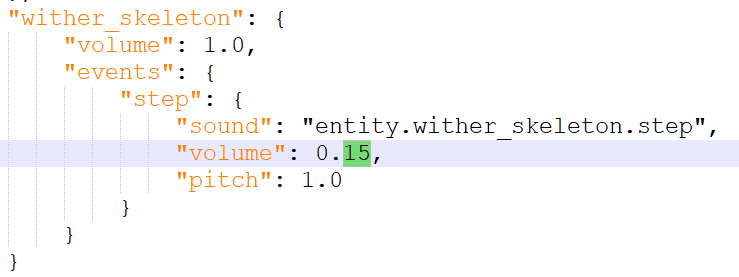
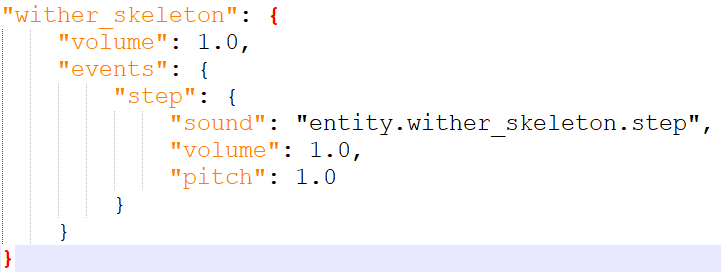
This issue is correct, but you must understand the underlying problem. Looking at sounds.json appears to show Wither Skeleton step sounds configured correctly.
However, many mob step sounds (but not all, frustratingly, and not most baby mobs) have an invisible 0.15x multiplier in-game. Here's the full list of mob step sounds with invisible multipliers:
Since the Wither Skeleton is affected by this invisible multiplier, the step sound in-game is played at 0.15 (from sounds.json) * 0.15 (invisible multiplier) = 0.0225 volume, which makes the sounds extremely quiet!
The correct configuration, with the invisible multiplier in mind, is this:
This makes Wither Skeleton step sounds play at 0.15 volume instead of 0.0225.
Not all mobs are affected by the step sound issue. Some mobs are exempt for no clear reason, such as (but not limited to):
@AgentMindStorm2
Thank you for explaining this! I am not skilled enough to look into the game files/folders. I just simply noticed the step sounds were very quiet.