 MCPE-187130
Several blocks render incorrectly with point lights in Deferred Lighting
Some blocks that don't use a full block geometry may stop rendering correctly if they have point light enabled.
I discovered this issue with Glow Lichen and Amethyst Clusters.
To demonstrate, I have a glow lichen and amethyst cluster with full PBR textures and without point lights, they render correctly:

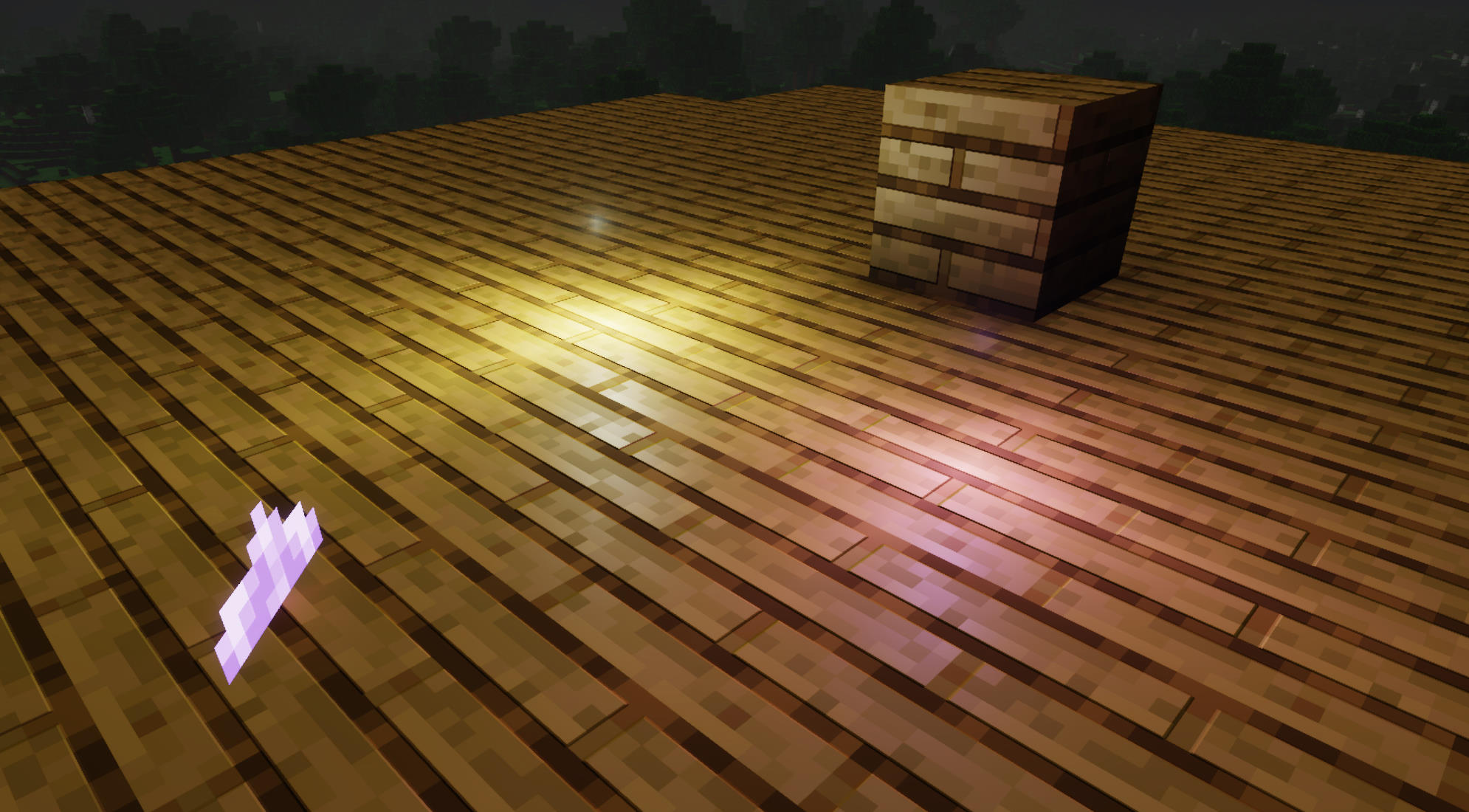
But once you enable point lights for them via global.json, the textures stop rendering correctly, amethyst displays incorrectly from certain angles, while glow lichen is completely missing its texture with the point light hovering over it.

Steps to re-produce:
1. Create a resource pack and enable point lights for the following blocks IDs:
"minecraft:glow_lichen"
"minecraft:amethyst_cluster"
"minecraft:large_amethyst_bud"
"minecraft:medium_amethyst_bud"
"minecraft:small_amethyst_bud"
Or you can use the global.json file I've provided in attachments, can be used with the current 1.21.40.23 preview by placing it in the root directory of a PBR-capable resource pack in a point_lights folder.
2. Place the blocks down in world and observe.
Expected results:
Blocks should render their textures correctly from all sides
Observed results:
Block textures will not render correctly as demonstrated earlier.
Notes:
This bug may apply to more blocks, I've only discovered it with glow lichen and amethyst clusters for the time being.
Glow lichen's point light is also floating too far away from the texture's plane, it would be a good idea to have hard-coded adjustments in place for some vanilla blocks such as glow lichen.
Ideally, the point light should be closer to texture's actual surface instead of hovering roughly half a block above it.
Linked Issues


Created Issue:
Several blocks render incorrectly with point lights in Deferred Lighting
Some bocks that don't use a full block geometry may stop rendering correctly if they have point light enabled.
I discovered this issue with Glow Lichen and Amethyst Clusters.
To demonstrate, I have a glow lichen and amethyst cluster with full PBR textures, and they render correctly:
But once you enable Point Lights via global.json, the textures stop rendering correctly, amethyst displays incorrectly from certain angles, while glow lichen is completely missing its texture:
Steps to re-produce:
1. Create a resource pack and enable point lights for the following blocks IDs:
"minecraft:glow_lichen""minecraft:amethyst_cluster"
"minecraft:large_amethyst_bud"
"minecraft:medium_amethyst_bud"
"minecraft:small_amethyst_bud"
Or you can use the global.json file I've provided in attachments, can be used with the current 1.21.40.23 preview by placing it in the root directory of a PBR-capable resource pack in a point_lights folder.2. Place the blocks down in world and observe.
Expected results:
Blocks should render their textures correctly from all sidesObserved results:
Block textures will not render correctly as demonstrated earlier.Notes:
This bug may apply to more blocks, I've only discovered it with glow lichen and amethyst clusters for the time being.
Attachments5
![[Bot] Arisa](../../../data/avatars/users/43007.png)
Some bocks that don't use a full block geometry may stop rendering correctly if they have point light enabled.
I discovered this issue with Glow Lichen and Amethyst Clusters.
To demonstrate, I have a glow lichen and amethyst cluster with full PBR textures, and they render correctly:
But once you enable Point Lights via global.json, the textures stop rendering correctly, amethyst displays incorrectly from certain angles, while glow lichen is completely missing its texture:
Steps to re-produce:
1. Create a resource pack and enable point lights for the following blocks IDs:
"minecraft:glow_lichen""minecraft:amethyst_cluster"
"minecraft:large_amethyst_bud"
"minecraft:medium_amethyst_bud"
"minecraft:small_amethyst_bud"
Or you can use the global.json file I've provided in attachments, can be used with the current 1.21.40.23 preview by placing it in the root directory of a PBR-capable resource pack in a point_lights folder.2. Place the blocks down in world and observe.
Expected results:
Blocks should render their textures correctly from all sidesObserved results:
Block textures will not render correctly as demonstrated earlier.Notes:
This bug may apply to more blocks, I've only discovered it with glow lichen and amethyst clusters for the time being.Some bocks that don't use a full block geometry may stop rendering correctly if they have point light enabled.
I discovered this issue with Glow Lichen and Amethyst Clusters.
To demonstrate, I have a glow lichen and amethyst cluster with full PBR textures, and they render correctly:
But once you enable Point Lights via global.json, the textures stop rendering correctly, amethyst displays incorrectly from certain angles, while glow lichen is completely missing its texture:
Steps to re-produce:
1. Create a resource pack and enable point lights for the following blocks IDs:
"minecraft:glow_lichen""minecraft:amethyst_cluster"
"minecraft:large_amethyst_bud"
"minecraft:medium_amethyst_bud"
"minecraft:small_amethyst_bud"
Or you can use the global.json file I've provided in attachments, can be used with the current 1.21.40.23 preview by placing it in the root directory of a PBR-capable resource pack in a point_lights folder.2. Place the blocks down in world and observe.
Expected results:
Blocks should render their textures correctly from all sidesObserved results:
Block textures will not render correctly as demonstrated earlier.Notes:
This bug may apply to more blocks, I've only discovered it with glow lichen and amethyst clusters for the time being.
Some bocks that don't use a full block geometry may stop rendering correctly if they have point light enabled.
I discovered this issue with Glow Lichen and Amethyst Clusters.
To demonstrate, I have a glow lichen and amethyst cluster with full PBR textures, and they render correctly:
But once you enable Point Lights via global.json, the textures stop rendering correctly, amethyst displays incorrectly from certain angles, while glow lichen is completely missing its texture:
Steps to re-produce:
1. Create a resource pack and enable point lights for the following blocks IDs:
"minecraft:glow_lichen""minecraft:amethyst_cluster"
"minecraft:large_amethyst_bud"
"minecraft:medium_amethyst_bud"
"minecraft:small_amethyst_bud"
Or you can use the global.json file I've provided in attachments, can be used with the current 1.21.40.23 preview by placing it in the root directory of a PBR-capable resource pack in a point_lights folder.2. Place the blocks down in world and observe.
Expected results:
Blocks should render their textures correctly from all sidesObserved results:
Block textures will not render correctly as demonstrated earlier.Notes:
This bug may apply to more blocks, I've only discovered it with glow lichen and amethyst clusters for the time being.Some bocks that don't use a full block geometry may stop rendering correctly if they have point light enabled.
I discovered this issue with Glow Lichen and Amethyst Clusters.
To demonstrate, I have a glow lichen and amethyst cluster with full PBR textures, and they render correctly:
But once you enable Point Lights via global.json, the textures stop rendering correctly, amethyst displays incorrectly from certain angles, while glow lichen is completely missing its texture:
Steps to re-produce:
1. Create a resource pack and enable point lights for the following blocks IDs:
"minecraft:glow_lichen""minecraft:amethyst_cluster"
"minecraft:large_amethyst_bud"
"minecraft:medium_amethyst_bud"
"minecraft:small_amethyst_bud"
Or you can use the global.json file I've provided in attachments, can be used with the current 1.21.40.23 preview by placing it in the root directory of a PBR-capable resource pack in a point_lights folder.2. Place the blocks down in world and observe.
Expected results:
Blocks should render their textures correctly from all sidesObserved results:
Block textures will not render correctly as demonstrated earlier.Notes:
This bug may apply to more blocks, I've only discovered it with glow lichen and amethyst clusters for the time being.
Some bocks that don't use a full block geometry may stop rendering correctly if they have point light enabled.
I discovered this issue with Glow Lichen and Amethyst Clusters.
To demonstrate, I have a glow lichen and amethyst cluster with full PBR textures,and they render correctly:
But once you enable Point Lights via global.json, the textures stop rendering correctly, amethyst displays incorrectly from certain angles, while glow lichen is completely missing its texture:
Steps to re-produce:
1. Create a resource pack and enable point lights for the following blocks IDs:
"minecraft:glow_lichen""minecraft:amethyst_cluster"
"minecraft:large_amethyst_bud"
"minecraft:medium_amethyst_bud"
"minecraft:small_amethyst_bud"
Or you can use the global.json file I've provided in attachments, can be used with the current 1.21.40.23 preview by placing it in the root directory of a PBR-capable resource pack in a point_lights folder.2. Place the blocks down in world and observe.
Expected results:
Blocks should render their textures correctly from all sidesObserved results:
Block textures will not render correctly as demonstrated earlier.Notes:
This bug may apply to moreblocks, I've only discovered it with glow lichen and amethyst clusters for the time being.Some bocks that don't use a full block geometry may stop rendering correctly if they have point light enabled.
I discovered this issue with Glow Lichen and Amethyst Clusters.
To demonstrate, I have a glow lichen and amethyst cluster with full PBR textures and without point lights, they render correctly:
But once you enable point lights for them via global.json, the textures stop rendering correctly, amethyst displays incorrectly from certain angles, while glow lichen is completely missing its texture with the point light hovering over it.
Steps to re-produce:
1. Create a resource pack and enable point lights for the following blocks IDs:
"minecraft:glow_lichen""minecraft:amethyst_cluster"
"minecraft:large_amethyst_bud"
"minecraft:medium_amethyst_bud"
"minecraft:small_amethyst_bud"
Or you can use the global.json file I've provided in attachments, can be used with the current 1.21.40.23 preview by placing it in the root directory of a PBR-capable resource pack in a point_lights folder.2. Place the blocks down in world and observe.
Expected results:
Blocks should render their textures correctly from all sidesObserved results:
Block textures will not render correctly as demonstrated earlier.Notes:
This bug may apply to more blocks, I've only discovered it with glow lichen and amethyst clusters for the time being.Glow lichen's point light is floating too far away from the texture's plane, it would be a good idea to have hard-coded adjustments in place for some vanilla blocks such as glow lichen.
Ideally, the point light should be closer to texture's actual surface instead of hovering roughly half a block above it.
Some bocks that don't use a full block geometry may stop rendering correctly if they have point light enabled.
I discovered this issue with Glow Lichen and Amethyst Clusters.
To demonstrate, I have a glow lichen and amethyst cluster with full PBR textures and without point lights, they render correctly:
But once you enable point lights for them via global.json, the textures stop rendering correctly, amethyst displays incorrectly from certain angles, while glow lichen is completely missing its texture with the point light hovering over it.
Steps to re-produce:
1. Create a resource pack and enable point lights for the following blocks IDs:
"minecraft:glow_lichen""minecraft:amethyst_cluster"
"minecraft:large_amethyst_bud"
"minecraft:medium_amethyst_bud"
"minecraft:small_amethyst_bud"
Or you can use the global.json file I've provided in attachments, can be used with the current 1.21.40.23 preview by placing it in the root directory of a PBR-capable resource pack in a point_lights folder.2. Place the blocks down in world and observe.
Expected results:
Blocks should render their textures correctly from all sidesObserved results:
Block textures will not render correctly as demonstrated earlier.Notes:
This bug may apply to more blocks, I've only discovered it with glow lichen and amethyst clusters for the time being.Glow lichen's point light is also floating too far away from the texture's plane, it would be a good idea to have hard-coded adjustments in place for some vanilla blocks such as glow lichen.
Ideally, the point light should be closer to texture's actual surface instead of hovering roughly half a block above it.
![[MCPE Mod] Celesian](../../../data/avatars/users/81635.png)
is duplicated by
This also includes 2D block faces on top of Redstone torches

![[Mod] OcelotOnesie](../../../data/avatars/users/43220.png)
Some bocks that don't use a full block geometry may stop rendering correctly if they have point light enabled.
I discovered this issue with Glow Lichen and Amethyst Clusters.
To demonstrate, I have a glow lichen and amethyst cluster with full PBR textures and without point lights, they render correctly:
But once you enable point lights for them via global.json, the textures stop rendering correctly, amethyst displays incorrectly from certain angles, while glow lichen is completely missing its texture with the point light hovering over it.
Steps to re-produce:
1. Create a resource pack and enable point lights for the following blocks IDs:
"minecraft:glow_lichen"
"minecraft:amethyst_cluster"
"minecraft:large_amethyst_bud"
"minecraft:medium_amethyst_bud"
"minecraft:small_amethyst_bud"
Or you can use the global.json file I've provided in attachments, can be used with the current 1.21.40.23 preview by placing it in the root directory of a PBR-capable resource pack in a point_lights folder.2. Place the blocks down in world and observe.
Expected results:
Blocks should render their textures correctly from all sidesObserved results:
Block textures will not render correctly as demonstrated earlier.Notes:
This bug may apply to more blocks, I've only discovered it with glow lichen and amethyst clusters for the time being.Glow lichen's point light is also floating too far away from the texture's plane, it would be a good idea to have hard-coded adjustments in place for some vanilla blocks such as glow lichen.
Ideally, the point light should be closer to texture's actual surface instead of hovering roughly half a block above it.Some blocks that don't use a full block geometry may stop rendering correctly if they have point light enabled.
I discovered this issue with Glow Lichen and Amethyst Clusters.
To demonstrate, I have a glow lichen and amethyst cluster with full PBR textures and without point lights, they render correctly:
But once you enable point lights for them via global.json, the textures stop rendering correctly, amethyst displays incorrectly from certain angles, while glow lichen is completely missing its texture with the point light hovering over it.
Steps to re-produce:
1. Create a resource pack and enable point lights for the following blocks IDs:
"minecraft:glow_lichen"
"minecraft:amethyst_cluster"
"minecraft:large_amethyst_bud"
"minecraft:medium_amethyst_bud"
"minecraft:small_amethyst_bud"
Or you can use the global.json file I've provided in attachments, can be used with the current 1.21.40.23 preview by placing it in the root directory of a PBR-capable resource pack in a point_lights folder.2. Place the blocks down in world and observe.
Expected results:
Blocks should render their textures correctly from all sidesObserved results:
Block textures will not render correctly as demonstrated earlier.Notes:
This bug may apply to more blocks, I've only discovered it with glow lichen and amethyst clusters for the time being.Glow lichen's point light is also floating too far away from the texture's plane, it would be a good idea to have hard-coded adjustments in place for some vanilla blocks such as glow lichen.
Ideally, the point light should be closer to texture's actual surface instead of hovering roughly half a block above it.
![[MCQA] Bartłomiej Słodkowski](../../../data/avatars/users/18941.svg)
Example pack with pointlights.mcpack
Thank you for your report!
We're tracking this issue in MCPE-187130, so this ticket is being resolved and linked as a duplicate.
If you would like to add a vote and any extra information to the main ticket it would be appreciated.
If you haven't already, you might like to make use of the search feature to see if the issue has already been mentioned.
Quick Links:
📓 Bug Tracker Guidelines – 💬 Community Support – 📧 Mojang Support (Technical Issues) – 📧 Microsoft Support (Account Issues)
📓 Project Summary – ✍️ Feedback and Suggestions – 📖 Game Wiki
[MCPE Mod] Celesian can you please add the "deferred technical preview" label to MCPE-187130 so it can be found easier. Thanks
Well, some of them don’t have shaders, but I’ll vote.
Thank you for your report!
However, this issue has been temporarily closed as Awaiting Response.
I do not experience these blocks being invisible from certain sides while using only the attached mcpack with Deferred Technical Preview enabled. Are you using any other resource packs that may be affecting this?
This ticket will automatically reopen when you reply.
Quick Links:
📓 Issue Guidelines – 💬 Mojang Support – 📓 Project Summary – 📧 Suggestions – 📖 Minecraft Wiki
I provided a global.json for point lights. It seems the other example pack attached had an invalid json for point lights which is likely why you couldn't experience the issue, I attached the corrected example file, check out Example pack with pointlights.mcpack
You can also use any resource pack that defines point lights for glow lichen and amethyst to test for this issue.
I tested again and found out Amethyst clusters now render correctly in 1.21.70.20 Preview, however Glow Lichen still renders incorrectly. Check out the following screenshot:
I haven't had the chance to test all blocks yet, but other plane-shaped geometries may also have this issue if point lights are enabled. As of the latest 1.21.70.20 Preview, to my knowledge, this issue only affects Glow Lichen.