Updating the world causes some loaded unchanged chunks to regenerate incorrectly
Updated by [Mod] EVGENSYPERPRO.
Summary:
Updating the world causes some loaded unchanged chunks to regenerate incorrectly.
As a result, cut-off water appears in caves, air under water, the landscape on the surface changes, etc.
This does not affect newly created worlds and chunks that were not previously generated.
Steps to reproduce:
- Create a world in 1.21.51 with seed -3763674536482985406.
- Teleport to coordinates -14 63 -17.
- Save the world.
- Update to version 1.21.60.
- Open the created world.
Observed results:
The generation of the world around you is broken.
Expected results:
The generation will correspond to the current seed, as a result of which there will be no corrupted chunks.
Original description:
Many parts of rivers are broken in the latest Preview version. I have exported a world from the non-preview version of the game (1.21.51) to the preview version, and when I opened the world, I saw that many river chunks are broken, being overwritten with land instead. It seems like it doesn't overwrite caves, only the water.
I attached some screenshots of 2 different coordinates in the same world in both the non-preview and preview versions showing how the chunks in the Preview are broken in rivers.
Linked Issues
is duplicated by10
 MCPE-155333Aquifer chunk found generating in normal caveDuplicateMCPE-171609Weird patches of grass and air pocket spawn underwaterDuplicateMCPE-175571Unusual boxy translucent structural outline on ocean floor?DuplicateMCPE-175706Chunks get replaced/Reset and have odd generationDuplicateMCPE-189165Problem with the water DuplicateMCPE-189249water chunks are appering pale garden is missing and trail chambers are missing tooDuplicateMCPE-189293Missing blocks and random block placementDuplicateMCPE-189386Problems with waterDuplicateMCPE-189978Chunk continuation errors.DuplicateMCPE-190008World/Chunk generation feel brokeDuplicate
Attachments8


![[Mod] EVGENSYPERPRO](../../../data/avatars/users/92853.png)
Created Issue:
Broken river chunks in Preview
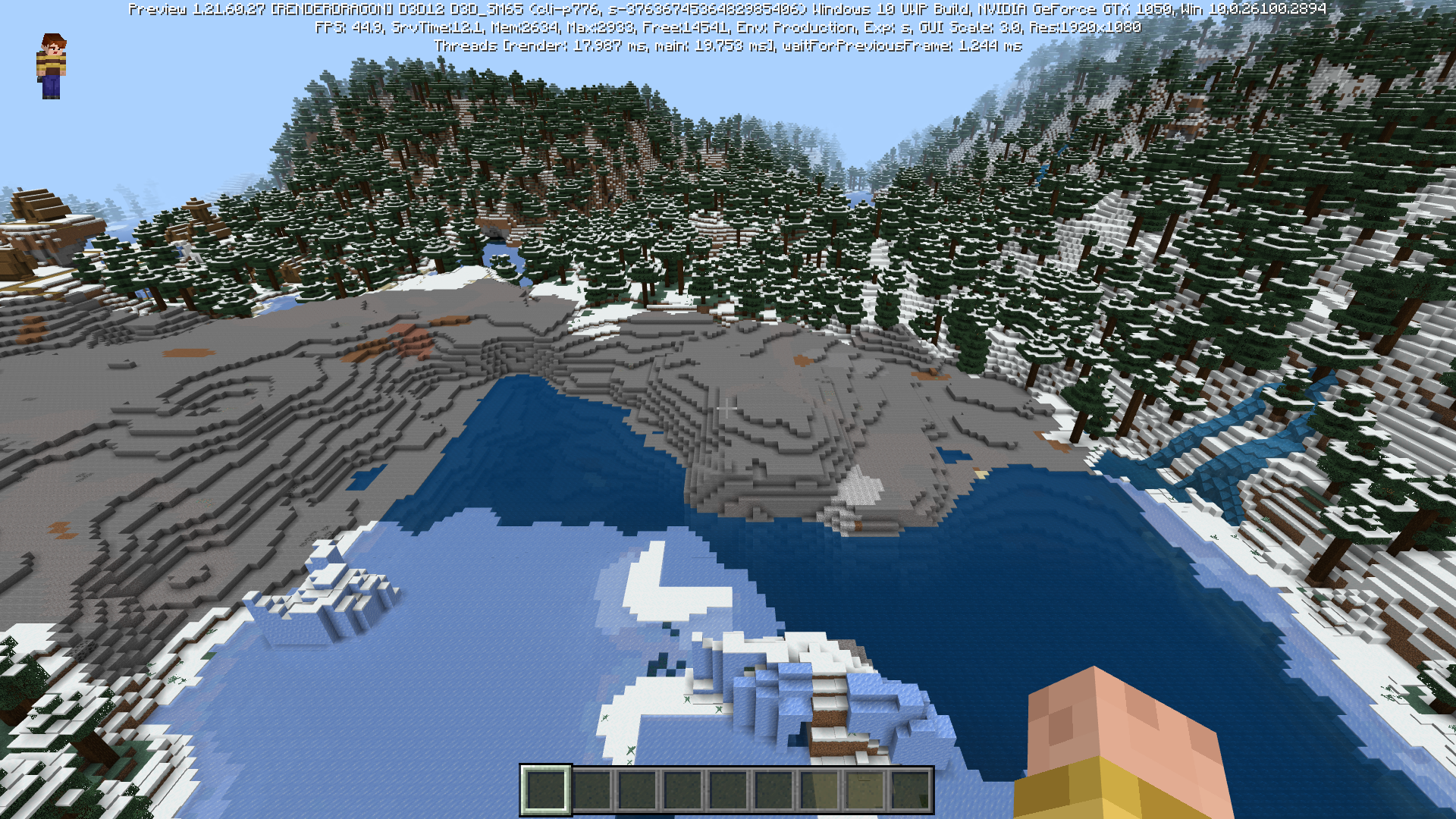
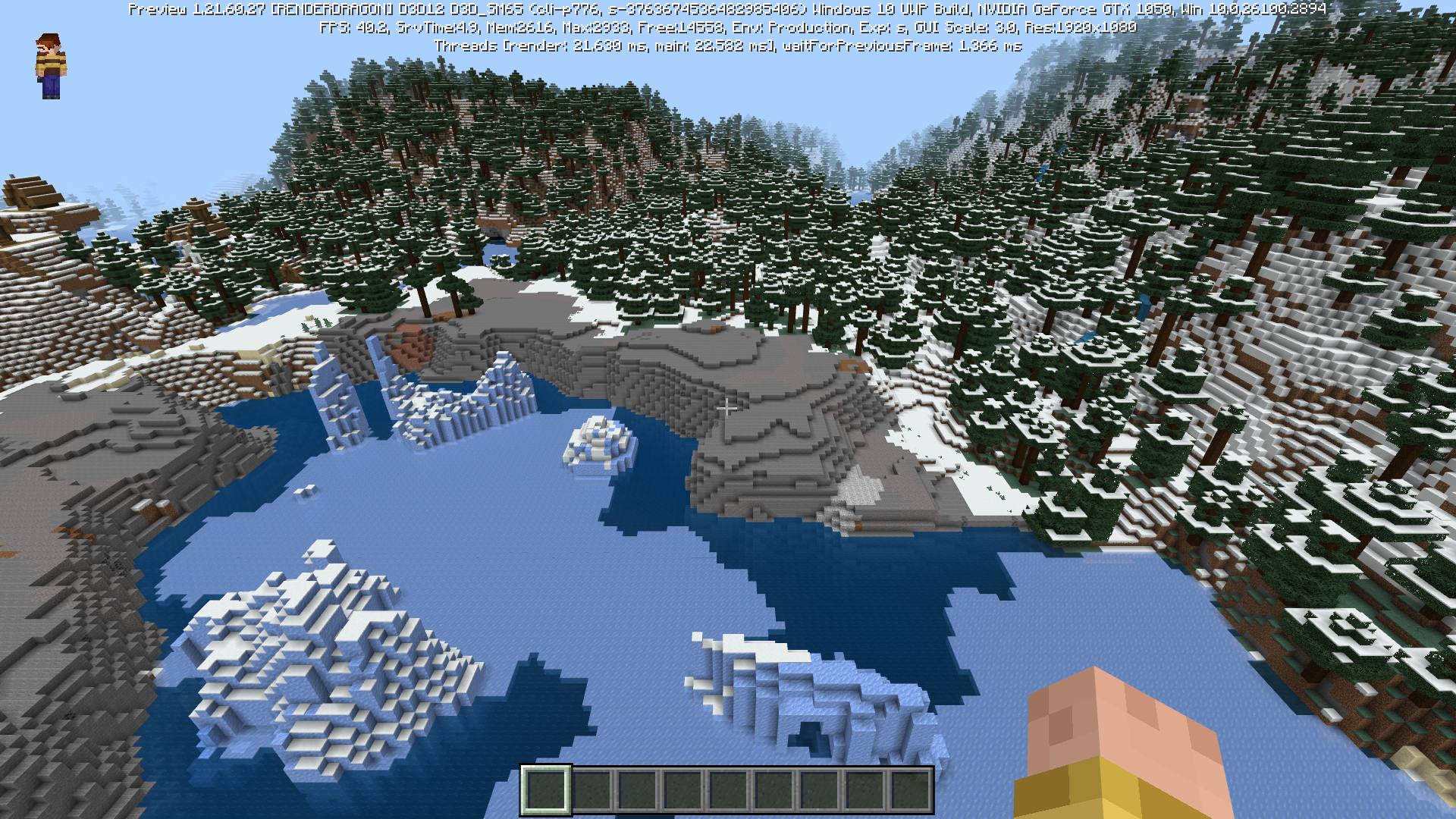
Many parts of rivers are broken in the latest Preview version. I have exported a world from the non-preview version of the game to the preview version, and when I opened the world, I saw that many river chunks are broken, being overwritten with land instead. It seems like it doesn't overwrite caves, only the water.
I attached some screenshots of 2 different coordinates in the same world in both the non-preview and preview versions showing how the chunks in the Preview are broken in rivers.
Attachments4
Many parts of rivers are broken in the latest Preview version. I have exported a world from the non-preview version of the game (1.21.51) to the preview version, and when I opened the world, I saw that many river chunks are broken, being overwritten with land instead. It seems like it doesn't overwrite caves, only the water.
I attached some screenshots of 2 different coordinates in the same world in both the non-preview and preview versions showing how the chunks in the Preview are broken in rivers.
Many parts of rivers are broken in the latest Preview version. I have exported a world from the non-preview version of the game (1.21.51) to the preview version, and when I opened the world, I saw that many river chunks are broken, being overwritten with land instead. It seems like it doesn't overwrite caves, only the water.
I attached some screenshots of 2 different coordinates in the same world in both the non-preview and preview versions showing how the chunks in the Preview are broken in rivers.
Updated by [Mod] EVGENSYPERPRO.
Summary:
Updating the world to version 1.21.60 sometimes causes loaded river chunks to regenerate.
This does not affect newly created worlds in 1.21.60 and chunks that were not previously generated.Steps to reproduce:
- Create a world in 1.21.51 with seed -3763674536482985406.
- Teleport to coordinates -14 110 -17.
- Save the world.
- Update to version 1.21.60.
- Open the created world.
Observed results:
The generation of the world around you is broken.Expected results:
Generation will be preserved in both 1.21.51 and newly created worlds.
Original description:
Many parts of rivers are broken in the latest Preview version. I have exported a world from the non-preview version of the game (1.21.51) to the preview version, and when I opened the world, I saw that many river chunks are broken, being overwritten with land instead. It seems like it doesn't overwrite caves, only the water.I attached some screenshots of 2 different coordinates in the same world in both the non-preview and preview versions showing how the chunks in the Preview are broken in rivers.
Broken river chunks in PreviewUpdating the world to version 1.21.60 sometimes causes loaded river chunks to regenerate
Updated by [Mod] EVGENSYPERPRO.
Summary:
Updating the world to version 1.21.60 sometimes causes loaded river chunks to regenerate.
This does not affect newly created worlds in 1.21.60 and chunks that were not previously generated.Steps to reproduce:
- Create a world in 1.21.51 with seed -3763674536482985406.
- Teleport to coordinates -14
110-17.- Save the world.
- Update to version 1.21.60.
- Open the created world.
Observed results:
The generation of the world around you is broken.Expected results:
Generation will be preserved in both 1.21.51 and newly created worlds.
Original description:
Many parts of rivers are broken in the latest Preview version. I have exported a world from the non-preview version of the game (1.21.51) to the preview version, and when I opened the world, I saw that many river chunks are broken, being overwritten with land instead. It seems like it doesn't overwrite caves, only the water.I attached some screenshots of 2 different coordinates in the same world in both the non-preview and preview versions showing how the chunks in the Preview are broken in rivers.
Updated by [Mod] EVGENSYPERPRO.
Summary:
Updating the world to version 1.21.60 sometimes causes loaded river chunks to regenerate.
This does not affect newly created worlds in 1.21.60 and chunks that were not previously generated.Steps to reproduce:
- Create a world in 1.21.51 with seed -3763674536482985406.
- Teleport to coordinates -14 63 -17.
- Save the world.
- Update to version 1.21.60.
- Open the created world.
Observed results:
The generation of the world around you is broken.Expected results:
Generation will be preserved in both 1.21.51 and newly created worlds.
Original description:
Many parts of rivers are broken in the latest Preview version. I have exported a world from the non-preview version of the game (1.21.51) to the preview version, and when I opened the world, I saw that many river chunks are broken, being overwritten with land instead. It seems like it doesn't overwrite caves, only the water.I attached some screenshots of 2 different coordinates in the same world in both the non-preview and preview versions showing how the chunks in the Preview are broken in rivers.
Updated by [Mod] EVGENSYPERPRO.
Summary:
Updating the world to version 1.21.60 sometimes causes loaded river chunks to regenerate incorrectly.
This does not affect newly created worlds in 1.21.60 and chunks that were not previously generated.Steps to reproduce:
- Create a world in 1.21.51 with seed -3763674536482985406.
- Teleport to coordinates -14 63 -17.
- Save the world.
- Update to version 1.21.60.
- Open the created world.
Observed results:
The generation of the world around you is broken.Expected results:
Generation will be preserved in both 1.21.51 and newly created worlds.
Original description:
Many parts of rivers are broken in the latest Preview version. I have exported a world from the non-preview version of the game (1.21.51) to the preview version, and when I opened the world, I saw that many river chunks are broken, being overwritten with land instead. It seems like it doesn't overwrite caves, only the water.I attached some screenshots of 2 different coordinates in the same world in both the non-preview and preview versions showing how the chunks in the Preview are broken in rivers.
Updating the world to version 1.21.60 sometimes causes loaded river chunks to regenerate incorrectly
![[Mod] Umija5895M](../../../data/avatars/users/10122.svg)
is duplicated by
![[Bot] Arisa](../../../data/avatars/users/43007.png)
is duplicated by
![[Mojang] Mega_Spud (Jay Wells)](../../../data/avatars/users/92696.png)
Updated by [Mod] EVGENSYPERPRO.
Summary:
Updating the worldto version 1.21.60 sometimes causes loaded riverchunks to regenerate incorrectly.
This does not affect newly created worlds in 1.21.60 and chunks that were not previously generated.Steps to reproduce:
- Create a world in 1.21.51 with seed -3763674536482985406.
- Teleport to coordinates -14 63 -17.
- Save the world.
- Update to version 1.21.60.
- Open the created world.
Observed results:
The generation of the world around you is broken.Expected results:
Generation willbe preserved in both 1.21.51 and newly created worlds.
Original description:
Many parts of rivers are broken in the latest Preview version. I have exported a world from the non-preview version of the game (1.21.51) to the preview version, and when I opened the world, I saw that many river chunks are broken, being overwritten with land instead. It seems like it doesn't overwrite caves, only the water.I attached some screenshots of 2 different coordinates in the same world in both the non-preview and preview versions showing how the chunks in the Preview are broken in rivers.
Updated by [Mod] EVGENSYPERPRO.
Summary:
Updating the world causes some loaded unchanged chunks to regenerate incorrectly.
As a result, cut-off water appears in caves, the landscape on the surface changes, etc.
This does not affect newly created worlds and chunks that were not previously generated.Steps to reproduce:
- Create a world in 1.21.51 with seed -3763674536482985406.
- Teleport to coordinates -14 63 -17.
- Save the world.
- Update to version 1.21.60.
- Open the created world.
Observed results:
The generation of the world around you is broken.Expected results:
The generation will correspond to the current seed, as a result of which there will be no corrupted chunks.
Original description:
Many parts of rivers are broken in the latest Preview version. I have exported a world from the non-preview version of the game (1.21.51) to the preview version, and when I opened the world, I saw that many river chunks are broken, being overwritten with land instead. It seems like it doesn't overwrite caves, only the water.I attached some screenshots of 2 different coordinates in the same world in both the non-preview and preview versions showing how the chunks in the Preview are broken in rivers.
Updating the worldto version 1.21.60 sometimes causes loaded riverchunks to regenerate incorrectlyUpdating the world causes some loaded unchanged chunks to regenerate incorrectly
Updated by [Mod] EVGENSYPERPRO.
Summary:
Updating the world causes some loaded unchanged chunks to regenerate incorrectly.
As a result, cut-off water appears in caves, air under water, the landscape on the surface changes, etc.
This does not affect newly created worlds and chunks that were not previously generated.Steps to reproduce:
- Create a world in 1.21.51 with seed -3763674536482985406.
- Teleport to coordinates -14 63 -17.
- Save the world.
- Update to version 1.21.60.
- Open the created world.
Observed results:
The generation of the world around you is broken.Expected results:
The generation will correspond to the current seed, as a result of which there will be no corrupted chunks.
Original description:
Many parts of rivers are broken in the latest Preview version. I have exported a world from the non-preview version of the game (1.21.51) to the preview version, and when I opened the world, I saw that many river chunks are broken, being overwritten with land instead. It seems like it doesn't overwrite caves, only the water.I attached some screenshots of 2 different coordinates in the same world in both the non-preview and preview versions showing how the chunks in the Preview are broken in rivers.
is duplicated by
relates to
is duplicated by
is duplicated by
is duplicated by
relates to
image-2025-02-10-13-19-28-532.png
Please also see MCPE-189996 to see if that describes your issue.
Thank you for your report!
We're resolving and linking this ticket forward as a duplicate of MCPE-189996, as that ticket contains more detailed information and/or has already been triaged by Mojang.
If you would like to add a vote and any extra information to the main ticket it would be appreciated.
Quick Links:
📓 Bug Tracker Guidelines – 💬 Community Support – 📧 Mojang Support (Technical Issues) – 📧 Microsoft Support (Account Issues)
📓 Project Summary – ✍️ Feedback and Suggestions – 📖 Game Wiki
– I am a bot. This action was performed automatically! The ticket was resolved by one of our moderators, and I left this message to give more information to you.
Thank you for your report!
We're tracking this issue in MCPE-189996, so this ticket is being resolved and linked as a duplicate.
If you would like to add a vote and any extra information to the main ticket it would be appreciated.
If you haven't already, you might like to make use of the search feature to see if the issue has already been mentioned.
Quick Links:
📓 Bug Tracker Guidelines – 💬 Community Support – 📧 Mojang Support (Technical Issues) – 📧 Microsoft Support (Account Issues)
📓 Project Summary – ✍️ Feedback and Suggestions – 📖 Game Wiki
– I am a bot. This action was performed automatically! The ticket was resolved by one of our moderators, and I left this message to give more information to you.
Thank you for your report!
We're resolving and linking this ticket forward as a duplicate of MCPE-189996, as that ticket contains more detailed information and/or has already been triaged by Mojang.
If you would like to add a vote and any extra information to the main ticket it would be appreciated.
Quick Links:
📓 Bug Tracker Guidelines – 💬 Community Support – 📧 Mojang Support (Technical Issues) – 📧 Microsoft Support (Account Issues)
📓 Project Summary – ✍️ Feedback and Suggestions – 📖 Game Wiki
– I am a bot. This action was performed automatically! The ticket was resolved by one of our moderators, and I left this message to give more information to you.
Thank you for your report!
We're resolving and linking this ticket forward as a duplicate of MCPE-189996, as that ticket contains more detailed information and/or has already been triaged by Mojang.
If you would like to add a vote and any extra information to the main ticket it would be appreciated.
Quick Links:
📓 Bug Tracker Guidelines – 💬 Community Support – 📧 Mojang Support (Technical Issues) – 📧 Microsoft Support (Account Issues)
📓 Project Summary – ✍️ Feedback and Suggestions – 📖 Game Wiki
– I am a bot. This action was performed automatically! The ticket was resolved by one of our moderators, and I left this message to give more information to you.
Thank you for your report!
We're resolving and linking this ticket forward as a duplicate of MCPE-189996, as that ticket contains more detailed information and/or has already been triaged by Mojang.
If you would like to add a vote and any extra information to the main ticket it would be appreciated.
Quick Links:
📓 Bug Tracker Guidelines – 💬 Community Support – 📧 Mojang Support (Technical Issues) – 📧 Microsoft Support (Account Issues)
📓 Project Summary – ✍️ Feedback and Suggestions – 📖 Game Wiki
– I am a bot. This action was performed automatically! The ticket was resolved by one of our moderators, and I left this message to give more information to you.
Thank you for your report!
We're resolving and linking this ticket forward as a duplicate of MCPE-189996, as that ticket contains more detailed information and/or has already been triaged by Mojang.
If you would like to add a vote and any extra information to the main ticket it would be appreciated.
Quick Links:
📓 Bug Tracker Guidelines – 💬 Community Support – 📧 Mojang Support (Technical Issues) – 📧 Microsoft Support (Account Issues)
📓 Project Summary – ✍️ Feedback and Suggestions – 📖 Game Wiki
– I am a bot. This action was performed automatically! The ticket was resolved by one of our moderators, and I left this message to give more information to you.
Thank you for your report!
We're resolving and linking this ticket forward as a duplicate of MCPE-189996, as that ticket contains more detailed information and/or has already been triaged by Mojang.
If you would like to add a vote and any extra information to the main ticket it would be appreciated.
Quick Links:
📓 Bug Tracker Guidelines – 💬 Community Support – 📧 Mojang Support (Technical Issues) – 📧 Microsoft Support (Account Issues)
📓 Project Summary – ✍️ Feedback and Suggestions – 📖 Game Wiki
– I am a bot. This action was performed automatically! The ticket was resolved by one of our moderators, and I left this message to give more information to you.
Thank you for your report!
We're resolving and linking this ticket forward as a duplicate of MCPE-189996, as that ticket contains more detailed information and/or has already been triaged by Mojang.
If you would like to add a vote and any extra information to the main ticket it would be appreciated.
Quick Links:
📓 Bug Tracker Guidelines – 💬 Community Support – 📧 Mojang Support (Technical Issues) – 📧 Microsoft Support (Account Issues)
📓 Project Summary – ✍️ Feedback and Suggestions – 📖 Game Wiki
– I am a bot. This action was performed automatically! The ticket was resolved by one of our moderators, and I left this message to give more information to you.

Since the 1.21.70-20 release, water generation is happening before or at the same time as cave, river, and feature shavers. (This does not involve upgraded worlds as seen in MCPE-189996.) This causes mangled water volumes and many dangerous situations where the player can fall to their death due to a water volume suddenly switching to open air. It also causes flowing water to be overly present in caves and makes caving an unpleasant experience, especially in Ancient Cities where the player cannot remain silent in water.
Steps to Reproduce:
- Create a new world in 1.22.70.xx in Creative Mode. The attached screenshots used seed 3525273462592995040.
- Turn on night vision and switch to spectator mode. Fly around and observe various volumes of water. The screenshots were taken at positions -253 64 -229, 820 -35 -250, 680 -7 -1070, and 358 -12 -1062.
Expected Results:
The generation should look like the two screenshots taken from 1.21.51, where water is enclosed in solid blocks. Refer to the two screenshots ending with the filename "v51".
Observed Results:
Water is cut off, resulting in unexpected changes to air. Refer to the four screenshots ending with the filename ending with "v70".
1.21.60.27 (new world)
1.21.60.27 (updated from 1.21.51)
1.21.51
Still in 1.21.70.22