 MCPE-27671
Not being able to scroll through the chat box using a controller.
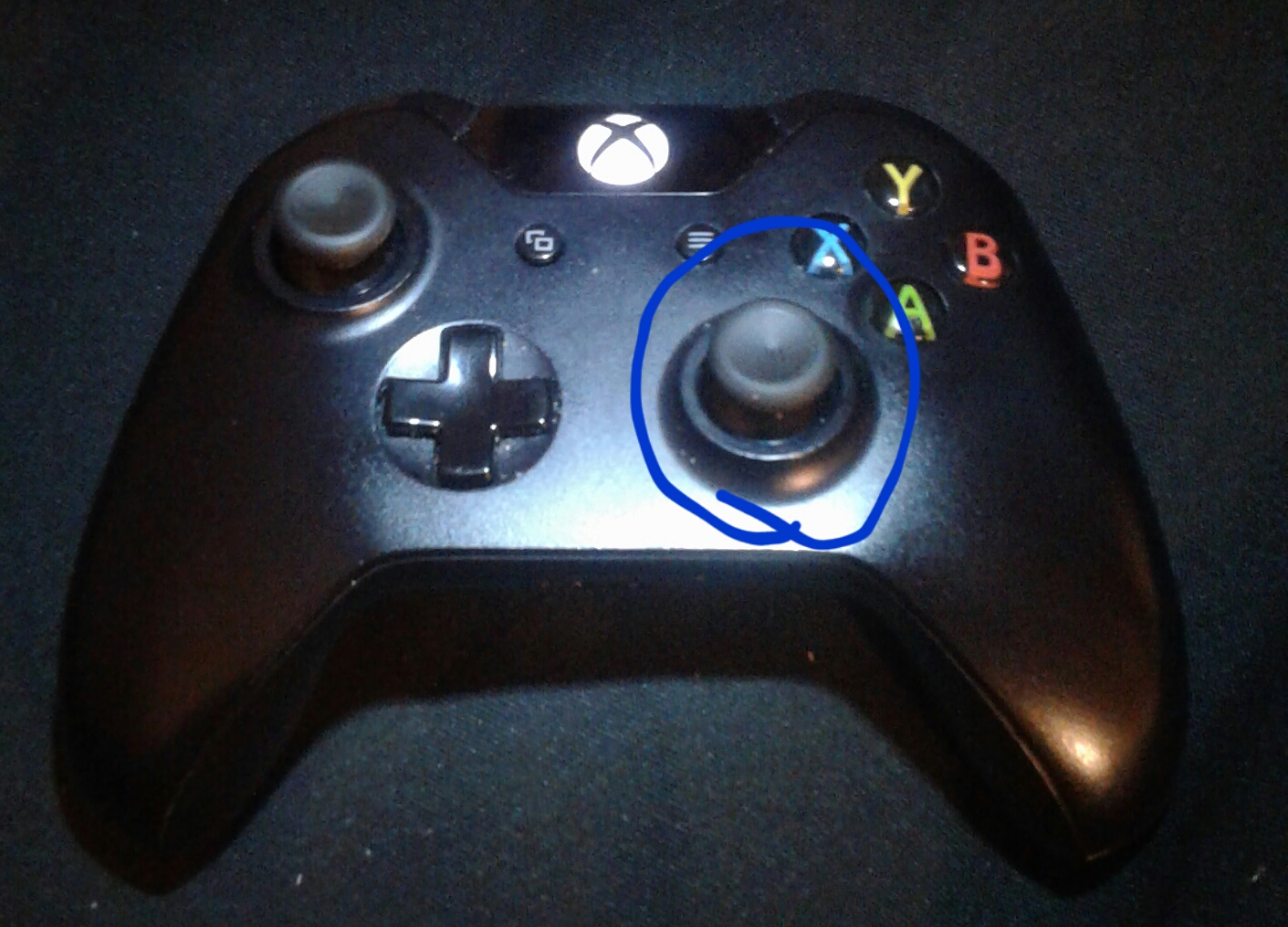
I think this is a easy one to fix☺.I wanted to scroll to see my rewards in the chat box in Mineplex but I couldn't. This is also a problem in regular gameplay.I think this can be fixed by using the right stick on the controller☺.I know the left stick is used for selecting through typing bar, command button and keyboard button same with the D pad. But the right stick dose nothing. ☺So I say it
should be used for scrolling through chat.
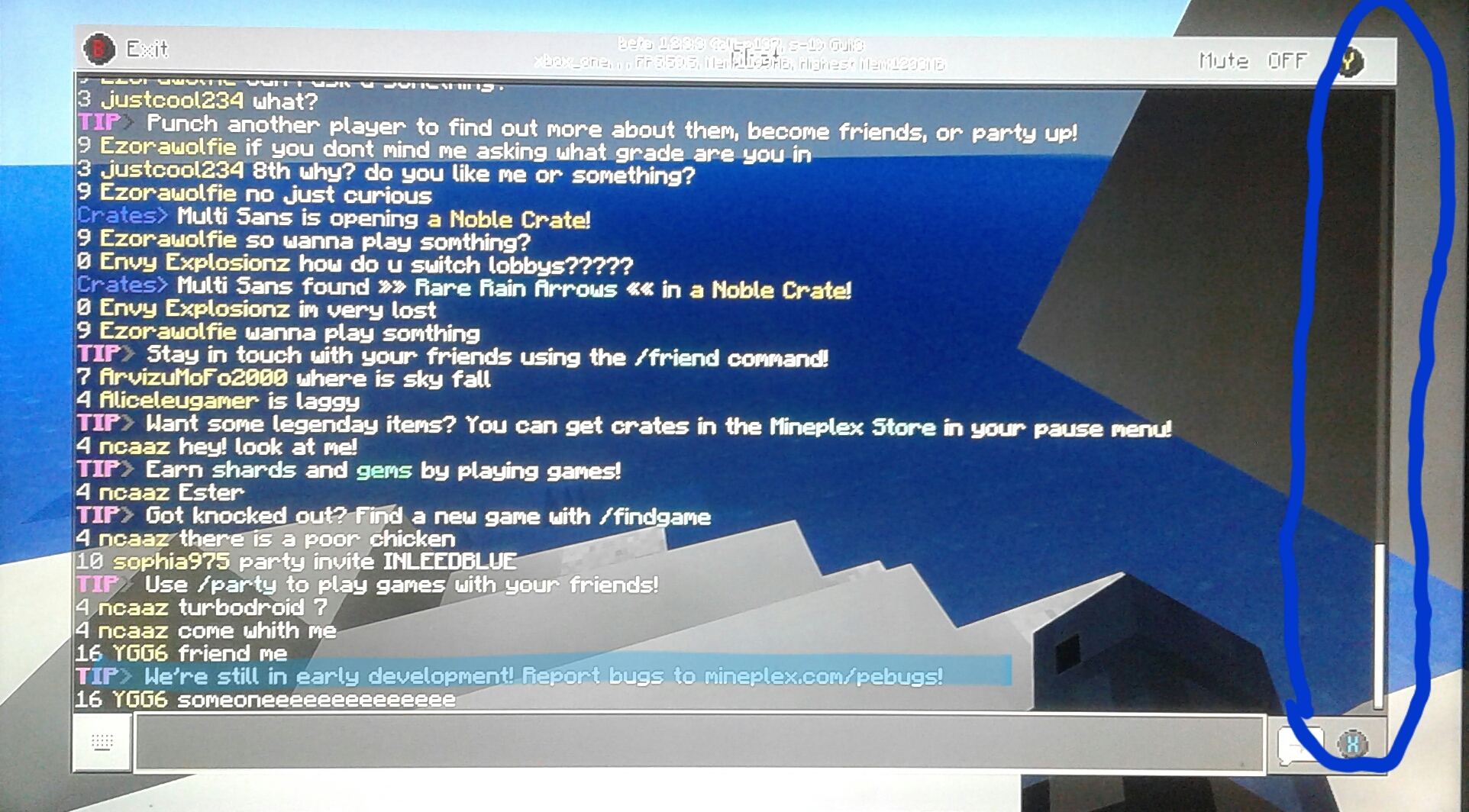
Here's some help for reporting bugs in mineplex look in the picture below in the blue highlight. For their website.

Created Issue:
Not being able to scroll through the chat box using a controller.
I think this is a easy one to fix😉.I wanted to scroll to see my rewards in the chat box in Mineplex but I couldn't. This is also a problem in regular gameplay.I think this can be fixed by using the right stick on the controller☺.
20171010_010927.jpg
I think this is a easy one to fix😉.I wanted to scroll to see my rewards in the chat box in Mineplex but I couldn't. This is also a problem in regular gameplay.I think this can be fixed by using the right stick on the controller☺.I know the left stick is used for selecting through typing bar, command button and keyboard button
I think this is a easy one to fix😉.I wanted to scroll to see my rewards in the chat box in Mineplex but I couldn't. This is also a problem in regular gameplay.I think this can be fixed by using the right stick on the controller☺.I know the left stick is used for selecting through typing bar, command button and keyboard button same with the D pad. But the right stick dose nothing so☺
I think this is a easy one to fix😉.I wanted to scroll to see my rewards in the chat box in Mineplex but I couldn't. This is also a problem in regular gameplay.I think this can be fixed by using the right stick on the controller☺.I know the left stick is used for selecting through typing bar, command button and keyboard button same with the D pad. But the right stick dose nothing so☺ I say it should be used for scrolling in the chat.
I think this is a easy one to fix😉.I wanted to scroll to see my rewards in the chat box in Mineplex but I couldn't. This is also a problem in regular gameplay.I think this can be fixed by using the right stick on the controller☺.I know the left stick is used for selecting through typing bar, command button and keyboard button same with the D pad. But the right stick dose nothing so☺ I say it should be used for scrolling in the chat
.
I think this is a easy one to fix
😉.I wanted to scroll to see my rewards in the chat box in Mineplex but I couldn't. This is also a problem in regular gameplay.I think this can be fixed by using the right stick on the controller☺.I know the left stick is used for selecting through typing bar, command button and keyboard button same with the D pad. But the right stick dose nothingso☺I say it should be used for scrolling in the chatI think this is a easy one to fix👍.I wanted to scroll to see my rewards in the chat box in Mineplex but I couldn't. This is also a problem in regular gameplay.I think this can be fixed by using the right stick on the controller☺.I know the left stick is used for selecting through typing bar, command button and keyboard button same with the D pad. But the right stick dose nothing. ☺So I say it should be used for scrolling in the chat👍.
I think this is a easy one to fix
👍.I wanted to scroll to see my rewards in the chat box in Mineplex but I couldn't. This is also a problem in regular gameplay.I think this can be fixed by using the right stick on the controller☺.I know the left stick is used for selecting through typing bar, command button and keyboard button same with the D pad. But the right stick dose nothing. ☺So I say it should be used for scrolling in the chat👍.I think this is a easy one to fix☺.I wanted to scroll to see my rewards in the chat box in Mineplex but I couldn't. This is also a problem in regular gameplay.I think this can be fixed by using the right stick on the controller☺.I know the left stick is used for selecting through typing bar, command button and keyboard button same with the D pad. But the right stick dose nothing. ☺So I say it should be used for scrolling in the chat👍.
I think this is a easy one to fix☺.I wanted to scroll to see my rewards in the chat box in Mineplex but I couldn't. This is also a problem in regular gameplay.I think this can be fixed by using the right stick on the controller☺.I know the left stick is used for selecting through typing bar, command button and keyboard button same with the D pad. But the right stick dose nothing. ☺So I say it should be used for scrolling in the chat
👍.I think this is a easy one to fix☺.I wanted to scroll to see my rewards in the chat box in Mineplex but I couldn't. This is also a problem in regular gameplay.I think this can be fixed by using the right stick on the controller☺.I know the left stick is used for selecting through typing bar, command button and keyboard button same with the D pad. But the right stick dose nothing. ☺So I say it should be used for scrolling in the chat☺.
I think this is a easy one to fix☺.I wanted to scroll to see my rewards in the chat box in Mineplex but I couldn't. This is also a problem in regular gameplay.I think this can be fixed by using the right stick on the controller☺.I know the left stick is used for selecting through typing bar, command button and keyboard button same with the D pad. But the right stick dose nothing. ☺So I say it should be used for scrolling in the chat☺
.
I think this is a easy one to fix☺.I wanted to scroll to see my rewards in the chat box in Mineplex but I couldn't. This is also a problem in regular gameplay.I think this can be fixed by using the right stick on the controller☺.I know the left stick is used for selecting through typing bar, command button and keyboard button same with the D pad. But the right stick dose nothing. ☺So I say it should be used for scrolling in the chat☺.
I think this is a easy one to fix☺.I wanted to scroll to see my rewards in the chat box in Mineplex but I couldn't. This is also a problem in regular gameplay.I think this can be fixed by using the right stick on the controller☺.I know the left stick is used for selecting through typing bar, command button and keyboard button same with the D pad. But the right stick dose nothing. ☺So I say it should be used for scrolling in the chat☺
.
I think this is a easy one to fix☺.I wanted to scroll to see my rewards in the chat box in Mineplex but I couldn't. This is also a problem in regular gameplay.I think this can be fixed by using the right stick on the controller☺.I know the left stick is used for selecting through typing bar, command button and keyboard button same with the D pad. But the right stick dose nothing. ☺So I say it should be used for scrolling in the chat☺.
I think this is a easy one to fix☺.I wanted to scroll to see my rewards in the chat box in Mineplex but I couldn't. This is also a problem in regular gameplay.I think this can be fixed by using the right stick on the controller☺.I know the left stick is used for selecting through typing bar, command button and keyboard button same with the D pad. But the right stick dose nothing. ☺So I say it should be used for scrolling in the chat☺
.
I think this is a easy one to fix☺.I wanted to scroll to see my rewards in the chat box in Mineplex but I couldn't. This is also a problem in regular gameplay.I think this can be fixed by using the right stick on the controller☺.I know the left stick is used for selecting through typing bar, command button and keyboard button same with the D pad. But the right stick dose nothing. ☺So I say it should be used for scrolling in the chat☺.
I think this is a easy one to fix☺.I wanted to scroll to see my rewards in the chat box in Mineplex but I couldn't. This is also a problem in regular gameplay.I think this can be fixed by using the right stick on the controller☺.I know the left stick is used for selecting through typing bar, command button and keyboard button same with the D pad. But the right stick dose nothing. ☺So I say it should be used for scrolling in the chat☺
.
I think this is a easy one to fix☺.I wanted to scroll to see my rewards in the chat box in Mineplex but I couldn't. This is also a problem in regular gameplay.I think this can be fixed by using the right stick on the controller☺.I know the left stick is used for selecting through typing bar, command button and keyboard button same with the D pad. But the right stick dose nothing. ☺So I say it should be used for scrolling in the chat☺.
I think this is a easy one to fix☺.I wanted to scroll to see my rewards in the chat box in Mineplex but I couldn't. This is also a problem in regular gameplay.I think this can be fixed by using the right stick on the controller☺.I know the left stick is used for selecting through typing bar, command button and keyboard button same with the D pad. But the right stick dose nothing. ☺So I say it should be used for scrolling in the chat☺.
I think this is a easy one to fix☺.I wanted to scroll to see my rewards in the chat box in Mineplex but I couldn't. This is also a problem in regular gameplay.I think this can be fixed by using the right stick on the controller☺.I know the left stick is used for selecting through typing bar, command button and keyboard button same with the D pad. But the right stick dose nothing. ☺So I say it
should be used for scrolling in the chat☺.For support for bugs in mineplex look in the picture below in the blue highlight for their website.
it showed up when I screenshotted it.
I think this is a easy one to fix☺.I wanted to scroll to see my rewards in the chat box in Mineplex but I couldn't. This is also a problem in regular gameplay.I think this can be fixed by using the right stick on the controller☺.I know the left stick is used for selecting through typing bar, command button and keyboard button same with the D pad. But the right stick dose nothing. ☺So I say it
should be used for scrolling in the chat☺.For support for bugs in mineplex look in the picture below in the blue highlight for their website.
it showed up when I screenshotted it.I think this is a easy one to fix☺.I wanted to scroll to see my rewards in the chat box in Mineplex but I couldn't. This is also a problem in regular gameplay.I think this can be fixed by using the right stick on the controller☺.I know the left stick is used for selecting through typing bar, command button and keyboard button same with the D pad. But the right stick dose nothing. ☺So I say it
should be used for scrolling in the chat☺.For support for bugs in mineplex look in the picture below in the blue highlight for their website.
it showed up when I made the screenshot.
I think this is a easy one to fix☺.I wanted to scroll to see my rewards in the chat box in Mineplex but I couldn't. This is also a problem in regular gameplay.I think this can be fixed by using the right stick on the controller☺.I know the left stick is used for selecting through typing bar, command button and keyboard button same with the D pad. But the right stick dose nothing. ☺So I say it
should be used for scrolling in the chat☺.For support for bugs in mineplex look in the picture below in the blue highlight for their website.
it showed up when I made the screenshot.
I think this is a easy one to fix☺.I wanted to scroll to see my rewards in the chat box in Mineplex but I couldn't. This is also a problem in regular gameplay.I think this can be fixed by using the right stick on the controller☺.I know the left stick is used for selecting through typing bar, command button and keyboard button same with the D pad. But the right stick dose nothing. ☺So I say it
should be used for scrolling in the chat☺.For support for bugs in mineplex look in the picture below in the blue highlight for their website.
it showed up when I made the screenshot.
I think this is a easy one to fix☺.I wanted to scroll to see my rewards in the chat box in Mineplex but I couldn't. This is also a problem in regular gameplay.I think this can be fixed by using the right stick on the controller☺.I know the left stick is used for selecting through typing bar, command button and keyboard button same with the D pad. But the right stick dose nothing. ☺So I say it
should be used for scrolling in the chat☺.For support for bugs in mineplex look in the picture below in the blue highlight for their website.
it showed up when I made the screenshot.
I think this is a easy one to fix☺.I wanted to scroll to see my rewards in the chat box in Mineplex but I couldn't. This is also a problem in regular gameplay.I think this can be fixed by using the right stick on the controller☺.I know the left stick is used for selecting through typing bar, command button and keyboard button same with the D pad. But the right stick dose nothing. ☺So I say it
should be used for scrollingin thechat☺.For support for bugs in mineplex look in the picture below in the blue highlight for their website.
it showed up when I made the screenshotI think this is a easy one to fix☺.I wanted to scroll to see my rewards in the chat box in Mineplex but I couldn't. This is also a problem in regular gameplay.I think this can be fixed by using the right stick on the controller☺.I know the left stick is used for selecting through typing bar, command button and keyboard button same with the D pad. But the right stick dose nothing. ☺So I say it
should be used for scrolling through chat.Here's some help for reporting bugs in mineplex look in the picture below in the blue highlight.
I think this is a easy one to fix☺.I wanted to scroll to see my rewards in the chat box in Mineplex but I couldn't. This is also a problem in regular gameplay.I think this can be fixed by using the right stick on the controller☺.I know the left stick is used for selecting through typing bar, command button and keyboard button same with the D pad. But the right stick dose nothing. ☺So I say it
should be used for scrolling through chat.Here's some help for reporting bugs in mineplex look in the picture below in the blue highlight. For their website.
I think this is a easy one to fix☺.I wanted to scroll to see my rewards in the chat box in Mineplex but I couldn't. This is also a problem in regular gameplay.I think this can be fixed by using the right stick on the controller☺.I know the left stick is used for selecting through typing bar, command button and keyboard button same with the D pad. But the right stick dose nothing. ☺So I say it
should be used for scrolling through chat.Here's some help for reporting bugs in mineplex look in the picture below in the blue highlight. For their website.
![[MCPE Mod] Celesian](../../../data/avatars/users/81635.png)
I hope I didn't do something wrong for giving help support for bugs in mineplex in my bug report? Just being helpful.
Mineplex is a third-party server. Issues with any third-party server or content need to be reported to the third party, not Mojang. So if I hadn't read carefully, this issue would have been tagged as invalid for that reason.
Unfortunately, I still have to tag it as invalid for a different reason. You are making a suggestion, but this site is only for reporting bugs. The place for suggestions is the feedback site. It sounds like a good suggestion, so I hope you'll post it there.
Ok I'll make a post there. I wrote that about Mineplex because the message popped up in chat at the right moment.