 WEB-1099
Some places changed blue after the Mojira site is updated
I remember that there was an update of Jira: https://<name>.atlassian.com not long ago and it changed https://bugs.mojang.com as well.
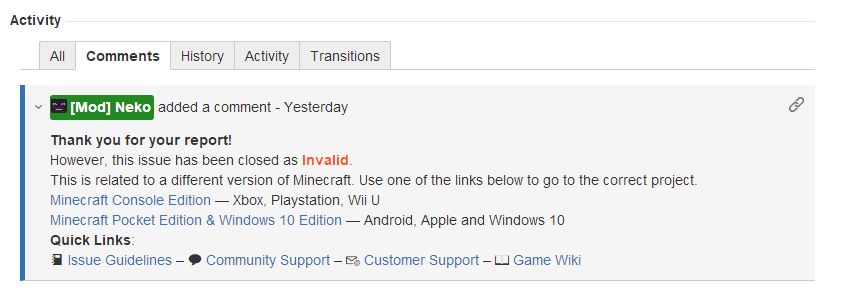
Despite this Mojira site has a custom setting for apperance (including colour) to let it look different, some places, including the "Log in" button, the "Create" button at the bottom of the "Create issue" page and the thin line besides a comment (shown in the screenshot of the comment under WEB-1098) remains the same blue colour as it is in most Jira sites such as https://jira.atlassian.com. This is inconsistent with the red colour in other places such as the "Create" button at the top of the main page, and the entire red-and-white appearance of this site. And most importantly, these blue places weren't blue before the Jira update occurred.
Attachments1

 Low
LowCreated Issue:
Some places changed blue after the Mojira site is updated
I remember that there was an update of Jira: https://<name>.atlassian.com not long ago and it changed https://bugs.mojang.com as well.
Despite this Mojira site has a custom setting for apperance (including colour) to let it look different, some places, including the "Log in" button and the thin line besides a comment (shown in the screenshot) remains the same blue colour as it is in most Jira sites such as https://jira.atlassian.com. This is inconsistent with the red colour in other places such as the "Create" button.
Attachments1
 Normal
I remember that there was an update of Jira: https://<name>.atlassian.com not long ago and it changed https://bugs.mojang.com as well.
Despite this Mojira site has a custom setting for apperance (including colour) to let it look different, some places, including the "Log in" button, the "Create" button at the bottom of the "Create issue" page and the thin line besides a comment (shown in the screenshot) remains the same blue colour as it is in most Jira sites such as https://jira.atlassian.com. This is inconsistent with the red colour in other places such as the "Create" button at the top of the main page, and the entire red-and-white appearance of this site. And most importantly, these blue places weren't blue before the Jira update occurred.
I remember that there was an update of Jira: https://<name>.atlassian.com not long ago and it changed https://bugs.mojang.com as well.
Despite this Mojira site has a custom setting for apperance (including colour) to let it look different, some places, including the "Log in" button, the "Create" button at the bottom of the "Create issue" page and the thin line besides a comment (shown in the screenshot
) remains the same blue colour as it is in most Jira sites such ashttps://jira.atlassian.com. This is inconsistent with the red colour in other places such as the "Create" button at the top of the main page, and the entire red-and-white appearance of this site. And most importantly, these blue places weren't blue before the Jira update occurred.I remember that there was an update of Jira: https://<name>.atlassian.com not long ago and it changed https://bugs.mojang.com as well.
Despite this Mojira site has a custom setting for apperance (including colour) to let it look different, some places, including the "Log in" button, the "Create" button at the bottom of the "Create issue" page and the thin line besides a comment (shown in the screenshot of the comment under
WEB-1098) remains the same blue colour as it is in most Jira sites such as https://jira.atlassian.com. This is inconsistent with the red colour in other places such as the "Create" button at the top of the main page, and the entire red-and-white appearance of this site. And most importantly, these blue places weren't blue before the Jira update occurred.
![[Mod] bemoty](../../../data/avatars/users/50554.png)

Most of the projects delete the configure field "priority", so why is WEB keeping it...
It's kinda "fixed" right now because more blue has been introduced to this website.
Sounds like a feature suggestion
Thank you for your report!
However, this issue is Invalid.
You have posted a feature request or a suggestion. This site is for bug reports only.
Quick Links:
📓 Issue Guidelines – 💬 Community Support – 📧 Customer Support – 📖 Game Wiki