 Marc Jones
- _marcjones_
- _marcjones_
- Europe/Stockholm
- Yes
- No
 MCPE-65682


Custom biomes have several problems with customization.
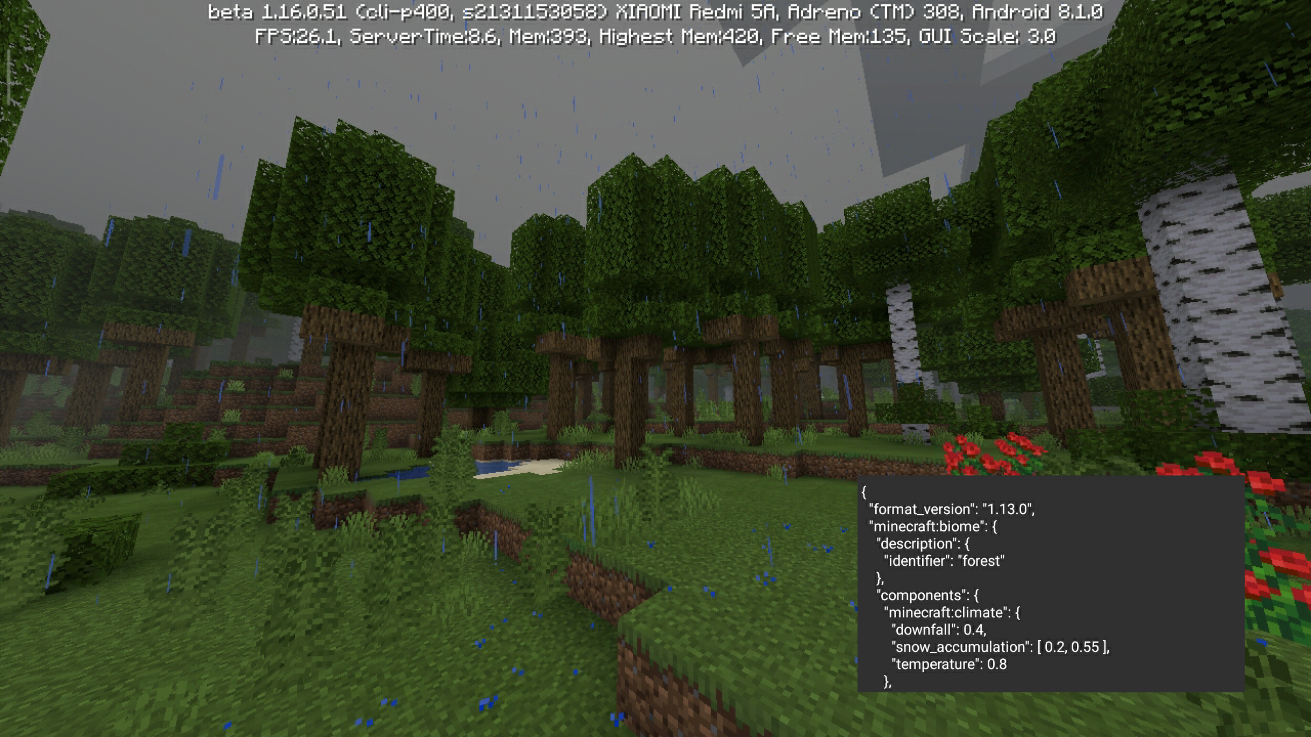
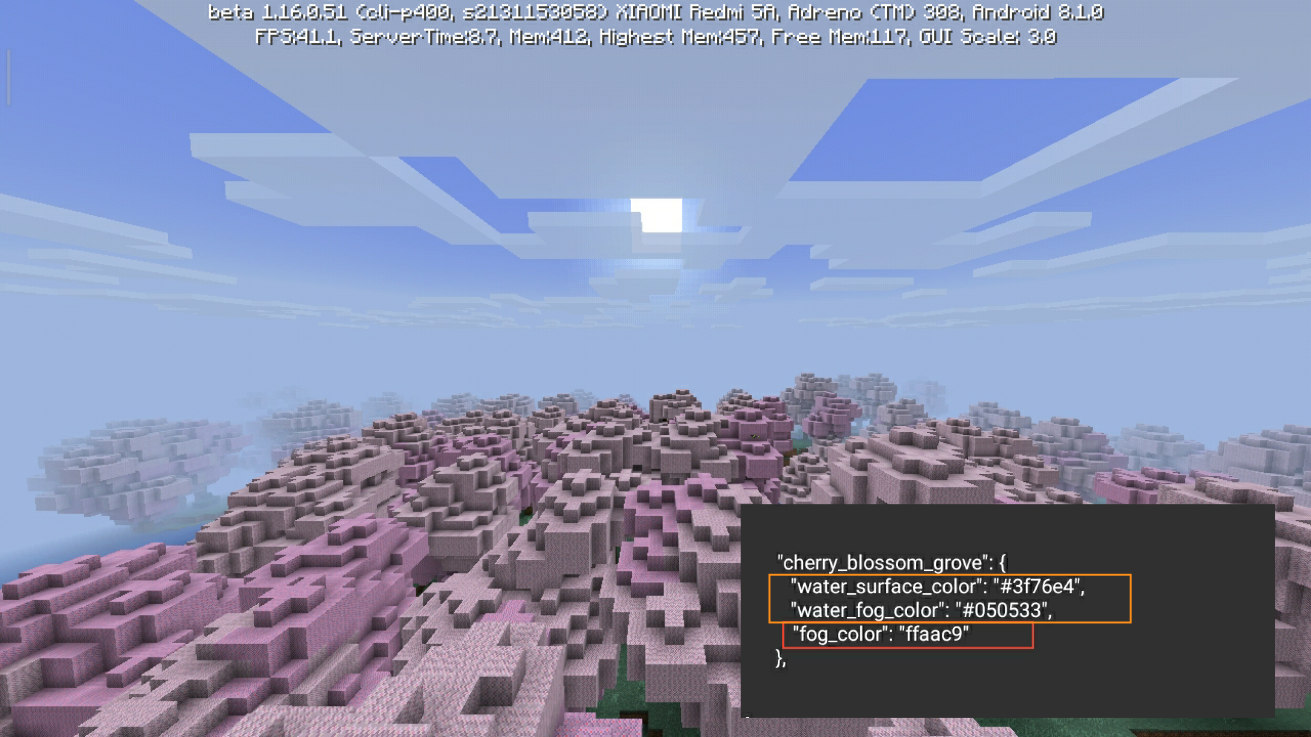
1. The climate. Does not match the set value. Using the same value for vanilla and custom biome, the color of the grass, foliage; and weather are different. (examples in screenshots: cherry blossom grove and forest)
2. Color of biome elements in biomes_client.json
Any color values for the custom biome that were added to the file (biomes_client.json) will not be applied to the custom biome (water surface and fog color; biome fog color). A custom biome applies the values set for a 'default' biome. (example in screenshot: cherry blossom grove)Custom biomes use the default value instead of the custom value.
1. Climate . The color of grass and foliage, the weather does not match. Using the same value on a vanilla biome and a custom biome, we get different results.
2. Water -biome fog . The color of the water and the fog does not match the intended value. The biome will use the default value.Both issues are extremely negative for Minecraft Bedrock 'modding'. Please fix them.
I am ready to provide more materials to help fix this bugs.
Data-driven: custom biomes problemsCustom biomes problems
Custom biomes use the default value instead of the custom value.
1. Climate. The color of grass and foliage, the weather does not match. Using the same value on a vanilla biome and a custom biome, we get different results.
2. Water -biome fog. The color of the waterand the fog does not match the intended value. The biome will use the default value.Both issues are extremely negative for Minecraft Bedrock 'modding'. Please fix them.
I am ready to provide more materials to help fix this bugs.Custom biomes use the default value instead of the custom value.
1. Climate. The color of grass and foliage, the weather does not match. Using the same value on a vanilla biome and a custom biome, we get different results.
2. Water - biome fog. The color of the water color and the biome fog does not match the intended value. The biome will use the default value.Both issues are extremely negative for Minecraft Bedrock 'modding'. Please fix them.
I am ready to provide more materials to help fix this bugs.
Custom biomes use the default value instead of the custom value.
1. Climate. The color of grass and foliage, the weather does not match. Using the same value on a vanilla biome and a custom biome, we get different results.
2. Water - biome fog. The color of the watercolorand the biome fog does not match the intended value. The biome will use the default value.Both issues are extremely negative for Minecraft Bedrock 'modding'. Please fix them.
I am ready to provide more materials to help fix this bugs.
Custom biomes use the default value instead of the custom value.
1. Climate. The color of grass and foliage, the weather does not match. Using the same value on a vanilla biome and a custom biome, we get different results.
2. Water - biome fog. The color of the water and the biome fog does not match the intended value. The biome will use the default value.Both issues are extremely negative for Minecraft Bedrock 'modding'. Please fix them.
I am ready to provide more materials to help fix this bugs.*Upd. *this problem is missing on Windows 10. But exists on Android.
Custom biomes use the default value instead of the custom value.
1. Climate. The color of grass and foliage, the weather does not match. Using the same value on a vanilla biome and a custom biome, we get different results.
2. Water - biome fog. The color of the water and the biome fog does not match the intended value. The biome will use the default value.Both issues are extremely negative for Minecraft Bedrock 'modding'. Please fix them.
I am ready to provide more materials to help fix this bugs.*Upd. *this problem is missing on Windows 10. But exists on Android.
Custom biomes use the default value instead of the custom value.
1. Climate. The color of grass and foliage, the weather does not match. Using the same value on a vanilla biome and a custom biome, we get different results.
2. Water - biome fog. The color of the water and the biome fog does not match the intended value. The biome will use the default value.Both issues are extremely negative for Minecraft Bedrock 'modding'. Please fix them.
I am ready to provide more materials to help fix this bugs.Upd. this problem is missing on Windows 10. But exists on Android.
Custom biomes use the default value instead of the custom value.
1. Climate. The color of grass and foliage, the weather does not match. Using the same value on a vanilla biome and a custom biome, we get different results.
2. Water - biome fog. The color of the water and the biome fog does not match the intended value. The biome will use the default value.Both issues are extremely negative for Minecraft Bedrock 'modding'. Please fix them.
I am ready to provide more materials to help fix this bugs.Upd. this problem is missing on Windows 10. But exists on Android.
Minecraft Bedrock (Android) has problems with custom biomes. Climate values, water colors, and biome fog colors are mixed. As a result, each custom biome accepts a random value of another biome or accepts the "default" biome value.
Minecraft Bedrock (Android) has problems with custom biomes. Climate values, water colors, and biome fog colors are mixed. As a result, each custom biome accepts a random value of another biome or accepts the "default" biome value.
Custom biomes are broken on android devices. The climate value, the water surface color value, the water fog color value, the biome fog color are not working correctly.
Broken components:
1. {{"minecraft:climate" }}( [behavior_pack_name] /biomes/ [biome_name] .json
Description of the problem: the color of grass or leaves applies the wrong value in the biome or “mixes” with other custom biomes and applies to them. When specifying a value "downfall": 0.4, "snow_accumulation": [ 0.0, 0.125 ], "temperature": 1.6 snow instead of rain; grass and foliage will be blue or gray.2. {{ "water_surface_color" }}( [resource_pack_name] /biomes_client.json
{ "water_surface_color": "#ffffff" }
Description of the problem: often the value of the custom biome takes the default biome value. For example:
{{ "custom":,}}
{ "water_surface_color": "#aaaaaa" }
{{ "default":,}}
The value of "custom" biome in the world: "#aaaaaa"Rarely does the value of a custom biome apply to another custom biome. For example:
{ "water_surface_color": "#ffffff" }
{{ "custom":,}}
{ "water_surface_color": "#aaaaaa" }
{{ "custom2":,}}
The value of "custom2" biome in the world: "#ffffff".3. {{ "water_fog_color"}} ( [resource_pack_name] /biomes_client.json
Description of the problem: has the same problem as the component{{ "water_surface_color"}}.4. "fog_color" ( [resource_pack_name] /biomes_client.json
Description of the problem: has the same problem as the component "water_surface_color" .
Custom biomesproblemsCustom biomes broken
Custom biomes are broken on android devices. The climate value, the water surface color value, the water fog color value, the biome fog color are not working correctly.
Broken components:1.{{"minecraft:climate"}}([behavior_pack_name]/biomes/[biome_name].json
Description of the problem: the color of grass or leaves applies the wrong value in the biome or “mixes” with other custom biomes and applies to them. When specifying a value "downfall": 0.4, "snow_accumulation": [ 0.0, 0.125 ], "temperature": 1.6 snow instead of rain; grass and foliage will be blue or gray.2. {{ "water_surface_color" }}([resource_pack_name]
{/biomes_client.json
Description of the problem: often the value of the custom biome takes the default biome value. For example:
{{"custom":"water_surface_color": "#ffffff" },
{}}
{{"default":"water_surface_color": "#aaaaaa" },
}}
The value of "custom" biome in the world: "#aaaaaa"Rarely does the value of a custom biome apply to another custom biome. For example:
{
{{"custom":"water_surface_color": "#ffffff"},
{}}
{{"custom2":"water_surface_color": "#aaaaaa"},}}
The value of "custom2" biome in the world: "#ffffff".3.
{{"water_fog_color"}}([resource_pack_name]/biomes_client.json
Description of the problem: has the same problem as the component{{"water_surface_color"}}.4. "fog_color" ([resource_pack_name]/biomes_client.json
Description of the problem: has the same problem as the component "water_surface_color".Custom biomes are broken on android devices. The climate value, the water surface color value, the water fog color value, the biome fog color are not working correctly.
Broken components:
1. "minecraft:climate" ([behavior_pack_name]/biomes/[biome_name].json
Description of the problem: the color of grass or leaves applies the wrong value in the biome or “mixes” with other custom biomes and applies to them. When specifying a value"downfall": 0.4, "snow_accumulation": [ 0.0, 0.125 ], "temperature": 1.6snow instead of rain; grass and foliage will be blue or gray.
2. "water_surface_color" ([resource_pack_name]/biomes_client.json
{ "water_surface_color": "#ffffff" }
Description of the problem: often the value of the custom biome takes the default biome value. For example:
"custom":,
{ "water_surface_color": "#aaaaaa" }
"default":,
The value of "custom" biome in the world: "#aaaaaa"Rarely does the value of a custom biome apply to another custom biome. For example:
{ "water_surface_color": "#ffffff" }
"custom":,
{ "water_surface_color": "#aaaaaa" }
"custom2":,
The value of "custom2" biome in the world: "#ffffff"
3. "water_fog_color" ([resource_pack_name]/biomes_client.json
Description of the problem: has the same problem as the component "water_surface_color".4. "fog_color" ([resource_pack_name]/biomes_client.json
Description of the problem: has the same problem as the component "water_surface_color".
Custom biomes are broken on android devices. The climate value, the water surface color value, the water fog color value, the biome fog color are not working correctly.
Broken components:
1. "minecraft:climate" ([behavior_pack_name]/biomes/[biome_name].json
Description of the problem: the color of grass or leaves applies the wrong value in the biome or “mixes” with other custom biomes and applies to them. When specifying a value"downfall": 0.4, "snow_accumulation": [ 0.0, 0.125 ], "temperature": 1.6snow instead of rain; grass and foliage will be blue or gray.
2. "water_surface_color" ([resource_pack_name]/biomes_client.json
{ "water_surface_color": "#ffffff" }
Description of the problem: often the value of the custom biome takes the default biome value. For example:
"custom":,
{ "water_surface_color": "#aaaaaa" }
"default":,
The value of "custom" biome in the world: "#aaaaaa"Rarely does the value of a custom biome apply to another custom biome. For example:
{ "water_surface_color": "#ffffff" }
"custom":,
{ "water_surface_color": "#aaaaaa" }
"custom2":,
The value of "custom2" biome in the world: "#ffffff"3. "water_fog_color" ([resource_pack_name]/biomes_client.json
Description of the problem: has the same problem as the component "water_surface_color".4. "fog_color" ([resource_pack_name]/biomes_client.json
Description of the problem: has the same problem as the component "water_surface_color".Custom biomes are broken on android devices. The climate value, the water surface color value, the water fog color value, the biome fog color are not working correctly.
Broken components:
1. "minecraft:climate" ([behavior_pack_name]/biomes/[biome_name].json
Description of the problem: the color of grass or leaves applies the wrong value in the biome or “mixes” with other custom biomes and applies to them. When specifying a value"downfall": 0.4, "snow_accumulation": [ 0.0, 0.125 ], "temperature": 1.6snow instead of rain; grass and foliage will be blue or gray.
2. "water_surface_color" ([resource_pack_name]/biomes_client.json
Description of the problem: often the value of the custom biome takes the default biome value. For example:"custom": { "water_surface_color": "#ffffff" },"default": { "water_surface_color": "#aaaaaa" },The value of "custom" biome in the world:
"#aaaaaa"Rarely does the value of a custom biome apply to another custom biome. For example:
"custom": { "water_surface_color": "#ffffff" },"custom2": { "water_surface_color": "#aaaaaa" },The value of "custom2" biome in the world:
"#ffffff"3. "water_fog_color" ([resource_pack_name]/biomes_client.json
Description of the problem: has the same problem as the component "water_surface_color".4. "fog_color" ([resource_pack_name]/biomes_client.json
Description of the problem: has the same problem as the component "water_surface_color".
Custom biomes are broken on android devices. The climate value, the water surface color value, the water fog color value, the biome fog color are not working correctly.
Broken components:
1."minecraft:climate"([behavior_pack_name]/biomes/[biome_name].json
Description of the problem: the color of grass or leaves applies the wrong value in the biome or “mixes” with other custom biomes and applies to them. When specifying a value"downfall": 0.4, "snow_accumulation": [ 0.0, 0.125 ], "temperature": 1.6snow instead of rain; grass and foliage will be blue or gray.
2."water_surface_color"([resource_pack_name]/biomes_client.json
Description of the problem: often the value of the custom biome takes the default biome value. For example:"custom": { "water_surface_color": "#ffffff" },"default": { "water_surface_color": "#aaaaaa" },The value of "custom" biome in the world:
"#aaaaaa"Rarely does the value of a custom biome apply to another custom biome. For example:
"custom": { "water_surface_color": "#ffffff" },"custom2": { "water_surface_color": "#aaaaaa" },The value of "custom2" biome in the world:
"#ffffff"
3."water_fog_color"([resource_pack_name]/biomes_client.json
Description of the problem: has the same problem as the component"water_surface_color".4.
"fog_color" ([resource_pack_name]/biomes_client.json
Description of the problem: has the same problem as the component"water_surface_color".Custom biomes are broken on android devices. The climate value, the water surface color value, the water fog color value, the biome fog color are not working correctly.
Broken components:
1. "minecraft:climate" ([behavior_pack_name]/biomes/[biome_name].json)
Description of the problem: the color of grass or leaves applies the wrong value in the biome or “mixes” with other custom biomes and applies to them. When specifying a value"downfall": 0.4, "snow_accumulation": [ 0.0, 0.125 ], "temperature": 1.6snow instead of rain; grass and foliage will be blue or gray.
2. "water_surface_color" ([resource_pack_name]/biomes_client.json)
Description of the problem: often the value of the custom biome takes the default biome value. For example:"custom": { "water_surface_color": "#ffffff" },"default": { "water_surface_color": "#aaaaaa" },The value of "custom" biome in the world:
"#aaaaaa"Rarely does the value of a custom biome apply to another custom biome. For example:
"custom": { "water_surface_color": "#ffffff" },"custom2": { "water_surface_color": "#aaaaaa" },The value of "custom2" biome in the world:
"#ffffff"3. "water_fog_color" ([resource_pack_name]/biomes_client.json)
Description of the problem: has the same problem as the component "water_surface_color".4. "fog_color" ([resource_pack_name]/biomes_client.json)
Description of the problem: has the same problem as the component "water_surface_color".
Ebb046rXQAA2jTZ.jfif
Custom biomes are broken
Custom biomes are broken on android devices. The climate value, the water surface color value, the water fog color value, the biome fog color are not working correctly.
Broken components:
1. "minecraft:climate" ([behavior_pack_name]/biomes/[biome_name].json)
Description of the problem: the color of grass or leaves applies the wrong value in the biome or “mixes” with other custom biomes and applies to them. When specifying a value"downfall": 0.4, "snow_accumulation": [ 0.0, 0.125 ], "temperature": 1.6snow instead of rain; grass and foliage will be blue or gray.
Ash particles.
Ash particles are identified in the biome with their parent climate value.2. "water_surface_color" ([resource_pack_name]/biomes_client.json)
Description of the problem: often the value of the custom biome takes the default biome value. For example:"custom": { "water_surface_color": "#ffffff" },"default": { "water_surface_color": "#aaaaaa" },The value of "custom" biome in the world:
"#aaaaaa"Rarely does the value of a custom biome apply to another custom biome. For example:
"custom": { "water_surface_color": "#ffffff" },"custom2": { "water_surface_color": "#aaaaaa" },The value of "custom2" biome in the world:
"#ffffff"3. "water_fog_color" ([resource_pack_name]/biomes_client.json)
Description of the problem: has the same problem as the component "water_surface_color".4. "fog_color" ([resource_pack_name]/biomes_client.json)
Description of the problem: has the same problem as the component "water_surface_color".
Version 1.17.20.23. Fixed.
Thanks!
Custom biomes are broken on android devices. The climate value, the water surface color value, the water fog color value, the biome fog color are not working correctly.
Broken components:
1. "minecraft:climate" ([behavior_pack_name]/biomes/[biome_name].json)
Description of the problem: the color of grass or leaves applies the wrong value in the biome or “mixes” with other custom biomes and applies to them. When specifying a value"downfall": 0.4, "snow_accumulation": [ 0.0, 0.125 ], "temperature": 1.6snow instead of rain; grass and foliage will be blue or gray.
Ash particles.
Ash particles are identified in the biome with their parent climate value.2. "water_surface_color" ([resource_pack_name]/biomes_client.json)
Description of the problem: often the value of the custom biome takes the default biome value. For example:"custom": { "water_surface_color": "#ffffff" },"default": { "water_surface_color": "#aaaaaa" },The value of "custom" biome in the world:
"#aaaaaa"Rarely does the value of a custom biome apply to another custom biome. For example:
"custom": { "water_surface_color": "#ffffff" },"custom2": { "water_surface_color": "#aaaaaa" },The value of "custom2" biome in the world:
"#ffffff"3. "water_fog_color" ([resource_pack_name]/biomes_client.json)
Description of the problem: has the same problem as the component "water_surface_color".4. "fog_color" ([resource_pack_name]/biomes_client.json)
Description of the problem: has the same problem as the component "water_surface_color".Custom biomes are broken on android devices. The climate value, the water surface color value, the water fog color value, the biome fog color are not working correctly.
Steps to Reproduce:
1. Create an addon with your custom biomes;
2. Add add-on to your world;
3. Look for new biomes.Observed Results:
Biome colors (grass, foliage, water, fog) mixes between different custom biomes.Expected Results:
Biome colors (climate etc.) must math the code.Broken components:
1. "minecraft:climate" ([behavior_pack_name]/biomes/[biome_name].json)
Description of the problem: the color of grass or leaves applies the wrong value in the biome or “mixes” with other custom biomes and applies to them. When specifying a value"downfall": 0.4, "snow_accumulation": [ 0.0, 0.125 ], "temperature": 1.6snow instead of rain; grass and foliage will be blue or gray.
Ash particles.
Ash particles are identified in the biome with their parent climate value.2. "water_surface_color" ([resource_pack_name]/biomes_client.json)
Description of the problem: often the value of the custom biome takes the default biome value. For example:"custom": { "water_surface_color": "#ffffff" },"default": { "water_surface_color": "#aaaaaa" },The value of "custom" biome in the world:
"#aaaaaa"Rarely does the value of a custom biome apply to another custom biome. For example:
"custom": { "water_surface_color": "#ffffff" },"custom2": { "water_surface_color": "#aaaaaa" },The value of "custom2" biome in the world:
"#ffffff"3. "water_fog_color" ([resource_pack_name]/biomes_client.json)
Description of the problem: has the same problem as the component "water_surface_color".4. "fog_color" ([resource_pack_name]/biomes_client.json)
Description of the problem: has the same problem as the component "water_surface_color".
Custom biomes are broken on android devices.
The climatevalue, thewater surface colorvalue, thewater fog colorvalue, thebiome fog color are not working correctly.Steps to Reproduce:
1. Create an addon with your custom biomes;
2. Add add-on to your world;
3. Look for new biomes.Observed Results:
Biome colors (grass, foliage, water, fog) mixes between different custom biomes.Expected Results:
Biome colors (climate etc.) must math the code.Broken components:
1. "minecraft:climate" ([behavior_pack_name]/biomes/[biome_name].json)
Descriptionof the problem: the color of grass or leaves applies the wrong value in the biome or “mixes” with other custom biomes and applies to them. When specifying a value"downfall": 0.4, "snow_accumulation": [ 0.0, 0.125 ], "temperature": 1.6snow instead of rain; grass and foliage will be blue or gray.
Ash particles.
Ash particles are identified in the biome with their parent climate value.2. "water_surface_color" ([resource_pack_name]/biomes_client.json)
Description of the problem: often the value of the custom biome takes the default biome value. For example:"custom": { "water_surface_color": "#ffffff" },"default": { "water_surface_color": "#aaaaaa" },The value of "custom" biome in the world:
"#aaaaaa"Rarely does the value of a custom biome apply to another custom biome. For example:
"custom": { "water_surface_color": "#ffffff" },"custom2": { "water_surface_color": "#aaaaaa" },The value of "custom2" biome in the world:
"#ffffff"3. "water_fog_color" ([resource_pack_name]/biomes_client.json)
Description of the problem: has the same problem as the component "water_surface_color".4. "fog_color" ([resource_pack_name]/biomes_client.json)
Description of the problem: has the same problem as the component "water_surface_color".Custom biomes are broken on android devices. Climate, water surface color, water fog color, biome fog color are not working correctly.
Steps to Reproduce:
1. Create an addon with your custom biomes;
2. Add add-on to your world;
3. Look for new biomes.Observed Results:
Biome colors (grass, foliage, water, fog) mixes between different custom biomes.Expected Results:
Biome colors (climate etc.) must math the code.Broken components:
1. "minecraft:climate" ([behavior_pack_name]/biomes/[biome_name].json)
Description: the color of grass or leaves applies the wrong value in the biome or “mixes” with other custom biomes and applies to them. When specifying a value"downfall": 0.4, "snow_accumulation": [ 0.0, 0.125 ], "temperature": 1.6snow instead of rain; grass and foliage will be blue or gray.
Ash particles.
Ash particles are identified in the biome with their parent climate value.2. "water_surface_color" ([resource_pack_name]/biomes_client.json)
Description of the problem: often the value of the custom biome takes the default biome value. For example:"custom": { "water_surface_color": "#ffffff" },"default": { "water_surface_color": "#aaaaaa" },The value of "custom" biome in the world:
"#aaaaaa"Rarely does the value of a custom biome apply to another custom biome. For example:
"custom": { "water_surface_color": "#ffffff" },"custom2": { "water_surface_color": "#aaaaaa" },The value of "custom2" biome in the world:
"#ffffff"3. "water_fog_color" ([resource_pack_name]/biomes_client.json)
Description of the problem: has the same problem as the component "water_surface_color".4. "fog_color" ([resource_pack_name]/biomes_client.json)
Description of the problem: has the same problem as the component "water_surface_color".
Confirmation Method: Download the world on Android and Windows. And compare custom biomes.
Or create your own simple biome-pack and compare how it works on two platforms (Windows 10 and Android).
Updated (more info): Probably the bug (error) is related to the in-game component of biomes. Custom biomes on android are broken, but the world with these biomes on Windows works as it should.
Updated: added world with reproduction the bug.
Custom biomes are broken on android devices. Climate, water surface color, water fog color, biome fog color are not working correctly.
Steps to Reproduce:
1. Create an addon with your custom biomes;
2. Add add-on to your world;
3. Look fornewbiomes.Observed Results:
Biome colors (grass, foliage, water, fog) mixes between different custom biomes.Expected Results:
Biome colors (climate etc.) must math the code.Broken components:
1. "minecraft:climate" ([behavior_pack_name]/biomes/[biome_name].json)
Description: the color of grass or leaves applies the wrong value in the biome or “mixes” with other custom biomes and applies to them. When specifying a value"downfall": 0.4, "snow_accumulation": [ 0.0, 0.125 ], "temperature": 1.6snow instead of rain; grass and foliage will be blue or gray.
Ash particles.
Ash particles are identified in the biome with their parent climate value.2. "water_surface_color" ([resource_pack_name]/biomes_client.json)
Description of the problem: often the value of the custom biome takes the default biome value. For example:"custom": { "water_surface_color": "#ffffff" },"default": { "water_surface_color": "#aaaaaa" },The value of "custom" biome in the world:
"#aaaaaa"Rarely does the value of a custom biome apply to another custom biome. For example:
"custom": { "water_surface_color": "#ffffff" },"custom2": { "water_surface_color": "#aaaaaa" },The value of "custom2" biome in the world:
"#ffffff"3. "water_fog_color" ([resource_pack_name]/biomes_client.json)
Description of the problem: has the same problem as the component "water_surface_color".4. "fog_color" ([resource_pack_name]/biomes_client.json)
Description of the problem: has the same problem as the component "water_surface_color".Custom biomes are broken on android devices. Climate, water surface color, water fog color, biome fog color are not working correctly.
Steps to Reproduce:
1. Create an addon with your custom biomes (biomes must contain different values of climate, fog and water colors);
2. Add add-on to your world;
3. Look for custom biomes.Observed Results:
Biome colors (grass, foliage, water, fog) mixes between different custom biomes.Expected Results:
Biome colors (climate etc.) must math the code.Broken components:
1. "minecraft:climate" ([behavior_pack_name]/biomes/[biome_name].json)
Description: the color of grass or leaves applies the wrong value in the biome or “mixes” with other custom biomes and applies to them. When specifying a value"downfall": 0.4, "snow_accumulation": [ 0.0, 0.125 ], "temperature": 1.6snow instead of rain; grass and foliage will be blue or gray.
Ash particles.
Ash particles are identified in the biome with their parent climate value.2. "water_surface_color" ([resource_pack_name]/biomes_client.json)
Description of the problem: often the value of the custom biome takes the default biome value. For example:"custom": { "water_surface_color": "#ffffff" },"default": { "water_surface_color": "#aaaaaa" },The value of "custom" biome in the world:
"#aaaaaa"Rarely does the value of a custom biome apply to another custom biome. For example:
"custom": { "water_surface_color": "#ffffff" },"custom2": { "water_surface_color": "#aaaaaa" },The value of "custom2" biome in the world:
"#ffffff"3. "water_fog_color" ([resource_pack_name]/biomes_client.json)
Description of the problem: has the same problem as the component "water_surface_color".4. "fog_color" ([resource_pack_name]/biomes_client.json)
Description of the problem: has the same problem as the component "water_surface_color".
Custom biomes are broken on android devices. Climate, water surface color, water fog color, biome fog color are not working correctly
.Steps to Reproduce:
1. Create an addon with your custom biomes (biomes must contain different values of climate, fog and water colors);
2. Add add-on to your world;
3. Look for custom biomes.Observed Results:
Biome colors (grass, foliage, water, fog) mixes between different custom biomes.Expected Results:
Biome colors (climate etc.) must math the code.Broken components:
1. "minecraft:climate" ([behavior_pack_name]/biomes/[biome_name].json)
Description: the color of grass or leaves applies the wrong value in the biome or “mixes” with other custom biomes and applies to them. When specifying a value"downfall": 0.4, "snow_accumulation": [ 0.0, 0.125 ], "temperature": 1.6snow instead of rain; grass and foliage will be blue or gray.
Ash particles.
Ash particles are identified in the biome with their parent climate value.2. "water_surface_color" ([resource_pack_name]/biomes_client.json)
Description of the problem: often the value of the custom biome takes the default biome value. For example:"custom": { "water_surface_color": "#ffffff" },"default": { "water_surface_color": "#aaaaaa" },The value of "custom" biome in the world:
"#aaaaaa"Rarely does the value of a custom biome apply to another custom biome. For example:
"custom": { "water_surface_color": "#ffffff" },"custom2": { "water_surface_color": "#aaaaaa" },The value of "custom2" biome in the world:
"#ffffff"3. "water_fog_color" ([resource_pack_name]/biomes_client.json)
Description of the problem: has the same problem as the component "water_surface_color".4. "fog_color" ([resource_pack_name]/biomes_client.json)
Description of the problem: has the same problem as the component "water_surface_color".Custom biomes are broken on android devices (since new Caves&Cliffs world gen - on all devices). Climate, water surface color, water fog color, biome fog color are not working correctly (and you no longer can get access to it with the experimental features).
Steps to Reproduce:
1. Create an addon with your custom biomes (biomes must contain different values of climate, fog and water colors);
2. Add add-on to your world;
3. Look for custom biomes.Observed Results:
Biome colors (grass, foliage, water, fog) mixes between different custom biomes.Expected Results:
Biome colors (climate etc.) must math the code.Broken components:
1. "minecraft:climate" ([behavior_pack_name]/biomes/[biome_name].json)
Description: the color of grass or leaves applies the wrong value in the biome or “mixes” with other custom biomes and applies to them. When specifying a value"downfall": 0.4, "snow_accumulation": [ 0.0, 0.125 ], "temperature": 1.6snow instead of rain; grass and foliage will be blue or gray.
Ash particles.
Ash particles are identified in the biome with their parent climate value.2. "water_surface_color" ([resource_pack_name]/biomes_client.json)
Description of the problem: often the value of the custom biome takes the default biome value. For example:"custom": { "water_surface_color": "#ffffff" },"default": { "water_surface_color": "#aaaaaa" },The value of "custom" biome in the world:
"#aaaaaa"Rarely does the value of a custom biome apply to another custom biome. For example:
"custom": { "water_surface_color": "#ffffff" },"custom2": { "water_surface_color": "#aaaaaa" },The value of "custom2" biome in the world:
"#ffffff"3. "water_fog_color" ([resource_pack_name]/biomes_client.json)
Description of the problem: has the same problem as the component "water_surface_color".4. "fog_color" ([resource_pack_name]/biomes_client.json)
Description of the problem: has the same problem as the component "water_surface_color".
[Addons] Custom biomes are broken
*Deferred Technical Preview causes a crash on Android devices using Mali GPU.
*
Steps to reproduce:
1. Launch the game (Minecraft Beta 1.20.30.20)
2. Create a new world
3. Select "Render Dragon Features for Creators"
4. Select any resource pack that uses PBR (for example, Defined PBR, By MADLAD3718)
5. Press the button to create a new world
6. Enter settings after world creation
5. Select "Deffered Technical Preview" in the Video tab
6. Your game has crashedUsed for test: POCO M5 4/64 (Mali G-57)
Deferred Technical Preview causes a crash on Android devices using Mali GPU.
Steps to reproduce:
1. Launch the game (Minecraft Beta 1.20.30.20)
2. Create a new world
3. Select "Render Dragon Features for Creators"
4. Select any resource pack that uses PBR (for example, Defined PBR, By MADLAD3718)
5. Press the button to create a new world
6. Enter settings after world creation
5. Select "Deffered Technical Preview" in the Video tab
6. Your game has crashedUsed for test: POCO M5 4/64 (Mali G-57)
Deferred Technical Preview causes a crash on Android devices using Mali GPU.
Steps to reproduce:
1. Launch the game (Minecraft Beta 1.20.30.20)
2. Create a new world
3. Select "Render Dragon Features for Creators"
4. Select any resource pack that uses PBR (for example, Defined PBR, By MADLAD3718)
5. Press the button to create a new world
6. Enter settings after world creation
5. Select "Deffered Technical Preview" in the Video tab
6. Your game has crashedUsed for test: POCO M5 4/64 (Mali G-57)
Deferred Technical Preview causes a crash on Android devices using Mali GPU.
Steps to reproduce:
1. Launch the game (Minecraft Beta 1.20.30.20)
2. Create a new world
3. Select "Render Dragon Features for Creators"
4. Select any resource pack that uses PBR (for example, Defined PBR, By MADLAD3718)
5. Press the button to create a new world
6. Enter settings after world creation
5. Select "Deferred Technical Preview" in the Video tab
6. Your game has crashedUsed for test: POCO M5 4/64 (Mali G-57)
[Android] Deferred Technical Preview causes crash on Mali GPU
Deferred Technical Preview causes a crash on Android devices using Mali GPUs.
Steps to reproduce:
1. Launch the game (Minecraft Beta 1.20.30.20)
2. Create a new world
3. Select "Render Dragon Features for Creators"
4. Select any resource pack that uses PBR (for example, Defined PBR, By MADLAD3718)
5. Press the button to create a new world
6. Enter settings after world creation
5. Select "Deferred Technical Preview" in the Video tab
6. Your game has crashedUsed for test: POCO M5 4/64 (Mali G-57)
[Android] Deferred Technical Preview causes crash on Mali GPUs
Deferred Technical Preview causes a crash on Android devices using Mali GPUs.
Steps to reproduce:
1. Launch the game (Minecraft Beta 1.20.30.20)
2. Create a new world
3. Select "Render Dragon Features for Creators"
4. Select any resource pack that uses PBR (for example, Defined PBR, By MADLAD3718)
5. Press the button to create a new world
6. Enter settings after world creation
5. Select "Deferred Technical Preview" in the Video tab
6. Your game has crashedUsed for test: POCO M5 4/64 (Mali G-57)
Affected: 1.20.30.20 Preview/Beta, 1.20.30.21 Preview/Beta, 1.20.30.22 Preview/Beta
Deferred Technical Preview causes a crash on Android devices using Mali GPUs.
Steps to reproduce:
1. Launch the game (Minecraft Beta 1.20.30.20)
2. Create a new world
3. Select "Render Dragon Features for Creators"
4. Select any resource pack that uses PBR (for example, Defined PBR, By MADLAD3718)
5. Press the button to create a new world
6. Enter settings after world creation
5. Select "Deferred Technical Preview" in the Video tab
6. Your game has crashedUsed for test: POCO M5 4/64 (Mali G-57)
Affected: 1.20.30.20 Preview/Beta, 1.20.30.21 Preview/Beta, 1.20.30.22 Preview/Beta, 1.20.30.23 Beta
[Java parity] Belarusian language is missing in Minecraft Bedrock
@baslod this is the same parity issue as others posted on bugs.mojang.com. I demand an appeal against your actions from the main moderators.
@baslod jest to ten sam problem z parzystością, jak inne opublikowane na stronie bugs.mojang.com. Żądam odwołania od twoich działań od głównych moderatorów.
I will require all managers to explain the baslod's actions. Why weren't the other parity issue marked as "invalid"? This is the same.
If you are a moderator and you are planning to tag this title as "Invalid", please explain why the other parity issues were not marked as "Invalid" but
MCPE-174342was.
[Mod] Umija5895M this is not a duplicate, this is a requirement for an explanation.
Relevant in 1.12.X/ 1.13/1.14 beta even on higher-end devices.
Incorrect details are specified, which is why this report is not visible in the search. However, I confirm Mali G-57, POCO M5.
Edited: please add correct summary and details, steps to reproduce as required by this platform so that users don't create duplicates.
I can't say it's a bug. Java has the same thing, and it's much better, because it doesn't irritate the eyesight, and the text is on a contrasting background.
Actual for 1.20.30.21 and 1.20.30.22
I can confirm. This bug exists since the Pillage&Village update, which makes it impossible to create custom villagers for other biomes, as they replace the vanilla ones, regardless of the NBT structure tag on the data-driven level.
Just tested this. This is a issue in the resource pack you are using (not the game). Please contact the resource pack creator to fix this issue.
I can confirm. Ore UI does not support colored characters.
This is possible if you are not using a PBR resource pack. Vanilla game will not show this option by default.
Please install PBR resourcepack (made specifically for 1.20.30), test it and complete your report.
Thanks for the clarification, Jay!
Mojang talks about parity everywhere, but not about the fact that there are articles about what parity is in this case.
Duplicate. This problem is described in full here:
MCPE-166351You didn't provide enough information in your report, only screenshots that don't explain (or partially explain) the problem (issue).
Actual for Deferred Rendering in the latest 1.20.30 Previews.
You won't get access to the new graphics features if your game doesn't see DX12 (even if it's supported).
Actual for 1.20.30.23
Hello. There is very little information here about the issue you reported. It could be a lack of RAM or something else. To help fix the issue/bug in the future, please attach more information about your device, a video, or a screenshot of the main menu (if you're in the beta program).
Actual for 1.20.30.24. Along with this, there is a sharp drop in RAM and the device reboots. This was not the case before.
Looks like this issue MCPE-174371. However, even in the latest Beta/Preview, I didn't see any changes due to which Ore UI will support character formatting.