 Masahiro Kurokawa
- Agglutinator
- agglutinator
- Europe/Stockholm
- Yes
- No
 MC-62255
![[Mojang] Searge (Michael Stoyke)](../../../data/assets/gravatar/searge.png)
 Normal



If you set up a sign with a click event - run_command, the command will not be run by the user who clicked the sign, but by the sign itself
e.setblock ~ ~1 ~ standing_sign 0 replace {Text1:"{text:\"\",clickEvent:{action:run_command,value:\"setblock ~1 ~ ~ stone\"}}"
-> if you click the sign, the player should run the command, thus the stone should be place beside the player
-X Instead it runs the command from the perspective of the sign, thus the stone is placed next to the signIn the screenshot you can see the problem.
Camparison between run_command from book and signTellraw and books with click events + run_command work as assumed, no problems
If you set up a sign with a click event - run_command, the command will not be run by the user who clicked the sign, but by the sign itself.
setblock ~ ~1 ~ standing_sign 0 replace {Text1:"{text:\"\",clickEvent:{action:run_command,value:\"setblock ~1 ~ ~ stone\"}}"}-> if you click the sign, the player should run the command, thus the stone should be place beside the player
-X Instead it runs the command from the perspective of the sign, thus the stone is placed next to the signIn the screenshot you can see the problem.
Camparison between run_command from book and signTellraw and books with click events + run_command work as assumed, no problems
It happens
,that commandblock are activated in the wrong order.
This happens randomly witheout any obvious cause or structureTo illustrade this effect it's best to stack two commandblocks on top of each other.
The lower commandblock has the command "say 1"
The top commandblock has the command "say 2"
Then you put a redstone on the top and power that redstone, so both commandblocks will be activated.What should happen:
The top commandblock should be powered slightly before the commandblock under it.
Thus first the upper one should say "2" and after that the lower one outputs "2" in the chat.What actually happens:
Well, most times thats actually the case and everything works as expected.
In the chat you will be able to read "2" followed by "1"
But occasionally the lower commandblock will be powerd first, thus it says first "1" and then "2".In the screenshots you are able to see it.
Most times the upper commandblock is powered first, then the lower one.
In the chat is says "2 1
But on some places the lower commandblock ist powered first, so it says "1 2". This will happen everytime and you can repeat it over and over. It depends on the coordinates where the commandblock stack is placed.To replicate this bug, just randomly set up these stacks of commandblocks with the redstone on top. On some positions this symptom will happen.
This bug can be reproduced from 1.7.x - 1.8It sometimes happens that commandblock are being activated in the wrong order.
This happens randomly witheout any obvious cause or structureTo illustrade this effect it's best to stack two commandblocks on top of each other.
The lower commandblock has the command "say 1"
The top commandblock has the command "say 2"
Then you put a redstone on the top and power that redstone, so both commandblocks will be activated.What should happen:
The top commandblock should be powered slightly before the commandblock under it.
Thus first the upper one should say "2" and after that the lower one outputs "2" in the chat.What actually happens:
Well, most times thats actually the case and everything works as expected.
In the chat you will be able to read "2" followed by "1"
But occasionally the lower commandblock will be powerd first, thus it says first "1" and then "2".In the screenshots you are able to see it.
Most times the upper commandblock is powered first, then the lower one.
In the chat is says "2 1
But on some places the lower commandblock ist powered first, so it says "1 2". This will happen everytime and you can repeat it over and over. It depends on the coordinates where the commandblock stack is placed.To replicate this bug, just randomly set up these stacks of commandblocks with the redstone on top. On some positions this symptom will happen.
This bug can be reproduced from 1.7.x - 1.8
It sometimes happens that commandblock are being activated in the wrong order.
This happens randomly witheout any obvious cause or structure - but it depends on the position/coordinatesTo illustrade this effect it's best to stack two commandblocks on top of each other.
The lower commandblock has the command "say 1"
The top commandblock has the command "say 2"
Then you put a redstone on the top and power that redstone, so both commandblocks will be activated.What should happen:
The top commandblock should be powered slightly before the commandblock under it.
Thus first the upper one should say "2" and after that the lower one outputs "2" in the chat.What actually happens:
Well, most times thats actually the case and everything works as expected.
In the chat you will be able to read "2" followed by "1"
But occasionally the lower commandblock will be powerd first, thus it says first "1" and then "2".In the screenshots you are able to see it.
Most times the upper commandblock is powered first, then the lower one.
In the chat is says "2 1
But on some places the lower commandblock ist powered first, so it says "1 2". This will happen everytime and you can repeat it over and over. It depends on the coordinates where the commandblock stack is placed.To replicate this bug, just randomly set up these stacks of commandblocks with the redstone on top. On some positions this symptom will happen.
This bug can be reproduced from 1.7.x - 1.8
It sometimes happens that commandblock are being activated in the wrong order.
This happens randomly witheout any obvious cause or structure - but it depends on the position/coordinatesTo illustrade this effect it's best to stack two commandblocks on top of each other.
The lower commandblock has the command "say 1"
The top commandblock has the command "say 2"
Then you put a redstone on the top and power that redstone, so both commandblocks will be activated.What should happen:
The top commandblock should be powered slightly before the commandblock under it.
Thus first the upper one should say "2" and after that the lower one outputs "2" in the chat.What actually happens:
Well, most times thats actually the case and everything works as expected.
In the chat you will be able to read "2" followed by "1"
But occasionally the lower commandblock will be powerd first, thus it says first "1" and then "2".In the screenshots you are able to see it.
Most times the upper commandblock is powered first, then the lower one.
In the chat is says "2 1
But on some places the lower commandblock ist powered first, so it says "1 2". This will happen everytime and you can repeat it over and over. It depends on the coordinates where the commandblock stack is placed.To replicate this bug, just randomly set up these stacks of commandblocks with the redstone on top. On some positions this symptom will happen.
This bug can be reproduced from 1.7.x - 1.8It sometimes happens that commandblock are being activated in the wrong order.
This happens randomly witheout any obvious cause or structure - but it depends on the position/coordinatesTo illustrade this effect it's best to stack two commandblocks on top of each other.
The lower commandblock has the command "say 1"
The top commandblock has the command "say 2"
Then you put a redstone on the top and power that redstone, so both commandblocks will be activated.What should happen:
The top commandblock should be powered slightly before the commandblock under it.
Thus first the upper one should say "2" and after that the lower one outputs "1" in the chat.What actually happens:
Well, most times thats actually the case and everything works as expected.
In the chat you will be able to read "2" followed by "1"
But occasionally the lower commandblock will be powerd first, thus it says first "1" and then "2".In the screenshots you are able to see it.
Most times the upper commandblock is powered first, then the lower one.
In the chat is says "2 1
But on some places the lower commandblock ist powered first, so it says "1 2". This will happen everytime and you can repeat it over and over. It depends on the coordinates where the commandblock stack is placed.To replicate this bug, just randomly set up these stacks of commandblocks with the redstone on top. On some positions this symptom will happen.
This bug can be reproduced from 1.7.x - 1.8
It sometimes happens that commandblock are being activated in the wrong order.
This happens randomly witheout any obvious cause or structure - but it depends on the position/coordinatesTo illustrade this effect it's best to stack two commandblocks on top of each other.
The lower commandblock has the command "say 1"
The top commandblock has the command "say 2"
Then you put a redstone on the top and power that redstone, so both commandblocks will be activated.What should happen:
The top commandblock should be powered slightly before the commandblock under it.
Thus first the upper one should say "2" and after that the lower one outputs "1" in the chat.What actually happens:
Well, most times thats actually the case and everything works as expected.
In the chat you will be able to read "2" followed by "1"
But occasionally the lower commandblock will be powerd first, thus it says first "1" and then "2".In the screenshots you are able to see it.
Most times the upper commandblock is powered first, then the lower one.
In the chat is says "2 1"
But on some places the lower commandblock ist powered first, so it says "1 2". This will happen everytime and you can repeat it over and over. It depends on the coordinates where the commandblock stack is placed.To replicate this bug, just randomly set up these stacks of commandblocks with the redstone on top. On some positions this symptom will happen.
This bug can be reproduced from 1.7.x - 1.8
It sometimes happens that commandblock are being activated in the wrong order.
This happens randomly witheout any obvious cause or structure - but it depends on the position/coordinatesTo illustrade this effect it's best to stack two commandblocks on top of each other.
The lower commandblock has the command "say 1"
The top commandblock has the command "say 2"
Then you put a redstone on the top and power that redstone, so both commandblocks will be activated.What should happen:
The top commandblock should be powered slightly before the commandblock under it.
Thus first the upper one should say "2" and after that the lower one outputs "1" in the chat.What actually happens:
Well, most times thats actually the case and everything works as expected.
In the chat you will be able to read "2" followed by "1"
But occasionally the lower commandblock will be powerd first, thus it says first "1" and then "2".In the screenshots you are able to see it.
Most times the upper commandblock is powered first, then the lower one.
In the chat is says "2 1"
But on some places the lower commandblock ist powered first, so it says "1 2". This will happen everytime and you can repeat it over and over.It depends on the coordinates where the commandblock stack is placed.To replicate this bug, just randomly set up these stacks of commandblocks with the redstone on top. On some positions this symptom will happen.
This bug can be reproduced from 1.7.x - 1.8It sometimes happens that commandblock are being activated in the wrong order.
This happens randomly witheout any obvious cause or structure - but it depends on the position/coordinatesTo illustrade this effect it's best to stack two commandblocks on top of each other.
The lower commandblock has the command "say 1"
The top commandblock has the command "say 2"
Then you put a redstone on the top and power that redstone, so both commandblocks will be activated.What should happen:
The top commandblock should be powered slightly before the commandblock under it.
Thus first the upper one should say "2" and after that the lower one outputs "1" in the chat.What actually happens:
Well, most times thats actually the case and everything works as expected.
In the chat you will be able to read "2" followed by "1"
But occasionally the lower commandblock will be powerd first, thus it says first "1" and then "2".In the screenshots you are able to see it.
Most times the upper commandblock is powered first, then the lower one.
In the chat is says "2 1"
But on some places the lower commandblock ist powered first, so it says "1 2". This will happen everytime and you can repeat it over and over.
It depends on the coordinates where the commandblock stack is placed.To replicate this bug, just randomly set up these stacks of commandblocks with the redstone on top. On some positions this symptom will happen.
This bug can be reproduced from 1.7.x - 1.8
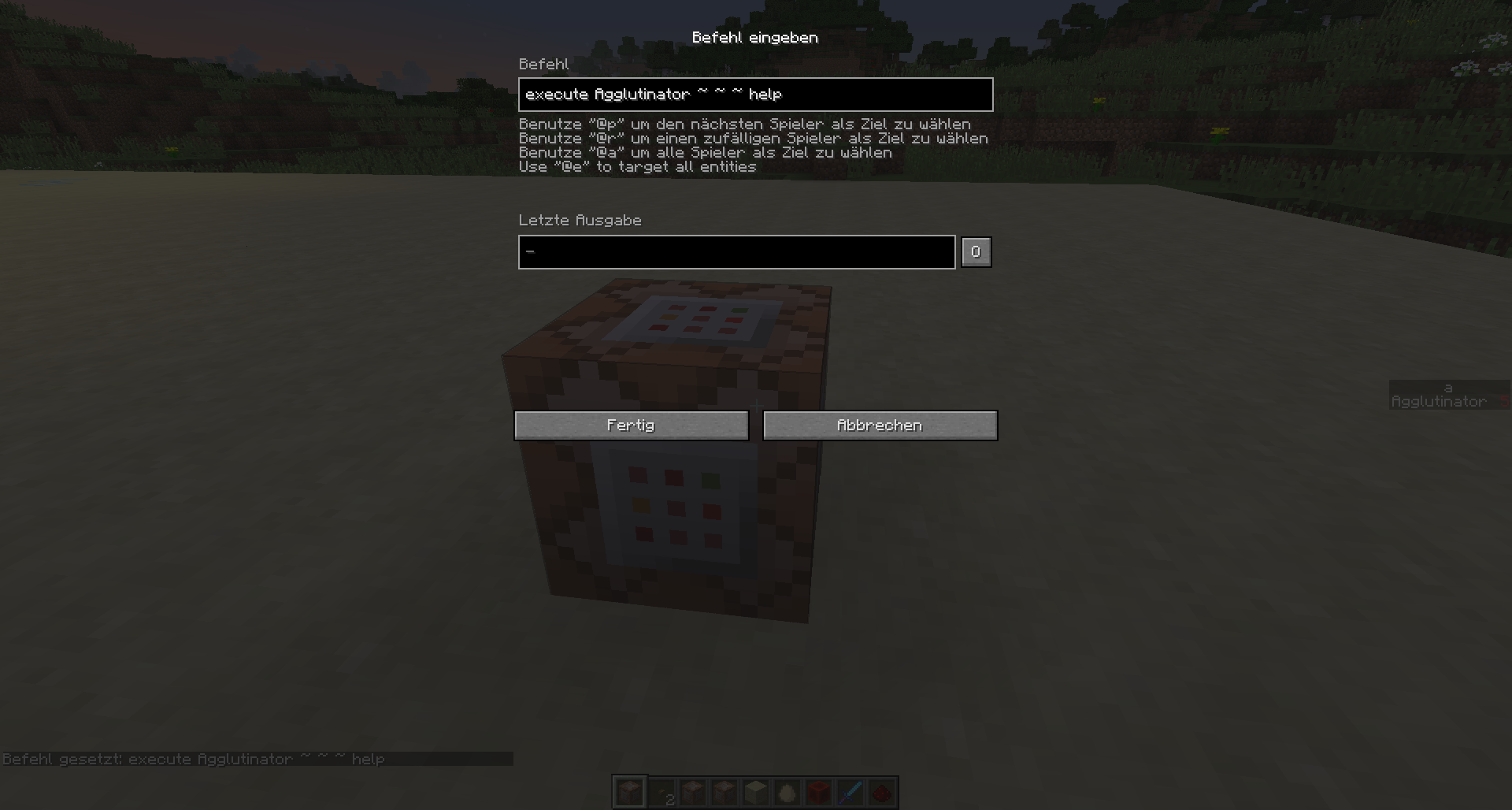
Some commands, I guess when the command is supposed to be run be the client itself,
they won't work since the "execute" command is just "sudo-ing" the player.The affected commands are:
"/help" , "/seed" , "/spawnpont" , "testforblock" , "tell" ... and so onFor example: Put this command in a commandblock and run it.
execute @p ~ ~ ~ /tell "playername" hello
What I expect:
When the command is run, it should force the nearest player to write a message to "playername" (here you write either @p(c=-1) or a specific name)What actually happens:
- Nothing -
There is no error message in commandblock, neither the target player is receiving a message, nor is there a error displayed to the sending player.When you run these commands b
eyourself, you will get a output in you chat.
With "/help" you will get the list of commands, with "/seed" it will show you the seed code, "/spawnpoint", "/tell" will write a message to a player.What they all have in common is that they give a output in the chat.
Another example:
execute @p ~ ~ ~ /help
What I expect:
It should show the help menu to the target playerWhat actually happens:
- nothing - , nothing is shown in the chat, also no errors.
If you use the tellraw funktion with clickEvent + runCommand and use there "/help" as the command, it will work. It shows the help menu.
Also with books this works. for example:/give @p minecraft:written_book 1 0 { title:"", author:"", pages:[ "{ text:\"Click.\", clickEvent:
{ action:run_command, value:\"/help\" }}" ]}
So my suggested fix is, that when you run the "execute" command, it works the same way as "tellraw" with "runCommand"
Some commands, I guess when the command is supposed to be run be the client itself,
they won't work since the "execute" command is just "sudo-ing" the player.The affected commands are:
"/help" , "/seed" , "/spawnpont" , "testforblock" , "tell" ... and so onFor example: Put this command in a commandblock and run it.
execute @p ~ ~ ~ /tell "playername" hello
What I expect:
When the command is run, it should force the nearest player to write a message to "playername" (here you write either @p(c=-1) or a specific name)What actually happens:
- Nothing -
There is no error message in commandblock, neither the target player is receiving a message, nor is there a error displayed to the sending player.When you run these commands by yourself, you will get a output in you chat.
With "/help" you will get the list of commands, with "/seed" it will show you the seed code, "/spawnpoint", "/tell" will write a message to a player.What they all have in common is that they give a output in the chat.
Another example:
execute @p ~ ~ ~ /help
What I expect:
It should show the help menu to the target playerWhat actually happens:
- nothing - , nothing is shown in the chat, also no errors.
If you use the tellraw funktion with clickEvent + runCommand and use there "/help" as the command, it will work. It shows the help menu.
Also with books this works. for example:/give @p minecraft:written_book 1 0 { title:"", author:"", pages:[ "{ text:\"Click.\", clickEvent:
{ action:run_command, value:\"/help\" }}" ]}
So my suggested fix is, that when you run the "execute" command, it works the same way as "tellraw" with "runCommand"
This is no bug, can not confirm.
You can't spawn water as an item anymore (only god knows why - thats one of totally unnecessary things mojang does to the game)
Same for nether portals etc. but if you do, it will spawn as a stone item.if you spawn an existing item, it will just work as intended
/summon Item ~ ~ ~10 {Item:{id:sandstone,Count:1}}
Pigman still aren't working. I suppose either you did not push your fix, or its just not working.
{Anger:1}
Spawning Pigman with /summon PigZombie ~ ~ ~is not wirking, they won't attack the player
Wolfs is somehow understandable as they need a specefic player to attack. they won't attack random/all players
So please mark this as unresolved again
Yeah there was a brace missing at the end, but I just didn't copy paste that.
Was right in the commandblock.
If intended or not, the big problem with that behaviour is, that if the player thould run the command,
you need to "exucute @p" and a lot of commands wont work with that.
For example, you want to put up a sign, when you right click it,
it is supposed run the "/help" command for the player. That won't work (maybe that is a bug?)
So the problem i see is, that you will only be able to "sudo" the player, not actually allow him to run the command.
If you think ahead to bukkit servers, where you have custom commands, they won't work unless the player really runs that command
What I also recognized was. if you run the command "say hi" be the sign, the player who clicked the sign will affected. [Player: hi]
But what I wrote above, if you want to run commands like "help" it won't affect the player, instead the sign runs the command.
So yeah, either of that just isn't right.
This kinda is a bug yeah.
The new command for /particel has the argument "force"
/particle crit ~ ~2 ~ 1 1 1 0.01 10 force @e[type=Creeper] <--- this will work
But if you don't put the "force" in between, it won't work.
So this should be fixed
So guess this is a "requested feauture" and they should just add a "owner" NBT for arrows.
@Searge, you know what the next "secret feature" will be ;D (and actually one, that poeple except for SethBling requested ...)
When we are at the topic and you read this, also please look at the request that other projectiles are able to do knockback to players
and a way to register "hitting" the player, even if it will not do damage. (for expample. stat.hitPlayer)
Then please see it as a "bugfix suggestion" ;D
The "bug" can be fixed by giving arrows a "Owner"-nbt tag, so you will be able to track them.
And yes, I can confirm this "bug"
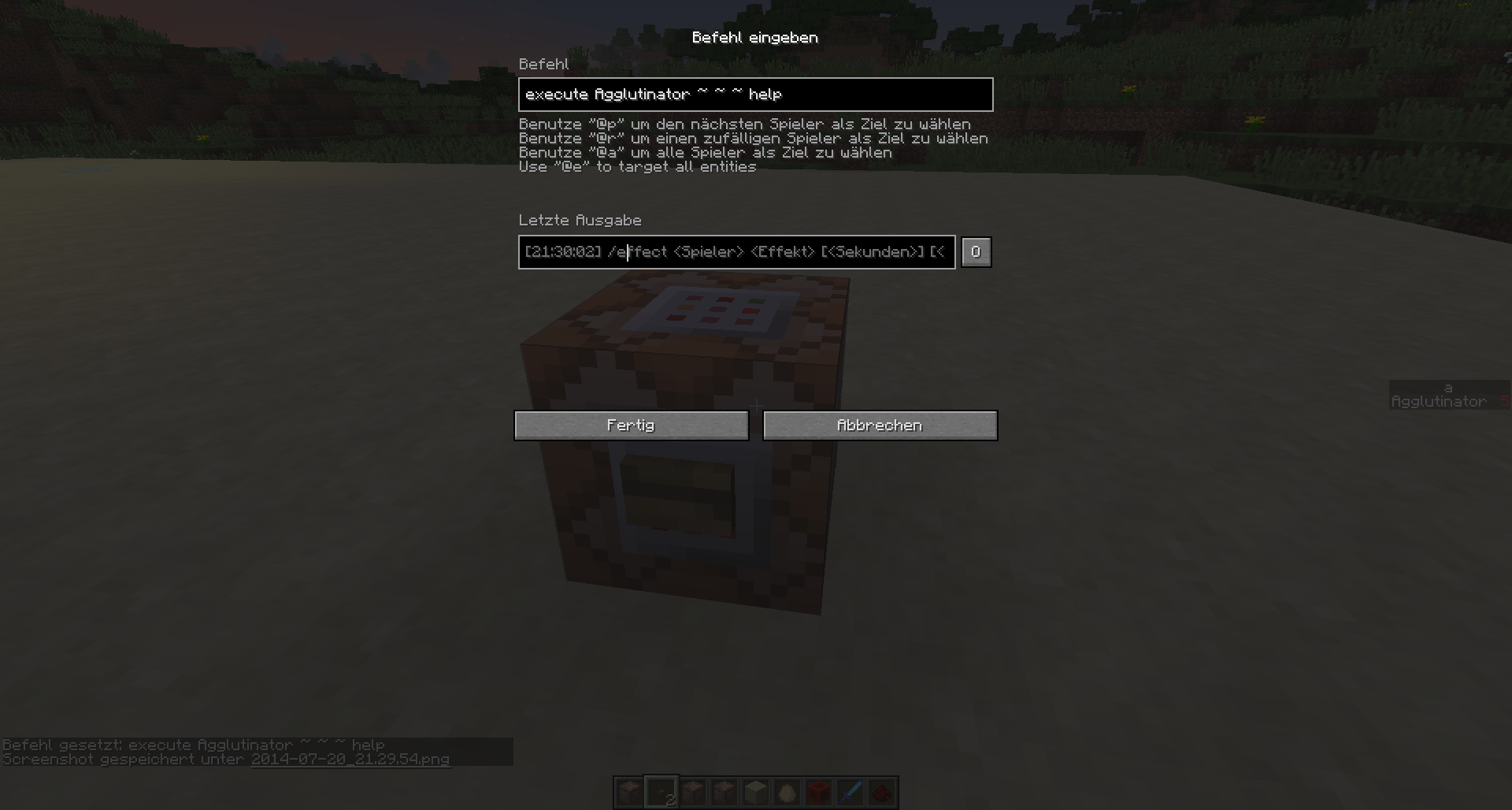
if you have a look at the output in the commandblock, you will see that there is a error/abnormality.
If you execute "/help" then there is no way the output will say something about "/effect"
Also the other commands like "/seed" they DO work. They just ouput the result in the commandblock and not to the players chat.
But for "/help" this will cause a error.
+ I in this report i pointed out, that according to the commands strukture, this ought be able to work
So reopen this report and let someone responsible decide!
Because of these unnecessary actions, bugs keep getting ignored and stay in the game forever.
confirmed for 14w30c
still the case in 14w30c
Texture in the inventory is looking really odd, same fore beacons by the way.
Should result to the same problem beacaus of the glass sourrinding the beacon
It's the inverted daylight sensor signal - so it is working as itended.
Daylight sensor has a long period (during nighttime) where it has no signal and during daytime it has a rising strengh until midday.
The inverted sensor is mostly active, only during midday it will completely loose its power strengh.
cannot confirm - works as intended
This is no duplication. That might happended to be a bug but was fixed at least in 1.7
Thats a bug since 1.8 somewhere during the snapshots ...
if it was fixed in 1.7 then it makes no sense that it is a "feauture" again.
At least let someone from mojang decide or did you ask them if the want this shit in the game?
Can confirm. They used to render much mre further in previous versions.
Now you need to be really really close to see the lightning.
(btw the lightning bold rendering is also affected. It will render behind some objects like water)
Still an issue in 14w32d
---------------
I will add someting that may also relates to this bug. I think this might be the cause auf the stuttering.
If you change the "motion" nbt auf projectile entities, it will have different results - also explaining this bug.
Have a CMD-Block circuit clock which will change the motion of nearby entities.
{Motion:[0:-0.75d,1:0.1d,2:-0.25d]}In the folliwing command I changed the motion every time, so that it will fly in a cycle.
/entitydata @e[type=!Player]
If mobs, items and vehicles are affected, they will fly in a cycle very smooth and non stuttering.
However if arrows, snowballs, thrownpotions/xpbottles, enderpearls and eggs are affected,
they will be very, very laggy and stuttering.
I do know that you don't accept the "changing the motion with entitydata" thing but thats not the point.
The point is, that the reason these projetiles are sturring has something to do with this cause.
Some entities will be just fine, so it can be fixed. And I think be researching this symtom you may find the solution.
A Lightning Bolt is not an existing entity.
In fact the moment it is "spawned" it will vanish again. (Can you call it spawning if it never existed to begin with?)
All you see is the "lightning bolt particle"
A Lighting Bolt won't be saved when you exit the game. It also has no nbt tags.
So I pretty much guess this is working as intended.
No chance, they are mods.
They do what they want and since mojang is too stingy to actually hire a full payed employee who knows what he does, nothing will change.
I think we should report this whole fact as a bug.
Solution:
Hire a qualified person, who is trained for this job (payment based work should raise the quality).
The employee sorts bugs regarding priority and actually assigns it to a developer.
He has contact to the mojang team and asks them if needed whether bugs are dupes/invalid
still in 14w33 and 34b
It seems this has been fixed slightly , it is better now.
In case of maps in item frames, they are rendered until they are nearly at the very end of the screen boarder.
But in this small area when they are supposed to be still visible, they aren't rendered anymore.
So but yeah, still a (minor) bug until 14w34c
It would be great if the entities really are visible until the very end, when they are in the FOV.
Also it would be nice if the display offset from minecarts could be regarded
still in 14w34d
"hopefully no more snapshots" - hmm ... I wonder ... I really wonder
btw this is (as expected) a client side bug.
It's just rendering wrong from the perspective of the client.
(The other possibility would have been, that the "Riders" position is actually wrong)
You can test this if you join a 1.7 world with a 1.8 client.
It just makes sense that you can't do both at the same time.
In Minecraft barely anything is really realistic, but on the other side not everything needs to be unrealistic.
Either you hit with the sword or you block but you can't do both
Just adjust to this new feature / bug fix
You can no longer use these kinds of hologramms anymore with 1.8.
Horses with very low age values will crash the game
still in 1.8.1 pre 1