 Airplaneboy14
- airplaneboy14
- JIRAUSER656629
- America/Chicago
- Yes
- No
 MCPE-132915
 MCL-20396
![[Mojang] Brandon Pearce](../../../data/avatars/users/40932.png)
 REALMS-10101
 MC-251687









Microsoft Store Launcher encounters an error when launching(Error Box)
When I open the launcher an error pops up with a path to a location and below that it says "No applicable app licenses" I can work around this for now since I have the old launcher but I would prefer to use the new launcher.
Side note - The old launcher has a paper icon instead of the typical grass icon
When I open the launcher an error pops up with a path to a location and below that it says "No applicable app licenses" I can work around this for now since I have the old launcher but I would prefer to use the new launcher.
This was also after installing the latest version of the launcher from the store.Side note - The old launcher has a paper icon instead of the typical grass icon
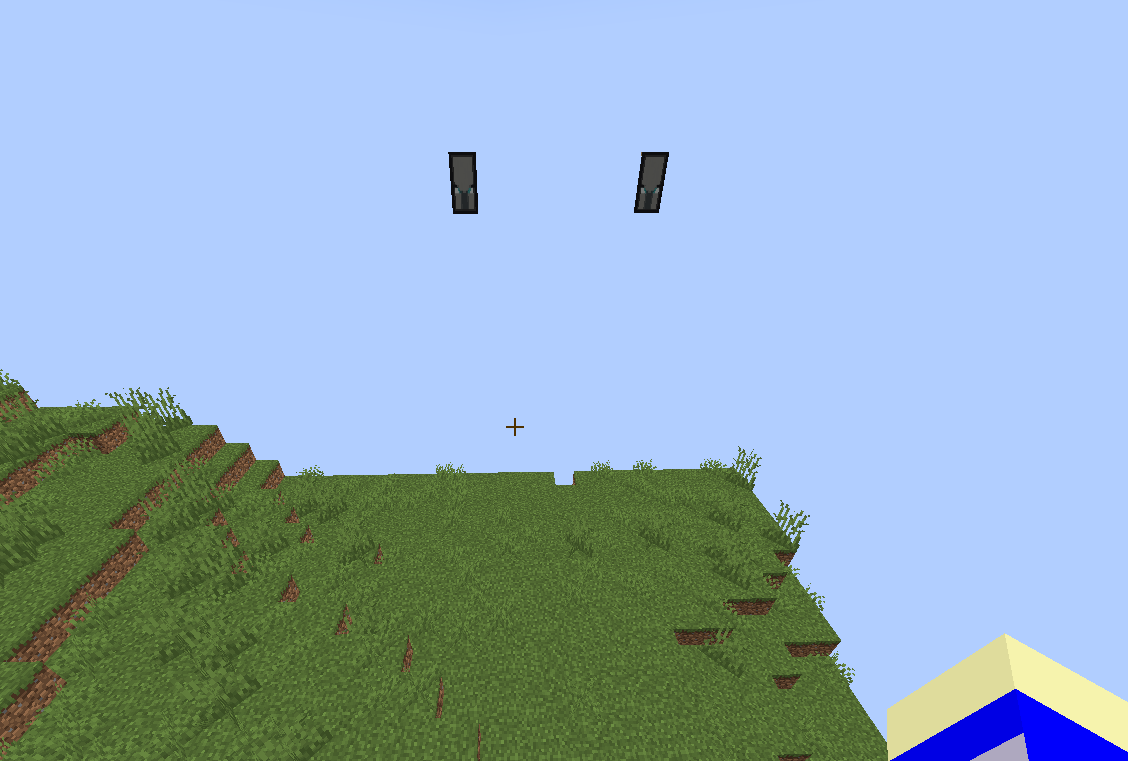
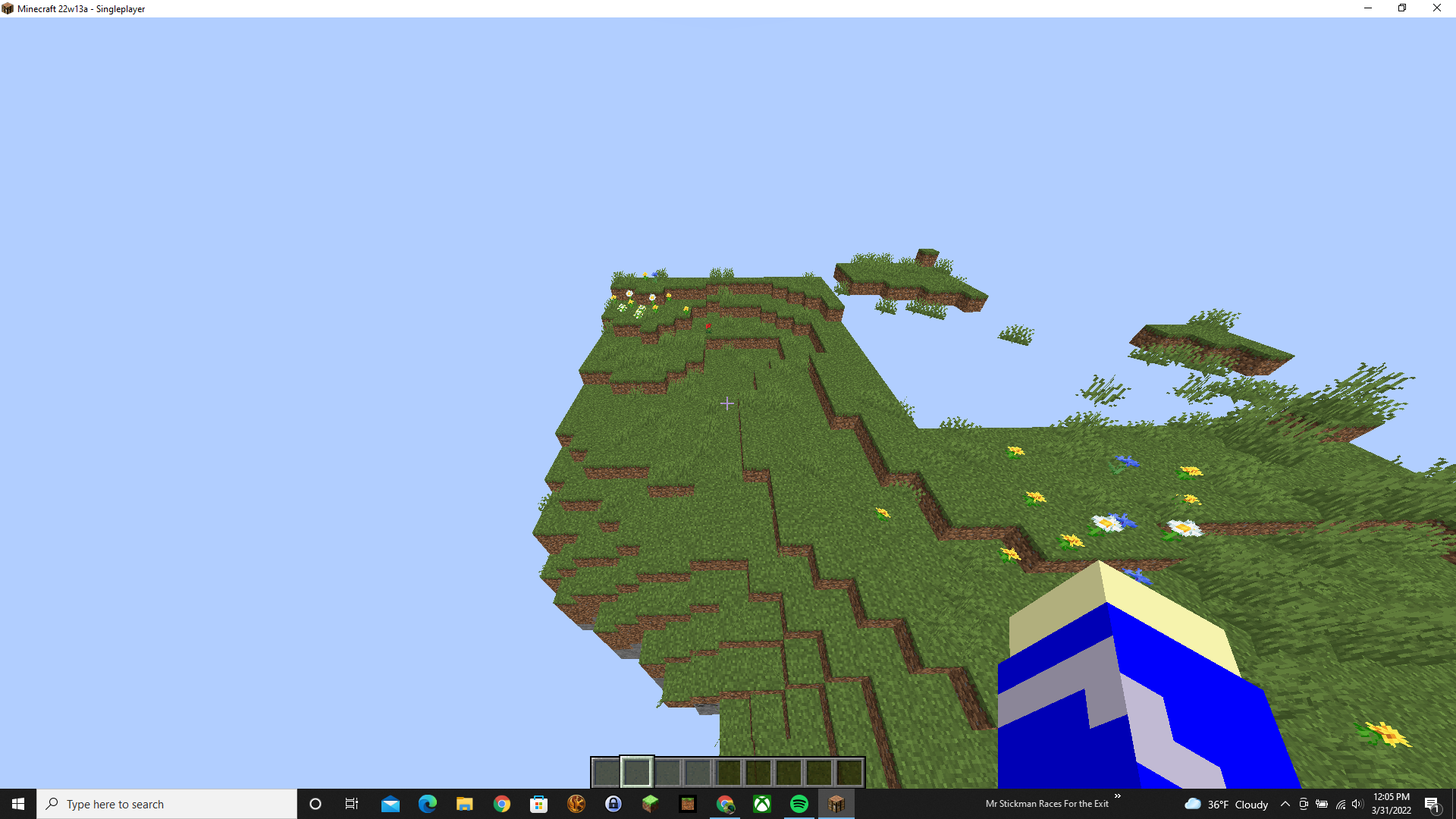
When I teleported a few thousand blocks away all chunks stopped loading and using the f3 menu works and gamemode switcher ui and other ui's open up but do nothing. The f3 menu is stuck showing the internal server tick at 18ms and is not allowing chunks to keep loading in.
Edit: Reloading chunks with F3 + A does not allow chunks to load in and only makes a flash on the screen.
When I teleported a few thousand blocks away all chunks stopped loading and using the f3 menu works and gamemode switcher ui and other ui's open up but do nothing. The f3 menu is stuck showing the internal server tick at 18ms and is not allowing chunks to keep loading in.
Edit: Reloading chunks with F3 + A does not allow chunks to load in and only makes a flash on the screen.
Edit 2: Summoning mobs, commands, etc. do nothing
When I teleported a few thousand blocks away all chunks stopped loading and using the f3 menu works and gamemode switcher ui and other ui's open up but do nothing. The f3 menu is stuck showing the internal server tick at 18ms and is not allowing chunks to keep loading in.
Edit: Reloading chunks with F3 + A does not allow chunks to load in and only makes a flash on the screen.
Edit 2: Summoning mobs, commands, etc. do nothing
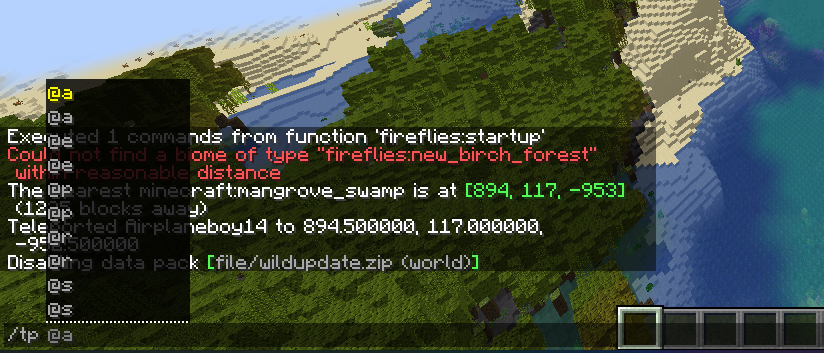
Edit 3: only about 6-8 chunks load in if you teleported far away using /teleport (includes teleports from /locate command and /locatebiome command)
When I teleported a few thousand blocks away all chunks stopped loading and using the f3 menu works and gamemode switcher ui and other ui's open up but do nothing. The f3 menu is stuck showing the internal server tick at 18ms and is not allowing chunks to keep loading in.
Edit: Reloading chunks with F3 + A does not allow chunks to load in and only makes a flash on the screen.
Edit 2: Summoning mobs, commands, etc. do nothing
Edit 3: only about 6-8 chunks load in if you teleported far away using /teleport (includes teleports from /locate command and /locatebiome command), these chunks are very visually glitchy though
When I teleported a few thousand blocks away all chunks stopped loading and using the f3 menu works and gamemode switcher ui and other ui's open up but do nothing. The f3 menu is stuck showing the internal server tick at 18ms and is not allowing chunks to keep loading in.
Edit: Reloading chunks with F3 + A does not allow chunks to load in and only makes a flash on the screen.
Edit 2: Summoning mobs, commands, etc. do nothing
Edit 3: only about 6-8 chunks load in if you teleported far away using /teleport (includes teleports from /locate command and /locatebiome command), these chunks are very visually glitchy though
Edit 4: May be related to distance from spawn?
When I teleported a few thousand blocks away all chunks stopped loading and using the f3 menu works and gamemode switcher ui and other ui's open up but do nothing. The f3 menu is stuck showing the internal server tick at 18ms and is not allowing chunks to keep loading in.
Edit: Reloading chunks with F3 + A does not allow chunks to load in and only makes a flash on the screen.
Edit 2: Summoning mobs, commands, etc. do nothing
Edit 3: only about 6-8 chunks load in if you teleported far away using /teleport (includes teleports from /locate command and /locatebiome command), these chunks are very visually glitchy though
Edit 4: May be related to distance from spawn?
Edit 5: Incapable of saving world due to this
Windows 10, Java 17
Windows 10, Java 17
GPU: GTX 1050
CPU: Intel i5 - 8300H
RAM - 8GB
Resolution: 1920 x 1080
Windows 10, Java 17
GPU: GTX 1050 (Laptop GPU)
CPU: Intel i5 - 8300H
RAM - 8GB
Resolution: 1920 x 1080
Internal server desyncwith clientChunk loading error/internal server desync
When I teleported a few thousand blocks away all chunks stopped loading and using the f3 menu works and gamemode switcher ui and other ui's open up but do nothing. The f3 menu is stuck showing the internal server tick at 18ms and is not allowing chunks to keep loading in.
Edit: Reloading chunks with F3 + A does not allow chunks to load in and only makes a flash on the screen.
Edit 2: Summoning mobs, commands, etc. do nothing
Edit 3: only about 6-8 chunks load in if you teleported far away using /teleport (includes teleports from /locate command and /locatebiome command), these chunks are very visually glitchy though
Edit 4: May be related to distance from spawn?
Edit 5: Incapable of saving world due to this
Edit 6: Sometimes when teleporting, there will not be any chunks that load
When I teleported a few thousand blocks away all chunks stopped loading and using the f3 menu works and gamemode switcher ui and other ui's open up but do nothing. The f3 menu is stuck showing the internal server tick at 18ms and is not allowing chunks to keep loading in.
Edit: Reloading chunks with F3 + A does not allow chunks to load in and only makes a flash on the screen.
Edit 2: Summoning mobs, commands, etc. do nothing
Edit 3: only about 6-8 chunks load in if you teleported far away using /teleport (includes teleports from /locate command and /locatebiome command), these chunks are very visually glitchy though
Edit 4: May be related to distance from spawn?
Edit 5: Incapable of saving world due to this
Edit 6: Sometimes when teleporting, there will not be any chunks that load
How to reproduce:
1a) Fly about 2500 - 3000 blocks away at full speed
1b) Teleport to a far away structure such as woodland mansion, pillager outpost, etc.
2) Look at the chunks near you, are they loading in?
3a) If they aren't loading in, reload chunks using F3 + A, do they load in now?
3b) You messed up or didn't fly far enough, try step 1b
4a) If they didn't load in now, you have successfully reproduced this bug
4b) If they didn't load in, refer to step 3b
When I teleported a few thousand blocks away all chunks stopped loading and using the f3 menu works and gamemode switcher ui and other ui's open up but do nothing. The f3 menu is stuck showing the internal server tick at 18ms and is not allowing chunks to keep loading in.
Edit: Reloading chunks with F3 + A does not allow chunks to load in and only makes a flash on the screen.
Edit 2: Summoning mobs, commands, etc. do nothing
Edit 3: only about 6-8 chunks load in if you teleported far away using /teleport (includes teleports from /locate command and /locatebiome command), these chunks are very visually glitchy though
Edit 4: May be related to distance from spawn?
Edit 5: Incapable of saving world due to this
Edit 6: Sometimes when teleporting, there will not be any chunks that load
How to reproduce:
1a) Fly about 2500 - 3000 blocks away at full speed
1b) Teleport to a far away structure such as woodland mansion, pillager outpost, etc.
2) Look at the chunks near you, are they loading in?
3a) If they aren't loading in, reload chunks using F3 + A, do they load in now?
3b) You messed up or didn't fly far enough, try step 1b
4a) If they didn't load in now, you have successfully reproduced this bug
4b) If they didn't load in, refer to step 3b
When I teleported a few thousand blocks away all chunks stopped loading and using the f3 menu works and gamemode switcher ui and other ui's open up but do nothing. The f3 menu is stuck showing the internal server tick at 18ms and is not allowing chunks to keep loading in.
Edit: Reloading chunks with F3 + A does not allow chunks to load in and only makes a flash on the screen.
Edit 2: Summoning mobs, commands, etc. do nothing
Edit 3: only about 6-8 chunks load in if you teleported far away using /teleport (includes teleports from /locate command and /locatebiome command), these chunks are very visually glitchy though
Edit 4: May be related to distance from spawn?
Edit 5: Incapable of saving world due to this
Edit 6: Sometimes when teleporting, there will not be any chunks that load
How to reproduce ("a" and "b" steps are one or the other, not in a row):
1a) Fly about 2500 - 3000 blocks away at full speed
1b) Teleport to a far away structure such as woodland mansion, pillager outpost, etc.
2) Look at the chunks near you, are they loading in?
3a) If they aren't loading in, reload chunks using F3 + A, do they load in now?
3b) You messed up or didn't fly far enough, try step 1b
4a) If they didn't load in now, you have successfully reproduced this bug
4b) If they didn't load in, refer to step 3b
When I teleported a few thousand blocks away all chunks stopped loading and using the f3 menu works and gamemode switcher ui and other ui's open up but do nothing. The f3 menu is stuck showing the internal server tick at 18ms and is not allowing chunks to keep loading in.
Edit: Reloading chunks with F3 + A does not allow chunks to load in and only makes a flash on the screen.
Edit 2: Summoning mobs, commands, etc. do nothing
Edit 3: only about 6-8 chunks load in if you teleported far away using /teleport (includes teleports from /locate command and /locatebiome command), these chunks are very visually glitchy though
Edit 4: May be related to distance from spawn?
Edit 5: Incapable of saving world due to this
Edit 6: Sometimes when teleporting, there will not be any chunks that load
How to reproduce ("a" and "b" steps are one or the other, not in a row):
1a) Fly about 2500 - 3000 blocks away at full speed
1b) Teleport to a far away structure such as woodland mansion, pillager outpost, etc.
2) Look at the chunks near you, are they loading in?
3a) If they aren't loading in, reload chunks using F3 + A, do they load in now?
3b) You messed up or didn't fly far enough, try starting with step 1b
4a) If they didn't load in now, you have successfully reproduced this bug
4b) If they didn't load in, refer to step 3b
When I teleported a few thousand blocks away all chunks stopped loading and using the f3 menu works and gamemode switcher ui and other ui's open up but do nothing. The f3 menu is stuck showing the internal server tick at 18ms and is not allowing chunks to keep loading in.
Edit: Reloading chunks with F3 + A does not allow chunks to load in and only makes a flash on the screen.
Edit 2: Summoning mobs, commands, etc. do nothing
Edit 3: only about 6-8 chunks load in if you teleported far away using /teleport (includes teleports from /locate command and /locatebiome command), these chunks are very visually glitchy though
Edit 4: May be related to distance from spawn?
Edit 5: Incapable of saving world due to this (You have to force crash your game)
Edit 6: Sometimes when teleporting, there will not be any chunks that load
How to reproduce ("a" and "b" steps are one or the other, not in a row):
1a) Fly about 2500 - 3000 blocks away at full speed
1b) Teleport to a far away structure such as woodland mansion, pillager outpost, etc.
2) Look at the chunks near you, are they loading in?
3a) If they aren't loading in, reload chunks using F3 + A, do they load in now?
3b) You messed up or didn't fly far enough, try starting with step 1b
4a) If they didn't load in now, you have successfully reproduced this bug
4b) If they didn't load in, refer to step 3b
When I teleported a few thousand blocks away all chunks stopped loading and using the f3 menu works and gamemode switcher ui and other ui's open up but do nothing. The f3 menu is stuck showing the internal server tick at 18ms and is not allowing chunks to keep loading in.
Edit: Reloading chunks with F3 + A does not allow chunks to load in and only makes a flash on the screen.
Edit 2: Summoning mobs, commands, etc. do nothing
Edit 3: only about 6-8 chunks load in if you teleported far away using /teleport (includes teleports from /locate command and /locatebiome command), these chunks are very visually glitchy though
Edit 4: May be related to distance from spawn?
Edit 5: Incapable of saving world due to this (You have to force crash your game)
Edit 6: Sometimes when teleporting, there will not be any chunks that load
How to reproduce ("a" and "b" steps are one or the other, not in a row):
1a) Fly about 2500 - 3000 blocks away at full speed
1b) Teleport to a far away structure such as woodland mansion, pillager outpost, etc.
2) Look at the chunks near you, are they loading in?
3a) If they aren't loading in, reload chunks using F3 + A, do they load in now?
3b) You messed up or didn't fly far enough, try starting with step 1b
4a) If they didn't load in now, you have successfully reproduced this bug
4b) If they didn't load in, refer to step 3b
5) To exit if this happens;
On Windows: Open task manager
On Linux: Open the terminal and kill the OpenJDK process using "kill <process id>"
MacOS instructions coming soon.
When I teleported a few thousand blocks away all chunks stopped loading and using the f3 menu works and gamemode switcher ui and other ui's open up but do nothing. The f3 menu is stuck showing the internal server tick at 18ms and is not allowing chunks to keep loading in.
Edit: Reloading chunks with F3 + A does not allow chunks to load in and only makes a flash on the screen.
Edit 2: Summoning mobs, commands, etc. do nothing
Edit 3: only about 6-8 chunks load in if you teleported far away using /teleport (includes teleports from /locate command and /locatebiome command), these chunks are very visually glitchy though
Edit 4: May be related to distance from spawn?
Edit 5: Incapable of saving world due to this (You have to force crash your game)
Edit 6: Sometimes when teleporting, there will not be any chunks that load
How to reproduce ("a" and "b" steps are one or the other, not in a row):
1a) Fly about 2500 - 3000 blocks away at full speed
1b) Teleport to a far away structure such as woodland mansion, pillager outpost, etc.
2) Look at the chunks near you, are they loading in?
3a) If they aren't loading in, reload chunks using F3 + A, do they load in now?
3b) You messed up or didn't fly far enough, try starting with step 1b
4a) If they didn't load in now, you have successfully reproduced this bug
4b) If they didn't load in, refer to step 3b
5) To exit if this happens;
On Windows: Open task manager, and end the task called "OpenJDK..."
On Linux: Open the terminal and kill the OpenJDK process using "kill <process id>"
MacOS instructions coming soon.
When I teleported a few thousand blocks away all chunks stopped loading and using the f3 menu works and gamemode switcher ui and other ui's open up but do nothing. The f3 menu is stuck showing the internal server tick at 18ms and is not allowing chunks to keep loading in.
Edit: Reloading chunks with F3 + A does not allow chunks to load in and only makes a flash on the screen.
Edit 2: Summoning mobs, commands, etc. do nothing
Edit 3: only about 6-8 chunks load in if you teleported far away using /teleport (includes teleports from /locate command and /locatebiome command), these chunks are very visually glitchy though
Edit 4: May be related to distance from spawn?
Edit 5: Incapable of saving world due to this (You have to force crash your game)
Edit 6: Sometimes when teleporting, there will not be any chunks that load
Edit 7: Does not happen when an allay is summoned using "/summon allay"
How to reproduce ("a" and "b" steps are one or the other, not in a row):
1a) Fly about 2500 - 3000 blocks away at full speed
1b) Teleport to a far away structure such as woodland mansion, pillager outpost, etc.
2) Look at the chunks near you, are they loading in?
3a) If they aren't loading in, reload chunks using F3 + A, do they load in now?
3b) You messed up or didn't fly far enough, try starting with step 1b
4a) If they didn't load in now, you have successfully reproduced this bug
4b) If they didn't load in, refer to step 3b
5) To exit if this happens;
On Windows: Open task manager, and end the task called "OpenJDK..."
On Linux: Open the terminal and kill the OpenJDK process using "kill <process id>"
MacOS instructions coming soon.
When I teleported a few thousand blocks away all chunks stopped loading and using the f3 menu works and gamemode switcher ui and other ui's open up but do nothing. The f3 menu is stuck showing the internal server tick at 18ms and is not allowing chunks to keep loading in.
Edit: Reloading chunks with F3 + A does not allow chunks to load in and only makes a flash on the screen.
Edit 2: Summoning mobs, commands, etc. do nothing
Edit 3: only about 6-8 chunks load in if you teleported far away using /teleport (includes teleports from /locate command and /locatebiome command), these chunks are very visually glitchy though
Edit 4: May be related to distance from spawn?
Edit 5: Incapable of saving world due to this (You have to force crash your game)
Edit 6: Sometimes when teleporting, there will not be any chunks that load
Edit 7: Does not happen when an allay is summoned using "/summon allay"
Edit 8: Going to a woodland mansion without any allays will not cause this issue to happen
How to reproduce ("a" and "b" steps are one or the other, not in a row):
1a) Fly about 2500 - 3000 blocks away at full speed
1b) Teleport to a far away structure such as woodland mansion, pillager outpost, etc.
2) Look at the chunks near you, are they loading in?
3a) If they aren't loading in, reload chunks using F3 + A, do they load in now?
3b) You messed up or didn't fly far enough, try starting with step 1b
4a) If they didn't load in now, you have successfully reproduced this bug
4b) If they didn't load in, refer to step 3b
5) To exit if this happens;
On Windows: Open task manager, and end the task called "OpenJDK..."
On Linux: Open the terminal and kill the OpenJDK process using "kill <process id>"
MacOS instructions coming soon.
When I teleported a few thousand blocks away all chunks stopped loading and using the f3 menu works and gamemode switcher ui and other ui's open up but do nothing. The f3 menu is stuck showing the internal server tick at 18ms and is not allowing chunks to keep loading in.
Edit: Reloading chunks with F3 + A does not allow chunks to load in and only makes a flash on the screen.
Edit 2: Summoning mobs, commands, etc. do nothing
Edit 3: only about 6-8 chunks load in if you teleported far away using /teleport (includes teleports from /locate command and /locatebiome command), these chunks are very visually glitchy though
Edit 4: May be related to distance from spawn?
Edit 5: Incapable of saving world due to this (You have to force crash your game)
Edit 6: Sometimes when teleporting, there will not be any chunks that load
Edit 7: Does not happen when an allay is summoned using "/summon allay"
Edit 8: Going to a woodland mansion without any allays will not cause this issue to happen
How to reproduce ("a" and "b" steps are one or the other, not in a row):
1a) Fly about 2500 - 3000 blocks away at full speed
1b) Teleport to a far away structure such as woodland mansion, pillager outpost, etc.
2) Look at the chunks near you, are they loading in?
3a) If they aren't loading in, reload chunks using F3 + A, do they load in now?
3b) You messed up or didn't fly far enough, try starting with step 1b
4a) If they didn't load in now, you have successfully reproduced this bug
4b) If they didn't load in, refer to step 3b
5) To exit if this happens;
On Windows: Open task manager, and end the task called "OpenJDK..."
On Linux: Open the terminal and kill the OpenJDK process using "kill <process id>"
MacOS instructions coming soon.
When I teleported a few thousand blocks away all chunks stopped loading and using the f3 menu works and gamemode switcher ui and other ui's open up but do nothing. The f3 menu is stuck showing the internal server tick at 18ms and is not allowing chunks to keep loading in.
Edit: Reloading chunks with F3 + A does not allow chunks to load in and only makes a flash on the screen.
Edit 2: Summoning mobs, commands, etc. do nothing
Edit 3: only about 6-8 chunks load in if you teleported far away using /teleport (includes teleports from /locate command and /locatebiome command), these chunks are very visually glitchy though
Edit 4: May be related to distance from spawn?
Edit 5: Incapable of saving world due to this (You have to force crash your game)
Edit 6: Sometimes when teleporting, there will not be any chunks that load
Edit 7: Does not happen when an allay is summoned using "/summon allay"
Edit 8: Going to a woodland mansion without any allays will not cause this issue to happen
How to reproduce ("a" and "b" steps are one or the other, not in a row):
1a) Fly about 2500 - 3000 blocks away at full speed
1b) Teleport to a far away structure such as woodland mansion, pillager outpost, etc.
2) Look at the chunks near you, are they loading in?
3a) If they aren't loading in, reload chunks using F3 + A, do they load in now?
3b) You messed up or didn't fly far enough, try starting with step 1b
4a) If they didn't load in now, you have successfully reproduced this bug
4b) If they didn't load in, refer to step 3b
5) To exit if this happens;
On Windows: Open task manager, and end the task called "OpenJDK..."
On Linux: Open the terminal and kill the OpenJDK process using "kill <process id>"
On MacOS: In the application press and hold Command + Option + Shift, press Esc, Confirm force quit (may not ask for confirmation for some apps)
When I teleported a few thousand blocks away all chunks stopped loading and using the f3 menu works and gamemode switcher ui and other ui's open up but do nothing. The f3 menu is stuck showing the internal server tick at 18ms and is not allowing chunks to keep loading in.
Edit: Reloading chunks with F3 + A does not allow chunks to load in and only makes a flash on the screen.
Edit 2: Summoning mobs, commands, etc. do nothing
Edit 3: only about 6-8 chunks load in if you teleported far away using /teleport (includes teleports from /locate command and /locatebiome command), these chunks are very visually glitchy though
Edit 4: May be related to distance from spawn?
Edit 5: Incapable of saving world due to this (You have to force crash your game)
Edit 6: Sometimes when teleporting, there will not be any chunks that load
Edit 7: Does not happen when an allay is summoned using "/summon allay"
Edit 8: Going to a woodland mansion without any allays will not cause this issue to happen
How to reproduce ("a" and "b" steps are one or the other, not in a row):
1a) Fly about 2500 - 3000 blocks away at full speed
1b) Teleport to a far away structure such as woodland mansion, pillager outpost, etc.
2) Look at the chunks near you, are they loading in?
3a) If they aren't loading in, reload chunks using F3 + A, do they load in now?
3b) You messed up or didn't fly far enough, try starting with step 1b
4a) If they didn't load in now, you have successfully reproduced this bug
4b) If they didn't load in, refer to step 3b
5) To exit if this happens;
On Windows: Open task manager, and end the task called "OpenJDK..."
On Linux: Open the terminal and kill the OpenJDK process using "kill <process id>", you can use the killall command in the terminal as well, xkill or System Monitor should also be capable
On MacOS: In the application press and hold Command + Option + Shift, press Esc, Confirm force quit (may not ask for confirmation for some apps)
When I teleported a few thousand blocks away all chunks stopped loading and using the f3 menu works and gamemode switcher ui and other ui's open up but do nothing. The f3 menu is stuck showing the internal server tick at 18ms and is not allowing chunks to keep loading in.
Edit: Reloading chunks with F3 + A does not allow chunks to load in and only makes a flash on the screen.
Edit 2: Summoning mobs, commands, etc. do nothing
Edit 3: only about 6-8 chunks load in if you teleported far away using /teleport (includes teleports from /locate command and /locatebiome command), these chunks are very visually glitchy though
Edit 4: May be related to distance from spawn?
Edit 5: Incapable of saving world due to this (You have to force crash your game)
Edit 6: Sometimes when teleporting, there will not be any chunks that load
Edit 7: Does not happen when an allay is summoned using "/summon allay"
Edit 8: Going to a woodland mansion without any allays will not cause this issue to happen
How to reproduce ("a" and "b" steps are one or the other, not in a row):
1a) Fly about 2500 - 3000 blocks away at full speed
1b) Teleport to a far away structure such as woodland mansion, pillager outpost, etc.
2) Look at the chunks near you, are they loading in?
3a) If they aren't loading in, reload chunks using F3 + A, do they load in now?
3b) You messed up or didn't fly far enough, try starting with step 1b
4a) If they didn't load in now, you have successfully reproduced this bug
4b) If they didn't load in, refer to step 3b
5) To exit if this happens;
On Windows: Open task manager, and end the task called "OpenJDK
..."On Linux: Open the terminal and kill the OpenJDK process using "kill <process id>", you can use the killall command in the terminal as well, xkill or System Monitor should also be capable
On MacOS: In the application press and hold Command + Option + Shift, press Esc, Confirm force quit (may not ask for confirmation for some apps)
When I teleported a few thousand blocks away all chunks stopped loading and using the f3 menu works and gamemode switcher ui and other ui's open up but do nothing. The f3 menu is stuck showing the internal server tick at 18ms and is not allowing chunks to keep loading in.
Edit: Reloading chunks with F3 + A does not allow chunks to load in and only makes a flash on the screen.
Edit 2: Summoning mobs, commands, etc. do nothing
Edit 3: only about 6-8 chunks load in if you teleported far away using /teleport (includes teleports from /locate command and /locatebiome command), these chunks are very visually glitchy though
Edit 4: May be related to distance from spawn?
Edit 5: Incapable of saving world due to this (You have to force crash your game)
Edit 6: Sometimes when teleporting, there will not be any chunks that load
Edit 7: Does not happen when an allay is summoned using "/summon allay"
Edit 8: Going to a woodland mansion without any allays will not cause this issue to happen
How to reproduce ("a" and "b" steps are one or the other, not in a row):
1a) Fly about 2500 - 3000 blocks away at full speed
1b) Teleport to a far away structure such as woodland mansion, pillager outpost, etc.
2) Look at the chunks near you, are they loading in?
3a) If they aren't loading in, reload chunks using F3 + A, do they load in now?
3b) You messed up or didn't fly far enough, try starting with step 1b
4a) If they didn't load in now, you have successfully reproduced this bug
4b) If they didn't load in, refer to step 3b
5) To exit if this happens;
On Windows: Open task manager, and end the task called "OpenJDK Platform binary"
On Linux: Open the terminal and kill the OpenJDK process using "kill <process id>", you can use the killall command in the terminal as well, xkill or System Monitor should also be capable
On MacOS: In the application press and hold Command + Option + Shift, press Esc, Confirm force quit (may not ask for confirmation for some apps)
When I teleported a few thousand blocks away all chunks stopped loading and using the f3 menu works and gamemode switcher ui and other ui's open up but do nothing. The f3 menu is stuck showing the internal server tick at 18ms and is not allowing chunks to keep loading in.
Edit: Reloading chunks with F3 + A does not allow chunks to load in and only makes a flash on the screen.
Edit 2: Summoning mobs, commands, etc. do nothing
Edit 3: only about 6-8 chunks load in if you teleported far away using /teleport (includes teleports from /locate command and /locatebiome command), these chunks are very visually glitchy though
Edit 4: May be related to distance from spawn?
Edit 5: Incapable of saving world due to this (You have to force crash your game)
Edit 6: Sometimes when teleporting, there will not be any chunks that load
Edit 7: Does not happen when an allay is summoned using "/summon allay"
Edit 8: Going to a woodland mansion without any allays will not cause this issue to happen
How to reproduce ("a" and "b" steps are one or the other, not in a row):
1a) Fly about 2500 - 3000 blocks away at full speed
1b) Teleport to a far away structure such as woodland mansion, pillager outpost, etc.
2) Look at the chunks near you, are they loading in?
3a) If they aren't loading in, reload chunks using F3 + A, do they load in now?
3b) You messed up or didn't fly far enough, try starting with step 1b
4a) If they didn't load in now, you have successfully reproduced this bug
4b) If they didn't load in, refer to step 3b
5) To exit if this happens;
DO NOT USE F3 + C AS IT DOES NOT WORK!!!
On Windows: Open task manager, and end the task called "OpenJDK Platform binary"
On Linux: Open the terminal and kill the OpenJDK process using "kill <process id>", you can use the killall command in the terminal as well, xkill or System Monitor should also be capable
On MacOS: In the application press and hold Command + Option + Shift, press Esc, Confirm force quit (may not ask for confirmation for some apps)
When I teleported a few thousand blocks away all chunks stopped loading and using the f3 menu works and gamemode switcher ui and other ui's open up but do nothing. The f3 menu is stuck showing the internal server tick at 18ms and is not allowing chunks to keep loading in.
Edit: Reloading chunks with F3 + A does not allow chunks to load in and only makes a flash on the screen.
Edit 2: Summoning mobs, commands, etc. do nothing
Edit 3: only about 6-8 chunks load in if you teleported far away using /teleport (includes teleports from /locate command and /locatebiome command), these chunks are very visually glitchy though
Edit 4: May be related to distance from spawn?
Edit 5: Incapable of saving world due to this (You have to force crash your game)
Edit 6: Sometimes when teleporting, there will not be any chunks that load
Edit 7: Does not happen when an allay is summoned using "/summon allay"
Edit 8: Going to a woodland mansion without any allays will not cause this issue to happen
How to reproduce ("a" and "b" steps are one or the other, not in a row):
1a) Fly about 2500 - 3000 blocks away at full speed
1b) Teleport to a far away structure such as woodland mansion, pillager outpost, etc.
2) Look at the chunks near you, are they loading in?
3a) If they aren't loading in, reload chunks using F3 + A, do they load in now?
3b) You messed up or didn't fly far enough, try starting with step 1b
4a) If they didn't load in now, you have successfully reproduced this bug
4b) If they didn't load in, refer to step 3b
5) To exit if this happens;
DO NOT USE F3 + C AS IT DOES NOT WORK!!! ALT F4 DOES NOT WORK AS WELL!!!
On Windows: Open task manager, and end the task called "OpenJDK Platform binary"
On Linux: Open the terminal and kill the OpenJDK process using "kill <process id>", you can use the killall command in the terminal as well, xkill or System Monitor should also be capable
On MacOS: In the application press and hold Command + Option + Shift, press Esc, Confirm force quit (may not ask for confirmation for some apps)
When I teleported a few thousand blocks away all chunks stopped loading and using the f3 menu works and gamemode switcher ui and other ui's open up but do nothing. The f3 menu is stuck showing the internal server tick at 18ms and is not allowing chunks to keep loading in.
Edit: Reloading chunks with F3 + A does not allow chunks to load in and only makes a flash on the screen.
Edit 2: Summoning mobs, commands, etc. do nothing
Edit 3: only about 6-8 chunks load in if you teleported far away using /teleport (includes teleports from /locate command and /locatebiome command), these chunks are very visually glitchy though
Edit 4: May be related to distance from spawn?
Edit 5: Incapable of saving world due to this (You have to force crash your game)
Edit 6: Sometimes when teleporting, there will not be any chunks that load
Edit 7: Does not happen when an allay is summoned using "/summon allay"
Edit 8: Going to a woodland mansion without any allays will not cause this issue to happen
How to reproduce ("a" and "b" steps are one or the other, not in a row):
1a) Fly about 2500 - 3000 blocks away at full speed
1
b) Teleport to a far away structure such as woodland mansion, pillager outpost,etc.2) Look at the chunks near you, are they loading in?
3a) If they aren't loading in, reload chunks using F3 + A, do they load in now?
3b)
You messed up or didn't fly far enough, try starting with step 1b4a) If they didn't load in now, you have successfully reproduced this bug
4b) If they didn't load in, refer to step 3b
5) To exit if this happens;
DO NOT USE F3 + C AS IT DOES NOT WORK!!! ALT F4 DOES NOT WORK AS WELL!!!
On Windows: Open task manager, and end the task called "OpenJDK Platform binary"
On Linux: Open the terminal and kill the OpenJDK process using "kill <process id>", you can use the killall command in the terminal as well, xkill or System Monitor should also be capable
On MacOS: In the application press and hold Command + Option + Shift, press Esc, Confirm force quit (may not ask for confirmation for some apps)
When I teleported a few thousand blocks away all chunks stopped loading and using the f3 menu works and gamemode switcher ui and other ui's open up but do nothing. The f3 menu is stuck showing the internal server tick at 18ms and is not allowing chunks to keep loading in.
Edit: Reloading chunks with F3 + A does not allow chunks to load in and only makes a flash on the screen.
Edit 2: Summoning mobs, commands, etc. do nothing
Edit 3: only about 6-8 chunks load in if you teleported far away using /teleport (includes teleports from /locate command and /locatebiome command), these chunks are very visually glitchy though
Edit 4: May be related to distance from spawn?
Edit 5: Incapable of saving world due to this (You have to force crash your game)
Edit 6: Sometimes when teleporting, there will not be any chunks that load
Edit 7: Does not happen when an allay is summoned using "/summon allay"
Edit 8: Going to a woodland mansion without any allays will not cause this issue to happen
How to reproduce ("a" and "b" steps are one or the other, not in a row):
1) Teleport to a far away structure such as woodland mansion, pillager outpost, or any other structure that may contain naturally generated allays
2) Look at the chunks near you, are they loading in?
3a) If they aren't loading in, reload chunks using F3 + A, do they load in now?
3b) If they don't load in, you may not have teleported close enough to the woodland mansion, or outpost, try teleporting closer
4a) If they didn't load in now, you have successfully reproduced this bug
4b) If they didn't load in, refer to step 3b
5) To exit if this happens;
DO NOT USE F3 + C AS IT DOES NOT WORK!!! ALT F4 DOES NOT WORK AS WELL!!!
On Windows: Open task manager, and end the task called "OpenJDK Platform binary"
On Linux: Open the terminal and kill the OpenJDK process using "kill <process id>", you can use the killall command in the terminal as well, xkill or System Monitor should also be capable
On MacOS: In the application press and hold Command + Option + Shift, press Esc, Confirm force quit (may not ask for confirmation for some apps)
When I teleported a few thousand blocks away all chunks stopped loading and using the f3 menu works and gamemode switcher ui and other ui's open up but do nothing. The f3 menu is stuck showing the internal server tick at 18ms and is not allowing chunks to keep loading in.
Edit: Reloading chunks with F3 + A does not allow chunks to load in and only makes a flash on the screen.
Edit 2: Summoning mobs, commands, etc. do nothing
Edit 3: only about 6-8 chunks load in if you teleported far away using /teleport (includes teleports from /locate command and /locatebiome command), these chunks are very visually glitchy though
Edit 4: May be related to distance from spawn?
Edit 5: Incapable of saving world due to this (You have to force crash your game)
Edit 6: Sometimes when teleporting, there will not be any chunks that load
Edit 7: Does not happen when an allay is summoned using "/summon allay"
Edit 8: Going to a woodland mansion without any allays will not cause this issue to happen
Edit 9: Structures have to have an allay naturally generated in them to cause this issue
How to reproduce ("a" and "b" steps are one or the other, not in a row):
1) Teleport to a far away structure such as woodland mansion, pillager outpost, or any other structure that may contain naturally generated allays
2) Look at the chunks near you, are they loading in?
3a) If they aren't loading in, reload chunks using F3 + A, do they load in now?
3b) If they don't load in, you may not have teleported close enough to the woodland mansion, or outpost, try teleporting closer
4a) If they didn't load in now, you have successfully reproduced this bug
4b) If they didn't load in, refer to step 3b
5) To exit if this happens;
DO NOT USE F3 + C AS IT DOES NOT WORK!!! ALT F4 DOES NOT WORK AS WELL!!! (If in the "Saving World" screen)
On Windows: Open task manager, and end the task called "OpenJDK Platform binary"
On Linux: Open the terminal and kill the OpenJDK process using "kill <process id>", you can use the killall command in the terminal as well, xkill or System Monitor should also be capable
On MacOS: In the application press and hold Command + Option + Shift, press Esc, Confirm force quit (may not ask for confirmation for some apps)
When I teleported a few thousand blocks away all chunks stopped loading and using the f3 menu works and gamemode switcher ui and other ui's open up but do nothing. The f3 menu is stuck showing the internal server tick at 18ms and is not allowing chunks to keep loading in.
Edit: Reloading chunks with F3 + A does not allow chunks to load in and only makes a flash on the screen.
Edit 2: Summoning mobs, commands, etc. do nothing
Edit 3: only about 6-8 chunks load in if you teleported far away using /teleport (includes teleports from /locate command and /locatebiome command), these chunks are very visually glitchy though
Edit 4: May be related to distance from spawn?
Edit 5: Incapable of saving world due to this (You have to force crash your game)
Edit 6: Sometimes when teleporting, there will not be any chunks that load
Edit 7: Does not happen when an allay is summoned using "/summon allay"
Edit 8: Going to a woodland mansion without any allays will not cause this issue to happen
Edit 9: Structures have to have an allay naturally generated in them to cause this issue
How to reproduce ("a" and "b" steps are one or the other, not in a row):
1) Teleport to a far away structure such as woodland mansion, pillager outpost, or any other structure that may contain naturally generated allays
2) Look at the chunks near you, are they loading in?
3a) If they aren't loading in, reload chunks using F3 + A, do they load in now?
3b) If they don't load in, you may not have teleported close enough to the woodland mansion, or outpost, try teleporting closer
4a) If they didn't load in now, you have successfully reproduced this bug
4b) If they didn't load in, refer to step 3b
5) To exit if this happens;
DO NOT USE F3 + C AS IT DOES NOT WORK!!! ALT F4 DOES NOT WORK AS WELL!!! (If in the "Saving World" screen)
On Windows: Open task manager, and end the task called "OpenJDK Platform binary"
On Linux: Open the terminal and kill the OpenJDK process using "kill <process id>", you can use the killall command in the terminal as well, xkill or System Monitor should also be capable
On MacOS: In the application press and hold Command + Option + Shift, press Esc, Confirm force quit (may not ask for confirmation for some apps)
When I teleported a few thousand blocks away all chunks stopped loading and using the f3 menu works and gamemode switcher ui and other ui's open up but do nothing. The f3 menu is stuck showing the internal server tick at 18ms and is not allowing chunks to keep loading in.
Edit: Reloading chunks with F3 + A does not allow chunks to load in and only makes a flash on the screen.
Edit 2: Summoning mobs, commands, etc. do nothing
Edit 3: only about 6-8 chunks load in if you teleported far away using /teleport (includes teleports from /locate command and /locatebiome command), these chunks are very visually glitchy though
Edit 4: May be related to distance from spawn?
Edit 5: Incapable of saving world due to this (You have to force crash your game)
Edit 6: Sometimes when teleporting, there will not be any chunks that load
Edit 7: Does not happen when an allay is summoned using "/summon allay"
Edit 8: Going to a woodland mansion without any allays will not cause this issue to happen
Edit 9: Structures have to have an allay naturally generated in them to cause this issue
How to reproduce ("a" and "b" steps are one or the other, not in a row):
1) Teleport to a far away structure such as woodland mansion, pillager outpost, or any other structure that may contain naturally generated allays
2) Look at the chunks near you, are they loading in?
3a) If they aren't loading in, reload chunks using F3 + A, do they load in now?
3b) If they don't load in, you may not have teleported close enough to the woodland mansion, or outpost, try teleporting closer
4a) If they didn't load in now, you have successfully reproduced this bug
4b) If they didn't load in, you are probably on the wrong version of minecraft (Make sure your version is 22w13a, it is likely to have been patched in future snapshots)
5) To exit if this happens;
DO NOT USE F3 + C AS IT DOES NOT WORK!!! ALT F4 DOES NOT WORK AS WELL!!! (If in the "Saving World" screen)
On Windows: Open task manager, and end the task called "OpenJDK Platform binary"
On Linux: Open the terminal and kill the OpenJDK process using "kill <process id>", you can use the killall command in the terminal as well, xkill or System Monitor should also be capable
On MacOS: In the application press and hold Command + Option + Shift, press Esc, Confirm force quit (may not ask for confirmation for some apps)
When I teleported a few thousand blocks away all chunks stopped loading and using the f3 menu works and gamemode switcher ui and other ui's open up but do nothing. The f3 menu is stuck showing the internal server tick at 18ms and is not allowing chunks to keep loading in.
Edit: Reloading chunks with F3 + A does not allow chunks to load in and only makes a flash on the screen.
Edit 2: Summoning mobs, commands, etc. do nothing
Edit 3: only about 6-8 chunks load in if you teleported far away using /teleport (includes teleports from /locate command and /locatebiome command), these chunks are very visually glitchy though
Edit 4: May be related to distance from spawn?
Edit 5: Incapable of saving world due to this (You have to force crash your game)
Edit 6: Sometimes when teleporting, there will not be any chunks that load
Edit 7: Does not happen when an allay is summoned using "/summon allay"
Edit 8: Going to a woodland mansion without any allays will not cause this issue to happen
Edit 9: Structures have to have an allay naturally generated in them to cause this issue
How to reproduce ("a" and "b" steps are one or the other, not in a row):
1) Teleport to a far away structure such as woodland mansion, pillager outpost, or any other structure that may contain naturally generated allays
2) Look at the chunks near you, are they loading in?
3a) If they aren't loading in, reload chunks using F3 + A, do they load in now?
3b) If they don't load in, you may not have teleported close enough to the woodland mansion, or outpost, try teleporting closer
4a) If they didn't load in now, you have successfully reproduced this bug
4b) If they didn't load in, you are probably on the wrong version of minecraft (Make sure your version is 22w13a, it is likely to have been patched in future snapshots)
5) To exit if this happens;
DO NOT USE F3 + C AS IT DOES NOT WORK!!! ALT F4 DOES NOT WORK AS WELL!!! (If in the "Saving World" screen)
On Windows: Open task manager, and end the task called "OpenJDK Platform binary"
On Linux: Open the terminal and kill the OpenJDK process using "kill <process id>", you can use the killall command in the terminal as well, xkill or System Monitor should also be capable
On MacOS: In the application press and hold Command + Option + Shift, press Esc, Confirm force quit (may not ask for confirmation for some apps)
When I teleported a few thousand blocks away all chunks stopped loading and using the f3 menu works and gamemode switcher ui and other ui's open up but do nothing. The f3 menu is stuck showing the internal server tick at 18ms and is not allowing chunks to keep loading in. Reloading chunks does not fix this. When the server hangs, commands, etc do not work. Sometimes, 2-8 chunks will load in if you are not inside of the structure that contains allays naturally generated. If you go to save your world while the chunks won't load, you will not be able to save your world and have to force crash the game (No data will be saved if you do this). Summoning an allay using "/summon allay" does not cause this issue. Going to a woodland mansion without any naturally generated allays will not cause this issue. Only structures with naturally generated allays can cause this issue.
How to reproduce ("a" and "b" steps are one or the other, not in a row):
1) Teleport to a far away structure such as woodland mansion, pillager outpost, or any other structure that may contain naturally generated allays
2) Look at the chunks near you, are they loading in?
3a) If they aren't loading in, reload chunks using F3 + A, do they load in now?
3b) If they don't load in, you may not have teleported close enough to the woodland mansion, or outpost, try teleporting closer
4a) If they didn't load in now, you have successfully reproduced this bug
4b) If they didn't load in, you are probably on the wrong version of minecraft (Make sure your version is 22w13a, it is likely to have been patched in future snapshots)
5) To exit if this happens;
DO NOT USE F3 + C AS IT DOES NOT WORK!!! ALT F4 DOES NOT WORK AS WELL!!! (If in the "Saving World" screen)
On Windows: Open task manager, and end the task called "OpenJDK Platform binary"
On Linux: Open the terminal and kill the OpenJDK process using "kill <process id>", you can use the killall command in the terminal as well, xkill or System Monitor should also be capable
On MacOS: In the application press and hold Command + Option + Shift, press Esc, Confirm force quit (may not ask for confirmation for some apps)
When I teleported a few thousand blocks away all chunks stopped loading and using the f3 menu works and gamemode switcher ui and other ui's open up but do nothing. The f3 menu is stuck showing the internal server tick at 18ms and is not allowing chunks to keep loading in. Reloading chunks does not fix this. When the server hangs, commands, etc do not work. Sometimes, 2-8 chunks will load in if you are not inside of the structure that contains allays naturally generated. If you go to save your world while the chunks won't load, you will not be able to save your world and have to force crash the game (No data will be saved if you do this). Summoning an allay using "/summon allay" does not cause this issue. Going to a woodland mansion without any naturally generated allays will not cause this issue. Only structures with naturally generated allays can cause this issue.
How to reproduce ("a" and "b" steps are one or the other, not in a row):
1) Teleport to a far away structure such as woodland mansion, pillager outpost, or any other structure that may contain naturally generated allays
2) Look at the chunks near you, are they loading in?
3a) If they aren't loading in, reload chunks using F3 + A, do they load in now?
3b) If they don't load in, you may not have teleported close enough to the woodland mansion, or outpost, try teleporting closer
4a) If they didn't load in now, you have successfully reproduced this bug
4b) If they didn't load in, you are probably on the wrong version of minecraft (Make sure your version is 22w13a, it is likely to have been patched in future snapshots)
5) To exit if this happens;
DO NOT USE F3 + C AS IT DOES NOT WORK!!! ALT F4 DOES NOT WORK AS WELL!!! (If in the "Saving World" screen)
On Windows: Open task manager, and end the task called "OpenJDK Platform binary"
On Linux: Open the terminal and kill the OpenJDK process using "kill <process id>", you can use the killall command in the terminal as well, xkill or System Monitor should also be capable
On MacOS: In the application press and hold Command + Option + Shift, press Esc, Confirm force quit (may not ask for confirmation for some apps)
When I teleported a few thousand blocks away all chunks stopped loading and using the f3 menu works and gamemode switcher ui and other ui's open up but do nothing. The f3 menu is stuck showing the internal server tick at 18ms and is not allowing chunks to keep loading in. Reloading chunks does not fix this. When the server hangs, commands, etc do not work. Sometimes, 2-8 chunks will load in if you are not inside of the structure that contains allays naturally generated. If you go to save your world while the chunks won't load, you will not be able to save your world and have to force crash the game (No data will be saved if you do this). Summoning an allay using "/summon allay" does not cause this issue. Going to a woodland mansion without any naturally generated allays will not cause this issue. Only structures with naturally generated allays can cause this issue.
How to reproduce:
1) Teleport to a far away structure such as woodland mansion, pillager outpost, or any other structure that may contain naturally generated allays
2) Look at the chunks near you, are they loading in?
3a) If they aren't loading in, reload chunks using F3 + A, do they load in now?
3b) If they don't load in, you may not have teleported close enough to the woodland mansion, or outpost, try teleporting closer
4a) If they didn't load in now, you have successfully reproduced this bug
4b) If they didn't load in, you are probably on the wrong version of minecraft (Make sure your version is 22w13a, it is likely to have been patched in future snapshots)
5) To exit if this happens;
DO NOT USE F3 + C AS IT DOES NOT WORK!!! ALT F4 DOES NOT WORK AS WELL!!! (If in the "Saving World" screen)
On Windows: Open task manager, and end the task called "OpenJDK Platform binary"
On Linux: Open the terminal and kill the OpenJDK process using "kill <process id>", you can use the killall command in the terminal as well, xkill or System Monitor should also be capable
On MacOS: In the application press and hold Command + Option + Shift, press Esc, Confirm force quit (may not ask for confirmation for some apps)
**"a" and "b" steps are specific to certain conditions and only follow that path if those conditions are met, if new conditions are discovered, comment and I will update the instructions**
When I teleported a few thousand blocks away all chunks stopped loading and using the
f3 menu works and gamemode switcher ui and other ui's open up but do nothing. Thef3 menu is stuck showing the internal server tick at 18ms and is not allowing chunks to keep loading in. Reloading chunks does not fix this. When the server hangs, commands, etc do not work. Sometimes, 2-8 chunks will load in if you are not inside of the structure that contains allays naturally generated. If you go to save your world while the chunks won't load, you will not be able to save your world and have to force crash the game (No data will be saved if you do this). Summoning an allay using "/summon allay" does not cause this issue. Going to a woodland mansion without any naturally generated allays will not cause this issue. Only structures with naturally generated allays can cause this issue.How to reproduce:
1) Teleport to a far away structure such as woodland mansion, pillager outpost, or any other structure that may contain naturally generated allays
2) Look at the chunks near you, are they loading in?
3a) If they aren't loading in, reload chunks using F3 + A, do they load in now?
3b) If they don't load in, you may not have teleported close enough to the woodland mansion, or outpost, try teleporting closer
4a) If they didn't load in now, you have successfully reproduced this bug
4b) If they didn't load in, you are probably on the wrong version of minecraft (Make sure your version is 22w13a, it is likely to have been patched in future snapshots)
5) To exit if this happens;
DO NOT USE F3 + C AS IT DOES NOT WORK!!! ALT F4 DOES NOT WORK AS WELL!!! (If in the "Saving World" screen)
On Windows: Open task manager, and end the task called "OpenJDK Platform binary"
On Linux: Open the terminal and kill the OpenJDK process using "kill <process id>", you can use the killall command in the terminal as well, xkill or System Monitor should also be capable
On MacOS: In the application press and hold Command + Option + Shift, press Esc, Confirm force quit (may not ask for confirmation for some apps)
*
*"a" and "b" steps are specific to certain conditions and only follow that path if those conditions are met, if new conditions are discovered, comment and I will update the instructions**When I teleported a few thousand blocks away all chunks stopped loading and using the F3 menu works and gamemode switcher ui and other ui's open up but do nothing. The F3 menu is stuck showing the internal server tick at 18ms and is not allowing chunks to keep loading in. Reloading chunks does not fix this. When the server hangs, commands, etc do not work. Sometimes, 2-8 chunks will load in if you are not inside of the structure that contains allays naturally generated. If you go to save your world while the chunks won't load, you will not be able to save your world and have to force crash the game (No data will be saved if you do this). Summoning an allay using "/summon allay" does not cause this issue. Going to a woodland mansion without any naturally generated allays will not cause this issue. Only structures with naturally generated allays can cause this issue.
How to reproduce:
1) Teleport to a far away structure such as woodland mansion, pillager outpost, or any other structure that may contain naturally generated allays
2) Look at the chunks near you, are they loading in?
3a) If they aren't loading in, reload chunks using F3 + A, do they load in now?
3b) If they don't load in, you may not have teleported close enough to the woodland mansion, or outpost, try teleporting closer
4a) If they didn't load in now, you have successfully reproduced this bug
4b) If they didn't load in, you are probably on the wrong version of minecraft (Make sure your version is 22w13a, it is likely to have been patched in future snapshots)
5) To exit if this happens;
DO NOT USE F3 + C AS IT DOES NOT WORK!!! ALT F4 DOES NOT WORK AS WELL!!! (If in the "Saving World" screen)
On Windows: Open task manager, and end the task called "OpenJDK Platform binary"
On Linux: Open the terminal and kill the OpenJDK process using "kill <process id>", you can use the killall command in the terminal as well, xkill or System Monitor should also be capable
On MacOS: In the application press and hold Command + Option + Shift, press Esc, Confirm force quit (may not ask for confirmation for some apps)
*{}"a" and "b" steps are specific to certain conditions and only follow that path if those conditions are met, if new conditions are discovered, comment and I will update the instructions{}*
When I teleported a few thousand blocks away all chunks stopped loading and using the F3 menu works and gamemode switcher ui and other ui's open up but do nothing. The F3 menu is stuck showing the internal server tick at 18ms and is not allowing chunks to keep loading in. Reloading chunks does not fix this. When the server hangs, commands, etc do not work. Sometimes, 2-8 chunks will load in if you are not inside of the structure that contains allays naturally generated. If you go to save your world while the chunks won't load, you will not be able to save your world and have to force crash the game (No data will be saved if you do this). Summoning an allay using "/summon allay" does not cause this issue. Going to a woodland mansion without any naturally generated allays will not cause this issue. Only structures with naturally generated allays can cause this issue.
How to reproduce:
1) Teleport to a far away structure such as woodland mansion, pillager outpost, or any other structure that may contain naturally generated allays
2) Look at the chunks near you, are they loading in?
3a) If they aren't loading in, reload chunks using F3 + A, do they load in now?
3b) If they don't load in, you may not have teleported close enough to the woodland mansion, or outpost, try teleporting closer
4a) If they didn't load in now, you have successfully reproduced this bug
4b) If they didn't load in, you are probably on the wrong version of minecraft (Make sure your version is 22w13a, it is likely to have been patched in future snapshots)
5) To exit if this happens;
DO NOT USE F3 + C AS IT DOES NOT WORK!!! ALT F4 DOES NOT WORK AS WELL!!! (If in the "Saving World" screen)
On Windows: Open task manager, and end the task called "OpenJDK Platform binary"
On Linux: Open the terminal and kill the OpenJDK process using "kill <process id>", you can use the killall command in the terminal as well, xkill or System Monitor should also be capable
On MacOS: In the application press and hold Command + Option + Shift, press Esc, Confirm force quit (may not ask for confirmation for some apps)
*{
}"a" and "b" steps are specific to certain conditions and only follow that path if those conditions are met, if new conditions are discovered, comment and I will update the instructions{}*
When I teleported a few thousand blocks away all chunks stopped loading and using the F3 menu works and gamemode switcher ui and other ui's open up but do nothing. The F3 menu is stuck showing the internal server tick at 18ms and is not allowing chunks to keep loading in. Reloading chunks does not fix this. When the server hangs, commands, etc do not work. Sometimes, 2-8 chunks will load in if you are not inside of the structure that contains allays naturally generated. If you go to save your world while the chunks won't load, you will not be able to save your world and have to force crash the game (No data will be saved if you do this). Summoning an allay using "/summon allay" does not cause this issue. Going to a woodland mansion without any naturally generated allays will not cause this issue. Only structures with naturally generated allays can cause this issue.
How to reproduce:
1) Teleport to a far away structure such as woodland mansion, pillager outpost, or any other structure that may contain naturally generated allays
2) Look at the chunks near you, are they loading in?
3a) If they aren't loading in, reload chunks using F3 + A, do they load in now?
3b) If they don't load in, you may not have teleported close enough to the woodland mansion, or outpost, try teleporting closer
4a) If they didn't load in now, you have successfully reproduced this bug
4b) If they didn't load in, you are probably on the wrong version of minecraft (Make sure your version is 22w13a, it is likely to have been patched in future snapshots)
5) To exit if this happens;
DO NOT USE F3 + C AS IT DOES NOT WORK!!! ALT F4 DOES NOT WORK AS WELL!!! (If in the "Saving World" screen)
On Windows: Open task manager, and end the task called "OpenJDK Platform binary"
On Linux: Open the terminal and kill the OpenJDK process using "kill <process id>", you can use the killall command in the terminal as well, xkill or System Monitor should also be capable
On MacOS: In the application press and hold Command + Option + Shift, press Esc, Confirm force quit (may not ask for confirmation for some apps)
*"a" and "b" steps are specific to certain conditions and only follow that path if those conditions are met, if new conditions are discovered, comment and I will update the instructions*
When I teleported a few thousand blocks away all chunks stopped loading and using the F3 menu works and gamemode switcher ui and other ui's open up but do nothing. The F3 menu is stuck showing the internal server tick at 18ms and is not allowing chunks to keep loading in. Reloading chunks does not fix this. When the server hangs, commands, etc do not work. Sometimes, 2-8 chunks will load in if you are not inside of the structure that contains allays naturally generated. If you go to save your world while the chunks won't load, you will not be able to save your world and have to force crash the game (No data will be saved if you do this). Summoning an allay using "/summon allay" does not cause this issue. Going to a woodland mansion without any naturally generated allays will not cause this issue. Only structures with naturally generated allays can cause this issue.
How to reproduce:
1) Teleport to a far away structure such as woodland mansion, pillager outpost, or any other structure that may contain naturally generated allays
2) Look at the chunks near you, are they loading in?
3a) If they aren't loading in, reload chunks using F3 + A, do they load in now?
3b) If they don't load in, you may not have teleported close enough to the woodland mansion, or outpost, try teleporting closer
4a) If they didn't load in now, you have successfully reproduced this bug
4b) If they didn't load in, you are probably on the wrong version of minecraft (Make sure your version is 22w13a, it is likely to have been patched in future snapshots)
5) To exit if this happens;
DO NOT USE F3 + C AS IT DOES NOT WORK!!! ALT F4 DOES NOT WORK AS WELL!!! (If in the "Saving World" screen)
On Windows: Open task manager, and end the task called "OpenJDK Platform binary"
On Linux: Open the terminal and kill the OpenJDK process using "kill <process id>", you can use the killall command in the terminal as well, xkill or System Monitor should also be capable
On MacOS: In the application press and hold Command + Option + Shift, press Esc, Confirm force quit (may not ask for confirmation for some apps)
{}"a" and "b" steps are specific to certain conditions and only follow that path if those conditions are met, if new conditions are discovered, comment and I will update the instructions*{*}
When I teleported a few thousand blocks away all chunks stopped loading and using the F3 menu works and gamemode switcher ui and other ui's open up but do nothing. The F3 menu is stuck showing the internal server tick at 18ms and is not allowing chunks to keep loading in. Reloading chunks does not fix this. When the server hangs, commands, etc do not work. Sometimes, 2-8 chunks will load in if you are not inside of the structure that contains allays naturally generated. If you go to save your world while the chunks won't load, you will not be able to save your world and have to force crash the game (No data will be saved if you do this). Summoning an allay using "/summon allay" does not cause this issue. Going to a woodland mansion without any naturally generated allays will not cause this issue. Only structures with naturally generated allays can cause this issue.
How to reproduce:
1) Teleport to a far away structure such as woodland mansion, pillager outpost, or any other structure that may contain naturally generated allays
2) Look at the chunks near you, are they loading in?
3a) If they aren't loading in, reload chunks using F3 + A, do they load in now?
3b) If they don't load in, you may not have teleported close enough to the woodland mansion, or outpost, try teleporting closer
4a) If they didn't load in now, you have successfully reproduced this bug
4b) If they didn't load in, you are probably on the wrong version of minecraft (Make sure your version is 22w13a, it is likely to have been patched in future snapshots)
5) To exit if this happens;
DO NOT USE F3 + C AS IT DOES NOT WORK!!! ALT F4 DOES NOT WORK AS WELL!!! (If in the "Saving World" screen)
On Windows: Open task manager, and end the task called "OpenJDK Platform binary"
On Linux: Open the terminal and kill the OpenJDK process using "kill <process id>", you can use the killall command in the terminal as well, xkill or System Monitor should also be capable
On MacOS: In the application press and hold Command + Option + Shift, press Esc, Confirm force quit (may not ask for confirmation for some apps)
{}"a" and "b" steps are specific to certain conditions and only follow that path if those conditions are met, if new conditions are discovered, comment and I will update the instructions*{*}When I teleported a few thousand blocks away all chunks stopped loading and using the F3 menu works and gamemode switcher ui and other ui's open up but do nothing. The F3 menu is stuck showing the internal server tick at 18ms and is not allowing chunks to keep loading in. Reloading chunks does not fix this. When the server hangs, commands, etc do not work. Sometimes, 2-8 chunks will load in if you are not inside of the structure that contains allays naturally generated. If you go to save your world while the chunks won't load, you will not be able to save your world and have to force crash the game (No data will be saved if you do this). Summoning an allay using "/summon allay" does not cause this issue. Going to a woodland mansion without any naturally generated allays will not cause this issue. Only structures with naturally generated allays can cause this issue.
How to reproduce:
1) Teleport to a far away structure such as woodland mansion, pillager outpost, or any other structure that may contain naturally generated allays
2) Look at the chunks near you, are they loading in?
3a) If they aren't loading in, reload chunks using F3 + A, do they load in now?
3b) If they don't load in, you may not have teleported close enough to the woodland mansion, or outpost, try teleporting closer
4a) If they didn't load in now, you have successfully reproduced this bug
4b) If they didn't load in, you are probably on the wrong version of minecraft (Make sure your version is 22w13a, it is likely to have been patched in future snapshots)
5) To exit if this happens;
DO NOT USE F3 + C AS IT DOES NOT WORK!!! ALT F4 DOES NOT WORK AS WELL!!! (If in the "Saving World" screen)
On Windows: Open task manager, and end the task called "OpenJDK Platform binary"
On Linux: Open the terminal and kill the OpenJDK process using "kill <process id>", you can use the killall command in the terminal as well, xkill or System Monitor should also be capable
On MacOS: In the application press and hold Command + Option + Shift, press Esc, Confirm force quit (may not ask for confirmation for some apps)
{}"a" and "b" steps are specific to certain conditions and only follow that path if those conditions are met, if new conditions are discovered, comment and I will update the instructions
When I teleported a few thousand blocks away all chunks stopped loading and using the F3 menu works and gamemode switcher ui and other ui's open up but do nothing. The F3 menu is stuck showing the internal server tick at 18ms and is not allowing chunks to keep loading in. Reloading chunks does not fix this. When the server hangs, commands, etc do not work. Sometimes, 2-8 chunks will load in if you are not inside of the structure that contains allays naturally generated. If you go to save your world while the chunks won't load, you will not be able to save your world and have to force crash the game (No data will be saved if you do this). Summoning an allay using "/summon allay" does not cause this issue. Going to a woodland mansion without any naturally generated allays will not cause this issue. Only structures with naturally generated allays can cause this issue.
How to reproduce:
1) Teleport to a far away structure such as woodland mansion, pillager outpost, or any other structure that may contain naturally generated allays
2) Look at the chunks near you, are they loading in?
3a) If they aren't loading in, reload chunks using F3 + A, do they load in now?
3b) If they don't load in, you may not have teleported close enough to the woodland mansion, or outpost, try teleporting closer
4a) If they didn't load in now, you have successfully reproduced this bug
4b) If they didn't load in, you are probably on the wrong version of minecraft (Make sure your version is 22w13a, it is likely to have been patched in future snapshots)
5) To exit if this happens;
DO NOT USE F3 + C AS IT DOES NOT WORK!!! ALT F4 DOES NOT WORK AS WELL!!! (If in the "Saving World" screen)
On Windows: Open task manager, and end the task called "OpenJDK Platform binary"
On Linux: Open the terminal and kill the OpenJDK process using "kill <process id>", you can use the killall command in the terminal as well, xkill or System Monitor should also be capable
On MacOS: In the application press and hold Command + Option + Shift, press Esc, Confirm force quit (may not ask for confirmation for some apps)
{}"a" and "b" steps are specific to certain conditions and only follow that path if those conditions are met, if new conditions are discovered, comment and I will update the instructions
When I teleported a few thousand blocks away all chunks stopped loading and using the F3 menu works and gamemode switcher ui and other ui's open up but do nothing. The F3 menu is stuck showing the internal server tick at 18ms and is not allowing chunks to keep loading in. Reloading chunks does not fix this. When the server hangs, commands, etc do not work. Sometimes, 2-8 chunks will load in if you are not inside of the structure that contains allays naturally generated. If you go to save your world while the chunks won't load, you will not be able to save your world and have to force crash the game (No data will be saved if you do this). Summoning an allay using "/summon allay" does not cause this issue. Going to a woodland mansion without any naturally generated allays will not cause this issue. Only structures with naturally generated allays can cause this issue.
How to reproduce:
1) Teleport to a far away structure such as woodland mansion, pillager outpost, or any other structure that may contain naturally generated allays
2) Look at the chunks near you, are they loading in?
3a) If they aren't loading in, reload chunks using F3 + A, do they load in now?
3b) If they don't load in, you may not have teleported close enough to the woodland mansion, or outpost, try teleporting closer
4a) If they didn't load in now, you have successfully reproduced this bug
4b) If they didn't load in, you are probably on the wrong version of minecraft (Make sure your version is 22w13a, it is likely to have been patched in future snapshots)
5) To exit if this happens;
DO NOT USE F3 + C AS IT DOES NOT WORK!!! ALT F4 DOES NOT WORK AS WELL!!! (If in the "Saving World" screen)
On Windows: Open task manager, and end the task called "OpenJDK Platform binary"
On Linux: Open the terminal and kill the OpenJDK process using "kill <process id>", you can use the killall command in the terminal as well, xkill or System Monitor should also be capable
On MacOS: In the application press and hold Command + Option + Shift, press Esc, Confirm force quit (may not ask for confirmation for some apps)
*{}"a" and "b" steps are specific to certain conditions and only follow that path if those conditions are met, if new conditions are discovered, comment and I will update the instructions*{}
When I teleported a few thousand blocks away all chunks stopped loading and using the F3 menu works and gamemode switcher ui and other ui's open up but do nothing. The F3 menu is stuck showing the internal server tick at 18ms and is not allowing chunks to keep loading in. Reloading chunks does not fix this. When the server hangs, commands, etc do not work. Sometimes, 2-8 chunks will load in if you are not inside of the structure that contains allays naturally generated. If you go to save your world while the chunks won't load, you will not be able to save your world and have to force crash the game (No data will be saved if you do this). Summoning an allay using "/summon allay" does not cause this issue. Going to a woodland mansion without any naturally generated allays will not cause this issue. Only structures with naturally generated allays can cause this issue.
How to reproduce:
1) Teleport to a far away structure such as woodland mansion, pillager outpost, or any other structure that may contain naturally generated allays
2) Look at the chunks near you, are they loading in?
3a) If they aren't loading in, reload chunks using F3 + A, do they load in now?
3b) If they don't load in, you may not have teleported close enough to the woodland mansion, or outpost, try teleporting closer
4a) If they didn't load in now, you have successfully reproduced this bug
4b) If they didn't load in, you are probably on the wrong version of minecraft (Make sure your version is 22w13a, it is likely to have been patched in future snapshots)
5) To exit if this happens;
DO NOT USE F3 + C AS IT DOES NOT WORK!!! ALT F4 DOES NOT WORK AS WELL!!! (If in the "Saving World" screen)
On Windows: Open task manager, and end the task called "OpenJDK Platform binary"
On Linux: Open the terminal and kill the OpenJDK process using "kill <process id>", you can use the killall command in the terminal as well, xkill or System Monitor should also be capable
On MacOS: In the application press and hold Command + Option + Shift, press Esc, Confirm force quit (may not ask for confirmation for some apps)
*{}"a" and "b" steps are specific to certain conditions and only follow that path if those conditions are met, if new conditions are discovered, comment and I will update the instructions*{}
When I teleported a few thousand blocks away all chunks stopped loading and using the F3 menu works and gamemode switcher ui and other ui's open up but do nothing. The F3 menu is stuck showing the internal server tick at 18ms and is not allowing chunks to keep loading in. Reloading chunks does not fix this. When the server hangs, commands, etc do not work. Sometimes, 2-8 chunks will load in if you are not inside of the structure that contains allays naturally generated. If you go to save your world while the chunks won't load, you will not be able to save your world and have to force crash the game (No data will be saved if you do this). Summoning an allay using "/summon allay" does not cause this issue. Going to a woodland mansion without any naturally generated allays will not cause this issue. Only structures with naturally generated allays can cause this issue.
How to reproduce:
1) Teleport to a far away structure such as woodland mansion, pillager outpost, or any other structure that may contain naturally generated allays
2) Look at the chunks near you, are they loading in?
3a) If they aren't loading in, reload chunks using F3 + A, do they load in now?
3b) If they don't load in, you may not have teleported close enough to the woodland mansion, or outpost, try teleporting closer
4a) If they didn't load in now, you have successfully reproduced this bug
4b) If they didn't load in, you are probably on the wrong version of minecraft (Make sure your version is 22w13a, it is likely to have been patched in future snapshots)
5) To exit if this happens;
DO NOT USE F3 + C AS IT DOES NOT WORK!!! ALT F4 DOES NOT WORK AS WELL!!! (If in the "Saving World" screen)
On Windows: Open task manager, and end the task called "OpenJDK Platform binary"
On Linux: Open the terminal and kill the OpenJDK process using "kill <process id>", you can use the killall command in the terminal as well, xkill or System Monitor should also be capable
On MacOS: In the application press and hold Command + Option + Shift, press Esc, Confirm force quit (may not ask for confirmation for some apps)
{}"a" and "b" steps are specific to certain conditions and only follow that path if those conditions are met, if new conditions are discovered, comment and I will update the instructions
When I teleported a few thousand blocks away all chunks stopped loading and using the F3 menu works and gamemode switcher ui and other ui's open up but do nothing. The F3 menu is stuck showing the internal server tick at 18ms and is not allowing chunks to keep loading in. Reloading chunks does not fix this. When the server hangs, commands, etc do not work. Sometimes, 2-8 chunks will load in if you are not inside of the structure that contains allays naturally generated. If you go to save your world while the chunks won't load, you will not be able to save your world and have to force crash the game (No data will be saved if you do this). Summoning an allay using "/summon allay" does not cause this issue. Going to a woodland mansion without any naturally generated allays will not cause this issue. Only structures with naturally generated allays can cause this issue.
How to reproduce:
1) Teleport to a far away structure such as woodland mansion, pillager outpost, or any other structure that may contain naturally generated allays
2) Look at the chunks near you, are they loading in?
3a) If they aren't loading in, reload chunks using F3 + A, do they load in now?
3b) If they don't load in, you may not have teleported close enough to the woodland mansion, or outpost, try teleporting closer
4a) If they didn't load in now, you have successfully reproduced this bug
4b) If they didn't load in, you are probably on the wrong version of minecraft (Make sure your version is 22w13a, it is likely to have been patched in future snapshots)
5) To exit if this happens;
DO NOT USE F3 + C AS IT DOES NOT WORK!!! ALT F4 DOES NOT WORK AS WELL!!! (If in the "Saving World" screen)
On Windows: Open task manager, and end the task called "OpenJDK Platform binary"
On Linux: Open the terminal and kill the OpenJDK process using "kill <process id>", you can use the killall command in the terminal as well, xkill or System Monitor should also be capable
On MacOS: In the application press and hold Command + Option + Shift, press Esc, Confirm force quit (may not ask for confirmation for some apps)
{}"a" and "b" steps are specific to certain conditions and only follow that path if those conditions are met, if new conditions are discovered, comment and I will update the instructionsWhen I teleported a few thousand blocks away all chunks stopped loading and using the F3 menu works and gamemode switcher ui and other ui's open up but do nothing. The F3 menu is stuck showing the internal server tick at 18ms and is not allowing chunks to keep loading in. Reloading chunks does not fix this. When the server hangs, commands, etc do not work. Sometimes, 2-8 chunks will load in if you are not inside of the structure that contains allays naturally generated. If you go to save your world while the chunks won't load, you will not be able to save your world and have to force crash the game (No data will be saved if you do this). Summoning an allay using "/summon allay" does not cause this issue. Going to a woodland mansion without any naturally generated allays will not cause this issue. Only structures with naturally generated allays can cause this issue.
How to reproduce:
1) Teleport to a far away structure such as woodland mansion, pillager outpost, or any other structure that may contain naturally generated allays
2) Look at the chunks near you, are they loading in?
3a) If they aren't loading in, reload chunks using F3 + A, do they load in now?
3b) If they don't load in, you may not have teleported close enough to the woodland mansion, or outpost, try teleporting closer
4a) If they didn't load in now, you have successfully reproduced this bug
4b) If they didn't load in, you are probably on the wrong version of minecraft (Make sure your version is 22w13a, it is likely to have been patched in future snapshots)
5) To exit if this happens;
DO NOT USE F3 + C AS IT DOES NOT WORK!!! ALT F4 DOES NOT WORK AS WELL!!! (If in the "Saving World" screen)
On Windows: Open task manager, and end the task called "OpenJDK Platform binary"
On Linux: Open the terminal and kill the OpenJDK process using "kill <process id>", you can use the killall command in the terminal as well, xkill or System Monitor should also be capable
On MacOS: In the application press and hold Command + Option + Shift, press Esc, Confirm force quit (may not ask for confirmation for some apps)
⭐"a" and "b" steps are specific to certain conditions and only follow that path if those conditions are met, if new conditions are discovered, comment and I will update the instructions⭐
When I teleported a few thousand blocks away all chunks stopped loading and using the F3 menu works and gamemode switcher ui and other ui's open up but do nothing. The F3 menu is stuck showing the internal server tick at 18ms and is not allowing chunks to keep loading in. Reloading chunks does not fix this. When the server hangs, commands, etc do not work. Sometimes, 2-8 chunks will load in if you are not inside of the structure that contains allays naturally generated. If you go to save your world while the chunks won't load, you will not be able to save your world and have to force crash the game (No data will be saved if you do this). Summoning an allay using "/summon allay" does not cause this issue. Going to a woodland mansion without any naturally generated allays will not cause this issue. Only structures with naturally generated allays can cause this issue.
How to reproduce:
1) Teleport to a far away structure such as woodland mansion, pillager outpost, or any other structure that may contain naturally generated allays
2) Look at the chunks near you, are they loading in?
3a) If they aren't loading in, reload chunks using F3 + A, do they load in now?
3b) If they don't load in, you may not have teleported close enough to the woodland mansion, or outpost, try teleporting closer
4a) If they didn't load in now, you have successfully reproduced this bug
4b) If they didn't load in, you are probably on the wrong version of minecraft (Make sure your version is 22w13a, it is likely to have been patched in future snapshots)
5) To exit if this happens;
DO NOT USE F3 + C AS IT DOES NOT WORK!!! ALT F4 DOES NOT WORK AS WELL!!! (If in the "Saving World" screen)
On Windows: Open task manager, and end the task called "OpenJDK Platform binary"
On Linux: Open the terminal and kill the OpenJDK process using "kill <process id>", you can use the killall command in the terminal as well, xkill or System Monitor should also be capable
On MacOS: In the application press and hold Command + Option + Shift, press Esc, Confirm force quit (may not ask for confirmation for some apps)
⭐"a" and "b" steps are specific to certain conditions and only follow that path if those conditions are met, if new conditions are discovered, comment and I will update the instructions⭐
When I teleported a few thousand blocks away all chunks stopped loading and using the F3 menu works and gamemode switcher ui and other ui's open up but do nothing. The F3 menu is stuck showing the internal server tick at 18ms and is not allowing chunks to keep loading in. Reloading chunks does not fix this. When the server hangs, commands, etc do not work. Sometimes, 2-8 chunks will load in if you are not inside of the structure that contains allays naturally generated. If you go to save your world while the chunks won't load, you will not be able to save your world and have to force crash the game (No data will be saved if you do this). Summoning an allay using "/summon allay" does not cause this issue. Going to a woodland mansion without any naturally generated allays will not cause this issue. Only structures with naturally generated allays can cause this issue.
Important parts are marked by a star (⭐)
How to reproduce:
1) Teleport to a far away structure such as woodland mansion, pillager outpost, or any other structure that may contain naturally generated allays
2) Look at the chunks near you, are they loading in?
3a) If they aren't loading in, reload chunks using F3 + A, do they load in now?
3b) If they don't load in, you may not have teleported close enough to the woodland mansion, or outpost, try teleporting closer
4a) If they didn't load in now, you have successfully reproduced this bug
⭐4b) If they didn't load in, you are probably on the wrong version of minecraft (Make sure your version is 22w13a, it is likely to have been patched in future snapshots)⭐
5) To exit if this happens;
⭐DO NOT USE F3 + C AS IT DOES NOT WORK!!! ALT F4 DOES NOT WORK AS WELL!!! (If in the "Saving World" screen)⭐
On Windows: Open task manager, and end the task called "OpenJDK Platform binary"
On Linux: Open the terminal and kill the OpenJDK process using "kill <process id>", you can use the killall command in the terminal as well, xkill or System Monitor should also be capable
On MacOS: In the application press and hold Command + Option + Shift, press Esc, Confirm force quit (may not ask for confirmation for some apps)
⭐"a" and "b" steps are specific to certain conditions and only follow that path if those conditions are met, if new conditions are discovered, comment and I will update the instructions⭐
Windows 10, Java 17
GPU: GTX 1050 (Laptop GPU)
CPU: Intel i5 - 8300H
RAM - 8GB
Resolution: 1920 x 1080Windows 10, Java 17
Windows 10, Java 17
Windows 10, Java 17
Ubuntu 21.10, Java 17
Fedora 35, Java 17
Windows 10, Java 17
Ubuntu 21.10, Java 17
Fedora 35, Java 17Any OS, Java 17
I was sent a realms invite and does not show up at all
If you have no realms you are in and have no pending invites, by default that invite thing does not show up
You have to press F11 (IDK why that works) to get it to show
(Confirmation that the invite was sent is below and names are censored for privacy)
Clicking on UI while in the chat window on iOS in the latest beta/preview does not work at all, the UI seems to not register being clicked on at all.
To replicate:
1) Open the latest preview on iOS (1.19.0.29)
2) Enter a world
3) Open chat window and try an interact with buttons
UOBUE4218.MOV
Clicking on UI while in the chat window on iOS in the latest beta/preview does not work at all, the UI seems to not register being clicked on at all.
To replicate:
1) Open the latest preview on iOS (1.19.0.
29)2) Enter a world
3) Open chat window and try an interact with buttons
Clicking on UI while in the chat window on iOS in the latest beta/preview does not work at all, the UI seems to not register being clicked on at all.
To replicate:
1) Open the latest preview on iOS (1.19.0.31)
2) Enter a world
3) Open chat window and try an interact with buttons
When summoning in a vex with the the tag
{Invulnerable:1b}the vex disappears as if it never existed, this never happened before because I was using this tag on vexes for a datapack I made and it worked just fine.
Seems to only happen while a datapack is active tho
When summoning in a vex with the the tag
{Invulnerable:1b}the vex disappears as if it never existed, this never happened before because I was using this tag on vexes for a datapack I made and it worked just fine.
Seems to only happen while a datapack is active tho, specifically ones that make use of vexes with this tag
When using the /tp command, in the chat window several @ selectors are displayed of the same type
Edit 1: There is no difference in functionality between duplicate selectors
I don't think this is a bug...
I have fixed this because for some reason I have a java installation somewhere else too, but either way it still breaks it, I am just fortunate that I had a backup installation.
playing on a beta version is not recommended for servers as there are going to be bugs
confirmed in 1.18.1, likely in 1.18.0
can confirm in 1.18.0 also does not allow critical hits when attack damage is negative
So its related to distance then?
I think it is actually related to moving large distances fast and the renderer not being able to keep up with how fast the player is moving away from spawn
ok thank you
It appears those crash logs are just a result of forcing the game to crash when it stops working
I believe it is related to
MC-249712Can confirm it is in 1.18.2
Can confirm, equipped an allay with full netherite via this method
Can confirm in 22w13a
can confirm in 22w13a
Having video evidence would also be helpful as a visual for the devs
Can also confirm
I think it is similar to village generation in the sense that it does not have to generate every possible structure, I think it is working as intended but the mods and devs will have to confirm that
If your stuck, refer to step 5 above to crash the game to get out, it should not save your data on the world
The problem is that the invite itself isn’t being sent, not the buttons not showing up
(Relates to
MC-249021)I agree with Dhranios that it is intentional, it is similar to how dimensional advancements work, they are only visible once you unlock that dimension and complete the advancement
I can confirm this is true in 22w14a (Video attached and in 10 fps to give enough time to see that it is happening)
I was unable to get this issue to happen and it would be helpful if you added a section on how to reproduce to make it easier to confirm
Can confirm in 22w14a
This relates to
REALMS-10101andMC-249021Render Dragon seems to be having more issues on 1.18.30 than other versions with incomplete rendering and major framerate drops, freezes when connected to servers, etc
I can confirm it is not hardware bottlenecks - Specs-
i5 10th gen
16GB RAM
RTX 3050
750 Watt PSU
1TB SSD
After lots of testing, I have been able to reproduce it several times
Title should be "Particles render on top of portal"
Confirmed in 1.18.30
I can confirm this happening in 22w16b and it is not related to changing volume but related to enabling directional audio while sound such as music discs are already playing
@Bizhan Gonzalez does that happen after parts start turning pink or is that another way to trigger it?
was the spawner in an area with a light level of 0 during the day? if not, this is working as intended
Duplicate of
MCPE-154110This just likely due to render dragon’s poor performance issues (MCPE-142934)
Yes it does occur without spectator, I just happened to be in spectator mode
The slabs issue is being tracked in
MCPE-151887Visitors I believe are made to not interact with anything at all which includes beds
nvm it was a resourcepack I had
From what we know it is not related to vsync and rather is related to memory
Seeming to be particularly common on devices with integrated graphics, in which video memory is shared with the RAM which results in a lower amount of memory to be used for the game
you don't have any books which are required for the trade, thus its defaulting to the second item which is a trade you can actually complete
Edit: If this is not the issue, attach a video showing the issue to help
I could not replicate this at all
I have seen this happen as well
the vex is moved like 5 blocks away and it is in normal difficulty, I have checked all of the commands and they are correct so something else is wrong
also its a bit more universal since I have other tags the datapack targets that in the video were not used
this is an issue with the minecraft launcher and should be reported there, not in the minecraft java bug tracker
I am standing on top of the block and placing but I have to press the button each time its placed unlike with other axis where you can just hold right click
still happening in the latest preview
1) You can't mark the version as "Future Release" as you do not have access to that
2) Are you playing in a world that achievements can be earned?
That is an intended feature
I can confirm this behavior happening
Its working as intended because that is how the devs coded it, and was mentioned in changelogs for snapshots an possibly in the the full release.
It could be specific to the platform the server is hosted on rather than the world the server is running
can you provide the crash logs?
It was marked as "Working as intended" because it was made that way and stated in certain snapshot changelogs and may or may not be in the release changelogs (likely not)
Might relate to MCPE-152487
Can confirm this behavior, it is indeed playing the sound when you try to grab water but no water bottles are added to your inventory, I can upload the video in a bit
Edit: From further testing, this happens without the potion in the offhand as well
try sneaking and taking a screenshot, it may appear that way because that is how you activate it
Can you provide more info on how it was achieved and how it is supposed to be achieved
Can you provide screenshots or videos of this happening?
I can confirm there is indeed z-fighting happening with this text and glow ink
Chromebooks arent officially supported devices, while you can install an apk version, its unofficial and not directly from Mojang
I am unable to replicate this issue on windows 11 latest version and default packs