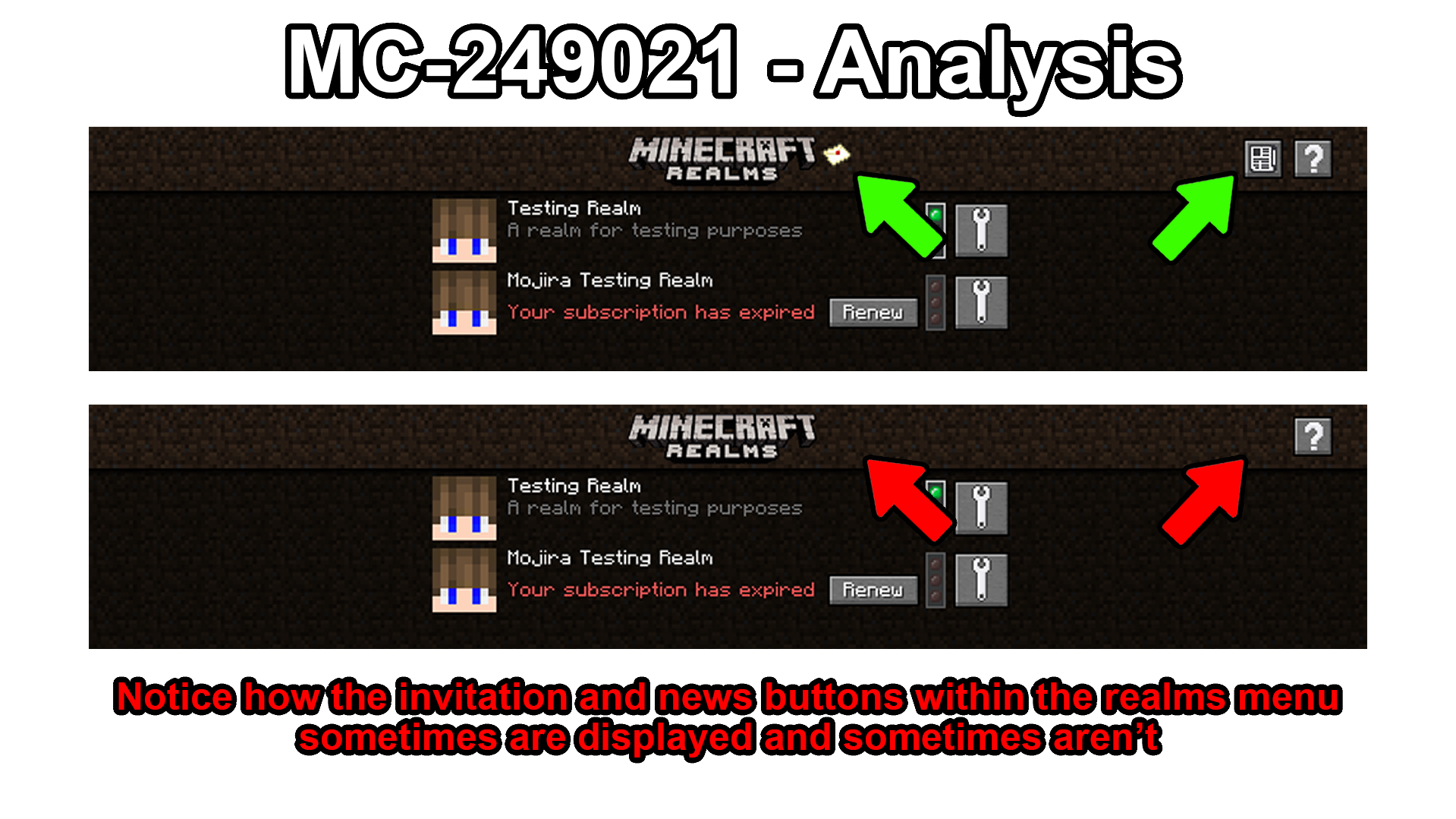
The invitation and news buttons aren't consistently displayed within the realms menu
The Bug:
The invitation and news buttons aren't consistently displayed within the realms menu.
This is a problem because it makes reading realms news and accepting realms invitations much more difficult because the buttons aren't always present. In my testing, it appears that you have to switch between menus in order to make them appear, thus creating quite a large inconvenience. The player shouldn't have to do this and instead, the buttons should always be displayed regardless of any circumstances.
This is also most notably problematic when players aren't currently a member of any realm as when they open the realms menu, they are greeted with the realms pop-up despite the title screen indicating that the user has a pending invitation to join a realm.
Simply resize your game window and these buttons should appear.
Steps to Reproduce:
- Navigate to the realms menu.
- Take note as to whether or not the invitation and news buttons are displayed.
- Click on a realm that you own and hit the "Configure realm" button.
- Now press the "Back" button to return to the realms menu.
- Take note as to whether or not the invitation and news buttons are now displayed.
Observed Behavior:
The buttons are sometimes displayed and sometimes aren't.
Expected Behavior:
The buttons would always be displayed.
Linked Issues
is duplicated by10
 MC-248948The letter button does not show up in the realms menu when invited.DuplicateMC-248956Realms invite does not appearDuplicateMC-250875Cant Join RealmDuplicateMC-251259Minecraft realmDuplicateMC-251276My friend can not join to my realm without buying Minecraft RealmsDuplicate
 REALMS-10068Some players unable to accept realms inviteDuplicateREALMS-10073The realm gui is broken in 1.18.2DuplicateREALMS-10101Realms invites do not show upDuplicateREALMS-10217i cant access realmsDuplicateREALMS-10241Realms invite not showingDuplicate
![[Mod] Avoma](../../../data/avatars/users/86198.png)
Created Issue:
The invitation and news buttons aren't consistently displayed within the realms menu
The Bug:
The invitation and news buttons aren't consistently displayed within the realms menu.
This is a problem because the player shouldn't have to keep switching between menus in order to make these buttons appear so that they can interact with them. This makes reading realms news and accepting realms invitations much more difficult and creates quite a large inconvenience. These buttons should always be displayed regardless of any circumstances, just like every other menu throughout the game.
Steps to Reproduce:
- Navigate to the minecraft realms menu.
- Take note as to whether or not the invitation and news buttons are displayed.
- Click on any realm you own and hit the "Configure realm" button.
- Now press the "Back" button to return to the realms menu.
- Take note as to whether or not the invitation and news buttons are now displayed.
Observed Behavior:
The buttons are sometimes displayed and sometimes aren't.
Expected Behavior:
The buttons would always be displayed.
The Bug:
The invitation and news buttons aren't consistently displayed within the realms menu.
This is a problem because
the player shouldn't have to keep switching between menus in order to make thesebuttons appearsothatthey can interactwiththem. This makes reading realms news and accepting realms invitations much more difficult andcreatesquite a large inconvenience. These buttons should always be displayed regardless of any circumstances, just like every other menu throughout the game.Steps to Reproduce:
- Navigate to the minecraft realms menu.
- Take note as to whether or not the invitation and news buttons are displayed.
- Click on any realm you own and hit the "Configure realm" button.
- Now press the "Back" button to return to the realms menu.
- Take note as to whether or not the invitation and news buttons are now displayed.
Observed Behavior:
The buttons are sometimes displayed and sometimes aren't.
Expected Behavior:
The buttons would always be displayed.
The Bug:
The invitation and news buttons aren't consistently displayed within the realms menu.
This is a problem because it makes reading realms news and accepting realms invitations much more difficult because the buttons aren't always present. In my testing, it appears that you have to switch between menus in order to make them appear, thus creating quite a large inconvenience. The player shouldn't have to do this and instead, the buttons should always be displayed regardless of any circumstances.
Steps to Reproduce:
- Navigate to the minecraft realms menu.
- Take note as to whether or not the invitation and news buttons are displayed.
- Click on any realm you own and hit the "Configure realm" button.
- Now press the "Back" button to return to the realms menu.
- Take note as to whether or not the invitation and news buttons are now displayed.
Observed Behavior:
The buttons are sometimes displayed and sometimes aren't.
Expected Behavior:
The buttons would always be displayed.
The Bug:
The invitation and news buttons aren't consistently displayed within the realms menu.
This is a problem because it makes reading realms news and accepting realms invitations much more difficult because the buttons aren't always present. In my testing, it appears that you have to switch between menus in order to make them appear, thus creating quite a large inconvenience. The player shouldn't have to do this and instead, the buttons should always be displayed regardless of any circumstances.
Steps to Reproduce:
- Navigate to the
minecraftrealms menu.- Take note as to whether or not the invitation and news buttons are displayed.
- Click on a
nyrealm you own and hit the "Configure realm" button.- Now press the "Back" button to return to the realms menu.
- Take note as to whether or not the invitation and news buttons are now displayed.
Observed Behavior:
The buttons are sometimes displayed and sometimes aren't.
Expected Behavior:
The buttons would always be displayed.
The Bug:
The invitation and news buttons aren't consistently displayed within the realms menu.
This is a problem because it makes reading realms news and accepting realms invitations much more difficult because the buttons aren't always present. In my testing, it appears that you have to switch between menus in order to make them appear, thus creating quite a large inconvenience. The player shouldn't have to do this and instead, the buttons should always be displayed regardless of any circumstances.
Steps to Reproduce:
- Navigate to the realms menu.
- Take note as to whether or not the invitation and news buttons are displayed.
- Click on a realm that you own and hit the "Configure realm" button.
- Now press the "Back" button to return to the realms menu.
- Take note as to whether or not the invitation and news buttons are now displayed.
Observed Behavior:
The buttons are sometimes displayed and sometimes aren't.
Expected Behavior:
The buttons would always be displayed.
![[Mod] Michael Wobst](../../../data/avatars/users/37868.png)
relates to
![[Mojang] MimmiB](../../../data/avatars/users/18949.svg)
 Low
LowThe Bug:
The invitation and news buttons aren't consistently displayed within the realms menu.
This is a problem because it makes reading realms news and accepting realms invitations much more difficult because the buttons aren't always present. In my testing, it appears that you have to switch between menus in order to make them appear, thus creating quite a large inconvenience. The player shouldn't have to do this and instead, the buttons should always be displayed regardless of any circumstances.
WorkaroundResizing your game menu makes these buttons appear
Steps to Reproduce:
- Navigate to the realms menu.
- Take note as to whether or not the invitation and news buttons are displayed.
- Click on a realm that you own and hit the "Configure realm" button.
- Now press the "Back" button to return to the realms menu.
- Take note as to whether or not the invitation and news buttons are now displayed.
Observed Behavior:
The buttons are sometimes displayed and sometimes aren't.
Expected Behavior:
The buttons would always be displayed.
The Bug:
The invitation and news buttons aren't consistently displayed within the realms menu.
This is a problem because it makes reading realms news and accepting realms invitations much more difficult because the buttons aren't always present. In my testing, it appears that you have to switch between menus in order to make them appear, thus creating quite a large inconvenience. The player shouldn't have to do this and instead, the buttons should always be displayed regardless of any circumstances.
WorkaroundResizing your game menu makes these buttons appear
Steps to Reproduce:
- Navigate to the realms menu.
- Take note as to whether or not the invitation and news buttons are displayed.
- Click on a realm that you own and hit the "Configure realm" button.
- Now press the "Back" button to return to the realms menu.
- Take note as to whether or not the invitation and news buttons are now displayed.
Observed Behavior:
The buttons are sometimes displayed and sometimes aren't.
Expected Behavior:
The buttons would always be displayed.
The Bug:
The invitation and news buttons aren't consistently displayed within the realms menu.
This is a problem because it makes reading realms news and accepting realms invitations much more difficult because the buttons aren't always present. In my testing, it appears that you have to switch between menus in order to make them appear, thus creating quite a large inconvenience. The player shouldn't have to do this and instead, the buttons should always be displayed regardless of any circumstances.
WorkaroundSimply resize your game window and these buttons should appear.
Steps to Reproduce:
- Navigate to the realms menu.
- Take note as to whether or not the invitation and news buttons are displayed.
- Click on a realm that you own and hit the "Configure realm" button.
- Now press the "Back" button to return to the realms menu.
- Take note as to whether or not the invitation and news buttons are now displayed.
Observed Behavior:
The buttons are sometimes displayed and sometimes aren't.
Expected Behavior:
The buttons would always be displayed.
![[Mod] violine1101](../../../data/avatars/users/92858.png)
is duplicated by
![[Mod] markderickson](../../../data/avatars/users/18946.svg)
![[Mod] OcelotOnesie](../../../data/avatars/users/43220.png)
is duplicated by
![[Bot] Arisa](../../../data/avatars/users/43007.png)
is duplicated by
is duplicated by
The Bug:
The invitation and news buttons aren't consistently displayed within the realms menu.
This is a problem because it makes reading realms news and accepting realms invitations much more difficult because the buttons aren't always present. In my testing, it appears that you have to switch between menus in order to make them appear, thus creating quite a large inconvenience. The player shouldn't have to do this and instead, the buttons should always be displayed regardless of any circumstances.
This is also most notably problematic when players aren't currently a member of any realm as when they open the realms menu, they are greeted with the realms pop-up despite the title screen indicating that the user has a pending invitation to join a realm.
WorkaroundSimply resize your game window and these buttons should appear.
Steps to Reproduce:
- Navigate to the realms menu.
- Take note as to whether or not the invitation and news buttons are displayed.
- Click on a realm that you own and hit the "Configure realm" button.
- Now press the "Back" button to return to the realms menu.
- Take note as to whether or not the invitation and news buttons are now displayed.
Observed Behavior:
The buttons are sometimes displayed and sometimes aren't.
Expected Behavior:
The buttons would always be displayed.
![[Mojang] Timur Nazarov](../../../data/avatars/users/18945.svg) [Mojang] Timur Nazarov
[Mojang] Timur Nazarovis duplicated by
![[Bot] Piston](../../../data/avatars/users/31202.png)
is duplicated by
is duplicated by
![[Mod] Greymagic27](../../../data/avatars/users/92875.png)
is duplicated by
![[Mod] LateLag](../../../data/avatars/users/92884.png)
is duplicated by
is duplicated by
Relates to MC-249021
This ticket is a duplicate of MC-249021. As a workaround, simply resize your game window and these buttons should appear.
This ticket is a duplicate of MC-249021. As a workaround, simply resize your game window and these buttons should appear within the realms menu.
Would MC-249021 happen to describe your issue?
This ticket is actually a duplicate of MC-249021. As a workaround, simply resize your game window and the button should appear.

Not the same issue that was in MC-249021 no matter what size the window they couldn't access the buttons we could see them but the popup wouldn't go away for us to accept an invitation or do anything in the realms menu.
Thank you for your report!
We're tracking this issue in MC-249021, so this ticket is being resolved and linked as a duplicate.
If you would like to add a vote and any extra information to the main ticket it would be appreciated.
If you haven't already, you might like to make use of the search feature to see if the issue has already been mentioned.
Quick Links:
📓 Bug Tracker Guidelines – 💬 Community Support – 📧 Mojang Support
📓 Project Summary – ✍️ Feedback and Suggestions – 📖 Game Wiki
Thank you for your report!
We're tracking this issue in MC-196607 and MC-249021, so this ticket is being resolved and linked as a duplicate.
If you would like to add a vote and any extra information to the main ticket it would be appreciated.
If you haven't already, you might like to make use of the search feature to see if the issue has already been mentioned.
Quick Links:
📓 Bug Tracker Guidelines – 💬 Community Support – 📧 Mojang Support
📓 Project Summary – ✍️ Feedback and Suggestions – 📖 Game Wiki – 📖 FAQs
– I am a bot. This action was performed automatically! The ticket was resolved by one of our moderators, and I left this message to give more information to you.

See MC-249021

The problem is that the invite itself isn’t being sent, not the buttons not showing up
(Relates to MC-249021)
This relates to REALMS-10101 and MC-249021
Would MC-249021 happen to describe your issue? If so, get your friend to resize their game window and the invitation should appear. 
Thank you for your report!
We're tracking this issue in MC-249021, so this ticket is being resolved and linked as a duplicate.
If you would like to add a vote and any extra information to the main ticket it would be appreciated.
If you haven't already, you might like to make use of the search feature to see if the issue has already been mentioned.
Quick Links:
📓 Bug Tracker Guidelines – 💬 Community Support – 📧 Mojang Support
📓 Project Summary – ✍️ Feedback and Suggestions – 📖 Game Wiki
Thank you for your report!
We're tracking this issue in MC-249021, so this ticket is being resolved and linked as a duplicate.
That ticket has already been resolved as Fixed. Please check the Fix Version/s field in that ticket to see in which version this behavior was or will be fixed.
If you haven't already, you might like to make use of the search feature to see if the issue has already been mentioned.
Quick Links:
📓 Bug Tracker Guidelines – 💬 Community Support – 📧 Mojang Support
📓 Project Summary – ✍️ Feedback and Suggestions – 📖 Game Wiki
My guess is that this would be a duplicate of MC-249021. If this is the case, simply get your friends to resize their game window (Hit F11) and the invitation button should appear, allowing them to accept your invitation and join your realm.
Thank you for your report!
We're tracking this issue in MC-249021, so this ticket is being resolved and linked as a duplicate.
That ticket has already been resolved as Fixed. Please check the Fix Version/s field in that ticket to see in which version this behavior was or will be fixed.
If you haven't already, you might like to make use of the search feature to see if the issue has already been mentioned.
Quick Links:
📓 Bug Tracker Guidelines – 💬 Community Support – 📧 Mojang Support
📓 Project Summary – ✍️ Feedback and Suggestions – 📖 Game Wiki
– I am a bot. This action was performed automatically! The ticket was resolved by one of our moderators, and I left this message to give more information to you.
Hi – does MC-249021 describe your issue? If that's what you're experiencing, it should be fixed in the next release (it has already been fixed in the snapshots).
This ticket is a duplicate of MC-249021. As a workaround, simply resize your game window and these buttons should appear.
This ticket is a duplicate of MC-249021 which has been fixed for the next release of Minecraft. As a workaround, simply resize your game window and these buttons should appear.
Thank you for your report!
We're tracking this issue in MC-249021, so this ticket is being resolved and linked as a duplicate.
That ticket has already been resolved as Fixed. Please check the Fix Version/s field in that ticket to see in which version this behavior was or will be fixed.
If you haven't already, you might like to make use of the search feature to see if the issue has already been mentioned.
Quick Links:
📓 Bug Tracker Guidelines – 💬 Community Support – 📧 Mojang Support
📓 Project Summary – ✍️ Feedback and Suggestions – 📖 Game Wiki – 📖 FAQs
– I am a bot. This action was performed automatically! The ticket was resolved by one of our moderators, and I left this message to give more information to you.
Thank you for your report!
We're tracking this issue in MC-249021, so this ticket is being resolved and linked as a duplicate.
That ticket has already been resolved as Fixed. Please check the Fix Version/s field in that ticket to see in which version this behavior was or will be fixed.
If you haven't already, you might like to make use of the search feature to see if the issue has already been mentioned.
Quick Links:
📓 Bug Tracker Guidelines – 💬 Community Support – 📧 Mojang Support
📓 Project Summary – ✍️ Feedback and Suggestions – 📖 Game Wiki – 📖 FAQs
– I am a bot. This action was performed automatically! The ticket was resolved by one of our moderators, and I left this message to give more information to you.
Thank you for your report!
We're tracking this issue in MC-249021, so this ticket is being resolved and linked as a duplicate.
If you would like to add a vote and any extra information to the main ticket it would be appreciated.
If you haven't already, you might like to make use of the search feature to see if the issue has already been mentioned.
Quick Links:
📓 Bug Tracker Guidelines – 💬 Community Support – 📧 Mojang Support
📓 Project Summary – ✍️ Feedback and Suggestions – 📖 Game Wiki – 📖 FAQs
– I am a bot. This action was performed automatically! The ticket was resolved by one of our moderators, and I left this message to give more information to you.
Relates to
MC-234898.I've provided a workaround for this issue to the description of this report.