 Jochen Theodorou
- blackdrag
- blackdrag
- Europe/Stockholm
- Yes
- No
 MC-753
 Normal
![[Mod] markderickson](../../../data/avatars/users/18946.svg)

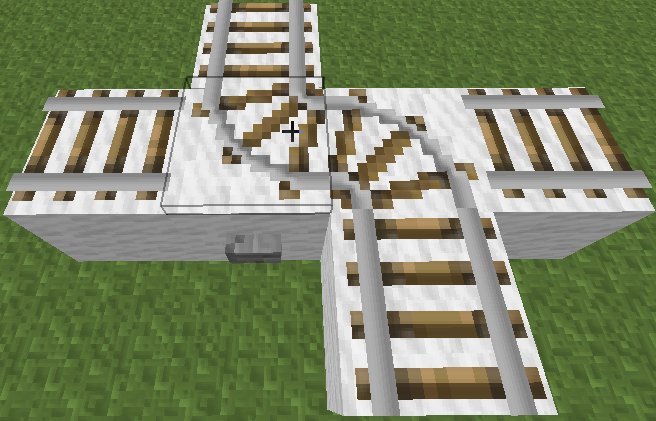
Problem:
Once you get the rails into a configuration as seen in the attached, you cannot change the orientation through a signal anymore."What I expected to happen was...":
The button press can still change the orientation"What actually happend was...":
The signal is simply ignored"Steps to reproduce":
1.) Arrange the rails in an S like in.Under each bent there is a button.
2.) add the missing rails like in
3.) press a buttons to see one of the rails moving like inand

4.) press the buttons to from the figure seen inOnce this configuration is reached you can press the buttons as much as you want, the rails won't change.
This bug appears also in 1.3.2. I did not test 1.3.1. I didn't check if the single player mode is affected as well (but I would assume it is).
The problem with this bug is, that it requires some structure to be build bigger than needed, since you need to place an extra rail between the two bent ones. Also, if you accidentally get into the configuration of
, you are stuck and need to rebuild.
Problem:
Once you get the rails into a configuration as seen in the attached
You cannot change the orientation through a signal anymore."What I expected to happen was...":
The button press can still change the orientation"What actually happend was...":
The signal is simply ignored"Steps to reproduce":
1.) Arrange the rails in an S like in
Under each bent there is a button.
2.) add the missing rails like in
3.) press a buttons to see one of the rails moving like in
4.) press the buttons to form the figure seen inOnce this configuration is reached you can press the buttons as much as you want, the rails won't change.
This bug appears also in 1.3.2. I did not test 1.3.1. I didn't check if the single player mode is affected as well (but I would assume it is).
The problem with this bug is, that it requires some structure to be build bigger than needed, since you need to place an extra rail between the two bent ones. Also, if you accidentally get into the configuration of step5.jpg, you are stuck and need to rebuild.
If you have a detector rail it can affect rails directly connected to it. A powered rail for example is powered and a curved rail can change orientation. Imagine now to have a t-junction setup like in
The detector rail is on the left and passing it will cause the curved rail to change orientation. we start our cart from the detector, but from where the rail is bend to. After starting the cart it goes into the bend and before leaving it, the detector will react. This causes a flicker in which the cart and the rail change orientation several times to then finally settle in the right-side position as in
This basically means the detector rail caused a change of orientation for the bend rail before the minecart was even standing on it.I assume that the signaling goes by this: If the cart, would in a next step touch the detector rail, it fires. Since the rail is then bending in another direction there is an update as the minecart will now not go over the rail, causing another oriantation change. This then causes the detector to fire again going back to the situation in the beginning. The reason why this does not cause an endless loop is that each action takes one tick. Depending on the speed of the cart you will see a longer or shorter flicker then.
What I expected was that the cart will go to the left, not the right as it actually did.

If you have a detector rail it can affect rails directly connected to it. A powered rail for example is powered and a curved rail can change orientation. Imagine now to have a t-junction setup like in
The detector rail is on the left and passing it will cause the curved rail to change orientation. we start our cart from the detector, but from where the rail is bend to. After starting the cart it goes into the bend and before leaving it, the detector will react. This causes a flicker in which the cart and the rail change orientation several times to then finally settle in the right-side position as in
This basically means the detector rail caused a change of orientation for the bend rail before the minecart was even standing on it.I assume that the signaling goes by this: If the cart, would in a next step touch the detector rail, it fires. Since the rail is then bending in another direction there is an update as the minecart will now not go over the rail, causing another oriantation change. This then causes the detector to fire again going back to the situation in the beginning. The reason why this does not cause an endless loop is that each action takes one tick. Depending on the speed of the cart you will see a longer or shorter flicker then.
What I expected was that the cart will go to the left, not the right as it actually did.
If you have a detector rail it can affect rails directly connected to it. A powered rail for example is powered and a curved rail can change orientation. Imagine now to have a t-junction setup like in
The detector rail is on the left and passing it will cause the curved rail to change orientation. we start our cart from the detector, but from where the rail is bend to. After starting the cart it goes into the bend and before leaving it, the detector will react. This causes a flicker in which the cart and the rail change orientation several times to then finally settle in the right-side position as in
This basically means the detector rail caused a change of orientation for the bend rail before the minecart was even standing on it.I assume that the signaling goes by this: If the cart, would in a next step touch the detector rail, it fires. Since the rail is then bending in another direction there is an update as the minecart will now not go over the rail, causing another oriantation change. This then causes the detector to fire again going back to the situation in the beginning. The reason why this does not cause an endless loop is that each action takes one tick. Depending on the speed of the cart you will see a longer or shorter flicker then.
What I expected was that the cart will go to the left, not the right as it actually did.
If you have a detector rail it can affect rails directly connected to it. A powered rail for example is powered and a curved rail can change orientation. Imagine now to have a t-junction setup like in
The detector rail is on the left and passing it will cause the curved rail to change orientation. we start our cart from the detector, but from where the rail is bend to. After starting the cart it goes into the bend and before leaving it, the detector will react. This causes a flicker in which the cart and the rail change orientation several times to then finally settle in the right-side position as in
This basically means the detector rail caused a change of orientation for the bend rail before the minecart was even standing on it.I assume that the signaling goes by this: If the cart, would in a next step touch the detector rail, it fires. Since the rail is then bending in another direction there is an update as the minecart will now not go over the rail, causing another oriantation change. This then causes the detector to fire again going back to the situation in the beginning. The reason why this does not cause an endless loop is that each action takes one tick. Depending on the speed of the cart you will see a longer or shorter flicker then.
What I expected was that the cart will go to the left, not the right as it actually did.
If you have a detector rail it can affect rails directly connected to it. A powered rail for example is powered and a curved rail can change orientation. Imagine now to have a t-junction setup like in
The detector rail is on the left and passing it will cause the curved rail to change orientation. we start our cart from the detector, but from where the rail is bend to. After starting the cart it goes into the bend and before leaving it, the detector will react. This causes a flicker in which the cart and the rail change orientation several times to then finally settle in the right-side position as in
This basically means the detector rail caused a change of orientation for the bend rail before the minecart was even standing on it.I assume that the signaling goes by this: If the cart, would in a next step touch the detector rail, it fires. Since the rail is then bending in another direction there is an update as the minecart will now not go over the rail, causing another oriantation change. This then causes the detector to fire again going back to the situation in the beginning. The reason why this does not cause an endless loop is that each action takes one tick. Depending on the speed of the cart you will see a longer or shorter flicker then.
What I expected was that the cart will go to the left, not the right as it actually did.
If you have a detector rail it can affect rails directly connected to it. A powered rail for example is powered and a curved rail can change orientation. Imagine now to have a t-junction setup like in
The detector rail is on the left and passing it will cause the curved rail to change orientation. we start our cart from the detector, but from where the rail is bend to. After starting the cart it goes into the bend and before leaving it, the detector will react. This causes a flicker in which the cart and the rail change orientation several times to then finally settle in the right-side position as in
This basically means the detector rail caused a change of orientation for the bend rail before the minecart was even standing on it.I assume that the signaling goes by this: If the cart, would in a next step touch the detector rail, it fires. Since the rail is then bending in another direction there is an update as the minecart will now not go over the rail, causing another oriantation change. This then causes the detector to fire again going back to the situation in the beginning. The reason why this does not cause an endless loop is that each action takes one tick. Depending on the speed of the cart you will see a longer or shorter flicker then.
What I expected was that the cart will go to the left, not the right as it actually did.
If you have a detector rail it can affect rails directly connected to it. A powered rail for example is powered and a curved rail can change orientation. Imagine now to have a t-junction setup like in
The detector rail is on the left and passing it will cause the curved rail to change orientation.we start our cart from the detector, but from where the rail is bend to. After starting the cart it goes into the bend and before leaving it, the detector will react. This causes a flicker in which the cart and the rail change orientation several times to then finally settle in the right-side position as in
This basically means the detector rail caused a change of orientation for the bend rail before the minecart was even standing on it.I assume that the signaling goes by this: If the cart, would in a next step touch the detector rail, it fires. Since the rail is then bending in another direction there is an update as the minecart will now not go over the rail, causing another oriantation change. This then causes the detector to fire again going back to the situation in the beginning. The reason why this does not cause an endless loop is that each action takes one tick. Depending on the speed of the cart you will see a longer or shorter flicker then.
What I expected was that the cart will go to the left, not the right as it actually did.
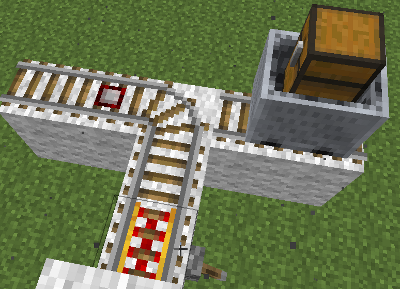
If you have a detector rail it can affect rails directly connected to it. A powered rail for example is powered and a curved rail can change orientation. Imagine now to have a t-junction setup like in
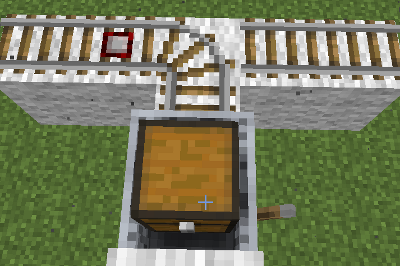
The detector rail is on the left and passing it will cause the curved rail to change orientation. We start our cart not from the detector, but from where the rail is bend to. After starting the cart it goes into the bend and before leaving it, the detector will react. This causes a flicker in which the cart and the rail change orientation several times to then finally settle in the right-side position as in
This basically means the detector rail caused a change of orientation for the bend rail before the minecart was even standing on it.I assume that the signaling goes by this: If the cart, would in a next step touch the detector rail, it fires. Since the rail is then bending in another direction there is an update as the minecart will now not go over the rail, causing another oriantation change. This then causes the detector to fire again going back to the situation in the beginning. The reason why this does not cause an endless loop is that each action takes one tick. Depending on the speed of the cart you will see a longer or shorter flicker then.
What I expected was that the cart will go to the left, not the right as it actually did.
end.png
added smalelr images
If that is how they are intended to work, then you can surely explain what the reason for this behaviour is. For me I see I can flip directions with a button normally. But here it stops working once a certain configuration is reached. So what is the reason for being able to switch the rails into a fixed position, that is no escaping from?
Alex, if you argument like that, then pressing a button from the configuration in step2.jpg, should not lead to a configuration as shown in step3.jpg/step4.jpg but instead directly to the configuration shown in step5.jpg. And then I would expect that pressing a button would change step5 into step2. I would still not expect step5 to be a "final" configuration. Coming from that direction, that it doesn't care whether the other piece stays connected or not, seems to be wrong to me. I can understand implementation wise why it is like this now, but that doesn't make it right
The problem with corner rail is then to define how they switch. An isolated (nowhere connected) corner rail has in theory two ways to switch, thus should not. If we don't use connected, but possibly connected and that simply as "there is another rail" and don't care about the orientation of that rail, then I could define the following rules: A rail with 0, 2 or 4 possible connections cannot switch. A corner rail with one possible connection can switch the unconnected side. A corner rail with 3 possible connections can switch the opposite directions, meaning east-west or north-south. Please note: I define here only the way a corner rail can switch, not how a rail becomes a corner rail
These rules are local enough for the implementation, since it has no cascading effects. The cases with 0,2 and 4 possible connections are today also not switchable, thus it does not disable anything that could switch before. And they allow my double T-Junction to work.
I strongly assume that the switching rules are as they are because of the event of placing a rails, in other words: from how to make them a corner rail. And I think those should be different rule sets.
Alex, my (and not only my) stations are broken, yes, because I expected this to work and it does not. Basically you speak against all behavioural changes. If that is the policy for minecraft, then things like the Redstone update should never happen as well.
Since this got closed as "Works as intended" can somebody please explain me why this works as intended and what the intension is here?
Since no one did answer I guess the answer of what the intension is, is simply: minecraft can't be changed this way.
As the original author of this issue I just wanted to say hello. It is 10 years now, I still play Minecraft. I am not complaining, I see no need to rush to fix this.