 Damariobros
- Damariobros
- damariobros
- America/Los_Angeles
- Yes
- No
 MCPE-22910
 MC-200363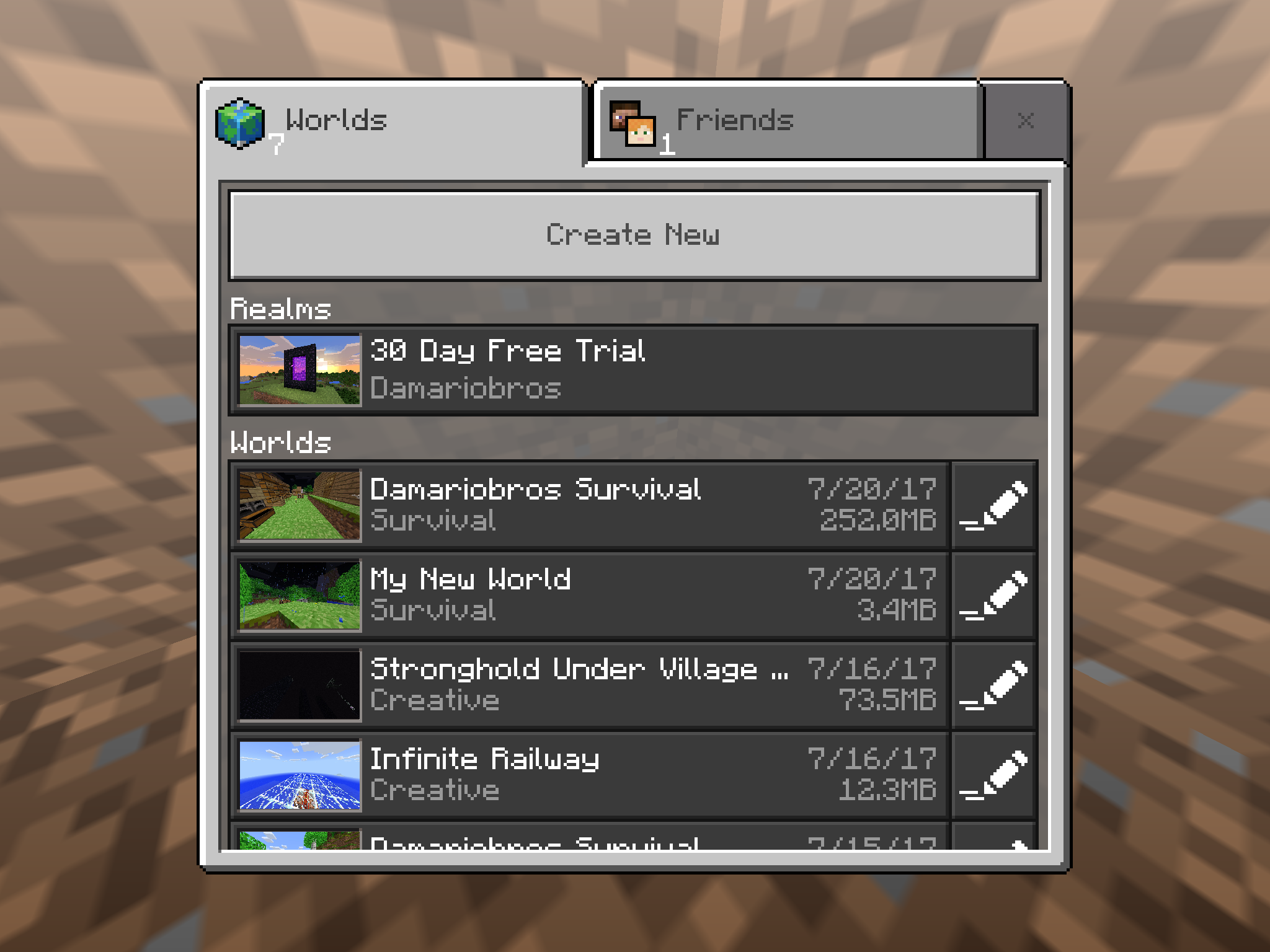
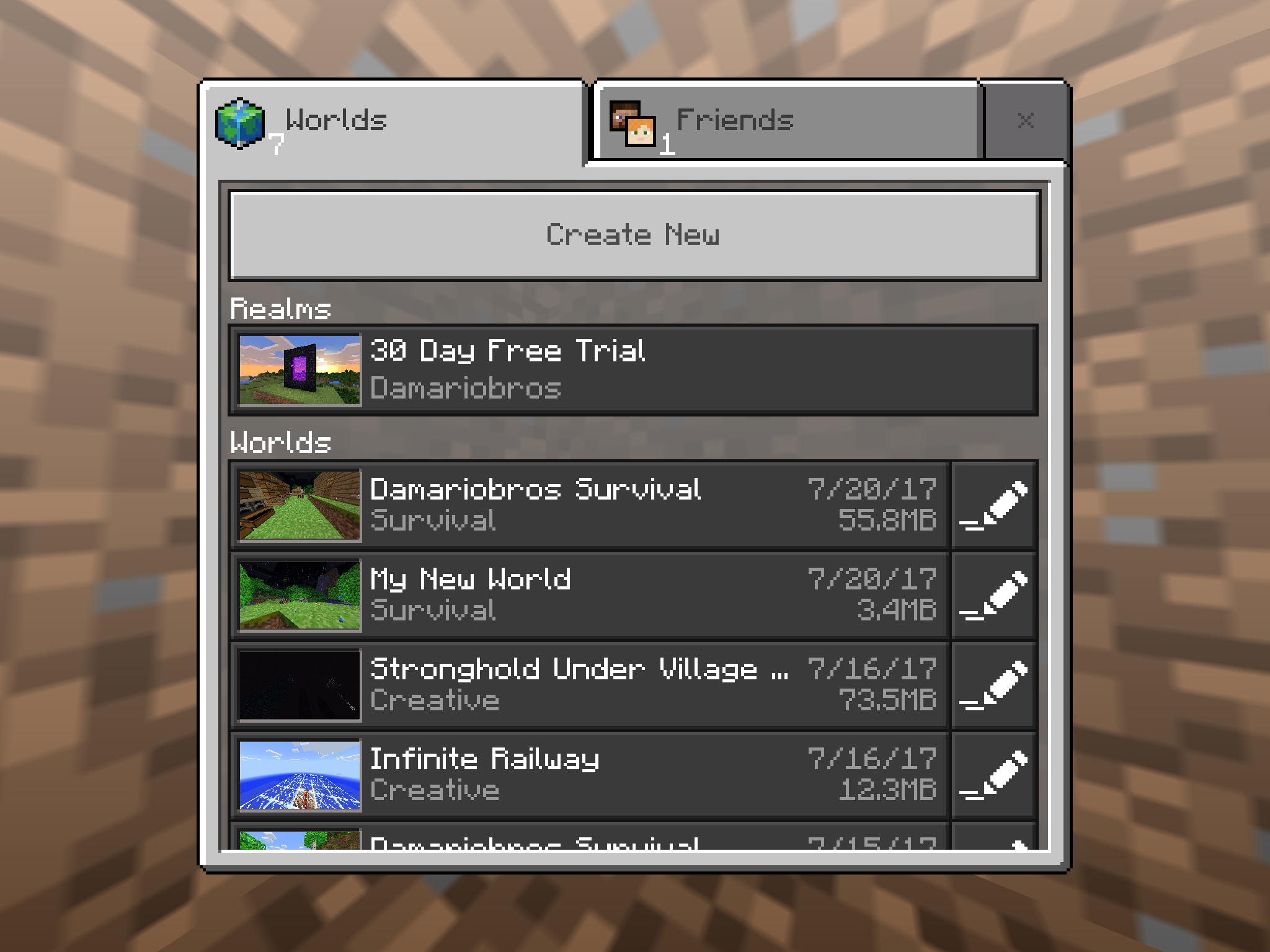
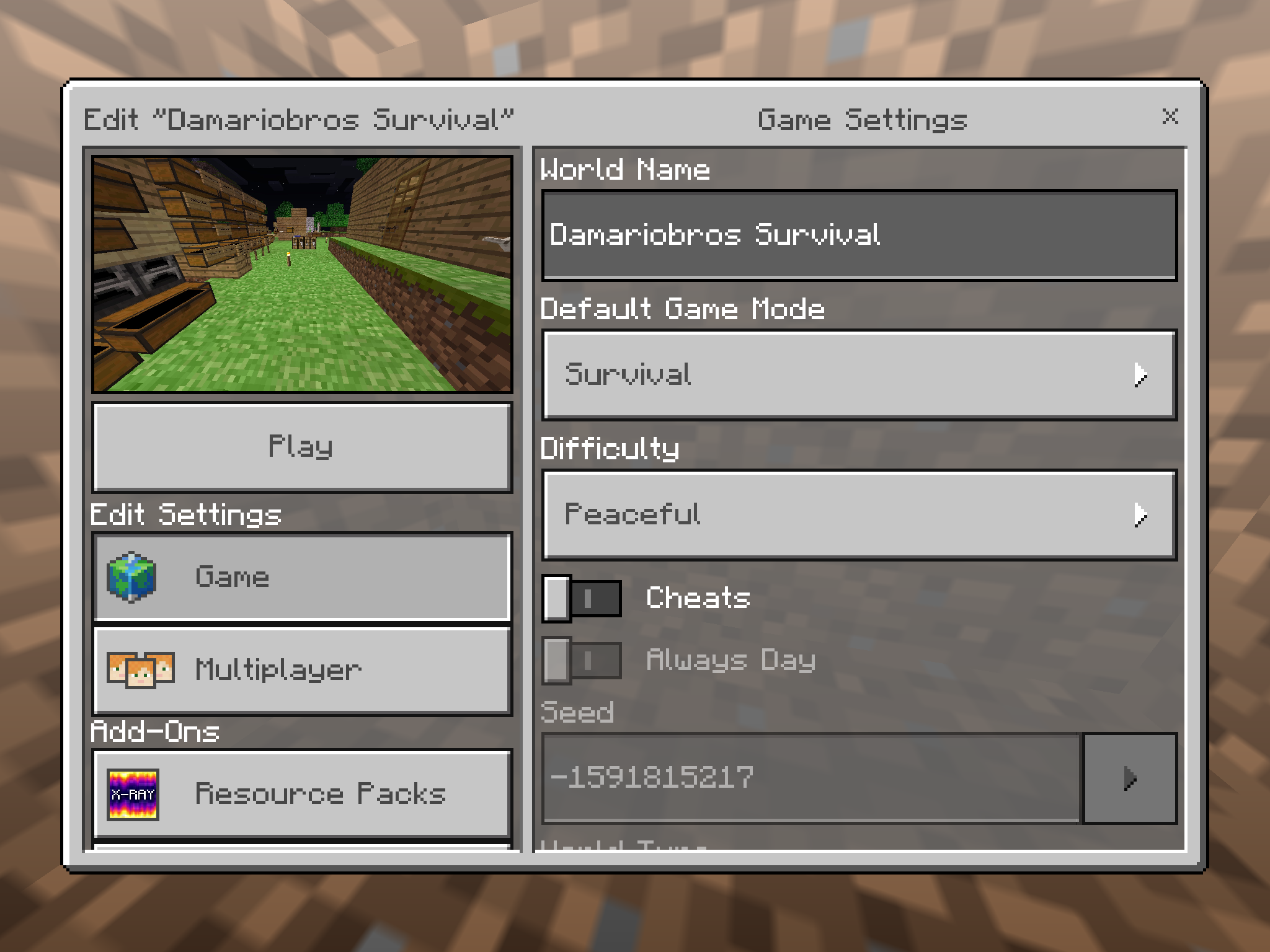
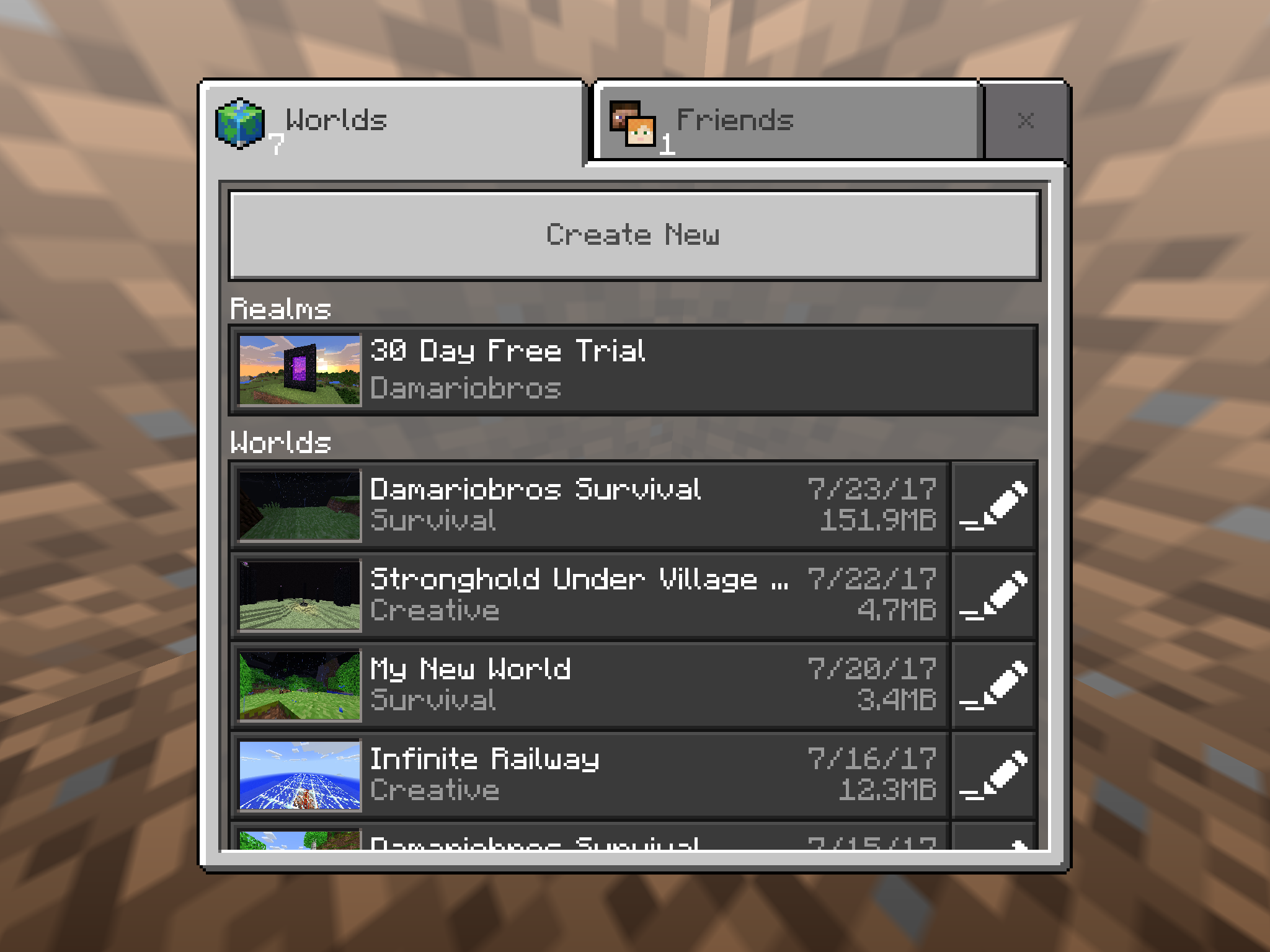


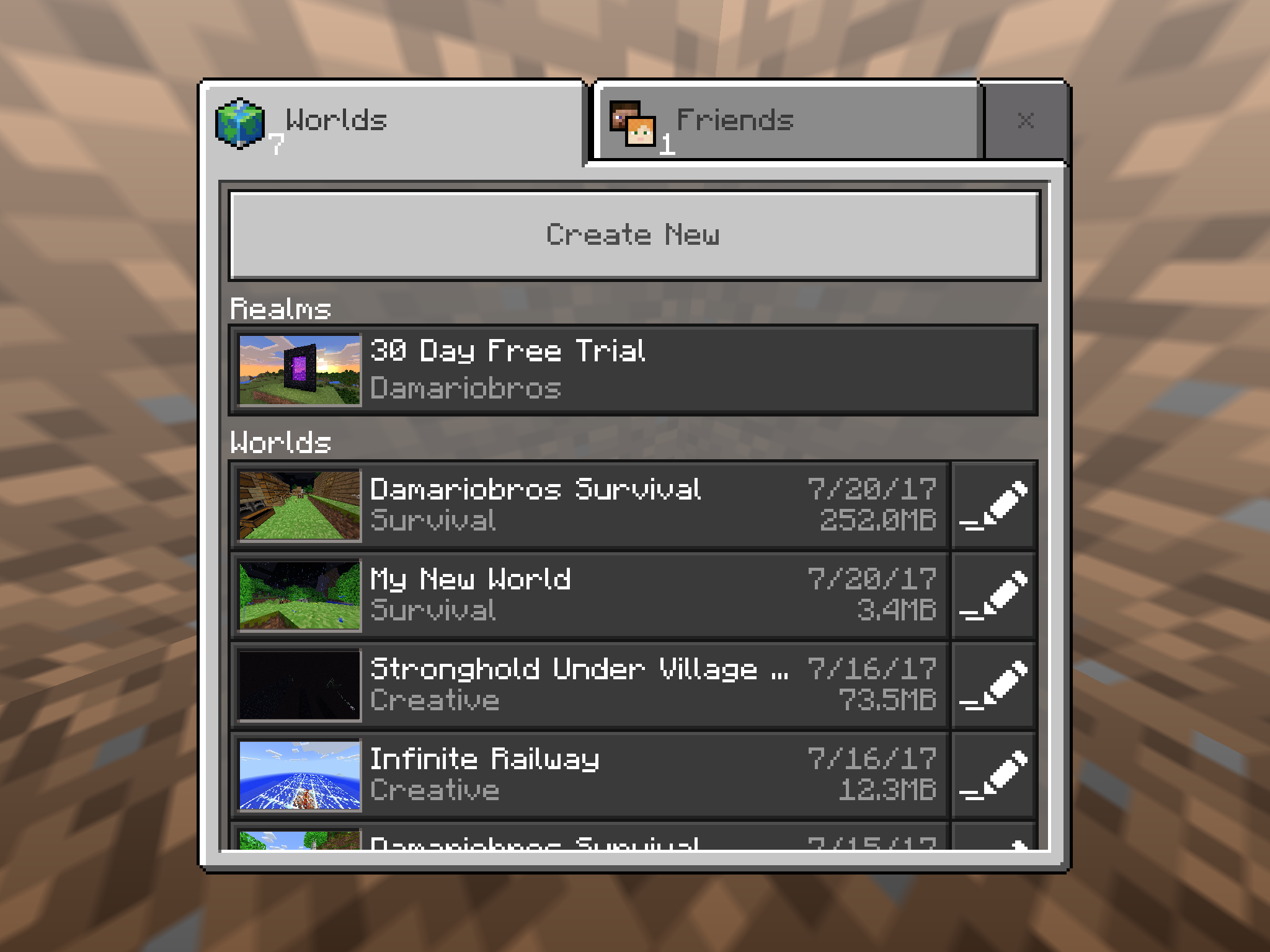
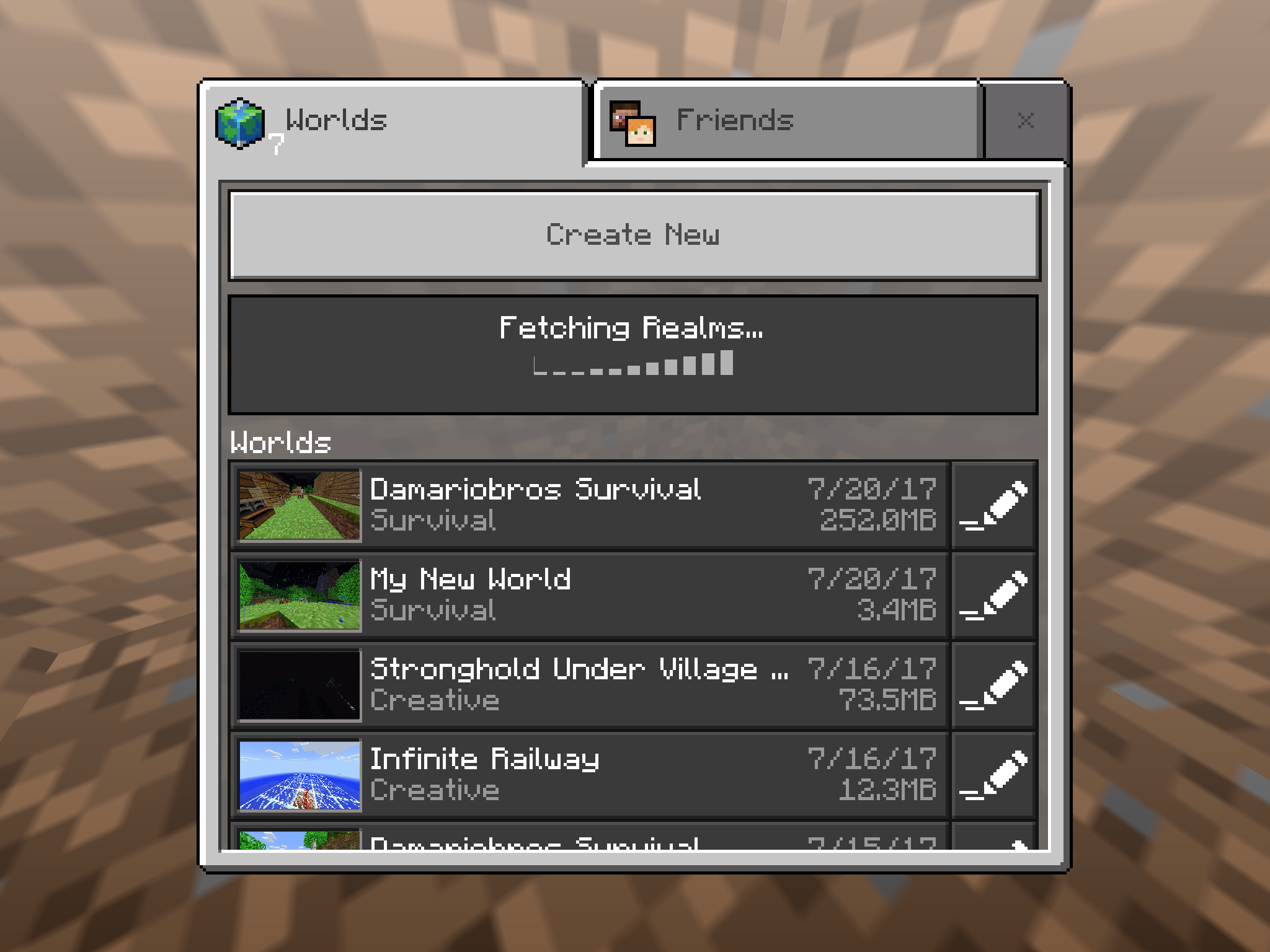
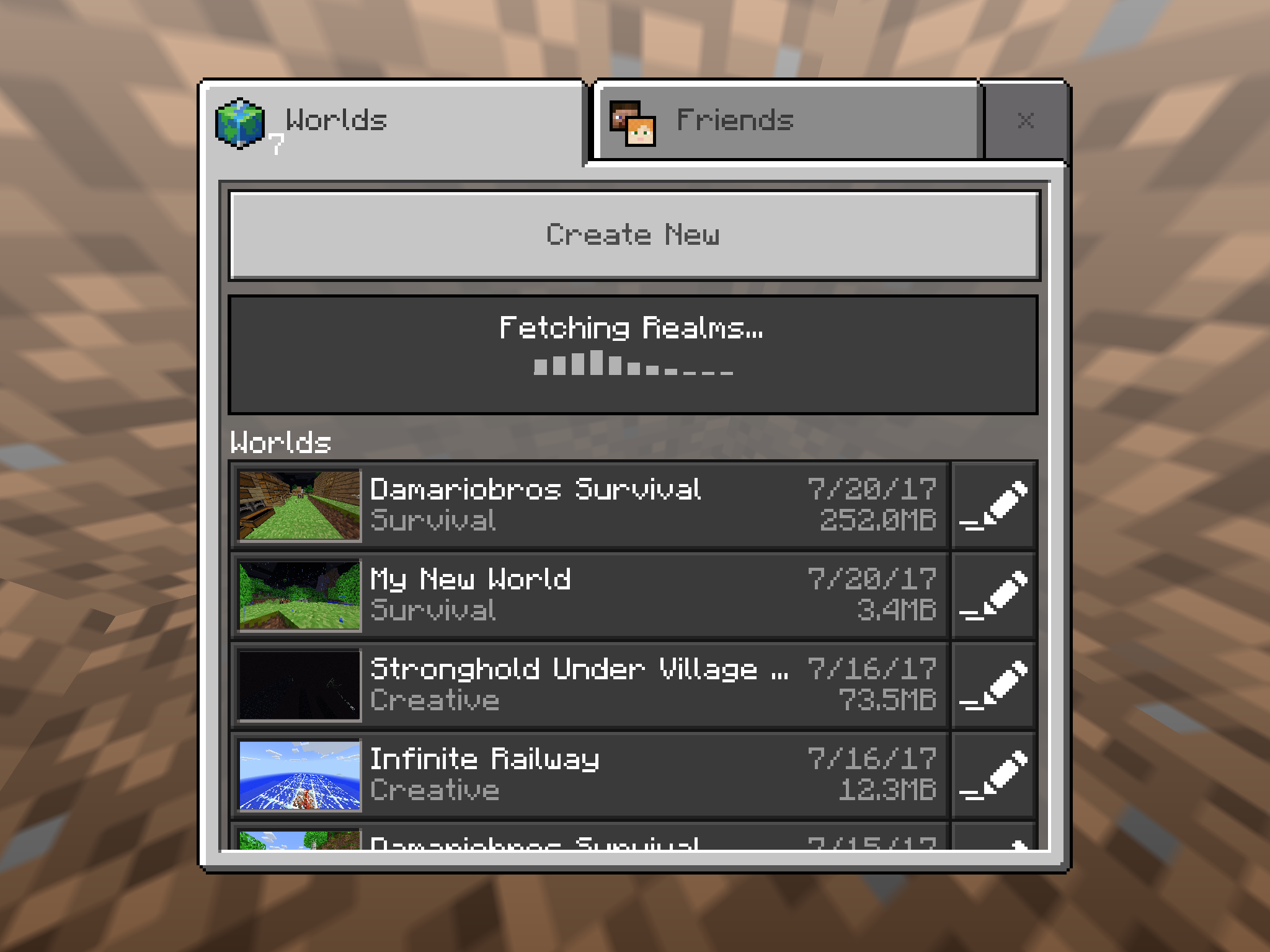


I have the latest version of Minecraft Pocket Edition: iOS, using an iPad Mini 4 with the latest iOS version. The file size is going crazy. I could open the app and go into a world that says it is 43.2MB, chop down a tree or something, save/exit, and then it's claiming to be 250.3MB! I go back into the world, which is now taking a lot longer than usual to load, do something else, log out, and then it's saying it's 41.0MB! I exit the app and restart it, it's back to normal, and then the whole cycle repeats itself! This is happening on all of my worlds, with it being a whole lot worse on the worlds I've explored more of and have been using more often. Also, I could go onto one world, and then when I exit, sometimes other worlds get affected by that bug! I have roughly about 2GB of storage space available on my iPad, and when I exit a world and see that multiple worlds claim to be 200+MB, I don't get the notification telling me that I should be careful because the storage is beginning to get a bit low, and that's what's most bizarre about it. I check the storage by going into Settings, and I still have over 2GB available. It's irritating the crap out of me, so can you please hurry up and fix it? FYI it's happening on worlds I haven't even filled a Level 2 Map up on as well. Please fix it soon, I don't want other people encountering this glitch and panicking because they think their phone with 30MB available storage is having all it's info crammed to make room for 200+MB of a level in a high-resource 3D Game and then take it to the Apple/Android Store to have their phone potentially wiped. Please fix it.
EDIT: The first image is after I have exited my world after a while. The second image is when I went to the settings for that world right afterwords, and the third image is of me exiting the world settings and the file size is back to normal!
I have the latest version of Minecraft Pocket Edition: iOS, using an iPad Mini 4 with the latest iOS version. The file size is going crazy. I could open the app and go into a world that says it is 43.2MB, chop down a tree or something, save/exit, and then it's claiming to be 250.3MB! I go back into the world, which is now taking a lot longer than usual to load, do something else, log out, and then it's saying it's 41.0MB! I exit the app and restart it, it's back to normal, and then the whole cycle repeats itself! This is happening on all of my worlds, with it being a whole lot worse on the worlds I've explored more of and have been using more often. Also, I could go onto one world, and then when I exit, sometimes other worlds get affected by that bug! I have roughly about 2GB of storage space available on my iPad, and when I exit a world and see that multiple worlds claim to be 200+MB, I don't get the notification telling me that I should be careful because the storage is beginning to get a bit low, and that's what's most bizarre about it. I check the storage by going into Settings, and I still have over 2GB available. It's irritating the crap out of me, so can you please hurry up and fix it? FYI it's happening on worlds I haven't even filled a Level 2 Map up on as well. Please fix it soon, I don't want other people encountering this glitch and panicking because they think their phone with 30MB available storage is having all it's info crammed to make room for 200+MB of a level in a high-resource 3D Game and then take it to the Apple/Android Store to have their phone potentially wiped. Please fix it.
EDIT: The first image is after I have exited my world after a while. The second image is when I went to the settings for that world right afterwords, and the third image is of me exiting the world settings and the file size is back to normal!
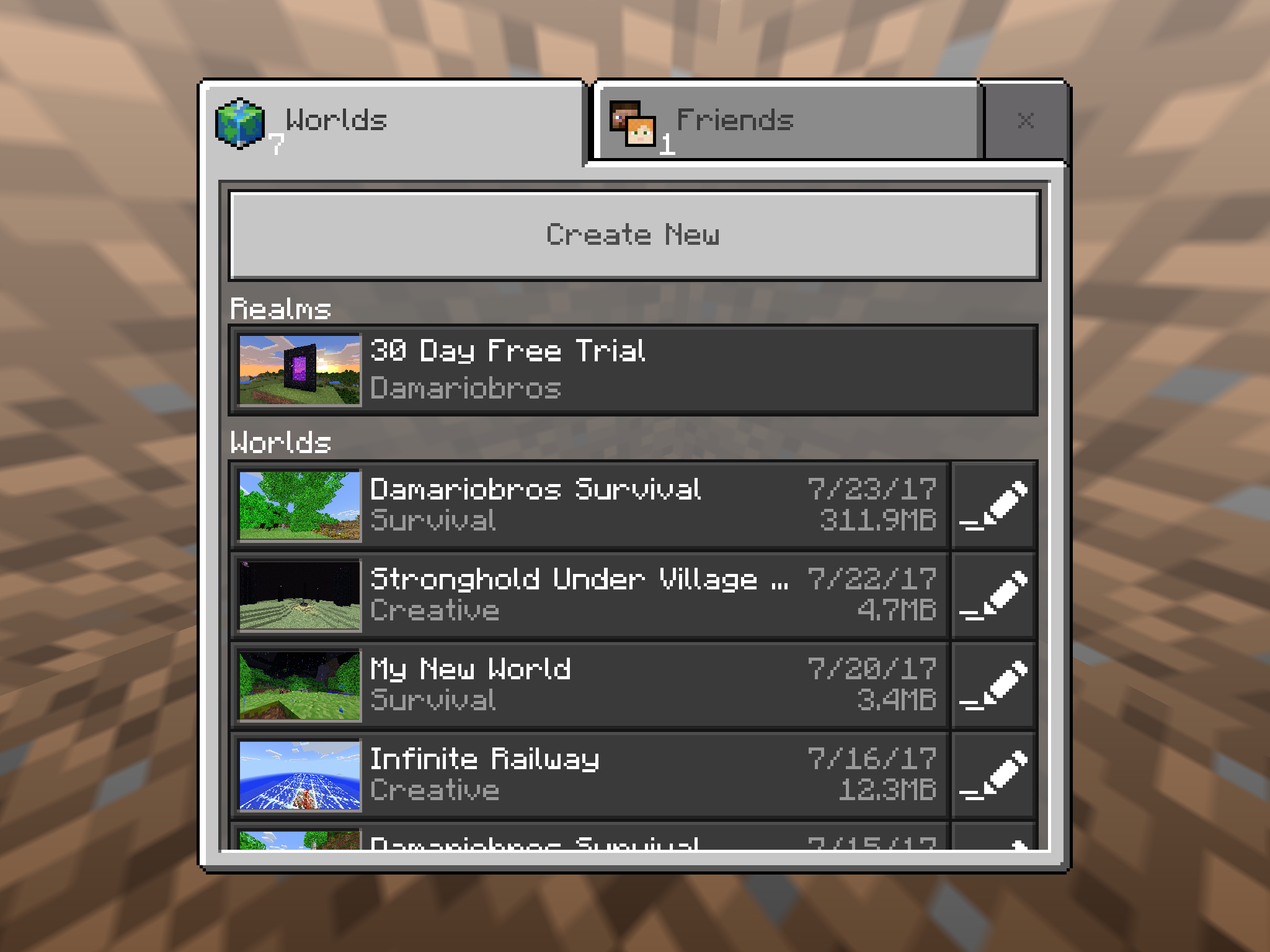
UPDATE: Here are some more screenshots of this glitch happening. I will post them in the order they actually happened so you can see how crazy this glitch really is. Remember, they are IN THE ORDER THEY HAPPENED. They are in the Attachments section, in the order of occurrence with the top image being the oldest and the bottom image being the most recent.
I have the latest version of Minecraft Pocket Edition: iOS, using an iPad Mini 4 with the latest iOS version. The file size is going crazy. I could open the app and go into a world that says it is 43.2MB, chop down a tree or something, save/exit, and then it's claiming to be 250.3MB! I go back into the world, which is now taking a lot longer than usual to load, do something else, log out, and then it's saying it's 41.0MB! I exit the app and restart it, it's back to normal, and then the whole cycle repeats itself! This is happening on all of my worlds, with it being a whole lot worse on the worlds I've explored more of and have been using more often. Also, I could go onto one world, and then when I exit, sometimes other worlds get affected by that bug! I have roughly about 2GB of storage space available on my iPad, and when I exit a world and see that multiple worlds claim to be 200+MB, I don't get the notification telling me that I should be careful because the storage is beginning to get a bit low, and that's what's most bizarre about it. I check the storage by going into Settings, and I still have over 2GB available. It's irritating the crap out of me, so can you please hurry up and fix it? FYI it's happening on worlds I haven't even filled a Level 2 Map up on as well. Please fix it soon, I don't want other people encountering this glitch and panicking because they think their phone with 30MB available storage is having all it's info crammed to make room for 200+MB of a level in a high-resource 3D Game and then take it to the Apple/Android Store to have their phone potentially wiped. Please fix it.
EDIT: The first image is after I have exited my world after a while. The second image is when I went to the settings for that world right afterwords, and the third image is of me exiting the world settings and the file size is back to normal!
UPDATE: Here are some more screenshots of this glitch happening. I will post them in the order they actually happened so you can see how crazy this glitch really is. Remember, they are IN THE ORDER THEY HAPPENED. They are in the Attachments section, in the order of occurrence with the top image being the oldest and the bottom image being the most recent.
Also, even though it says it on the world selection screen, it does not affect the actual storage of my iPad in the slightest. It occurs, I check the iPad storage to find that it has not even dropped down 1/100 of a GB!
I am playing Minecraft Pocket Edition v1.1.1.1 on an iPad Mini 4. For some reason, I am unable to have people join my worlds unless they connect via LAN, but I can join other peoples' worlds just fine. It's the Invite through Xbox Live that's bugging out. The only error message they get is "Unable to Connect to World." LAN Players can join without a single problem, but no one can join my world who is not on LAN. I have tried everything. I can join other peoples' worlds, Multiplayer Servers, and Realms JUST FINE, but NO ONE can join MY worlds (except for LAN). It started happening right after I updated my game. The last time I updated my game it started happening, but then a month or two later that bug seems to have blown itself up and people could join again, but still having to wait it out due to multiplayer causing crashes/rollbacks that go back EVEN BEFORE I SAVED MY WORLD BY QUITTING THE GAME ON SINGLEPLAYER! I NEED this bug fixed or else I won't be able to have someone join, with that happening every time I update. FIX IT PLEASE PLEASE PLEASE PLEASE PLEASE PLEASE PLEASE! PLEEEEAAAAASSSEEE! FIX! IT!
EDIT: It is still happening. I made sure everyone was on the same version, tried everything, and still nothing. The rollback has been fixed, though, so that's good, but I am still experiencing problems connecting other people to my world, especially right after updating. Please fix it! I usually have to wait a few weeks after updating before people are able to join my world, yet I can join other peoples' worlds just fine. Please. I need this stupid bug fixed already, so hurry up!
I am playing Minecraft Pocket Edition v1.1.1.1 on an iPad Mini 4. For some reason, I am unable to have people join my worlds unless they connect via LAN, but I can join other peoples' worlds just fine. It's the Invite through Xbox Live that's bugging out. The only error message they get is "Unable to Connect to World." LAN Players can join without a single problem, but no one can join my world who is not on LAN. I have tried everything. I can join other peoples' worlds, Multiplayer Servers, and Realms JUST FINE, but NO ONE can join MY worlds (except for LAN). It started happening right after I updated my game. The last time I updated my game it started happening, but then a month or two later that bug seems to have blown itself up and people could join again, but still having to wait it out due to multiplayer causing crashes/rollbacks that go back EVEN BEFORE I SAVED MY WORLD BY QUITTING THE GAME ON SINGLEPLAYER! I NEED this bug fixed or else I won't be able to have someone join, with that happening every time I update. FIX IT PLEASE PLEASE PLEASE PLEASE PLEASE PLEASE PLEASE! PLEEEEAAAAASSSEEE! FIX! IT!
EDIT: It is still happening. I made sure everyone was on the same version, tried everything, and still nothing. The rollback has been fixed, though, so that's good, but I am still experiencing problems connecting other people to my world, especially right after updating. Please fix it! I usually have to wait a few weeks after updating before people are able to join my world, yet I can join other peoples' worlds just fine. Please. I need this stupid bug fixed already, so hurry up!I am playing Minecraft Pocket Edition v1.1.1.1 on an iPad Mini 4. For some reason, I am unable to have people join my worlds unless they connect via LAN, but I can join other peoples' worlds just fine. It's the Invite through Xbox Live that's bugging out. The only error message they get is "Unable to Connect to World." LAN Players can join without a single problem, but no one can join my world who is not on LAN. I have tried everything. I can join other peoples' worlds, Multiplayer Servers, and Realms JUST FINE, but NO ONE can join MY worlds (except for LAN). It started happening right after I updated my game. The last time I updated my game it started happening, but then a month or two later that bug seems to have blown itself up and people could join again, but still having to wait it out due to multiplayer causing crashes/rollbacks that go back EVEN BEFORE I SAVED MY WORLD BY QUITTING THE GAME ON SINGLEPLAYER! I NEED this bug fixed or else I won't be able to have someone join, with that happening every time I update. FIX IT PLEASE PLEASE PLEASE PLEASE PLEASE PLEASE PLEASE! PLEEEEAAAAASSSEEE! FIX! IT!
UPDATE: It is still happening. I made sure everyone was on the same version, tried everything, and still nothing. The rollback has been fixed, though, so that's good, but I am still experiencing problems connecting other people to my world, especially right after updating. Please fix it! I usually have to wait a few weeks after updating before people are able to join my world, yet I can join other peoples' worlds just fine. Please. I need this stupid bug fixed already, so hurry up!
UPDATE: It has gotten worse. Whenever I get onto my world, or any world for that matter, the world is NOT appearing on their Multiplayer LAN Games list. I was able to get a multiplayer world hosted by me working by signing another device into my Microsoft Account without signing out on my device, so that it was pretty much two players with the exact same account on one world, except that it was considered a LAN connection and that it meant that two of the same username was on the world, bugging out the Commands. Other than that, there is no way to get a WORKING multiplayer world. When I get a chance, I am going to see if it has fixed itself by now. Like I said, after updating, I usually have to wait weeks before it sorts itself out. Please look into this bug at least a little bit more and see if you can fix it! I'm also noticing that it is getting slightly worse with each time it gets triggered, which is usually when I update. Oh, and by the way, I am remembering that when I first started noticing that it was recurring and getting bad, I tried seeing if uninstalling and reinstalling the game would fix it. Long story short, it did NOTHING. The bug is still there. Please look into it. I will tell you if/when it has sorted itself out, and, if it does sort itself out, I will update again when it comes back.
Xbox LiveMultiplayer ProblemMCPE Multiplayer Problem
I am playing Minecraft Pocket Edition v1.1.1.1 on an iPad Mini 4. For some reason, I am unable to have people join my worlds unless they connect via LAN, but I can join other peoples' worlds just fine. It's the Invite through Xbox Live that's bugging out. The only error message they get is "Unable to Connect to World." LAN Players can join without a single problem, but no one can join my world who is not on LAN. I have tried everything. I can join other peoples' worlds, Multiplayer Servers, and Realms JUST FINE, but NO ONE can join MY worlds (except for LAN). It started happening right after I updated my game. The last time I updated my game it started happening, but then a month or two later that bug seems to have blown itself up and people could join again, but still having to wait it out due to multiplayer causing crashes/rollbacks that go back EVEN BEFORE I SAVED MY WORLD BY QUITTING THE GAME ON SINGLEPLAYER! I NEED this bug fixed or else I won't be able to have someone join, with that happening every time I update. FIX IT PLEASE PLEASE PLEASE PLEASE PLEASE PLEASE PLEASE! PLEEEEAAAAASSSEEE! FIX! IT!
UPDATE: It is still happening. I made sure everyone was on the same version, tried everything, and still nothing. The rollback has been fixed, though, so that's good, but I am still experiencing problems connecting other people to my world, especially right after updating. Please fix it! I usually have to wait a few weeks after updating before people are able to join my world, yet I can join other peoples' worlds just fine. Please. I need this stupid bug fixed already, so hurry up!
UPDATE: It has gotten worse. Whenever I get onto my world, or any world for that matter, the world is NOT appearing on their Multiplayer LAN Games list. I was able to get a multiplayer world hosted by me working by signing another device into my Microsoft Account without signing out on my device, so that it was pretty much two players with the exact same account on one world, except that it was considered a LAN connection and that it meant that two of the same username was on the world, bugging out the Commands. Other than that, there is no way to get a WORKING multiplayer world. When I get a chance, I am going to see if it has fixed itself by now. Like I said, after updating, I usually have to wait weeks before it sorts itself out. Please look into this bug at least a little bit more and see if you can fix it! I'm also noticing that it is getting slightly worse with each time it gets triggered, which is usually when I update. Oh, and by the way, I am remembering that when I first started noticing that it was recurring and getting bad, I tried seeing if uninstalling and reinstalling the game would fix it. Long story short, it did NOTHING. The bug is still there. Please look into it. I will tell you if/when it has sorted itself out, and, if it does sort itself out, I will update again when it comes back.
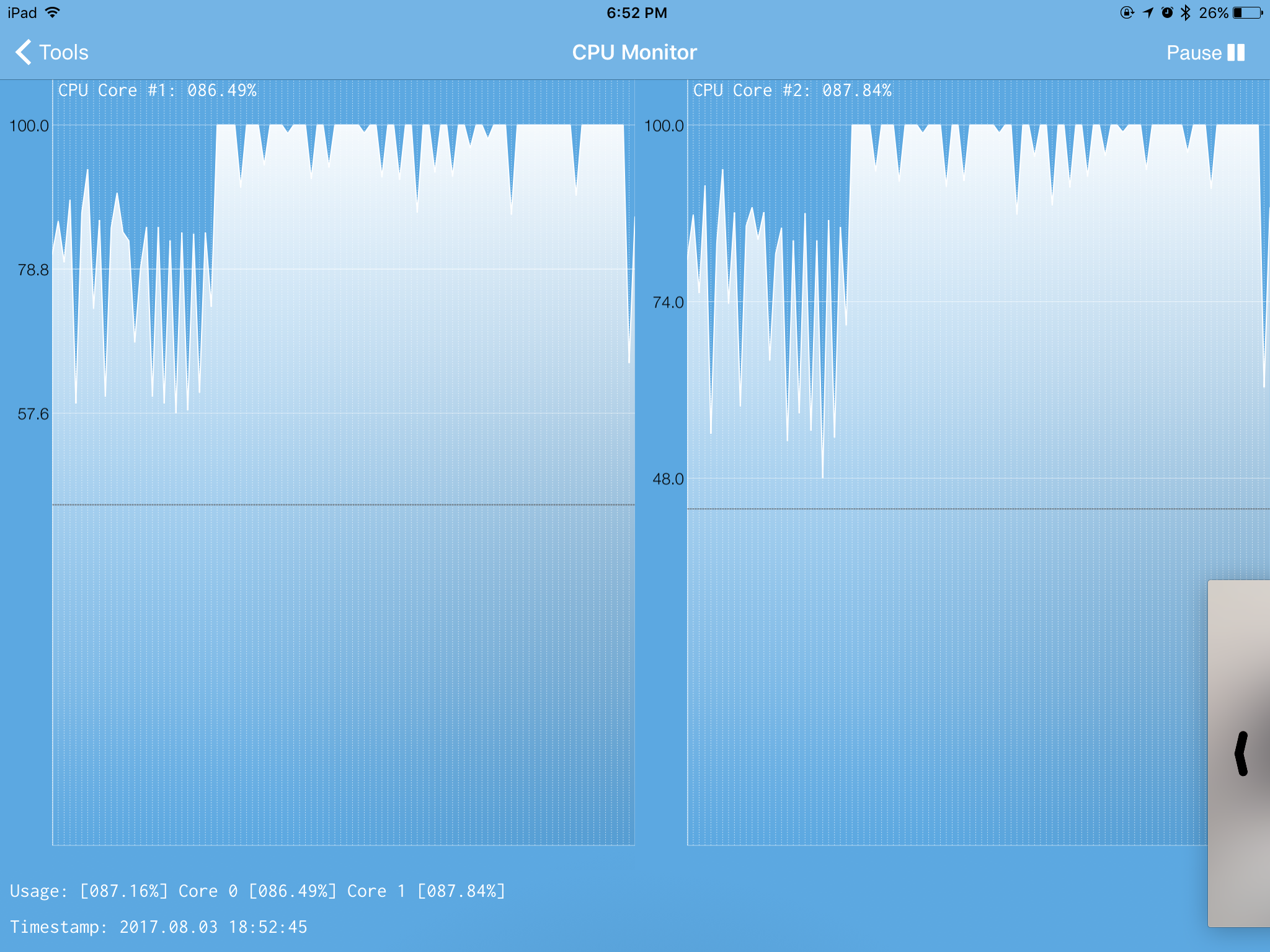
UPDATE: I have tested it (finally) and it has FINALLY sorted itself out, and other people can finally join my world. However, in the attachments, there is a screenshot of what just a few hours of ONE person not on the LAN being on my world caused (apart from extreme lag that is almost to the point of crashing for the entire time). Apparently, it caused my CPU to be 100% USED UP 99.999% OF THE TIME, EVEN 5 MINUTES AFTER I CLOSED MINECRAFT! Also, no other apps were open. Next time I update, I am sure that the bug will do a repeat of all that this report has told you.
I am playing Minecraft Pocket Edition v1.1.1.1 on an iPad Mini 4. For some reason, I am unable to have people join my worlds unless they connect via LAN, but I can join other peoples' worlds just fine. It's the Invite through Xbox Live that's bugging out. The only error message they get is "Unable to Connect to World." LAN Players can join without a single problem, but no one can join my world who is not on LAN. I have tried everything. I can join other peoples' worlds, Multiplayer Servers, and Realms JUST FINE, but NO ONE can join MY worlds (except for LAN). It started happening right after I updated my game. The last time I updated my game it started happening, but then a month or two later that bug seems to have blown itself up and people could join again, but still having to wait it out due to multiplayer causing crashes/rollbacks that go back EVEN BEFORE I SAVED MY WORLD BY QUITTING THE GAME ON SINGLEPLAYER! I NEED this bug fixed or else I won't be able to have someone join, with that happening every time I update. FIX IT PLEASE PLEASE PLEASE PLEASE PLEASE PLEASE PLEASE! PLEEEEAAAAASSSEEE! FIX! IT!
UPDATE: It is still happening. I made sure everyone was on the same version, tried everything, and still nothing. The rollback has been fixed, though, so that's good, but I am still experiencing problems connecting other people to my world, especially right after updating. Please fix it! I usually have to wait a few weeks after updating before people are able to join my world, yet I can join other peoples' worlds just fine. Please. I need this stupid bug fixed already, so hurry up!
UPDATE: It has gotten worse. Whenever I get onto my world, or any world for that matter, the world is NOT appearing on their Multiplayer LAN Games list. I was able to get a multiplayer world hosted by me working by signing another device into my Microsoft Account without signing out on my device, so that it was pretty much two players with the exact same account on one world, except that it was considered a LAN connection and that it meant that two of the same username was on the world, bugging out the Commands. Other than that, there is no way to get a WORKING multiplayer world. When I get a chance, I am going to see if it has fixed itself by now. Like I said, after updating, I usually have to wait weeks before it sorts itself out. Please look into this bug at least a little bit more and see if you can fix it! I'm also noticing that it is getting slightly worse with each time it gets triggered, which is usually when I update. Oh, and by the way, I am remembering that when I first started noticing that it was recurring and getting bad, I tried seeing if uninstalling and reinstalling the game would fix it. Long story short, it did NOTHING. The bug is still there. Please look into it. I will tell you if/when it has sorted itself out, and, if it does sort itself out, I will update again when it comes back.
UPDATE: I have tested it (finally) and it has FINALLY sorted itself out, and other people can finally join my world. However, in the attachments, there is a screenshot of what just a few hours of ONE person not on the LAN being on my world caused (apart from extreme lag that is almost to the point of crashing for the entire time). Apparently, it caused my CPU to be 100% USED UP 99.999% OF THE TIME, EVEN 5 MINUTES AFTER I CLOSED MINECRAFT! Also, no other apps were open. Next time I update, I am sure that the bug will do a repeat of all that this report has told you.
I am playing Minecraft Pocket Edition v1.1.1.1 on an iPad Mini 4. For some reason, I am unable to have people join my worlds unless they connect via LAN, but I can join other peoples' worlds just fine. It's the Invite through Xbox Live that's bugging out. The only error message they get is "Unable to Connect to World." LAN Players can join without a single problem, but no one can join my world who is not on LAN. I have tried everything. I can join other peoples' worlds, Multiplayer Servers, and Realms JUST FINE, but NO ONE can join MY worlds (except for LAN). It started happening right after I updated my game. The last time I updated my game it started happening, but then a month or two later that bug seems to have blown itself up and people could join again, but still having to wait it out due to multiplayer causing crashes/rollbacks that go back EVEN BEFORE I SAVED MY WORLD BY QUITTING THE GAME ON SINGLEPLAYER! I NEED this bug fixed or else I won't be able to have someone join, with that happening every time I update. FIX IT PLEASE PLEASE PLEASE PLEASE PLEASE PLEASE PLEASE! PLEEEEAAAAASSSEEE! FIX! IT!
UPDATE: It is still happening. I made sure everyone was on the same version, tried everything, and still nothing. The rollback has been fixed, though, so that's good, but I am still experiencing problems connecting other people to my world, especially right after updating. Please fix it! I usually have to wait a few weeks after updating before people are able to join my world, yet I can join other peoples' worlds just fine. Please. I need this stupid bug fixed already, so hurry up!
UPDATE: It has gotten worse. Whenever I get onto my world, or any world for that matter, the world is NOT appearing on their Multiplayer LAN Games list. I was able to get a multiplayer world hosted by me working by signing another device into my Microsoft Account without signing out on my device, so that it was pretty much two players with the exact same account on one world, except that it was considered a LAN connection and that it meant that two of the same username was on the world, bugging out the Commands. Other than that, there is no way to get a WORKING multiplayer world. When I get a chance, I am going to see if it has fixed itself by now. Like I said, after updating, I usually have to wait weeks before it sorts itself out. Please look into this bug at least a little bit more and see if you can fix it! I'm also noticing that it is getting slightly worse with each time it gets triggered, which is usually when I update. Oh, and by the way, I am remembering that when I first started noticing that it was recurring and getting bad, I tried seeing if uninstalling and reinstalling the game would fix it. Long story short, it did NOTHING. The bug is still there. Please look into it. I will tell you if/when it has sorted itself out, and, if it does sort itself out, I will update again when it comes back.
UPDATE: I have tested it (finally) and it has FINALLY sorted itself out, and other people can finally join my world. However, in the attachments, there is a screenshot of what just a few hours of ONE person not on the LAN being on my world caused (apart from extreme lag that is almost to the point of crashing for the entire time). Apparently, it caused my CPU to be 100% USED UP 99.999% OF THE TIME, EVEN 5 MINUTES AFTER I CLOSED MINECRAFT! Also, no other apps were open. Next time I update, I am sure that the bug will do a repeat of all that this report has told you.
EDIT: Right after updating this report and posting the attachment, my iPad bugged out and I had to FORCE RESTART IT, no doubt caused by having people on my world. It just recently fixed itself, probably yesterday or today, so the game is still unstable. What happened is that my iPad froze after going to the home screen, and no apps would open, the App Switcher (double pressing the home button) would not open, and it is completely soft locked. And, when this happens and I shut it off (not power off) and turn it back on, there is a blank and blurred background and nothing else until I force/hard restart the iPad. There is a screenshot of that screen in the attachments. That is how bad this bug is. When it finally sorts itself out and fixes itself, the game's multiplayer features are left VERY unstable, but usable. A few of the things that happen when I use it right after it fixes itself include crashing suddenly and rolling back the world at least a few days, doing what I just explained with it bugging out the iPad, clear my ENTIRE RAM, cause my iPad to suddenly shut down, DRAIN MY FREAKING BATTERY AT LIGHTNING SPEED, cause ultra extreme lag/lag spikes, freeze my iPad, and a lot of other things. You need to fix the bug NOW. I have found other people who have some variation of what I have, even though mine is 10 times worse than what those people have combined. AT LEAST ACTIVELY LOOK INTO THIS DEEPER THAN YOU ARE NOW SO YOU CAN KNOW AT LEAST HALF OF WHAT I AM SAYING. I AM GETTING IMPATIENT.
IMG_0826.PNG
I am playing Minecraft Pocket Edition v1.1.1.1 on an iPad Mini 4. For some reason, I am unable to have people join my worlds unless they connect via LAN, but I can join other peoples' worlds just fine. It's the Invite through Xbox Live that's bugging out. The only error message they get is "Unable to Connect to World." LAN Players can join without a single problem, but no one can join my world who is not on LAN. I have tried everything. I can join other peoples' worlds, Multiplayer Servers, and Realms JUST FINE, but NO ONE can join MY worlds (except for LAN). It started happening right after I updated my game. The last time I updated my game it started happening, but then a month or two later that bug seems to have blown itself up and people could join again, but still having to wait it out due to multiplayer causing crashes/rollbacks that go back EVEN BEFORE I SAVED MY WORLD BY QUITTING THE GAME ON SINGLEPLAYER! I NEED this bug fixed or else I won't be able to have someone join, with that happening every time I update. FIX IT PLEASE PLEASE PLEASE PLEASE PLEASE PLEASE PLEASE! PLEEEEAAAAASSSEEE! FIX! IT!
UPDATE: It is still happening. I made sure everyone was on the same version, tried everything, and still nothing. The rollback has been fixed, though, so that's good, but I am still experiencing problems connecting other people to my world, especially right after updating. Please fix it! I usually have to wait a few weeks after updating before people are able to join my world, yet I can join other peoples' worlds just fine. Please. I need this stupid bug fixed already, so hurry up!
UPDATE: It has gotten worse. Whenever I get onto my world, or any world for that matter, the world is NOT appearing on their Multiplayer LAN Games list. I was able to get a multiplayer world hosted by me working by signing another device into my Microsoft Account without signing out on my device, so that it was pretty much two players with the exact same account on one world, except that it was considered a LAN connection and that it meant that two of the same username was on the world, bugging out the Commands. Other than that, there is no way to get a WORKING multiplayer world. When I get a chance, I am going to see if it has fixed itself by now. Like I said, after updating, I usually have to wait weeks before it sorts itself out. Please look into this bug at least a little bit more and see if you can fix it! I'm also noticing that it is getting slightly worse with each time it gets triggered, which is usually when I update. Oh, and by the way, I am remembering that when I first started noticing that it was recurring and getting bad, I tried seeing if uninstalling and reinstalling the game would fix it. Long story short, it did NOTHING. The bug is still there. Please look into it. I will tell you if/when it has sorted itself out, and, if it does sort itself out, I will update again when it comes back.
UPDATE: I have tested it (finally) and it has FINALLY sorted itself out, and other people can finally join my world. However, in the attachments, there is a screenshot of what just a few hours of ONE person not on the LAN being on my world caused (apart from extreme lag that is almost to the point of crashing for the entire time). Apparently, it caused my CPU to be 100% USED UP 99.999% OF THE TIME, EVEN 5 MINUTES AFTER I CLOSED MINECRAFT! Also, no other apps were open. Next time I update, I am sure that the bug will do a repeat of all that this report has told you.
EDIT: Right after updating this report and posting the attachment, my iPad bugged out and I had to FORCE RESTART IT, no doubt caused by having people on my world. It just recently fixed itself, probably yesterday or today, so the game is still unstable. What happened is that my iPad froze after going to the home screen, and no apps would open, the App Switcher (double pressing the home button) would not open, and it is completely soft locked. And, when this happens and I shut it off (not power off) and turn it back on, there is a blank and blurred background and nothing else until I force/hard restart the iPad. There is a screenshot of that screen in the attachments. That is how bad this bug is. When it finally sorts itself out and fixes itself, the game's multiplayer features are left VERY unstable, but usable. A few of the things that happen when I use it right after it fixes itself include crashing suddenly and rolling back the world at least a few days, doing what I just explained with it bugging out the iPad, clear my ENTIRE RAM, cause my iPad to suddenly shut down, DRAIN MY FREAKING BATTERY AT LIGHTNING SPEED, cause ultra extreme lag/lag spikes, freeze my iPad, and a lot of other things. You need to fix the bug NOW. I have found other people who have some variation of what I have, even though mine is 10 times worse than what those people have combined. AT LEAST ACTIVELY LOOK INTO THIS DEEPER THAN YOU ARE NOW SO YOU CAN KNOW AT LEAST HALF OF WHAT I AM SAYING. I AM GETTING IMPATIENT.UPDATE: Whoop-de-Doo, there's another update to MCPE. I am 100% sure that updating my MCPE WILL re-trigger the bug. It hasn't even sorted out its unstabality yet! FREAKING FIX IT ALREADY!
Just dying on a large world bugs out the game to the point where, sometimes, it forces the RAM on my iPad to be cleared (as if I went into the App Switcher and closed all the apps at once) when it crashes, or, more rarely, forces me to Force Restart my iPad because the iPad got Hard-Locked while MCPE was crashing. When you die, at first it seems normal, until you click the Respawn button, which is now broken and just teleports your dead "player" to the place of death (only a fraction of a block above where you died) without getting rid of the You Died screen. You click the Return to Title Screen, and rarely it will crash but most of the time it works almost perfectly. If you try to rejoin the world, it either takes anywhere from 5 minutes all the way up to waiting 10 minutes and then pressing the home button and returning to the app for it to load, or, it will fill up in seconds, Soft Locking the game when it fills up but before the Loading Screen dissapears, and if you try to rejoin the app, it crashes after about 10 seconds and you have to restart the iPad to get back into Minecraft, sometimes also forcing you to Force Restart the iPad because it bugs out the entire system. When you do manage to rejoin the world, it takes about 5 minutes to load before the world renders, being VERY laggy and having Lag Spikes of Death every 2 seconds with the chunks either taking 5 minutes to load after walking to a VERY SPECIFIC location at the edge of the unloaded chunks, starting at about 1 or 2 chunks from where you are, forcing you to quit the world and spend 5 minutes getting back in only to have it load about 2 chunks. Also, near the chunk errors, if you get into water, you can't get out AT ALL, and you have to JUMP to get onto Stairs and Slabs. What's worse, it only happens in the area of what would be considered the Spawn Chunks if it were on the PC, even though there ARE NO Spawn Chunks on PE. It also gets very jittery even at the place near spawn, jittery as if you were halfway to the Far Lands, and walking causes Lag Spikes of Death to happen every 2 seconds, no matter where you are. This lasts for MULTIPLE REAL LIFE DAYS OF ACTUALLY BEING IN THE WORLD, with it resetting EVERY TIME YOU DIE. Also, turning down your Render Distance to minimum DOESN'T HELP AT ALL. It seems to only happen on worlds that haven't once had Cheats turned on OR put in Creative (simply put, in worlds that have had Achievements active the whole time), just on large Survival Only worlds. This made finding my items be EXTREMELY difficult, along with getting back to Spawn safely. The Chunk Errors were like having a Minecraft Glitch version of Security at a Country Border, as I had to log out and log back in to advance going in OR out of the range of the spawn. Please fix this stupid ** - *** sonofaglitch ASAP. Please. There's TONS more that happens in this glitch, but I don't want to make the description too long. Please fix it.
UPDATE: I just remembered to tell you that it ONLY started happening after v1.1.4 was released. Any version before that does NOT have this bug. I just wanted to point that out.
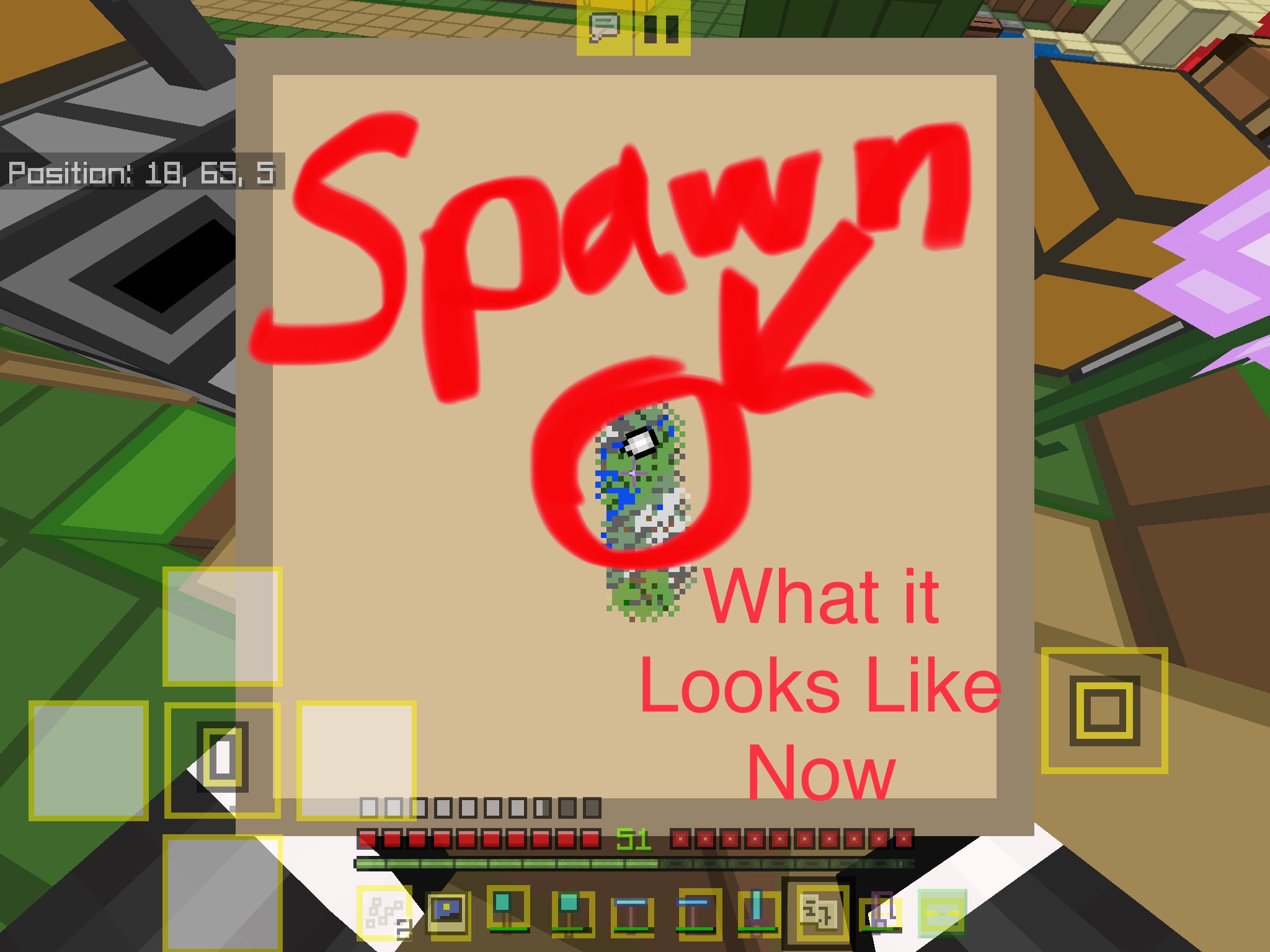
In my Minecraft world, all of the maps in the world suddenly went missing, and when I created a new one, the map number was back to #1. Also, I created the map in the same place as the other one, but instead of me being in the top left corner of the map, I ended up in the dead center, meaning that I would have to create multiple maps to map out the path from Spawn to the nearest Desert biome, which is around 2,000 blocks away. This happened after I updated Minecraft to 1.5.3. I am using Minecraft for iOS on an iPad Mini 4 with iOS 11.4 on it. It is really frustrating. Please
fix it.In my Minecraft world, all of the maps in the world suddenly went missing, and when I created a new one, the map number was back to #1. Also, I created the map in the same place as the other one, but instead of me being in the top left corner of the map, I ended up in the dead center, meaning that I would have to create multiple maps to map out the path from Spawn to the nearest Desert biome, which is around 2,000 blocks away. This happened after I updated Minecraft to 1.5.3. I am using Minecraft for iOS on an iPad Mini 4 with iOS 11.4 on it. It is really frustrating. Please comment below and vote for this issue if you have had this happen to you as well.
In my Minecraft world, all of the maps in the world suddenly went missing, and when I created a new one, the map number was back to #1. Also, I created the map in the same place as the other one, but instead of me being in the top left corner of the map, I ended up in the dead center, meaning that I would have to create multiple maps to map out the path from Spawn to the nearest Desert biome, which is around 2,000 blocks away. This happened after I updated Minecraft to 1.5.3. I am using Minecraft for iOS on an iPad Mini 4 with iOS 11.4 on it. It is really frustrating. Please comment below and vote for this issue if you have had this happen to you as well.
Update 8/17/18
I forgot to mention that I use that world to play with my friends through multiplayer, inviting them to the world through Xbox Live.
For YEARS now, my Minecraft has been glitched. I don’t know if it’s just me or what, but I can join my friends whenever I want, but anytime my friends try to join me, they get the “Unable to Connect to World” error.
We have tried everything (ON BOTH ENDS) from signing out of and then back into Xbox Live, closing and re-opening Minecraft, restarting my iPad, restarting their device (whether it is an Xbox, iOS, Android, tablet, etc.), trying other worlds, signing in on my other iPad and trying to have them join a world on the other iPad… EVEN DELETING AND REINSTALLING MINECRAFT HAS NOT WORKED! I have no clue what is causing it or why this is happening, but IT IS DRIVING ME INSANE! Please help!
EDIT: I just got done snooping around in my Xbox Live privacy settings and now my Minecraft is outright CRASHING when I try to open it!
For YEARS now, my Minecraft has been glitched. I don’t know if it’s just me or what, but I can join my friends whenever I want, but anytime my friends try to join me, they get the “Unable to Connect to World” error.
We have tried everything (ON BOTH ENDS) from signing out of and then back into Xbox Live, closing and re-opening Minecraft, restarting my iPad, restarting their device (whether it is an Xbox, iOS, Android, tablet, etc.), trying other worlds, signing in on my other iPad and trying to have them join a world on the other iPad… EVEN DELETING AND REINSTALLING MINECRAFT HAS NOT WORKED! I have no clue what is causing it or why this is happening, but IT IS DRIVING ME INSANE! Please help!
EDIT: I just got done snooping around in my Xbox Live privacy settings and now my Minecraft is outright CRASHING when I try to open it!
ANOTHER EDIT (6/18/19): Be prepared for a big textwall. I have a lot of information and I am not good at telling where I should stop and make another paragraph. I'm terribly sorry. I just have a lot of information to give, and when it comes to debugging, every detail counts, right? Anyways, try your best to get through it. Thank you. 😅
Apparently, the above glitch has affected EVERY Minecraft Bedrock Edition that I was signed into immediately after the editing of the Xbox Live Privacy Settings. When I opened Minecraft, it would IMMEDIATELY crash. In addition to this, the different Minecraft apps were on different iPads, which were on ENTIRELY DIFFERENT iOS VERSIONS, and it did not help if I switched to another Wi-Fi Network, switched to Cellular Data, or even turning on Airplane Mode altogether. To top it all off, there is another glitch where, if you are NOT CONNECTED TO THE INTERNET, OR ARE ON A WI-FI THAT FILTERS OUT XBOX LIVE, and try to open a Minecraft that is ALREADY signed into Xbox Live, it will try to sign in for about a minute before freezing for about 10 to 15 seconds... and then it crashes. The Xbox App does not seem to be affected by either of these glitches, HOWEVER, if you are under the SECOND circumstance, and try to choose the option "Sign Out of Xbox Live on ALL Apps on This Device," it WILL NOT SIGN OUT OF MINECRAFT UNTIL YOU ARE IN A POSITION WHERE A SUCCESSFUL CONNECTION TO THE XBOX LIVE SERVER CAN BE MADE, AND IS MADE. The FIRST glitch can ONLY BE FIXED WITH A COMPLETE DELETION AND REINSTALLATION OF MINECRAFT. OFFLOADING THE APP DOES NOT WORK!
Oh, and after deleting and reinstalling Minecraft, and then going into and changing some of my Router's settings, MY PERSONAL IPAD STILL CANNOT HOST MULTIPLAYER OUTSIDE OF LAN! HOWEVER, another iPad can now FINALLY host multiplayer worlds in Minecraft and have people join via Xbox Live. But my personal iPad is still out of luck.
For YEARS now, my Minecraft has been glitched. I don’t know if it’s just me or what, but I can join my friends whenever I want, but anytime my friends try to join me, they get the “Unable to Connect to World” error.
We have tried everything (ON BOTH ENDS) from signing out of and then back into Xbox Live, closing and re-opening Minecraft, restarting my iPad, restarting their device (whether it is an Xbox, iOS, Android, tablet, etc.), trying other worlds, signing in on my other iPad and trying to have them join a world on the other iPad… EVEN DELETING AND REINSTALLING MINECRAFT HAS NOT WORKED! I have no clue what is causing it or why this is happening, but IT IS DRIVING ME INSANE! Please help!
EDIT: I just got done snooping around in my Xbox Live privacy settings and now my Minecraft is outright CRASHING when I try to open it!
ANOTHER EDIT (6/18/19): Be prepared for a big textwall. I have a lot of information and I am not good at telling where I should stop and make another paragraph. I'm terribly sorry. I just have a lot of information to give, and when it comes to debugging, every detail counts, right? Anyways, try your best to get through it. Thank you. 😶😅
Apparently, the above glitch has affected EVERY Minecraft Bedrock Edition that I was signed into immediately after the editing of the Xbox Live Privacy Settings. When I opened Minecraft, it would IMMEDIATELY crash. In addition to this, the different Minecraft apps were on different iPads, which were on ENTIRELY DIFFERENT iOS VERSIONS, and it did not help if I switched to another Wi-Fi Network, switched to Cellular Data, or even turning on Airplane Mode altogether. To top it all off, there is another glitch where, if you are NOT CONNECTED TO THE INTERNET, OR ARE ON A WI-FI THAT FILTERS OUT XBOX LIVE, and try to open a Minecraft that is ALREADY signed into Xbox Live, it will try to sign in for about a minute before freezing for about 10 to 15 seconds... and then it crashes. The Xbox App does not seem to be affected by either of these glitches, HOWEVER, if you are under the SECOND circumstance, and try to choose the option "Sign Out of Xbox Live on ALL Apps on This Device," it WILL NOT SIGN OUT OF MINECRAFT UNTIL YOU ARE IN A POSITION WHERE A SUCCESSFUL CONNECTION TO THE XBOX LIVE SERVER CAN BE MADE, AND IS MADE. The FIRST glitch can ONLY BE FIXED WITH A COMPLETE DELETION AND REINSTALLATION OF MINECRAFT. OFFLOADING THE APP DOES NOT WORK!
Oh, and after deleting and reinstalling Minecraft, and then going into and changing some of my Router's settings, MY PERSONAL IPAD STILL CANNOT HOST MULTIPLAYER OUTSIDE OF LAN! HOWEVER, another iPad can now FINALLY host multiplayer worlds in Minecraft and have people join via Xbox Live. But my personal iPad is still out of luck.
Windows 10
![[Mojang] Mega_Spud (Jay Wells)](../../../data/avatars/users/92696.png)
Damariobros Please watch your language and keep comments related to new information only.
![[Mod] LateLag](../../../data/avatars/users/92884.png)
Damariobros - Please check if you're running the latest version of the game. There haven't been any new reports of this issue occurring in months.
The first image is after I have exited my world after a while. The second image is when I went to the settings for that world right afterwords, and the third image is of me exiting the world settings and the file size is back to normal!
For me, it just appears as a giant 3D version of the picture that appears when you have not gotten a thumbnail for a world on the selection screen being held in my hand, only happening with compasses. I have to get the angle just right in 3rd Person Front View or go into the inventory in the Classic UI to see all of it. It's quite funny in my opinion, yet it works fine in the hotbar even when being held.
I have a problem in my Singleplayer world. Whenever someone joins, whether it is via LAN or via Xbox Live, as the game finishes loading the world and logging them in, there is INSANE lag from the time the message appears in chat that they joined the game all the way to the point where they are able to walk and do stuff in the world. It's annoying as crap! It even happens on my 5GHz Wi-Fi! Fix it!
I have the same problem and I have 5GHz Wi-Fi AND 6GB+ on my iPad Mini 4! I need this fixed!
Same. Villagers are opening but ot closing. Lucky I have it on Peaceful Mode!
Hey Killerbeenl, check out this video. It will show you that it is NOT an Integer Overflow/Underflow.
THE LAST DAY of a MINECRAFT WORLD?! AntVenom
I am experiencing the same problem, though it started when I died for the first time in my world and has gotten worse with each time I died. It eventually dissipates, but comes back when I die again. It also happens on a much grander scale, sometimes even ******* up the ENTIRE IPAD to the point where forcing a Hard Restart will show a COMPLETELY MESSED UP BACKGROUND WHILE SHUTTING DOWN! It looks like it is the background, but it is very blurry, like it is when you have the Enter Passcode screen showing, as well as being split in half with one side showing a semi-normal background (remember, it is blurry) and the other side showing the background but it is appearing to be SCROLLING. That is what happens when I am doing a Force Restart when the iPad is bugged out by the game. Other effects include the Slide To Shut Down screen ABSOLUTELY NOT SHOWING UP, the iPad extremely laggy or sometimes even frozen and disabled COMPLETELY, and when that happens, if I press the Power Button to get it to go into sleep mode, then when it is pressed again to turn it on, it IS COMPLETELY DISABLED WITH A BLURRY BACKGROUND AND NOTHING ELSE! That is usually when I have to Force Restart it. Another thing that happens is that the RAM gets cleared (Not just MCPE crashing, but ALL apps, whether they are active or not), none of the apps wanting to open, including Settings and MCPE, the iPad suddenly shutting down completely and NOT turning on for AT LEAST 10 minutes, and an absolute METRIC CRAP-TON MORE. What happens if I get lucky and the glitching does not spread to the rest of the iPad include, MCPE crashing, the Chunk Errors you describe, INSANE lag (especially when looking at an area that has a lot of data like a bunch of Chests filled up with stuff), MCPE NOT opening for at least an hour or even until I restart the iPad, the Respawn Button being broken (that starts the instant I die), and even Multiplayer acting as if I were SIGNED OUT when I am actually signed in to Xbox Live. Those are just a few of the things that happen. The worst part? It started happening AFTER the latest update was installed (v1.1.4). Just be glad you have it easy with the problems you are having and telling about here, because the variation of your bug that I have is like a Lucky Block version of ExplodingTNT's Impossible Mode (https://m.youtube.com/watch?v=pJCLyF8HU-U). Take that link and go to 0:46 in the video. Anyways, I know your pain, because I am experiencing much worse right now, and I tried reporting my problem but they deleted it, because, well, let's just say I was a little too furious about the bug while writing it and was going "crazy-mouthed" in the report, as minutes before I got unlucky and experienced the WORST of the problem when I died thousands of blocks away and my iPad just completely shriveled up until I force restarted it. I hope they realize that it is a mistake that they are telling people that it is just some bad luck and brushing it off as some one-time thing. If I could, I would upvote this 37 times as an anonymous upvoter. Good luck in getting them to see what this bug really is. I will gather as much intelligence on this problem as I can and give it to Mojang in the form of one giant report.
I have the EXACT SAME problem on MCPE iOS, except that it will, at times, completely **** up my ENTIRE IPAD.
I have a variation of this bug, 10 times worse with a metric crap-ton more things that happen than just crashing. Check out my report. MCPE-22910
I have an iPad Mini 4 and my Logitech Focus Keyboard Case does NOTHING except for type things in. It doesn't even freaking change the hotkeys when I try to change them in settings! And it is even happening in v1.1.5!
+cookiebuild3r Didn't he clearly state that he tried that command and it did not work?
I got this problem and it started about 7 hours ago. I uninstalled the game and put it back on there, and it fixed it, and FINALLY an extremely nasty bug (which is an understatement put on top of itself 147 times) that I have dubbed "The Multiplayer Bug That Should Go To The 37th Basement Below H###." It was also the world that I have made the most progress on. I didn't even get to the nether when, yet again, some STUPID BUG comes and COMPLETELY F###S UP MY GAME AND MAKES IT A DEATH TRAP TO MY IPAD and I have to DELETE THE WORLD AND RESTART IT. This has happened OVER 10 TIMES! And this is the FINAL STRAW. I just want to host a multiplayer survival world with my friends without some STUPID S### SOMING IN AND MAKING ME DELETE THE WORLD OVER AND OVER AGAIN!
This happens to me too. I just ignore it.
It STILL happens!
Not all of us are able to edit the Minecraft code! Mojang, please fix it!