 Donna W
- dejaded1
- dejaded1
- Europe/Stockholm
- Yes
- No
 MCL-287
![[Mojang] Nathan Adams](../../../data/assets/gravatar/dinnerbone.png)
 MC-16187



 New launcher issue.JPG
Changed Environment:
OS: win 7 64 - bit
RAM: 16Gb
Java:ver 7-21OS: win 7 64 - bit
RAM: 16Gb
Java: "1.7.0_21"
Java(TM) SE Runtime Environment (build 1.7.0_21-b11)
Java HotSpot(TM) 64-Bit Server VM (build 23.21-b01, mixed mode)
Changed Summary:
Launcher freezes -only interact with register buttonLauncher gui freezes - no access to tabs
Changed Summary:
Launcher guifreezes- no access to tabsLauncher gui has limited visuals, can't select version - no access to tabs
Changed Description:
Ever since the update to 13w23b, I've encountered block lag. I had no block lag of any kind before on single or multiplayer.
When I logged out restarted my computer and logged back in was still there. But once I rode a horse far away from where the block lag was occurring (I thought that maybe all the horses near my house was causing it) the block lag was gone even after I returned home.
added new picture with login and password fields blocked
I can't click on any of the tabs. Where would I find the console output?
EDIT/UPDATE: While trying to find the console file, I found the launcher profile file. I changed the "username" field to my email address(used Dreamweaver). This allowed the "Play" button to become "active". See screenshot. All tabs remain inactive (can't access). However when I clicked on the grey area of the updates notes I was taken to a webpage. I assumed that something was visually hidden. Therefore, I typed my password in (even though I couldn't see any characters) and hit "Play".
As you can see from the screenshot the game started (it played normally). However the launcher remains as it was. No visuals, no interaction with tabs, and no version indicator.
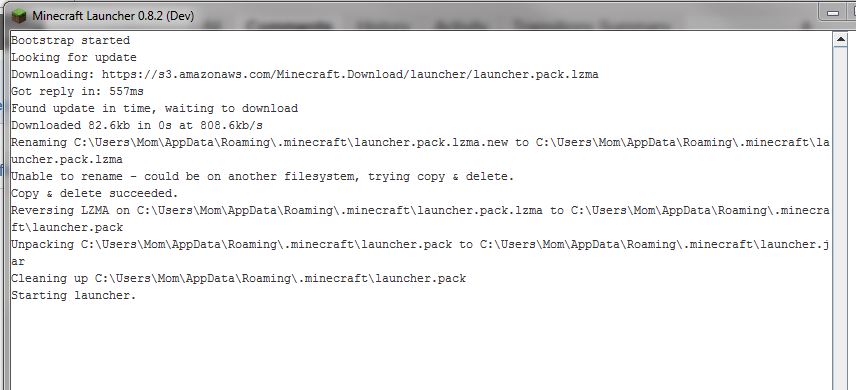
I have added two new screenshots. The first (new launcher issue4) is the loading text for the launcher. I could get a screenshot of this because the launcher completely froze on this screen. It happens occasionally, so I just close it restart and it behaves as described above. The second shot(new launcher issue5) is a copy paste of the development console output. Although I couldn't see it, I assumed it was there. I clicked on the tab and then clicked in the blank grey area. I then did a ctrl-a, ctrl-c and a ctrl-v into notepad. I hope this helps. I have no idea why only your launcher is like this. FTB, magiclauncher or any other I have tried does not do this and overall for vanilla Minecraft I would prefer to use your launcher.
The only custom theme I had was the background but just to be sure I switched to the default theme. This didn't fix the problem.
Block lag is when you break a block with an axe or pick and it takes several seconds to break into a particle you can pick up after the “block breaking” sound had occurred. I hope that clears it up. The lag has returned but it is not quite as severe yet but it seems to be worsening.
Also I can't seem to get an Enderman to try and kill me. I am standing under a two block high by 2 block wide overhang when I look at them. I hear the noise but then it stops and no Enderman comes even though I continue looking at it. Is this normal behavior?
Yes
This is not resolved I responde to an email indicating it was not resolved. I guess I should have responded here instead.
Server added as requested. Created in-game by pressing f3 +c for 10 seconds
As requested
This is what I got after blindly clicking the grey screen until it took me to a web page. I then clicked the development console tab (blindly assuming it was selected) and clicked int he grey area. then doing as you asked.
This is a scrennshot after I selected the Dev con tab. It is exactly the same as when I first open minecraft. The profile drop down box does not appear to function. I cannot press any of the profile buttons. The only thing I can do is click on the area that says "play offline". This brings the game up normally in "online" mode.
Done that several times. See above.
I meant see my original issue post. Somehow my issue got merged and my original post info is gone!!!
Is this the correct ticket. I was previously sent to another ticket which was "resolved" but didn't seem to be related to mine. The recent email I received was somewhat confusing. Please indicate how / where I am to find complete console output. Particularly if the same issues happen again. "Do you mean Dev Console? Screenshot?
This all the output that ctrl-s, ctrl-c and ctrl-v will give me. Note same grey screen except the login info is absent and I can't type it into the log-in box. (Good thing I saved my old install in a temp folder)
Hitting ctrl-home and doing the above (several fails) allowed me to get a little more of the dev console output:
Launcher dev console output from the second time I restarted the game. Note: no changes to the launcher interface. ie. log in name and password blank. None of the drop down boxes work (grey "data" areas)
The new launcher totally broke my ability to play minecraft!! Now it has forgotten my login details and I can't play!!! see screenshot.....
Ok, I got it to work. I used another PC logged in and closed the launcher. I copied the launcher_profiles.json from that pc to mine and restarted the launcher. Note: Everything is the same as the picture I just posted above, but when I clicked the greyed out play button, the game started. I may not be able to play any modded or previous version with your launcher but this way I can at least play the latest release.
I have a total 430 GB of free space.
I completely deleted all files in my .minecraft folder and reinstalled. This did not help.
Progress!!! I now see this. However I still cannot click any tabs or interact with the drop down boxes.
I really didn't do anything different. When I launched the game a new update for the launcher was downloaded. I couldn't do anything again. So after several attempts of shutting it down and restarting, I replaced the newly downloaded version of the launcher_profiles.json with my back-up version (the version I copied from another PC that I successfully logged in with). This time when I restarted I was presented with graphics (minecraft brown background) and an box I could interact with. It asked for my email and password. I entered this info and it gave me the gui you see in the screenshot above.
As I said before I still can't use the drop-down box or click the tabs etc.
I used a seed that previously had tons of horses in the plains biome. So far, even though I have encountered several plains biomes, I have found no horses yet. I've been searching in the direction that they were previously known to exist and beyond.
EDIT: Tons of sheep instead
EDIT2: I have finally found 3. (Went into creative mode and started flying everywhere.) 3 is a far cry from what this seed used to produce.
Sorry, but am I to understand that horse spawning has been seriously reduced?
I've found that no villages generated in my newly created world for 13w37b.
Note: I have not used this world in any previous version. I am not trying to transition a world to this snapshot.
No I can't I have an issue with the launcher that has never been resolved. So I can only use the latest and greatest version. I have a pretty good idea that the only thing that can fix it is to reinstall windows . I did however run Admist 3.2 and went to every location that said a village should spawn. No luck (As well I did some creative flying - no luck, Although the temples were where they were supposed to be.)
This says it is resolved. However I created a new world in the latest snapshot and there are still no villages generating.
Thank you for your response. I will wait for 13w38a.
Yay. It's fixed when starting a world in 13w38a. Thank you Dinnerbone!!!