 dpokor
- dpokor
- dpokor
- Europe/Stockholm
- Yes
- No
 MC-164123







Ever since the new rendering engine was introduced (19w38a/b if I recall correctly), performance has tanked even on very capable systems. I run the server on a separate computer to maximize FPS while playing on a 8700k at 5Ghz and 4000Mhz C16 RAM (60GB/s RAM throughput to keep java's garbage collection snappy, this settings have been thoroughly stresstested and memtested). Running the latest Windows 10, nVidia drivers and Java version.
I play with 28-chunk draw distance (server chunkloading radius is 24) with maxed settings including biome blend to 15x15 except Reduced Particles : pretty much the automatic settings when starting MC on my machine except dragging the chunk loading distance to 28 and turning down the particles a Notch (he, he).
I used to have >110FPS in my base depending on where I'm looking, up to the last snapshot with the old rendering engine. With the new rendering engine the FPS halved and now the game regularly sits at 50-55FPS. I'm not very technical so I don't know why that's the case and can't pinpoint the source of the issue, but it's been ongoing for 5 snapshots already and not improving appreciably. Performance was supposed to get better with the new rendering but apparently it doesn't work as intended. My friends also experienced the same issues when testing the new snapshots and some of them have AMD GPUs so I don't think is driver related.
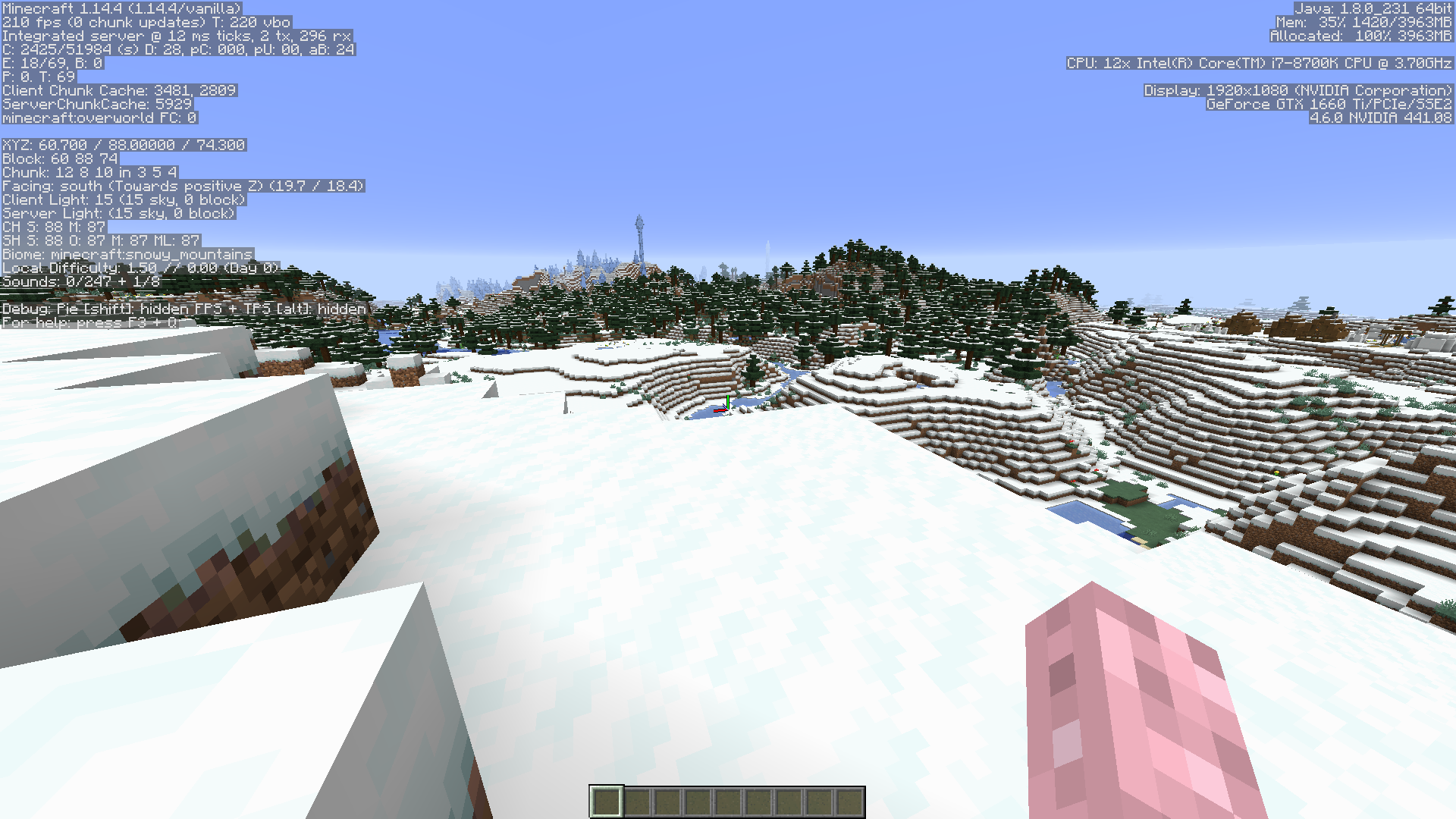
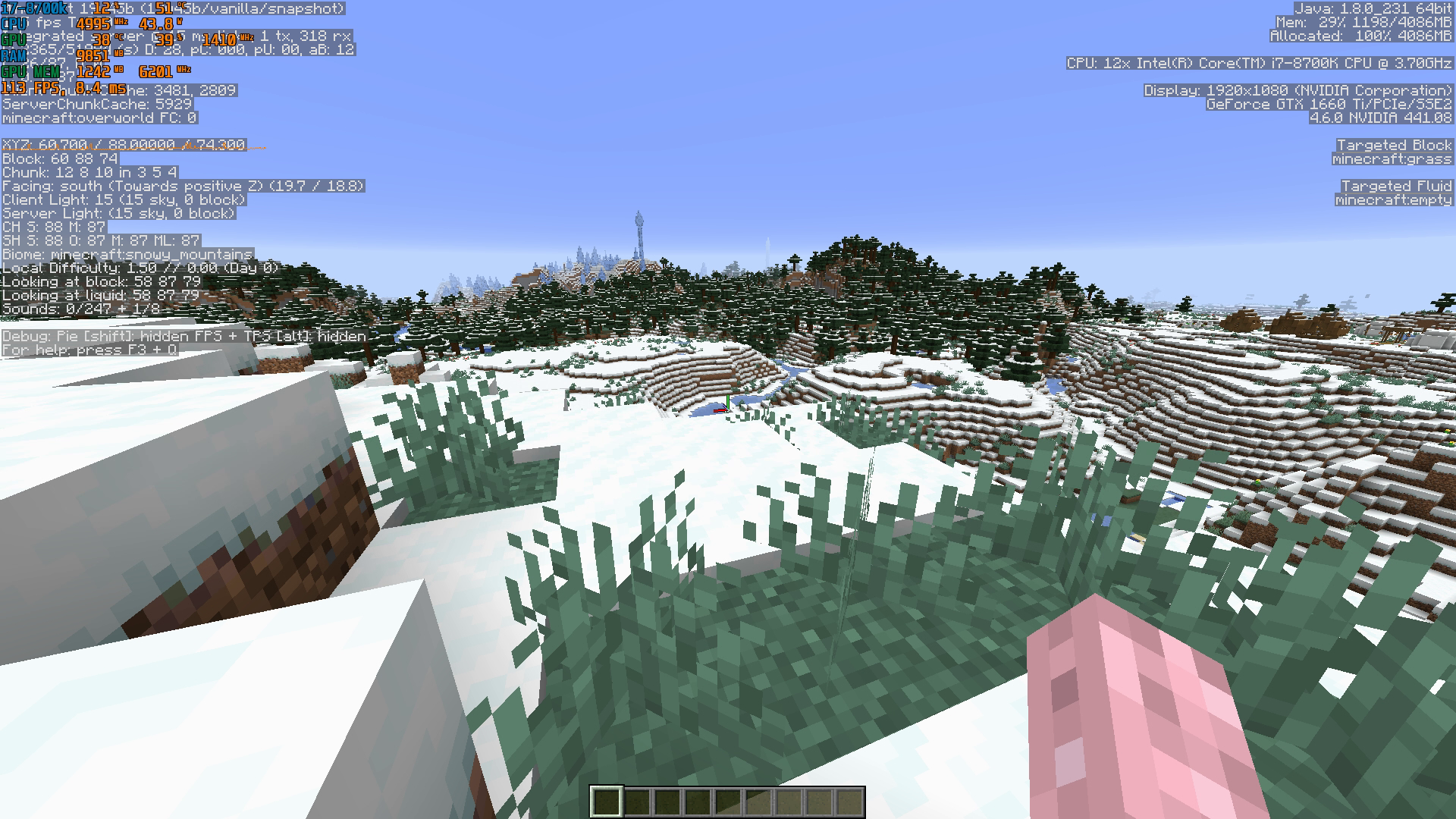
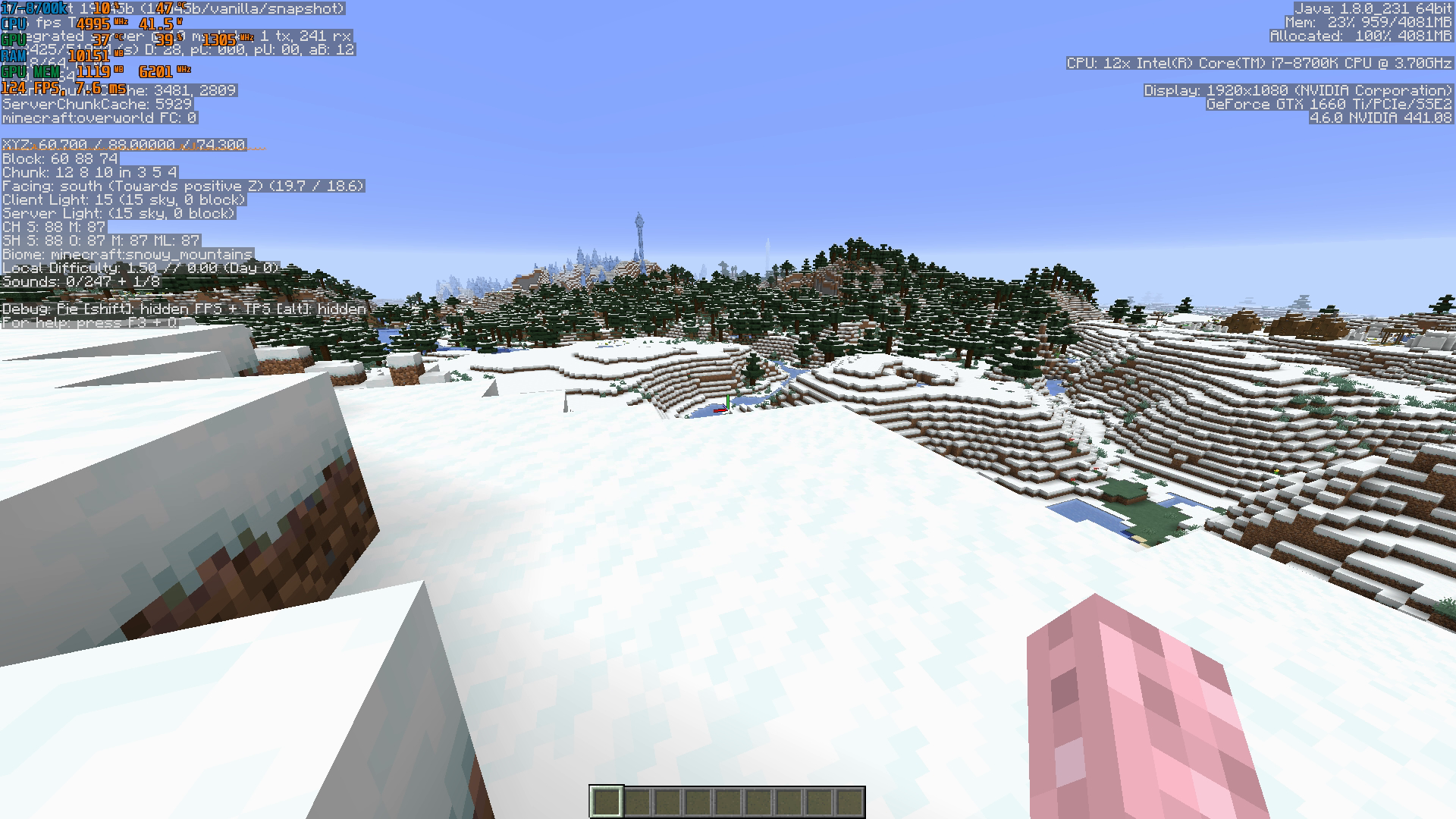
I took two comparative screenshots running 19w34a and 19w42a on the same server, same spot and facing the same direction after giving the game 2 minutes to load the chunks around the base: you can see in the early snapshot I have 115FPS while with the new rendering engine I have 55FPS even with less villagers on screen.
Also the game seems to be unable to retrieve GPU info with the new rendering engine (it's the same 1660Ti and driver version for both screenshots), not sure if that's related to the performance issues and if it should be reported on a separate bug report.
Ever since the new rendering engine was introduced (19w38a/b if I recall correctly), performance has tanked even on very capable systems. I run the server on a separate computer to maximize FPS while playing on a 8700k at 5Ghz and 4000Mhz C16 RAM (60GB/s RAM throughput to keep java's garbage collection snappy, this settings have been thoroughly stresstested and memtested). Running the latest Windows 10, nVidia drivers and Java version.
I play with 28-chunk draw distance (server chunkloading radius is 24) with maxed settings including biome blend to 15x15 except Reduced Particles : pretty much the automatic settings when starting MC on my machine except dragging the chunk loading distance to 28 and turning down the particles a Notch (he, he).
I used to have >110FPS in my base depending on where I'm looking, up to the last snapshot with the old rendering engine. With the new rendering engine the FPS halved and now the game regularly sits at 50-55FPS. I'm not very technical so I don't know why that's the case and can't pinpoint the source of the issue, but it's been ongoing for 5 snapshots already and not improving appreciably. Performance was supposed to get better with the new rendering but apparently it doesn't work as intended. My friends also experienced the same issues when testing the new snapshots and some of them have AMD GPUs so I don't think is driver related.
I took two comparative screenshots running 19w34a and 19w42a on the same server, same spot and facing the same direction after giving the game 2 minutes to load the chunks around the base: you can see in the early snapshot I have 115FPS while with the new rendering engine I have 55FPS even with less villagers on screen.
Also the game seems to be unable to retrieve GPU info with the new rendering engine (it's the same 1660Ti and driver version for both screenshots), not sure if that's related to the performance issues and if it should be reported on a separate bug report.
Relevant update in a comment I made below: the GPU appears to not be boosting to 3D clocks after a minute into the world like with previous rendering engine.
Ever since the new rendering engine was introduced (19w38a/b if I recall correctly), performance has tanked even on very capable systems. I run the server on a separate computer to maximize FPS while playing on a 8700k at 5Ghz and 4000Mhz C16 RAM (60GB/s RAM throughput to keep java's garbage collection snappy, this settings have been thoroughly stresstested and memtested). Running the latest Windows 10, nVidia drivers and Java version.
I play with 28-chunk draw distance (server chunkloading radius is 24) with maxed settings including biome blend to 15x15 except Reduced Particles : pretty much the automatic settings when starting MC on my machine except dragging the chunk loading distance to 28 and turning down the particles a Notch (he, he).
I used to have >110FPS in my base depending on where I'm looking, up to the last snapshot with the old rendering engine. With the new rendering engine the FPS halved and now the game regularly sits at 50-55FPS. I'm not very technical so I don't know why that's the case and can't pinpoint the source of the issue, but it's been ongoing for 5 snapshots already and not improving appreciably. Performance was supposed to get better with the new rendering but apparently it doesn't work as intended. My friends also experienced the same issues when testing the new snapshots and some of them have AMD GPUs so I don't think is driver related.
I took two comparative screenshots running 19w34a and 19w42a on the same server, same spot and facing the same direction after giving the game 2 minutes to load the chunks around the base: you can see in the early snapshot I have 115FPS while with the new rendering engine I have 55FPS even with less villagers on screen.
Also the game seems to be unable to retrieve GPU info with the new rendering engine (it's the same 1660Ti and driver version for both screenshots), not sure if that's related to the performance issues and if it should be reported on a separate bug report.
Relevant update in a comment I made below: the GPU appears to not be boosting to 3D clocks after a minute into the world like with previous rendering engine. Read it and try to reproduce the test using the overlay of MSI's Afterburner. Download it, and it will side-install RivaTuner Statistics Server as a component, where you can toggle on an overlay with your performance numbers. Run Afterburner, open the Windows 10 System Tray and click on RTSS icon (a screen with a 60 on it), then click a toggle in the top left that says "Show On-Screen Display" and open Minecraft. GPU clocks should be there by default, but if not you can search within Afterburner's configuration, tab "Monitoring" and scroll down to GPU Core Clock then tick the option "Show in OSD". Restart Minecraft for the new info of OSD to show up.
Ever since the new rendering engine was introduced (19w38a/b if I recall correctly), performance has tanked even on very capable systems. I run the server on a separate computer to maximize FPS while playing on a 8700k at 5Ghz and 4000Mhz C16 RAM (60GB/s RAM throughput to keep java's garbage collection snappy, this settings have been thoroughly stresstested and memtested). Running the latest Windows 10, nVidia drivers and Java version.
I play with 28-chunk draw distance (server chunkloading radius is 24) with maxed settings including biome blend to 15x15 except Reduced Particles
: pretty much the automatic settings when starting MC on my machine except dragging the chunk loading distance to 28 and turning down the particles a Notch (he, he).
I used to have >110FPS in my base depending on where I'm looking, up to the last snapshot with the old rendering engine. With the new rendering engine the FPS halved and now the game regularly sits at 50-55FPS. I'm not very technical so I don't know why that's the case and can't pinpoint the source of the issue, but it's been ongoing for 5 snapshots already and not improving appreciably. Performance was supposed to get better with the new rendering but apparently it doesn't work as intended. My friends also experienced the same issues when testing the new snapshots and some of them have AMD GPUs so I don't think is driver related.
I took
twocomparative screenshots running 19w34a and 19w42a on the same server, same spot and facing the same direction after giving the game 2 minutes to load the chunks around the base: you can see in the early snapshot I have 115FPS while with the new rendering engine I have 55FPS even with less villagers on screen.Also the game seems to be unable to retrieve GPU info with the new rendering engine (it's the same 1660Ti and driver version for both screenshots), not sure if that's related to the performance issues and if it should be reported on a separate bug report.
Relevant update in a comment I made below: the GPU appears to not be boosting to 3D clocks after a minute into the world like with previous rendering engine. Read it and try to reproduce the test using the overlay of MSI's Afterburner. Download it, and it will side-install RivaTuner Statistics Server as a component, where you can toggle on an overlay with your performance numbers. Run Afterburner, open the Windows 10 System Tray and click on RTSS icon (a screen with a 60 on it), then click a toggle in the top left that says "Show On-Screen Display" and open Minecraft. GPU clocks should be there by default, but if not you can search within Afterburner's configuration, tab "Monitoring" and scroll down to GPU Core Clock then tick the option "Show in OSD". Restart Minecraft for the new info of OSD to show up.
Ever since the new rendering engine was introduced (19w38a/b if I recall correctly), performance has tanked even on very capable systems. I run the server on a separate computer to maximize FPS while playing on a 8700k at 5Ghz and 4000Mhz C16 RAM (60GB/s RAM throughput to keep java's garbage collection snappy, this settings have been thoroughly stresstested and memtested). Running the latest Windows 10, nVidia drivers and Java version.
I play with 28-chunk draw distance (server chunkloading radius is 24) with maxed settings including biome blend to 15x15 except Reduced Particles. Used to have >110FPS in my base depending on where I'm looking, up to the last snapshot with the old rendering engine. With the new rendering engine the FPS halved and now the game regularly sits at 50-55FPS. Performance was supposed to get better with the new rendering but apparently it doesn't work as intended. My friends also experienced the same issues when testing the new snapshots and some of them have AMD GPUs so I don't think is driver related.
I took comparative screenshots running 19w34a and 19w42a on the same server, same spot and facing the same direction after giving the game 2 minutes to load the chunks around the base: you can see in the early snapshot I have 115FPS while with the new rendering engine I have 55FPS even with less villagers on screen.
Also the game seems to be unable to retrieve GPU info with the new rendering engine (it's the same 1660Ti and driver version for both screenshots), not sure if that's related to the performance issues and if it should be reported on a separate bug report.
Relevant update in a comment I made below: the GPU appears to not be boosting to 3D clocks after a minute into the world like with previous rendering engine. Read it and try to reproduce the test using the overlay of MSI's Afterburner. Download it, and it will side-install RivaTuner Statistics Server as a component, where you can toggle on an overlay with your performance numbers. Run Afterburner, open the Windows 10 System Tray and click on RTSS icon (a screen with a 60 on it), then click a toggle in the top left that says "Show On-Screen Display" and open Minecraft. GPU clocks should be there by default, but if not you can search within Afterburner's configuration, tab "Monitoring" and scroll down to GPU Core Clock then tick the option "Show in OSD". Restart Minecraft for the new info of OSD to show up.
Ever since the new rendering engine was introduced (19w38a/b if I recall correctly), performance has tanked even on very capable systems. I run the server on a separate computer to maximize FPS while playing on a 8700k at 5Ghz and 4000Mhz C16 RAM (60GB/s RAM throughput to keep java's garbage collection snappy, this settings have been thoroughly stresstested and memtested). Running the latest Windows 10, nVidia drivers and Java version.
I play with 28-chunk draw distance (server chunkloading radius is 24) with maxed settings including biome blend to 15x15 except Reduced Particles. Used to have >110FPS in my base depending on where I'm looking, up to the last snapshot with the old rendering engine. With the new rendering engine the FPS halved and now the game regularly sits at 50-55FPS. Performance was supposed to get better with the new rendering but apparently it doesn't work as intended. My friends also experienced the same issues when testing the new snapshots and some of them have AMD GPUs so I don't think is driver related.
I took comparative screenshots running 19w34a and 19w42a on the same server, same spot and facing the same direction after giving the game 2 minutes to load the chunks around the base: you can see in the early snapshot I have 115FPS while with the new rendering engine I have 55FPS even with less villagers on screen.
Also the game seems to be unable to retrieve GPU info with the new rendering engine (it's the same 1660Ti and driver version for both screenshots), not sure if that's related to the performance issues and if it should be reported on a separate bug report.
Relevant update in a comment I made below: the GPU appears to not be boosting to 3D clocks after a minute into the world like with previous rendering engine. Read it and try to reproduce the test using the overlay of MSI's Afterburner. Download it, and it will side-install RivaTuner Statistics Server as a component, where you can toggle on an overlay with your performance numbers. Run Afterburner, open the Windows 10 System Tray and click on RTSS icon (a screen with a 60 on it), then click a toggle in the top left that says "Show On-Screen Display" and open Minecraft. GPU clocks should be there by default, but if not you can search within Afterburner's configuration, tab "Monitoring" and scroll down to GPU Core Clock then tick the option "Show in OSD". Restart Minecraft for the new info of OSD to show up. Ofc you can use your own monitoring tools if you prefer so, just describing what I'm running currently and how to set it up.
Ever since the new rendering engine was introduced (19w38a/b if I recall correctly), performance has tanked even on very capable systems. I run the server on a separate computer to maximize FPS while playing on a 8700k at 5Ghz and 4000Mhz C16 RAM (60GB/s RAM throughput to keep java's garbage collection snappy, this settings have been thoroughly stresstested and memtested). Running the latest Windows 10, nVidia drivers and Java version.
I play with 28-chunk draw distance (server chunkloading radius is 24) with maxed settings including biome blend to 15x15 except Reduced Particles. Used to have >110FPS in my base depending on where I'm looking, up to the last snapshot with the old rendering engine. With the new rendering engine the FPS halved and now the game regularly sits at 50-55FPS. Performance was supposed to get better with the new rendering but apparently it doesn't work as intended. My friends also experienced the same issues when testing the new snapshots and some of them have AMD GPUs so I don't think is driver related.
I took comparative screenshots running 19w34a and 19w42a on the same server, same spot and facing the same direction after giving the game 2 minutes to load the chunks around the base: you can see in the early snapshot I have 115FPS while with the new rendering engine I have 55FPS even with less villagers on screen.
Also the game seems to be unable to retrieve GPU info with the new rendering engine (it's the same 1660Ti and driver version for both screenshots), not sure if that's related to the performance issues and if it should be reported on a separate bug report.
Relevant update in a comment I made below: the GPU appears to not be boosting to 3D clocks after a minute into the world like with previous rendering engine. Read it and you can try to reproduce the test using the overlay of MSI's Afterburner. Download it, and it will side-install RivaTuner Statistics Server as a component, where you can toggle on an overlay with your performance numbers. Run Afterburner, open the Windows 10 System Tray and click on RTSS icon (a screen with a 60 on it), then click a toggle in the top left that says "Show On-Screen Display" and open Minecraft. GPU clocks should be there by default, but if not you can search within Afterburner's configuration, tab "Monitoring" and scroll down to GPU Core Clock then tick the option "Show in OSD". Restart Minecraft for the new info of OSD to show up. Ofc you can use your own monitoring tools if you prefer so, just describing what I'm running currently and how to set it up.
Ever since the new rendering engine was introduced (19w38a/b if I recall correctly), performance has tanked even on very capable systems. I run the server on a separate computer to maximize FPS while playing on a 8700k at 5Ghz and 4000Mhz C16 RAM (60GB/s RAM throughput to keep java's garbage collection snappy, this settings have been thoroughly stresstested and memtested). Running the latest Windows 10, nVidia drivers and Java version.
I play with 28-chunk draw distance (server chunkloading radius is 24) with maxed settings including biome blend to 15x15 except Reduced Particles. Used to have >110FPS in my base depending on where I'm looking, up to the last snapshot with the old rendering engine. With the new rendering engine the FPS halved and now the game regularly sits at 50-55FPS. Performance was supposed to get better with the new rendering but apparently it doesn't work as intended. My friends also experienced the same issues when testing the new snapshots and some of them have AMD GPUs so I don't think is driver related.
I took comparative screenshots running 19w34a and 19w42a on the same server, same spot and facing the same direction after giving the game 2 minutes to load the chunks around the base: you can see in the early snapshot I have 115FPS while with the new rendering engine I have 55FPS even with less villagers on screen.
Also the game seems to be unable to retrieve GPU info with the new rendering engine (it's the same 1660Ti and driver version for both screenshots), not sure if that's related to the performance issues and if it should be reported on a separate bug report.
Relevant update in a comment I made below: the GPU appears to not be boosting to 3D clocks after a minute into the world like with previous rendering engine.Read it and you can try to reproduce the test using the overlay of MSI's Afterburner. Download it, and it will side-installRivaTunerStatistics Server as a component, where you can toggle onan overlay with your performance numbers. Run Afterburner, open the Windows 10 System Tray and click on RTSS icon (a screen with a 60 on it), then click a toggle in the top left that says "Show On-Screen Display" and open Minecraft. GPU clocks should be there by default, but if not you can search withinAfterburner's configuration, tab "Monitoring" and scroll down to GPU Core Clock then tick the option "Show in OSD". Restart Minecraft for the new info of OSD to show up. Ofc you can use your own monitoring tools if you prefer so, just describing what I'm running currently and how to set it up.The GPUs are not boosting to 3D clocks, someone in the rendering team has to enable a flag or change a tag somewhere in the code to give the GPUs the memo that this particular OpenGL load is 3D rendering instead of general computing or crypto mining. Then we can perhaps start talking about optimization, which is way worse even with the GPU boosting correctly. Spoiler alert: -25%.
-First, a baseline test of 1.14.4 with no tweaks or shenanigans. Minecraft Seed for the latest round of tests is "test2", fresh generated world. About 200FPS after a minute of waiting until GPU clocks stabilize up. 44%GPU utilization at 2025Mhz.

-then 1.15-pre1 with no tweaks or shenanigans, reusing the world from 1.14.4 due to the bugfixing of world generation resulting in different visuals in some places, want a 100% correlated test here within reason (villagers or mobs popping in sight). About 110FPS, 38%GPU utilization at 1395Mhz (which is 2D-mode clocks)
-then you can force the driver to boost the GPU to Maximum Performance via the nVidia Control Panel (right-click in windows desktop): you have to manually add the javaw.exe in the Manage 3D Configuration tab to do so, AND manually select the GPU (1660Ti in this example) as the predetermined OpenGL Renderer. The workaround does not work with only one of the two fixes applied; and unfortunately I can't help Radeon users because I don't have one of their GPUs. Adding a screenshot of my own for visual reference, sorry it's in spanish but I think I'd have to change my OS language and reinstall the drivers to show you in english.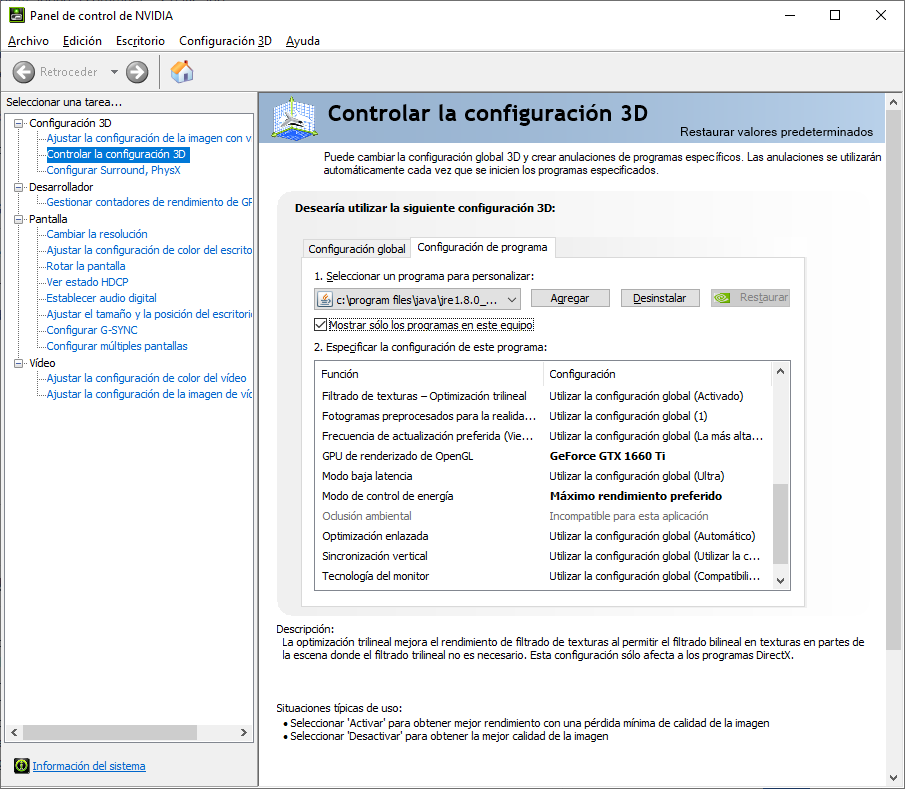

This workaround results in peaks of about 155-160FPS with 39% GPU utilization at 2025Mhz. GPU frequency usually dips below because there seems to be a "ghost" framerate limiter so the game hovers around 150±5FPS; perhaps it's a frequency-related bottleneck from the new rendering engine. I have the framerate unlimited as you can see in the F3 tags top left. Somehow, the illusion breaks when you look around as the GPU goes insane and it downclocks for no apparent reason other than refreshing the frame buffer and probably the texture buffer too; it dips well below the 60FPS mark which is quite a painful disparity between the top and bottom range of the framerate during playtime.
----------------------
TL;DR: in the same benchmarking conditions, 1.14.4 was giving 200FPS, 1.15-pre1 gives 110FPS if you're an average user or 150FPS if you know how to force your GPU as the OpenGL renderer and bruteforce Maximum Performance or 3D clocks-mode on it, but then the game stutters insanely when you actually look around and try to play instead of benchmark it. That's a -25% direct performance improvement in the absolute best case scenario.
GPU Frequency can be observed through gpuZ, hwinfo64, Afterburner or Rivatuner RTSS; there's plenty of material online if you google any of those names to check how your GPUs are behaving and/or toggling overlays with real time reporting. It would be nice if Minecraft could retrieve the info itself and display it in the F3 menu, it would make these issues more ovbious in the future but that's maybe besides the point of this bug report.
The GPUs are not boosting to 3D clocks, someone in the rendering team has to enable a flag or change a tag somewhere in the code to give the GPUs the memo that this particular OpenGL load is 3D rendering instead of general computing or crypto mining. Then we can perhaps start talking about optimization, which is way worse even with the GPU boosting correctly. Spoiler alert: -25%.
-First, a baseline test of 1.14.4 with no tweaks or shenanigans. Minecraft Seed for the latest round of tests is "test2", fresh generated world. About 200FPS after a minute of waiting until GPU clocks stabilize up. 44%GPU utilization at 2025Mhz.
-then 1.15-pre1 with no tweaks or shenanigans, reusing the world from 1.14.4 due to the bugfixing of world generation resulting in different visuals in some places, want a 100% correlated test here within reason (villagers or mobs popping in sight). About 110FPS, 38%GPU utilization at 1395Mhz (which is 2D-mode clocks)
-then you can force the driver to boost the GPU to Maximum Performance via the nVidia Control Panel (right-click in windows desktop): you have to manually add the javaw.exe in the Manage 3D Configuration tab to do so, AND manually select the GPU (1660Ti in this example) as the predetermined OpenGL Renderer. The workaround does not work with only one of the two fixes applied; and unfortunately I can't help Radeon users because I don't have one of their GPUs. Adding a screenshot of my own for visual reference, sorry it's in spanish but I think I'd have to change my OS language and reinstall the drivers to show you in english.
This workaround results in peaks of about 155-160FPS with 39% GPU utilization at 2025Mhz. GPU frequency usually dips below because there seems to be a "ghost" framerate limiter so the game hovers around 150±5FPS; perhaps it's a frequency-related bottleneck from the new rendering engine. I have the framerate unlimited as you can see in the F3 tags top left. Somehow, the illusion breaks when you look around as the GPU goes insane and it downclocks for no apparent reason other than refreshing the frame buffer and probably the texture buffer too; it dips well below the 60FPS mark which is quite a painful disparity between the top and bottom range of the framerate during playtime. In 1.14.4 it dips from 200FPS to 120ish during normal gameplay or 100FPS if I really try hard to spin around with the mouse.
----------------------
TL;DR: in the same benchmarking conditions, 1.14.4 was giving 200FPS, 1.15-pre1 gives 110FPS if you're an average user or 150FPS if you know how to force your GPU as the OpenGL renderer and bruteforce Maximum Performance or 3D clocks-mode on it, but then the game stutters insanely when you actually look around and try to play instead of benchmark it. That's a -25% direct performance improvement in the absolute best case scenario.
GPU Frequency can be observed through gpuZ, hwinfo64, Afterburner or Rivatuner RTSS; there's plenty of material online if you google any of those names to check how your GPUs are behaving and/or toggling overlays with real time reporting. It would be nice if Minecraft could retrieve the info itself and display it in the F3 menu, it would make these issues more ovbious in the future but that's maybe besides the point of this bug report.
The GPUs are not boosting to 3D clocks, someone in the rendering team has to enable a flag or change a tag somewhere in the code to give the GPUs the memo that this particular OpenGL load is 3D rendering instead of general computing or crypto mining. Then we can perhaps start talking about optimization, which is way worse even with the GPU boosting correctly. Spoiler alert: -25%.
-First, a baseline test of 1.14.4 with no tweaks or shenanigans. Minecraft Seed for the latest round of tests is "test2", fresh generated world with standard settings. About 200FPS after a minute of waiting until GPU clocks stabilize up. 44%GPU utilization at 2025Mhz.
-then 1.15-pre1 with no tweaks or shenanigans, reusing the world from 1.14.4 due to the bugfixing of world generation resulting in different visuals in some places, want a 100% correlated test here within reason (villagers or mobs popping in sight). About 110FPS, 38%GPU utilization at 1395Mhz (which is 2D-mode clocks)
-then you can force the driver to boost the GPU to Maximum Performance via the nVidia Control Panel (right-click in windows desktop): you have to manually add the javaw.exe in the Manage 3D Configuration tab to do so, AND manually select the GPU (1660Ti in this example) as the predetermined OpenGL Renderer. The workaround does not work with only one of the two fixes applied; and unfortunately I can't help Radeon users because I don't have one of their GPUs. Adding a screenshot of my own for visual reference, sorry it's in spanish but I think I'd have to change my OS language and reinstall the drivers to show you in english.
This workaround results in peaks of about 155-160FPS with 39% GPU utilization at 2025Mhz. GPU frequency usually dips below because there seems to be a "ghost" framerate limiter so the game hovers around 150±5FPS; perhaps it's a frequency-related bottleneck from the new rendering engine. I have the framerate unlimited as you can see in the F3 tags top left. Somehow, the illusion breaks when you look around as the GPU goes insane and it downclocks for no apparent reason other than refreshing the frame buffer and probably the texture buffer too; it dips well below the 60FPS mark which is quite a painful disparity between the top and bottom range of the framerate during playtime. In 1.14.4 it dips from 200FPS to 120ish during normal gameplay or 100FPS if I really try hard to spin around with the mouse.
----------------------
TL;DR: in the same benchmarking conditions, 1.14.4 was giving 200FPS, 1.15-pre1 gives 110FPS if you're an average user or 150FPS if you know how to force your GPU as the OpenGL renderer and bruteforce Maximum Performance or 3D clocks-mode on it, but then the game stutters insanely when you actually look around and try to play instead of benchmark it. That's a -25% direct performance improvement in the absolute best case scenario.
GPU Frequency can be observed through gpuZ, hwinfo64, Afterburner or Rivatuner RTSS; there's plenty of material online if you google any of those names to check how your GPUs are behaving and/or toggling overlays with real time reporting. It would be nice if Minecraft could retrieve the info itself and display it in the F3 menu, it would make these issues more ovbious in the future but that's maybe besides the point of this bug report.
The GPUs are not boosting to 3D clocks, someone in the rendering team has to enable a flag or change a tag somewhere in the code to give the GPUs the memo that this particular OpenGL load is 3D rendering instead of general computing or crypto mining. Then we can perhaps start talking about optimization, which is way worse even with the GPU boosting correctly. Spoiler alert: -25%.
-First, a baseline test of 1.14.4 with no tweaks or shenanigans. Minecraft Seed for the latest round of tests is "test2", fresh generated world with standard settings. About 200FPS after a minute of waiting until GPU clocks stabilize up. 44%GPU utilization at 2025Mhz.
-then 1.15-pre1 with no tweaks or shenanigans, reusing the world from 1.14.4 due to the bugfixing of world generation resulting in different visuals in some places, want a 100% correlated test here within reason (villagers or mobs popping in sight). About 110FPS, 38%GPU utilization at 1395Mhz (which is 2D-mode clocks)
-then you can force the driver to boost the GPU to Maximum Performance via the nVidia Control Panel (right-click in windows desktop): you have to manually add the javaw.exe in the Manage 3D Configuration tab to do so, AND manually select the GPU (1660Ti in this example) as the predetermined OpenGL Renderer. The workaround does not work with only one of the two fixes applied; and unfortunately I can't help Radeon users because I don't have one of their GPUs. Adding a screenshot of my own for visual reference, sorry it's in spanish but I think I'd have to change my OS language and reinstall the drivers to show you in english.
This workaround results in peaks of about 155-160FPS with 39% GPU utilization at 2025Mhz. GPU frequency usually dips below because there seems to be a "ghost" framerate limiter so the game hovers around 150±5FPS; perhaps it's a frequency-related bottleneck from the new rendering engine. I have the framerate unlimited as you can see in the F3 tags top left. Somehow, the illusion breaks when you look around as the GPU goes insane and it downclocks for no apparent reason other than refreshing the frame buffer and probably the texture buffer too; it dips well below the 60FPS mark which is quite a painful disparity between the top and bottom range of the framerate during playtime. In 1.14.4 it dips from 200FPS to 120ish during normal gameplay or 100FPS if I really try hard to spin around with the mouse.
----------------------
TL;DR: in the same benchmarking conditions, 1.14.4 was giving 200FPS, 1.15-pre1 gives 110FPS if you're an average user or 150FPS if you know how to force your GPU as the OpenGL renderer and bruteforce Maximum Performance or 3D clocks-mode on it, but then the game stutters insanely when you actually look around and try to play instead of benchmark it. That's a -25% direct performance improvement in the absolute best case scenario.
GPU Frequency can be observed through gpuZ, hwinfo64, Afterburner or Rivatuner RTSS; there's plenty of material online if you google any of those names to check how your GPUs are behaving and/or toggling overlays with real time reporting. It would be nice if Minecraft could retrieve the info itself and display it in the F3 menu, it would make these issues more ovbious in the future but that's maybe besides the point of this bug report.The GPUs are not boosting to 3D clocks, someone in the rendering team has to enable a flag or change a tag somewhere in the code to give the GPUs the memo that this particular OpenGL load is 3D rendering instead of general computing or crypto mining. Then we can perhaps start talking about optimization, which is way worse even with the GPU boosting correctly. Spoiler alert: -25%.
-First, a baseline test of 1.14.4 with no tweaks or shenanigans. Minecraft Seed for the latest round of tests is "test2", fresh generated world with standard settings. About 200FPS after a minute of waiting until GPU clocks stabilize up. 44%GPU utilization at 2025Mhz.
-then 1.15-pre1 with no tweaks or shenanigans, reusing the world from 1.14.4 due to the bugfixing of world generation resulting in different visuals in some places, want a 100% correlated test here within reason (villagers or mobs popping in sight). About 110FPS, 38%GPU utilization at 1395Mhz (which is 2D-mode clocks)
-then you can force the driver to boost the GPU to Maximum Performance via the nVidia Control Panel (right-click in windows desktop): you have to manually add the javaw.exe in the Manage 3D Configuration tab to do so, AND manually select the GPU (1660Ti in this example) as the predetermined OpenGL Renderer. The workaround does not work with only one of the two fixes applied; and unfortunately I can't help Radeon users because I don't have one of their GPUs. Adding a screenshot of my own for visual reference, sorry it's in spanish but I think I'd have to change my OS language and reinstall the drivers to show you in english.
This workaround results in peaks of about 155-160FPS with 39% GPU utilization at 2025Mhz. GPU frequency usually dips below because there seems to be a "ghost" framerate limiter so the game hovers around 150±5FPS; perhaps it's a frequency-related bottleneck from the new rendering engine. I have the framerate unlimited as you can see in the F3 tags top left. Somehow, the illusion breaks when you look around as the GPU goes insane and it downclocks for no apparent reason other than refreshing the frame buffer and probably the texture buffer too; it dips well below the 60FPS mark which is quite a painful disparity between the top and bottom range of the framerate during playtime. In 1.14.4 it dips from 200FPS to 120ish during normal gameplay or 100FPS if I really try hard to spin around with the mouse.
----------------------
TL;DR: in the same benchmarking conditions, 1.14.4 was giving 200FPS, 1.15-pre1 gives 110FPS if you're an average user or 150FPS if you know how to force your GPU as the OpenGL renderer and bruteforce Maximum Performance or 3D clocks-mode on it, but then the game stutters insanely when you actually look around and try to play instead of benchmark it. That's a -25% direct performance improvement in the absolute best case scenario.
GPU Frequency can be observed through gpuZ, hwinfo64, Afterburner or Rivatuner RTSS; there's plenty of material online if you google any of those names to check how your GPUs are behaving and/or toggling overlays with real time reporting. It would be nice if Minecraft could retrieve the info itself and display it in the F3 menu, it would make these issues more ovbious in the future but that's maybe besides the point of this bug report.
The GPUs are not boosting to 3D clocks, someone in the rendering team has to enable a flag or change a tag somewhere in the code to give the GPUs the memo that this particular OpenGL load is 3D rendering instead of general computing or crypto mining. Then we can perhaps start talking about optimization, which is way worse even with the GPU boosting correctly. Spoiler alert:
-25%.-First, a baseline test of 1.14.4 with no tweaks or shenanigans. Minecraft Seed for the latest round of tests is "test2", fresh generated world with standard settings. About 200FPS after a minute of waiting until GPU clocks stabilize up. 44%GPU utilization at 2025Mhz.
-then 1.15-pre1 with no tweaks or shenanigans, reusing the world from 1.14.4 due to the bugfixing of world generation resulting in different visuals in some places, want a 100% correlated test here within reason (villagers or mobs popping in sight). About 110FPS, 38%GPU utilization at 1395Mhz (which is 2D-mode clocks)
-then you can force the driver to boost the GPU to Maximum Performance via the nVidia Control Panel (right-click in windows desktop): you have to manually add the javaw.exe in the Manage 3D Configuration tab to do so, AND manually select the GPU (1660Ti in this example) as the predetermined OpenGL Renderer. The workaround does not work with only one of the two fixes applied; and unfortunately I can't help Radeon users because I don't have one of their GPUs. Adding a screenshot of my own for visual reference, sorry it's in spanish but I think I'd have to change my OS language and reinstall the drivers to show you in english.
This workaround results in peaks of about 155-160FPS with 39% GPU utilization at 2025Mhz. GPU frequency usually dips below because there seems to be a "ghost" framerate limiter so the game hovers around 150±5FPS; perhaps it's a frequency-related bottleneck from the new rendering engine. I have the framerate unlimited as you can see in the F3 tags top left. Somehow, the illusion breaks when you look around as the GPU goes insane and it downclocks for no apparent reason other than refreshing the frame buffer and probably the texture buffer too; it dips well below the 60FPS mark which is quite a painful disparity between the top and bottom range of the framerate during playtime. In 1.14.4 it dips from 200FPS to 120ish during normal gameplay or 100FPS if I really try hard to spin around with the mouse.
----------------------
TL;DR: in the same benchmarking conditions, 1.14.4 was giving 200FPS, 1.15-pre1 gives 110FPS if you're an average user or 150FPS if you know how to force your GPU as the OpenGL renderer and bruteforce Maximum Performance or 3D clocks-mode on it, but then the game stutters insanely when you actually look around and try to play instead of benchmark it. That's a -25% direct performance improvement in the absolute best case scenario.
GPU Frequency can be observed through gpuZ, hwinfo64, Afterburner or Rivatuner RTSS; there's plenty of material online if you google any of those names to check how your GPUs are behaving and/or toggling overlays with real time reporting. It would be nice if Minecraft could retrieve the info itself and display it in the F3 menu, it would make these issues more ovbious in the future but that's maybe besides the point of this bug report.The GPUs are not boosting to 3D clocks, someone in the rendering team has to enable a flag or change a tag somewhere in the code to give the GPUs the memo that this particular OpenGL load is 3D rendering instead of general computing or crypto mining. Then we can perhaps start talking about optimization, which is way worse even with the GPU boosting correctly. Spoiler alert: >-50%.
-First, a baseline test of 1.14.4 with no tweaks or shenanigans. Minecraft Seed for the latest round of tests is "test2", fresh generated world with standard settings. About 200FPS after a minute of waiting until GPU clocks stabilize up. 44%GPU utilization at 2025Mhz.
-then 1.15-pre1 with no tweaks or shenanigans, reusing the world from 1.14.4 due to the bugfixing of world generation resulting in different visuals in some places, want a 100% correlated test here within reason (villagers or mobs popping in sight). About 110FPS, 38%GPU utilization at 1395Mhz (which is 2D-mode clocks)
-then you can force the driver to boost the GPU to Maximum Performance via the nVidia Control Panel (right-click in windows desktop): you have to manually add the javaw.exe in the Manage 3D Configuration tab to do so, AND manually select the GPU (1660Ti in this example) as the predetermined OpenGL Renderer. The workaround does not work with only one of the two fixes applied; and unfortunately I can't help Radeon users because I don't have one of their GPUs. Adding a screenshot of my own for visual reference, sorry it's in spanish but I think I'd have to change my OS language and reinstall the drivers to show you in english.
This workaround results in peaks of about 155-160FPS with 39% GPU utilization at 2025Mhz. GPU frequency usually dips below because there seems to be a "ghost" framerate limiter so the game hovers around 150±5FPS; perhaps it's a frequency-related bottleneck from the new rendering engine. I have the framerate unlimited as you can see in the F3 tags top left. Somehow, the illusion breaks when you look around as the GPU goes insane and it downclocks for no apparent reason other than refreshing the frame buffer and probably the texture buffer too; it dips well below the 60FPS mark which is quite a painful disparity between the top and bottom range of the framerate during playtime. In 1.14.4 it dips from 200FPS to 120ish during normal gameplay or 100FPS if I really try hard to spin around with the mouse.
----------------------
TL;DR: in the same benchmarking conditions, 1.14.4 was giving 200FPS, 1.15-pre1 gives 110FPS if you're an average user or 150FPS if you know how to force your GPU as the OpenGL renderer and bruteforce Maximum Performance or 3D clocks-mode on it, but then the game stutters insanely when you actually look around and try to play instead of benchmark it. That's a -25% direct performance improvement in the absolute best case scenario.
GPU Frequency can be observed through gpuZ, hwinfo64, Afterburner or Rivatuner RTSS; there's plenty of material online if you google any of those names to check how your GPUs are behaving and/or toggling overlays with real time reporting. It would be nice if Minecraft could retrieve the info itself and display it in the F3 menu, it would make these issues more ovbious in the future but that's maybe besides the point of this bug report.
The GPUs are not boosting to 3D clocks, someone in the rendering team has to enable a flag or change a tag somewhere in the code to give the GPUs the memo that this particular OpenGL load is 3D rendering instead of general computing or crypto mining. Then we can perhaps start talking about optimization, which is way worse even with the GPU boosting correctly. Spoiler alert: >
-50%.-First, a baseline test of 1.14.4 with no tweaks or shenanigans. Minecraft Seed for the latest round of tests is "test2", fresh generated world with standard settings. About 200FPS after a minute of waiting until GPU clocks stabilize up. 44%GPU utilization at 2025Mhz.
-then 1.15-pre1 with no tweaks or shenanigans, reusing the world from 1.14.4 due to the bugfixing of world generation resulting in different visuals in some places, want a 100% correlated test here within reason (villagers or mobs popping in sight). About 110FPS, 38%GPU utilization at 1395Mhz (which is 2D-mode clocks)
-then you can force the driver to boost the GPU to Maximum Performance via the nVidia Control Panel (right-click in windows desktop): you have to manually add the javaw.exe in the Manage 3D Configuration tab to do so, AND manually select the GPU (1660Ti in this example) as the predetermined OpenGL Renderer. The workaround does not work with only one of the two fixes applied; and unfortunately I can't help Radeon users because I don't have one of their GPUs. Adding a screenshot of my own for visual reference, sorry it's in spanish but I think I'd have to change my OS language and reinstall the drivers to show you in english.
This workaround results in peaks of about 155-160FPS with 39% GPU utilization at 2025Mhz. GPU frequency usually dips below because there seems to be a "ghost" framerate limiter so the game hovers around 150±5FPS; perhaps it's a frequency-related bottleneck from the new rendering engine. I have the framerate unlimited as you can see in the F3 tags top left. Somehow, the illusion breaks when you look around as the GPU goes insane and it downclocks for no apparent reason other than refreshing the frame buffer and probably the texture buffer too; it dips well below the 60FPS mark which is quite a painful disparity between the top and bottom range of the framerate during playtime. In 1.14.4 it dips from 200FPS to 120ish during normal gameplay or 100FPS if I really try hard to spin around with the mouse.----------------------
TL;DR: in the same benchmarking conditions, 1.14.4 was giving 200FPS, 1.15-pre1 gives 110FPS if you're an average user or 150FPS if you know how to force your GPU as the OpenGL renderer and bruteforce Maximum Performance or 3D clocks-mode on it, but then the game stutters insanely when you actually look around and try to play instead of benchmark it. That's a -25% direct performance improvement in the absolute best case scenario.GPU Frequency can beobserved through gpuZ, hwinfo64, Afterburner or Rivatuner RTSS; there's plenty of material online if you google any of those names to check how your GPUs are behaving and/or toggling overlays with real time reporting. It would be nice if Minecraft could retrieve the info itself and display it in the F3 menu, it would make these issues more ovbious in the future but that's maybe besides the point of this bug report.The GPUs are not boosting to 3D clocks, someone in the rendering team has to enable a flag or change a tag somewhere in the code to give the GPUs the memo that this particular OpenGL load is 3D rendering instead of general computing or crypto mining. Then we can perhaps start talking about optimization, which is way worse even with the GPU boosting correctly. Spoiler alert: >50% drop.
-First, a baseline test of 1.14.4 with no tweaks or shenanigans. Minecraft Seed for the latest round of tests is "test2", fresh generated world with standard settings. About 200FPS after a minute of waiting until GPU clocks stabilize up. 44%GPU utilization at 2025Mhz.
-then 1.15-pre1 with no tweaks or shenanigans, reusing the world from 1.14.4 due to the bugfixing of world generation resulting in different visuals in some places, want a 100% correlated test here within reason (villagers or mobs popping in sight). About 110FPS, 38%GPU utilization at 1395Mhz (which is 2D-mode clocks)
-then you can force the driver to boost the GPU to Maximum Performance via the nVidia Control Panel (right-click in windows desktop): you have to manually add the javaw.exe in the Manage 3D Configuration tab to do so, AND manually select the GPU (1660Ti in this example) as the predetermined OpenGL Renderer. The workaround does not work with only one of the two fixes applied; and unfortunately I can't help Radeon users because I don't have one of their GPUs. Adding a screenshot of my own for visual reference, sorry it's in spanish but I think I'd have to change my OS language and reinstall the drivers to show you in english.
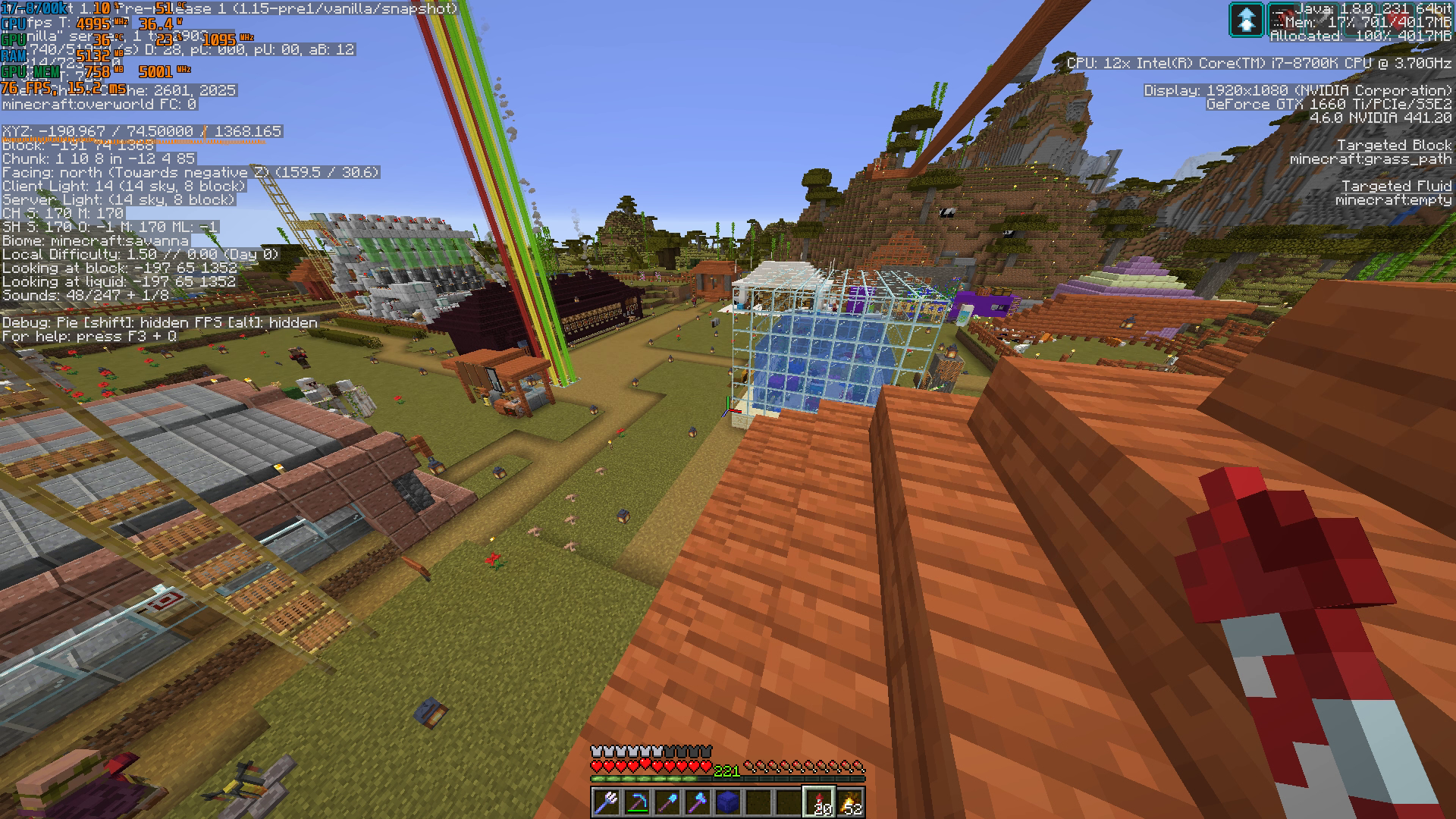
This workaround results in peaks of about 155-160FPS with 39% GPU utilization at 2025Mhz. GPU frequency usually dips below because there seems to be a "ghost" framerate limiter so the game hovers around 150±5FPS; perhaps it's a frequency-related bottleneck from the new rendering engine. I have the framerate unlimited as you can see in the F3 tags top left. Somehow, the illusion breaks when you look around as the GPU goes insane and it downclocks for no apparent reason other than refreshing the frame buffer and probably the texture buffer too; it dips well below the 60FPS mark which is quite a painful disparity between the top and bottom range of the framerate during playtime. In 1.14.4 it dips from 200FPS to 120ish during normal gameplay or 100FPS if I really try hard to spin around with the mouse.I wanted to try a harder graphics load so I loaded my multiplayer server with snapshot 19w34a (last one before the new rendering engine) and stood still for a minute until everything loaded in, then took a screenshot. 164 FPS, GPU at 1815Mhz 40% use
After that, I updated the same server to 1.15-pre1 and tried to apply my workaround from nVidia Control Panel to get the GPU to boost up in the client PC. Unfortunately, for whatever reason it won't work even if I restart the PC and apply the settings multiple times. I guess the game is happy to provide over 30FPS and doesn't bother to ask for more resources from the GPU lol. Waited 5 minutes to see if anything changed but nope: 76 FPS, GPU at 1095Mhz and chilling at 23% usage
So, when you're actually playing the game on a multiplayer server, you can expect at least a halving of the FPS from the old rendering engine to the new one. In this particular instance, dropping from 164 to 76FPS means a [1-(76/164)] x 100 = 53.6% performance drop in static conditions. I wanted to try dynamic conditions by logging and recording a test drive of a minecart rail facing the same spot, but unfortunately the game crashed on me several times while moving around in the world so I eventually gave up.
----------------------
TL;DR: in the same benchmarking conditions, 1.14.4 was giving 200FPS, 1.15-pre1 gives 110FPS if you're an average user or 150FPS if you know how to force your GPU as the OpenGL renderer and bruteforce Maximum Performance or 3D clocks-mode on it, but then the game stutters insanely when you actually look around and try to play instead of benchmark it. That's a -25% direct performance improvement in the absolute best case scenario. The workaround may or may not work, it seems that in graphics-intensive scenarios it doesn't so performance can tank from 160s to 70s FPS, over 50%.GPU Frequency can be observed through gpuZ, hwinfo64, Afterburner or Rivatuner RTSS; there's plenty of material online if you google any of those names to check how your GPUs are behaving and/or toggling overlays with real time reporting. It would be nice if Minecraft could retrieve the info itself and display it in the F3 menu, it would make these issues more ovbious in the future.
The GPUs are not boosting to 3D clocks, someone in the rendering team has to enable a flag or change a tag somewhere in the code to give the GPUs the memo that this particular OpenGL load is 3D rendering instead of general computing or crypto mining. Then we can perhaps start talking about optimization, which is way worse even with the GPU boosting correctly. Spoiler alert: >50% drop.
-First, a baseline test of 1.14.4 with no tweaks or shenanigans. Minecraft Seed for the latest round of tests is "test2", fresh generated world with standard settings. About 200FPS after a minute of waiting until GPU clocks stabilize up. 44%GPU utilization at 2025Mhz.
-then 1.15-pre1 with no tweaks or shenanigans, reusing the world from 1.14.4 due to the bugfixing of world generation resulting in different visuals in some places, want a 100% correlated test here within reason (villagers or mobs popping in sight). About 110FPS, 38%GPU utilization at 1395Mhz (which is 2D-mode clocks)
-then you can force the driver to boost the GPU to Maximum Performance via the nVidia Control Panel (right-click in windows desktop): you have to manually add the javaw.exe in the Manage 3D Configuration tab to do so, AND manually select the GPU (1660Ti in this example) as the predetermined OpenGL Renderer. The workaround does not work with only one of the two fixes applied; and unfortunately I can't help Radeon users because I don't have one of their GPUs. Adding a screenshot of my own for visual reference, sorry it's in spanish but I think I'd have to change my OS language and reinstall the drivers to show you in english.
This workaround results in peaks of about 155-160FPS with 39% GPU utilization at 2025Mhz. GPU frequency usually dips below because there seems to be a "ghost" framerate limiter so the game hovers around 150±5FPS; perhaps it's a frequency-related bottleneck from the new rendering engine. I have the framerate unlimited as you can see in the F3 tags top left. Somehow, the illusion breaks when you look around as the GPU goes insane and it downclocks for no apparent reason other than refreshing the frame buffer and probably the texture buffer too; it dips well below the 60FPS mark which is quite a painful disparity between the top and bottom range of the framerate during playtime. In 1.14.4 it dips from 200FPS to 120ish during normal gameplay or 100FPS if I really try hard to spin around with the mouse.I wanted to try a harder graphics load so I loaded my multiplayer server with snapshot 19w34a (last one before the new rendering engine) and stood still for a minute until everything loaded in, then took a screenshot. 164 FPS, GPU at 1815Mhz 40% use
After that, I updated the same server to 1.15-pre1 and tried to apply my workaround from nVidia Control Panel to get the GPU to boost up in the client PC. Unfortunately, for whatever reason it won't work even if I restart the PC and apply the settings multiple times. I guess the game is happy to provide over 30FPS and doesn't bother to ask for more resources from the GPU lol. Waited 5 minutes to see if anything changed but nope: 76 FPS, GPU at 1095Mhz and chilling at 23% usage
So, when you're actually playing the game on a multiplayer server, you can expect at least a halving of the FPS from the old rendering engine to the new one. In this particular instance, dropping from 164 to 76FPS means a [1-(76/164)] x 100 = 53.6% performance drop in static conditions. I wanted to try dynamic conditions by logging and recording a test drive of a minecart rail facing the same spot, but unfortunately the game crashed on me several times while moving around in the world so I eventually gave up.
----------------------
TL;DR: in the same benchmarking conditions, 1.14.4 was giving 200FPS, 1.15-pre1 gives 110FPS if you're an average user; or 150FPS if you know how to force your GPU as the OpenGL renderer and bruteforce Maximum Performance or 3D clocks-mode on it, but then the game stutters insanely when you actually look around and try to play instead of benchmark it. That's a -25% direct performance improvement in the absolute best case scenario. The workaround may or may not work, it seems that in graphics-intensive scenarios it doesn't so performance can tank from 160s to 70s FPS, over 50%.GPU Frequency can be observed through gpuZ, hwinfo64, Afterburner or Rivatuner RTSS; there's plenty of material online if you google any of those names to check how your GPUs are behaving and/or toggling overlays with real time reporting. It would be nice if Minecraft could retrieve the info itself and display it in the F3 menu, it would make these issues more ovbious in the future.
up-to-date Windows 10 Home version 190
3, nVidia drivers 436.48and Java 8 update 231 64-bitup-to-date Windows 10 Home version 1909, nVidia drivers 441.20 and Java 8 update 231 64-bit
The GPUs are not boosting to 3D clocks, someone in the rendering team has to enable a flag or change a tag somewhere in the code to give the GPUs the memo that this particular OpenGL load is 3D rendering instead of general computing or crypto mining. Then we can perhaps start talking about optimization, which is way worse even with the GPU boosting correctly. Spoiler alert: >50% drop.
-First, a baseline test of 1.14.4 with no tweaks or shenanigans. Minecraft Seed for the latest round of tests is "test2", fresh generated world with standard settings. About 200FPS after a minute of waiting until GPU clocks stabilize up. 44%GPU utilization at 2025Mhz.
-then 1.15-pre1 with no tweaks or shenanigans, reusing the world from 1.14.4 due to the bugfixing of world generation resulting in different visuals in some places, want a 100% correlated test here within reason (villagers or mobs popping in sight). About 110FPS, 38%GPU utilization at 1395Mhz (which is 2D-mode clocks)
-then you can force the driver to boost the GPU to Maximum Performance via the nVidia Control Panel (right-click in windows desktop): you have to manually add the javaw.exe in the Manage 3D Configuration tab to do so, AND manually select the GPU (1660Ti in this example) as the predetermined OpenGL Renderer. The workaround does not work with only one of the two fixes applied; and unfortunately I can't help Radeon users because I don't have one of their GPUs. Adding a screenshot of my own for visual reference, sorry it's in spanish but I think I'd have to change my OS language and reinstall the drivers to show you in english.
This workaround results in peaks of about 155-160FPS with 39% GPU utilization at 2025Mhz. GPU frequency usually dips below because there seems to be a "ghost" framerate limiter so the game hovers around 150±5FPS; perhaps it's a frequency-related bottleneck from the new rendering engine. I have the framerate unlimited as you can see in the F3 tags top left. Somehow, the illusion breaks when you look around as the GPU goes insane and it downclocks for no apparent reason other than refreshing the frame buffer and probably the texture buffer too; it dips well below the 60FPS mark which is quite a painful disparity between the top and bottom range of the framerate during playtime. In 1.14.4 it dips from 200FPS to 120ish during normal gameplay or 100FPS if I really try hard to spin around with the mouse.I wanted to try a harder graphics load so I loaded my multiplayer server with snapshot
19w34a (last one before the new rendering engine) and stood still for a minute until everything loaded in, then took a screenshot.164 FPS, GPU at 1815Mhz 40% use
After that, I updated the same server to 1.15-pre1and tried to apply my workaround from nVidia Control Panel to get the GPU to boost up in the client PC. Unfortunately, for whatever reason it won't work even if I restart the PC and apply the settings multiple times. I guess the game is happy to provide over 30FPS and doesn't bother to ask for more resources from the GPU lol. Waited 5 minutes to see if anything changed but nope: 76 FPS, GPU at 1095Mhz and chilling at 23% usage
So, when you're actually playing the game on a multiplayer server, you can expect at least a halving of the FPS from the old rendering engine to the new one. In this particular instance, dropping from 164 to 76FPS means a [1-(76/164)] x 100 = 53.6% performance drop in static conditions. I wanted to try dynamic conditions by logging and recording a test drive of a minecart rail facing the same spot, but unfortunately the game crashed on me several times while moving around in the world so I eventually gave up.
----------------------
TL;DR: in the same benchmarking conditions, 1.14.4 was giving 200FPS, 1.15-pre1 gives 110FPS if you're an average user; or 150FPS if you know how to force your GPU as the OpenGL renderer and bruteforce Maximum Performance or 3D clocks-mode on it, but then the game stutters insanely when you actually look around and try to play instead of benchmark it. That's a -25% direct performance improvement in the absolute best case scenario. The workaround may or may not work, it seems that in graphics-intensive scenarios it doesn't so performance can tank from 160s to 70s FPS, over 50%.
GPU Frequency can be observed through gpuZ, hwinfo64, Afterburner or Rivatuner RTSS; there's plenty of material online if you google any of those names to check how your GPUs are behaving and/or toggling overlays with real time reporting. It would be nice if Minecraft could retrieve the info itself and display it in the F3 menu, it would make these issues more ovbious in the future.The GPUs are not boosting to 3D clocks, someone in the rendering team has to enable a flag or change a tag somewhere in the code to give the GPUs the memo that this particular OpenGL load is 3D rendering instead of general computing or crypto mining. Then we can perhaps start talking about optimization, which is way worse even with the GPU boosting correctly. Spoiler alert: >50% drop.
-First, a baseline test of 1.14.4 with no tweaks or shenanigans. Minecraft Seed for the latest round of tests is "test2", fresh generated world with standard settings. About 200FPS after a minute of waiting until GPU clocks stabilize up. 44%GPU utilization at 2025Mhz.
-then 1.15-pre1 with no tweaks or shenanigans, reusing the world from 1.14.4 due to the bugfixing of world generation resulting in different visuals in some places, want a 100% correlated test here within reason (villagers or mobs popping in sight). About 110FPS, 38%GPU utilization at 1395Mhz (which is 2D-mode clocks)
-then you can force the driver to boost the GPU to Maximum Performance via the nVidia Control Panel (right-click in windows desktop): you have to manually add the javaw.exe in the Manage 3D Configuration tab to do so, AND manually select the GPU (1660Ti in this example) as the predetermined OpenGL Renderer. The workaround does not work with only one of the two fixes applied; and unfortunately I can't help Radeon users because I don't have one of their GPUs. Adding a screenshot of my own for visual reference, sorry it's in spanish but I think I'd have to change my OS language and reinstall the drivers to show you in english.
This workaround results in peaks of about 155-160FPS with 39% GPU utilization at 2025Mhz. GPU frequency usually dips below because there seems to be a "ghost" framerate limiter so the game hovers around 150±5FPS; perhaps it's a frequency-related bottleneck from the new rendering engine. I have the framerate unlimited as you can see in the F3 tags top left. Somehow, the illusion breaks when you look around as the GPU goes insane and it downclocks for no apparent reason other than refreshing the frame buffer and probably the texture buffer too; it dips well below the 60FPS mark which is quite a painful disparity between the top and bottom range of the framerate during playtime. In 1.14.4 it dips from 200FPS to 120ish during normal gameplay or 100FPS if I really try hard to spin around with the mouse.I wanted to try a harder graphics load so I loaded my multiplayer server with snapshot 19w34a (last one before the new rendering engine) and stood still for a minute until everything loaded in, then took a screenshot. 164 FPS, GPU at 1815Mhz 40% use
After that, I updated the same server to 1.15-pre1 and tried to apply my workaround from nVidia Control Panel to get the GPU to boost up in the client PC. Unfortunately, for whatever reason it won't work even if I restart the PC and apply the settings multiple times. I guess the game is happy to provide over 30FPS and doesn't bother to ask for more resources from the GPU lol. Waited 5 minutes to see if anything changed but nope: 76 FPS, GPU at 1095Mhz and chilling at 23% usage
So, when you're actually playing the game on a multiplayer server, you can expect at least a halving of the FPS from the old rendering engine to the new one. In this particular instance, dropping from 164 to 76FPS means a [1-(76/164)] x 100 = 53.6% performance drop in static conditions. I wanted to try dynamic conditions by logging and recording a test drive of a minecart rail facing the same spot, but unfortunately the game crashed on me several times while moving around in the world so I eventually gave up.
----------------------
TL;DR: in the same benchmarking conditions, 1.14.4 was giving 200FPS, 1.15-pre1 gives 110FPS if you're an average user; or 150FPS if you know how to force your GPU as the OpenGL renderer and bruteforce Maximum Performance or 3D clocks-mode on it, but then the game stutters insanely when you actually look around and try to play instead of benchmark it. That's a -25% direct performance improvement in the absolute best case scenario. The workaround may or may not work, it seems that in graphics-intensive scenarios it doesn't so performance can tank from 160s to 70s FPS, over 50%.GPU Frequency can be observed through gpuZ, hwinfo64, Afterburner or Rivatuner RTSS; there's plenty of material online if you google any of those names to check how your GPUs are behaving and/or toggling overlays with real time reporting. It would be nice if Minecraft could retrieve the info itself and display it in the F3 menu, it would make these issues more ovbious in the future.
This issue is definitely not resolved. I had the problem on a world that I wasn't sure which snapshots has been running on so I tried to reproduce on a fresh new world created in 1.14-pre2. Only 4 minutes after world generation I found a buggy spot. For some reason, there's a void from y=94.5 to y=110.4 in certain random areas where the sky light drops to 0 and the player character goes pitch black accordingly.
Video from creation of the world to the bug showing up: https://youtu.be/-GXOzrF8RRw
Detail of the height at which it triggers: https://youtu.be/1Rg4CX0Gh70
World seed is 7985723480508602877, although it shouldn't be related to the bug as I just showed it's a random fresh new world created in 1.14 pre 2.
This "issue" or "bug" was pretty useful for servers: yes, some people might have to move their tree farms to another biome but in return every server on earth doesn't need to move the world border away or search for new generated chunks: you can just bonemeal saplings in any of the 3 biome types on existing chunks. I mean I understand it was kind of needed with pandas as they only spawn on their own new biome, but bees? Come on... There has to be a better solution. Like making bee nests movable by pistons or something: we already have obsidian, glazed terracota or furnaces.
I just checked and I don't see any immediate effect turning off biome blend or running it at 15x15. Then I tried to set every graphics setting to minimum or off (except chunk distance rendering), still locked in the 50-60fps on the same spot.
There seems to be a CPU bottleneck in the new rendering engine, because with the old engine changing the graphics settings did actually affect your performance very appreciably even when surrounded by a lot of entities like in my base area.Sure, if I look to the sky or fly to world generated chunks without buildings or entities I get >100FPS again but I should be able to get them too in the base area like with the old engine.
surely! this weekend I'll give the new snapshot a go and report back
It's DEFINITELY still an issue, but might be easier to solve than a CPU bottleneck.
I made some tests on a fresh generated world for each MC version: seed "test1", then climbing to the same hill, standing in the same spot and facing the same direction (within reasonable 0.2º tolerance of a mere human pointing with a mouse). The two instances of the test were running the same java arguments (-xms 4G -xmx 4G), same Java version, same driver version, etc. Here are some relevant screenshots:
1.14.4: 210FPS (after 1 minute):




same 1.14.4, with performance overlay reveals the GPU is correctly boosting to 2070Mhz:
19w45b: 116FPS (after more than 3 minutes):
same 19w45b with performance overlay reveals the GPU core is not boosting to 3D clocks, staying in 2D mode at ~1400Mhz:
The rest of the performance parameters look similar to me:
-CPU usage and power consumption are the same, so with the new rendering engine it's doing the same job than in 1.14.4. Thus, my first intuition of a CPU bottleneck seems incorrect.
-That being said, it's clear that the GPU core is not boosting to 3D clocks although it may not be the culprit of the bug but a symptom, because the load percentage seems to be about the same 40% and the GDDR graphics memory is correctly boosting to 3D clocks: 6200Mhz.
-VRAM (GDDR6) consumption has increased 20% from around 1000MB to 1200MB despite the increase in framerates (or FPS decrease), which is weird but somewhat expectable if the new rendering engine uses more detailed textures.
To avoid unreasonable claims of the new world generation heavily affecting graphics performance, I upgraded the 1.14.4 world of the first test to 19w45b and took an additional couple of screenshots. While I was at it, I unlocked the FPS limit from 220 to infinite (despite being far below from it), just in case...


the old world generation and less grass foliage results in a paltry increase to 124FPS. Worth noting that VRAM usage is ~1100MB, 10% more than 1.14.4 exactly in the same conditions. The GPU stays in 2D-clocks
It's worth pointing out that when testing the 1.14.4 version for the second time, I noticed that it appears like the GPU starts boosting to 3D clocks only after a minute (almost exactly) of loading into the world. The test starts at 200FPS after the loading screen, then as chunks get loaded the FPS goes down to around 110FPS until the 60 second mark where it boosts all the way up to 210FPS and stays there until you close the game. The following video proves it, you can skip to around 0:50 to see the GPU clock boost from 1300Mhz to 2070Mhz and the FPS climbing from 110ish to 210: https://www.youtube.com/watch?v=BcqjClWTung
The behavior shown in the video is the reason why I mention how much time I waited after loading the world to take the snapshots, unfortunately no matter how long you wait 19w45b does not boost the GPU.
Please do forward this information to the developers, I'm sure whoever is in charge of the rendering engine can replicate the behavior from 1.14.4 and force the GPUs to 3D clocks mode. It's strange that it's not happening automatically via OpenGL and the graphics driver, but for whatever reason it's not happening.
just gave 19w46b a spin but the issue persist. GPU not boosting to 3D clocks, FPS still halved in comparison to 1.14.4
wow... pre-release version 1? Honey blocks are pointless if the game is going to be a slideshow due to the GPU not boosting to 3D clocks, someone in the rendering team has to enable a flag or change a tag somewhere in the code to give the GPUs the memo that this particular OpenGL load is 3D rendering instead of general computing or crypto mining. Then we can perhaps start talking about optimization, which is way worse even with the GPU boosting correctly. Spoiler alert: -25%.
-First, a baseline: test of 1.14.4 with no tweaks or shenanigans. Minecraft Seed for this round of tests is "test2", fresh generated world. About 200FPS after a minute of waiting until GPU clocks stabilize. 44%GPU utilization at 2025Mhz.




-then 1.15-pre1 with no tweaks or shenanigans, reusing the world from 1.14.4 due to the bugfixing of world generation resulting in different visuals in some places, want a 100% correlated test here within reason (villagers or mobs popping in sight). About 110FPS, 38%GPU utilization at 1395Mhz
-then I forced the driver to boost the GPU to Maximum Performance via the nVidia Control Panel (right-click in windows desktop), had to manually add the javaw.exe in the Manage 3D Configuration tab to do so; AND manually select my GPU (1660Ti) as the predetermined OpenGL Renderer. The workaround does not work with only one of the two fixes. Adding a screenshot for visual reference, sorry it's in spanish but I think I'd have to change my OS language and reinstall the drivers to show you in english.
This workaround results in peaks of about 155-160FPS with 39% GPU utilization at 2025Mhz. GPU frequency usually dips below because there seems to be a "ghost" framerate limiter so the game hovers around 150±5FPS. I have the framerate unlimited as you can see in the F3 tags top left. Somehow, the illusion breaks when you look around as the GPU goes insane and it downclocks for no apparent reason other than refreshing the frame buffer and probably the texture buffer too; it dips well below the 60FPS mark which is quite a painful disparity between the top and bottom range of the framerate during playtime.
----------------------
TL;DR: in the same benchmarking conditions, 1.14.4 was giving 200FPS, 1.15-pre1 gives 110FPS if you're an average user or 150FPS if you know how to bruteforce your GPU as the OpenGL renderer and force Maximum Performance or 3D clocks-mode on it, but then the game stutters insanely when you actually look around and try to play instead of benchmark it. That's a -25% direct performance improvement in the absolute best case scenario.
after reading that Reddit post I'm baffled. So in the era of 240Hz monitors, Mojang is targetting 30FPS with the new rendering engine. I mean PAL was 50FPS and NTSC was 60FPS, they are literally targetting worse performance than the original PlayStation from 20 years ago. I really hope they let us customize the target through settings or .txt. People with capable systems shouldn't be punished because of people playing in potatoes, that's beyond unreasonable. But also beyond the scope of this bug report, so I'll stick to testing:
I wanted to try a harder graphics load so I loaded my multiplayer server with snapshot 19w34a (last one before the new rendering engine) and stood still for a minute until everything loaded in, then took a screenshot. 164 FPS, GPU at 1815Mhz 40% use


After that, I updated the same server to 1.15-pre1 and tried to apply my workaround from nVidia Control Panel to get the GPU to boost up in the client PC. Unfortunately, for whatever reason it won't work even if I restart the PC and apply the settings multiple times. I guess the game is happy to provide over 30FPS and doesn't bother to ask for more resources from the GPU lol. Waited 5 minutes to see if anything changed but nope: 76 FPS, GPU at 1095Mhz and chilling at 23% usage
So, when you're actually playing the game on a multiplayer server, you can expect at least a halving of the FPS from the old rendering engine to the new one. In this particular instance, dropping from 164 to 76FPS means a [1-(76/164)] x 100 = 53.6% performance drop in static conditions. I wanted to try dynamic conditions by logging and recording a test drive of a minecart rail facing the same spot, but unfortunately the game crashed on me several times while moving around in the world so I just gave up. FPS were consistently dipping below 60 in a machine that previously dipped to 120s in the same conditions.
Pretty sure most people would rather trade having 5-10 distant chunks not rendering but enjoy high framerates all time rather than having "all chunks rendered" (unable to personally verify due to game crashing) but potato FPS all time. I can bear having to stop mid-air to wait 3-5s until chunks are loaded if I'm flying long distances with the elytra; but I can't bear with barely 60FPS gameplay all time. It's a stuttery mess, and it's ridiculous that I can fly a plane in BFV at flawless 144FPS with explosions, terrain destruction, smoke and all kinds of madness going on a full-scale Iwo Jima island with 60 players; but I can't plant potatoes in my Minecraft base at 60FPS.
OpenGL doesn't even realise it's rendering a 3D load, so even though I crashed several times no crash-report was generated btw. At least not in the usual folder: %appdata%/.minecraft/crash-reports. The logs folder doesn't reveal anything on it's .log files either, nor the Windows Event Viewer.
1.15-pre2 affected too
it's working for me, vanilla 1.15. It might be related to the HUD mod you're running, try updating it to the latest version or just disable it

Messing around in a fresh singleplayer world, I found what could be the main culprit of the FPS issues: mobs around you, even with entity shadows off. Unfortunately, most people build mob farms near their bases (to let the babies grow to adult while you do some housekeeping/other stuff), so it's pretty much a game breaker for anything but a singleplayer world with the usual 70 cows, rabbits and chickens spawned around you.
Example with ~800 cows: 83FPS
After /kill @e[type=cow]: 144FPS (max. of my monitor, Gsync is on)
b...but 800 mobs is unreasonable!: it wasn't with the old rendering engine before. Usually people build at least the basic mob farms around their base: cow, chicken, sheep, pig, maybe even rabbit. And if you're in a server with 2-3 friends but sharing a common base/storage system, it's not unreasonable to have 50-100 of those 4-5 species of mobs in a pen to speed up the gathering of resources when you need to trade emeralds with another 50-100 villagers (5-10 of every profession to avoid spending an hour to gather some emeralds and xp). So it's not unreasonable to have at least 500 mobs around your base, then add some pets on top of it (pandas, horses, donkeys, cats, parrots, dogs, foxes, dolphins, tropical fish... you name it!), and you are easily halving your FPS just because you like to do other stuff in base while waiting until the baby animals grow up and you can farm the resources. I'd rather avoid ilmangoing everything and make it an afk-farm a thousand blocks away from base to have decent FPS in the place where I'm playing most of the time, it makes gameplay rather boring.
Hopefully you guys can find a solution! Not sure if it's possible to offload some of the calculations to the GPU... Maybe the performance pie chart could reflect how much time is spent calculating mob rendering vs terrain, to at least give us an idea of what could be tanking performance in crowded bases with multiple mob farms. That'd be my lazy fix for it: let people decide wether they value more their farms or their FPS xD. At least for the time being... hopefully a proper solution is feasible so we don't need to slaughter animals and villagers around our bases fingers crossed