 Paul Bramhall
- ErTnEc
- ertnec
- Europe/Stockholm
- Yes
- No
 BDS-1264
 MCPE-97228


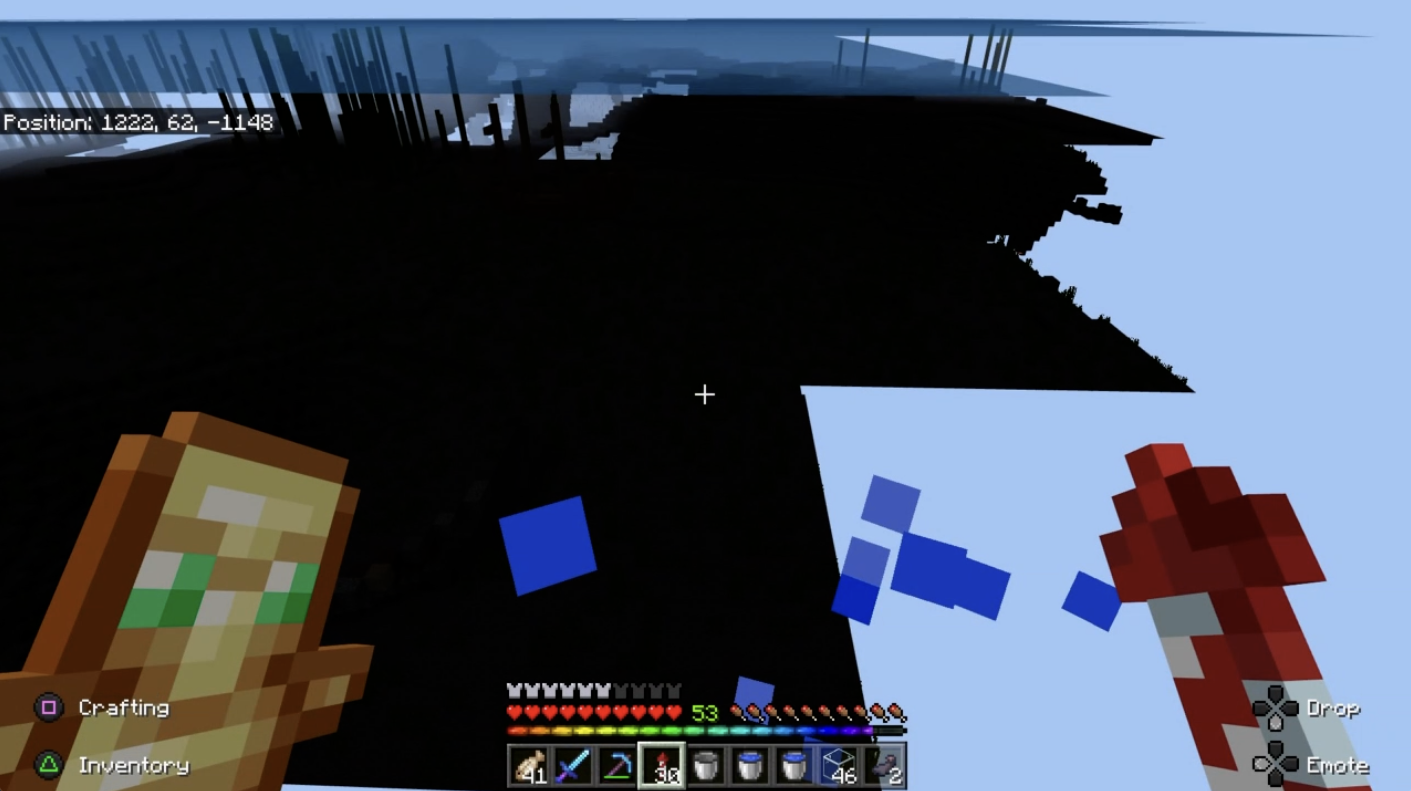


Since 1.19.30 (and still in 1.19.31 Hotfix) I've been seeing a severe performance degradation where chunks do not fully load and remain as empty spaces in the world. It can take upto a minute for these areas to fully load, sometimes I need to leave the area and return for it to correctly load. While the chunks are incomplete, the player is also unable to enter that area and is blocked as if hitting an invisible wall.
I've also noticed this performance degradation when exploring and moving around the world too (specifically when using an Elytra) where the player will just stop moving in the world & be prevented from going further. This worsens the more the player explores or moves around the world through unloaded chunks.
This is more apparent when logging into the server, as the world can take a long time to load.
Checking the server load, performance and IO/Network throughput, while these chunks are unloaded, there is very little load on the host and no IO or Network bottlenecks.
My BDS Server stores all world data on a remote NFS Share, however I have moved the world data to local storage to rule out any networking issues, and this made no difference at all.
There are no corruption warnings in the terminal output, and the only log entries are the standard player joined/left and auto compaction messages.
Performance degradation is also the same regardless of platform used to play (PC/Switch/PS4). Performance on pre-1.19.30 server is absolutely fine.
server-1.properties
After some further digging, it appears that BDS doesn't respect using the kernel boot-time option ipv6.disable=1 and relies entirely on ipv6 being disabled via sysctl:
Once ipv6 was disabled via sysctl, BDS would launch successfully:
Are you correctly populating the whitelist.json file?
This is also affecting me, and I have also performed the following steps:
It seems that, randomly, it does allow me to sign into the Playstation Network, and then will allow me to sign in to my Microsoft Account, however, after a while it stops loading my player character (I just get given the standard 'Steve' model), and then will no longer sign back in to my Microsoft account, and then starts to complain that I need to sign in to my Playstation Account, and I'm back at square one.
This appears to affect other parts of the game too:
This is still an issue with v1.16.201.
Relaunching Minecraft from the PS4 directly (not remote play) resolves these issues & allows the game to be played. Once launched, as long as the game is not closed, you will still be able to access all content via Remote Play, even after putting the PS4 to standby mode.
If Minecraft is launched from Remote Play itself, and not on the PS4, then all the above issues can be observed.
I'm experiencing this too, noticing the following:
Connecting to a BDS Server, after a while chunks can take upto a minute to fully load if flying through the world. CPU usage of the bedrock_server process shows high utilisation, however, IO throughput and wait times remain low. I'm running BDS with the world data stored on a remote NFS share. Moving this to local storage (SSD) makes zero difference in chunk load times. Restarting the bds server process does sometimes resolve this and help to improve response times.
When playing on Switch (either on a local world or a remotely connected bds server), the players movement will be blocked as if they are hitting a wall when flying too far outside of rendered chunk areas. The player can turn around and fly/move back, however until further chunks load the player is in essence 'blocked' from moving further. This is not due to something blocking the player physically, as I've seen this when flying above the build height limit. When the chunks finally load, the player can continue to travel in that direction. I've not yet observed this on PS4, however I've not tested this much on that platform yet.
So far, in one world, I've had 2 chunks completely disappear which I'm not sure is related or not, but this did follow a slow loading period in the surrounding area. The chunks were replaced with world holes, and needed to be manually filled in. I've only seen this against 2 chunks so far, and it was on a remote BDS instance connected to via PS4 and Switch.
Interestingly, so can I if you directly launch bedrock_server without specifying the LD_LIBRARY_PATH option.
Just checking libraries used by bedrock_server on mine (tested against a fresh install with no files left over from previous installs other than the world files), it's been running now for the past couple of hours just fine without specifying the `LD_LIBRARY_PATH` option. Checking with ldd shows
# ldd bedrock_server linux-vdso.so.1 (0x00007ffe2a5e5000) libz.so.1 => /lib/x86_64-linux-gnu/libz.so.1 (0x00007f91fb47a000) libnsl.so.1 => /lib/x86_64-linux-gnu/libnsl.so.1 (0x00007f91fb461000) libssl.so.1.1 => /lib/x86_64-linux-gnu/libssl.so.1.1 (0x00007f91fb3cf000) libcrypto.so.1.1 => /lib/x86_64-linux-gnu/libcrypto.so.1.1 (0x00007f91fb0e6000) libdl.so.2 => /lib/x86_64-linux-gnu/libdl.so.2 (0x00007f91fb0e1000) librt.so.1 => /lib/x86_64-linux-gnu/librt.so.1 (0x00007f91fb0d7000) libm.so.6 => /lib/x86_64-linux-gnu/libm.so.6 (0x00007f91faf52000) libpthread.so.0 => /lib/x86_64-linux-gnu/libpthread.so.0 (0x00007f91faf31000) libstdc++.so.6 => /lib/x86_64-linux-gnu/libstdc++.so.6 (0x00007f91fadad000) libgcc_s.so.1 => /lib/x86_64-linux-gnu/libgcc_s.so.1 (0x00007f91fad93000) libc.so.6 => /lib/x86_64-linux-gnu/libc.so.6 (0x00007f91fabd2000) /lib64/ld-linux-x86-64.so.2 (0x00007f91fb6a5000)I have the following packages installed which provide these libraries:
I've updated to 1.16.220.02, and so far I've seen a very noticeable drop in system load, as well as a sizeable performance increase.
Sorry but the other ticket has no extra details I can see other than linking a load of other tickets to it, or any mention specific to the issue in question in that if Minecraft is launched via Remote Play, that the Sign In functionality or ability to play online fails. As mentioned in this ticket above, signing in on the PlayStation directly overcomes this issue and it works as expected.
I can confirm this affects Mobile, Switch, PS4 and Windows. I don't have an Xbox so unable to test. This is against a BDS instance running 1.16.221.01, and also tested locally in a local world on each.
The initial post is fairly descriptive on the issue. However, to satisfy further requirements:
Steps to Reproduce:
Steps to overcome this issue:
If you have already launched Minecraft on the PS4 console directly, and subsequently connect to it via Remote Play (without closing the game down), then you will still be able to access servers/realms/store just fine. The issue lies entirely when launching the game from within a Remote Play session.
As previously mentioned, this does not relate to
MCPE-98544as the behaviour and observed issue from this is completely different.The archive appears up for 1.17.0.03 on Linux, but the link on the main page hasn't gone live yet it seems.
Not sure if there are possibly some issues with this yet unless they just forgot to update the page. Windows download seems to be live.
[edit]
Scrap that, the Windows link has also been reverted to 1.16, so I guess there are some issues still...
I'm seeing the same issues following upgrading a Bedrock Server instance from 1.17.41.01 to 1.18.0.02.


Seed is 1494988, coords can be seen in the images.
Sounds like similar to this issue?
MCPE-152265I've seen this a few times on mine, although rarely. I run 4 BDS servers, and have seen this on each one at some point.
Interested to know, are you running this on a physical machine or a VM? Also, is your Minecraft install & map storage stored directly on the servers storage or on a share such as NFS?
Snapshot of world available here:
https://minecraft.tardis.io/maps/bd30074d7b352df19f4ff14d31290fdd-unmined/1.19.31.01-2022.10.10.11.23.04.tar.gz
I've also been experiencing this more as of late, I've also been monitoring CPU/Memory usage and can confirm the same pattern as others. I've done some tests on my own BDS server too which caused it to crash within 5 minutes by simply teleporting between 2 previously generated areas at a 10 second interval. I'll attach both the output from pidstat, server log (with tp commands prefixed with the time at which they occured) and server.properties. You can clearly see memory utilisation increasing at each teleportation event.
Do you have access to the server console? You enable coordinates through there by typing the following
I've been noticing this behaviour too, and from what I can tell is it's to do with client chunk generation differing from that of the BDS server.
Playing on a PS4 for example, I see lots of random effects such as this when exploring a world running on a server, where distant chunks as I get closer appear to regenerate differently when closer, and from that point on they remain static as they generated. I see this less on other platforms (Switch/PC), but it is still there. It feels very much similar to both
MCPE-162424andMCPE-39439.Setting the server option
seems to completely eliminate this, however you will then run into
BDS-17527There seems to be a few other tickets about this same behaviour too (
BDS-17953for example)