 Fiopon
- Fiopon
- fiopon
- Europe/Stockholm
- Yes
- No
 MC-50121
![[Mojang] Cory Scheviak](../../../data/avatars/users/92893.png)
 WEB-1607
 Low
Low![[Mojang] Brandon Pearce](../../../data/avatars/users/40932.png)
 Important






When a wolf with "NoAI" tag is right clicked by it's owner, it does not sit/stand for the client. Checking the data, the "Sitting" tag is changed, but the player needs to relog to see the changes. (Simply reloading chunks or going far away and returning does not work)
Steps to reproduce:
- Run the following command:
/summon wolf ~ ~ ~ {NoAI:1b,OwnerUUID:"[your uuid here]"}
- Check the Sitting tag with this command:
/data get entity @e[type=wolf,distance=..5,limit=1] Sitting
- The tag should be 0b, now right click the wolf and run the command from step 2 again. The tag should now be 1b, but the wolf will be standing.
- Close the world and log in again, the wolf will be sitting. Right clicking the wolf while it's sitting will create the same effect, but with sitting and standing swapped.
When a wolf with "NoAI" tag is right clicked by it's owner, it does not sit/stand for the client. Checking the data, the "Sitting" tag is changed, but the player needs to relog to see the changes. (Simply reloading chunks or going far away and returning does not work)
Steps to reproduce:
- Run the following command:
/summon wolf ~ ~ ~ {NoAI:1b,OwnerUUID:"[your uuid here]"}
- Check the Sitting tag with this command:
/data get entity @e[type=wolf,distance=..5,limit=1] Sitting
- The tag should be 0b, now right click the wolf and run the command from step 2 again. The tag should now be 1b, but the wolf will be standing.
- Close the world and log in again, the wolf will be sitting. Right clicking the wolf while it's sitting will create the same effect, but with sitting and standing swapped.
When a wolf with "NoAI" tag is right clicked by it's owner, it does not sit/stand for the client. Checking the data, the "Sitting" tag is changed, but the player needs to relog to see the changes. (Simply reloading chunks or going far away and returning does not work)
Steps to reproduce:
- Run the following command:
/summon wolf ~ ~ ~ {NoAI:1b,OwnerUUID:"[your uuid here]"}
Check the Sitting tag with this command:
- The tag should be 0b, now right click the wolf and run the command from step 2 again. The tag should now be 1b, but the wolf will be standing.
- Close the world and log in again, the wolf will be sitting. Right clicking the wolf while it's sitting will create the same effect, but with sitting and standing swapped.
When a wolf with "NoAI" tag is right clicked by it's owner, it does not sit/stand for the client. Checking the data, the "Sitting" tag is changed, but the player needs to relog to see the changes. (Simply reloading chunks or going far away and returning does not work)
Steps to reproduce:
- Run the following command:
/summon wolf ~ ~ ~ {NoAI:1b,OwnerUUID:"[your uuid here]"}
Check the Sitting tag with this command:
/data get entity @e[type=wolf,distance=..5,limit=1] Sitting
- The tag should be 0b, now right click the wolf and run the command from step 2 again. The tag should now be 1b, but the wolf will be standing.
- Close the world and log in again, the wolf will be sitting. Right clicking the wolf while it's sitting will create the same effect, but with sitting and standing swapped.
When a wolf with "NoAI" tag is right clicked by it's owner, it does not sit/stand for the client. Checking the data, the "Sitting" tag is changed, but the player needs to relog to see the changes. (Simply reloading chunks or going far away and returning does not work)
Steps to reproduce:
- Run the following command:
/summon wolf ~ ~ ~ {NoAI:1b,OwnerUUID:"[your uuid here]"}
- Check the Sitting tag with this command:
- The tag should be 0b, now right click the wolf and run the command from step 2 again. The tag should now be 1b, but the wolf will be standing.
- Close the world and log in again, the wolf will be sitting. Right clicking the wolf while it's sitting will create the same effect, but with sitting and standing swapped.
When a wolf with "NoAI" tag is right clicked by it's owner, it does not sit/stand for the client. Checking the data, the "Sitting" tag is changed, but the player needs to relog to see the changes. (Simply reloading chunks or going far away and returning does not work)
Steps to reproduce:
- Run the following command:
/summon wolf ~ ~ ~ {NoAI:1b,OwnerUUID:"[your uuid here]"}
- Check the Sitting tag with this command:
/data get entity @e[type=wolf,distance=..5,limit=1] Sitting
- The tag should be 0b, now right click the wolf and run the command from step 2 again. The tag should now be 1b, but the wolf will be standing.
- Close the world and log in again, the wolf will be sitting. Right clicking the wolf while it's sitting will create the same effect, but with sitting and standing swapped.
When a wolf with "NoAI" tag is right clicked by it's owner, it does not sit/stand for the client. Checking the data, the "Sitting" tag is changed, but the player needs to relog to see the changes. (Simply reloading chunks or going far away and returning does not work)
Steps to reproduce:
- Run the following command:
/summon wolf ~ ~ ~ {NoAI:1b,OwnerUUID:"[your uuid here]"}
- Check the Sitting tag with this command:
/data get entity @e[type=wolf,distance=..5,limit=1] Sitting
- The tag should be 0b, now right click the wolf and run the command from step 2 again. The tag should now be 1b, but the wolf will be standing.
- Close the world and log in again, the wolf will be sitting. Right clicking the wolf while it's sitting will create the same effect, but with sitting and standing swapped.
When a wolf with "NoAI" tag is right clicked by it's owner, it does not sit/stand for the client. Checking the data, the "Sitting" tag is changed, but the player needs to relog to see the changes. (Simply reloading chunks or going far away and returning does not work)
Steps to reproduce:
1. Run the following command:
/summon wolf ~ ~ ~ {NoAI:1b,OwnerUUID:"[your uuid here]"}2. Check the Sitting tag with this command:
/data get entity @e[type=wolf,distance=..5,limit=1] Sitting3. The tag should be 0b, now right click the wolf and run the command from step 2 again. The tag should now be 1b, but the wolf will be standing.
4. Close the world and log in again, the wolf will be sitting. Right clicking the wolf while it's sitting will create the same effect, but with sitting and standing swapped.
When a wolf with "NoAI" tag is right clicked by it's owner, it does not sit/stand for the client. Checking the data, the "Sitting" tag is changed, but the player needs to relog to see the changes. (Simply reloading chunks or going far away and returning does not work)
Steps to reproduce:
1. Run the following command:
/summon wolf ~ ~ ~ {NoAI:1b,OwnerUUID:"[your uuid here]"}2. Check the Sitting tag with this command:
/data get entity @e[type=wolf,distance=..5,limit=1] Sitting3. The tag should be 0b, now right click the wolf and run the command from step 2 again. The tag should now be 1b, but the wolf will be standing.
4. Close the world and log in again, the wolf will be sitting. Right clicking the wolf while it's sitting will create the same effect, but with sitting and standing swapped.
This bug applies to tamed Cats as well.
Wolf and Cat with NoAI tag does not visually sit when right clicked
When a wolf with "NoAI" tag is right clicked by it's owner, it does not sit/stand for the client. Checking the data, the "Sitting" tag is changed, but the player needs to relog to see the changes. (Simply reloading chunks or going far away and returning does not work)
Steps to reproduce:
1. Run the following command:
/summon wolf ~ ~ ~ {NoAI:1b,OwnerUUID:"[your uuid here]"}2. Check the Sitting tag with this command:
/data get entity @e[type=wolf,distance=..5,limit=1] Sitting3. The tag should be 0b, now right click the wolf and run the command from step 2 again. The tag should now be 1b, but the wolf will be standing.
4. Close the world and log in again, the wolf will be sitting. Right clicking the wolf while it's sitting will create the same effect, but with sitting and standing swapped.
This bug applies to tamed Cats as well.
When a wolf or a cat with "NoAI" tag is right clicked by it's owner, it does not sit/stand for the client. Checking the data, the "Sitting" tag is changed, but the player needs to relog to see the changes. (Simply reloading chunks or going far away and returning does not work)
Steps to reproduce:
1. Run the following command:
/summon wolf ~ ~ ~ {NoAI:1b,OwnerUUID:"[your uuid here]"}2. Check the Sitting tag with this command:
/data get entity @e[type=wolf,distance=..5,limit=1] Sitting3. The tag should be 0b, now right click the wolf and run the command from step 2 again. The tag should now be 1b, but the wolf will be standing.
4. Close the world and log in again, the wolf will be sitting. Right clicking the wolf while it's sitting will create the same effect, but with sitting and standing swapped.
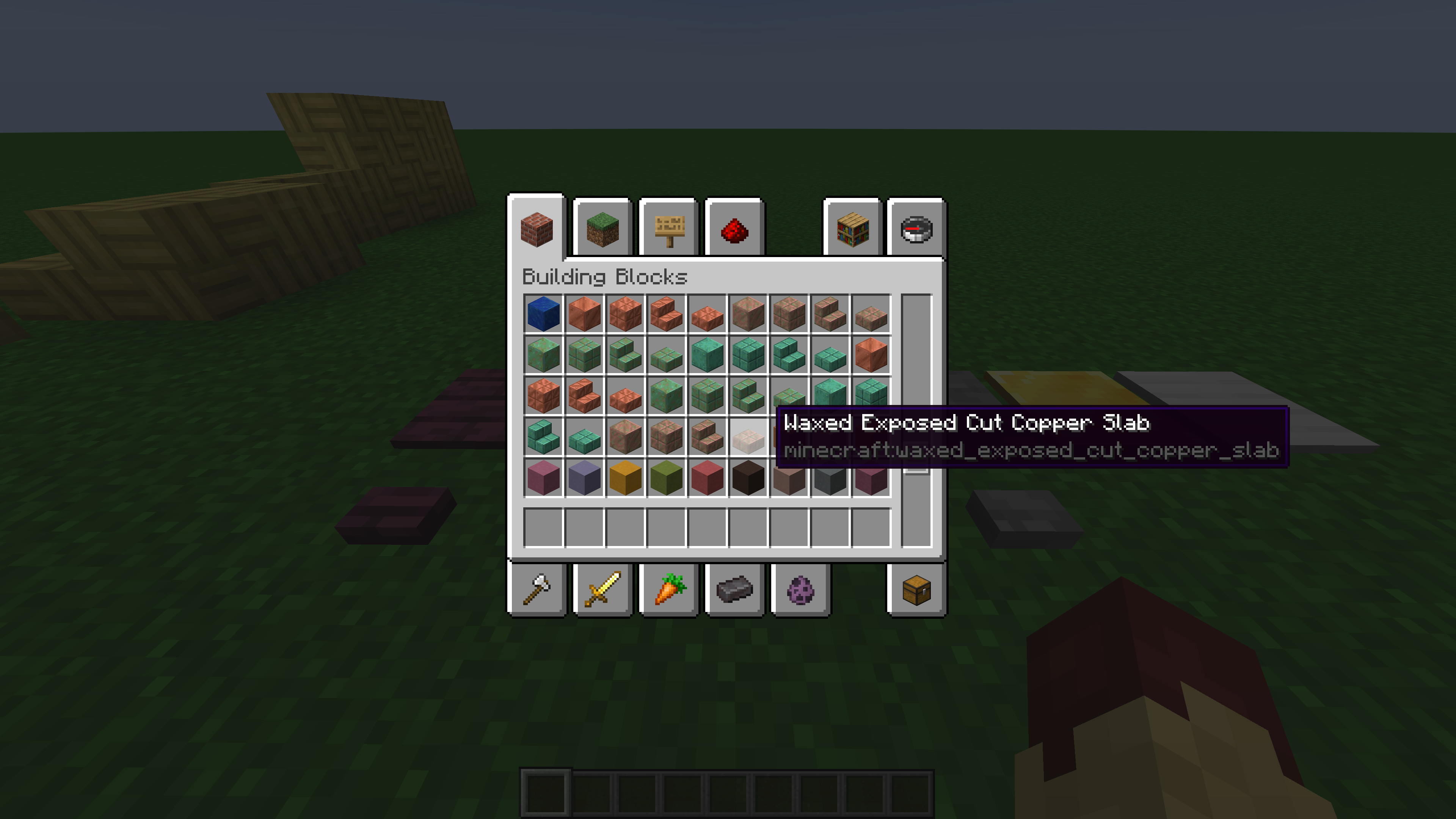
Waxed Exposed Copper blocks appear after Waxed Oxidized Copper blocks, as opposed to appearing after Waxed Copper blocks, as is the case with the non-waxed variants.
This issue also appears when searching for items.
Update claims that wooden blocks of different types will have unique sounds. This is true for most components, including the wooden buttons. But wooden pressure plates all use the same sounds no matter their type. Nether wood pressure plates, Cherry wood pressure plates and Bamboo pressure plates sound the same as Overworld wooden pressure plates.
I was only trying to dance in F5 mode haha
Sorry, its my first post i didn't know it was already posted by somebody else.
ah, sorry for wasting your time =/
Use a bucket of water
Confirmed for 19w09a
Only seems to occur when there is an air block/non solid block (excluding grass path, farmland and soul sand) adjacent to the block
Found some new ones
new content is added via datapacks in world creation. you can enable snapshot content with /datapack enable update_1_20
Added Cherry wood pressure plates to list of unchanged sounds
I believe this is intended behaviour, as axes aren't supposed to have sword enchantments and /enchant will only allow enchantments that are possible in survival mode.
Attached updated video for 1.20 Snapshots
Shift+Left Click cannot disable Crafter slots in 23w43a, but this desync issue persists anyways.
This also applies to step sounds, which also use the generic metal step sounds.
Yes, this is in fact typical door behaviour. However, in every other door's case, they use a unique texture which doesn't match any other block (with exception of trapdoors) but in this case, they match textures with the copper blocks. This creates a strange disparity, since all copper blocks follow this texturing format of "shade from bottom left to top right" and makes them stick out in a negative manner against the other copper blocks.