 franswa
- francois137
- francois137
- Europe/Stockholm
- Yes
- No
 MC-66129
![[Mojang] Nathan Adams](../../../data/assets/gravatar/dinnerbone.png)


 bug instamining.nbt
The bug
When the recipe book is enabled in a crafting table or in survival inventory, opening the creative inventory make the game to crash.
How to reproduce
- Be in survival mode
- Use a crafting table or open your inventory
- Enable the recipe book
- Close the crafting table menu or close your inventory
- Switch to creative mode
- Open your inventory
Crash report
Description: Unexpected error java.lang.ClassCastException: cby$b cannot be cast to amn at cda.a(SourceFile:39) at ccy.f(SourceFile:84) at ccy.a(SourceFile:73) at ccx.c(SourceFile:186) at ccx.a(SourceFile:114) at ccx.a(SourceFile:78) at ccg.c(SourceFile:56) at cau.a(SourceFile:310) at bxe.a(SourceFile:728) at bxe.av(SourceFile:1335) at bxe.m(SourceFile:1220) at bxe.b(SourceFile:791) at bxe.a(SourceFile:381) at net.minecraft.client.main.Main.main(SourceFile:141)The bug
When the recipe book is enabled in a crafting table or in survival inventory, opening the creative inventory make the game to crash.
How to reproduce
- Use a crafting table or open your inventory in survival mode
- Enable the recipe book
- Close the crafting table menu or close your inventory
- Switch to creative mode
- Open your inventory
Crash report
Description: Unexpected error

java.lang.ClassCastException: cby$b cannot be cast to amn
	at cda.a(SourceFile:39)
	at ccy.f(SourceFile:84)
	at ccy.a(SourceFile:73)
	at ccx.c(SourceFile:186)
	at ccx.a(SourceFile:114)
	at ccx.a(SourceFile:78)
	at ccg.c(SourceFile:56)
	at cau.a(SourceFile:310)
	at bxe.a(SourceFile:728)
	at bxe.av(SourceFile:1335)
	at bxe.m(SourceFile:1220)
	at bxe.b(SourceFile:791)
	at bxe.a(SourceFile:381)
	at net.minecraft.client.main.Main.main(SourceFile:141)
The bug
When the recipe book is enabled in a crafting table or in survival inventory, opening the creative inventory make the game to crash.
How to reproduce
- Use a crafting table or open your inventory in survival mode
- Enable the recipe book
- Close the crafting table menu or close your inventory
- Switch to creative mode if required
- Open your inventory
Crash report
Description: Unexpected error

java.lang.ClassCastException: cby$b cannot be cast to amn
	at cda.a(SourceFile:39)
	at ccy.f(SourceFile:84)
	at ccy.a(SourceFile:73)
	at ccx.c(SourceFile:186)
	at ccx.a(SourceFile:114)
	at ccx.a(SourceFile:78)
	at ccg.c(SourceFile:56)
	at cau.a(SourceFile:310)
	at bxe.a(SourceFile:728)
	at bxe.av(SourceFile:1335)
	at bxe.m(SourceFile:1220)
	at bxe.b(SourceFile:791)
	at bxe.a(SourceFile:381)
	at net.minecraft.client.main.Main.main(SourceFile:141)
The bug
When the recipe book is enabled in a crafting table or in survival inventory, opening the creative inventory make the game to crash.
How to reproduce
- Use a crafting table or open your inventory in survival mode
- Enable the recipe book
- Close the crafting table menu or close your inventory
- Switch to creative mode
if required- Open your inventory
Crash report
Description: Unexpected error

java.lang.ClassCastException: cby$b cannot be cast to amn
	at cda.a(SourceFile:39)
	at ccy.f(SourceFile:84)
	at ccy.a(SourceFile:73)
	at ccx.c(SourceFile:186)
	at ccx.a(SourceFile:114)
	at ccx.a(SourceFile:78)
	at ccg.c(SourceFile:56)
	at cau.a(SourceFile:310)
	at bxe.a(SourceFile:728)
	at bxe.av(SourceFile:1335)
	at bxe.m(SourceFile:1220)
	at bxe.b(SourceFile:791)
	at bxe.a(SourceFile:381)
	at net.minecraft.client.main.Main.main(SourceFile:141)
The bug
Mining lots of blocks at once by holding your mouse while equipped with a tool capable of instamining blocks (efficiency 5 diamond shovel vs dirt, for example) will leave some blocks on the server, but the client thinks they're gone.
This bug can occur on a server running 20 TPS constantly. It only occurs when the time to break a block is instant, e.g. with a diamond pickaxe on Nether rack or high-Efficiency diamond shovel on dirt. While the block in question disappears from the client's view (it is not rendered anymore and is removed from clientside collision), the server says it's still there and pushes the players' movement back when the client tries to move within the block's space. This can be a quite tricky and dangerous situation, especially when taking down a pillar below you: You fall into the ghost block again and again (many times a second) and cannot move. Client and server arrive at no consensus over whether the block is still there or not. Reloading the chunks on the client by pressing F3+A does not resolve this. It can be resolved by trying to place a new block in the old location. This of course fails server-side, the new block is not placed, but the old one reappears client-side. It can also be resolved by rejoining the server.
How to reproduce (with provided structure)
Partwise by franswa
- Download the attached structure bug_instamining.nbt
 and place it in the structures folder of your world folder
 - Stand on the command block, and switch your gamemode to Survival
/gamemode survival
- Press the button
- Hold down the block breaking key (default: left click) and move forward without rotating
→ The red sandstone block became a ghost-block
How to reproduce
See Ghost-block reproduction (1.12).mp4 for the video version
- Build a two block wide sandstone tower
- Give yourself an efficiency pickaxe
/give @p diamond_pickaxe 1 0 {ench:[{id:32s,lvl:5s}]} - Move to the top of the tower and stand in the middle of the two blocks
- Switch to Survival mode
/gamemode survival
- Look at one block
- Hold down the block breaking key (default: left click) and move towards the block you are looking at
→ While falling you get stuck in a ghost block
Code analysis
Based on 1.12 decompiled using MCP 9.40 PRE 1
It looks like this bug is caused by the server thinking that the player is not on ground and therefore cannot instamine a block while the client thinks it can. This can be seen when setting a breakpoint in net.minecraft.server.management.PlayerInteractionManager.onBlockClicked(BlockPos, EnumFacing) for the specific block position where a ghost block will be (see "How to reproduce (with provided structure)") and then following the method calls to EntityPlayer.getDigSpeed(IBlockState).
For lagging servers or clients this another cause could likely be the method net.minecraft.network.NetHandlerPlayServer.processPlayerDigging(CPacketPlayerDigging) which is not sending a SPacketBlockChange packet to resync the block if the block position is too far away from the player.
Suggested fix by [Mojang] Gnembon can be found in fix_miningGhostBlocks.PNG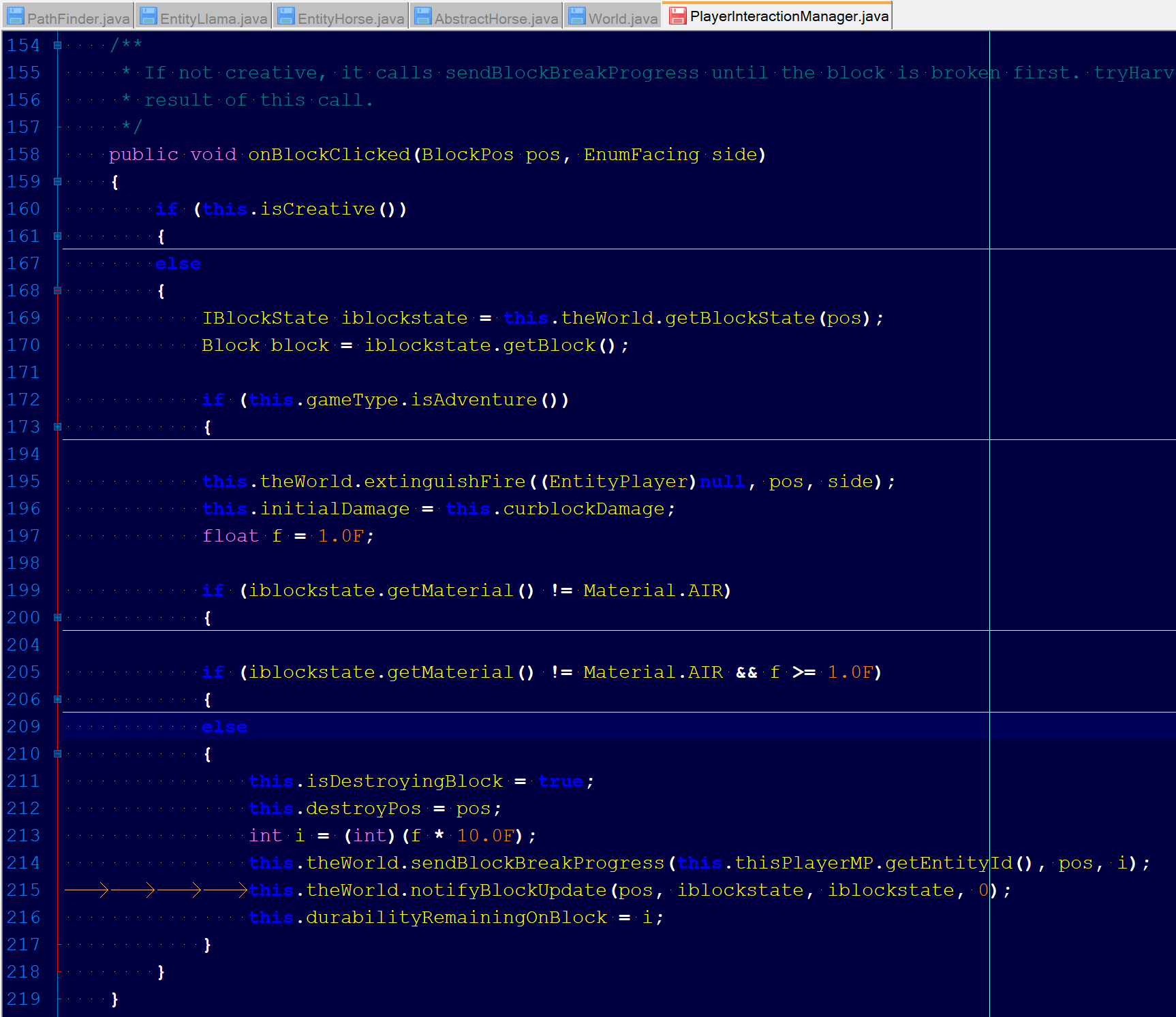 ; explanation can be found in this comment

@franswa you are the reporter of the ticket which means you can edit the affected versions yourself and do not need to comment 
@franswa thank you very much for these reproduction steps. I am going to include them in the description.
Edit: Could you please remove your attached structure? I re-uploaded it with a valid resource location name (space replaced with underscore) and added two command blocks to give a pickaxe and position the player correctly.
![[Mojang] Panda](../../../data/avatars/users/41658.png)
franswa You can press shift to get the debug stick to work.
Confirmed for 16w06a
confirmed for 16w07a
Confirmed for 1.9-Pre1
confirmed in 1.11
a workaround is to edit models for skull.json and skull_dragon.json and to replace y rotation in the GUI by 45.
All the blocks that were supposed to be broken in this hole. They appeared after reconnecting. Tested in 1.11.2 vanilla.
Impossible to check as it depend of Windows, the name of the pack is stored in the folder name and not in the pack.mcmeta file
as it may depend of the OS, I've seen the bug on the creators update of Windows 10.
Confirmed for 1.12-pre5
Confirmed for 1.12-pre6
Pay attention to the fact that the next version of optifine for 1.12 will fix this bug, so if you see in a future release that this bug is fixed, you have to check without optifine.
I made a system that prove that the bug has no random and that we can generate ghost block as we want.
The nbt structure is linked and a screenshot shows it.
How to use:
-Stand at the perfect middle of the yellow concrete block
-Take an efficiency 5 diamond pickaxe
-Target the middle of the first Sandstone block you can reach
-Hold your Attack control and don't change your direction
-Keep hold your Attack control and go forward without moving your mouse
-The red Sandstone block should be a ghost block, or one other that will be always the same at each trial.
I've forgotten to say that player must sprint while going forward. It won't work without sprinting.
confirmed for 1.2.1
done
Right, for the crafting table it's not required, It's a mistake caused by a mod edit.
I through that issues that weren't caused by the use of the debug stick was considered as valid, like
MC-136681In my opinion, the example of the debug stick is just an example of a mistake with right click handling with the redstone dot that could cause other issue in the future.
I read Grumm's comment from 2017, but I've seen in
MC-136681's history that Dinnerbone set priority to normal and didn't closed this issue.If this issue remains closed, do you think the item frame part of it could be submitted as a valid issue?