 Geroyuni
- Geroyuni
- geroyuni
- America/Sao_Paulo
- Yes
- No
 MCPE-27784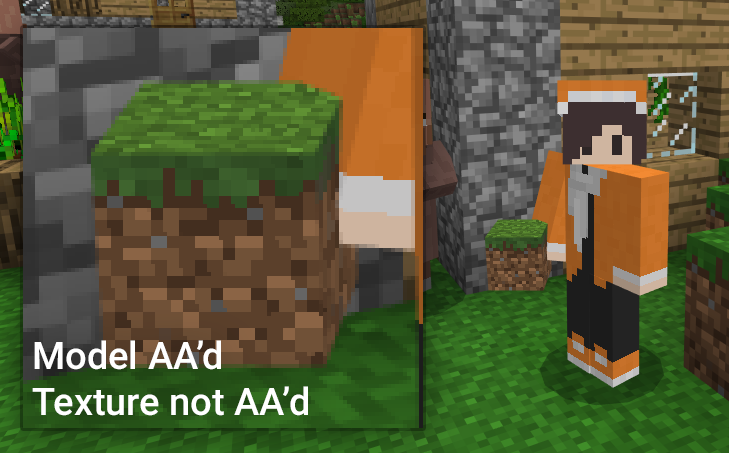


There are times in which either the models (that is, the 3D shapes' edges) and/or the textures are not anti-aliased. The following table will show the instances that I identified.
Name Model Texture All entities (players, block/item drops, mobs. etc.) Yes No Block being held in first or third person Yes No Items in inventory and hotbar No No Player (starting screen and pause menu) No No Highlight outline (for blocks) No N/A Here's another situation, where anti-aliasing is applied to the texture, but incorrectly.
I'll put this on a different issue, this is a placeholder as it is somewhat related.There are times in which either the models (that is, the 3D shapes' edges) and/or the textures are not anti-aliased. The following table will show the instances that I identified.
Name Model Texture All entities (players, block/item drops, mobs. etc.) Yes No Block being held in first or third person Yes No Items in inventory and hotbar No No Player (starting screen and pause menu) No No Highlight outline (for blocks) No N/A Here's another situation, where anti-aliasing is applied to the texture, but incorrectly. I put this as different issue, but I'm saying this here as it's somewhat related.
There are times in which either the models (that is, the 3D shapes' edges) and/or the textures are not anti-aliased. The following table will show the instances that I identified.
NameModel Texture All entities (players, block/item drops, mobs. etc.) Yes NoBlock being held in first or third person Yes NoItems in inventory and hotbar NoNoPlayer (starting screen and pause menu) NoNoHighlight outline (for blocks) NoN/A Here's another situation, where anti-aliasing is applied to the texture, but incorrectly.
I put this as different issue,but I'm saying this here as it's somewhat related.There are times in which either the models (that is, the 3D shapes' edges) and/or the textures are not anti-aliased. The following table will show the instances that I identified.
Whether it is anti-aliased or not Model Texture All entities (players, block/item drops, mobs. etc.) Yes No Block being held in first or third person Yes No Items in inventory and hotbar No No Player (starting screen and pause menu) No No Highlight outline (for blocks) No N/A
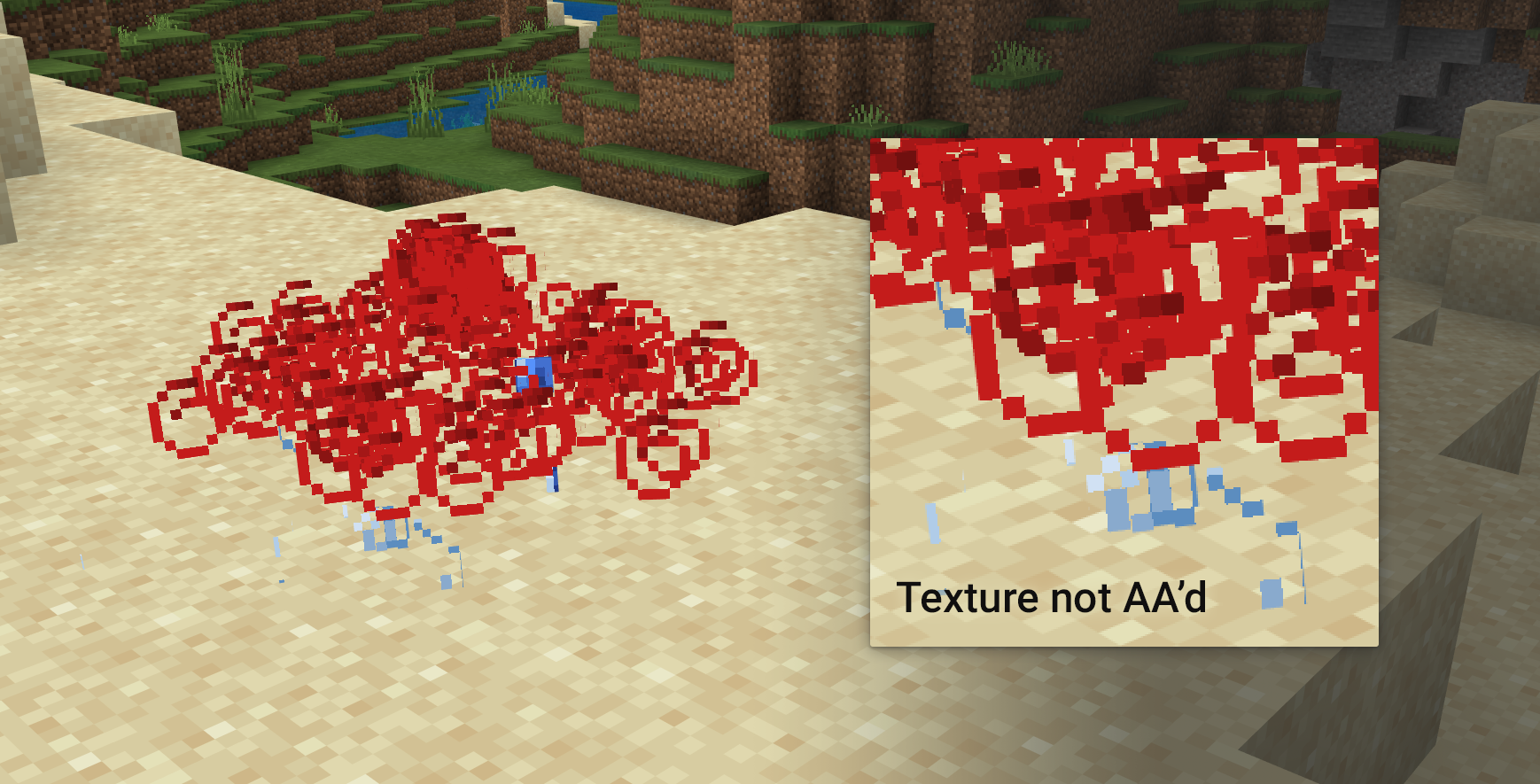
Somewhat related to MCPE-27785, in which the antialiasing messes up, but only on parts of the texture which have transparency
There are times in which either the models (that is, the 3D shapes' edges) and/or the textures are not anti-aliased. The following table will show the instances that I identified.
Whether it is anti-aliased or not Model Texture All entities (players, block/item drops, mobs. etc.) Yes No Block being held in first or third person Yes No Items in inventory and hotbar No No Player (starting screen and pause menu) No No Highlight outline (for blocks) No N/A
Somewhat related to MCPE-27785, in which the antialiasing messes up, but only on parts of the texture which have transparency
There are times in which either the models (that is, the 3D shapes' edges) and/or the textures are not anti-aliased. The following table will show the instances that I identified.
Whether it is anti-aliased or not Model Texture All entities (players, block/item drops, mobs. etc.) Yes No Block being held in first or third person Yes No Particles Yes?*** No Items in inventory and hotbar No No Player (starting screen and pause menu) No No Highlight outline (for blocks) No N/A *** You might notice some sections in the screenshot seem anti-aliased, I think those are the very edges of the texture's 2D square model but I might be overthinking it
Somewhat related to MCPE-27785, in which the antialiasing messes up, but only on parts of the texture which have transparency
There are times in which either the models (that is, the 3D shapes' edges) and/or the textures are not anti-aliased. The following table will show the instances that I identified.
Whether it is anti-aliased or not Model Texture All entities (players, block/item drops, mobs. etc.) Yes No Block being held in first or third person Yes No Particles Yes?* **No Items in inventory and hotbar No No Player (starting screen and pause menu) No No Highlight outline (for blocks) No N/A
*** You might notice some sections in the screenshot seem anti-aliased, I think those are the very edges of the texture's 2D square model but I might be overthinking itSomewhat related to MCPE-27785, in which the antialiasing messes up, but only on parts of the texture which have transparency
There are times in which either the models (that is, the 3D shapes' edges) and/or the textures are not anti-aliased. The following table will show the instances that I identified.
Whether it is anti-aliased or not Model Texture All entities (players, block/item drops, mobs. etc.) Yes No Block being held in first or third person Yes No Particles Yes?* No Items in inventory and hotbar No No Player (starting screen and pause menu) No No Highlight outline (for blocks) No N/A * You might notice some sections in the screenshot seem anti-aliased, I think those are the very edges of the texture's 2D square "model" but I might be overthinking it
Somewhat related to MCPE-27785, in which the antialiasing messes up, but only on parts of the texture which have transparency
There are times in which either the models (that is, the 3D shapes' edges) and/or the textures are not anti-aliased. The following table will show the instances that I identified.
Whether it is anti-aliased or not Model Texture All entities (players, block/item drops, mobs. etc.) Yes No Block being held in first or third person Yes No Particles Yes?* No Items in inventory and hotbar No No Player (starting screen and pause menu) No No Highlight outline (for blocks) No N/A * You might notice some sections in the screenshot seem anti-aliased, I think those are the very edges of the texture's 2D square "model" but I might be overthinking it
Somewhat related to MCPE-27785, in which the antialiasing messes up, but only on parts of the texture which have transparency
There are times in which either the models (that is, the 3D shapes' edges) and/or the textures are not anti-aliased. The following table will show the instances that I identified.
Whether it is anti-aliased or not Model Texture All entities (players, block/item drops, mobs. etc.) Yes No Block being held in first or third person Yes No Particles Yes?* No Items in inventory and hotbar No No Player (starting screen and pause menu) No No Highlight outline (for blocks) Yes (fixed in newer versions) N/A * You might notice some sections in the screenshot seem anti-aliased, I think those are the very edges of the texture's 2D square "model" but I might be overthinking it
Somewhat related to MCPE-27785, in which the antialiasing messes up, but only on parts of the texture which have transparency
Antialiasing (andtexel) not being applied to all models and textures that are neededAnti-aliasing (including texel) not being applied to all models and textures that are needed
alpha channel antialias.png
It appears that the game is attempting to make it anti-alias, but instead transparency is seen as a black pixel.The game antialiases the texture, but seems to not do it when transparency is involved. Notably this does not affect glasses.
The game antialiases the texture, but seems to not do it when transparency is involved. Notably this does not affect glasses.
Somewhat related to MCPE-27784
The game antialiases the texture, but seems to not do it
whentransparency isinvolved. Notably this does not affect glasses.
Somewhat related to MCPE-27784
The game antialiases the texture, but seems to not do it in the edges where the transparency is. Notably this does not affect glasses.
Somewhat related to MCPE-27784
Antialiasing(texel)not being applied correctly to textures with transparencyTexel anti-aliasing not being applied correctly to textures with transparency
Texel anti-aliasing messes up highlight selection on textures with transparency
Hello @Mega_Spud - I have updated this as it does seem to me that the issue still exists.
Hello @Mega_Spud - This does still happen and I have again updated the issue with the latest version I tested.
Hi @Mega_Spud - I've confirmed that this still happens in the latest beta
This issue is still awaiting resolution on MCPE-110848
This issue is still awaiting resolution on MCPE-110848
Part of this issue (on texel anti-aliasing) is still blocked by and awaiting resolution on MCPE-110848. For now I can confirm that the models for items in the inventory and the player in the UI still lacks anti-aliasing in the model. However, the highlight outline does have anti-aliasing in the newer versions, which I'll tweak in the report.