 MCPE-27784
Anti-aliasing (including texel) not being applied to all models and textures that are needed
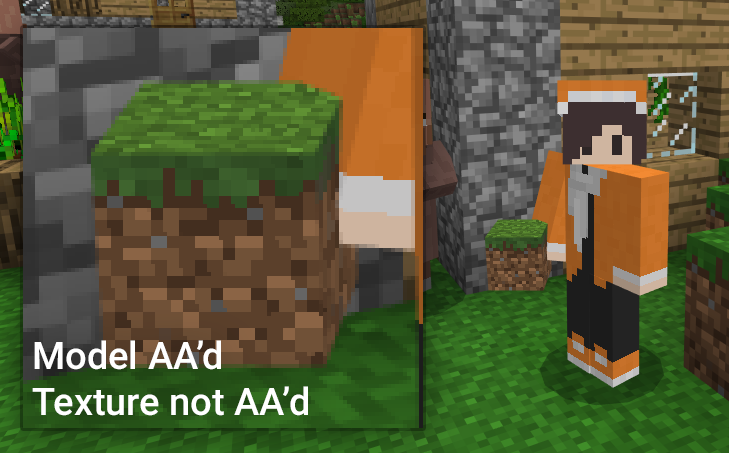
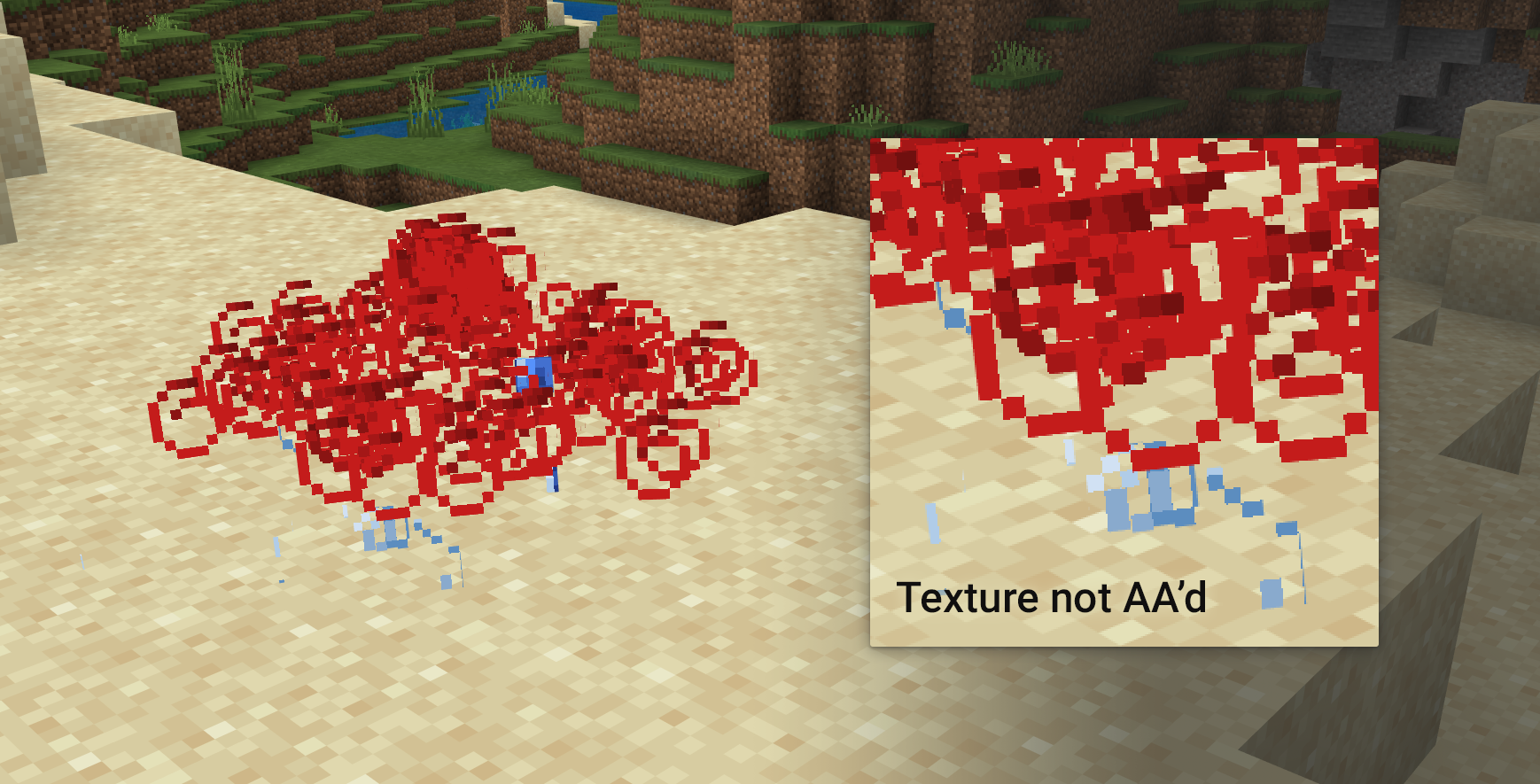
There are times in which either the models (that is, the 3D shapes' edges) and/or the textures are not anti-aliased. The following table will show the instances that I identified.
| Whether it is anti-aliased or not | Model | Texture |
|---|---|---|
| All entities (players, block/item drops, mobs. etc.) | Yes | No |
| Block being held in first or third person | Yes | No |
| Particles | Yes?* | No |
| Items in inventory and hotbar | No | No |
| Player (starting screen and pause menu) | No | No |
| Highlight outline (for blocks) | Yes (fixed in newer versions) | N/A |
* You might notice some sections in the screenshot seem anti-aliased, I think those are the very edges of the texture's 2D square "model" but I might be overthinking it
Somewhat related to MCPE-27785, in which the antialiasing messes up, but only on parts of the texture which have transparency
Linked Issues
is duplicated by1


Created Issue:
Antialiasing (and texel) not being applied to all models and textures that are needed
There are times in which either the models (that is, the 3D shapes' edges) and/or the textures are not anti-aliased. The following table will show the instances that I identified.
Name Model Texture All entities (players, block/item drops, mobs. etc.) Yes No Block being held in first or third person Yes No Items in inventory and hotbar No No Player (starting screen and pause menu) No No Highlight outline (for blocks) No N/A Here's another situation, where anti-aliasing is applied to the texture, but incorrectly. I'll put this on a different issue, this is a placeholder as it is somewhat related.
Attachments6
There are times in which either the models (that is, the 3D shapes' edges) and/or the textures are not anti-aliased. The following table will show the instances that I identified.
Name Model Texture All entities (players, block/item drops, mobs. etc.) Yes No Block being held in first or third person Yes No Items in inventory and hotbar No No Player (starting screen and pause menu) No No Highlight outline (for blocks) No N/A Here's another situation, where anti-aliasing is applied to the texture, but incorrectly.
I'll put this on a different issue, this is a placeholder as it is somewhat related.There are times in which either the models (that is, the 3D shapes' edges) and/or the textures are not anti-aliased. The following table will show the instances that I identified.
Name Model Texture All entities (players, block/item drops, mobs. etc.) Yes No Block being held in first or third person Yes No Items in inventory and hotbar No No Player (starting screen and pause menu) No No Highlight outline (for blocks) No N/A Here's another situation, where anti-aliasing is applied to the texture, but incorrectly. I put this as different issue, but I'm saying this here as it's somewhat related.

![[Mojang] Mega_Spud (Jay Wells)](../../../data/avatars/users/92696.png)
is duplicated by
There are times in which either the models (that is, the 3D shapes' edges) and/or the textures are not anti-aliased. The following table will show the instances that I identified.
NameModel Texture All entities (players, block/item drops, mobs. etc.) Yes NoBlock being held in first or third person Yes NoItems in inventory and hotbar NoNoPlayer (starting screen and pause menu) NoNoHighlight outline (for blocks) NoN/A Here's another situation, where anti-aliasing is applied to the texture, but incorrectly.
I put this as different issue,but I'm saying this here as it's somewhat related.There are times in which either the models (that is, the 3D shapes' edges) and/or the textures are not anti-aliased. The following table will show the instances that I identified.
Whether it is anti-aliased or not Model Texture All entities (players, block/item drops, mobs. etc.) Yes No Block being held in first or third person Yes No Items in inventory and hotbar No No Player (starting screen and pause menu) No No Highlight outline (for blocks) No N/A
Somewhat related to MCPE-27785, in which the antialiasing messes up, but only on parts of the texture which have transparency
![[Mod] tryashtar](../../../data/avatars/users/41963.png)
There are times in which either the models (that is, the 3D shapes' edges) and/or the textures are not anti-aliased. The following table will show the instances that I identified.
Whether it is anti-aliased or not Model Texture All entities (players, block/item drops, mobs. etc.) Yes No Block being held in first or third person Yes No Items in inventory and hotbar No No Player (starting screen and pause menu) No No Highlight outline (for blocks) No N/A
Somewhat related to MCPE-27785, in which the antialiasing messes up, but only on parts of the texture which have transparency
There are times in which either the models (that is, the 3D shapes' edges) and/or the textures are not anti-aliased. The following table will show the instances that I identified.
Whether it is anti-aliased or not Model Texture All entities (players, block/item drops, mobs. etc.) Yes No Block being held in first or third person Yes No Particles Yes?*** No Items in inventory and hotbar No No Player (starting screen and pause menu) No No Highlight outline (for blocks) No N/A *** You might notice some sections in the screenshot seem anti-aliased, I think those are the very edges of the texture's 2D square model but I might be overthinking it
Somewhat related to MCPE-27785, in which the antialiasing messes up, but only on parts of the texture which have transparency
There are times in which either the models (that is, the 3D shapes' edges) and/or the textures are not anti-aliased. The following table will show the instances that I identified.
Whether it is anti-aliased or not Model Texture All entities (players, block/item drops, mobs. etc.) Yes No Block being held in first or third person Yes No Particles Yes?* **No Items in inventory and hotbar No No Player (starting screen and pause menu) No No Highlight outline (for blocks) No N/A
*** You might notice some sections in the screenshot seem anti-aliased, I think those are the very edges of the texture's 2D square model but I might be overthinking itSomewhat related to MCPE-27785, in which the antialiasing messes up, but only on parts of the texture which have transparency
There are times in which either the models (that is, the 3D shapes' edges) and/or the textures are not anti-aliased. The following table will show the instances that I identified.
Whether it is anti-aliased or not Model Texture All entities (players, block/item drops, mobs. etc.) Yes No Block being held in first or third person Yes No Particles Yes?* No Items in inventory and hotbar No No Player (starting screen and pause menu) No No Highlight outline (for blocks) No N/A * You might notice some sections in the screenshot seem anti-aliased, I think those are the very edges of the texture's 2D square "model" but I might be overthinking it
Somewhat related to MCPE-27785, in which the antialiasing messes up, but only on parts of the texture which have transparency

![[Bot] Arisa](../../../data/avatars/users/43007.png)
There are times in which either the models (that is, the 3D shapes' edges) and/or the textures are not anti-aliased. The following table will show the instances that I identified.
Whether it is anti-aliased or not Model Texture All entities (players, block/item drops, mobs. etc.) Yes No Block being held in first or third person Yes No Particles Yes?* No Items in inventory and hotbar No No Player (starting screen and pause menu) No No Highlight outline (for blocks) No N/A * You might notice some sections in the screenshot seem anti-aliased, I think those are the very edges of the texture's 2D square "model" but I might be overthinking it
Somewhat related to MCPE-27785, in which the antialiasing messes up, but only on parts of the texture which have transparency
There are times in which either the models (that is, the 3D shapes' edges) and/or the textures are not anti-aliased. The following table will show the instances that I identified.
Whether it is anti-aliased or not Model Texture All entities (players, block/item drops, mobs. etc.) Yes No Block being held in first or third person Yes No Particles Yes?* No Items in inventory and hotbar No No Player (starting screen and pause menu) No No Highlight outline (for blocks) Yes (fixed in newer versions) N/A * You might notice some sections in the screenshot seem anti-aliased, I think those are the very edges of the texture's 2D square "model" but I might be overthinking it
Somewhat related to MCPE-27785, in which the antialiasing messes up, but only on parts of the texture which have transparency
Antialiasing (andtexel) not being applied to all models and textures that are neededAnti-aliasing (including texel) not being applied to all models and textures that are needed
![[Mod] EVGENSYPERPRO](../../../data/avatars/users/92853.png)
is blocked by
The game antialiases the texture, but seems to not do it in the edges where the transparency is. Notably this does not affect glasses.
Somewhat related to MCPE-27784
Thank you for your report!
However, this issue has been closed as a Duplicate of MCPE-27784.
Please add a vote and any new information to the main ticket, which will be updated accordingly.
If you have not, you might like to make use of the search feature before making a new ticket, as it's likely that the issue has been reported already.
Quick Links:
📓 Issue Guidelines – 💬 Community Support – 📧 Feedback – 📖 Game Wiki
Affects latest versions according to
MCPE-36816.Cleaning up old tickets: This ticket has not been updated recently (~1 year+) so is being closed as Cannot Reproduce. If you feel this is still a valid issue then please comment, or create a new ticket following the Issue Guidelines.
Quick Links:
📓 Issue Guidelines – 💬 Mojang Support – 📧 Suggestions – 📖 Minecraft Wiki
Reopened, still in 1.14
Ps4 doesn't even have a texel option in the settings. Was the option removed or is it not a feature on ps4 at all?
Seem ps4 just doesn't have the toggle like on Switch but texel seems to be present, but as this bug implies, missing on many textures. As far as this bug, the most obvious offender in my base is wood flooring. Planks are a jaggy mess at medium to long range. When I walk, the lines on the floor "crawl" aggressively. Hopefully this can be fixed soon. I want a nice pretty game again.
Thank you for your report!
However, this issue has been temporarily closed as Awaiting Response
Is this still an issue in the latest version? If so, please make sure the ticket description contains the following information:
If your ticket does not look like the example given here, then it's likely to be closed as incomplete.
This ticket will automatically reopen when you reply.
Quick Links:
📓 Issue Guidelines – 💬 Mojang Support – 📧 Suggestions – 📖 Minecraft Wiki
Part of this issue (on texel anti-aliasing) is still blocked by and awaiting resolution on MCPE-110848. For now I can confirm that the models for items in the inventory and the player in the UI still lacks anti-aliasing in the model. However, the highlight outline does have anti-aliasing in the newer versions, which I'll tweak in the report.