 GFD
GFD
- gfd
- gfd
- America/Toronto
- Yes
- No
 MC-12413
![[Mojang] Grum (Erik Broes)](../../../data/assets/gravatar/grum.png)
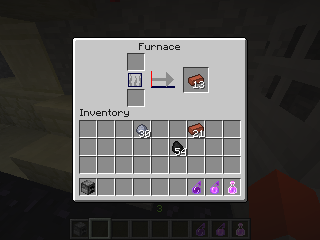
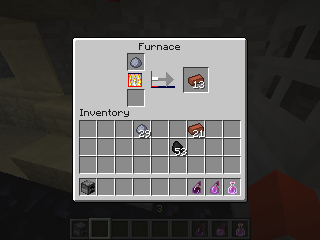
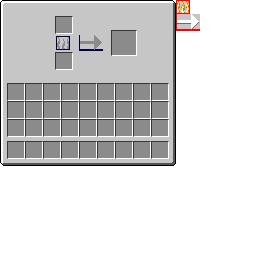

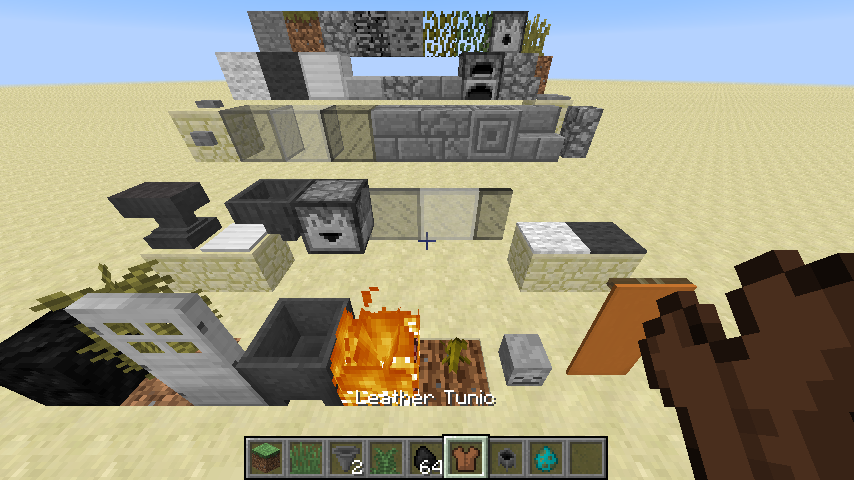


If a heavy-duty PNG compression tool such as ScriptPNG is used on a texture pack, Minecraft will not render some of these PNGs correctly. This seems to only apply to greyscale PNGs, wherein they will appear much lighter than they should, and/or will be solid black where they should be transparent. Attached is the default textures of Minecraft compressed with ScriptPNG's highest setting (9, or Ultra), so you don't have to compress them yourself (the process takes several hours), as well as the stitched files and some screenshots.
If a heavy-duty PNG compression tool such as ScriptPNG is used on a texture pack, Minecraft will not render some of these PNGs correctly. This seems to only apply to greyscale PNGs, wherein they will appear much lighter than they should, and/or will be solid black where they should be transparent. Attached
isthe default textures of Minecraft compressed with ScriptPNG's highest setting (9, or Ultra), so you don't have to compress them yourself (the process takes several hours), as well as the stitched files and some screenshots.If a heavy-duty PNG compression tool such as ScriptPNG is used on a texture pack, Minecraft will not render some of these PNGs correctly. This seems to only apply to greyscale PNGs, wherein they will appear much lighter than they should, and/or will be solid black where they should be transparent. Attached are the default textures of Minecraft compressed with ScriptPNG's highest setting (9, or Ultra), so you don't have to compress them yourself (the process takes several hours), as well as the stitched files and some screenshots.
If a heavy-duty PNG compression tool such as ScriptPNG is used on a texture pack, Minecraft will not render some of these PNGs correctly. This seems to
only apply to greyscale PNGs, wherein they will appear much lighter than they should, and/or will be solid black where they should be transparent. Attached are the default textures of Minecraft compressed with ScriptPNG's highest setting (9, or Ultra), so you don't have to compress them yourself (the process takes several hours), as well as the stitched files and some screenshots.If a heavy-duty PNG compression tool such as ScriptPNG is used on a texture pack, Minecraft will not render some of these PNGs correctly. This seems to apply mostly to greyscale PNGs, wherein they will appear much lighter than they should, and/or will be solid black where they should be transparent. Attached are the default textures of Minecraft compressed with ScriptPNG's highest setting (9, or Ultra), so you don't have to compress them yourself (the process takes several hours), as well as the stitched files and some screenshots.
debug.stitched_items.png
13w21a's textures, compressed with pngslim 1.4. 595 KB [609442 Bytes] saved.
If a heavy-duty PNG compression tool such as ScriptPNG is used on a texture pack, Minecraft will not render some of these
PNGs correctly. This seems to apply mostly to greyscale PNGs, wherein they will appear much lighter than they should, and/or will be solid black where they should be transparent. Attached are the default textures of Minecraft compressed withScriptPNG's highest setting (9, or Ultra), so you don't have to compress them yourself (the process takes several hours), as well as the stitched files and some screenshots.If a heavy-duty PNG compression tool such as ScriptPNG is used on the PNGs within a texture pack, Minecraft will not render some of these textures correctly. This seems to apply mostly to greyscale PNGs, wherein they will appear much lighter than they should, and/or will be solid black where they should be transparent. Attached are the default textures of Minecraft (13w21a) compressed with pngslim 1.4 , so you don't have to compress them yourself (the process takes several hours), as well as stitched files (generated by 1.5.1; the snapshots do not seem to save these externally anymore), and some screenshots of the side-effects.
If a heavy-duty PNG compression tool such as ScriptPNG is used on the PNGs within a texture pack, Minecraft will not render some of these textures correctly. This seems to apply mostly to greyscale PNGs, wherein they will appear much lighter than they should, and/or will be solid black where they should be transparent. Attached are the default textures of Minecraft (1
3w21a) compressed with pngslim 1.4 , so you don't have to compress them yourself (the process takes several hours), as well as stitched files (generated by 1.5.1; the snapshots do not seem to save these externally anymore), and some screenshots of the side-effects.If a heavy-duty PNG compression tool such as ScriptPNG is used on the PNGs within a texture pack, Minecraft will not render some of these textures correctly. This seems to apply mostly to greyscale PNGs, wherein they will appear much lighter than they should, and/or will be solid black where they should be transparent. Attached are the default textures of Minecraft (1.6) compressed with pngslim 1.4 , so you don't have to compress them yourself (the process takes several hours), as well as stitched files (generated by 1.5.1; the snapshots do not seem to save these externally anymore), and some screenshots of the side-effects.
If a heavy-duty PNG compression tool such as ScriptPNG is used on
thePNGswithin atexture pack, Minecraft will not render some of these textures correctly. This seems to apply mostly to greyscale PNGs, wherein they will appear much lighter than they should, and/or will be solid black where they should be transparent. Attached are the default textures of Minecraft (1.6) compressed with pngslim 1.4 , so you don't have to compress them yourself (the process takes several hours), as well as stitched files (generated by 1.5.1; the snapshots do not seem to save these externally anymore), and some screenshots of the side-effects.If a heavy-duty PNG compression tool such as ScriptPNG is used on PNGs in a resource pack, Minecraft will not render some of these textures correctly. This seems to apply mostly to greyscale PNGs, wherein they will appear much lighter than they should, and/or will be solid black where they should be transparent. Attached are the default textures of Minecraft (1.6) compressed with pngslim 1.4 , so you don't have to compress them yourself (the process takes several hours), as well as stitched files (generated by 1.5.1; the snapshots do not seem to save these externally anymore), and some screenshots of the side-effects.
If a heavy-duty PNG compression tool such as ScriptPNG
is used on PNGs in a resource pack,Minecraftwillnotrender some of these textures correctly. This seems to apply mostly to greyscale PNGs, wherein they will appear much lighter than they should, and/or will be solid black where they should be transparent. Attached are the default textures of Minecraft (1.6)compressed withpngslim 1.4, so you don't have to compress them yourself (the process takes several hours), as well as stitched files (generated by 1.5.1; the snapshots do not seem to savetheseexternally anymore), and some screenshots of the side-effects.Minecraft does not process some PNGs correctly. Specifically, it does not seem to implement the tRNS specification fully, nor does it handle greyscale PNGs correctly. Attached are some vanilla textures from the most recent snapshot as of this writing (15w42a) that render incorrectly when compressed with ScriptPNG 's most aggressive lossless setting. (If Mojang did this compression themselves, Minecraft's PNGs would be 34.45% [1299 KB] smaller, which is a not-insignificant amount of bandwidth.)
Somecompressed PNGs renderincorrectlyin-gameSome PNGs using greyscale or tRNS are processed incorrectly
By right-clicking the side of the collision box of a rail, it is possible to place an infinite number of minecarts on that one rail. If this is done with TNT minecarts, it is possible to make many TNT minecarts detonate at the same time and place, which creates a very strange crater
.
Example video here.
(This video also demonstrates [MC-6594].)By right-clicking the side of the collision box of a rail, it is possible to place an infinite number of minecarts on that one rail. If this is done with TNT minecarts, it is possible to make many TNT minecarts detonate at the same time and place, which creates a very strange crater, and can launch things very far away.
Example video here.
(This video also demonstrates [MC-6594].)
Extinguishing fire by punching it while in creative mode plays fizz.ogg twice instead of once.
Interestingly, Irfanview and XnView also render these compressed PNGs in exactly the same way Minecraft does. Other applications, including Windows Photo Viewer, Google Chrome, or GIMP, will render them correctly. Does Minecraft share a library with XnView and Irfanview for rendering PNGs?
Aw peas, I used the search function and everything. Sorry 'bout that.
Oh, that issue was actually marked as resolved for some reason?? That would explain why I didn't find it in searches - I only searched for unresolved issues. But, why is this bug considered resolved ????
Yes, this is still an issue in 13w19a.
Added a new .zip with 13w21a's textures compressed with pngslim 1.4.
This is still an issue with the new resource pack format. Added a new .zip with 1.6's textures compressed with pngslim 1.4.
Yes, this is still an issue in 1.6.1.
Excuse me???? I've added at least 1.7.2 to the Affected Version/s list, and that came out less than four months ago. This is indeed still an issue.
Gonna comment to make sure this doesn't get closed. This is still an issue and I've updated the affected versions.
Still an issue.
Yes, this is still bugged.
Tested in 14w29b, appears to still be an issue.
STILL an issue.
Yep, added.
Yes, 1230 days later, this somehow remains unfixed.
Yes, 1229 days later, this somehow remains unfixed.
Yes, 1326 days later, this somehow remains unfixed. And unassigned! Just like
MC-19112. So the burden of verifying the continued existence of these bugs falls to me once again, because I happened to be the one to report them first. Luckily for you, I'm still willing to waste 10 minutes of my day doing this for you whenever you happen to ask me to. I don't really play Minecraft anymore, let alone try to create resource packs for it (which is how I found these two bugs), so there's no reason for me to keep maintaining these reports besides charity. I'm sure many other issues didn't have OPs that were dedicated enough to maintain them for so long, so I hate to think of how many bugs were reported but won't get fixed because of the unsustainable system here. Seriously, my two issues should've been assigned literally years ago.This does not appear to be fixed in either latest stable (1.11.2) or latest snapshot (1.12 pre-3).