 Henry Markle
- HenryMarkle
- henrymarkle
- Europe/Istanbul
- Yes
- No
 MCPE-84513





Water is supposed to
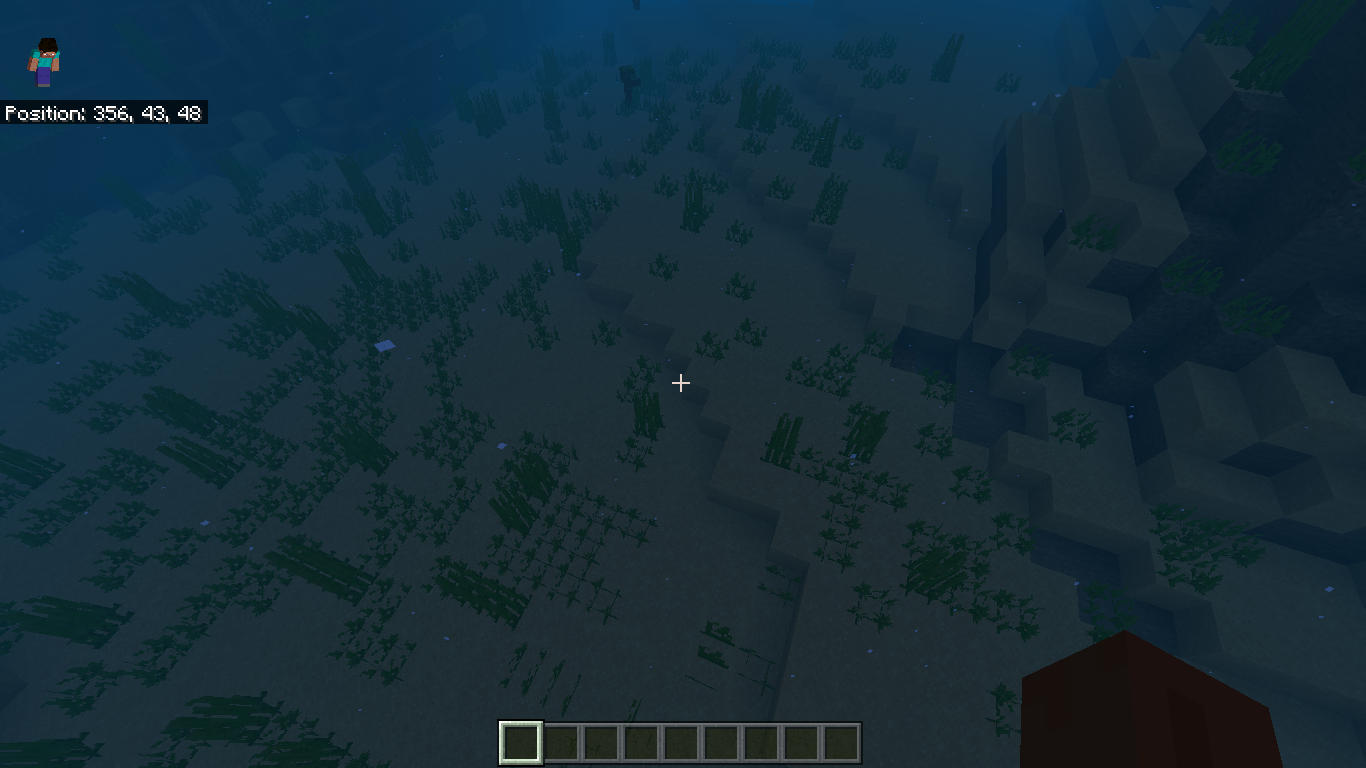
cutsky lighting and get it to decay by 3 for each block and eventually 0, meaning it should be dark at the bottom at the ocean. However, this is not how water is currently behaving.I have included two screenshots showing how I'm clearly able to see the bottom of the ocean at day time when swimming at 1-3 block deep under water, and, when going deeper, everything slowly becomes dark and turns back to what it's supposed to look like.
This issue existed since the Aquatic Update and wasn't fixed until now.
Water is supposed to block sky lighting and get it to decay by 3 for each block and eventually 0, meaning it should be dark at the bottom at the ocean. However, this is not how water is currently behaving.
I have included two screenshots showing how I'm clearly able to see the bottom of the ocean at day time when swimming at 1-3 block deep under water (screenshot on the left), and, when going deeper, everything slowly becomes dark and turns back to what it's supposed to look like (screenshot on the right).
This issue existed since the Aquatic Update and wasn't fixed until now.
Water is supposed to block sky lighting and get it to decay by 3 for each block and eventually 0, meaning it should be dark at the bottom at the ocean. However, this is not how water is currently behaving.
I have included two screenshots showing how I'm clearly able to see the bottom of the ocean at day time when swimming at 1-3 block deep under water (screenshot on the left), and, when going deeper, everything slowly becomes dark and turns back to what it's supposed to look like (screenshot on the right).
The expected behavior:
Whatever the light level is (underwater), it should stay consistent wherever the player is.
This issue existed since the Aquatic Update and wasn't fixed until now.
Water is supposed to block sky lighting and get it to decay by 3 for each block and eventually 0, meaning it should be dark at the bottom at the ocean. However, this is not how water is currently behaving.
I have included two screenshots showing how I'm clearly able to see the bottom of the ocean at day time when swimming at 1-3 block deep under water (screenshot on the left), and, when going deeper, everything slowly becomes dark and turns back to what it's supposed to look like (screenshot on the right).
Nonetheless, it's only a visual bug depends on where the player is underwater and it's less noticeable at night time.
The expected behavior:
Whatever the light level is (underwater), it should stay consistent wherever the player is.
This issue existed since the Aquatic Update and wasn't fixed until now.
Water is supposed to block sky lighting and get it to decay by 3 for each block and eventually 0, meaning it should be dark at the bottom at the ocean. However, this is not how water is currently behaving.
I have included two screenshots showing how I'm clearly able to see the bottom of the ocean at day time when swimming at 1-3 block deep under water (screenshot on the left), and, when going deeper, everything slowly becomes dark and turns back to what it's supposed to look like (screenshot on the right).
Nonetheless, it's only a visual bug depends on where the player is underwater and it's less noticeable at night time.
The expected behavior:
Whatever the light level is (underwater), it should stay consistent wherever the player is.
This issue existed since the Aquatic Update and wasn't fixed until now.
Steps to reproduce:
- Open World
- Set time to day
- Find a deep ocean
- Go underwater one block deep, and then slowly go deeper.
- You'll notice how deeper levels of the water is going slowly darker, until you go deep enough and it'll stop.
Water is supposed to block sky lighting and get it to decay by 3 for each block
andeventually 0, meaning it should be dark at the bottom at the ocean. However, this is not how water is currently behaving.I have included two screenshots showing how I'm clearly able to see the bottom of the ocean at day time when swimming at 1-3 block deep under water (screenshot on the left), and, when going deeper, everything slowly becomes dark and turns back to what it's supposed to look like (screenshot on the right).
Nonetheless, it's only a visual bug depends on where the player is underwater and it's less noticeable at night time.
The expected behavior:
Whatever the light level is (underwater), it should stay consistent wherever the player is.
This issue existed since the Aquatic Update and wasn't fixed until now.
Steps to reproduce:
- Open World
- Set time to day
- Find a deep ocean
- Go underwater one block deep, and then slowly go deeper.
- You'll notice how deeper levels of the water is going slowly darker, until you go deep enough and it'll stop.
Water is supposed to block sky lighting and get it to decay by 3 for each block to eventually 0, meaning it should be dark at the bottom at the ocean. However, this is not how water is currently behaving.
I have included two screenshots showing how I'm clearly able to see the bottom of the ocean at day time when swimming at 1-3 block deep under water (screenshot on the left), and, when going deeper, everything slowly becomes dark and turns back to what it's supposed to look like (screenshot on the right).
Nonetheless, it's only a visual bug depends on where the player is underwater and it's less noticeable at night time.
The expected behavior:
Whatever the light level is (underwater), it should stay consistent wherever the player is.
This issue existed since the Aquatic Update and wasn't fixed until now.
Steps to reproduce:
- Open World
- Set time to day
- Find a deep ocean
- Go underwater one block deep, and then slowly go deeper.
- You'll notice how deeper levels of the water is going slowly darker, until you go deep enough and it'll stop.
Water is supposed to block sky lighting and get it to decay by 3 for each block to eventually 0, meaning it should be dark at the bottom at the ocean. However, this is not how water is currently behaving.
I have included two screenshots showing how I'm clearly able to see the bottom of the ocean at day time when swimming at 1-3 block deep under water like I'm having a night vision effect (screenshot on the left), and, when going deeper, everything slowly becomes dark and turns back to what it's supposed to look like (screenshot on the right).
Nonetheless, it's only a visual bug depends on where the player is underwater and it's less noticeable at night time.
The expected behavior:
Whatever the light level is (underwater), it should stay consistent wherever the player is.
This issue existed since the Aquatic Update and wasn't fixed until now.
Steps to reproduce:
- Open World
- Set time to day
- Find a deep ocean
- Go underwater one block deep, and then slowly go deeper.
- You'll notice how deeper levels of the water is going slowly darker, until you go deep enough and it'll stop.
UnderwatervisibilityUnderwater sky lighting
Underwater sky lighting visually changes depending on player's underwater level
Water is supposed to block sky lighting and get it to decay by 3 for each block to eventually 0, meaning it should be dark at the bottom at the ocean. However, this is not how water is currently behaving.
I have included two screenshots showing how I'm clearly able to see the bottom of the ocean at day time when swimming at 1-3 block deep under water like I'm having a night vision effect (screenshot on the left), and, when going deeper, everything slowly becomes dark and turns back to what it's supposed to look like (screenshot on the right).
Nonetheless, it's only a visual bug depends on where the player is underwater and it's less noticeable at night time.
The expected behavior:
Whatever the light level is (underwater), it should stay consistent wherever the player is.
This issue existed since the Aquatic Update and
wasn't fixed until now.
Steps to reproduce:
- Open World
- Set time to day
- Find a deep ocean
- Go underwater one block deep, and then slowly go deeper.
- You'll notice how deeper levels of the water is going slowly darker, until you go deep enough and it'll stop.
Water is supposed to block sky lighting and get it to decay by 3 for each block to eventually 0, meaning it should be dark at the bottom at the ocean. However, this is not how water is currently behaving.
I have included two screenshots showing how I'm clearly able to see the bottom of the ocean at day time when swimming at 1-3 block deep under water like I'm having a night vision effect (screenshot on the left), and, when going deeper, everything slowly becomes dark and turns back to what it's supposed to look like (screenshot on the right).
Nonetheless, it's only a visual bug depends on where the player is underwater and it's less noticeable at night time.
The expected behavior:
Whatever the light level is (underwater), it should stay consistent wherever the player is.
This issue existed since the Aquatic Update and is yet to be fixed.
Steps to reproduce:
- Open World
- Set time to day
- Find a deep ocean
- Go underwater one block deep, and then slowly go deeper.
- You'll notice how deeper levels of the water is going slowly darker, until you go deep enough and it'll stop.
When opening the inventory or a container like a chest, hopper, shulkerbox or anything that opens the player's inventory and clicking on an item with the cursor, the item follows wherever the cursor goes. But, not as fast. As shown in the recorded video the item lacks behind the cursor for a good distance. That can be a big inconvenience, especially in PvP scenario or any thing that requires quick movement.
Steps To Reproduce The Issue
Open inventory and click on any item and try to grab it any where.
The expected behavior
The item that's being grabbed must be as fast as the cursor that's grabbing it.
**Additional info:
- No resource pack was loaded.
- 4GB RAM
- Intel Core i5 & AMD graphics card
- The computer is about 5 - 8 years old but it can run Minecraft (bedrock) just fine.
When opening the inventory or a container like a chest, hopper, shulkerbox or anything that opens the player's inventory and clicking on an item with the cursor, the item follows wherever the cursor goes. But, not as fast. As shown in the recorded video the item lacks behind the cursor for a good distance. That can be a big inconvenience, especially in PvP scenario or any thing that requires quick movement.
Steps To Reproduce The Issue
Open inventory and click on any item and try to grab it any where.
The expected behavior
The item that's being grabbed must be as fast as the cursor that's grabbing it.
Update
Disabling vsync and setting maximum framerate to 60 completely solve to the problem
for me. However, it requires editing the settings text file manually in the game files.
**Additional info:
- No resource pack was loaded.
- 4GB RAM
- Intel Core i5 & AMD graphics card
- The computer is about 5 - 8 years old but it can run Minecraft (bedrock) just fine.
Hand(s)areinvisible when holding a mapHand(s) being invisible when holding a map
Minecraft 2022-05-17 02-20-52.mp4
Minecraft 2022-05-17 02-20-37.mp4
Here are 2 recordings: one is moving an iron block, the other is moving a chest.
The result we're getting is that you can't see the iron block moving at all; just pops from one place to an other, while the chest is at a slightly better position, but still pretty bad.
The expected result is that you would be able to see the blocks smoothly transitioning from one place to an other.
The smoothness of the piston animation is inconsistent. Sometimes it's smooth; sometimes it's not.
Steps to reproduce
- Place a piston/sticky-piston and put a button or lever on it.
- Activate the piston with the button/lever.
The observed result:Here, I uploaded 2 recordings:
- The first one shows laggy animation. The piston looks like it's skipping some frames. Minecraft 2022-05-17 17-33-36.mp4
- The second video is recorded after I reloaded the world. The piston animation is smooth again, for some reason. Minecraft 2022-05-17 17-37-41.mp4
The expected result:
The piston animation should always be smooth, at all times.
Additional information
My PC is an Excalibur (Casper) g770 laptop. It has a dedicated Nvidia graphics card and an Intel Core i5 10th Gen processor, so my computer is in no way a low end device.
Only the default resource pack / behavior pack is running and no extra modification to the has been applied whatsoever.
The smoothness of the piston animation is inconsistent. Sometimes it's smooth; sometimes it's not.
Steps to reproduce
- Place a piston/sticky-piston and put a button or lever on it.
- Activate the piston with the button/lever.
The observed result:Here, I uploaded 2 recordings:
- The first one shows laggy animation. The piston looks like it's skipping some frames. Minecraft 2022-05-17 17-33-36.mp4
- The second video is recorded after I reloaded the world. The piston animation is smooth again, for some reason. Minecraft 2022-05-17 17-37-41.mp4
The expected result:
The piston arm animation should always be smooth, at all times.
Additional information
My PC is an Excalibur (Casper) g770 laptop. It has a dedicated Nvidia graphics card and an Intel Core i5 10th Gen processor, so my computer is in no way a low end device.
Only the default resource pack / behavior pack is running and no extra modification to the has been applied whatsoever.
Piston arm animation is inconsistent and choppy
The smoothness of the piston animation is inconsistent. Sometimes it's smooth; sometimes it's not.
Steps to reproduce
- Place a piston/sticky-piston and put a button or lever on it.
- Activate the piston with the button/lever.
The observed result:Here, I uploaded 2 recordings:
- The first one shows laggy animation. The piston looks like it's skipping some frames. Minecraft 2022-05-17 17-33-36.mp4
- The second video is recorded after I reloaded the world. The piston animation is smooth again, for some reason. Minecraft 2022-05-17 17-37-41.mp4
The expected result:
The piston arm animation should always be smooth, at all times.
Additional informationMy PC is an Excalibur (Casper) g770 laptop. It has a dedicated Nvidia graphics card and an Intel Core i5 10th Gen processor, so my computer is in no way a low end device.
Only the default resource pack / behavior pack is running and no extra modification to the has been applied whatsoever.
The smoothness of the piston animation is inconsistent. Sometimes it's smooth; sometimes it's not.
Steps to reproduce
- Place a piston/sticky-piston and put a button or lever on it.
- Activate the piston with the button/lever.
The observed result:Here, I uploaded 2 recordings:
- The first one shows laggy animation. The piston looks like it's skipping some frames. Minecraft 2022-05-17 17-33-36.mp4
- The second video is recorded after I reloaded the world. The piston animation is smooth again, for some reason. Minecraft 2022-05-17 17-37-41.mp4
The expected result:
The piston arm animation should always be smooth, at all times.
Important note
This issue not
MCPE-146597which is about the animation of the block that's being moved by the piston.This issue is about the piston's arm animation.{}
Additional information
My PC is an Excalibur (Casper) g770 laptop. It has a dedicated Nvidia graphics card and an Intel Core i5 10th Gen processor, so my computer is in no way a low end device.
Only the default resource pack / behavior pack is running and no extra modification to the has been applied whatsoever.
The smoothness of the piston animation is inconsistent. Sometimes it's smooth; sometimes it's not.
Steps to reproduce
- Place a piston/sticky-piston and put a button or lever on it.
- Activate the piston with the button/lever.
The observed result:Here, I uploaded 2 recordings:
- The first one shows laggy animation. The piston looks like it's skipping some frames. Minecraft 2022-05-17 17-33-36.mp4
- The second video is recorded after I reloaded the world. The piston animation is smooth again, for some reason. Minecraft 2022-05-17 17-37-41.mp4
The expected result:
The piston arm animation should always be smooth, at all times.
Important note
This issue not
MCPE-146597which is about the animation of the block that's being moved by the piston.This issue is about the piston's arm animation.{}
Additional information
My PC is an Excalibur (Casper) g770 laptop. It has a dedicated Nvidia graphics card and an Intel Core i5 10th Gen processor, so my computer is in no way a low end device.
Only the default resource pack / behavior pack is running and no extra modification to the has been applied whatsoever.
The smoothness of the piston animation is inconsistent. Sometimes it's smooth; sometimes it's not.
Steps to reproduce
- Place a piston/sticky-piston and put a button or lever on it.
- Activate the piston with the button/lever.
The observed result:Here, I uploaded 2 recordings:
- The first one shows laggy animation. The piston looks like it's skipping some frames. Minecraft 2022-05-17 17-33-36.mp4
- The second video is recorded after I reloaded the world. The piston animation is smooth again, for some reason. Minecraft 2022-05-17 17-37-41.mp4
The expected result:
The piston arm animation should always be smooth, at all times.
Important note
This issue is not
MCPE-146597which is about the animation of the block that's being moved by the piston.This issue is about the piston's arm animation.
Additional information
My PC is an Excalibur (Casper) g770 laptop. It has a dedicated Nvidia graphics card and an Intel Core i5 10th Gen processor, so my computer is in no way a low end device.
Only the default resource pack / behavior pack is running and no extra modification to the has been applied whatsoever.
The smoothness of the piston animation is inconsistent. Sometimes it's smooth; sometimes it's not.
Steps to reproduce
- Place a piston/sticky-piston and put a button or lever on it.
- Activate the piston with the button/lever.
The observed result:Here, I uploaded 2 recordings:
- The first one shows laggy animation. The piston looks like it's skipping some frames. Minecraft 2022-05-17 17-33-36.mp4
- The second video is recorded after I reloaded the world. The piston animation is smooth
again, for some reason. Minecraft 2022-05-17 17-37-41.mp4
The expected result:
The piston arm animation should always be smooth, at all times.
Important note
This issue is not
MCPE-146597which is about the animation of the block that's being moved by the piston.This issue is about the piston's arm animation.
Additional information
My PC is an Excalibur (Casper) g770 laptop. It has a dedicated Nvidia graphics card and an Intel Core i5 10th Gen processor, so my computer is in no way a low end device.
Only the default resource pack / behavior pack is running and no extra modification to the has been applied whatsoever.
The smoothness of the piston animation is inconsistent. Sometimes it's smooth; sometimes it's not.
Steps to reproduce
- Place a piston/sticky-piston and put a button or lever on it.
- Activate the piston with the button/lever.
The observed result:Here, I uploaded 2 recordings:
- The first one shows laggy animation. The piston looks like it's skipping some frames. Minecraft 2022-05-17 17-33-36.mp4
- The second video is recorded after I reloaded the world. The piston animation is smoother. But, as pointed out, the piston arm still travels different amounts of pixels for each frame. And also, 4 frames is kind of too little. Minecraft 2022-05-17 17-37-41.mp4
The expected result:
The piston arm, when piston is powered/un-powered, should always travel the same distance with the same velocity, consistently. It should also be given more than just 4 frames to do so.
Important note
This issue is not
MCPE-146597which is about the animation of the block that's being moved by the piston.This issue is about the piston's arm animation.
Additional information
My PC is an Excalibur (Casper) g770 laptop. It has a dedicated Nvidia graphics card and an Intel Core i5 10th Gen processor, so my computer is in no way a low end device.
Only the default resource pack / behavior pack is running and no extra modification to the has been applied whatsoever.
The smoothness of the piston animation is inconsistent. Sometimes it's smooth; sometimes it's not.
Steps to reproduce
- Place a piston/sticky-piston and put a button or lever on it.
- Activate the piston with the button/lever.
The observed result:Here, I uploaded 2 recordings:
- The first one shows laggy animation. The piston looks like it's skipping some frames. Minecraft 2022-05-17 17-33-36.mp4
- The second video is recorded after I reloaded the world. The piston animation is smoother. But, as pointed out, the piston arm still travels different amounts of pixels for each frame. And also,
4 framesis kind of too little. Minecraft 2022-05-17 17-37-41.mp4
The expected result:
The piston arm, when piston is powered/un-powered, should always travel the same distance with the same velocity, consistently. It should also be given more than just 4 frames to do so.
Important note
This issue is not
MCPE-146597which is about the animation of the block that's being moved by the piston.This issue is about the piston's arm animation.
Additional information
My PC is an Excalibur (Casper) g770 laptop. It has a dedicated Nvidia graphics card and an Intel Core i5 10th Gen processor, so my computer is in no way a low end device.
Only the default resource pack / behavior pack is running and no extra modification to the has been applied whatsoever.
The smoothness of the piston animation is inconsistent. Sometimes it's smooth; sometimes it's not.
Steps to reproduce
- Place a piston/sticky-piston and put a button or lever on it.
- Activate the piston with the button/lever.
The observed result:Here, I uploaded 2 recordings:
- The first one shows laggy animation. The piston looks like it's skipping some frames. Minecraft 2022-05-17 17-33-36.mp4
- The second video is recorded after I reloaded the world. The piston animation is smoother. But, as pointed out, the piston arm still travels different amounts of pixels for each frame. And also, extension/retraction takes 4 frames in total, which is kind of too little. Minecraft 2022-05-17 17-37-41.mp4
The expected result:
The piston arm, when piston is powered/un-powered, should always travel the same distance with the same velocity, consistently. It should also be given more than just 4 frames to do so.
Important note
This issue is not
MCPE-146597which is about the animation of the block that's being moved by the piston.This issue is about the piston's arm animation.
Additional information
My PC is an Excalibur (Casper) g770 laptop. It has a dedicated Nvidia graphics card and an Intel Core i5 10th Gen processor, so my computer is in no way a low end device.
Only the default resource pack / behavior pack is running and no extra modification to the has been applied whatsoever.
Can confirm, the block looks like it's teleporting. This issue affects 1.18.31.
I'd like to note that my ticket,MCPE-155987, has been marked as a duplicate to this ticket, despite talking about a separate issue, which is that the piston arm animation is not smooth.
Piston visually appears out of place when gets moved by other pistons, mainly when being pulled.
This can be demonstrated with the attached video I recorded in a testing super flat world.
Minecraft 2022-06-12 19-34-04.mp4
Steps to reproduce
- Place a sticky piston facing up
- Place an other sticky piston facing that sticky piston
- Connect the second sticky piston to a redstone clock
Observed result
The shape of the sticky piston that's being moved seems to break down for a moment: sometimes the body teleports further, sometimes gets disconnected from the head.
Expected result
The block smoothly moves as one piece from one place to another. No stuttering. No lag.
Piston appearsout of placefor a moment when being movedPiston blocks appears deforming for a moment when being moved
Piston blocksappears deforming for a moment when being moved
Piston blockappears deforming for a moment when being movedPiston block visually moves inconsistently
Does affect the latest release 1.21.
I don't see any reason for why it should stay like this. It doesn't make any sense.
Not only that, but the block that gets moved by pistons as well. Sometimes the block moves pretty smoothly; sometimes the block just disappears out of the way.
It effects 1.16 latest beta.
I think that the recipe book is related to the problem.
Try closing the recipe book first and see if it reduces lag.
Affects 1.16 latest release.
By the look if it, there doesn't seem to be an attempt to fix this issue. Perhaps it's insignificant or too difficult to fix?
Hi.
Yes, the animation is, indeed, still laggy, but not always.
I play on both Xiaomi Redmi Note 8 (Android 10) and a Windows 10 machine: It's laggy on the phone and the block just teleports on the computer.
And it seems to be purely random as I was unable to notice a clear pattern to reproduce the issue.
As for what is expected to happen:
Obviously the block, that's being pushed/pulled by the piston/sticky piston, should move very smoothly so the players can see, clearly, where the block is going.
As for the version that is being affected: The latest full release of 1.16. I'm not sure, however, whether or not the newer versions with the Renderdragon engine enabled are affected or not.
One thing I'd like to mention is that it doesn't get dark enough underwater even at night time. I still can clearly see the bottom of the ocean without the need of other night sources even at night time. I think it's mainly because there isn't much difference between light level 15 and 0 underwater OR it simply doesn't reach light level 0 underwater.
Reply from [Mod] GoldenHelmet: that's the issue tracked at MCPE-57701.
Does it effect versions with Renderdragon re-enabled?
Does it effect versions (beta) with Renderdragon re-enabled?
İt's not a duplicate. The issue you're referring to involves a glitched texture being rendered, while this one is talking about the animation not being displayed at all.
Yes it is still affecting the latest version 1.17.30
This issue, in particular, has been mishandled many times.
In short terms, the block movement animation doesn't synchronize with the piston/sticky piston, leading to jitter/not smooth animation or even for most times no animation at all. It happens generally speaking to everyone from higher-end devices and down.
It affects all platforms.
There's a bug where the block movement animation is, in most of the times, laggy or no animation at all.
Anyone can give me a reference to an open bug report about it? I can't seem to find it. they're all either duplicates or invalid.
The policy only includes parity issues that are appearing after 1.15 (if I remember correctly). this is far older than that. unfortunately, they may not ever fix this any time soon.
The number of simulation chunks allowed is decided depending on how capable the hardware (and software) is. You may be able to have more chucks on a more powerful device.
Affects 1.17.30
Can you please share a video demonstrating this? I also want to know if this issue is related to repeaters with random timing and stuff.
Someone has commented that MCPE-59935 has been fixed in 1.18.20 beta, if I remember correctly. Since this bug is related to it, can someone confirm whether it has been fixed in that beta?
Yes it does affect the latest stable release, and I'd imagine it being a bigger problem with 1.18.
It even appears on higher-end computers.
I am at the latest available version on Windows 11. I can confirm that piston animation is laggy if there's animation at all.
I have a very decent computer with a dedicated graphics card and this issue is still very clearly present. I am unaware of an issue ticket open for this one.
Some additional information: The piston itself is fine. It's the block that has no animation.
It is unaffected by game settings such as vsync, fps/max fps, render distance.
Minecraft 2022-05-17 02-25-51.mp4 Minecraft 2022-05-17 02-26-09.mp4
Here are 2 recordings of a 2x2 piston door: one with iron blocks, the other with chests.
The result we're getting is that you can't see the iron blocks moving at all; they just pop from one place to an other, while the chests are at a slightly better position, but still pretty bad.
The expected result is that you would be able to see the blocks smoothly transitioning from one place to an other.
@OcelotOnesie I'd like to request for this ticket to be reopened again for the reason mentioned in the comment above.
For more context, I've attached a short recording demonstrating the problem: There's no animation for when the blocks are being moved by pistons.
Minecraft 2022-05-17 02-25-51.mp4
Expected results:
You should be able to see the blocks smoothly transitioning from one place to an other, when moved by pistons.
GoldenHelmet: Does the issue I mentioned above need its own ticket? I prefer a mod to do it, because the issue has been reported many times, as far as I am aware, but most if not all were closed for various reasons, like being a duplicate for an unrelated bug. It has been around forever and it undermines the player's experience when working with redstone, yet it remains unresolved.
Finally as for your question,
MCPE-127932has been marked as a duplicate to this very ticket, despite that one talking about a completely different issue. It has been given injustice leaving a big issue everyone complaining about unresolved.It is the issue that I was talking about in the previous comments. I hope this helps.
MCPE-146597talks about the block that is being moved by the piston, while this one is about the piston arm itself not being smooth, which an entirely separate issue.The ticket has been slightly updated to clarify what the issue is about.
This issue still exists in 1.18.31, but in a different form now.
Now, the block movement animation is almost non-existent. I believe this is being tracked in
MCPE-146597.Affects 1.18.31
MCPE-118444has been reopened (oops). Didn't realize that happens automatically.r4isen: Please keep this site for bug reporting, and remember that the devs need as much feedback as possible to make debugging and fixing bugs easier.
Yes it has recently been reopenened. Does that mean that this ticket will stay marked as a duplicate?
Affects 1.18.31
If I remember correctly, the smoothest it could get was in the very first public beta 0.15 (beta1) and in 1.16 release.
Affects 1.18.31
Issue solved manually from player side.
Better English skills needed here, I guess.
Does it affect latest release?
I have downloaded the latest release; It's hard for me to tell, but it appears to be slightly improved.
Block movement animation has yet to see any kind of treatment, but that's a different issue with its own ticket.
FireLiz, if you can provide some footage to demonstrate whether the problem still consists, that would be appreciated.
Affects 1.19.30 hotfix
Although the issue of block flashing white had been resolved, the block still shows no sign of movement except for teleportation. It can be considered bad experience, because it gives no visual guidance for whether the block is moving or not, and/ or in what direction the block is being moved towards.
This ticket has not been resolved yet.
By the look of it, the problem seems to remain persistent. Therefore, the issue has not been solved yet, and this ticket should be reopened.
We're always told to use this site as a platform to report bugs. And now we're being told otherwise for doing this exact same thing. This is ridiculous.
Thanks for reopening
apparently, the issue has been marked as "fixed" in the latest preview versions. If someone could upload a short video demonstrating it, it would be appreciated.
Can someone upload a new video showing how the new version "fixed" the issue?
I've uploaded "Minecraft 2022-11-29 23-31-59.mp4" screen recording, and surprisingly the bug seems to be fixed, at least for me. (seems to be deleted)
I want to report that this is still an issue in the latest release 1.21.
Lag spikes and frame drops do occur periodically even on super flat worlds.
Can confirm that this is happening in the latest release 1.21.
I'm here running a super flat world and the lag spikes are consistent and unbearable. It happens every few seconds.
I can confirm this.
I'm running a super flat world and the lag is consistent and unbearable.
I have 16GB of RAM and I found out the game is taking almost all of the memory.
I have attached two screenshots as proof.
I'm not sure if this is relevant or the same issue, but I have an issue where the game is taking almost all of my device's memory (16 GB).

affects the latest 1.21 release