 Impetigo
- Impetigo69
- impetigo69
- America/Havana
- Yes
- No
24 issues
Key
Summary
Status
Reporter
Assignee
Created
 MCPE-26993
Moving block stacks from inventory to chest/furnace splits stacks back into inventory if partial stack exists in inventory
Duplicate
MCPE-27595Parrots move to top of buildings/caves/layer when jumping to shaking them off shoulders
Fixed
 REALMS-1649MCPE-146066
World different after updates - renders incorrectly, random weird chunks, not the same
Incomplete


Changed Summary:
Moving block stacks from inventory to chest/furnace splits stacks back into inventory if partial stack exists in inventory
Added Attachments:
Added Attachments:
Changed Environment:
Occurs in the latest Realms server.
Using Xbox One version or Windows 10 versions.
Changed Environment:
Occurs in the latest Realms server.
Using Xbox One version or Windows 10 versions.
Changed Environment:
Occurs in the latest Realms server.
Using Xbox One version or Windows 10 versions.
Added Attachments:
I have a world that is around 350MB that won't convert. Very frustrating considering the time investment that was put into it. I was hoping the official release would resolve the conversion issues, but its still happening. No way that I can find to send the file in for examination either.
This is something that was promising about the new version that is a huge let down, next to the terrible GUI.
Shawn, appreciate the info. Very disappointing if this is indeed true.
I have been experiencing the same thing, but for burning wood with wood to make charcoal, and for crafting an enchantment table. Some achievements work, others do not. Seems random.
No cheats, survival world created new in Better Together update beta, but playing through to release version.
I'm experiencing this as well. Only started in the 1.2.1 update. Noticed it right away.
Continuing to have the same issue. File is 350+MB. Crashes at 97-99%. Forces a hard reboot of the console.
Had this happen to me after 1.2.1 update.
Same issue on Xbox One. Caused by patch 1.2.1
Experiencing same issue on Xbox One Bedrock as of 1.2.1
Update: I was performing the wrong task for the burning wood achievement. Completed that today when I realized my mistake.
The Enchanting Table achievement did not recognize that I created one.
An "entity" is a mob (in the case of Minecraft), unless there's some other definition documented somewhere? I don't think its unreasonable to expect one's paintings and armor stands to remain after you issue a command to kill mobs.
What else falls under the "entity" classification? Is this documented anywhere for us to review prior to using commands such as /kill?
I've been experiencing the same for watermelons, pumpkins and sugarcane under the Xbox One version. On the old console version I could watch them grow constantly within minutes. Under the BTU they are painfully slow. I thought they were broken at first because it took so long for anything to grow.
I would say that the other crops such as wheat, carrots, red beats and potatoes are also slower in the BTU version. Not as bad, but still slower than the old console version. Can someone please look into the timing set on these? If you're a vegetarian you will starve under these conditions!
This makes for the rare but possible outcome of 0 netherwart available if a fortress generates without the proper stairs. I am sure this is theoretically possible unless code has been created to prevent this from ever happening.
Why the decision to make this change? It was a great alternative source for netherwart.
Is there documentation other than the Wiki (where you have to search each potential change) that lists all the differences between versions? It would be nice to have a table that lists out each item, function, feature, etc. for the versions (java, bedrock and consoles) so we can actually discover what's different without a) guessing and b) reporting it as a bug.
Experiencing the same problem with the "Oops" message and loss of Xbox Live connection. Seems to happen randomly and quite frequently for me. Not happening in other games, just Minecraft BTU.
In addition, friends are unable to join my world. They attempt to connect but it times out after about a minute giving them a message about the server not connecting (sorry can't remember the specifics).
Console: Xbox One (no S)
I will keep looking. Good to know that I'm not the only one experiencing a low armor rate. Thx!
@Cornelius,
Thanks for the information. I'm a little hesitant to try this as I am the primary account holder, not a secondary account. Not worried about wiping my profile. I've had to do that before. Rather I am worried that this is an issue beyond the account. However, if I can eliminate this as a possibility then I will. Will report back later. Thx!
Re: maps
I originally thought the maps were unusable due to their size, however if you read the Wiki article on Maps you soon realize that the maps now have 4 levels of zoom to them which gives you some options. Level 3 zoom is the equivalent to what we're used to in the console version (Xbox One and PS4).
What I don't like about the maps is that they are lacking coordinates and even though it says the maps will more or less snap to a particular chunk of the world, I have been able to make new maps outside these snapped areas which makes them useless if you want to use the marker feature. In this case the best solution is to duplicate a map and then put the duplicate into an item frame in order for it to mark where you are. Note there are two types of maps as well, one with and one without the marker, so make sure you create the right one.
I bet this has to do with timing issue everyone is experiencing. I am having the same problem. Stand still and try it again. If it works then that's the problem! Make sure you are not in the water, otherwise it will push you and cause the movement / timing issue.
On Xbox One seeing a lot of inconsistency when placing water. It either trails in a straight line, or fans out partially to full. There's no consistency to its behaviour. If I place a water source block on a flat surface, expected behaviour is for it to fan out in all directions. This doesn't always happen (it rarely happens). I'll usually get a single line in one direction, or a partial fanning effect. Seems to behave worse in hill areas. As it flows downwards it gets broader and covers more ground.
I don't think you are understanding the issue due to lack of explanation.
The issue is that a flowing stream of water is not dissipating when the source water block is gone. Expected behaviour is that the source block once removed, removes the rest of the water. It will disappear as it reverse flows down the path of the water. This is normal behaviour in Minecraft (all versions).
Step 1: Place a block of water on the ground.
Step 2: The water flows out from where it was placed. Let's assume this was at the top of a hill. So it flows down a hill.
Step 3: Remove the source block you originally placed.
Step 4: Observe that (sometimes) the water remains even though the source block is gone.
Step 5: Observe that in some cases where there are multiple levels that the water has flown down, the higher level(s) might clear, but part way down it gets stuck clearing the remaining blocks of water, and the water remains.
Step 6: Place blocks in the remaining water to remove. Then repeat steps 4-6 again as this can repeat itself over and over again.
What's happening is that if you remove the source water block, the water doesn't disappear. It stays. If it was flowing down a hill (like it does so often in Minecraft) it will continue to flow down the hill rather than disappearing and removing itself from the hill. This is NOT normal behaviour.
The bug is legitimate. I've had to place blocks down in an entire stream/pool of moving water to make it disappear even though I had removed the source block. You can even see in the original screenshot that the source block is gone but the water incorrectly remains.
I'm having issues in which my friends are unable to connect to my games and I am unable to connect to theirs. They are using an Xbox One S and I am using the original Xbox One.
However I can connect to my game via LAN through Windows 10 and my son can connect via XBox Live or LAN from another Xbox One.
Could the different Xbox versions be an issue?
I'm experiencing the same issue in Xbox One 1.2.2.
Tamed parrots always come to wherever I am when I start the game. I made a house to contain them hoping this would prevent the "teleport" to my start position, however it doesn't matter where I am.
I am experiencing this as well. I have yet to find one ocelot (or wolf - reported separately) in my map (Seed 7001, created in BTU beta). I have explored a lot of jungle area and nothing.
I am still experiencing this issue for my world after installing the 1.2.3 update. Big disappointment. Standard crash message telling me to try again or reboot.
Can confirm, still an issue in 1.2.3 in Xbox One version.
I just tried playing in Windows 10 for about 30 minutes and didn't have any issues, however I was playing on a relatively new map so there wasn't much to slow it down and it was in creative/peaceful. Can't say yet whether this will worsen as the world file size gets bigger.
Perhaps those that are having problems in Windows 10 can chime in? Are you playing on well established maps?
On Xbox One I originally created my world in the BTU beta. I'm wondering it is connected to that? I have a 350MB original Xbox One world that I can't convert yet due to conversion bugs, and if I lose everything I have done in my beta map because it was created in a beta, I'm going to be really pissed.
What's frustrating is that no one is responding from Mojang/Microsoft to get more information from us. You would think that with all these issues and people reporting them, that they would reach out to us to a) make sure we're also beta testing to correct the bugs and b) ask for our world files to see if its something specific with them. If there's a problem you go to those experiencing it to resolve it.
Based on the quality of the releases they are rushing them out the door to make money off the add-ons and don't care about the quality of the product anymore. BTU was not ready for public release and should still be in beta.
I am using the latest version of the console. I am running the 1.2.3 release of Minecraft and have tried several times to convert my old world.
Previously I was getting an error each time I tried to convert it, but now nothing. As it is converting I can see the background move. When it gets to 97% or 98% the background stops moving and then the game closes and takes me back to my home page on Xbox One. I can't get past the 97-98 percent range before it crashes.
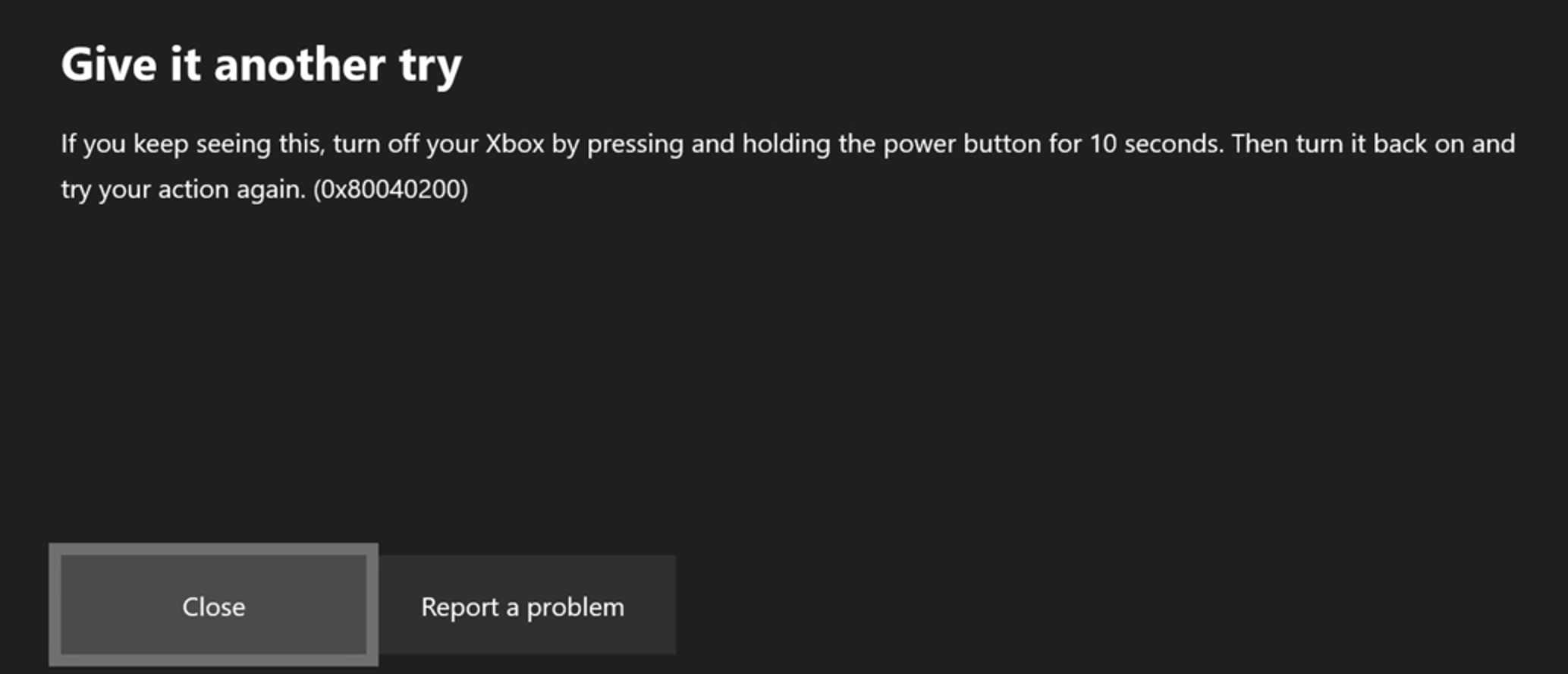
Now it will not show me the error. The error looked like it was coming from the Xbox One. Not the game. I did a little research and can confirm that it is a standard Xbox One error message. It says "Give it another try." and gives me the option to Close or Retry. Hitting either didn't do anything and required I hard-reset my console.
As luck would have it, just after I sent my response the conversion failed again this time with the error. See attached.

The error I received has happened numerous times after playing Minecraft and then playing other games. I believe there's a memory leak or something similar happening that is preventing Minecraft from shutting down correctly and causing issues with the stability of the Xbox after playing Minecraft. A hard reset is required all the time to resolve this and I do not experience this error with any other game combo. Just Minecraft BTU.
I am seeing this error mainly when trying to convert my world, (or playing Minecraft for a long time) and I still believe the issue remains in Minecraft. The Xbox error is a bi-product of that problem.
If you notice in the comments of this and other tickets, some people are seeing the problem go away after different updates to Minecraft happen. I just signed up for the beta again and am hoping to upload my world next beta version so Mojang can take a look at it directly.
Glad @Alberto was able to move on from this problem, but others are still experiencing the issue.
I disabled a redstone clock in my world and that reduced the lag - not 100%, but it was playable for the most part. The lag continues particularly when it rains, at night, or when there are other "heavy render activity" generators going on in the world such as too many mobs, a lot of movement (causing constant screen updates) and other such things.
This appears to be resolved in the latest beta 1.2.5 Build 12.
Still experimenting in 1.2.5 Build 12, but I haven't experienced any lag yet. I re-enabled my clock and that had no impact on the frame rate. Night did not impact the frame rate either. Waiting for some rain, but so far looks promising for me. Hoping this isn't one of those "spoke too soon moments".
Ugh... spoke too soon. Overall I see improvements but I am still noticing some lag and choppiness. The frame rate doesn't always drop according to the beta data at the top of the screen, but I am definitely experiencing choppiness, mostly when turning directions especially if there's a lot to render on the screen. The lag seems worst when there is disk activity and I notice frame rate drop then.
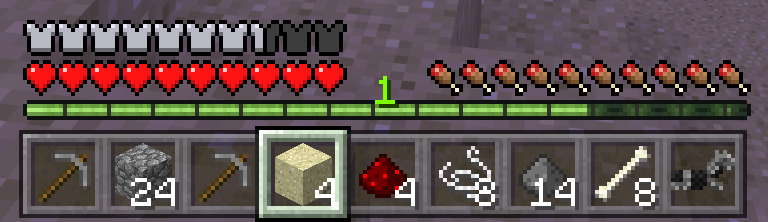
After killing hundreds of skeletons from a skeleton spawner farm I have yet to pickup an enchanted bow or any armor, enchanted or otherwise. Skeletons are not dropping/wearing any armor (nor are zombies) and they don't drop anything but regular bows, bones and arrows.
I have yet to receive enchanted armor from a Zombie or Skeleton from regular hunting either. Something is definitely off in regards to the rate at which they generate these items and drop them. Currently in my map the rate is 0%.
Playing in the beta 1.2.5 Build 12
Noticing much greater lag and FRP drop in non-peaceful modes. Makes sense as there are more mobs active.
So I continued to explore my world and eventually came across one lone wolf. I took a look at the wiki and noticed that they only spawn in particular biomes. So maybe that was the issue.
Oddly enough I never noticed this restriction before under the old Xbox One version. Maybe it was broken? Wolves would spawn like crazy in multiple biomes not listed in the wiki.
Anyway, I guess this can be closed now as I was able to finally find one.
Apologies for not supplying the receipt #, did see the notice on this ticket until after I uploaded my world.
In the latest beta 1.2.5.15, the world gets past the 99% crash I had experienced previously... finishes the upload, but then crashes on a dialog-less screen and takes me back to the Xbox One home page. It's progress, but still not there.
The lag was improved in beta 1.2.5.12 for me, however it is got worse again in 1.2.5.15.
It's not lag now but more choppy stuttering as I move about. It gets worse when writing to the HD or loading complex chunks. Instead of the screen dragging, it hops skipping frames to take me to the most current view.
After a lot of exploring of my world, I finally came across an ocelot in beta 1.2.5.12. Didn't have a fish on me (darn) to tame it, but at least I saw one.
I think the issue was they were taking a long time to spawn when you were in a chunk that spawns them. I noticed that in the last beta I suddenly started seeing them more, so I suspect they fixed something that resolved this issue.
Will continue to monitor.
This is fixed in beta 1.2.5.12 and 1.2.5.15 on Xbox One.
Still not resolved for me as of the latest release.
This has not worked for me since the BTU. I cannot connect with any players. Very frustrating considering that's how I played before BTU.
I agree, that this issue should be moved up in priority. It's a big deal and a game breaker. The issue hasn't even been assigned to someone yet.
Based on the definition of observer behavior in the wiki, the piston block triggering will update the observer. So if a piston block was in a block observed by the observer, then it would update when the piston expanded or contracted. This does not apply to the piston head movement.
As quoted from the Wiki "A piston (not the head) extending or contracting" triggers redstone signal from the observer.
This is not the current behavior as of 1.2.5.15 - i.e. it is broken, according to your own documentation in the wiki. Please re-open this case and fix.
@Alberto, I suspect they are working through one world at a time trying to identify the issues in the conversion process, crossing their fingers it will resolve numerous affected worlds. As you say, eventually we may see resolution. Crossing my fingers too!
Whenever I have challenged Minecraft "behaviors" or the like, I am pointed to the Wiki. Whether it is user-editable or not, if Minecraft representatives are going to use it as their rule book, then it works both ways.
The piston head is actually not a block, and I disagree that the "All other block / block state changes" Wiki entry actually applies. If a mob moves into a block, it does not trigger the observer. The piston head isn't any different. It's a temporary intrusion and should be treated as such. When sugarcane grows into the block it is there for a longer period of time to potentially always there. The piston is passing through, so to speak, and should not be treated the same way.
Besides, if the piston head is moving into a block that already has an object in it, then it should not re-trigger the observer as the state of the block is not changing from empty to full. It's going from full to full. It's not until the piston head has left the block that a change of state actually takes place, whether its changing the state of a block like sugarcane, or moving a block out of the current clock.
Ultimately, the behavior I am describing just makes the Observer a better feature of Minecraft. It makes for much simpler devices that are simply not possible with the changed behavior in the latest release. It is extremely frustrating having to rebuild every time someone at Minecraft decides its easier to fix other problems by changing behaviors in something else.
Almost 3 months since I reported this issue and it is still happening in the latest versions.
Still present in 1.2.6.2 beta.
Got the Xbox One X for Xmas and when I went to migrate my games over everything worked fine EXCEPT Minecraft. I can't sync with the Cloud to transfer the games. Gives me an error about the other Xbox is still trying to sync.
This seems like a size issue as the smaller worlds were backed up. I even copied the larger worlds just to see if they would sync to the cloud and no go. One larger world that was on the cloud corrupted on the new Xbox One X.
I did a lot of reading on the Internet about this and Microsoft blames Mojang and Mojang blames Xbox. The passing of the blame game. There are multiple versions of this issue in the database. Come on Mojang/Microsoft.. fix your game!
This issue is NOT fixed. Tried to migrate my games to a new Xbox and realized that the Cloud sync has not been working for at least a month. Saves are working locally but not syncing to the cloud. Never even had a notice this was happening until I tried to migrate.
Fix this. It is unacceptable to lose months of game play because of a bug that was introduced recently in an update. At this point I cannot migrate large saves because they won't sync to the Cloud.
Allow us a way to export/import the saves to a USB drive like we could on the Xbox 360. This would solve the problem (at least until you fix the cloud sync).
Yes, I am still experiencing this issue. It is NOT fixed. I've left two other comments relating to this under different tickets that all related to cloud syncs.
Seems to happen due to larger save files. They don't sync. Smaller ones do. Please resolve ASAP.
Seems to be a memory issue. Whenever the total mem gets close to 2000 it crashes. Worse when two players are in the world. Only started after 1.6.08 update and happens consistently, making exploring and moving more that 500 blocks challenging as the mem starts getting consumed.
@Lee,
This only started happening to me in the 1.6.08 release. This is the first time I've seen something that affected game play in such a significant way, apart from some terrible lighting issues that used to happen and sometimes pop up from time to time and connectivity problems with other players.
Under the previous beta 1.6.05 I had a world with a file size of over 400MB mostly due to having to travel many many blocks to find a manor house from a map. That map just corrupted last week and is now unplayable or retrievable. Really pissed about that because my friend and I had put a lot of time into it.
Explorability is the game and if we can't have unlimited sized worlds that are truly unlimited without crashing the game or corrupting the game file then what's the point of having unlimited? In theory its great but I don't think the people at Majong/Microsoft have been able to properly crack the recovery of memory when unloading blocks that are no longer in play. Eventually the game crashes. I've only experienced a few corrupt game files in my many years of playing, but those are usually the critical ones that hurt.
Backup regularly if you don't want to lose what you are working on. It would be great if backups were automatic. It would also be great if we could access local files to restore them if the cloud versions fail, but that's something they refuse to let players do. There it is...
Follow-up to my previous message...
After a lot of roaming around without a map in my off-hand I haven't experienced a crash. If I hold the map in the inventory bar, it seems to work - updating the map, without crashing the game.
Has anyone else that has experienced the unexpected crashing been using the map in the off-hand? If so, try using the map non-offhand and see if that works. Either way, report it here so we know if the map in the off-hand is causing the problem.
Are you using a map in your off-hand? Try moving it to the inventory bar and see if that resolves the problem. I was experiencing the same crashes but doing this seems to have fixed it, at least for now.
After experiencing a good amount of play without the problem it suddenly started again and now continues whether I have a map or not in hand or in my inventory. Sigh...
Additionally, experienced a power failure afterwards while playing and lost my map file. Just disappeared from Minecraft. Had a backup but that was 24 hours old so lost a lot.
As of 1.8 Ocelots cannot be tamed, so how can we get the Lion Tamer achievement if it is tied to Ocelots? Shouldn't it be tied to Cats now?
No longer happening in current versions.
Has this been resolved? My son and I just spent 3 days prepping a guardian farm only to find now guardians are spawning. This issue has been unresolved for over a year. Is anyone looking into it? The comment about changing the floor doesn't apply to us because we aren't using glass blocks as the floor. What "different material" were the developers referring to?
Also, I had read that mobs were not supposed to be able to spawn inside the template boundaries, but after we hollowed it out skeletons and spiders were spawning (we witnessed it at the very corner of the parameter). If this is accurate then is this another monument related bug?
Sorry I just realized I typo'd in my first message. It should have read... "Has this been resolved? My son and I just spent 3 days prepping a guardian farm only to find guardians are NOT spawning. "
I can write up the other part in a separate ticket, but it would be great to know if this has been looked into, and get clarification on the blocks the developers were referring to.
I received 1 bucket of milk, no cake, two buckets missing when trying to craft a cake.
When crafting bread, it consumes all my wheat but returns no bread.
You're missing the whole point of my message. Marking this as resolved doesn't solve the problem of a pissed off customer!!!
This morning, I tried to log in and its still unavailable. This is not resolved, this is Mojang sweeping complaints under the rug.
WHO do I talk to about customer service at Mojang?
I reported issues I was having with realms a few days ago when they kept going down. My report was quickly dismissed as a dupe without any acknowledgement of my frustration or the inconvenience that the realms being down caused.
Judging by all the comments I'm not alone. Here's my 2 cents which will probably be ignored by Mojang... again...
Dear @Galaxy_2Alex,
This issue is still happening in 1.16.1 and the ticket in which this was marked as a duplicate specifically stated to call out other similar issues in NEW tickets. Please reopen this ticket and investigate. This bug has been happening since at least 1.14 for me.
@Pig2Creeper No, I am not using the beta, just the normal release process. I gave up on the beta years ago because it kept corrupting worlds and ruining game play.
These are the settings selected (all available except the last two).
@Pig2Creeper Does this bug also completely rewrite the chunk(s) in the area? It's not just a matter of raising the chunk, but rather rewriting the entire area. Do you have the issue number so I can follow it? I didn't see it. Thanks!