 MCPE-26780
Cannot transfer my old worlds to new Minecraft Better Together on XBOX ONE
i can´t transfer my worlds from Minecraft xbox One Edition to the new Minecraft (1.2.1) Better Together it says "syncronizing Minecraft data" and does not sync anything and sends me an error... Sometimes appears "0%" and then show me a sync error (( it only happen on Minecraft Better Together 1.2.1 Xbox ONE im from Mexico City, please fix it( i love my old worlds... greetings from Mexico...
Attachments10




Created Issue:
Cannot transfer my old worlds to new Minecraft Better Together on XBOX ONE
i can´t transfer my worlds from Minecraft xbox One Edition to the new Minecraft (1.2.1) Better Together it says "syncronizing Minecraft data" and does not sync anything and sends me an error... Sometimes appears "0%" and then shoe me a sync error (( it only happen on Minecraft Better Together 1.2.1 Xbox ONE im from Mexico City, please fix it( i love my old worlds... greetings from Mexico...
![[Bot] Arisa](../../../data/assets/gravatar/mustek2.png)
i can´t transfer my worlds from Minecraft xbox One Edition to the new Minecraft (1.2.1) Better Together it says "syncronizing Minecraft data" and does not sync anything and sends me an error... Sometimes appears "0%" and then sho
eme a sync error (( it only happen on Minecraft Better Together 1.2.1 Xbox ONE im from Mexico City, please fix it( i love my old worlds... greetings from Mexico...i can´t transfer my worlds from Minecraft xbox One Edition to the new Minecraft (1.2.1) Better Together it says "syncronizing Minecraft data" and does not sync anything and sends me an error... Sometimes appears "0%" and then show me a sync error (( it only happen on Minecraft Better Together 1.2.1 Xbox ONE im from Mexico City, please fix it( i love my old worlds... greetings from Mexico...
![[Mod] bemoty](../../../data/avatars/users/50554.png)
I have exactly the same problem. Gamertag: SkyRim EvoLu3D, World Name: [Multigaming] World
Well to me personally, the error is still still in v1.2.3 since my world never reaches 100% always in 59% gives error, in truth I hope to fix this of the synchronization of the ancient worlds, since this very lazy to start a new project after already having very but really very advanced one previously, attached photos of my problem.
Well to me personally, the error is still still in v1.2.3 since my world never reaches 100% always in 59% gives error, in truth I hope to fix this of the synchronization of the ancient worlds, since this very lazy to start a new project after already having very but really very advanced one previously, attached photos of my problem.

SmartSelectImage_2017-10-19-13-54-27.png
Well to me personally, the error is still still in v1.2.3 since my world never reaches 100% always in 59% gives error, in truth I hope to fix this of the synchronization of the ancient worlds, since this very lazy to start a new project after already having very but really very advanced one previously, attached photos of my problem.
https://ibb.co/n6jLT6
https://ibb.co/jzLc86
https://ibb.co/eUeLT6
https://ibb.co/eaU4o6


It's been quite a few months. A patch came out saying it's been fixed on my screen yet I still cant transfer my large worlds. I hope it will be fixed by May!
![[Mojang] Mega_Spud (Jay Wells)](../../../data/avatars/users/92696.png)
Hi Rob Morton, this issue (MCPE-26780) is related with error happening during conversion process. It means that the conversion process didn't start at all or after starting, can't reach 100% (give some error message or crashing). It seems that your problem is different, as you could finish the conversion process but after that, something is missing or wrong in your converted world. For this, there is a ticket already opened: MCPE-25344.
Please do not mark unreleased versions as affected.
You don't have access to them yet.
I'm sorry that this afternoon came the 1.2.1 patch so I had marked that option
I’ve been seeing it as well; the synchronization will take place says it’s complete but when I go into the world, literally half of it is gone; I’ve also noticed that the file sizes pre and post-sync do not match. The world I’ve been trying to sync with the new game is 255mb but upon completion, the file size is only 170mb and once, only 180mb and, yes, this happened after the game updated to the newest version last night for me.
Continuing to have the same issue. File is 350+MB. Crashes at 97-99%. Forces a hard reboot of the console.
I have read that it happens to them, that they change the size of the world after synchronizing, but I can not even synchronize, it does not advance from 0% and it sends me an error and sometimes no percentage appears, I hope they fix it fast, I do not want to lose those worlds...
Same issue here. I was able to convert two of my worlds, however. The two most important worlds were not able to convert. I get an error message saying: "We were not able to synchronize with the cloud" and then "Error in the world conversion".
One world is 251Mb and the other 125Mb.
Please help!
I am running v1.2.1 and I am from Mexico City too... Is this an error related to Xbox One not syncing with the Cloud or is this Minecraft app related not able to convert the world file?
I think it's a Minecraft bug because if it were Xbox, I would not let you synchronize data from any game or application, exactly, all our worlds of Minecraft xbox ONE Edition have a great sentimental value for us, that's why we do not want to lose them and follow them playing on Better Together
Forgot to mention that I’m seeing this and I’m in the US.
do not worry Rob, I think it's a general problem and I hope they solve it quickly
I've seen the same problem. In my case, none of my world could be migrated, doesn't matter if it has 170 MB or 10 MB, so, it seems it is not related to the world size.
exact, no matter the size of the world to me does not leave me with any of the ones I have, the smallest is 3.4MB and the largest 184MB and none leave me
Can someone update de affected version to include 1.2.2? This bug still an issue after this latest update.
excatly, the issue still here
In my case, version 1.2.3 fixed the problem. I could import my worlds from Minecraft Xbox One Edition. So far, everything is there. Only problem is related with pistons. If nobody disagree, I would suggest to close this ticket.
I already forgot that I posted this error but yes, you're right the error was solved since the fall Xbox ONE update, and yes, I agree to close this ... I have not noticed problems with the pistons, What problem do you?
I am still experiencing this issue for my world after installing the 1.2.3 update. Big disappointment. Standard crash message telling me to try again or reboot.
have you updated your console yet? because I was solved by doing that, try that, I support what I can and I will not stop this since there are very few reports about this error
Still having the world conversion issue after updating to 1.2.3; saw more of my world but still areas where there’s nothing but blank space or half of something where I know a lot of stuff exists and is whole.
I have seen that happen to several also friend I hope they realize the error and solve it fast
Hi Rob Morton, this issue (
MCPE-26780) is related with error happening during conversion process. It means that the conversion process didn't start at all or after starting, can't reach 100% (give some error message or crashing). It seems that your problem is different, as you could finish the conversion process but after that, something is missing or wrong in your converted world. For this, there is a ticket already opened:MCPE-25344.Thanks for this information, Sandro; I'll check out this ticket and comment there.
ok I just updated console and eh to say that the old world synchronization was solved, only a small detail my world went crazy I mean the mechanisms does not work perfectly and as they should hurt so this would be another issue not focused to the synchronization of old worlds as well as referring to this subject I give it solved, only pending the correct function of pistons, and mechanisms created from these and redstone, greetings.
Impetico, did you have a chance to follow the Alberto Garcia suggestion to update the console and try again with Minecraft version 1.2.3 if you can transfer your legacy worlds? If you still facing problems, could you please post the error message image?
I am using the latest version of the console. I am running the 1.2.3 release of Minecraft and have tried several times to convert my old world.
Previously I was getting an error each time I tried to convert it, but now nothing. As it is converting I can see the background move. When it gets to 97% or 98% the background stops moving and then the game closes and takes me back to my home page on Xbox One. I can't get past the 97-98 percent range before it crashes.
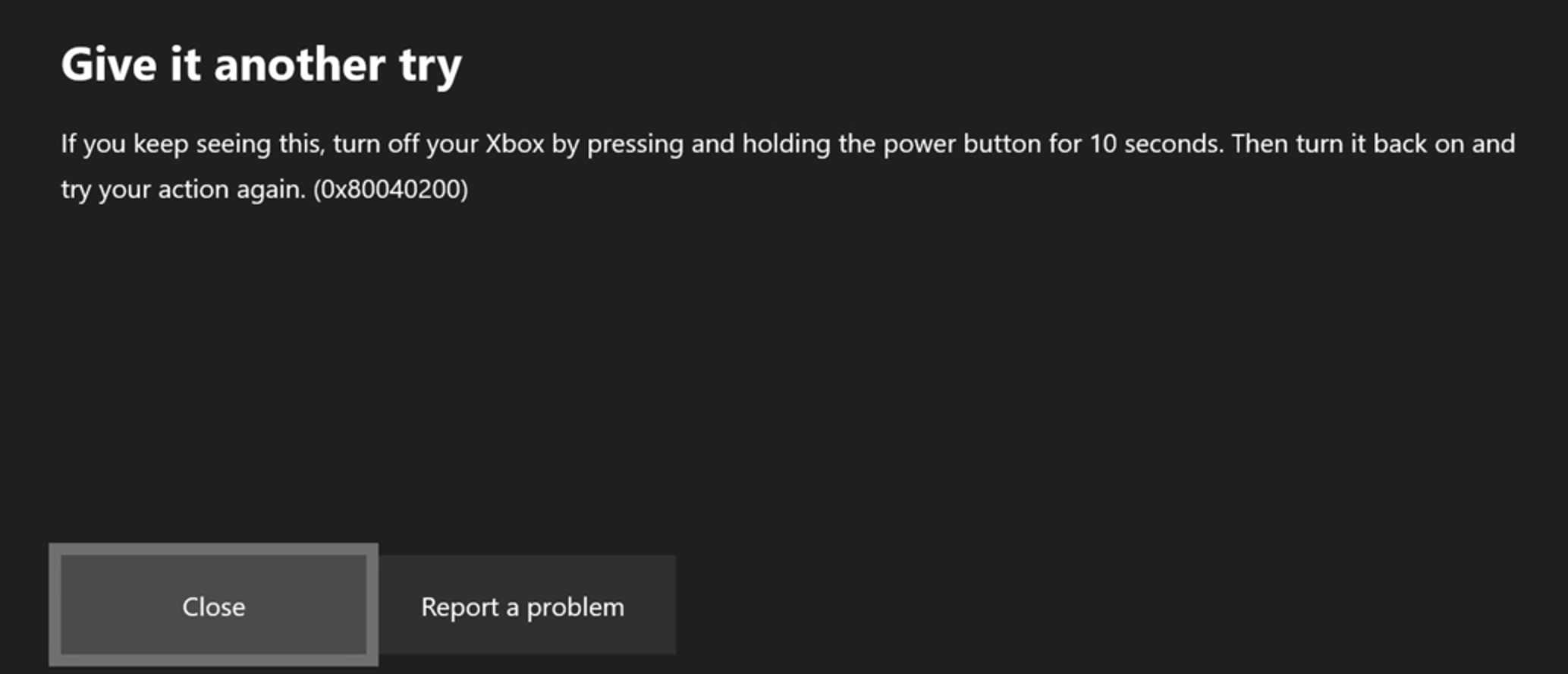
Now it will not show me the error. The error looked like it was coming from the Xbox One. Not the game. I did a little research and can confirm that it is a standard Xbox One error message. It says "Give it another try." and gives me the option to Close or Retry. Hitting either didn't do anything and required I hard-reset my console.
As luck would have it, just after I sent my response the conversion failed again this time with the error. See attached.

Exactly, I also just updated the console to the latest version and the problem was solved
The error I received has happened numerous times after playing Minecraft and then playing other games. I believe there's a memory leak or something similar happening that is preventing Minecraft from shutting down correctly and causing issues with the stability of the Xbox after playing Minecraft. A hard reset is required all the time to resolve this and I do not experience this error with any other game combo. Just Minecraft BTU.
I am seeing this error mainly when trying to convert my world, (or playing Minecraft for a long time) and I still believe the issue remains in Minecraft. The Xbox error is a bi-product of that problem.
If you notice in the comments of this and other tickets, some people are seeing the problem go away after different updates to Minecraft happen. I just signed up for the beta again and am hoping to upload my world next beta version so Mojang can take a look at it directly.
Glad @Alberto was able to move on from this problem, but others are still experiencing the issue.
in fact friend, others still present the problem and as you say, I read that with several updates of Minecraft or the update of the same console is solved, I hope that the solution gradually reaches all affected ...
@Alberto, I suspect they are working through one world at a time trying to identify the issues in the conversion process, crossing their fingers it will resolve numerous affected worlds. As you say, eventually we may see resolution. Crossing my fingers too!
We are looking into this!
Helen Zbihlyj. I'm so happy someone has actually replied regarding this gamebreaking bug. What is going on? Memory leak?
I have about 10 other bug reports that are almost 5 months old at this point and no fix, or even comment back at this point. Good luck guys!
Cleaning up old tickets: This ticket has not been updated recently (~1 year+) so is being closed as Cannot Reproduce. If you feel this is still a valid issue then please comment, or create a new ticket following the Issue Guidelines.
Quick Links:
📓 Issue Guidelines – 💬 Mojang Support – 📧 Suggestions – 📖 Minecraft Wiki