 Jared Jeyaretnam
- jaredjeya
- jaredjeya
- Europe/Stockholm
- Yes
- No
 MC-7349

When multiple TNT minecarts collide (I used 5), the game lags up, they make the rail sound continuously and explode with stronger than usual force. The game then crashes with a "Ticking Entity" bug.
What I expected to happen was...:
The minecarts produce the equivalent of 5 TNT explosions upon colliding, or do nothing.What actually happened was...:
The minecarts stopped, and my game lagged up. I got the "dirt screen of death" which then oddly disappeared and returned to the game. I heard explosions and saw items flying away but the terrain did not update for a few seconds, then I saw a huge square TNT crater pattern (characteristic of the old Tekkit Nukes (THIS WAS NOT TEKKIT OBVIOUSLY)). The game then crashed. Earlier, it did not crash but lagged so badly (0fps, not responding) that I had to force quit.Steps to Reproduce:
1. Create some sort of long, booster powered railway that ends in a wall.
2. Place multiple TNT carts at the end and fire them all at the wall.
3. They will stop at the end and lag the game before exploding and then crashing the game.[color:red}This is NOT a duplicate of
MC-7324, which had a different stack trace to my bug, although it had the same name. It is also not a duplicate ofMC-6804as this bug is incomplete[color:red}This is NOT a duplicate of
MC-7324, which had a different stack trace to my bug, although it had the same name. It is also not a duplicate ofMC-6804as this bug is incomplete, whereas mine contains a full crash report.
When multiple TNT minecarts collide (I used 5), the game lags up, they make the rail sound continuously and explode with stronger than usual force. The game then crashes with a "Ticking Entity" bug.
What I expected to happen was...:
The minecarts produce the equivalent of 5 TNT explosions upon colliding, or do nothing.
What actually happened was...:
The minecarts stopped, and my game lagged up. I got the "dirt screen of death" which then oddly disappeared and returned to the game. I heard explosions and saw items flying away but the terrain did not update for a few seconds, then I saw a huge square TNT crater pattern (characteristic of the old Tekkit Nukes (THIS WAS NOT TEKKIT OBVIOUSLY)). The game then crashed. Earlier, it did not crash but lagged so badly (0fps, not responding) that I had to force quit.
Steps to Reproduce:
1. Create some sort of long, booster powered railway that ends in a wall.
2. Place multiple TNT carts at the end and fire them all at the wall.
3. They will stop at the end and lag the game before exploding and then crashing the game.
[color:red}This is NOT a duplicate ofMC-7324, which had a different stack trace to my bug, although it had the same name. It is also not a duplicate ofMC-6804as this bug is incomplete, whereas mine contains a full crash report.
[color:red} This is NOT a duplicate of
MC-7324, which had a different stack trace to my bug, although it had the same name. It is also not a duplicate ofMC-6804as this bug is incomplete, whereas mine contains a full crash report.
When multiple TNT minecarts collide (I used 5), the game lags up, they make the rail sound continuously and explode with stronger than usual force. The game then crashes with a "Ticking Entity" bug.
What I expected to happen was...:
The minecarts produce the equivalent of 5 TNT explosions upon colliding, or do nothing.
What actually happened was...:
The minecarts stopped, and my game lagged up. I got the "dirt screen of death" which then oddly disappeared and returned to the game. I heard explosions and saw items flying away but the terrain did not update for a few seconds, then I saw a huge square TNT crater pattern (characteristic of the old Tekkit Nukes (THIS WAS NOT TEKKIT OBVIOUSLY)). The game then crashed. Earlier, it did not crash but lagged so badly (0fps, not responding) that I had to force quit.
Steps to Reproduce:
1. Create some sort of long, booster powered railway that ends in a wall.
2. Place multiple TNT carts at the end and fire them all at the wall.
3. They will stop at the end and lag the game before exploding and then crashing the game.
[color:red}This is NOT a duplicate ofMC-7324, which had a different stack trace to my bug, although it had the same name. It is also not a duplicate ofMC-6804as this bug is incomplete, whereas mine contains a full crash report.This is NOT a duplicate of
MC-7324, which had a different stack trace to my bug, although it had the same name. It is also not a duplicate ofMC-6804as this bug is incomplete, whereas mine contains a full crash report.When multiple TNT minecarts collide (I used 5), the game lags up, they make the rail sound continuously and explode with stronger than usual force. The game then crashes with a "Ticking Entity" bug.
What I expected to happen was...:
The minecarts produce the equivalent of 5 TNT explosions upon colliding, or do nothing.What actually happened was...:
The minecarts stopped, and my game lagged up. I got the "dirt screen of death" which then oddly disappeared and returned to the game. I heard explosions and saw items flying away but the terrain did not update for a few seconds, then I saw a huge square TNT crater pattern (characteristic of the old Tekkit Nukes ( THIS WAS NOT TEKKIT OBVIOUSLY )). The game then crashed . Earlier, it did not crash but lagged so badly (0fps, not responding) that I had to force quit.Steps to Reproduce:
1. Create some sort of long, booster powered railway that ends in a wall.
2. Place multiple TNT carts at the end and fire them all at the wall.
3. They will stop at the end and lag the game before exploding and then crashing the game.This is NOT a duplicate of
MC-7324, which had a different stack trace to my bug, although it had the same name. It is also not a duplicate ofMC-6804as this bug is incomplete, whereas mine contains a full crash report.
crash.png
Minecraft Version: 13w04a
Operating System: Windows 7 (amd64) version 6.1
Java Version: 1.7.0_04
JVM Flags: 2 total; -Xms512m -Xmx1024m
Suspicious classes: No suspicious classes found.
LWJGL: 2.4.2
OpenGL: Intel(R) HD Graphics Family GL version 3.1.0
Is Modded: Probably not. Jar signature remains and client brand is untouched.
Type: Client13w04a*, Windows 7 (amd64) version 6.1, Java 1.7.0_04-Xms512m -Xmx1024m
Suspicious classes: No suspicious classes found.
LWJGL: 2.4.2
OpenGL: Intel(R) HD Graphics Family GL version 3.1.0
Is Modded: Probably not. Jar signature remains and client brand is untouched.
Type: Client
13w04a
*,Windows 7 (amd64) version 6.1, Java 1.7.0_04-Xms512m -Xmx1024mSuspicious classes: No suspicious classes found.
LWJGL: 2.4.2
OpenGL: Intel(R) HD Graphics Family GL version 3.1.0
Is Modded: Probably not. Jar signature remains and client brand is untouched.
Type: Client13w04a, Windows 7 (amd64) version 6.1, Java 1.7.0_04-Xms512m -Xmx1024m
Suspicious classes: No suspicious classes found.
LWJGL: 2.4.2
OpenGL: Intel(R) HD Graphics Family GL version 3.1.0
Is Modded: Probably not. Jar signature remains and client brand is untouched.
Type: Client
13w04a , Windows 7 (amd64) version 6.1, Java 1.7.0_04
-Xms512m -Xmx1024mSuspicious classes: No suspicious classes found.
LWJGL: 2.4.2
OpenGL: Intel(R) HD Graphics Family GL version 3.1.0
Is Modded: Probably not. Jar signature remains and client brand is untouched.
Type: Client
13w04a , Windows 7
(amd64)version 6.1,Java 1.7.0_0413w04a , Windows 7 version 6.1, Java 1.7.0_04
13w04a , Windows 7 version 6.1, Java 1.7.0_04
13w04a, Windows 7 version 6.1, Java 1.7.0_04
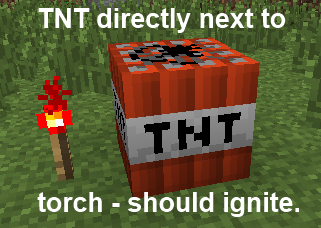
I placed TNT down and then a redstone torch next to it, on the same level.
What I expected to happen was
TNT blows up.What actually happened was
The TNT did not ignite, but when I triggered a block update of the torch (by placing another torch next to the original and diagonally from the
I placed TNT down and then a redstone torch next to it, on the same level.
What I expected to happen was
TNT blows up.What actually happened was
The TNT did not ignite, but when I triggered a block update of the torch (by placing another torch next to the original and diagonally from the TNT), it did ignite.How to replicate
1) Place TNT on a flat area of ground
2) Place a redstone torch or block adjacent to the TNT - even on all 4 sides.
3) Note that the TNT does not ignite.
4) Place a torch next to the original(s) (but not a block, this will not trigger an update) Relative position to the TNT does not matter upon further testing
5) Note that the TNT now ignites.How this should be fixed
Ensure that TNT receives block updates from redstone torches and blocks as soon as they are placed, instead of waiting for them to send one. This does not occur with doors or pistons, which are also redstone-activated device, so something has not been copied over.Please test this, replicate it and assign to a mojangsta, as there appear to be no other issues like this.
Forced Crash Log.
Diagram showing how to replicate, and the bug.
Launching the game with the launcher works fine (although there is a handled FileNotFoundException which does not affect the game). However minimising the game causes it to crash immediately:
"A fatal error has been detected by the Java Runtime Environment: EXCEPTION_ACCESS_VIOLATION (0xc0000005) at pc=0x000000000c90930a, pid=7448, tid=6268
Failed to write core dump. Minidumps are not enabled by default on client versions of Windows"I believe this is not a Minecraft error, but an actual JVM error. Attached is the log.
At the time, I still had the launcher open, but upon further testing this does not matter.
Launching the game with the launcher works fine (although there is a handled FileNotFoundException which does not affect the game). However minimising the game causes it to crash immediately:
{{A fatal error has been detected by the Java Runtime Environment: EXCEPTION_ACCESS_VIOLATION (0xc0000005) at pc=0x000000000c90930a, pid=7448, tid=6268
Failed to write core dump. Minidumps are not enabled by default on client versions of Windows}}I believe this is not a Minecraft error, but an actual JVM error. Attached is the log.
At the time, I still had the launcher open, but upon further testing this does not matter.
Launching the game with the launcher works fine (although there is a handled FileNotFoundException which does not affect the game). However minimising the game causes it to crash immediately:
{{A fatal error has been detected by the Java Runtime Environment: EXCEPTION_ACCESS_VIOLATION (0xc0000005) at pc=0x000000000c90930a, pid=7448, tid=6268
Failed to write core dump. Minidumps are not enabled by default on client versions of Windows}}I believe this is not a Minecraft error, but an actual JVM error. Attached is the log.
At the time, I still had the launcher open, but upon further testing this does not matter.
Launching the game with the launcher works fine (although there is a handled FileNotFoundException which does not affect the game). However minimising the game causes it to crash immediately:
{A fatal error has been detected by the Java Runtime Environment: EXCEPTION_ACCESS_VIOLATION (0xc0000005) at pc=0x000000000c90930a, pid=7448, tid=6268 Failed to write core dump. Minidumps are not enabled by default on client versions of Windows}I believe this is not a Minecraft error, but an actual JVM error. Attached is the log.
At the time, I still had the launcher open, but upon further testing this does not matter.
Launching the game with the launcher works fine (although there is a handled FileNotFoundException which does not affect the game). However minimising the game causes it to crash immediately:
{A fatal error has been detected by the Java Runtime Environment: EXCEPTION_ACCESS_VIOLATION (0xc0000005) at pc=0x000000000c90930a, pid=7448, tid=6268 Failed to write core dump. Minidumps are not enabled by default on client versions of Windows}I believe this is not a Minecraft error, but an actual JVM error. Attached is the log.
At the time, I still had the launcher open, but upon further testing this does not matter.
Launching the game with the launcher works fine (although there is a handled FileNotFoundException which does not affect the game). However minimising the game causes it to crash immediately:
A fatal error has been detected by the Java Runtime Environment: EXCEPTION_ACCESS_VIOLATION (0xc0000005) at pc=0x000000000c90930a, pid=7448, tid=6268
Failed to write core dump. Minidumps are not enabled by default on client versions of Windows
I believe this is not a Minecraft error, but an actual JVM error. Attached is the log.
At the time, I still had the launcher open, but upon further testing this does not matter.
Launching the game with the launcher works fine (although there is a handled FileNotFoundException which does not affect the game). However minimising the game causes it to crash immediately:
A fatal error has been detected by the Java Runtime Environment: EXCEPTION_ACCESS_VIOLATION (0xc0000005) at pc=0x000000000c90930a, pid=7448, tid=6268
Failed to write core dump. Minidumps are not enabled by default on client versions of Windows
I believe this is not a Minecraft error, but an actual JVM error. Attached is the log.
At the time, I still had the launcher open, but upon further testing this does not matter.
Launching the game with the launcher works fine (although there is a handled FileNotFoundException which does not affect the game). However minimising the game causes it to crash immediately:
A fatal error has been detected by the Java Runtime Environment: EXCEPTION_ACCESS_VIOLATION (0xc0000005) at pc=0x000000000c90930a, pid=7448, tid=6268
Failed to write core dump. Minidumps are not enabled by default on client versions of Windows
I believe this is not a Minecraft error, but an actual JVM error. Attached is the log.
At the time, I still had the launcher open, but upon further testing this does not matter.
Java 7u
4Java 7u21
Gamecrashes when minimisedJVM crashes when game is minimised
Launching the game with the launcher works fine (although there is a handled FileNotFoundException which does not affect the game). However minimising the game causes it to crash immediately:
A fatal error has been detected by the Java Runtime Environment: EXCEPTION_ACCESS_VIOLATION (0xc0000005) at pc=0x000000000c90930a, pid=7448, tid=6268
Failed to write core dump. Minidumps are not enabled by default on client versions of Windows
I believe this is not a Minecraft error, but an actual JVM error. Attached is the log, which tells me the error occurred in "Native Code".
At the time, I still had the launcher open, but upon further testing this does not matter.
You can clearly see the track I used plus the characteristic square, chaotic hole with "rays" seen before in Tekkit / IC2 Nukes.
That's a bug about hoppers....I'm confused.
If you mean
MC-6804, that's missing a crash log, so this is a better report.I think maybe TNT minecarts are meant to detonate if they hit blocks, but these are wrongly intersecting with blocks when they shouldn't be. I wonder what happens if you replace the block with a column of lava? That should detonate it but not normal blocks.
Nice job you ought to be paid by Mojang for this, you found the bug AND fixed it.
ALSO normal double click doesn't work, tested in creative inventory survival tab but I'm sure it does the same in survival. Strangely it works in container screens e.g dispensers.
Sorry, I searched for the keywords "TNT", "Fails" and "Ignite" but nothing came up. I do know that there can often be duplicates!
Will you consider merging some of the information, as I feel mine has a much more detailed report (including that if the redstone torch or block is updated by another torch, it will activate the device?) Thanks.
Could either the reporter or a mod copy some of the more detailed info from
MC-8478? That way when this gets assigned to a mojangsta they'll have more to work on.Thanks
@Marcono1234 but we're also talking about redstone blocks here.
Also I think Kevin may be referring to a torch on the side of a wall, above the block.
Someone update this since it's not fixed in 13w05a
Someone update this since it's not fixed in 13w05a
Dinnerbone, please reconsider. This feature is incredibly useful for all kinds of things: For example, when I use the distribute action in a crafting table, but don't use all the items, I can just double click to collect everything under one stack. The strangest thing is IT STILL WORKS IN DISPENSERS. The code is in there, you just need to apply it to other inventories.
Once again. Make this 12w07a. And get this fixed, Dinnerbone, this is a major problem! One of the ways most people set off TNT is through redstone torches, not flint and steel.
Crash report or it didn't happen.
ffs Dinnerbone, hurry up and fix this before 1.5!
I've tried to get this fixed but no-one seems to have noticed it. I don't think it has enough votes for it to be seen by you or jeb:
MC-8184This is a MAJOR problem with torches not triggering TNT and dispensers, etc, when placed down.
I believe this happens when mobs are allowed to move before the world fully loads, and the mobs fall down, then the blocks load around them. Otherwise I'm not sure
Also, check out and vote for
MC-8184- it's a pretty significant redstone bug, i.e. redstone torches don't even affect TNT, Dispensers, Noteblocks etc. but only has 26 votesI'll see if that fixes it.
No, not fixed. I installed both 32bit and 64bit update 21, and the error log says "7.0_21-b11". I'll update the attached error log to the latest one.
This is the latest error log, u21
Ok, will do. Is that because it's a JVM error and not a Java error?
I can't find the support email address, mind telling me what it is please? Thanks
Now you're telling me that as if I've neglected to update anything. I'm using an HP g4 pavillion, and they have f*cked up switchable graphics that mean Minecraft and OpenGL applications can't use the dedicated Radeon GPU. HP refuses to update anything ever, so that's probably why.
If this continues into 1.6 I will not be happy, with HP more than Mojang. >
Reinstalled it, still not fixed. This sounds too much like a Mojang issue because I've never had this with Java before.
I found out the HP driver was out of date by a whole MAJOR version (8.x instead of 9.x) and so downloaded the right one from intel. And it is STILL broken. I refuse to believe this is just a problem with my drivers being out of date.
I found bugs like this that have happened before, in the same .dll file, e.g
MC-612. I haven't touched my drivers, it's something that changed between 1.5 and 13w16a.FFS I told you before this is not a Java version problem, or a driver version problem. I've updated both of these things to the newest level, in the case of Java both 32 and 64 bit. I made an Oracle bug report but that's probably never going to be read or fixed, since it's a huge company.
Listen, it's NOT the drivers or updates for anything. I have the newest released drivers for both of my graphics cards as well, and the newest Java version. The java doesn't even matter since this is on java 6. Don't "resolve" this, throw it away and blame it on drivers because tons of people are getting this. Platypus's report says the game exited with exit code 1, which means something happened inside the code and not in the JVM - the method "system.exit(1)" was called. So stopp blaming it on us. Just get one of the devs to look at this for ten seconds, I want a second opinion.
I've got a similar issue. Seeing as it began with the new launcher and snapshot series, I feel as if this is Mojang's fault, but trying to get it resolved (I.e remove whatever is crashing graphics cards) is like running into a brick wall. Grum and/or other devs, please look at it and fix it otherwise Minecraft will be unplayable.
By the way it is on
MC-14051@Torabi if you had bothered reading the comments or the HP support page you would realise that certain HP laptops have a bug where the dGPU (high power) cannot be assigned to an openGL application in dynamic mode, only in fixed mode. But HP only updated the newest most expensive models, leaving my (less than 2 year old) model with the bug - all they need to do is give me the option to enable fixed mode graphics but HP are lazy and have terrible support. Given this only appeared in the latest series of snapshots, this is Mojang's fault - nothing changed my end.
I explained I had a g4. Does the "this pertains to" line on the customer support page say g4?
My computer is less than 2 years old. It has one of the latest i5 processors and corresponding integrated cards. It doesn't need upgrading, and if you're telling me "use old versions of Minecraft" I'd like my money back. Can you imagine if the government said "we're putting automated toll booths on the roads - if you don't have a new car from this year with the tech for that, go out and buy one"? I've explained that HP doesn't listen to their customers (so when I do buy a new computer it won't be an HP - but I can't upgrade every year). I've tried VERY hard to force my computer to use the dGPU, disabling the card in the device manager does not work.
Do you seriously think they will do anything? It isn't a big enough issue for a huge company like nVidia or Intel or widely used library like LWJGL. But since this seems specific to minecraft and my similar problem only occurred recently, across a large variety of graphics cards (such as the Intel i5 2nd generation integrated cards, and nVidia cards like this one), I feel it is a problem with Minecraft , and Mojang's responsibility to fix it.
I did report this to Java (intriguingly they have a special page, on the report landing page, just for Minecraft but it didn't cover my bug).
I don't know my similar issue (
MC-14051) is happening, but it is NOT my fault, and I'm made to feel like it is.I thought I'd upgraded all of my drivers when I was told that was the best way to fix it, but it turns out they weren't the newest. After using Device Manager to update them for both cards and downloading 13w19a, it no longer crashes (I'm really surprised, because I had downloaded the newest ones from the appropriate website).
It probably was my fault then Sorry for the trouble then, I should have double checked all my drivers.
Anyone else getting this problem, device manager is your friend. Use that to double check everything is as updated as it can be.
EDIT: Weird. Just did some further testing, now it only crashes if you are in the title screen (with the panoramic background) or mojang splash icon, not if you are in game or in any type of menu. But because it's fixed ingame, I'm regarding it as solved.
I just managed to solve my similar problem (sort of) - are you using Device Manager (in control panel -> system -> device manager) to update the graphics drivers, or are you downloading them from the website? When I updated using Device Manager, they worked perfectly and fixed the problem. I think it is because the website ones are "generic" but the Device Manager ones are tailored to your install.
Try updating ALL your graphics card drivers using Device Manager.
Try updating ALL your graphics card drivers using Device Manager.
Try updating ALL your graphics card drivers using Device Manager.
I guess the problem was that Regen got nerfed, but the apple didn't get buffed to compensate?
'
I've tried putting myself to 1/2 a heart, and just waiting for it to run out (having taken damage during the health boost effect). I die.
Since they are signed integers, I think the actual maximum value is 127. after this it overflows to -128.
Dinnerbone knows about it, I think he might be working on a fix.
For me it didn't occur when fullscreening (I actually tested that) but for others it did so that is fair.
Once again, a mod changes it to suggest we haven't updated all of our drivers again and again and again.
I never suggested you had to. I'm simply saying it's not fair to blame it on us not updating drivers. I'm getting a new computer soon anyway