 user-f5d8c
- jirauser200375
- JIRAUSER200375
- Europe/Stockholm
- No
- No
 MCPE-24650
 MC-217607





CrashwhenCrash on movement!
Umm... rplatham, that is exactly what I just said above... XDD
Mhm. Well, at least you CAN fix it... It would seem as if MCPE 0.16.0 Betas have a big problem with resource packs; first Build 1 crash and NOW this! (to fix the build 1 crash I just deleted the resource_packs folder...)
Crash on movement!
In 1.2.0.7, Custom Skins appear as black...Invalid! Please delete this! I do not know how!
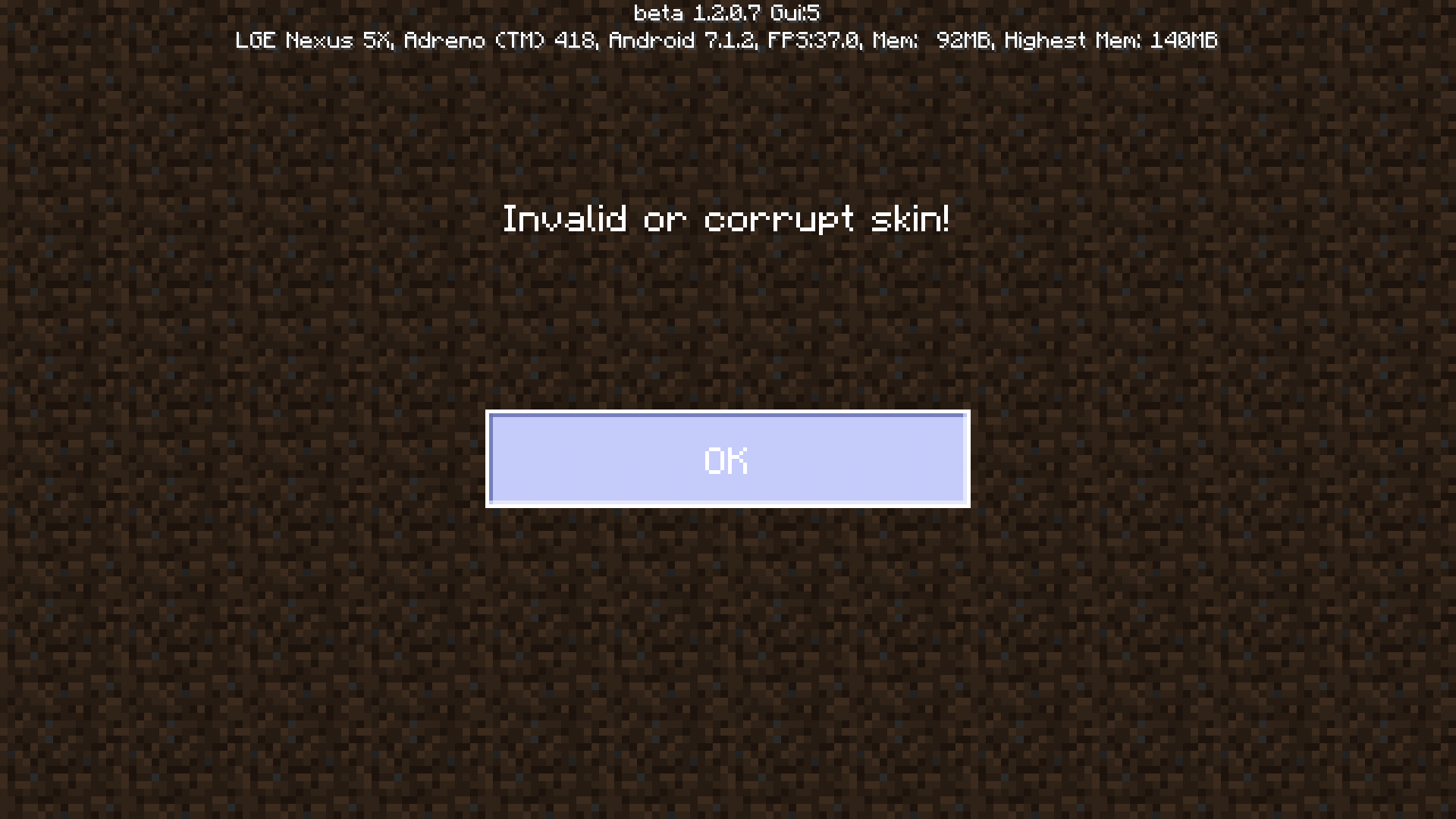
In version 1.2.0.7 (it didn't let me choose another version) Custom skins (and only custom skins, not skin pack skins) appear as simply being black. When trying to switch your skin, the Steve and Alex model selections appear as invisible. When trying to join a game with this weird black skin, it says "Invalid or corrupted skin" and doesn't allow you to join a world.
In version 1.2.0.7 (it didn't let me choose another version) Custom skins (and only custom skins, not skin pack skins) appear as simply being black. When trying to switch your skin, the Steve and Alex model selections appear as invisible. When trying to join a game with this weird black skin, it says "Invalid or corrupted skin" and doesn't allow you to join a world.
In version 1.2.0.7 (it didn't let me choose another version) Custom skins (and only custom skins, not skin pack skins) appear as simply being black. When trying to switch your skin, the Steve and Alex model selections appear as invisible. When trying to join a game with this weird black skin, it says "Invalid or corrupted skin" and doesn't allow you to join a world.
Invalid! Please delete this! I do not know how!This Thread Is a Duplicate!
In version 1.2.0.7 (it didn't let me choose another version) Custom skins (and only custom skins, not skin pack skins) appear as simply being black. When trying to switch your skin, the Steve and Alex model selections appear as invisible. When trying to join a game with this weird black skin, it says "Invalid or corrupted skin" and doesn't allow you to join a world.In version 1.2.0.7 (it didn't let me choose another version) Custom skins (and only custom skins, not skin pack skins) appear as simply being black. When trying to switch your skin, the Steve and Alex model selections appear as invisible. When trying to join a game with this weird black skin, it says "Invalid or corrupted skin" and doesn't allow you to join a world.
Oops! Soz m8! Ill take it down!
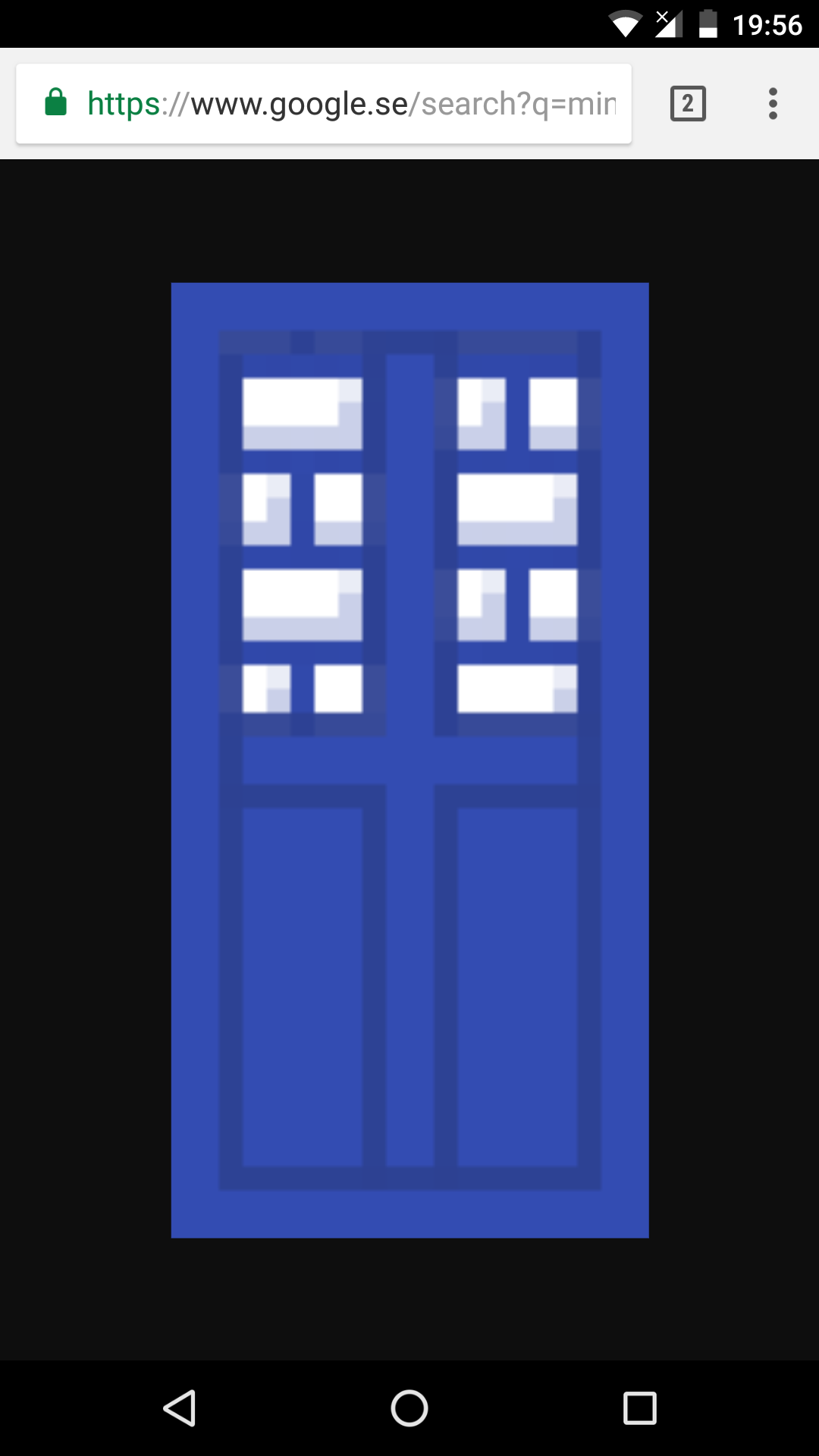
Long story short, I tried to make myself a nifty TARDIS banner in Minecraft PE... After I covered ink sac patterns with lapis lazuli patterns, the result was still darker than it should've been... Notice that the MCPE in-game TARDIS has darker outlines than the other version... This might work if you cover ink sac patterns with other dyes, too, although I haven't tested that out. Please fix this bug!
This bug has been fixed as of 1.2.0.11!
Long story short, I tried to make myself a nifty TARDIS banner in Minecraft PE... After I covered ink sac patterns with lapis lazuli patterns, the result was still darker than it should've been... Notice that the MCPE in-game TARDIS has darker outlines than the other version... This might work if you cover ink sac patterns with other dyes, too, although I haven't tested that out. Please fix this bug!
(Has Been Fixed) -Black lines on banners are not the right shade after lapis lazuli is applied to them...-
(Has Been Fixed)-Black lines on banners are not the right shade after lapis lazuli is applied to them...-
This bug has been fixed as of 1.2.0.11!
Long story short, I tried to make myself a nifty TARDIS banner in Minecraft PE... After I covered ink sac patterns with lapis lazuli patterns, the result was still darker than it should've been... Notice that the MCPE in-game TARDIS has darker outlines than the other version... This might work if you cover ink sac patterns with other dyes, too, although I haven't tested that out. Please fix this bug!Long story short, I tried to make myself a nifty TARDIS banner in Minecraft PE... After I covered ink sac patterns with lapis lazuli patterns, the result was still darker than it should've been... Notice that the MCPE in-game TARDIS has darker outlines than the other version... This might work if you cover ink sac patterns with other dyes, too, although I haven't tested that out. Please fix this bug!
Long story short, I tried to make myself a nifty TARDIS banner in Minecraft PE... After I covered ink sac patterns with lapis lazuli patterns, the result was still darker than it should've been... Notice that the MCPE in-game TARDIS has darker outlines than the other version... This might work if you cover ink sac patterns with other dyes, too, although I haven't tested that out.
Please fix this bug!
(Has Been Fixed)Black lines on banners are not the right shade after lapis lazuli is applied to them...
Black lines on banners are not the right shade after lapis lazuli is applied to them...
When selecting items in the crafting table and inventory, instead of the item being "picked up", the slot you are trying to select gains a white border, as if you were using a controller. You are also not able to drag items throughout the inventory, making "PC Crafting" practically impossible. This bug, however, seems to not affect you
r inventory or chest inventory at all. I have left two screenshots below of an item being selected in the inventory and in a chest.I am not sure if this is related to this specific bug, but items are also disappearing from the inventory, as well as the creative inventory being seemingly glitched out, although I can't make "glitched out" any more specific... Sorry! Either way, I hope these glitches are fixed soon!
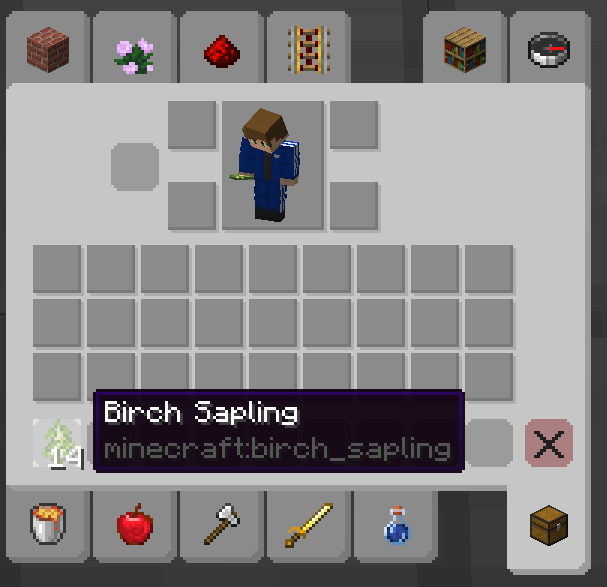
When selecting items in the crafting table and inventory, instead of the item being "picked up", the slot you are trying to select gains a white border, as if you were using a controller. You are also not able to drag items throughout the inventory, making "PC Crafting" practically impossible. This bug, however, seems to not affect you at all if you're in the chest GUI. I have left two screenshots below of an item being selected in the inventory and in a chest.
I am not sure if this is related to this specific bug, but items are also disappearing from the inventory, as well as the creative inventory being seemingly glitched out, although I can't make "glitched out" any more specific... Sorry! Either way, I hope these glitches are fixed soon!
When selecting items in the crafting table and inventory, instead of the item being "picked up", the slot you are trying to select gains a white border, as if you were using a controller. You are also not able to drag items throughout the inventory, making "PC Crafting" practically impossible. This bug, however, seem
stonotaffect you at all if you're in the chest GUI. I have left two screenshots below of an item being selected in the inventory and in a chest.I am not sure if this is related to this specific bug, but items are also disappearing from the inventory, as well as the creative inventory being seemingly glitched out, although I can't make "glitched out" any more specific... Sorry! Either way, I hope these glitches are fixed soon!
When selecting items in the crafting table and inventory, instead of the item being "picked up", the slot you are trying to select gains a white border, as if you were using a controller. You are also not able to drag items throughout the inventory, making "PC Crafting" practically impossible. This bug, however, does not seem to affect you at all if you're in the chest GUI. I have left two screenshots below of an item being selected in the inventory and in a chest.
I am not sure if this is related to this specific bug, but items are also disappearing from the inventory, as well as the creative inventory being seemingly glitched out, although I can't make "glitched out" any more specific... Sorry! Either way, I hope these glitches are fixed soon!
When selecting items in the crafting table and inventory, instead of the item being "picked up", the slot you are trying to select gains a white border, as if you were using a controller. You are also not able to drag items throughout the inventory, making "PC Crafting" practically impossible. This bug, however, does not seem to affect you at all if you're in the chest GUI. I have left two screenshots below of an item being selected in the inventory and in a chest.
I am not sure if this is related to this specific bug, but items are also disappearing from the inventory, as well as the creative inventory being seemingly glitched out, although I can't make "glitched out" any more specific... Sorry! And yet another thing, for whatever reason, heads (dragon heads, creeper heads, etc...) can not be equipped. Either way, I hope these glitches are fixed soon!
If you place a banner on a wall and then place another banner below it, the banners will occasionally overlap (the bottom banner will clip through the top banner). I use a Samsung Galaxy S8 phone.
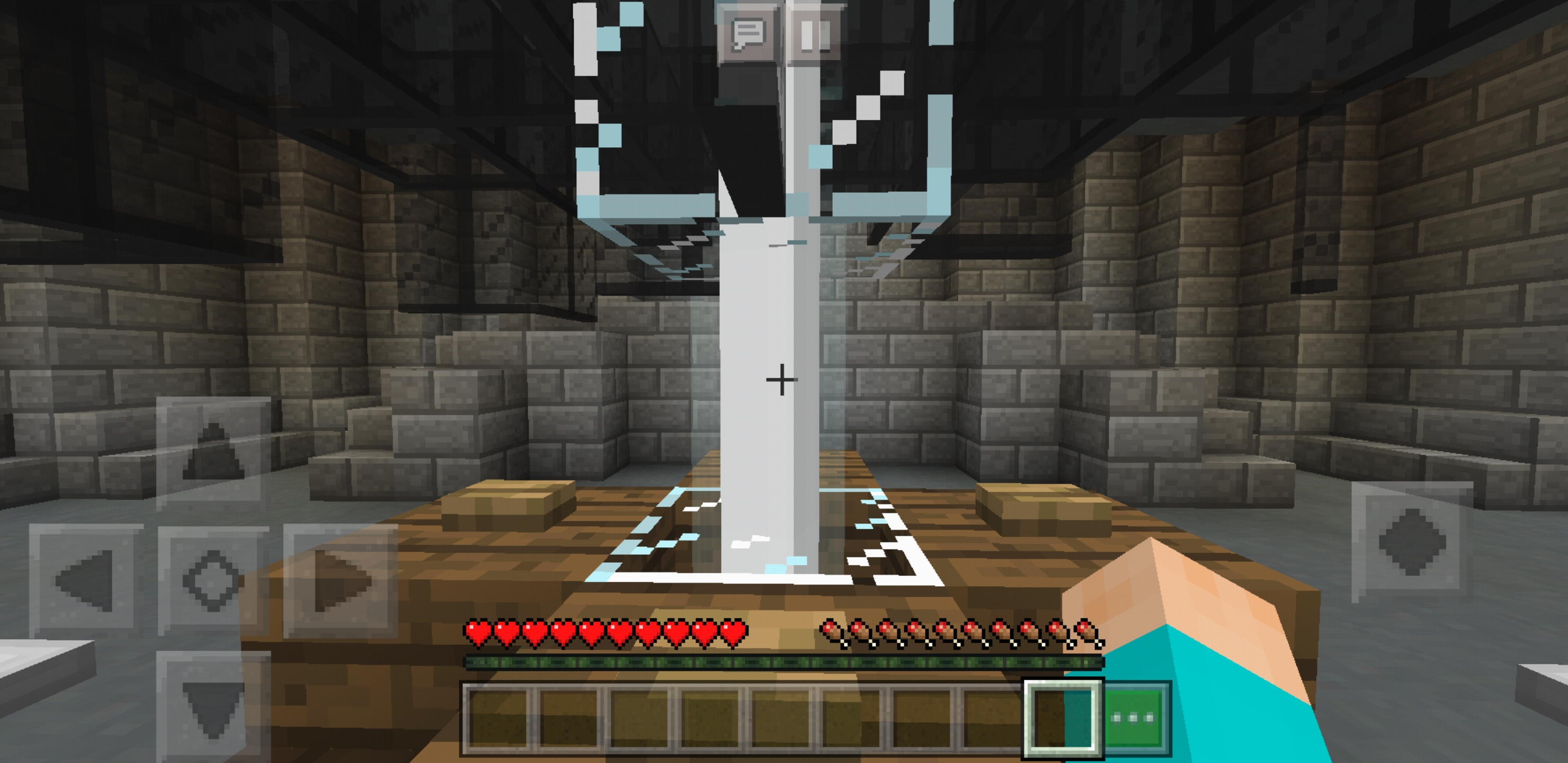
On a Samsung Galaxy S8 phone, beacon beams have a blank texture.
On a Samsung Galaxy S8 phone, beacon beams have a blank texture.It appears this is a duplicate. Sorry!
Beacon Beams Have Blank Texture (DUPLICATE)
On a Samsung Galaxy S8 phone, beacon beams have a blank texture.It appears this post is a duplicate. Sorry!
Banners that are placed on walls have the same stand behind them that
banners that are placed on the ground do. However, wall-banners are supposed to have just one single horizontal stand near the top of the banner; a wall-banner's stand shouldn't be shaped like a T. I use a Samsung Galaxy S8 phone.Banners that are placed on walls have the same stand behind them that standing banners do. I use a Samsung Galaxy S8 phone.
Wall-Banners' Stands AreShaped Like a TWall-Banners' Stands Are The Same As Standing-Banners' Stands
Executecommandruns differentlydepending on the selector usedto target the same entityChain commands may or may not run depending on the selector used
The execute command runs differently depending ontheselector used to target the same entity.
How to reproduce:
1. Create a new world with cheats enabled
2. Create a datapack called "test" in that world with a namespace called "test" containing one .mcfunction file called "test.mcfunction"
3. Put these two commands, in this order, in separate lines of the function file: teleport @s -6900 70 6900 and execute at @s run forceload add ~ ~
4. Summon an armor stand and give it the tag "test" (using this command: /tag @e[type=armour_stand] add test)
5. Run this command in the chat: /execute as @e[tag=test] at @s run function test:testThe armor stand should then be teleported to -6900 70 6900 and should be loaded thanks to the forceload command (you can check if the armour stand is loaded using this command: /execute if entity @e[tag=test].
Now, the same steps must be repeated with a couple of changes
- Enter the same world you previously created (unless you are inside of the world already)
- Open test.mcfunction with an editor. Delete everything that is inside of the function file. Then, Put these two commands, in this order, in separate lines of test.mcfunction: teleport @e[tag=test] -6900 70 6900 and execute at @e[tag=test] run forceload add ~ ~
- Kill all armor stands in the world and remove all forceloaded chunks. Summon a new armor stand and give it the tag "test"
- Run this command in the chat: /execute as @e[tag=test] at @s run function test:test
The armor stand should then still be teleported to -6900 70 6900 and should be loaded by the forceload command. However, the forceload command does not work in this case and, therefore, the armour stand remains unloaded. This should not happen as the @s selector is selecting the exact same entity that the @e[tag=test] selector was targeting, meaning that the commands should do the exact same thing.
If a non-player entity is teleported to unloaded chunks using a command inside of a function, the commands following the teleport command is not run unless the @s selector is used.
How to reproduce:
1. Create a new world with cheats enabled
2. Create a datapack called "test" in that world with a namespace called "test" containing one .mcfunction file called "test.mcfunction"
3. Put these two commands, in this order, in separate lines of the function file: teleport @s -6900 70 6900 and execute at @s run forceload add ~ ~
4. Summon an armor stand and give it the tag "test" (using this command: /tag @e[type=armour_stand] add test)
5. Run this command in the chat: /execute as @e[tag=test] at @s run function test:testThe armor stand should then be teleported to -6900 70 6900 and should be loaded thanks to the forceload command (you can check if the armour stand is loaded using this command: /execute if entity @e[tag=test].
Now, the same steps must be repeated with a couple of changes
- Enter the same world you previously created (unless you are inside of the world already)
- Open test.mcfunction with an editor. Delete everything that is inside of the function file. Then, Put these two commands, in this order, in separate lines of test.mcfunction: teleport @e[tag=test] -6900 70 6900 and execute at @e[tag=test] run forceload add ~ ~
- Kill all armor stands in the world and remove all forceloaded chunks. Summon a new armor stand and give it the tag "test"
- Run this command in the chat: /execute as @e[tag=test] at @s run function test:test
The armor stand should then still be teleported to -6900 70 6900 and should be loaded by the forceload command. However, the forceload command does not work in this case and, therefore, the armour stand remains unloaded. This should not happen as the @s selector is selecting the exact same entity that the @e[tag=test] selector was targeting, meaning that the commands should do the exact same thing.
Chain commands may or may not run depending onthe selector usedIf a non-player entity is teleported to unloaded chunks using a command inside of a function, the commands following the teleport command is not run unless the @s selector is used
If a non-player entity is teleported to unloaded chunks using a command inside of a function, the commands
followingthe teleport commandisnot run unless the @s selector is used.
How to reproduce:
1. Create a new world with cheats enabled
2. Create a datapack called "test" in that world with a namespace called "test" containing one .mcfunction file called "test.mcfunction"
3. Put these two commands, in this order, in separate lines of the function file: teleport @s -6900 70 6900 and execute at @s run forceload add ~ ~
4. Summon an armor stand and give it the tag "test" (using this command: /tag @e[type=armour_stand] add test)
5. Run this command in the chat: /execute as @e[tag=test] at @s run function test:testThe armor stand should then be teleported to -6900 70 6900 and should be loaded thanks to the forceload command (you can check if the armour stand is loaded using this command: /execute if entity @e[tag=test].
Now, the same steps must be repeated with a couple of changes
- Enter the same world you previously created (unless you are inside of the world already)
- Open test.mcfunction with an editor. Delete everything that is inside of the function file. Then, Put these two commands, in this order, in separate lines of test.mcfunction: teleport @e[tag=test] -6900 70 6900 and execute at @e[tag=test] run forceload add ~ ~
- Kill all armor stands in the world and remove all forceloaded chunks. Summon a new armor stand and give it the tag "test"
- Run this command in the chat: /execute as @e[tag=test] at @s run function test:test
The armor stand should then still be teleported to -6900 70 6900 and should be loaded by the forceload command. However, the forceload command does not work in this case and, therefore, the armour stand remains unloaded. This should not happen as the @s selector is selecting the exact same entity that the @e[tag=test] selector was targeting, meaning that the commands should do the exact same thing.
If a non-player entity is teleported to unloaded chunks using a command inside of a function, the commands that are below the teleport command are not run unless the @s selector is used.
How to reproduce:
1. Create a new world with cheats enabled
2. Create a datapack called "test" in that world with a namespace called "test" containing one .mcfunction file called "test.mcfunction"
3. Put these two commands, in this order, in separate lines of the function file: teleport @s -6900 70 6900 and execute at @s run forceload add ~ ~
4. Summon an armor stand and give it the tag "test" (using this command: /tag @e[type=armour_stand] add test)
5. Run this command in the chat: /execute as @e[tag=test] at @s run function test:testThe armor stand should then be teleported to -6900 70 6900 and should be loaded thanks to the forceload command (you can check if the armour stand is loaded using this command: /execute if entity @e[tag=test].
Now, the same steps must be repeated with a couple of changes
- Enter the same world you previously created (unless you are inside of the world already)
- Open test.mcfunction with an editor. Delete everything that is inside of the function file. Then, Put these two commands, in this order, in separate lines of test.mcfunction: teleport @e[tag=test] -6900 70 6900 and execute at @e[tag=test] run forceload add ~ ~
- Kill all armor stands in the world and remove all forceloaded chunks. Summon a new armor stand and give it the tag "test"
- Run this command in the chat: /execute as @e[tag=test] at @s run function test:test
The armor stand should then still be teleported to -6900 70 6900 and should be loaded by the forceload command. However, the forceload command does not work in this case and, therefore, the armour stand remains unloaded. This should not happen as the @s selector is selecting the exact same entity that the @e[tag=test] selector was targeting, meaning that the commands should do the exact same thing.
If a non-player entity is teleported to unloaded chunks using a command inside of a function, the commands following the teleport commandisnot run unless the @s selector is usedIf a non-player entity is teleported to unloaded chunks using a command inside of a function, the commands following the teleport command are not run unless the @s selector is used
If a non-player entity is teleported to unloaded chunks using a command inside of a function, the commands that are below the teleport command are not run unless the @s selector is used. This is a bug because all commands inside of a function are run within the same tick, meaning that the commands following the teleport command should be able to run before the entity unloads.
How to reproduce:
1. Create a new world with cheats enabled
2. Create a datapack called "test" in that world with a namespace called "test" containing one .mcfunction file called "test.mcfunction"
3. Put these two commands, in this order, in separate lines of the function file: teleport @s -6900 70 6900 and execute at @s run forceload add ~ ~
4. Summon an armor stand and give it the tag "test" (using this command: /tag @e[type=armour_stand] add test)
5. Run this command in the chat: /execute as @e[tag=test] at @s run function test:testThe armor stand should then be teleported to -6900 70 6900 and should be loaded thanks to the forceload command (you can check if the armour stand is loaded using this command: /execute if entity @e[tag=test].
Now, the same steps must be repeated with a couple of changes
- Enter the same world you previously created (unless you are inside of the world already)
- Open test.mcfunction with an editor. Delete everything that is inside of the function file. Then, Put these two commands, in this order, in separate lines of test.mcfunction: teleport @e[tag=test] -6900 70 6900 and execute at @e[tag=test] run forceload add ~ ~
- Kill all armor stands in the world and remove all forceloaded chunks. Summon a new armor stand and give it the tag "test"
- Run this command in the chat: /execute as @e[tag=test] at @s run function test:test
The armor stand should then still be teleported to -6900 70 6900 and should be loaded by the forceload command. However, the forceload command does not work in this case and, therefore, the armour stand remains unloaded. This should not happen as the @s selector is selecting the exact same entity that the @e[tag=test] selector was targeting, meaning that the commands should do the exact same thing.
If you open your inventory, let your mouse hover over a full stack of items, and hold the item-drop key (Q by default), you will be able to drop all of the items one by one in quick succession. However, upon picking the items back up, many of them will have dissapeared. This only occurs in creative mode, and only when dropping items from the inventory UI (it doesn't seem to happen through the hotbar).
Steps to reproduce:
**1. Enter a creative world
2. Obtain a full stack of any block or item that stacks to 64
3. Open your inventory and hover your mouse over the stack of blocks/items
4. Hold the item-drop key (Q by default) until you have dropped the whole stack of blocks/items.
5. Upon picking up the items you have dropped, check the amount of blocks/items you have dropped: only 14 of the original 64 will remain.
This bug also applies to blocks/items that are stacked to less than 64, and it doesn't have to be a full stack of items, either. As I have previously stated, this only seems to occur in creative mode and only when droppiing items using the inventory GUI.
If you open your inventory, let your mouse hover over a full stack of items, and hold the item-drop key (Q by default), you will be able to drop all of the items one by one in quick succession. However, upon picking the items back up, many of them will have dissapeared. This only occurs in creative mode, and only when dropping items from the inventory UI (it doesn't seem to happen through the hotbar).
Steps to reproduce:
1. Enter a creative world
2. Obtain a full stack of any block or item that stacks to 64
3. Open your inventory and hover your mouse over the stack of blocks/items
4. Hold the item-drop key (Q by default) until you have dropped the whole stack of blocks/items.
5. Upon picking up the items you have dropped, check the amount of blocks/items you have dropped: only 14 of the original 64 will remain.
This bug also applies to blocks/items that are stacked to less than 64, and it doesn't have to be a full stack of items, either. As I have previously stated, this only seems to occur in creative mode and only when droppiing items using the inventory GUI.
If you open your inventory, let your mouse hover over a full stack of items, and hold the item-drop key (Q by default), you will be able to drop all of the items one by one in quick succession. However, upon picking the items back up, many of them will have dissapeared. This only occurs in creative mode, and only when dropping items from the inventory UI (it doesn't seem to happen through the hotbar).
Steps to reproduce:
1. Enter a creative world
2. Obtain a full stack of any block or item that stacks to 64
3. Open your inventory and hover your mouse over the stack of blocks/items
4. Hold the item-drop key (Q by default) until you have dropped the whole stack of blocks/items.
5. Upon picking up the items you have dropped, check the amount of blocks/items you have dropped: only 14 of the original 64 will remain.
This bug also applies to blocks/items that are stacked to less than 64, and it doesn't have to be a full stack of items,either. As I have previously stated, this only seems to occur in creative mode and only when droppiing items using the inventory GUI.
If you open your inventory, let your mouse hover over a full stack of items, and hold the item-drop key (Q by default), you will be able to drop all of the items one by one in quick succession. However, upon picking the items back up, many of them will have dissapeared. This only occurs in creative mode, and only when dropping items from the inventory UI (it doesn't seem to happen through the hotbar).
Steps to reproduce:
1. Enter a creative world
2. Obtain a full stack of any block or item that stacks to 64
3. Open your inventory and hover your mouse over the stack of blocks/items
4. Hold the item-drop key (Q by default) until you have dropped the whole stack of blocks/items.
5. Upon picking up the items you have dropped, check the amount of blocks/items you have dropped: only 14 of the original 64 will remain.
This bug also applies to blocks/items that are stacked to less than 64, and it doesn't have to be a full stack of items either. As I have previously stated, this only seems to occur in creative mode and only when droppiing items using the inventory GUI.
Steps to reproduce:
1. Have one item in your inventory
2. Run the command /kill @s
3. Return to the spot where you died (DON'Tpick up the item!) and type in the command:/data get entity @e[type=item,limit=1] ThrowerThis will reveal that the item does not have a Thrower tag, despite technically
beingdropped by the player.This is related to MC-96782 but is not a duplicate as
MC-96782 does not mention that this is happening upon player death.Steps to reproduce:
1. Have one item in your inventory
2. Run the command /kill @s
3. Return to the spot where you died (without picking up the item!) and type in the command:/data get entity @e[type=item,limit=1] ThrowerThis will reveal that the item does not have a Thrower tag, despite technically having been dropped by the player.
This is related to MC-96782 but is not a duplicate, as MC-96782 does not mention that this is happening upon player death.
Steps to reproduce:
1. Have one item in your inventory
2. Run the command /kill @s
3. Return to the spot where you died (without picking up the item!) and type in the command:/data get entity @e[type=item,limit=1] ThrowerThis will reveal that the item does not have a Thrower tag, despite technically having been dropped by the player.
This is related to MC-96782 but is not a duplicate, as MC-96782 does not mention that this
is happeningupon player death.Steps to reproduce:
1. Have one item in your inventory
2. Run the command /kill @s
3. Return to the spot where you died (without picking up the item!) and type in the command:/data get entity @e[type=item,limit=1] ThrowerThis will reveal that the item does not have a Thrower tag, despite technically having been dropped by the player.
This is related to MC-96782 but is not a duplicate, as MC-96782 does not mention that this bug occurs upon player death.
When switching from holding one item (e.g. a sword) to holding another item of the same type (e.g. another sword), the attack speed does not get reset. This is presumably intended behaviour.
However, this behaviour does not take into account switching between two items of the same type but that have DIFFERENT attack speeds. If I had a default sword, and also had a sword with a custom, slower attack speed, switching from the default sword to the custom sword will result in a strange behaviour where the game will act as if you had been holding the slower, custom sword for the same amount of time that you had been holding the default sword.
Steps to reproduce:
- Ensure that the attack indicator is enabled in the video settings.
- Obtain a normal iron sword and place it in the hotbar.
- Run this command to obtain an iron sword with an attack speed of -3.9:
/give @p iron_sword{AttributeModifiers:[{AttributeName:"generic.attack_speed",Amount:-3.9,Operation:0,UUID:[I;-12123,24406,141845,-48812],Slot:mainhand,Name:"generic.attack_speed"}]} 1
- Hit something using the default sword and wait for approximately five seconds.
- Now, switch to holding the custom sword.
- Divert your gaze to the attack indicator next to your crosshair/hotbar. You will see that the attack indicator will already be half full, despite the player having only just switched to that item.
The expected behaviour would be for the attack speed cooldown to be reset upon switching to an item with a different attack speed, regardless of whether the two items are of the same type or not.
When switching from holding one item (e.g. an iron sword) to holding another item of the same type (e.g. another iron sword), the attack speed does not get reset. This is presumably intended behaviour.
However, this behaviour does not take into account switching between two items of the same type but that have DIFFERENT attack speeds. If I had a default sword, and also had a sword with a custom, slower attack speed, switching from the default sword to the custom sword will result in a strange behaviour where the game will act as if you had been holding the slower, custom sword for the same amount of time that you had been holding the default sword.
Steps to reproduce:
- Ensure that the attack indicator is enabled in the video settings.
- Obtain a normal iron sword and place it in the hotbar.
- Run this command to obtain an iron sword with an attack speed of -3.9:
/give @p iron_sword{AttributeModifiers:[{AttributeName:"generic.attack_speed",Amount:-3.9,Operation:0,UUID:[I;-12123,24406,141845,-48812],Slot:mainhand,Name:"generic.attack_speed"}]} 1
- Hit something using the default sword and wait for approximately five seconds.
- Now, switch to holding the custom sword.
- Divert your gaze to the attack indicator next to your crosshair/hotbar. You will see that the attack indicator will already be half full, despite the player having only just switched to that item.
The expected behaviour would be for the attack speed cooldown to be reset upon switching to an item with a different attack speed, regardless of whether the two items are of the same type or not.
When switching from holding one item (e.g. an iron sword) to holding another item of the same type (e.g. another iron sword), the attack speed indicator does not get reset. This is presumably intended behaviour.
However, this behaviour does not take into account switching between two items of the same type but that have DIFFERENT attack speeds. If I had a default sword, and also had a sword with a custom, slower attack speed, switching from the default sword to the custom sword will result in a strange behaviour where the game will act as if you had been holding the slower, custom sword for the same amount of time that you had been holding the default sword.
Steps to reproduce:
- Ensure that the attack indicator is enabled in the video settings.
- Obtain a normal iron sword and place it in the hotbar.
- Run this command to obtain an iron sword with an attack speed of -3.9:
/give @p iron_sword{AttributeModifiers:[{AttributeName:"generic.attack_speed",Amount:-3.9,Operation:0,UUID:[I;-12123,24406,141845,-48812],Slot:mainhand,Name:"generic.attack_speed"}]} 1
- Hit something using the default sword and wait for approximately five seconds.
- Now, switch to holding the custom sword.
- Divert your gaze to the attack indicator next to your crosshair/hotbar. You will see that the attack indicator will already be half full, despite the player having only just switched to that item.
The expected behaviour would be for the attack speed cooldown to be reset upon switching to an item with a different attack speed, regardless of whether the two items are of the same type or not.
When switching from holding one item (e.g. an iron sword) to holding another item of the same type (e.g. another iron sword), the attack speed indicator does not get reset. This is presumably intended behaviour.
However, this behaviour does not take into account switching between two items of the same type but that have DIFFERENT attack speeds. If I had a default iron sword, and also had an iron sword with a custom, slower attack speed, switching from the default sword to the custom sword will result in a strange behaviour where the game will act as if you had been holding the slower, custom sword for the same amount of time that you had been holding the default sword.
Steps to reproduce:
- Ensure that the attack indicator is enabled in the video settings.
- Obtain a normal iron sword and place it in the hotbar.
- Run this command to obtain an iron sword with an attack speed of -3.9:
/give @p iron_sword{AttributeModifiers:[{AttributeName:"generic.attack_speed",Amount:-3.9,Operation:0,UUID:[I;-12123,24406,141845,-48812],Slot:mainhand,Name:"generic.attack_speed"}]} 1
- Hit something using the default sword and wait for approximately five seconds.
- Now, switch to holding the custom sword.
- Divert your gaze to the attack indicator next to your crosshair/hotbar. You will see that the attack indicator will already be half full, despite the player having only just switched to that item.
The expected behaviour would be for the attack speed cooldown to be reset upon switching to an item with a different attack speed, regardless of whether the two items are of the same type or not.
When switching from holding one item (e.g. an iron sword) to holding another item of the same type (e.g. another iron sword), the attack speed indicator does not get reset. This is presumably intended behaviour.
However, this behaviour does not take into account switching between two items of the same type but that have DIFFERENT attack speeds. If I had a default iron sword, and also had an iron sword with a custom, slower attack speed, switching from the default sword to the custom sword will result in a strange behaviour where the game will act as if you had been holding the slower, custom sword for the same amount of time that you had been holding the default sword.
Steps to reproduce:
- Ensure that the attack indicator is enabled in the video settings.
- Obtain a normal iron sword and place it in the hotbar.
- Run this command to obtain an iron sword with a
nattack speed of -3.9:/give @p iron_sword{AttributeModifiers:[{AttributeName:"generic.attack_speed",Amount:-3.9,Operation:0,UUID:[I;-12123,24406,141845,-48812],Slot:mainhand,Name:"generic.attack_speed"}]} 1
- Hit something using the default sword and wait for approximately five seconds.
- Now, switch to holding the custom sword.
- Divert your gaze to the attack indicator next to your crosshair/hotbar. You will see that the attack indicator will already be half full, despite the player having only just switched to that item.
The expected behaviour would be for the attack speed cooldown to be reset upon switching to an item with a different attack speed, regardless of whether the two items are of the same type or not.
When switching from holding one item (e.g. an iron sword) to holding another item of the same type (e.g. another iron sword), the attack speed indicator does not get reset. This is presumably intended behaviour.
However, this behaviour does not take into account switching between two items of the same type but that have DIFFERENT attack speeds. If I had a default iron sword, and also had an iron sword with a custom, slower attack speed, switching from the default sword to the custom sword will result in a strange behaviour where the game will act as if you had been holding the slower, custom sword for the same amount of time that you had been holding the default sword.
Steps to reproduce:
- Ensure that the attack indicator is enabled in the video settings.
- Obtain a normal iron sword and place it in the hotbar.
- Run this command to obtain an iron sword with a modified attack speed of -3.9:
/give @p iron_sword{AttributeModifiers:[{AttributeName:"generic.attack_speed",Amount:-3.9,Operation:0,UUID:[I;-12123,24406,141845,-48812],Slot:mainhand,Name:"generic.attack_speed"}]} 1
- Hit something using the default sword and wait for approximately five seconds.
- Now, switch to holding the custom sword.
- Divert your gaze to the attack indicator next to your crosshair/hotbar. You will see that the attack indicator will already be half full, despite the player having only just switched to that item.
The expected behaviour would be for the attack speed cooldown to be reset upon switching to an item with a different attack speed, regardless of whether the two items are of the same type or not.
When switching from holding one item (e.g. an iron sword) to holding another item of the same type (e.g. another iron sword), the attack speed indicator does not get reset. This is presumably intended behaviour.
However, this behaviour does not take into account switching between two items of the same type but that have DIFFERENT attack speeds. If I had a default iron sword, and also had an iron sword with a custom, slower attack speed, switching from the default sword to the custom sword will result in a strange behaviour where the game will act as if you had been holding the slower, custom sword for the same amount of time that you had been holding the default sword.
Steps to reproduce:
- Ensure that the attack indicator is enabled in the video settings.
- Obtain a normal iron sword and place it in the hotbar.
- Run this command to obtain an iron sword with a modified attack speed of -3.9:
/give @p iron_sword{AttributeModifiers:[{AttributeName:"generic.attack_speed",Amount:-3.9,Operation:0,UUID:[I;-12123,24406,141845,-48812],Slot:mainhand,Name:"generic.attack_speed"}]} 1
- Hit something using the default sword and wait for approximately five seconds.
- Now, switch to holding the custom sword.
- Divert your gaze to the attack indicator next to your crosshair/hotbar. You will see that the attack indicator will already be half full, despite the player having only just switched to that item.
The expected behaviour would be for the attack speed cooldown to be reset upon switching to an item with a different attack speed, regardless of whether the two items are of the same type or not.
When switching from holding one item (e.g. an iron sword) to holding another item of the same type (e.g. another iron sword), the attack speed indicator does not get reset. This is presumably intended behaviour.
However, this behaviour does not take into account switching between two items of the same type but that have DIFFERENT attack speeds. If I had a default iron sword, and also had an iron sword with a custom, slower attack speed, switching from the default sword to the custom sword will result in a strange behaviour where the game will act as if you had been holding the slower, custom sword for the same amount of time that you had been holding the default sword.
Steps to reproduce:
1) Ensure that the attack indicator is enabled in the video settings.
2) Obtain a normal iron sword and place it in the hotbar.
3) Run this command to obtain an iron sword with a modified attack speed of -3.9:
/give @p iron_sword{AttributeModifiers:[{AttributeName:"generic.attack_speed",Amount:-3.9,Operation:0,UUID:[I;-12123,24406,141845,-48812],Slot:mainhand,Name:"generic.attack_speed"}]} 14) Hit something using the default sword and wait for approximately five seconds.
5) Now, switch to holding the custom sword.
6) Divert your gaze to the attack indicator next to your crosshair/hotbar. You will see that the attack indicator will already be half full, despite the player having only just switched to that item.
The expected behaviour would be for the attack speed cooldown to be reset upon switching to an item with a different attack speed, regardless of whether the two items are of the same type or not.
When switching from holding one item (e.g. an iron sword) to holding another item of the same type (e.g. another iron sword), the attack speed indicator does not get reset. This is presumably intended behaviour.
However, this behaviour does not take into account switching between two items of the same type but that have DIFFERENT attack speeds. If I had a default iron sword, and also had an iron sword with a custom, slower attack speed, switching from the default sword to the custom sword will result in a strange behaviour where the game will act as if you had been holding the slower, custom sword for the same amount of time that you had been holding the default sword.
Steps to reproduce:
1) Ensure that the attack indicator is enabled in the video settings.
2) Obtain a normal iron sword and place it in the hotbar.
3) Run this command to obtain an iron sword with a modified attack speed of -3.9:/give @p iron_sword{AttributeModifiers:[{AttributeName:"generic.attack_speed",Amount:-3.9,Operation:0,UUID:[I;-12123,24406,141845,-48812],Slot:mainhand,Name:"generic.attack_speed"}]} 1
4) Hit something using the default sword and wait for approximately five seconds.
5) Now, switch to holding the custom sword.
6) Divert your gaze to the attack indicator next to your crosshair/hotbar. You will see that the attack indicator will already be half full, despite the player having only just switched to that item.The expected behaviour would be for the attack speed cooldown to be reset upon switching to an item with a different attack speed, regardless of whether the two items are of the same type or not.
When switching from holding one item (e.g. an iron sword) to holding another item of the same type (e.g. another iron sword), the attack speed indicator does not get reset. This is presumably intended behaviour.
However, this behaviour does not take into account switching between two items of the same type but that have DIFFERENT attack speeds. If I had a default iron sword, and also had an iron sword with a custom, slower attack speed, switching from the default sword to the custom sword will result in a strange behaviour where the game will act as if you had been holding the slower, custom sword for the same amount of time that you had been holding the default sword.
Steps to reproduce:
1) Ensure that the attack indicator is enabled in the video settings.
2) Obtain a normal iron sword and place it in the hotbar.
3) Run this command to obtain an iron sword with a modified attack speed of -3.9:
/give @p iron_sword{AttributeModifiers:[{AttributeName:"generic.attack_speed",Amount:-3.9,Operation:0,UUID:[I;-12123,24406,141845,-48812],Slot:mainhand,Name:"generic.attack_speed"}]} 14) Hit something using the default sword and wait for approximately five seconds.
5) Now, switch to holding the custom sword.
6) Divert your gaze to the attack indicator next to your crosshair/hotbar. You will see that the attack indicator will already be half full, despite the player having only just switched to that item.
The expected behaviour would be for the attack speed cooldown to be reset upon switching to an item with a different attack speed, regardless of whether the two items are of the same type or not.
When switching from holding one item (e.g. an iron sword) to holding another item of the same type (e.g. another iron sword), the attack speed indicator does not get reset. This is presumably intended behaviour.
However, this behaviour does not take into account switching between two items of the same type but that have DIFFERENT attack speeds. If I had a default iron sword, and also had an iron sword with a custom, slower attack speed, switching from the default sword to the custom sword will result in a strange behaviour where the game will act as if you had been holding the slower, custom sword for the same amount of time that you had been holding the default sword.
Steps to reproduce:
1) Ensure that the attack indicator is enabled in the video settings.
2) Obtain a normal iron sword and place it in
thehotbar.3) Run this command to obtain an iron sword with a modified attack speed of -3.9:
/give @p iron_sword{AttributeModifiers:[{AttributeName:"generic.attack_speed",Amount:-3.9,Operation:0,UUID:[I;-12123,24406,141845,-48812],Slot:mainhand,Name:"generic.attack_speed"}]} 14) Hit something using the default sword and wait for approximately five seconds.
5) Now, switch to holding the custom sword.
6) Divert your gaze to the attack indicator next to your crosshair/hotbar. You will see that the attack indicator will already be half full, despite the player having only just switched to that item.
The expected behaviour would be for the attack speed cooldown to be reset upon switching to an item with a different attack speed, regardless of whether the two items are of the same type or not.
When switching from holding one item (e.g. an iron sword) to holding another item of the same type (e.g. another iron sword), the attack speed indicator does not get reset. This is presumably intended behaviour.
However, this behaviour does not take into account switching between two items of the same type but that have DIFFERENT attack speeds. If I had a default iron sword, and also had an iron sword with a custom, slower attack speed, switching from the default sword to the custom sword will result in a strange behaviour where the game will act as if you had been holding the slower, custom sword for the same amount of time that you had been holding the default sword.
Steps to reproduce:
1) Ensure that the attack indicator is enabled in the video settings.
2) Obtain a normal iron sword and place it in your hotbar.
3) Run this command to obtain an iron sword with a modified attack speed of -3.9:
/give @p iron_sword{AttributeModifiers:[{AttributeName:"generic.attack_speed",Amount:-3.9,Operation:0,UUID:[I;-12123,24406,141845,-48812],Slot:mainhand,Name:"generic.attack_speed"}]} 14) Hit something using the default sword and wait for approximately five seconds.
5) Now, switch to holding the custom sword.
6) Divert your gaze to the attack indicator next to your crosshair/hotbar. You will see that the attack indicator will already be half full, despite the player having only just switched to that item.
The expected behaviour would be for the attack speed cooldown to be reset upon switching to an item with a different attack speed, regardless of whether the two items are of the same type or not.
When switching from holding one item (e.g. an iron sword) to holding another item of the same type (e.g. another iron sword), the attack speed indicator does not get reset. This is presumably intended behaviour.
However, this behaviour does not take into account switching between two items of the same type but that have DIFFERENT attack speeds. If I had a default iron sword, and also had an iron sword with a custom, slower attack speed, switching from the default sword to the custom sword will result in a strange behaviour where the game will act as if you had been holding the slower, custom sword for the same amount of time that you had been holding the default sword.
Steps to reproduce:
1) Ensure that the attack indicator is enabled in the video settings.
2) Obtain a normal iron sword and place it in your hotbar.
3) Run this command to obtain an iron sword with a modified attack speed of -3.9:
/give @p iron_sword{AttributeModifiers:[{AttributeName:"generic.attack_speed",Amount:-3.9,Operation:0,UUID:[I;-12123,24406,141845,-48812],Slot:mainhand,Name:"generic.attack_speed"}]} 14) Hit something using the default sword and wait for approximately five seconds.
5) Now, switch to holding the custom sword.
6) Divert your gaze to the attack indicator next to your crosshair/hotbar. You will see that the attack indicator will already be half full, despite the player having only just switched to th
atitem.
The expected behaviour would be for the attack speed cooldown to be reset upon switching to an item with a different attack speed, regardless of whether the two items are of the same type or not.
When switching from holding one item (e.g. an iron sword) to holding another item of the same type (e.g. another iron sword), the attack speed indicator does not get reset. This is presumably intended behaviour.
However, this behaviour does not take into account switching between two items of the same type but that have DIFFERENT attack speeds. If I had a default iron sword, and also had an iron sword with a custom, slower attack speed, switching from the default sword to the custom sword will result in a strange behaviour where the game will act as if you had been holding the slower, custom sword for the same amount of time that you had been holding the default sword.
Steps to reproduce:
1) Ensure that the attack indicator is enabled in the video settings.
2) Obtain a normal iron sword and place it in your hotbar.
3) Run this command to obtain an iron sword with a modified attack speed of -3.9:
/give @p iron_sword{AttributeModifiers:[{AttributeName:"generic.attack_speed",Amount:-3.9,Operation:0,UUID:[I;-12123,24406,141845,-48812],Slot:mainhand,Name:"generic.attack_speed"}]} 14) Hit something using the default sword and wait for approximately five seconds.
5) Now, switch to holding the custom sword.
6) Divert your gaze to the attack indicator next to your crosshair/hotbar. You will see that the attack indicator will already be half full, despite the player having only just switched to the item they are holding.
The expected behaviour would be for the attack speed cooldown to be reset upon switching to an item with a different attack speed, regardless of whether the two items are of the same type or not.
The 'minecraft.custom:minecraft.sneak_time' scoreboard objective is triggered when crouching while flying in creative, even though the player is technically not sneaking during flight (as shown by the lack of crouch animation during flight).
On the other hand, predicates are unable to detect crouching during creative flight, which is inconsistent.
How To Reproduce:
1. Enter creative mode.
2. Create a new scoreboard objective using this command:
scoreboard objectives add sneakTest minecraft.custom:minecraft.sneak_time3. Place a repeating, always active command block and type the following command into it:
execute if score @p sneakTest matches 1.. run say SNEAKING4. Attach a chain, always active command block to the repeating command block, and enter this command into it:
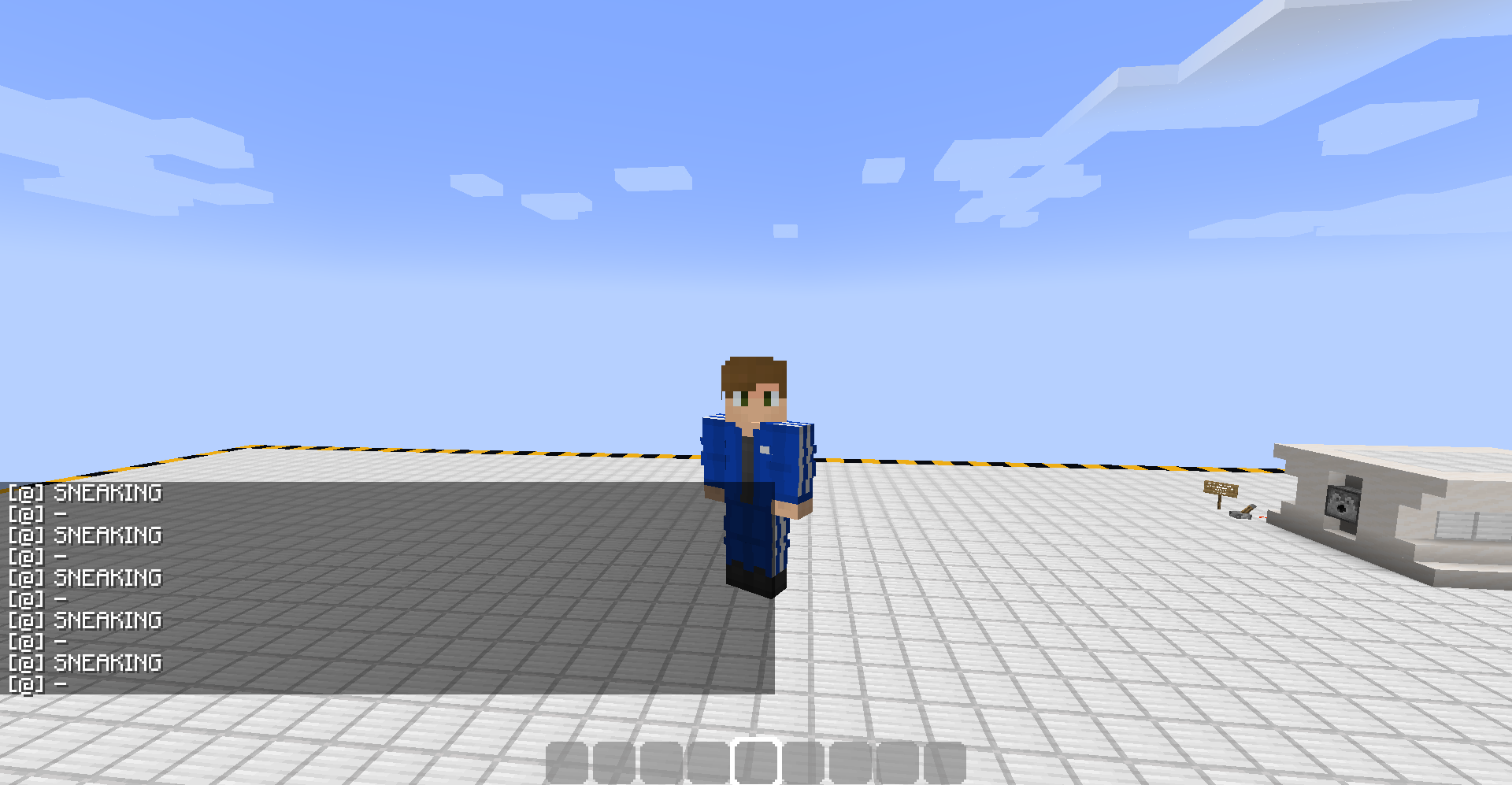
scoreboard players reset @a sneakTest5. Finally, fly up and then press your designated crouching key in order to fly down again. The repeating command block will be triggered by this, and the word 'SNEAKING' will appear in the chat. This shows that the sneak_time scoreboard detects sneaking during creative flight.
6. Optionally, a predicate can be created and put into a datapack to verify that they do not detect sneaking during creative flight:
{ "condition": "minecraft:entity_properties", "entity": "this", "predicate": { "flags": { "is_sneaking": true } } }A function or command block would then need to test for the predicate and run a command when triggered. If done correctly, the predicate will detect crouching on the ground, but will not detect 'crouching' during creative flight.
I have attached an image of a player sneaking during flight. As you can see, there is no crouch animation, and the hitbox also does not change from its default size (although this is not shown). Therefore, the 'sneak_time' scoreboard should not detect this as crouching, and should behave more like the 'is_sneaking' flag does in a predicate.
The 'minecraft.custom:minecraft.sneak_time' scoreboard objective is triggered when crouching while flying in creative, even though the player is technically not sneaking during flight (as shown by the lack of crouch animation during flight).
Additionally, the scoreboard objective is NOT triggered when a player stands under a slab unless they are holding the designated sneak key.
On the other hand, predicates are unable to detect crouching during creative flight, but do detect a player standing under a slab as crouching, which is inconsistent.
How To Reproduce:
1. Enter creative mode.
2. Create a new scoreboard objective using this command:
scoreboard objectives add sneakTest minecraft.custom:minecraft.sneak_time3. Place a repeating, always active command block and type the following command into it:
execute if score @p sneakTest matches 1.. run say SNEAKING4. Attach a chain, always active command block to the repeating command block, and enter this command into it:
scoreboard players reset @a sneakTest5. Finally, fly up and then press your designated crouching key in order to fly down again. The repeating command block will be triggered by this, and the word 'SNEAKING' will appear in the chat. This shows that the sneak_time scoreboard detects sneaking during creative flight.
6. Optionally, a predicate can be created and put into a datapack to verify that they do not detect sneaking during creative flight:
{ "condition": "minecraft:entity_properties", "entity": "this", "predicate": { "flags": { "is_sneaking": true } } }A function or command block would then need to test for the predicate and run a command when triggered. If done correctly, the predicate will detect crouching on the ground, but will not detect 'crouching' during creative flight.
I have attached an image of a player sneaking during flight. As you can see, there is no crouch animation, and the hitbox also does not change from its default size (although this is not shown). Therefore, the 'sneak_time' scoreboard should not detect this as crouching, and should behave more like the 'is_sneaking' flag does in a predicate.
Alternatively, the 'is_sneaking' flag should detect crouching during creative flight, for consistency.
The 'minecraft.custom:minecraft.sneak_time' scoreboard objective is triggered when crouching while flying in creative, even though the player is technically not sneaking during flight (as shown by the lack of crouch animation during flight).
Additionally, the scoreboard objective is NOT triggered when a player stands under a slab unless they are holding the designated sneak key.
On the other hand, predicates are unable to detect crouching during creative flight, but do detect a player standing
under a slab as crouching, which is inconsistent.
How To Reproduce:
1. Enter creative mode.
2. Create a new scoreboard objective using this command:
scoreboard objectives add sneakTest minecraft.custom:minecraft.sneak_time3. Place a repeating, always active command block and type the following command into it:
execute if score @p sneakTest matches 1.. run say SNEAKING4. Attach a chain, always active command block to the repeating command block, and enter this command into it:
scoreboard players reset @a sneakTest5. Finally, fly up and then press your designated crouching key in order to fly down again. The repeating command block will be triggered by this, and the word 'SNEAKING' will appear in the chat. This shows that the sneak_time scoreboard detects sneaking during creative flight.
6. Optionally, a predicate can be created and put into a datapack to verify that they do not detect sneaking during creative flight:
{ "condition": "minecraft:entity_properties", "entity": "this", "predicate": { "flags": { "is_sneaking": true } } }A function or command block would then need to test for the predicate and run a command when triggered. If done correctly, the predicate will detect crouching on the ground, but will not detect 'crouching' during creative flight.
I have attached an image of a player sneaking during flight. As you can see, there is no crouch animation, and the hitbox also does not change from its default size (although this is not shown). Therefore, the 'sneak_time' scoreboard should not detect this as crouching, and should behave more like the 'is_sneaking' flag does in a predicate.Alternatively, the 'is_sneaking' flag should detect crouching during creative flight, for consistency.
The 'minecraft.custom:minecraft.sneak_time' scoreboard objective is triggered when crouching while flying in creative, even though the player is technically not sneaking during flight (as shown by the lack of crouch animation during flight).
Additionally, the scoreboard objective is NOT triggered when a player stands under a slab unless they are holding the designated sneak key.
On the other hand, predicates are unable to detect crouching during creative flight, but do detect a player standing in a 1.5 block space, which is inconsistent.
How To Reproduce:
1. Enter creative mode.
2. Create a new scoreboard objective using this command:
scoreboard objectives add sneakTest minecraft.custom:minecraft.sneak_time3. Place a repeating, always active command block and type the following command into it:
execute if score @p sneakTest matches 1.. run say SNEAKING4. Attach a chain, always active command block to the repeating command block, and enter this command into it:
scoreboard players reset @a sneakTest5. Finally, fly up and then press your designated crouching key in order to fly down again. The repeating command block will be triggered by this, and the word 'SNEAKING' will appear in the chat. This shows that the sneak_time scoreboard detects sneaking during creative flight.
6. Optionally, a predicate can be created and put into a datapack to verify that they do not detect sneaking during creative flight:
{ "condition": "minecraft:entity_properties", "entity": "this", "predicate": { "flags": { "is_sneaking": true } } }A function or command block would then need to test for the predicate and run a command when triggered. If done correctly, the predicate will detect crouching on the ground, but will not detect 'crouching' during creative flight.
Similar steps can be taken to verify scoreboard and predicate crouch-detection behaviour when standing in a 1.5 block space (under a slab).
My expected behaviour would be for scoreboards and predicates to be consistent in their detection of crouching. They should either both detect sneaking based on key-press, or both detect sneaking based on the player hitbox.
Sneak_Time Scoreboard Detects Creative FlightSneak Detection Inconsistency Between Scoreboards and Predicates
The 'minecraft.custom:minecraft.sneak_time' scoreboard objective is triggered when crouching while flying in creative
, even though the player is technically not sneaking during flight (as shown by the lack of crouch animation during flight).
Additionally, the scoreboard objective is NOT triggered when a player stands under a slab unless they are holding the designated sneak key.On the other hand, predicates are unable to detect crouching during creative flight, but do detect a player standing in a 1.5 block space, which is inconsistent.
How To Reproduce:
1. Enter creative mode.
2. Create a new scoreboard objective using this command:
scoreboard objectives add sneakTest minecraft.custom:minecraft.sneak_time3. Place a repeating, always active command block and type the following command into it:
execute if score @p sneakTest matches 1.. run say SNEAKING4. Attach a chain, always active command block to the repeating command block, and enter this command into it:
scoreboard players reset @a sneakTest5. Finally, fly up and then press your designated crouching key in order to fly down again. The repeating command block will be triggered by this, and the word 'SNEAKING' will appear in the chat. This shows that the sneak_time scoreboard detects sneaking during creative flight.
6. Optionally, a predicate can be created and put into a datapack to verify that they do not detect sneaking during creative flight:
{ "condition": "minecraft:entity_properties", "entity": "this", "predicate": { "flags": { "is_sneaking": true } } }A function or command block would then need to test for the predicate and run a command when triggered. If done correctly, the predicate will detect crouching on the ground, but will not detect
'crouching'during creative flight.Similar steps can be taken to verify scoreboard and predicate crouch-detection behaviour when standing in a 1.5 block space (under a slab).
Myexpected behaviour would be for scoreboards and predicates to be consistent in their detection of crouching. They should either both detect sneaking based on key-press, or both detect sneaking based on the player hitbox.The 'minecraft.custom:minecraft.sneak_time' scoreboard objective is triggered when crouching while flying in creative. Additionally, the scoreboard objective is NOT triggered when a player stands under a slab, unless they are holding the designated sneak key.
On the other hand, predicates are unable to detect crouching during creative flight, but do detect a player standing in a 1.5 block space, which is inconsistent.
How To Reproduce:
1. Enter creative mode.
2. Create a new scoreboard objective using this command:
scoreboard objectives add sneakTest minecraft.custom:minecraft.sneak_time3. Place a repeating, always active command block and type the following command into it:
execute if score @p sneakTest matches 1.. run say SNEAKING4. Attach a chain, always active command block to the repeating command block, and enter this command into it:
scoreboard players reset @a sneakTest5. Finally, fly up and then press your designated crouching key in order to fly down again. The repeating command block will be triggered by this, and the word 'SNEAKING' will appear in the chat. This shows that the sneak_time scoreboard detects sneaking during creative flight.
6. Optionally, a predicate can be created and put into a datapack to verify that they do not detect sneaking during creative flight:
{ "condition": "minecraft:entity_properties", "entity": "this", "predicate": { "flags": { "is_sneaking": true } } }A function or command block would then need to test for the predicate and run a command when triggered. If done correctly, the predicate will detect crouching on the ground, but will not detect crouching during creative flight.
Similar steps can be taken to verify scoreboard and predicate crouch-detection behaviour when standing in a 1.5 block space (under a slab).
The expected behaviour here would be for scoreboards and predicates to be consistent in their detection of crouching. They should either both detect sneaking based on key-press (current scoreboard behaviour), or both detect sneaking based on the player hitbox (current predicate behaviour).
The 'minecraft.custom:minecraft.sneak_time' scoreboard objective is triggered when crouching while flying in creative. Additionally, the scoreboard objective is NOT triggered when a player stands under a slab, unless they are holding the designated sneak key.
On the other hand, predicates are unable to detect crouching during creative flight, but do detect a player standing in a 1.5 block space
,whichis inconsistent.
How To Reproduce:
1. Enter creative mode.
2. Create a new scoreboard objective using this command:
scoreboard objectives add sneakTest minecraft.custom:minecraft.sneak_time3. Place a repeating, always active command block and type the following command into it:
execute if score @p sneakTest matches 1.. run say SNEAKING4. Attach a chain, always active command block to the repeating command block, and enter this command into it:
scoreboard players reset @a sneakTest5. Finally, fly up and then press your designated crouching key in order to fly down again. The repeating command block will be triggered by this, and the word 'SNEAKING' will appear in the chat. This shows that the sneak_time scoreboard detects sneaking during creative flight.
6. Optionally, a predicate can be created and put into a datapack to verify that they do not detect sneaking during creative flight:
{ "condition": "minecraft:entity_properties", "entity": "this", "predicate": { "flags": { "is_sneaking": true } } }A function or command block would then need to test for the predicate and run a command when triggered. If done correctly, the predicate will detect crouching on the ground, but will not detect crouching during creative flight.
Similar steps can be taken to verify scoreboard and predicate crouch-detection behaviour when standing in a 1.5 block space (under a slab).
The expected behaviour here would be for scoreboards and predicates to be consistent in their detection of crouching. They should either both detect sneaking based on key-press (current scoreboard behaviour), or both detect sneaking based on the player hitbox (current predicate behaviour).
The 'minecraft.custom:minecraft.sneak_time' scoreboard objective is triggered when crouching while flying in creative. Additionally, the scoreboard objective is NOT triggered when a player stands under a slab, unless they are holding the designated sneak key.
On the other hand, predicates are unable to detect crouching during creative flight, but do detect a player standing in a 1.5 block space without holding the sneak key. This behaviour is inconsistent.
How To Reproduce:
1. Enter creative mode.
2. Create a new scoreboard objective using this command:
scoreboard objectives add sneakTest minecraft.custom:minecraft.sneak_time3. Place a repeating, always active command block and type the following command into it:
execute if score @p sneakTest matches 1.. run say SNEAKING4. Attach a chain, always active command block to the repeating command block, and enter this command into it:
scoreboard players reset @a sneakTest5. Finally, fly up and then press your designated crouching key in order to fly down again. The repeating command block will be triggered by this, and the word 'SNEAKING' will appear in the chat. This shows that the sneak_time scoreboard detects sneaking during creative flight.
6. Optionally, a predicate can be created and put into a datapack to verify that they do not detect sneaking during creative flight:
{ "condition": "minecraft:entity_properties", "entity": "this", "predicate": { "flags": { "is_sneaking": true } } }A function or command block would then need to test for the predicate and run a command when triggered. If done correctly, the predicate will detect crouching on the ground, but will not detect crouching during creative flight.
Similar steps can be taken to verify scoreboard and predicate crouch-detection behaviour when standing in a 1.5 block space (under a slab).
The expected behaviour here would be for scoreboards and predicates to be consistent in their detection of crouching. They should either both detect sneaking based on key-press (current scoreboard behaviour), or both detect sneaking based on the player hitbox (current predicate behaviour).
The 'minecraft.custom:minecraft.sneak_time' scoreboard objective is triggered when crouching while flying in creative. Additionally, the scoreboard objective is NOT triggered when a player stands under a slab, unless they are holding the designated sneak key.
On the other hand, predicates
areunable to detect crouching during creative flight, but do detect a player standing in a 1.5 block space without holding the sneak key. This behaviour is inconsistent.
How To Reproduce:
1. Enter creative mode.
2. Create a new scoreboard objective using this command:
scoreboard objectives add sneakTest minecraft.custom:minecraft.sneak_time3. Place a repeating, always active command block and type the following command into it:
execute if score @p sneakTest matches 1.. run say SNEAKING4. Attach a chain, always active command block to the repeating command block, and enter this command into it:
scoreboard players reset @a sneakTest5. Finally, fly up and then press your designated crouching key in order to fly down again. The repeating command block will be triggered by this, and the word 'SNEAKING' will appear in the chat. This shows that the sneak_time scoreboard detects sneaking during creative flight.
6. Optionally, a predicate can be created and put into a datapack to verify that they do not detect sneaking during creative flight:
{ "condition": "minecraft:entity_properties", "entity": "this", "predicate": { "flags": { "is_sneaking": true } } }A function or command block would then need to test for the predicate and run a command when triggered. If done correctly, the predicate will detect crouching on the ground, but will not detect crouching during creative flight.
Similar steps can be taken to verify scoreboard and predicate crouch-detection behaviour when standing in a 1.5 block space (under a slab).
The expected behaviour here would be for scoreboards and predicates to be consistent in their detection of crouching. They should either both detect sneaking based on key-press (current scoreboard behaviour), or both detect sneaking based on the player hitbox (current predicate behaviour).
The 'minecraft.custom:minecraft.sneak_time' scoreboard objective is triggered when crouching while flying in creative. Additionally, the scoreboard objective is NOT triggered when a player stands under a slab, unless they are holding the designated sneak key.
On the other hand, the 'is_sneaking' flag for predicates is unable to detect crouching during creative flight, but do detect a player standing in a 1.5 block space without holding the sneak key. This behaviour is inconsistent.
How To Reproduce:
1. Enter creative mode.
2. Create a new scoreboard objective using this command:
scoreboard objectives add sneakTest minecraft.custom:minecraft.sneak_time3. Place a repeating, always active command block and type the following command into it:
execute if score @p sneakTest matches 1.. run say SNEAKING4. Attach a chain, always active command block to the repeating command block, and enter this command into it:
scoreboard players reset @a sneakTest5. Finally, fly up and then press your designated crouching key in order to fly down again. The repeating command block will be triggered by this, and the word 'SNEAKING' will appear in the chat. This shows that the sneak_time scoreboard detects sneaking during creative flight.
6. Optionally, a predicate can be created and put into a datapack to verify that they do not detect sneaking during creative flight:
{ "condition": "minecraft:entity_properties", "entity": "this", "predicate": { "flags": { "is_sneaking": true } } }A function or command block would then need to test for the predicate and run a command when triggered. If done correctly, the predicate will detect crouching on the ground, but will not detect crouching during creative flight.
Similar steps can be taken to verify scoreboard and predicate crouch-detection behaviour when standing in a 1.5 block space (under a slab).
The expected behaviour here would be for scoreboards and predicates to be consistent in their detection of crouching. They should either both detect sneaking based on key-press (current scoreboard behaviour), or both detect sneaking based on the player hitbox (current predicate behaviour).
The 'minecraft.custom:minecraft.sneak_time' scoreboard objective is triggered when crouching while flying in creative. Additionally, the scoreboard objective is NOT triggered when a player stands under a slab, unless they are holding the designated sneak key.
On the other hand, the 'is_sneaking' flag for predicates is unable to detect crouching during creative flight, but do detect a player standing in a 1.5 block space without holding the sneak key. This behaviour is inconsistent.
How To Reproduce:
1. Enter creative mode.
2. Create a new scoreboard objective using this command:
scoreboard objectives add sneakTest minecraft.custom:minecraft.sneak_time3. Place a repeating, always active command block and type the following command into it:
execute if score @p sneakTest matches 1.. run say SNEAKING4. Attach a chain, always active command block to the repeating command block, and enter this command into it:
scoreboard players reset @a sneakTest5. Finally, fly up and then press your designated crouching key in order to fly down again. The repeating command block will be triggered by this, and the word 'SNEAKING' will appear in the chat. This shows that the sneak_time scoreboard detects sneaking during creative flight.
6. Optionally, a predicate can be created and put into a datapack to verify that they do not detect sneaking during creative flight:
{ "condition": "minecraft:entity_properties", "entity": "this", "predicate": { "flags": { "is_sneaking": true } } }A function or command block would then need to test for the predicate and run a command when triggered. If done correctly, the predicate will detect crouching on the ground, but will not detect crouching during creative flight.
Similar steps can be taken to verify scoreboard and predicate crouch-detection behaviour when standing in a 1.5 block space (under a slab).
The expected behaviour here would be for scoreboards and predicates to be consistent in their detection of crouching. They should either both detect sneaking based on key-press (current scoreboard behaviour), or both detect sneaking based on the player hitbox (current predicate behaviour).
Alternatively, 'minecraft.custom:minecraft.sneak_time' could be renamed to more accurately portray its true behaviour (something like 'minecraft.custom:minecraft.sneak_attempt_time').
The 'minecraft.custom:minecraft.sneak_time' scoreboard objective is triggered when crouching while flying in creative. Additionally, the scoreboard objective is NOT triggered when a player stands under a slab, unless they are holding the designated sneak key.
On the other hand, the 'is_sneaking' flag for predicates is unable to detect crouching during creative flight, but do detect a player standing in a 1.5 block space without holding the sneak key. This behaviour is inconsistent.
How To Reproduce:
1. Enter creative mode.
2. Create a new scoreboard objective using this command:
scoreboard objectives add sneakTest minecraft.custom:minecraft.sneak_time3. Place a repeating, always active command block and type the following command into it:
execute if score @p sneakTest matches 1.. run say SNEAKING4. Attach a chain, always active command block to the repeating command block, and enter this command into it:
scoreboard players reset @a sneakTest5. Finally, fly up and then press your designated crouching key in order to fly down again. The repeating command block will be triggered by this, and the word 'SNEAKING' will appear in the chat. This shows that the sneak_time scoreboard detects sneaking during creative flight.
6. Optionally, a predicate can be created and put into a datapack to verify that they do not detect sneaking during creative flight:
{ "condition": "minecraft:entity_properties", "entity": "this", "predicate": { "flags": { "is_sneaking": true } } }A function or command block would then need to test for the predicate and run a command when triggered. If done correctly, the predicate will detect crouching on the ground, but will not detect crouching during creative flight.
Similar steps can be taken to verify scoreboard and predicate crouch-detection behaviour when standing in a 1.5 block space (under a slab).
The expected behaviour here would be for scoreboards and predicates to be consistent in their detection of crouching. They should either both detect sneaking based on key-press (current scoreboard behaviour), or both detect sneaking based on the player hitbox (current predicate behaviour).
Alternatively, 'minecraft.custom:minecraft.sneak_time' could be renamed to more accurately portray its
truebehaviour (something like 'minecraft.custom:minecraft.sneak_attempt_time').The 'minecraft.custom:minecraft.sneak_time' scoreboard objective is triggered when crouching while flying in creative. Additionally, the scoreboard objective is NOT triggered when a player stands under a slab, unless they are holding the designated sneak key.
On the other hand, the 'is_sneaking' flag for predicates is unable to detect crouching during creative flight, but does detect a player standing in a 1.5 block space without holding the sneak key. This behaviour is inconsistent.
How To Reproduce:
1. Enter creative mode.
2. Create a new scoreboard objective using this command:
scoreboard objectives add sneakTest minecraft.custom:minecraft.sneak_time3. Place a repeating, always active command block and type the following command into it:
execute if score @p sneakTest matches 1.. run say SNEAKING4. Attach a chain, always active command block to the repeating command block, and enter this command into it:
scoreboard players reset @a sneakTest5. Finally, fly up and then press your designated crouching key in order to fly down again. The repeating command block will be triggered by this, and the word 'SNEAKING' will appear in the chat. This shows that the sneak_time scoreboard detects sneaking during creative flight.
6. Optionally, a predicate can be created and put into a datapack to verify that they do not detect sneaking during creative flight:
{ "condition": "minecraft:entity_properties", "entity": "this", "predicate": { "flags": { "is_sneaking": true } } }A function or command block would then need to test for the predicate and run a command when triggered. If done correctly, the predicate will detect crouching on the ground, but will not detect crouching during creative flight.
Similar steps can be taken to verify scoreboard and predicate crouch-detection behaviour when standing in a 1.5 block space (under a slab).
The expected behaviour here would be for scoreboards and predicates to be consistent in their detection of crouching. They should either both detect sneaking based on key-press (current scoreboard behaviour), or both detect sneaking based on the player hitbox (current predicate behaviour).
Alternatively, 'minecraft.custom:minecraft.sneak_time' could be renamed to more accurately portray its real behaviour (something like 'minecraft.custom:minecraft.sneak_attempt_time').
The 'minecraft.custom:minecraft.sneak_time' scoreboard objective is triggered when crouching while flying in creative. Additionally, the scoreboard objective is NOT triggered when a player stands under a slab, unless they are holding the designated sneak key.
On the other hand, the 'is_sneaking' flag for predicates is unable to detect crouching during creative flight, but does detect a player standing in a 1.5 block space without holding the sneak key. This behaviour is inconsistent.
How To Reproduce:
1. Enter creative mode.
2. Create a new scoreboard objective using this command:
scoreboard objectives add sneakTest minecraft.custom:minecraft.sneak_time3. Place a repeating, always active command block and type the following command into it:
execute if score @p sneakTest matches 1.. run say SNEAKING4. Attach a chain, always active command block to the repeating command block, and enter this command into it:
scoreboard players reset @a sneakTest5. Finally, fly up and then press your designated crouching key in order to fly down again. The repeating command block will be triggered by this, and the word 'SNEAKING' will appear in the chat. This shows that the sneak_time scoreboard detects sneaking during creative flight.
6.
Optionally, apredicate can be created and put into a datapack to verify that they do not detect sneaking during creative flight:{ "condition": "minecraft:entity_properties", "entity": "this", "predicate": { "flags": { "is_sneaking": true } } }A function or command block would then need to test for the predicate and run a command when triggered. If done correctly, the predicate will detect crouching on the ground, but will not detect crouching during creative flight.
Similar steps can be taken to verify scoreboard and predicate crouch-detection behaviour when standing in a 1.5 block space (under a slab).
The expected behaviour here would be for scoreboards and predicates to be consistent in their detection of crouching. They should either both detect sneaking based on key-press (current scoreboard behaviour), or both detect sneaking based on the player hitbox (current predicate behaviour).
Alternatively, 'minecraft.custom:minecraft.sneak_time' could be renamed to more accurately portray its real behaviour (something like 'minecraft.custom:minecraft.sneak_attempt_time').
The 'minecraft.custom:minecraft.sneak_time' scoreboard objective is triggered when crouching while flying in creative. Additionally, the scoreboard objective is NOT triggered when a player stands under a slab, unless they are holding the designated sneak key.
On the other hand, the 'is_sneaking' flag for predicates is unable to detect crouching during creative flight, but does detect a player standing in a 1.5 block space without holding the sneak key. This behaviour is inconsistent.
How To Reproduce:
1. Enter creative mode.
2. Create a new scoreboard objective using this command:
scoreboard objectives add sneakTest minecraft.custom:minecraft.sneak_time3. Place a repeating, always active command block and type the following command into it:
execute if score @p sneakTest matches 1.. run say SNEAKING4. Attach a chain, always active command block to the repeating command block, and enter this command into it:
scoreboard players reset @a sneakTest5. Finally, fly up and then press your designated crouching key in order to fly down again. The repeating command block will be triggered by this, and the word 'SNEAKING' will appear in the chat. This shows that the sneak_time scoreboard detects sneaking during creative flight.
6. A predicate can now be created and put into a datapack to verify that they do not detect sneaking during creative flight:
{ "condition": "minecraft:entity_properties", "entity": "this", "predicate": { "flags": { "is_sneaking": true } } }A function or command block would then need to test for the predicate and run a command when triggered. If done correctly, the predicate will detect crouching on the ground, but will not detect crouching during creative flight.
Similar steps can be taken to verify scoreboard and predicate crouch-detection behaviour when standing in a 1.5 block space (under a slab).
The expected behaviour here would be for scoreboards and predicates to be consistent in their detection of crouching. They should either both detect sneaking based on key-press (current scoreboard behaviour), or both detect sneaking based on the player hitbox (current predicate behaviour).
Alternatively, 'minecraft.custom:minecraft.sneak_time' could be renamed to more accurately portray its real behaviour (something like 'minecraft.custom:minecraft.sneak_attempt_time').
Although
MC-82046is marked as 'Works As Intended', something feels incorrect about this verdict. In particular, withers are damaged by splash potions of healing and healed by splash potions of harming, but are unable to receive the same effect through commands.How To Reproduce:
1. Summon a wither.
2. Get a Splash Potion of Healing, and throw it onto the wither. It will be damaged.
3. Type this command in chat:/effect give @e[type=minecraft:wither] minecraft:instant_health4. You will receive an error message stating that the target is immune to effects.
5. The previous 4 steps can be repeated using a Splash Potion of Harming and the 'instant_damage' effect.{+}Expected Behaviour:
{+}Even though withers are intentionally immune to the majority of effects, it is clear that theyare supposed to to be damaged by splash potions of healing, and healed by splash potions of harming, much like other undead mobs. Therefore, these two effects should also be applicable through commands, which is currently not the case.This bug does not apply to ender dragons, who are unaffected by splash potions and therefore should not be affected by the 'effect' command, either.
Although
MC-82046is marked as 'Works As Intended', something feels incorrect about this verdict. In particular, withers are damaged by splash potions of healing and healed by splash potions of harming, but are unable to receive the same effect through commands.How To Reproduce:
1. Summon a wither.
2. Get a Splash Potion of Healing, and throw it onto the wither. It will be damaged.
3. Type this command in chat:/effect give @e[type=minecraft:wither] minecraft:instant_health4. You will receive an error message stating that the target is immune to effects.
5. The previous 4 steps can be repeated using a Splash Potion of Harming and the 'instant_damage' effect.Expected Behaviour:
Even though withers are intentionally immune to the majority of effects, it is clear that they are supposed to to be damaged by splash potions of healing, and healed by splash potions of harming, much like other undead mobs. Therefore, these two effects should also be applicable through commands, which is currently not the case.This bug does not apply to ender dragons, who are unaffected by splash potions and therefore should not be affected by the 'effect' command, either.
Although
MC-82046is marked as 'Works As Intended', something feels incorrect about this verdict. In particular, withers are damaged by splash potions of healing and healed by splash potions of harming, but are unable to receive the same effect through commands.How To Reproduce:
1. Summon a wither.
2. Get a Splash Potion of Healing, and throw it onto the wither. It will be damaged.
3. Type this command in chat:/effect give @e[type=minecraft:wither] minecraft:instant_health4. You will receive an error message stating that the target is immune to effects.
5. The previous 4 steps can be repeated using a Splash Potion of Harming and the 'instant_damage' effect.Expected Behaviour:
Even though withers are intentionally immune to the majority of effects, it is clear that they are supposed to to be damaged by splash potions of healing, and healed by splash potions of harming, much like other undead mobs. Therefore, these two effects should also be applicable through commands, which is currently not the case.This bug does not apply to ender dragons, who are unaffected by splash potions and therefore should not be affected by the 'effect' command, either.
Although
MC-82046is marked as 'Works As Intended', something feels incorrect about this verdict. In particular, withers are damaged by splash potions of healing and healed by splash potions of harming, but are unable to receive the same effect through commands.
How To Reproduce:
1. Summon a wither.
2. Get a Splash Potion of Healing, and throw it onto the wither. It will be damaged.
3. Type this command in chat:/effect give @e[type=minecraft:wither] minecraft:instant_health4. You will receive an error message stating that the target is immune to effects.
5. The previous 4 steps can be repeated using a Splash Potion of Harming and the 'instant_damage' effect.
Expected Behaviour:
Even though withers are intentionally immune to the majority of effects, it is clear that they are supposed to to be damaged by splash potions of healing, and healed by splash potions of harming, much like other undead mobs. Therefore, these two effects should also be applicable through commands, which is currently not the case.This bug does not apply to ender dragons, who are unaffected by splash potions and therefore should not be affected by the 'effect' command, either.
Tried a couple of things... Nothing worked.. Flying seems to work, but nothing else... ((
((
I have discovered a fix for this issue.
You just need to go into the minecraftPE folder and delete ALL the text files in that folder that contain the words resource pack in it
Try deleting any resource packs you might have, and delete the resource_packs folder from your game/com.mojang if you have one. Delete the files again after that. I did not have this issue, so I am just guessing what you COULD try doing...
Oh. Thanks! Nice workaround, don't even need X BOX live... XD
Yep. That is happening to me too!
Has been happening to me since 1.0.6. Very annoying!
Yes. That's happening for me too.
Another thing I realized was that using gray dye instead of an ink sac doesn't solve the problem: the lines stay the same shade!
Can confirm!
Can (kinda) be fixed if using custom Skin Packs (if you know what those are)
This is no longer a bug as of 1.2.0.11
Ok, I understand. Sorry for the inconvenience caused!
If you click on the ? It will take you to the how to play page on the crafting tab. Although I do agree it should be placed elsewhere...
I have also already reported the selection button thing as a bug and recently it has been confirmed, so hopefully it will be fixed soon!
This issue was fixed a while back.
Yeah, but that is a separate bug that has already been reported and I believe has been fixed in one of the Beta versions.
This issue should be resolved as fix, as it no longer occurs.
Upon further research, this actually appears to be a duplicate of
MC-116618and may be marked as such. I didn't find it upon first searching for the issue.Is this how replying works?
I agree that the behaviours should not actually be changed. I think it would be really nice to have an option between the two, and personally would benefit from the current scoreboard behaviour not being altered.
This is why I suggested the option of renaming the scoreboard to better reflect what it actually does.
@Anthony Cicinelli
I literally explained why this bug is not a duplicate of
MC-82046, and how it differs from that particular report. Withers, unlike Ender Dragons, do take damage from potions of harming, but not when the effect is applied through command. This is not the same asMC-82046, which was reporting that both boss mobs are immune to all effects.@CubeTheThird
Shouldn't this ticket be marked as 'Works As Intended', then?
This issue was fixed by reinstalling Minecraft for Windows.