 Rory BD
- rorybd
- JIRAUSER742159
- Europe/Stockholm
- Yes
- No
 MC-217607
I would like to request ownership of this ticket with my new account, as I have stopped using the one with which I initially reported this ticket (hence the username being changed to Former User).
When switching from holding one item (e.g. an iron sword) to holding another item of the same type (e.g. another iron sword), the attack speed indicator does not get reset. This is presumably intended behaviour.
However, this behaviour does not take into account switching between two items of the same type but that have DIFFERENT attack speeds. If I had a default iron sword, and also had an iron sword with a custom, slower attack speed, switching from the default sword to the custom sword will result in a strange behaviour where the game will act as if you had been holding the slower, custom sword for the same amount of time that you had been holding the default sword.
Steps to reproduce:
1) Ensure that the attack indicator is enabled in the video settings.
2) Obtain a normal iron sword and place it in your hotbar.
3) Run this command to obtain an iron sword with a modified attack speed of -3.9:
/give @p iron_sword{AttributeModifiers:[{AttributeName:"generic.attack_speed",Amount:-3.9,Operation:0,UUID:[I;-12123,24406,141845,-48812],Slot:mainhand,Name:"generic.attack_speed"}]} 14) Hit something using the default sword and wait for approximately five seconds.
5) Now, switch to holding the custom sword.
6) Divert your gaze to the attack indicator next to your crosshair/hotbar. You will see that the attack indicator will already be half full, despite the player having only just switched to the item they are holding.
The expected behaviour would be for the attack speed cooldown to be reset upon switching to an item with a different attack speed, regardless of whether the two items are of the same type or not.
When switching from holding one item (e.g. an iron sword) to holding another item of the same type (e.g. another iron sword), the attack speed indicator does not get reset. This is presumably intended behaviour.
However, this behaviour does not take into account switching between two items of the same type but that have different attack speeds. If I had a default iron sword, and also had an iron sword with a slower attack speed, switching from the default sword to the custom sword will result in strange behaviour where the game will act as if you had been holding the custom sword for the same amount of time that you had been holding the default sword.
Steps to reproduce:
1) Ensure that the attack indicator is enabled in the video settings.
2) Obtain a normal iron sword and place it in your hotbar.
3) Run this command to obtain an iron sword with a modified attack speed of -3.9:
/give @p iron_sword{AttributeModifiers:[{AttributeName:"generic.attack_speed",Amount:-3.9,Operation:0,UUID:[I;-12123,24406,141845,-48812],Slot:mainhand,Name:"generic.attack_speed"}]} 14) Hit something using the default sword and wait for approximately five seconds.
5) Now, switch to holding the custom sword.
6) Divert your gaze to the attack indicator next to your crosshair/hotbar. You will see that the attack indicator will already be half full, despite the player having only just switched to the item they are holding.
The expected behaviour would be for the attack speed cooldown to be reset upon switching to an item with a different attack speed, regardless of whether the two items are of the same type or not.
When switching from holding one item (e.g. an iron sword) to holding another item of the same type (e.g. another iron sword), the attack speed indicator does not get reset. This is presumably intended behaviour.
However, this behaviour does not take into account switching between two items of the same type but that have different attack speeds. If
Ihad a default iron sword, and also had an iron sword with a slower attack speed, switching from the default sword to the custom sword will result in strange behaviour where the gamewillact as if you had been holding the custom sword for the same amount of time that you had been holding the default sword.
Steps to
reproduce:1) Ensure that the attack indicator is enabled in the video settings.
2) Obtain a normal iron sword and place it in your hotbar.
3) Run this command to obtain an iron sword with a modified attack speed of -3.9:
/give @p iron_sword{AttributeModifiers:[{AttributeName:"generic.attack_speed",Amount:-3.9,Operation:0,UUID:[I;-12123,24406,141845,-48812],Slot:mainhand,Name:"generic.attack_speed"}]} 14) Hit something using the default sword and wait for approximately five seconds.
5) Now, switch to holding the custom sword.
6) Divert your gaze to the attack indicator next to your crosshair/hotbar. You will see that the attack indicator will already be half full, despite the player having only just switched to the item they are holding.
The expected behaviour would be for the attack speed cooldown to be reset upon switching to an item with a different attack speed, regardless of whether the two items are of the same type or not.
Summary:
When switching from holding one item (e.g. an iron sword) to holding another item of the same type (e.g. another iron sword), the attack speed indicator does not get reset. This is presumably intended behaviour.
However, this behaviour does not take into account switching between two items of the same type but that have different attack speeds. If you had a default iron sword, and also had an iron sword with a slower attack speed, switching from the default sword to the custom sword would cause the game to act as if you had been holding the custom sword for the same amount of time that you had been holding the default sword.
Steps to Reproduce:
1) Ensure that the attack indicator is enabled in the video settings.
2) Obtain a normal iron sword and place it in your hotbar.
3) Run this command to obtain an iron sword with a modified attack speed of -3.9:
/give @p iron_sword{AttributeModifiers:[{AttributeName:"generic.attack_speed",Amount:-3.9,Operation:0,UUID:[I;-12123,24406,141845,-48812],Slot:mainhand,Name:"generic.attack_speed"}]} 14) Hit something using the default sword and wait for approximately five seconds.
5) Now, switch to holding the custom sword.
6) Divert your gaze to the attack indicator next to your crosshair/hotbar. You will see that the attack indicator will already be half full, despite the player having only just switched to the item they are holding.
The expected behaviour would be for the attack speed cooldown to be reset upon switching to an item with a different attack speed, regardless of whether the two items are of the same type or not.
Summary:
When switching from holding one item (e.g. an iron sword) to holding another item of the same type (e.g. another iron sword), the attack speed indicator does not get reset. This is presumably intended behaviour.
However, this behaviour does not take into account switching between two items of the same type but
thathave different attack speeds.If youhada default iron sword,and also had aniron sword with a slower attack speed, switching from the default sword to the custom sword would cause the game to act as ifyouhad been holding the custom sword for the same amount of time thatyouhad been holding the defaultsword.
Steps to Reproduce:
1) Ensure that the attack indicator is enabled in the video settings.
2) Obtain a normal iron sword and place it in your hotbar.
3) Run this command to obtain an iron sword with a modified attack speed of -3.9:
/give @p iron_sword{AttributeModifiers:[{AttributeName:"generic.attack_speed",Amount:-3.9,Operation:0,UUID:[I;-12123,24406,141845,-48812],Slot:mainhand,Name:"generic.attack_speed"}]} 14) Hit something using the default sword and wait for approximately five seconds.
5) Now, switch to holding the custom sword.
6) Divert your gaze to the attack indicator next to your crosshair
/hotbar. You will see that the attack indicator will already be half full, despitethe playerhaving only just switched to the itemtheyare holding.
The expected behaviour would be for the attack speed cooldown to be reset upon switching to an item with a different attack speed, regardless of whether the two items are of the same type
or not.Summary:
When switching from holding one item (e.g. an iron sword) to holding another item of the same type (e.g. another iron sword), the attack speed indicator does not get reset. This is presumably intended behaviour.
However, this behaviour does not take into account the edge case of switching between two items that are of the same type but have different attack speeds. For instance, if a player has a default iron sword as well as a custom iron sword with a slower attack speed, switching from the default sword to the custom sword would cause the game to act as if the player had been holding the custom sword for the same amount of time that they had been holding the default one — thus causing the attack speed bar to not reset.
Steps to Reproduce:
1) Ensure that the attack indicator is enabled in the video settings.
2) Obtain a normal iron sword and place it in your hotbar.
3) Run this command to obtain an iron sword with a modified attack speed of -3.9:
/give @p iron_sword{AttributeModifiers:[{AttributeName:"generic.attack_speed",Amount:-3.9,Operation:0,UUID:[I;-12123,24406,141845,-48812],Slot:mainhand,Name:"generic.attack_speed"}]} 14) Hit something using the default sword and wait for approximately five seconds.
5) Now, switch to holding the custom sword.
6) Divert your gaze to the attack indicator next to your crosshair or hotbar. You will see that the attack indicator will already be half full, despite having only just switched to the item you are holding.
The expected behaviour would be for the attack speed cooldown to be reset upon switching to an item with a different attack speed, regardless of whether or not the two items are of the same type.
Summary:
When switching from holding one item (e.g. an iron sword) to holding another item of the same type (e.g. another iron sword), the attack speed indicator does not get reset. This is presumably intended behaviour.
However, this behaviour does not take into account the edge case of switching between two items that are of the same type but have different attack speeds. For instance, if a player has a default iron sword as well as a custom iron sword with a slower attack speed, switching from the default sword to the custom sword w
ouldcause the game to act as if the player hadbeen holding the custom sword for the same amount of time that they had been holding the default one — thus causing the attack speed bar to not reset.
Steps to Reproduce:
1) Ensure that the attack indicator is enabled in the video settings.
2) Obtain a normal iron sword and place it in your hotbar.
3) Run this command to obtain an iron sword with a modified attack speed of -3.9:
/give @p iron_sword{AttributeModifiers:[{AttributeName:"generic.attack_speed",Amount:-3.9,Operation:0,UUID:[I;-12123,24406,141845,-48812],Slot:mainhand,Name:"generic.attack_speed"}]} 14) Hit something using the default sword and wait for approximately five seconds.
5) Now, switch to holding the custom sword.
6) Divert your gaze to the attack indicator next to your crosshair or hotbar. You will see that the attack indicator will already be half full, despite having only just switched to the item you are holding.
The expected behaviour would be for the attack speed cooldown to be reset upon switching to an item with a different attack speed, regardless of whether or not the two items are of the same type.
Summary:
When switching from holding one item (e.g. an iron sword) to holding another item of the same type (e.g. another iron sword), the attack speed indicator does not get reset. This is presumably intended behaviour.
However, this behaviour does not take into account the edge case of switching between two items that are of the same type but have different attack speeds. For instance, if a player has a default iron sword as well as a custom iron sword with a slower attack speed, switching from the default sword to the custom sword will cause the game to act as if the player has been holding the custom sword for the same amount of time that they had been holding the default one — thus causing the attack speed bar to not reset.
Steps to Reproduce:
1) Ensure that the attack indicator is enabled in the video settings.
2) Obtain a normal iron sword and place it in your hotbar.
3) Run this command to obtain an iron sword with a modified attack speed of -3.9:
/give @p iron_sword{AttributeModifiers:[{AttributeName:"generic.attack_speed",Amount:-3.9,Operation:0,UUID:[I;-12123,24406,141845,-48812],Slot:mainhand,Name:"generic.attack_speed"}]} 14) Hit something using the default sword and wait for approximately five seconds.
5) Now, switch to holding the custom sword.
6) Divert your gaze to the attack indicator next to your crosshair or hotbar. You will see that the attack indicator will already be half full, despite having only just switched to the item you are holding.
The expected behaviour would be for the attack speed cooldown to be reset upon switching to an item with a different attack speed, regardless of whether or not the two items are of the same type.
Summary:
When switching from holding one item (e.g. an iron sword) to holding another item of the same type (e.g. another iron sword), the attack speed indicator does not get reset. This is presumably intended behaviour.
However, this behaviour does not take into account the edge case of switching between two items that are of the same type but have different attack speeds. For instance, if a player has a default iron sword as well as a custom iron sword with a slower attack speed, switching from the default sword to the custom sword will
cause the game to act as if the player has been holding the custom sword for the same amount of time that they had been holding the default one — thus causing the attack speed bar to not reset.
Steps to Reproduce:
1) Ensure that the attack indicator is enabled in the video settings.
2) Obtain a normal iron sword and place it in your hotbar.
3) Run this command to obtain an iron sword with a modified attack speed of -3.9:
/give @p iron_sword{AttributeModifiers:[{AttributeName:"generic.attack_speed",Amount:-3.9,Operation:0,UUID:[I;-12123,24406,141845,-48812],Slot:mainhand,Name:"generic.attack_speed"}]} 14) Hit something using the default sword and wait for approximately five seconds.
5) Now, switch to holding the custom sword.
6) Divert your gaze to the attack indicator next to your crosshair or hotbar. You will see that the attack indicator will already be half full, despite having only just switched to the item you are holding.
The expected behaviour would be for the attack speed cooldown to be reset upon switching to an item with a different attack speed, regardless of whether or not the two items are of the same type.
Summary:
When switching from holding one item (e.g. an iron sword) to holding another item of the same type (e.g. another iron sword), the attack speed indicator does not get reset. This is presumably intended behaviour.
However, this behaviour does not take into account the edge case of switching between two items that are of the same type but have different attack speeds. For instance, if a player has a default iron sword as well as a custom iron sword with a slower attack speed, switching from the default sword to the custom sword will not reset the attack bar.
Steps to Reproduce:
1) Ensure that the attack indicator is enabled in the video settings.
2) Obtain a normal iron sword and place it in your hotbar.
3) Run this command to obtain an iron sword with a modified attack speed of -3.9:
/give @p iron_sword{AttributeModifiers:[{AttributeName:"generic.attack_speed",Amount:-3.9,Operation:0,UUID:[I;-12123,24406,141845,-48812],Slot:mainhand,Name:"generic.attack_speed"}]} 14) Hit something using the default sword and wait for approximately five seconds.
5) Now, switch to holding the custom sword.
6) Divert your gaze to the attack indicator next to your crosshair or hotbar. You will see that the attack indicator will already be half full, despite having only just switched to the item you are holding.
The expected behaviour would be for the attack speed cooldown to be reset upon switching to an item with a different attack speed, regardless of whether or not the two items are of the same type.
I would like to request ownership of this ticket with my new account, as I have stopped using the one with which I initially reported this ticket (hence the username being changed to Former User).
The 'minecraft.custom:minecraft.sneak_time' scoreboard objective is triggered when crouching while flying in creative. Additionally, the scoreboard objective is NOT triggered when a player stands under a slab, unless they are holding the designated sneak key.
On the other hand, the 'is_sneaking' flag for predicates is unable to detect crouching during creative flight, but does detect a player standing in a 1.5 block space without holding the sneak key. This behaviour is inconsistent.
How
To Reproduce:1. Enter creative mode.
2. Create a new scoreboard objective using this command:
scoreboard objectives add sneakTest minecraft.custom:minecraft.sneak_time3. Place a repeating, always active command block and type the following command into it:
execute if score @p sneakTest matches 1.. run say SNEAKING4. Attach a chain, always active command block to the repeating command block, and enter this command into it:
scoreboard players reset @a sneakTest5. Finally, fly up and then press your designated crouching key in order to fly down again. The repeating command block will be triggered by this, and the word 'SNEAKING' will appear in the chat. This shows that the sneak_time scoreboard detects sneaking during creative flight.
6. A predicate can now be created and put into a datapack to verify that they do not detect sneaking during creative flight:
{ "condition": "minecraft:entity_properties", "entity": "this", "predicate": { "flags": { "is_sneaking": true } } }A function or command block would then need to test for the predicate and run a command when triggered. If done correctly, the predicate will detect crouching on the ground, but will not detect crouching during creative flight.
Similar steps can be taken to verify scoreboard and predicate crouch-detection behaviour when standing in a 1.5 block space (under a slab).
The expected behaviour here would be for scoreboards and predicates to be consistent in their detection of crouching. They should either both detect sneaking based on key-press (current scoreboard behaviour), or both detect sneaking based on the player hitbox (current predicate behaviour).
Alternatively, 'minecraft.custom:minecraft.sneak_time' could be renamed to more accurately portray its real behaviour (something like 'minecraft.custom:minecraft.sneak_attempt_time').
Summary:
The 'minecraft.custom:minecraft.sneak_time' scoreboard objective is triggered when crouching while flying in creative. Additionally, the scoreboard objective is NOT triggered when a player stands under a slab, unless they are holding the designated sneak key.
On the other hand, the 'is_sneaking' flag for predicates is unable to detect crouching during creative flight, but does detect a player standing in a 1.5 block space without holding the sneak key. This behaviour is inconsistent.
How to Reproduce:
1. Enter creative mode.
2. Create a new scoreboard objective using this command:
scoreboard objectives add sneakTest minecraft.custom:minecraft.sneak_time3. Place a repeating, always active command block and type the following command into it:
execute if score @p sneakTest matches 1.. run say SNEAKING4. Attach a chain, always active command block to the repeating command block, and enter this command into it:
scoreboard players reset @a sneakTest5. Finally, fly up and then press your designated crouching key in order to fly down again. The repeating command block will be triggered by this, and the word 'SNEAKING' will appear in the chat. This shows that the sneak_time scoreboard detects sneaking during creative flight.
6. A predicate can now be created and put into a datapack to verify that they do not detect sneaking during creative flight:
{ "condition": "minecraft:entity_properties", "entity": "this", "predicate": { "flags": { "is_sneaking": true } } }A function or command block would then need to test for the predicate and run a command when triggered. If done correctly, the predicate will detect crouching on the ground, but will not detect crouching during creative flight.
Similar steps can be taken to verify scoreboard and predicate crouch-detection behaviour when standing in a 1.5 block space (under a slab).
The expected behaviour here would be for scoreboards and predicates to be consistent in their detection of crouching. They should either both detect sneaking based on key-press (current scoreboard behaviour), or both detect sneaking based on the player hitbox (current predicate behaviour).
Alternatively, 'minecraft.custom:minecraft.sneak_time' could be renamed to more accurately portray its real behaviour (something like 'minecraft.custom:minecraft.sneak_attempt_time').
Summary:
The 'minecraft.custom:minecraft.sneak_time' scoreboard objective is triggered when crouching while flying in creative. Additionally, the scoreboard objective is NOT triggered when a player stands under a slab, unless they are holding the designated sneak key.
On the other hand, the 'is_sneaking' flag for predicates is unable to detect crouching during creative flight, but does detect a player standing in a 1.5 block space without holding the sneak key. This behaviour is inconsistent.
How to Reproduce:
1. Enter creative mode.
2. Create a new scoreboard objective using this command:
scoreboard objectives add sneakTest minecraft.custom:minecraft.sneak_time3. Place a repeating, always active command block and type the following command into it:
execute if score @p sneakTest matches 1.. run say SNEAKING4. Attach a chain, always active command block to the repeating command block, and enter this command into it:
scoreboard players reset @a sneakTest5. Finally, fly up and then press your designated crouching key in order to fly down again. The repeating command block will be triggered by this, and the word 'SNEAKING' will appear in the chat. This shows that the sneak_time scoreboard detects sneaking during creative flight.
6. A predicate can now be created and p
utinto a datapack to verify that they do not detect sneaking during creative flight:{ "condition": "minecraft:entity_properties", "entity": "this", "predicate": { "flags": { "is_sneaking": true } } }A function or command block would then need to test for the predicate and run a command when triggered. If done correctly, the predicate will detect crouching on the ground, but will not detect crouching during creative flight.
Similar steps can be taken to verify scoreboard and predicate crouch-detection behaviour when standing in a 1.5 block space (under a slab).
The expected behaviour here would be for scoreboards and predicates to be consistent in their detection of crouching. They should either both detect sneaking based on key-press (current scoreboard behaviour), or both detect sneaking based on the player hitbox (current predicate behaviour).
Alternatively, 'minecraft.custom:minecraft.sneak_time' could be renamed to more accurately portray its real behaviour (
something like'minecraft.custom:minecraft.sneak_attempt_time').Summary:
The 'minecraft.custom:minecraft.sneak_time' scoreboard objective is triggered when crouching while flying in creative. Additionally, the scoreboard objective is NOT triggered when a player stands under a slab, unless they are holding the designated sneak key.
On the other hand, the 'is_sneaking' flag for predicates is unable to detect crouching during creative flight, but does detect a player standing in a 1.5 block space without holding the sneak key. This behaviour is inconsistent.
How to Reproduce:
1. Enter creative mode.
2. Create a new scoreboard objective using this command:
scoreboard objectives add sneakTest minecraft.custom:minecraft.sneak_time3. Place a repeating, always active command block and type the following command into it:
execute if score @p sneakTest matches 1.. run say SNEAKING4. Attach a chain, always active command block to the repeating command block, and enter this command into it:
scoreboard players reset @a sneakTest5. Finally, fly up and then press your designated crouching key in order to fly down again. The repeating command block will be triggered by this, and the word 'SNEAKING' will appear in the chat. This shows that the sneak_time scoreboard detects sneaking during creative flight.
6. A predicate can now be created and placed into a datapack to verify that they do not detect sneaking during creative flight:
{ "condition": "minecraft:entity_properties", "entity": "this", "predicate": { "flags": { "is_sneaking": true } } }A function or command block would then need to test for the predicate and run a command when triggered. If done correctly, the predicate will detect crouching on the ground, but will not detect crouching during creative flight.
Similar steps can be taken to verify scoreboard and predicate crouch-detection behaviour when standing in a 1.5 block space (under a slab).
The expected behaviour here would be for scoreboards and predicates to be consistent in their detection of crouching. They should either both detect sneaking based on key-press (current scoreboard behaviour), or both detect sneaking based on the player hitbox (current predicate behaviour).
Alternatively, 'minecraft.custom:minecraft.sneak_time' could be renamed to more accurately portray its real behaviour (for instance 'minecraft.custom:minecraft.sneak_attempt_time').
Summary:
The 'minecraft.custom:minecraft.sneak_time' scoreboard objective is triggered when crouching while flying in creative. Additionally, the scoreboard objective is NOT triggered when a player stands under a slab, unless they are holding the designated sneak key.
On the other hand, the 'is_sneaking' flag for predicates is unable to detect crouching during creative flight, but does detect a player standing in a 1.5 block space without holding the sneak key. This behaviour is inconsistent.
Howto Reproduce:1. Enter creative mode.
2. Create a new scoreboard objective using this command:
scoreboard objectives add sneakTest minecraft.custom:minecraft.sneak_time3. Place a repeating, always active command block and type the following command into it:
execute if score @p sneakTest matches 1.. run say SNEAKING4. Attach a chain, always active command block to the repeating command block, and enter this command into it:
scoreboard players reset @a sneakTest5. Finally, fly up and then press your designated crouching key in order to fly down again. The repeating command block will be triggered by this, and the word 'SNEAKING' will appear in the chat. This shows that the sneak_time scoreboard detects sneaking during creative flight.
6. A predicate can now be created and placed into a datapack to verify that they do not detect sneaking during creative flight:
{ "condition": "minecraft:entity_properties", "entity": "this", "predicate": { "flags": { "is_sneaking": true } } }A function or command block would then need to test for the predicate and run a command when triggered. If done correctly, the predicate will detect crouching on the ground, but will not detect crouching during creative flight.
Similar steps can be taken to verify scoreboard and predicate crouch-detection behaviour when standing in a 1.5 block space (under a slab).
The expected behaviour here would be for scoreboards and predicates to be consistent in their detection of crouching. They should either both detect sneaking based on key-press (current scoreboard behaviour), or both detect sneaking based on the player hitbox (current predicate behaviour).
Alternatively, 'minecraft.custom:minecraft.sneak_time' could be renamed to more accurately portray its real behaviour (for instance 'minecraft.custom:minecraft.sneak_attempt_time').
Summary:
The 'minecraft.custom:minecraft.sneak_time' scoreboard objective is triggered when crouching while flying in creative. Additionally, the scoreboard objective is NOT triggered when a player stands under a slab, unless they are holding the designated sneak key.
On the other hand, the 'is_sneaking' flag for predicates is unable to detect crouching during creative flight, but does detect a player standing in a 1.5 block space without holding the sneak key. This behaviour is inconsistent.
Steps to Reproduce:
1. Enter creative mode.
2. Create a new scoreboard objective using this command:
scoreboard objectives add sneakTest minecraft.custom:minecraft.sneak_time3. Place a repeating, always active command block and type the following command into it:
execute if score @p sneakTest matches 1.. run say SNEAKING4. Attach a chain, always active command block to the repeating command block, and enter this command into it:
scoreboard players reset @a sneakTest5. Finally, fly up and then press your designated crouching key in order to fly down again. The repeating command block will be triggered by this, and the word 'SNEAKING' will appear in the chat. This shows that the sneak_time scoreboard detects sneaking during creative flight.
6. A predicate can now be created and placed into a datapack to verify that they do not detect sneaking during creative flight:
{ "condition": "minecraft:entity_properties", "entity": "this", "predicate": { "flags": { "is_sneaking": true } } }A function or command block would then need to test for the predicate and run a command when triggered. If done correctly, the predicate will detect crouching on the ground, but will not detect crouching during creative flight.
Similar steps can be taken to verify scoreboard and predicate crouch-detection behaviour when standing in a 1.5 block space (under a slab).
The expected behaviour here would be for scoreboards and predicates to be consistent in their detection of crouching. They should either both detect sneaking based on key-press (current scoreboard behaviour), or both detect sneaking based on the player hitbox (current predicate behaviour).
Alternatively, 'minecraft.custom:minecraft.sneak_time' could be renamed to more accurately portray its real behaviour (for instance 'minecraft.custom:minecraft.sneak_attempt_time').
Summary:
The 'minecraft.custom:minecraft.sneak_time' scoreboard objective is triggered when crouching while flying in creative. Additionally, the scoreboard objective is NOT triggered when a player stands under a slab, unless they are holding the designated sneak key.
On the other hand, the 'is_sneaking' flag for predicates is unable to detect crouching during creative flight, but does detect a player standing in a 1.5 block space without holding the sneak key. This behaviour is inconsistent.
Steps to Reproduce:
1. Enter creative mode.
2. Create a new scoreboard objective using this command:
scoreboard objectives add sneakTest minecraft.custom:minecraft.sneak_time3. Place a repeating, always active command block and type the following command into it:
execute if score @p sneakTest matches 1.. run say SNEAKING4. Attach a chain, always active command block to the repeating command block, and enter this command into it:
scoreboard players reset @a sneakTest5. Finally, fly up and then press your designated crouching key in order to fly down again. The repeating command block will be triggered by this, and the word 'SNEAKING' will appear in the chat. This shows that the sneak_time scoreboard detects sneaking during creative flight.
6. A predicate can now be created and placed into a datapack to verify that they do not detect sneaking during creative flight:
{ "condition": "minecraft:entity_properties", "entity": "this", "predicate": { "flags": { "is_sneaking": true } } }A function or command block would then need to test for the predicate and run a command when triggered. If done correctly, the predicate will detect crouching on the ground, but will not detect crouching during creative flight.
Similar steps can be taken to verify scoreboard and predicate crouch-detection behaviour when standing in a 1.5 block space (under a slab).
The expected behaviour here would be for scoreboards and predicates to be consistent in their detection of crouching. They should either both detect sneaking based on key-press (current scoreboard behaviour), or both detect sneaking based on the player hitbox (current predicate behaviour).
Alternatively, 'minecraft.custom:minecraft.sneak_time' could be renamed to more accurately portray its real behaviour (for instance 'minecraft.custom:minecraft.sneak_attempt_time').
Summary:
The 'minecraft.custom:minecraft.sneak_time' scoreboard objective is triggered when crouching while flying in creative. Additionally, the scoreboard objective is NOT triggered when a player stands under a slab, unless they are holding the designated sneak key.
On the other hand, the 'is_sneaking' flag for predicates is unable to detect crouching during creative flight, but does detect a player standing in a 1.5 block space without holding the sneak key. This behaviour is inconsistent.
Steps to Reproduce:
1. Enter creative mode.
2. Create a new scoreboard objective using this command:
scoreboard objectives add sneakTest minecraft.custom:minecraft.sneak_time3. Place a repeating, always active command block and type the following command into it:
execute if score @p sneakTest matches 1.. run say SNEAKING4. Attach a chain, always active command block to the repeating command block, and enter this command into it:
scoreboard players reset @a sneakTest5. Finally, fly up and then press your designated crouching key in order to fly down again. The repeating command block will be triggered by this, and the word 'SNEAKING' will appear in the chat. This shows that the sneak_time scoreboard detects sneaking during creative flight.
6. A predicate can now be created and placed into a datapack to verify that they do not detect sneaking during creative flight:
{ "condition": "minecraft:entity_properties", "entity": "this", "predicate": { "flags": { "is_sneaking": true } } }A function or command block would then need to test for the predicate and run a command when triggered. If done correctly, the predicate will detect crouching on the ground, but will not detect crouching during creative flight.
Similar steps can be taken to verify scoreboard and predicate crouch-detection behaviour when standing in a 1.5 block space (under a slab).
The expected behaviour here would be for scoreboards and predicates to be consistent in their detection of crouching. They should either both detect sneaking based on key-press (current scoreboard behaviour), or both detect sneaking based on the player hitbox (current predicate behaviour).
However, a nicer fix would be to rename 'minecraft.custom:minecraft.sneak_time' to more accurately portray its real behaviour (for instance 'minecraft.custom:minecraft.sneak_attempt_time'). This would allow both behaviours to be leveraged by datapack makers.
I would like to request ownership of this ticket with my new account, as I have stopped using the one with which I initially reported this ticket (hence the username being changed to Former User).
Summary: Items dropped on death do not have the "Thrower" NBT tag.
Steps To Reproduce:
- Have one item in your inventory
- Run the command /kill @s
- Return to the spot where you died (without picking up the item!) and type in the command:
/data get entity @e[type=item,limit=1] ThrowerObserved Results:
This will reveal that the item does not have a Thrower tag, despite technically having been dropped by the player.Expected Results:
This will reveal that the item has a Thrower tag.Screenshots/Videos Attached: Yes,
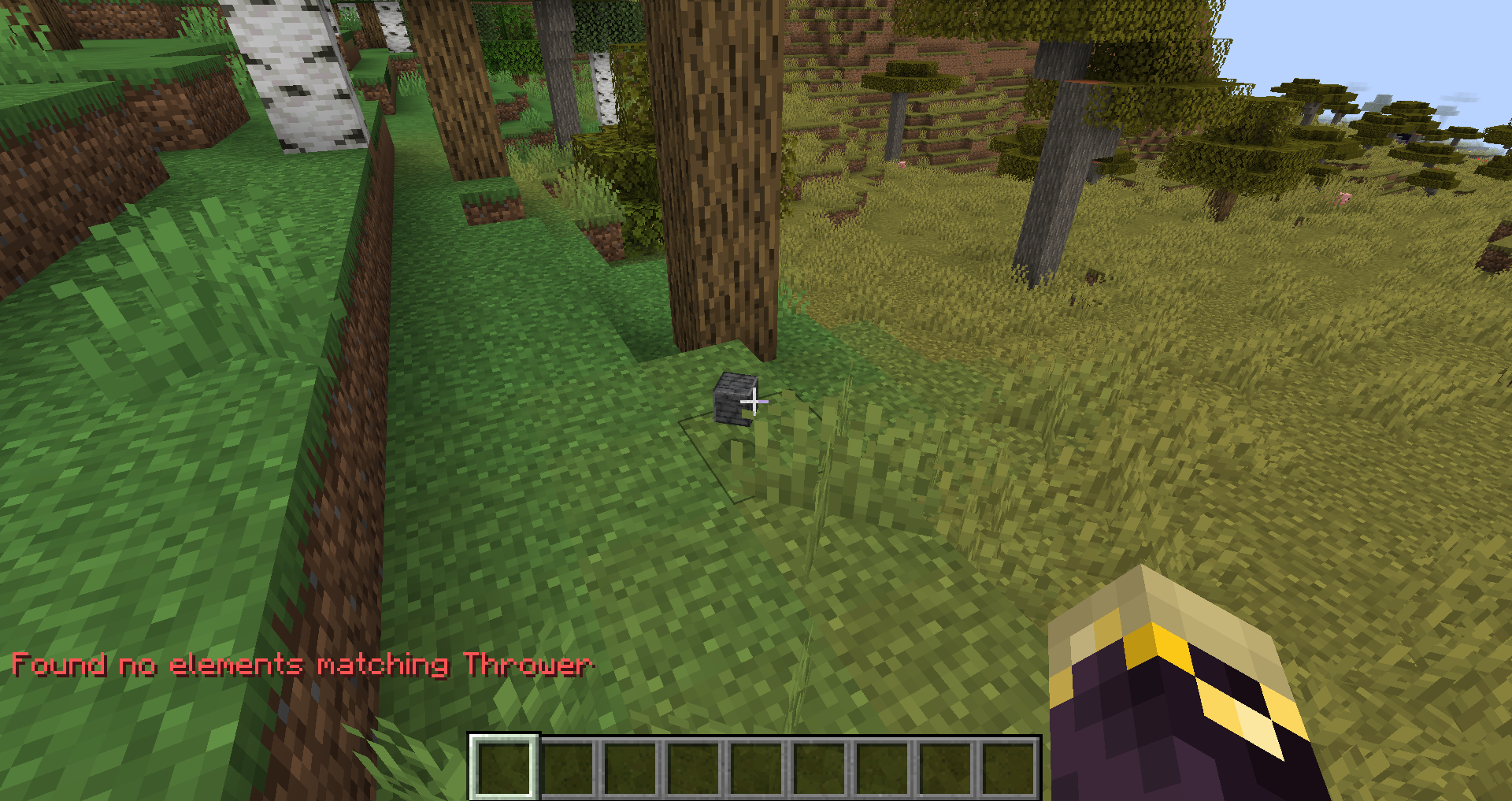
This is related to MC-96782 but is not a duplicate, as MC-96782 does not mention that this bug occurs upon player death.
Summary: Items dropped on death do not have the "Thrower" NBT tag.
Steps To Reproduce:
- Have one item in your inventory
- Run the command /kill @s
- Return to the spot where you died (without picking up the item!) and type in the command:
/data get entity @e[type=item,limit=1] ThrowerObserved Results:
This will reveal that the item does not have a Thrower tag, despite technically having been dropped by the player.Expected Results:
This will reveal that the item has a Thrower tag.
This is related to MC-96782 but is not a duplicate, as MC-96782 does not mention that this bug occurs upon player death.
Summary: Items dropped on death do not have the "Thrower" NBT tag.
Steps To Reproduce:
- Have one item in your inventory
- Run the command /kill @s
- Return to the spot where you died (without picking up the item!) and type in the command:
/data get entity @e[type=item,limit=1] ThrowerObserved Results:
This will reveal that the item does not have a Thrower tag, despite technically having been dropped by the player.Expected Results:
This will reveal that the item has a Thrower tag.
This is related to MC-96782 but is not a duplicate, as MC-96782 does not mention that this bug occurs upon player death.
Summary: Items dropped on death do not have the "Thrower" NBT tag.
Steps To Reproduce:
- Have one item in your inventory
- Run the command /kill @s
- Return to the spot where you died (without picking up the item!) and type in the command:
/data get entity @e[type=item,limit=1] ThrowerObserved Results:
This will reveal that the item does not have a Thrower tag, despite technically having been dropped by the player.Expected Results:
This will reveal that the item has a Thrower tag.
This is related to MC-96782 but is not a duplicate, as MC-96782 does not mention that this bug occurs upon player death.
Summary:
Items dropped on death do not have the "Thrower" NBT tag.Steps To Reproduce:
- Have one item in your inventory
- Run the command /kill @s
- Return to the spot where you died (without picking up the item!) and type in the command:
/data get entity @e[type=item,limit=1] ThrowerObserved Results:
This will reveal that the item does not have a Thrower tag, despite technically having been dropped by the player.Expected Results:
This will reveal that the item has a Thrower tag.
This is related to MC-96782 but is not a duplicate, as MC-96782 does not mention that this bug occurs upon player death.
Summary:
Items dropped on death do not have the "Thrower" NBT tag.Steps To Reproduce:
- Have one item in your inventory
- Run the command /kill @s
- Return to the spot where you died (without picking up the item!) and type in the command:
/data get entity @e[type=item,limit=1] ThrowerObserved Results:
This will reveal that the item does not have a Thrower tag, despite technically having been dropped by the player.Expected Results:
This will reveal that the item has a Thrower tag.This is related to MC-96782 but is not a duplicate, as MC-96782 does not mention that this bug occurs upon player death.
Summary:
Items dropped on death do not have the "Thrower" NBT tag.Steps To Reproduce:
- Have one item in your inventory
- Run the command /kill @s
- Return to the spot where you died (without picking up the item!) and type in the command:
/data get entity @e[type=item,limit=1] ThrowerObserved Results:
This will reveal that the item does not have a Thrower tag, despite technically having been dropped by the player.Expected Results:
This will reveal that the item has a Thrower tag.
This is related to MC-96782 but is not a duplicate, as MC-96782 does not mention that this bug occurs upon player death.
Summary:
Items dropped on death do not have the "Thrower" NBT tag.Steps
To Reproduce:
- Have one item in your inventory
- Run the command /kill @s
- Return to the spot where you died (without picking up the item
!) andtype in the command:/data get entity @e[type=item,limit=1] ThrowerObserved Results:
This will reveal that the item does not have a Thrower tag, despite technically having been dropped by the player.Expected Results:
This will reveal that the item has a Thrower tag.
This is related to MC-96782 but is not a duplicate, as MC-96782 does not mention that this bug occurs upon player death.
Summary:
Items dropped on death do not have the "Thrower" NBT tag.Steps to Reproduce:
- Have one item in your inventory
- Run the command /kill @s
- Return to the spot where you died (without picking up the item) and run the command:
/data get entity @e[type=item,limit=1] ThrowerObserved Results:
This will reveal that the item does not have a Thrower tag, despite technically having been dropped by the player.Expected Results:
This will reveal that the item has a Thrower tag.
This is related to MC-96782 but is not a duplicate, as MC-96782 does not mention that this bug occurs upon player death.
Summary:
Items dropped on deathdo not havethe"Thrower"NBT tag.Steps to Reproduce:
- Have one item in your inventory
- Run the command /kill @s
- Return to the spot where you died (without picking up the item) and run the command:
/data get entity @e[type=item,limit=1] ThrowerObserved Results:
This will reveal that the item does not have a Thrower tag, despite technically having been dropped by the player.Expected Results:
This will reveal that the item has a Thrower tag.
This is related to MC-96782 but is not a duplicate, as MC-96782 does not mention that this bug occurs upon player death.
Summary:
Items dropped upon death lack the 'Thrower' NBT tag.Steps to Reproduce:
- Have one item in your inventory
- Run the command /kill @s
- Return to the spot where you died (without picking up the item) and run the command:
/data get entity @e[type=item,limit=1] ThrowerObserved Results:
This will reveal that the item does not have a Thrower tag, despite technically having been dropped by the player.Expected Results:
This will reveal that the item has a Thrower tag.
This is related to MC-96782 but is not a duplicate, as MC-96782 does not mention that this bug occurs upon player death.
Summary:
Items dropped upon death lack the 'Thrower' NBT tag.Steps to Reproduce:
- Have one item in your inventory
- Run the command /kill @s
- Return to the spot where you died (without picking up the item) and run the command:
/data get entity @e[type=item,limit=1] ThrowerObserved Result
s:
This will reveal that the item does not have a Thrower tag, despite technically having been dropped by the player.Expected Result
s:
This will reveal that the item has a Thrower tag.
This is related to MC-96782 but is not a duplicate, as MC-96782 does not mention that this bug occurs upon player death.
Summary:
Items dropped upon death lack the 'Thrower' NBT tag.
Steps to Reproduce:
- Have one item in your inventory
- Run the command /kill @s
- Return to the spot where you died (without picking up the item) and run the command:
/data get entity @e[type=item,limit=1] ThrowerObserved Result:
This will reveal that the item does not have a Thrower tag, despite technically having been dropped by the player.Expected Result:
This will reveal that the item has a Thrower tag.
This is related to MC-96782 but is not a duplicate, as MC-96782 does not mention that this bug occurs upon player death.
Can confirm in 1.20 pre-release 6. Happened upon a nether fortress in a soul sand valley and it has an overwhelming amount of blazes and wither skeletons especially.
Can confirm in 1.20 pre-release 6
Can confirm in 1.20.2
Can confirm in 1.20.3
Can confirm in 1.20.4
This is obviously a bug and should be flagged for review. There is no logical reason why these items would use inconsistent palettes; it is evidently just a texturing error, and to mark it as "Works as Intended" (not even "Won't Fix") feels like a blatant abuse of that resolution type.
This should be flagged for review. There is no logical reason why this texture shouldn't be more in line with, say, the furnace top texture, and to mark it as "Works as Intended" (not even "Won't Fix") feels like an abuse of that resolution type.
This should be flagged for review. It would be trivial to fix and is a quite glaring error.
In Java Edition, tridents get dropped as items (or simply disappear if initially thrown in Creative mode) when the thrower enters spectator mode. Bedrock should probably share this behaviour.
Isn't this working as intended? Tridents pop into items when they lose track of their owners.
Isn't this working as intended? While thrown, the trident is not inside of the player's inventory — and thus isn't affected by keepInventory.
This should be flagged for review. Jeb has previously gone on record to note that this is a bug — perhaps indicating that it should instead be marked as "Won't Fix."
However, the way in which the trident flickers in the player's first person view is potentially triggering for those with epilepsy, which may be a good reason to switch to the usual behaviour for when tridents lose their targets — that is, to drop as an item.
Can confirm in 2.29.11-1.12.3. The launcher reports that "Skin images must be 64x64 or 64x32 pixel PNG files" even when the file matches those dimensions and file type.
Why is this marked as invalid? Why would it be "natural" that the skin doesn't refresh upon rejoining a singleplayer world, but does update when rejoining a multiplayer server? Surely the player's current skin could easily be fetched upon world load? This issue should be reopened.