 Austin
- KAT_IN_A_BOWL
- kat_in_a_bowl
- America/New_York
- Yes
- No
 MC-25691
![[Mod] Jiingy](../../../data/avatars/users/91802.png)
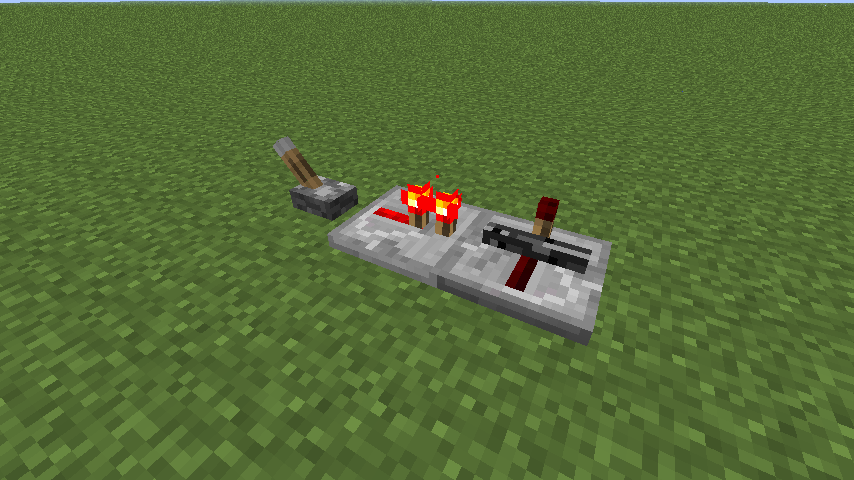
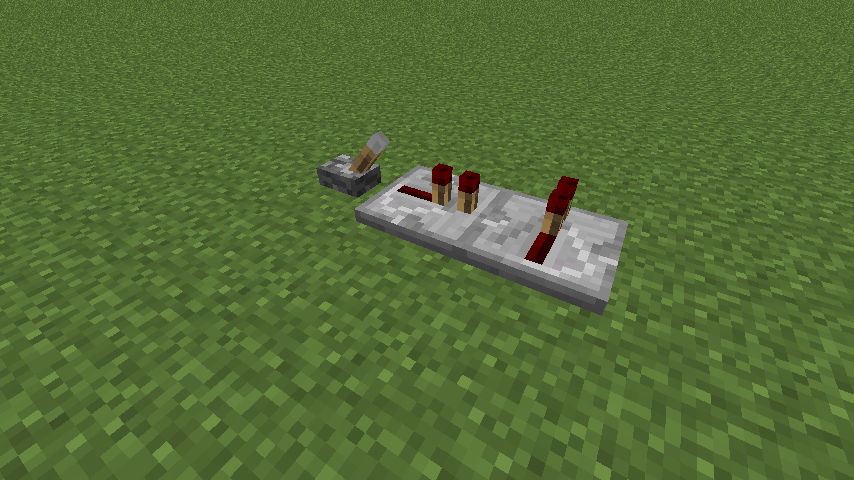


So, I was playing with redstone and stuff like that. I decided to place repeaters and stuff in random positions. The second repeater's movable torch turns into a bedrock texture on its side.
These images were the result of using a lever and 2 repeaters, works on any game mode,
To perform this glitch, do the following pattern below:
_ ii _i
key:
_ = lever,ii = repeater facing right, _i = repeater facing awaySo, I was playing with redstone and stuff like that. I decided to place repeaters and stuff in random positions. The second repeater's movable torch turns into a bedrock texture on its side.
These images were the result of using a lever and 2 repeaters, works on any game mode,
To perform this glitch, do the following pattern below:
/ _ii _i
key: / = lever, _ii = repeater facing right, _i = repeater facing away
***PLEASE IGNORE THE AFFECTS VERSION/S SECTION, IT DOESN'T HAVE VERSIONS BELOW 1.8 AND THIS ISSUE IS IN 1.7.10!***
This is something many people have been complaining about, but my issue is the other way around. I'm using the minecraft:blockname format on 1.7.10.
This is my custom preset, Better Superflat:3;1*minecraft:bedrock,74*minecraft:dirt,1*minecraft:grass;4;
Whenever I click Use Preset or Cancel, it just resets back to default Superflat (1 layer of grass, 2 layers of dirt, 1 layer of bedrock).
I know for a fact that 1.7.10 supports both the minecraft:blockname and numeric id formats for items. I tested it for both formats, no dice.***PLEASE IGNORE THE AFFECTS VERSION/S SECTION, IT DOESN'T HAVE VERSIONS BELOW 1.8 AND THIS ISSUE IS IN 1.7.10!***
This is something many people have been complaining about, but my issue is the other way around. I'm using the minecraft:blockname format on 1.7.10.
This is my custom preset, Better Superflat:3;1*minecraft:bedrock,74*minecraft:dirt,1*minecraft:grass;4;
Whenever I click Use Preset or Cancel, it just resets back to default Superflat (1 layer of grass, 2 layers of dirt, 1 layer of bedrock).
I know for a fact that 1.7.10 supports both the minecraft:blockname and numeric id formats for items. I tested it for both formats, no dice. I've tried to remove all layers and put in the line, also no dice.
When I try to place an item frame above a fence block or a stone wall, nothing happens. There is a placing animation, but the space above the fence/wall is actively preventing it from happening. Item frames can still be placed on the sides and bottom of fences/stone walls, but not on the top or any space directly above it. This behavior does not apply if you try to place it on a ceiling above a fence/stone wall.
Video did not render correctly, reuploading to youtube
Item frame bug.mp4
try doing it slower so you can switch more times
It's a feature, so if you try to hit a mob, you don't accidentally destroy blocks around it, which can be annoying.
This is a feature, not a bug. I believe this was added in 1.6.1.
Wow, an optical illusion, but really it's just part of the very end of the curl of the j, which can trick you into thinking it's a second "."
*bucket
Bukkit is a server plugin.
This happens because you collect leather. When you first collect leather, it assumes that you killed a cow for it.
Creepy Cosmic Cows.
Incomplete.
But that's a good thing! Right?
It happens to me in both singleplayer and multiplayer.
turns head 90 degrees right
@Chris Berry
lot is?
It's a HUGE issue for me, I'm almost always traveling. It literally points the opposite direction of my spawn (not bed spawn)
@Edward Babin
I was just about to say that...
This is not a bug. The clocks and compasses have specifically coded textures that always function when shown anywhere in game.
Clocks and compasses have specifically coded textures that always function when shown anywhere in game. This probably isn't a bug.
Your sentence needs to be finished. Are you choking or something?
This is a removed feature. It was buggy, like when shooting a ghast or big slime, it would put a giant arrow in them.
Wtf does hitten mean?
Upload a screenshot IN THE DAYTIME. I can't even see the item you're holding
@Bene Daniel
How is this a feature?
Well, what do you expect? You're starving, so you can't even sleep!
*Obstructs
*Bottom
Probably intended, as you can only break certain blocks without a tool.
This was intentional...
Oops, this is a duplicate. I wish I could delete my own tickets. Sorry.
I actually tried this, you DO move faster, but it's hard to tell.
*through
Yeah, try using only slowness and speed 1
Incomplete without a crash report from (minecraft/crash-reports/crash-<DATE>-client.txt). Please attach it so that we can diagnose your issue.
For technical support please use the Mojang Support Center.
This is seriously just a waste of space.
Mobs have a brief moment of invincibility after being hit. The invincibility is indicated by them turning red. Of course if you spam it, they will get hit less times. This also applies to players. It is to prevent the damage spam crutch to make the game playable. If it were not for this, a mob or player could kill you in mere seconds, and vice-versa. This is a feature.
Try going to "Edit Profile" and untick the option that says "Game directory." I had this problem too, so I checked the launcher log and it said something about aborting because it couldn't find the game directory.
So as of reading your comment, I tested this in the latest snapshot. The buzzing persisted. I've also noticed that the same pitch thing happens when an in-game sound is played, but that is only specific to the new snapshot. Further curious, I tested explosions, breaking blocks, mob noises, juke boxes, etc.. I've even tried to update all drivers, but they were all up to date. My headphones have an independent volume slider, so I tried lowering that and increasing my computer's volume. The buzzing noise is gone, but a similar pitch shift in 18w01a is still present. Rotation in not only pitch but also yaw noticeably distorts sound pitch except for music (since music is not played from direction). This does not occur between versions for me, and is something completely new. Try igniting a creeper or TNT and quickly looking in different directions in 1.12.2, then repeat the same process in 18w01a. If it's different for you, it may be a problem on my end and not Minecraft's. I nearly thought my headphones were broken because of that.
TL;DR Fixed the buzzing sound, but 18w01a's sound feels very strange and "like being in a jar" compared to 1.12.2
This is not that bug, the bug here is the farmland being trampled when climbing out of water, which never happened until 1.13. However I do somewhat see that bug occurring in the video incidentally.
There's no way this is a feature. It was not listed in the changelog and it only makes building with water even more annoying. Nothing changed specifically for buckets or their interactions with liquids in this snapshot.
This is a feature. Works as intended.
Could not reproduce. Plus this was already fixed in 1.17.1.