 Legopitstop
- Legopitstop
- legopitstop
- America/New_York
- Yes
- No
 MC-142339
 MCPE-64487
![[Mojang] Gegy](../../../data/avatars/users/10122.svg)
 WEB-6815













custom items that are from .mcaddons do not show up in the creative inventory or in the recipe book like custom blocks from .mcaddons
Steps to Reproduce:
1.
2.
3.
custom items that are from .mcaddons do not show up in the creative inventory or in the recipe book like custom blocks from .mcaddons
Steps to Reproduce:
1.
2.
3.
custom items that are from .mcaddons do not show up in the creative inventory or in the recipe book like custom blocks from .mcaddons
Steps to Reproduce:
1. Create a resourcepack and behavior pack.
2. Add files to create a new item(s).
3. Add them to a world that has experimental game-play enabled.Observed Results:
- Custom items can be received by /give a command or by recipe
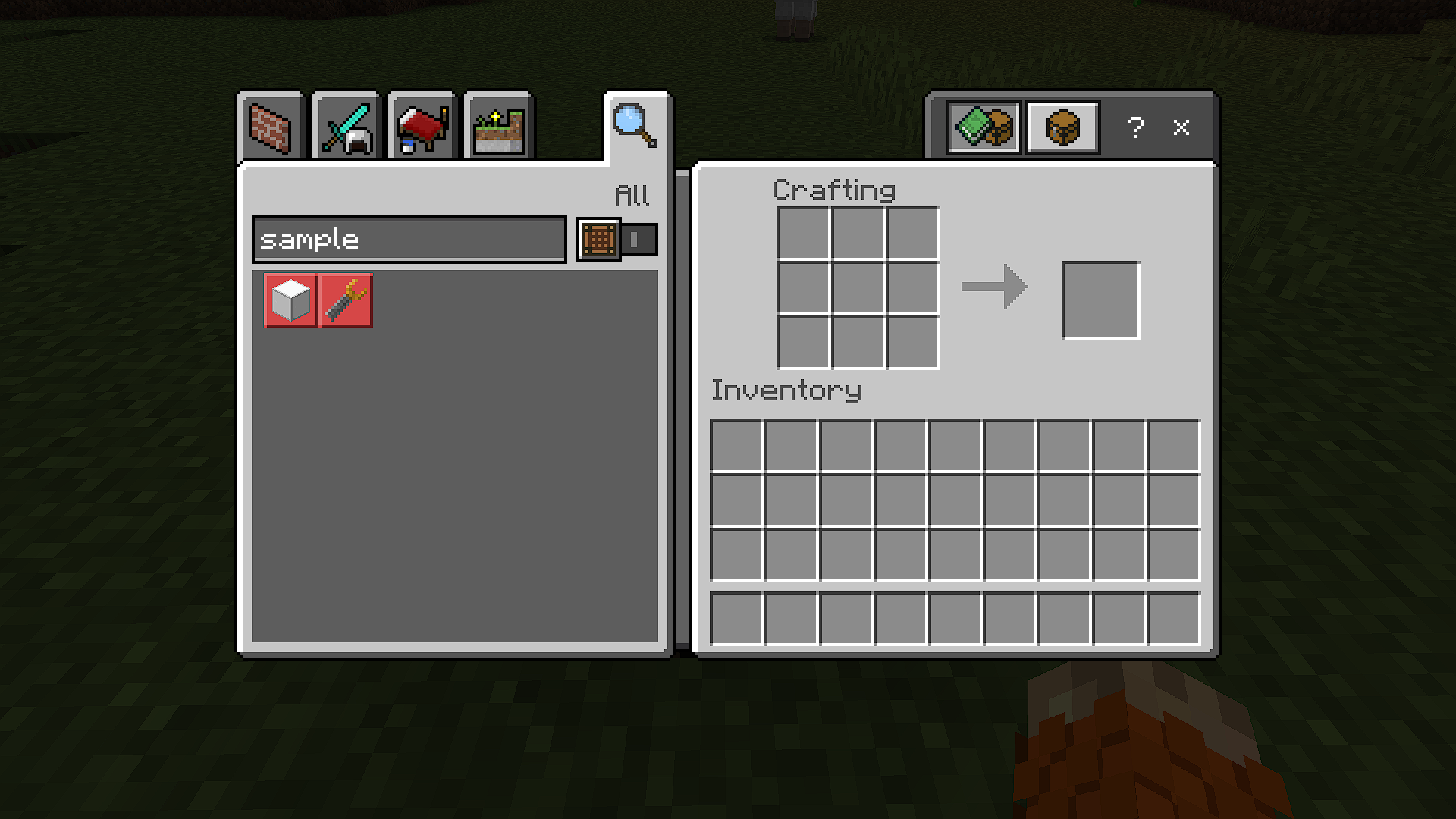
- The recipe is not shown in recipe book like vanilla items (both players, and crafting table)
- Items are not shown in the creative inventory.
Expected Results:
- Items can be received in creative inventory
- Item recipes will be shown in the recipe book (both players, and crafting table)
-
custom items that are from .mcaddons do not show up in the creative inventory or in the recipe book like custom blocks from .mcaddons
Steps to Reproduce:
1. Create a resourcepack and behavior pack.
2. Add files to create a new item(s).
3. Add them to a world that has experimental game-play enabled.Observed Results:
- Custom items can be received by /give a command or by recipe
- The recipe is not shown in recipe book like vanilla items (both players, and crafting table)
- Items are not shown in the creative inventory.
Expected Results:
- Items can be received in creative inventory
- Item recipes will be shown in the recipe book (both players, and crafting table)
-
custom items that are from .mcaddons do not show up in the creative inventory or in the recipe book like custom blocks from .mcaddons
Steps to Reproduce:
1. Create a resourcepack and behavior pack.
2. Add files to create a new item(s).
3. Add them to a world that has experimental game-play enabled.Observed Results:
- Custom items can be received by /give a command or by recipe
- The recipe is not shown in recipe book like vanilla items (both players, and crafting table)
- Items are not shown in the creative inventory.
Expected Results:
- Items can be received in creative inventory
- Item recipes will be shown in the recipe book (both players, and crafting table)
custom items that are from .mcaddons do not show up in the creative inventory or in the recipe book like custom blocks from
.mcaddons
Steps to Reproduce:
1.Create a resourcepack and behavior pack.
2. Add files to create a new item(s).
3. Add them to a world that has experimental game-play enabled.Observed Results:
- Custom items can be received by /give
a commandorby recipe
- The recipe is not shown in recipe book like vanilla items
(both players, and crafting table)
- Items are not shown in the creative inventory.
Expected Results:
- Items can be received in creative inventory
- Item recipes will be shown in the recipe book (both players, and crafting table)
custom items and blocks (blocks are broken in 1.16) that are from .mcaddons do not show up in the creative inventory or in the recipe book like custom blocks from older versions
Steps to Reproduce:
1. Download the example addon below2. install it how you would install all other addons (click on it for windows 10)
3. create a new world
4. make sure experimental gameplay is turned on.
5. activate the resourcepack and behavior pack
6. finish creating your world
Observed Results:
- Custom items/blocks can be received by /give @s custom:sample_item and/or /give @s custom:sample_block
- The recipe is not shown in recipe book like vanilla items/blocks (both players, and crafting table)
- Items are not shown in the creative inventory.
Expected Results:
- Items can be received in creative inventory
- Item recipes will be shown in the recipe book (both players, and crafting table)
MCPE-64487 sample.mcaddon
Custom items and blocks do not show up in the creative inventory or the recipe book
custom items and blocks (blocks are broken in 1.16) that are from .mcaddons do not show up in the creative inventory or in the recipe book like custom blocks from older versions
Steps to Reproduce:
1. Download the example addon below2. install it how you would install all other addons (click on it for windows 10)
3. create a new world
4. make sure experimental gameplay is turned on.
5. activate the resourcepack and behavior pack
6. finish creating your world
Observed Results:
- Custom items/blocks can be received by /give @s custom:sample_item and/or /give @s custom:sample_block
- The recipe is not shown in recipe book like vanilla items/blocks (both players, and crafting table)
- Items are not shown in the creative inventory.
Expected Results:
- Items can be received in creative inventory
- Item recipes will be shown in the recipe book (both players, and crafting table)
custom
items andblocks (blocks are broken in 1.16) that are from .mcaddons do not show up in the creative inventory or in the recipe book like custom blocks from older versions
Steps to Reproduce:
1. Download the example addon below2. install it how you would install all other addons (click on it for windows 10)
3. create a new world
4. make sure experimental gameplay is turned on. (holiday creator features)
5. activate the resourcepack and behavior pack
6. finish creating your world
Observed Results:
- Custom items/blocks can be received by '/give @s custom:sample_item' and/or '/give @s custom:sample_block'
- The recipe is not shown in the recipe book like vanilla
items/blocks (both players, and crafting table)
Items are not shown in the creative inventory.- Blocks do not show up in the creative inventory.
Expected Results:
Items andblocks can be received in creative inventory
Item andblock recipes will be shown in the recipe book (both players, and crafting table)
custom
items andblocks (blocks are broken in 1.16) that are from .mcaddons do not show up in the creative inventory or in the recipe book like custom blocks from older versions
Steps to Reproduce:
1. Download the example addon below2. install it how you would install all other addons (click on it for windows 10)
3. create a new world
4. make sure experimental gameplay is turned on. (holiday creator features)
5. activate the resourcepack and behavior pack
6. finish creating your world
Observed Results:
- Custom items/blocks can be received by '/give @s custom:sample_item' and/or '/give @s custom:sample_block'
- The recipe is not shown in the recipe book like vanilla
items/blocks (both players, and crafting table)
Items are not shown in the creative inventory.- Blocks do not show up in the creative inventory.
Expected Results:
Items andblocks can be received in creative inventory
Item andblock recipes will be shown in the recipe book (both players, and crafting table)
custom
items andblocks (blocks are broken in 1.17) that are from .mcaddons do not show up in the creative inventory or in the recipe book like custom blocks from older versionsEdit:
Items do show up in the creative inventory, just now blocks don't show up in the inventory.
Steps to Reproduce:
1. Download the example addon below2. install it how you would install all other addons (click on it for windows 10)
3. create a new world
4. make sure experimental gameplay is turned on. (holiday creator features)
5. activate the resourcepack and behavior pack
6. finish creating your world
Observed Results:
- Custom items/blocks can be received by '/give @s custom:sample_item' and/or '/give @s custom:sample_block'
- The recipe is not shown in the recipe book like vanilla
items/blocks (both players, and crafting table)
Items are not shown in the creative inventory.- Blocks do not show up in the creative inventory.
Expected Results:
Items andblocks can be received in creative inventory
Item andblock recipes will be shown in the recipe book (both players, and crafting table)
custom
items andblocks (blocks are broken in 1.17) that are from .mcaddons do not show up in the creative inventory or in the recipe book like custom blocks from older versionsEdit:
Items do show up in the creative inventory, just now blocks don't show up in the inventory.
Steps to Reproduce:
1. Download the example addon below2. install it how you would install all other addons (click on it for windows 10)
3. create a new world
4. make sure experimental gameplay is turned on. (holiday creator features)
5. activate the resourcepack and behavior pack
6. finish creating your world
Observed Results:
- Custom items/blocks can be received by '/give @s custom:sample_item' and/or '/give @s custom:sample_block'
- The recipe is not shown in the recipe book like vanilla
items/blocks (both players, and crafting table)
Items are not shown in the creative inventory.- Blocks do not show up in the creative inventory.
Expected Results:
Items andblocks can be received in creative inventory
Item andblock recipes will be shown in the recipe book (both players, and crafting table)
custom items and blocks (blocks are broken in 1.17) that are from .mcaddons do not show up in the creative inventory or in the recipe book like custom blocks from older versions
Edit:
Both items, and blocks now show up in the creative inventory. Make sure to include the minecraft:creative_category component.
Steps to Reproduce:
1. Download the example addon below2. install it how you would install all other addons (click on it for windows 10)
3. create a new world
4. make sure experimental gameplay is turned on. (holiday creator features)
5. activate the resourcepack and behavior pack
6. finish creating your world
Observed Results:
- Custom items/blocks can be received by '/give @s custom:sample_item' and/or '/give @s custom:sample_block'
- The recipe is not shown in the recipe book like vanilla items/blocks (both players, and crafting table)
- Items are not shown in the creative inventory.
- Blocks do not show up in the creative inventory.
Expected Results:
- Items and blocks can be received in creative inventory
- Item and block recipes will be shown in the recipe book (both players, and crafting table)
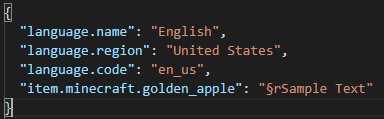
chat reset code (§r) doesn't work at the start of the text in resource pack lang file. in 1.15 it defaults to white color and sets italic to false.
<sample rp>/assets/minecraft/lang/en_us.json
{"item.minecraft.golden_apple": "§rSample Text" }chat reset code (§r) doesn't work at the start of the text in resource pack lang file. in 1.15 it defaults to white color and sets italic to false.
<sample rp>/assets/minecraft/lang/en_us.json
{ "item.minecraft.golden_apple": "§rSample Text" }
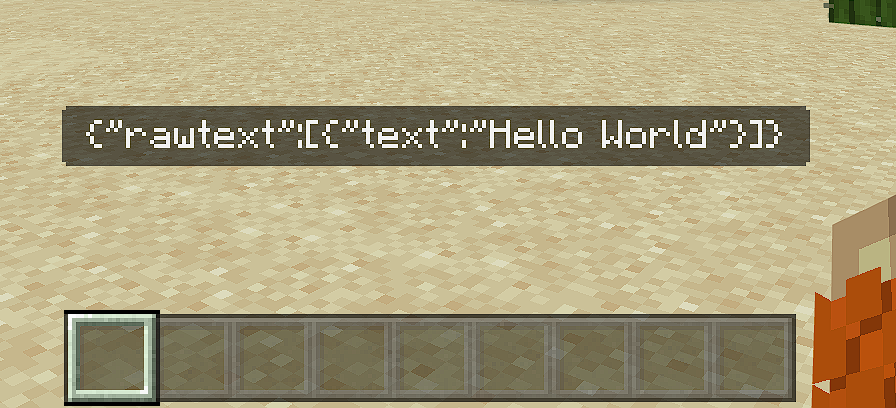
title does not take into account rawtext. It will only use the text itself.
/title @p title {"rawtext":[
{"text":"Hello World"}]}
/title @p subtitle {"rawtext":[
{"text":"Hello World"}]}
/title @p actionbar {"rawtext":[
{"text":"Hello World"}]}
However the same format works in tellraw
/tellraw @p {"rawtext":[
{"text":"Hello World"}]}
Recipes that use a Powder Snow Bucket do not return a bucket, in addition, to the result item like a recipe that uses a water or lava bucket.
Steps to Reproduce:
1. Download the example datapack below.
2. Install the datapack on any world.
3. Using a crafting table or the player's inventory place 4 Powder Snow Buckets inside the recipe slots (shapeless)Observed Results:
- You get the resulting item as expected
- You do not get the bucket in return from the input slot.
Expected Results:
You get both the bucket from the Powder Snow Bucket, and the set result item.
Recipes that use a Powder Snow Bucket do not return a bucket, in addition, to the result item like a recipe that uses a water or lava bucket.
Steps to Reproduce:
1. Download the example datapack below.2. Install the example datapack in any world.
3. For the shapeless recipe place a Powder Snow Bucket anywhere to get a Snow Block
4. For the shaped recipe place 2 Powder Snow Buckets next to each other horizontally.
Observed Results:
- You get the resulting item as expected
- You do not get the bucket in return from the input slot.
Expected Results:
You get both the bucket from the Powder Snow Bucket, and the set result item.
Custom powder snow recipes doesnot return a bucket
Cannot connect to a local LAN world in 1.18, But did work in 1.17.
Steps to Reproduce:
1. Create a LAN world on a device that is connected to the internet.2. On a separate device, that is on the same internet as LAN hoast, connect to the LAN world using the 'Direct Connect' button under multiplayer
Observed Results:
- Connecting to LAN world fails
Expected Results:
- The device properly connects to LAN world, like in 1.17 or older versions
Other Notes
- The below attachment contains the
server, the device that hosted the world, and theclient that failed to connect to the world.- The attachment includes both the Vanilla Minecraft and the OptiFine logs.
- Everything worked fine prior to 1.18.
- Tested the issue on 1.18 and 1.18.1 with the same result.
Cannot connect to a local LAN world in 1.18, But did work in 1.17.
Steps to Reproduce:
1. Create a LAN world on a device that is connected to the internet.2. On a separate device, that is on the same internet as LAN hoast, connect to the LAN world using the 'Direct Connect' button under multiplayer
Observed Results:
- Connecting to LAN world fails
Expected Results:
- The device properly connects to LAN world, like in 1.17 or older versions
Other Notes
- The below attachment contains the "Server", the device that hosted the world, and the "Client", The device that failed to connect to the world.
- The attachment includes both the Vanilla Minecraft and the OptiFine logs.
- Everything worked fine prior to 1.18.
- Tested the issue on 1.18 and 1.18.1 with the same result.
Cannot connect to a local LAN world in 1.18, But did work in 1.17.
Steps to Reproduce:
1. Create a LAN world on a device that is connected to the internet.2. On a separate device, that is on the same internet as LAN hoast, connect to the LAN world using the 'Direct Connect' button under multiplayer
Observed Results:
Connectingto LAN worldfailsExpected Results:
- The device properly connects to LAN world, like in 1.17 or older versions
Other Notes
- The below attachment contains the "Server", the device that hosted the world, and the "Client", The device that failed to connect to the world.
- The attachment includes both the Vanilla Minecraft and the OptiFine logs.
- Everything worked fine prior to 1.18.
- Tested the issue on 1.18 and 1.18.1 with the same result.
Cannot connect to a local LAN world in 1.18, But did work in 1.17.
Steps to Reproduce:
1. Create a LAN world on a device that is connected to the internet.2. On a separate device, that is on the same internet as LAN hoast, connect to the LAN world using the 'Direct Connect' button under multiplayer
Observed Results:
- Minecraft attempts to connect to LAN world but ends up failing.
Expected Results:
- The device properly connects to LAN world, like in 1.17 or older versions
Other Notes
- The below attachment contains the "Server", the device that hosted the world, and the "Client", The device that failed to connect to the world.
- The attachment includes both the Vanilla Minecraft and the OptiFine logs.
- Everything worked fine prior to 1.18.
- Tested the issue on 1.18 and 1.18.1 with the same result.
Cannot connect to a local LAN world in 1.18, But did work in 1.17.
Steps to Reproduce:
1. Create a LAN world on a device that is connected to the internet.2. On a separate device, that is on the same internet as LAN hoast, connect to the LAN world using the 'Direct Connect' button under multiplayer
Observed Results:
- Minecraft attempts to connect to LAN world but ends up failing.
Expected Results:
- The device properly connects to LAN world, like in 1.17 or older versions
Other Notes
- The below attachment contains the "Server", the device that hosted the world called "LAPTOP-V0RUD04F", and the "Client", The device that failed to connect to the world.
- The attachment includes both the Vanilla Minecraft and the OptiFine logs.
- Everything worked fine prior to 1.18.
- Tested the issue on 1.18 and 1.18.1 with the same result.
Cannot connect to a local LAN world in 1.18, But did work in 1.17.
Steps to Reproduce:
1. Create aLANworld on a device that is connected to the internet.2. On
a separate device, that is on thesameinternet as LAN hoast, connect to the LAN world using the 'Direct Connect' button under multiplayerObserved Results:
- Minecraft attempts to connect to LAN world but ends up failing.
Expected Results:
- The device properly connects to LAN world, like in 1.17 or older versions
Other Notes
- The below attachment contains the "Server", the device that hosted the world called "LAPTOP-V0RUD04F", and the "Client", The device that failed to connect to the world.
- The attachment includes both the Vanilla Minecraft and the OptiFine logs.
- Everything worked fine prior to 1.18.
- Tested the issue on 1.18 and 1.18.1 with the same result.
Cannot connect to a local LAN world in 1.18, But did work in 1.17.
Steps to Reproduce:
1. Create a new world on a device that is connected to the internet.2. On the pause game menu press "Open to LAN", then "open LAN"
2. On a separate device, that is on the same internet as LAN host, connect to the LAN world using the 'Direct Connect' button under multiplayer
Observed Results:
- Minecraft attempts to connect to LAN world but ends up failing.
Expected Results:
- The device properly connects to LAN world, like in 1.17 or older versions
Other Notes
- The below attachment contains the "Server", the device that hosted the world called "LAPTOP-V0RUD04F", and the "Client", The device that failed to connect to the world.
- The attachment includes both the Vanilla Minecraft and the OptiFine logs.
- Everything worked fine prior to 1.18.
- Tested the issue on 1.18 and 1.18.1 with the same result.
Cannot connect to a local LAN world in 1.18, But did work in 1.17.
Steps to Reproduce:
1. Create a new world on a device that is connected to the internet.2. On the pause game menu press "Open to LAN", then "open LAN"
2. On a separate device, that is on the same internet as LAN host, connect to the LAN world using the 'Direct Connect' button under multiplayerObserved Results:
- Minecraft attempts to connect to LAN world but ends up failing.
Expected Results:
- The device properly connects to LAN world, like in 1.17 or older versions
Other Notes
- The below attachment contains the "Server", the device that hosted the world called "LAPTOP-V0RUD04F", and the "Client", The device that failed to connect to the world.
- The attachment includes both the Vanilla Minecraft and the OptiFine logs.
- Everything worked fine prior to 1.18.
- Tested the issue on 1.18 and 1.18.1 with the same result.
Cannot connect to a local LAN world in 1.18, But did work in 1.17.
Steps to Reproduce:
1. Create a new world on a device that is connected to the internet.2. On the pause game menu press "Open to LAN", then "open LAN"
3. On a separate device, that is on the same internet as LAN host, connect to the LAN world using the 'Direct Connect' button under multiplayer
4. Enter the hoast's IPv4 address followed by the port number that the server device received afterward separated by a ":"
5. Then press enters to attempt to connect to LAN world.
Observed Results:
- Minecraft attempts to connect to LAN world but ends up failing.
Expected Results:
- The device properly connects to LAN world, like in 1.17 or older versions
Other Notes
- The below attachment contains the "Server", the device that hosted the world called "LAPTOP-V0RUD04F", and the "Client", The device that failed to connect to the world.
- The attachment includes both the Vanilla Minecraft and the OptiFine logs.
- Everything worked fine prior to 1.18.
- Tested the issue on 1.18 and 1.18.1 with the same result.
Custom structures do not use the target pool to generate the structure and do not get removed in this process.
Steps to Reproduce:
1. Download the example addon below2. Install it how you would install all other addons (click on it for windows 10)
3. Create a new world
4. Make sure experimental gameplay is turned on. (custom biomes)
5. Activate the behavior pack
6. Finish creating your world
Observed Results:
- Parent structure properly generates
- Jigsaw blocks do not generate the child structure
- Jigsaw blocks do not get replaced by the defined block.
Expected Results:
- Parent structure properly generates
- Jigsaw blocks generate the targeted pool, if pool is not found it should
send a console error and not generate the parent structure.When child structure has successfully generated it should replace thejigsaw withthe defined block.Custom structures do not use the target pool to generate the structure and do not get removed in this process.
Steps to Reproduce:
1. Download the example addon below2. Install it how you would install all other addons (click on it for windows 10)
3. Create a new world
4. Make sure experimental gameplay is turned on. (custom biomes)
5. Activate the behavior pack
6. Finish creating your world
Observed Results:
- Parent structure properly generates
- Jigsaw blocks do not generate the child structure
- Jigsaw blocks do not get replaced by the defined block.
Expected Results:
- Parent structure properly generates.
- Jigsaw blocks generate the targeted pool, if pool is not found it should print an error.
- The Jigsaw block should always be replaced with the defined block. If the defined block is invalid it should print an error, and replace the Jigsaw with air.
Custom structures do not use the target pool to generate the structure and do not get removed in this process.
Steps to Reproduce:
1. Download the example addon below2. Install it how you would install all other addons (click on it for windows 10)
3. Create a new world
4. Make sure experimental gameplay is turned on. (custom biomes)
5. Activate the behavior pack
6. Finish creating your world
Observed Results:
- Parent structure properly generates
- Jigsaw blocks do not generate the child structure
- Jigsaw blocks do not get replaced by the defined block.
Expected Results:
- Parent structure properly generates.
- Jigsaw blocks generate the targeted pool, if pool is not found it should print an error.
- The Jigsaw block should always be replaced with the defined block. If the defined block is invalid it should print an error, and replace the Jigsaw with air.
Other Notes
- Java Edition's jigsaw blocks have a level slider and a generate button. Having these in Bedrock Edition would be useful for debugging
- Possibly include a field inside the structure_template_feature that tells the game how many levels to generate.
{ "format_version": "1.18", "minecraft:structure_template_feature": { "description": { "identifier": "custom:parent_feature" }, "structure_name": "custom:parent", "adjustment_radius": 8, "facing_direction": "random", "jigsaw_level": 1, // The number of jigsaw blocks to generate, default: 0, all ungenerated jigsaws should get replaced with their defined block "constraints": { "grounded": {}, "unburied": {} } } }
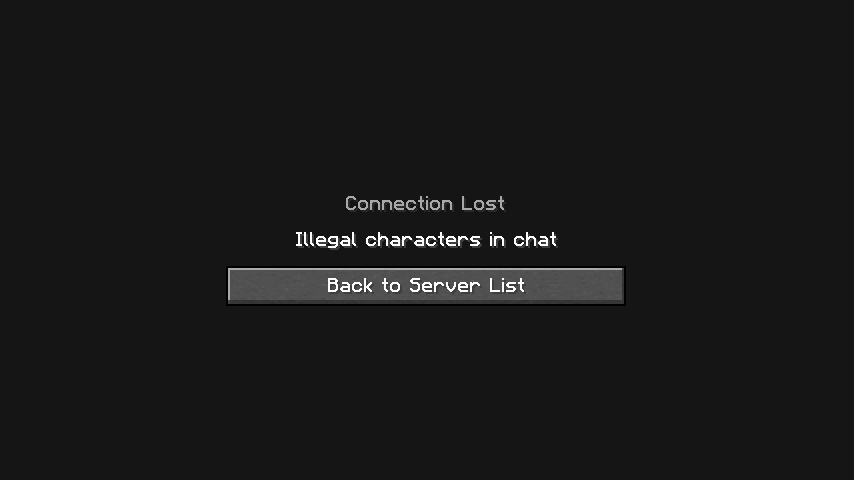
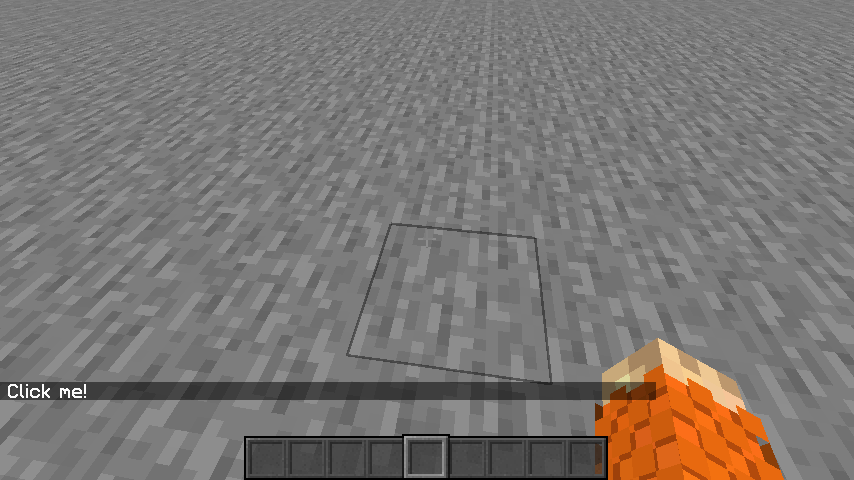
If a run_command click event that has a new character ( \n ) causes the player to get kicked from the world and displays the `Illegal characters in chat` screen
Steps to Reproduce:
- Create a singleplayer world (make sure to enable cheats).
- Paste the following command into the chat. Then press enter. <cmd here>
- Open chat and press `Click me!`
Observed Results:
- The world closes and displays the `Connection lost, Illegal characters in chat` screen after pressing the text.
Expected Results:
- The click event properly runs the tellraw command and displays all active players.
If a run_command click event that has a new character ( \n ) causes the player to get kicked from the world and displays the `Illegal characters in chat` screen
Steps to Reproduce:
- Create a singleplayer world (make sure to enable cheats).
- Paste the following command into the chat. Then press enter.
/tellraw @s [{"text":"Click me!","clickEvent": {"action":"run_command","value": "/tellraw @s [{\"text\":\"Players:\n\"},{\"color\":\"gray\",\"selector\":\"@a\"}]"} }]
- Open chat and press `Click me!`
Observed Results:
- The world closes and displays the `Connection lost, Illegal characters in chat` screen after pressing the text.
- Removing the `\n` character from the run command event causes the command to run.
- Putting the new line character in the main tellraw command properly works.
/tellraw @s {"text":"Hello\nWorld"}Expected Results:
- The click event properly runs the tellraw command and displays all active players.
If a run_command click event that has a new character ( \n ) causes the player to get kicked from the world and displays the `Illegal characters in chat` screen
Steps to Reproduce:
- Create a singleplayer world (make sure to enable cheats).
- Paste the following command into the chat. Then press enter.
/tellraw @s [{"text":"Click me!","clickEvent": {"action":"run_command","value": "/tellraw @s [{\"text\":\"Players:\n\"},{\"color\":\"gray\",\"selector\":\"@a\"}]"} }]
- Open chat and press `Click me!`
Observed Results:
- The world closes and displays the `Connection lost, Illegal characters in chat` screen after pressing the text.
- Removing the `\n` character from the run command event causes the command to run.
- Putting the new line character in the main tellraw command properly works.
/tellraw @s {"text":"Hello\nWorld"}Expected Results:
- The click event properly runs the tellraw command and displays all active players.
If a run_command click event that has a new character ( \n ) causes the player to get kicked from the world and displays the `Illegal characters in chat` screen
Steps to Reproduce:
- Create a singleplayer world (make sure to enable cheats).
- Paste the following command into the chat. Then press enter.
/tellraw @s [{"text":"Click me!","clickEvent": {"action":"run_command","value": "/tellraw @s [{\"text\":\"Players:\n\"},{\"color\":\"gray\",\"selector\":\"@a\"}]"} }]
- Open chat and press `Click me!`
Observed Results:
- The world closes and displays the `Connection lost, Illegal characters in chat` screen after pressing the text.
- Removing the `\n` character from the run command event causes the command to run.
- Double escaping the new line character seems to fix it. `\n` -> `
n`/tellraw @s [{"text":"Click me!","clickEvent": {"action":"run_command","value": "/tellraw @s [{\"text\":\"Players:\\n\"},{\"color\":\"gray\",\"selector\":\"@a\"}]"} }]
- Putting the new line character in the main tellraw command properly works.
/tellraw @s {"text":"Hello\nWorld"}Expected Results:
- The click event properly runs the tellraw command and displays all active players.
If a run_command click event that has a new character ( \n ) causes the player to get kicked from the world and displays the `Illegal characters in chat` screen
Steps to Reproduce:
- Create a singleplayer world (make sure to enable cheats).
- Paste the following command into the chat. Then press enter.
/tellraw @s [{"text":"Click me!","clickEvent": {"action":"run_command","value": "/tellraw @s [{\"text\":\"Players:\n\"},{\"color\":\"gray\",\"selector\":\"@a\"}]"} }]
- Open chat and press `Click me!`
Observed Results:
- The world closes and displays the `Connection lost, Illegal characters in chat` screen after pressing the text.
- Removing the `\n` character from the run command event causes the command to run.
- Double escaping the new line character seems to fix it.
`\n` -> `
n`/tellraw @s [{"text":"Click me!","clickEvent": {"action":"run_command","value": "/tellraw @s [{\"text\":\"Players:\\n\"},{\"color\":\"gray\",\"selector\":\"@a\"}]"} }]
- Putting the new line character in the main tellraw command properly works.
/tellraw @s {"text":"Hello\nWorld"}Expected Results:
- The click event properly runs the tellraw command and displays all active players.
If a run_command click event that has a new character ( \n ) causes the player to get kicked from the world and displays the `Illegal characters in chat` screen
Steps to Reproduce:
- Create a singleplayer world (make sure to enable cheats).
- Paste the following command into the chat. Then press enter.
/tellraw @s [{"text":"Click me!","clickEvent": {"action":"run_command","value": "/tellraw @s [{\"text\":\"Players:\n\"},{\"color\":\"gray\",\"selector\":\"@a\"}]"} }]
- Open chat and press `Click me!`
Observed Results:
- The world closes and displays the `Connection lost, Illegal characters in chat` screen after pressing the text.
- Removing the `\n` character from the run command event causes the command to run.
- Double escaping the new line character seems to fix it.
/tellraw @s [{"text":"Click me!","clickEvent": {"action":"run_command","value": "/tellraw @s [{\"text\":\"Players:\\n\"},{\"color\":\"gray\",\"selector\":\"@a\"}]"} }]
- Putting the new line character in the main tellraw command properly works.
/tellraw @s {"text":"Hello\nWorld"}Expected Results:
- The click event properly runs the tellraw command and displays all active players.
Block and item events have been removed. Use [Custom Components](https://learn.microsoft.com/en-us/minecraft/creator/documents/customcomponents?view=minecraft-bedrock-stable) instead
play_sound and play_effect block event responses do not work. play_sound does not play the sound to the player who interacted with the block and play_effect does not spawn particles at the position of the target.
{ "events": { "on_interact": { "play_effect": { "data": 0, "effect": "minecraft:candle_flame_particle", "target": "self" }, "play_sound": { "sound": "random.click", "target": "self" } } } }
Steps to Reproduce:
- Download the example addon below
- Install it how you would install all other addons (click on it for Windows 10)
- Create a new world
- Make sure experimental gameplay is turned on. (Holiday features)
- Activate the behavior pack
- Finish creating your world
- Place "bug:play_effect" and "bug:play_sound" blocks on the ground from the creative inventory.
- Right-click on the placed blocks.
Observed Results:
- Clicking on bug:play_effect does not spawn any particles
- Clicking on bug:play_sound does not play any sounds.
- Both blocks print "I triggered on_interact event!" in chat showing that the event is properly triggering.
Expected Results:
- Clicking on bug:play_effect will spawn the defined particle like the /particle command
- Clicking on bug:play_sound will play the defined sound to the player like the /playsound command
Other Notes
- According to the Microsoft docs "target" can use Minecraft Filters. but throws an error if you do use an object-like filter.
"play_sound":{ "sound" : "jumpscare", "target" : {"test": "random_chance", "value": "2"} // Causes error. only excepts enums }
Block and item events have been removed. Use [Custom Components](
https://learn.microsoft.com/en-us/minecraft/creator/documents/customcomponents?view=minecraft-bedrock-stable)insteadplay_sound and play_effect block event responses do not work. play_sound does not play the sound to the player who interacted with the block and play_effect does not spawn particles at the position of the target.
{ "events": { "on_interact": { "play_effect": { "data": 0, "effect": "minecraft:candle_flame_particle", "target": "self" }, "play_sound": { "sound": "random.click", "target": "self" } } } }
Steps to Reproduce:
- Download the example addon below
- Install it how you would install all other addons (click on it for Windows 10)
- Create a new world
- Make sure experimental gameplay is turned on. (Holiday features)
- Activate the behavior pack
- Finish creating your world
- Place "bug:play_effect" and "bug:play_sound" blocks on the ground from the creative inventory.
- Right-click on the placed blocks.
Observed Results:
- Clicking on bug:play_effect does not spawn any particles
- Clicking on bug:play_sound does not play any sounds.
- Both blocks print "I triggered on_interact event!" in chat showing that the event is properly triggering.
Expected Results:
- Clicking on bug:play_effect will spawn the defined particle like the /particle command
- Clicking on bug:play_sound will play the defined sound to the player like the /playsound command
Other Notes
- According to the Microsoft docs "target" can use Minecraft Filters. but throws an error if you do use an object-like filter.
"play_sound":{ "sound" : "jumpscare", "target" : {"test": "random_chance", "value": "2"} // Causes error. only excepts enums }Block and item events have been removed. Use Custom Components instead
play_sound and play_effect block event responses do not work. play_sound does not play the sound to the player who interacted with the block and play_effect does not spawn particles at the position of the target.
{ "events": { "on_interact": { "play_effect": { "data": 0, "effect": "minecraft:candle_flame_particle", "target": "self" }, "play_sound": { "sound": "random.click", "target": "self" } } } }
Steps to Reproduce:
- Download the example addon below
- Install it how you would install all other addons (click on it for Windows 10)
- Create a new world
- Make sure experimental gameplay is turned on. (Holiday features)
- Activate the behavior pack
- Finish creating your world
- Place "bug:play_effect" and "bug:play_sound" blocks on the ground from the creative inventory.
- Right-click on the placed blocks.
Observed Results:
- Clicking on bug:play_effect does not spawn any particles
- Clicking on bug:play_sound does not play any sounds.
- Both blocks print "I triggered on_interact event!" in chat showing that the event is properly triggering.
Expected Results:
- Clicking on bug:play_effect will spawn the defined particle like the /particle command
- Clicking on bug:play_sound will play the defined sound to the player like the /playsound command
Other Notes
- According to the Microsoft docs "target" can use Minecraft Filters. but throws an error if you do use an object-like filter.
"play_sound":{ "sound" : "jumpscare", "target" : {"test": "random_chance", "value": "2"} // Causes error. only excepts enums }
Data-driven blocks with the "random_ticking" component doesn't trigger.
Steps to Reproduce:
1. Download the example addon below
2. Install it how you would install all other addons (click on it for windows 10)
3. Create a new world
4. Make sure experimental gameplay is turned on. (Mainly Holiday Creator Features)
5. Activate the resourcepack and behavior pack
6. Finish creating your worldObserved Results:
- Block registers without any errors
- After some time it should say "Hello" but doesn't
- Increasing randomtickspeed has no effect on the block
Expected Results:
The event will get triggered randomly as before 1.20.50
titleactionbar lingers between worldsactionbar text lingers between worlds
Running any of the below commands fail because the "minecraft" namespace is'nt defined
Applies to:
- /camera
Steps to Reproduce:
- In a world run the below command in chat
- The command will fail because you need to define the minecraft namespace like this
Observed Results:
- The suggested text only shows "minecraft;free" and not "free" like how "paper" and "minecraft:paper" shows up in the /give command.
Expected Results:
- The command should work like /give and /setblock where you don't need to define the minecraft namespace.
Running any of the below commands fail because the "minecraft" namespace is'nt defined
Applies to:
- preset in /camera
Steps to Reproduce:
- In a world run the below command in chat
- The command will fail because you need to define the minecraft namespace like this
Observed Results:
- The suggested text only shows "minecraft;free" and not "free" like how "paper" and "minecraft:paper" shows up in the /give command.
Expected Results:
- The command should work like /give and /setblock where you don't need to define the minecraft namespace.
Running any of the below commands fail because the "minecraft" namespace is'nt defined
Applies to:
- preset in /camera
Steps to Reproduce:
- In a world run the below command in chat
- The command will fail because you need to define the minecraft namespace like this
Observed Results:
- The suggested text only shows "minecraft;free" and not "free" like how "paper" and "minecraft:paper" shows up in the /give command.
Expected Results:
- The command should work like /give and /setblock where you don't need to define the minecraft namespace.
Running any of the below commands fail because the "minecraft" namespace is'nt defined
Applies to:
- preset in /camera
Steps to Reproduce:
- In a world run the below command in chat
- The command will fail because you need to define the minecraft namespace like this
Observed Results:
- The suggested text only shows "minecraft;free" and not "free" like how "paper" and "minecraft:paper" shows up in the /give command.
Expected Results:
- The command should work like /give and /setblock where you don't need to define the minecraft namespace.
Running any of the below commands fail because the "minecraft" namespace is'nt defined
Applies to:
- preset in /camera
Steps to Reproduce:
- In a world run the below command in chat
- The command will fail because you need to define the minecraft namespace like this
Observed Results:
- The suggested text only shows "minecraft;free" and not "free" like how "paper" and "minecraft:paper" shows up in the /give command.
Expected Results:
- The command should work like /give and /setblock where you don't need to define the minecraft namespace.
Running any of the below commands fail because the "minecraft" namespace is'nt defined
Applies to:
- preset in /camera
Steps to Reproduce:
- In a world run the below command in chat
- The command will fail because you need to define the minecraft namespace like this
Observed Results:
- The suggested text only shows "minecraft;free" and not "free" like how "paper" and "minecraft:paper" shows up in the /give command.
Expected Results:
- The command should work like /give and /setblock where you don't need to define the minecraft namespace.
Running any of the below commands fail because the "minecraft" namespace is'nt defined
Applies to:
- preset in /camera
Steps to Reproduce:
- In a world run the below command in chat
Thecommand will fail because you need to define the minecraft namespace like thisObserved Results:
- The suggested text only shows "minecraft;free" and not "free" like how "paper" and "minecraft:paper" shows up in the /give command.
Expected Results:
- The command should work like /give and /setblock where you don't need to define the minecraft namespace.
Running any of the below commands fail because the "minecraft" namespace is'nt defined
Applies to:
- preset in /camera
- effect in /particle
Steps to Reproduce:
- In a world run the below commands in chat
- Both commands will fail because you need to define the minecraft namespace like this
Observed Results:
- The suggested text only shows "minecraft;free" and not "free" like how "paper" and "minecraft:paper" shows up in the /give command.
Expected Results:
- The command should work like /give and /setblock where you don't need to define the minecraft namespace.
Running any of the below commands fail because the "minecraft" namespace is
'nt definedApplies to:
- preset in /camera
- effect in /particle
Steps to Reproduce:
- In a world run the below commands in chat
- Both commands will fail because you need to define the
minecraft namespace like thisObserved Results:
- The suggested text only shows "minecraft;free" and not "free" like how "paper" and "minecraft:paper" shows up in the /give command.
Expected Results:
- The command should work like /give and /setblock where you don't need to define the minecraft namespace.
Running any of the below commands fail because the "minecraft" namespace isn't defined
Applies to:
- preset in /camera
- effect in /particle
Steps to Reproduce:
- In a world run the below commands in chat
- Both commands will fail because you need to define the Minecraft namespace like this
Observed Results:
- For /camera, preset only shows "minecraft;free" and not "free" like how "paper" and "minecraft:paper" shows up in the /give command.
Expected Results:
- The command should work like /give and /setblock where you don't need to define the minecraft namespace.
Running any of the below commands fail because the "minecraft" namespace isn't defined
Applies to:
- preset in /camera
- effect in /particle
Steps to Reproduce:
- In a world run the below commands in chat
Bothcommands will fail because you need to define the Minecraft namespace like thisObserved Results:
- For /camera, preset only shows "minecraft;free" and not "free" like how "paper" and "minecraft:paper" shows up in the /give command.
Expected Results:
- The command should work like /give and /setblock where you don't need to define the minecraft namespace.
Running any of the below commands fail because the "minecraft" namespace isn't defined
Applies to:
- preset in /camera
- effect in /particle
Steps to Reproduce:
- In a world run the below commands in chat.
- All commands will fail because you need to define the Minecraft namespace like this
Observed Results:
- For /camera, preset only shows "minecraft;free" and not "free" like how "paper" and "minecraft:paper" shows up in the /give command.
Expected Results:
- The command should work like /give and /setblock where you don't need to define the minecraft namespace.
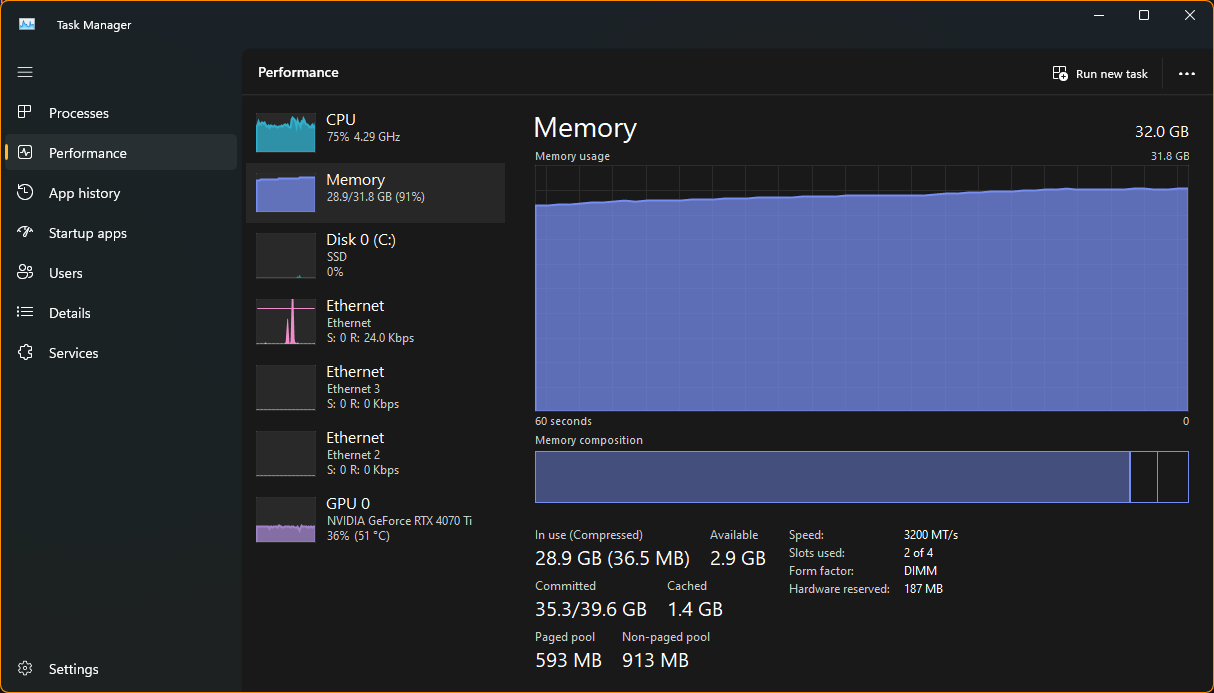
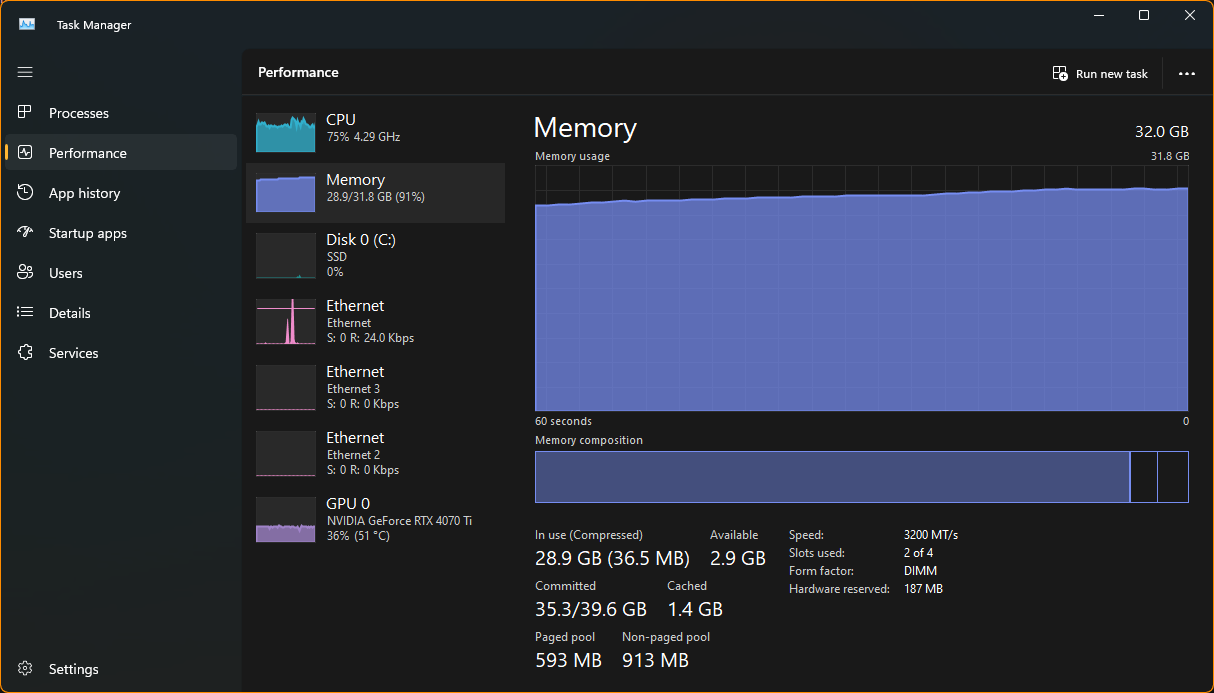
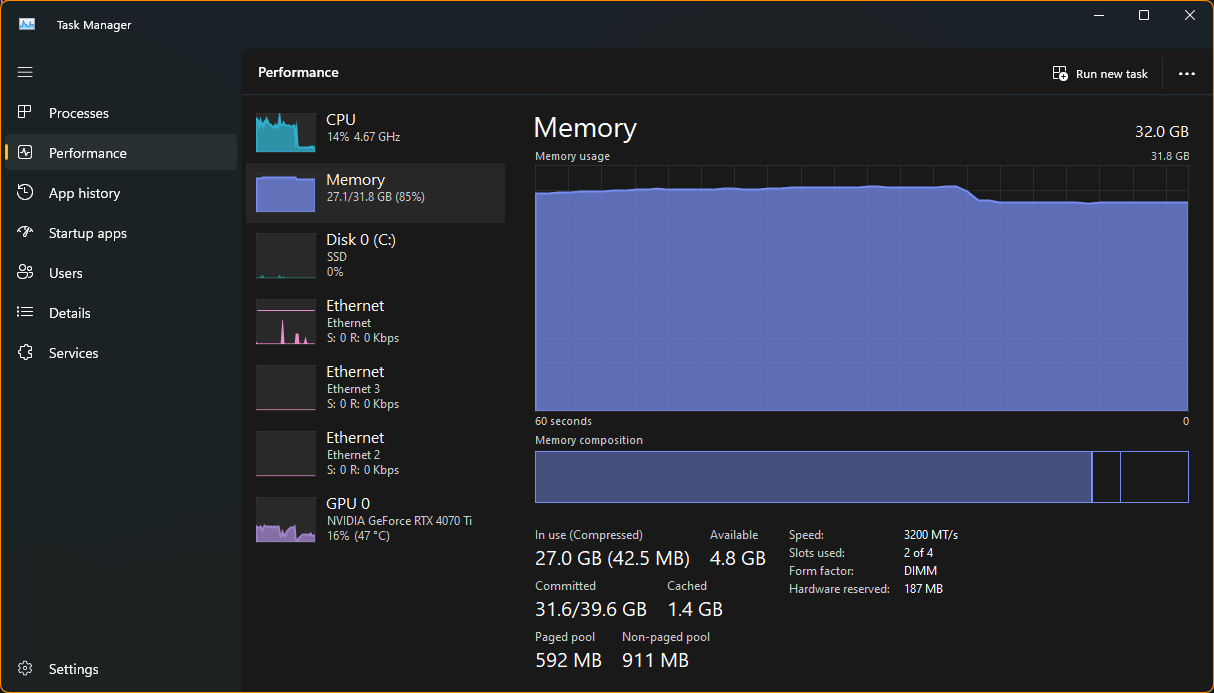
High render distances use 20GB+ of memory.
Steps to Reproduce:
- Open Minecraft
- Open Task Manager in the performance > memory tab on a separate monitor.
- In Minecraft, lower your render distance to 16.
- Create or enter a world.
- Increase your render distance to 50+
- See Task manager eating up all your memory.
Expected Results:
- "Render Distance" should not use multiple gigs of memory.
High render distances use 20GB+ of memory.
Steps to Reproduce:
- Open Minecraft
- Open Task Manager in the performance > memory tab on a separate monitor.
- In Minecraft, lower your render distance to 16.
- Create or enter a world.
- Increase your render distance to 50+
- See Task
manager eating up all your memory.Expected Results:
- "Render Distance" should not use multiple gigs of memory.
High render distances use 20GB+ of memory.
Steps to Reproduce:
- Open Minecraft
- Open Task Manager in the performance > memory tab on a separate monitor.
- In Minecraft, lower your render distance to 16.
- Create or enter a world.
- Increase your render distance to 50+
- See Task Manager eating up all your memory.
Expected Results:
- "Render Distance" should not use multiple gigs of memory.
High render distances use 20GB+ of memory.
Steps to Reproduce:
- Open Minecraft
- Open Task Manager in the performance > memory tab on a separate monitor.
- In Minecraft, lower your render distance to 16.
- Create or enter a world.
- Increase your render distance to 50+
- See Task Manager eating up all your memory.
Expected Results:
- "Render Distance" should not use multiple gigs of memory.
HighRenderDistance uses A LOT of memoryHigh render distance uses A LOT of memory
High render distances use 20GB+ of memory.
Steps to Reproduce:
- Open Minecraft
- Open Task Manager in the performance > memory tab on a separate monitor.
- In Minecraft, lower your render distance to 16.
- Create or enter a world.
- Increase your render distance to 50+
- See Task Manager eating up all your memory.
Expected Results:
- "Render Distance" should not use multiple gigs of memory.
High render distances use 20GB+ of memory.
Steps to Reproduce:
- Open Minecraft
- Open Task Manager in the performance > memory tab on a separate monitor.
- In Minecraft, lower your render distance to 16.
- Create or enter a world.
- Increase your render distance to 50+
- See Task Manager eating up all your memory.
Observed Results:
- Minecraft uses 20GB+ of memory.
Expected Results:
- "Render Distance" should not use multiple gigs of memory.
Vaults, Ominous Vaults, and Trail Spawners constantly play sounds every tick in the debug world.
Steps to Reproduce:
- Create a new debug world
- Fly east until you find the Vaults, Ominous Vaults, and Trail Spawners.
Observed Results:
- Both Vaults, Ominous Vaults, and Trail Spawners play sounds every tick.
Expected Results:
- Blocks should be silent.

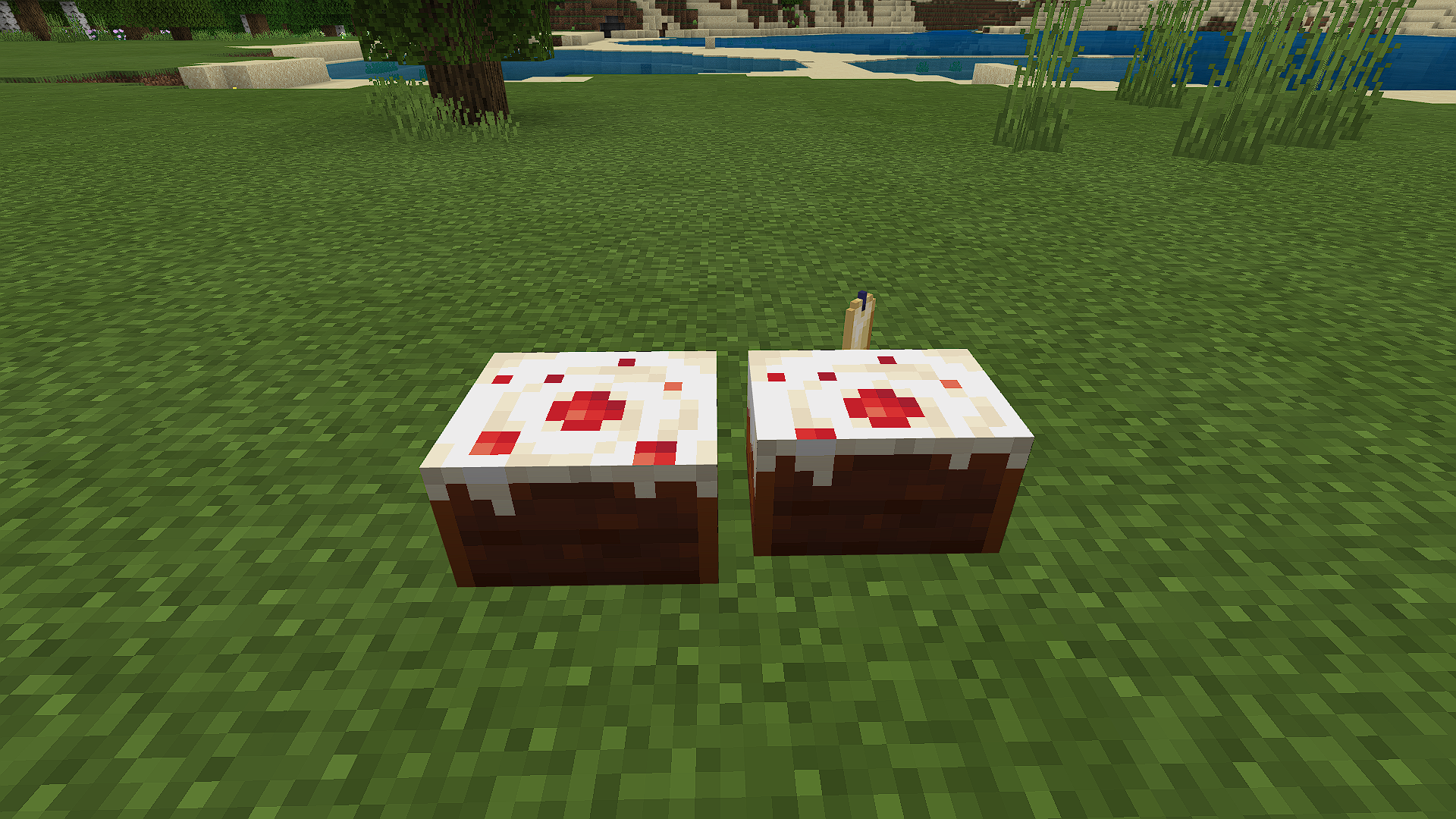
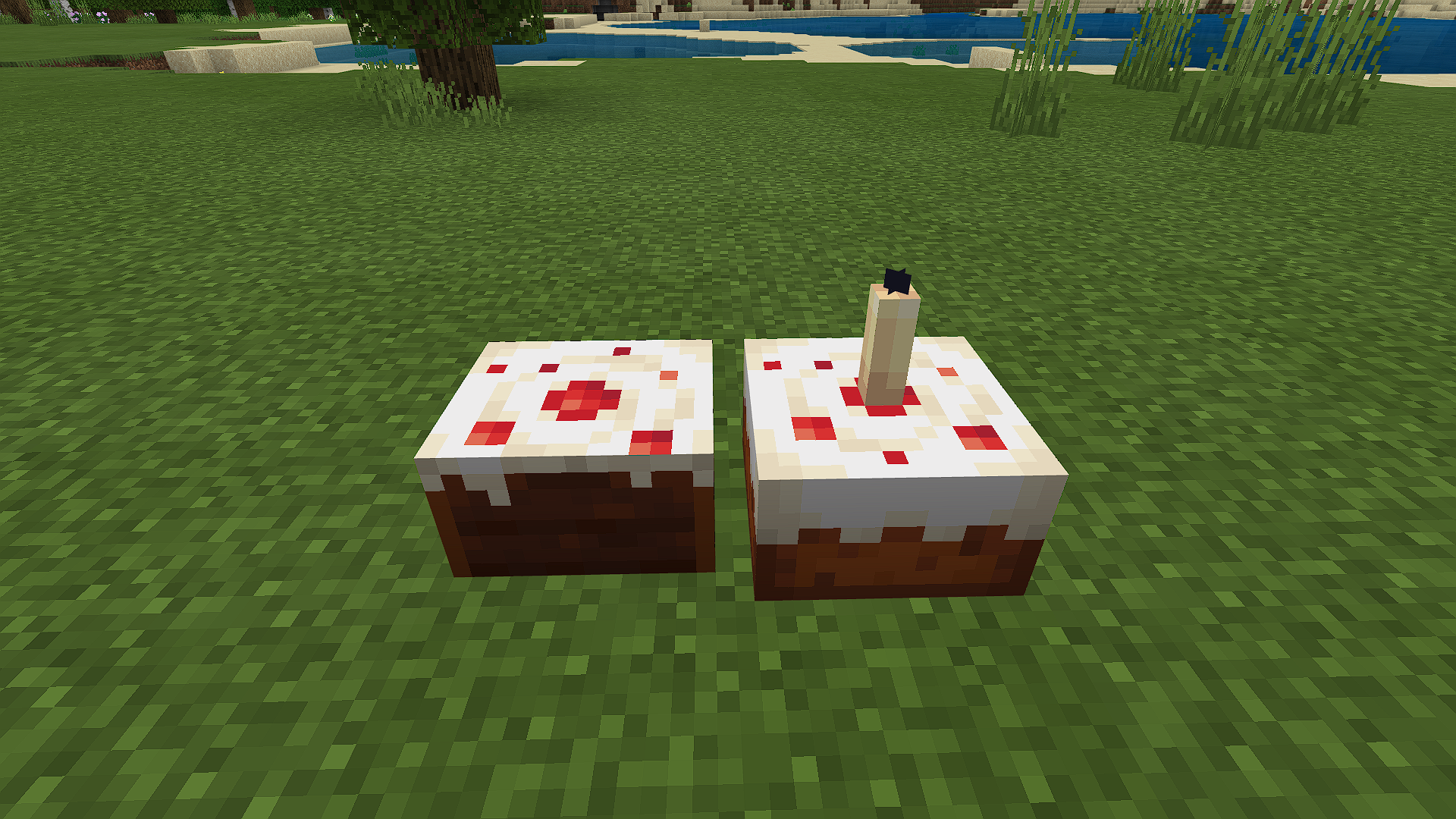
When using powder_snow_bucket, cod_bucket, pufferfish_bucket, salmon_bucket, or tropical_fish_bucket in crafting recipes, an empty bucket isn't left behind like when using lava_bucket or water_bucket.
Expected Result
An empty bucket should be left behind.
Reproduce
Data pack taken from MC-226756 by Legopitstop showing this in action MC-226756 powder snow recipe.zip
Yes, you have to have experimental gameplay on for any/most addon features, but just items don't show up in the creative inventory/ creative tab entity spawn eggs, and blocks do show up.
you cannot use Raw JSON text in a resource pack's lang files. Only §r doesn't work all other colors/formats that use § work. could make it where [MOTD unicode|https://minecraft.tools/en/color-code.php] will also work in any lang file instead of §
all is good, I could see how you could have mistaken it as being the other bugs.
added steps to reproduce observed results, and expected results and a sample addon for the bug.
Updated example addon. Items show up in the creative inventory and crafting table. But blocks still do not show up in the creative inventory or crafting table.
ok, took and commented that it also applies to the powder_snow_bucket.
Also applies to the powder_snow_bucket in 1.17 Pre-release 1.
Is still an issue in the latest version, Updated the pack for 1.17.10.
# Changelog for v1.1.0
- updated for 1.17.10 (issue still present)
- updated the block to use `cardinal_facing_2d` instead of `cardinal_player_facing`
updated example pack for 1.17.10
# Changelog v1.3.0
- Still effects 1.17.1
- updated for 1.17.1
The issue applies to 1.18 snapshot 21w37a, also added all fish bucket recipes to the data pack.
Fixed in 1.17.3. You need to use the minecraft:creative_category component.
Updated the block in the addon to include the minecraft:creative_category component.
Fix for anyone that is having the same issue:
Still broken in 1.18.2
working in version 1.18.30
Added a fixed pack. It should now properly import and both the item and block can be found in creative inventory, Make sure to activate Holiday Creator Features. Item is in the items tab. The block is in the construction tab.
Now working as intended in 1.19.10
Still an issue in 1.19.10
query.get_equipped_item_name is deprived. Use query.is_item_name_any instead. The new animation controller should look like this:
{ "format_version": "1.10.0", "animation_controllers": { "controller.animation.apple": { "states": { "default": { "transitions": [ { "vanilla_apple": "query.is_item_name_any('slot.weapon.mainhand','minecraft:apple')" }, { "custom_apple": "query.is_item_name_any('slot.weapon.mainhand','custom:apple')" } ] }, "vanilla_apple": { "on_entry": ["/say VANILLA APPLE"], "transitions": [ { "default": "!query.is_item_name_any('slot.weapon.mainhand','minecraft:apple')" } ] }, "custom_apple": { "on_entry": ["/say CUSTOM APPLE"], "transitions": [ { "default": "!query.is_item_name_any('slot.weapon.mainhand','custom:apple')" } ] } } } } }I'm experiencing the same issue with query.block_neighbor_has_any_tag after updating to 1.20 but it works fine on a singleplayer world.
In 1.20.50 random_ticking doesn't seem to work at all.
I've added an addon for the random_ticking bug
random_ticking is confirmed fixed in 1.20.51. I still need to test it using worldgen.
Ok, In 1.20.51 random_ticking works both when generated and when placed by hand. But queued_ticking only works when placed by hand and not when generated
I've updated GenBugTestAddon (called GenBugTestAddon2 since I can't delete it) so that world generation works
Same thing for me. Here's some data and tests that I've collected. This issue also seems only to affect PCs. During startup, it stays at a black screen for most of the time and is unresponsive to key presses (Pressing F11 to enter/exit from fullscreen).
My PC Specs:
OS: Windows 11 Home 22621.3007 Build
Processor: Intel Core i7 12700F 12-cores (8p 4e)
RAM: 32GB Duel Channel
Storage: 1TB Kingston SNV2S100G
Graphics: NVIDIA GeForce RTX 4070 Ti
My Phone Specs:
Model: iPhone 12 Pro
RAM: 6GB
Storage: 128GB (76.86 Free)
Chip: A14 6-core CPU (2p 4e), 4-core GPU, 4-core neutral engine
Test Results
The timer starts when I click on the icon and stops when I'm loaded into a new world.
Initial Launch:
PC: 2 minutes, 55 seconds, 02ms
Phone: 50 seconds, 26ms
Second Launch directly after initial launch:
PC: 39 seconds, 02ms
Phone: 42 seconds, 74ms
The same test on Java to compare values with.
Initial: 56 seconds 88ms
Second: 39 seconds, 24ms
Can confirm that this issue in 1.20.71:
Minecraft Version: 1.20.71
OS: Windows 11
Steps to Reproduce:
Observed Results: * Can be heard within a 17-block range (with simulation and render distance having no effect)
**
Expected Results:{}
Can confirm fixed in 1.20.81 on IOS. However "D-Pad & tap to interact" still shows the arrow buttons on the left. The hunger bar is also still visible on IOS and Windows 11.
"Upcoming Creator Features" is no longer required to use the /hud command in 1.20.81
I found a fix for this issue on Windows 11 by doing the following;
Oddly enough that seems to be my issue.
Can confirm on 1.21.31 hotfix. Disabling "Improved Input Response" and restarting the game fixed the high memory usage and leak.
When I first open Minecraft:
When I'm in a world with a high render distance with "Improved Input Response" on.
After exiting the world:
Affects 1.21.31
This also applies to the camera command
❌/camera @s set free pos ~5
✅/camera @s set minecraft:free pos ~5