 Matt
Matt
- Mattcarter11
- mattcarter11
- Europe/Stockholm
- Yes
- No
 MCPE-20741
 MC-156261


Some bugs with mcpe 0.12.1 beta 11
When you are using a keyboard and a mouse, or you are using a controller, some keys don't work properly. So if you try to fix it by assigning manually the key to an action in the setting it doesn't work.
You can select one actions and when you type in the key nothing happens.Plus there are some keys that don't work properly:
-shift for flying down.
-tab, for autocomplete a command.
-enter when typing in chat.In this what happens is that when you are in chat with a keyboard, it's detected as if you where typing in the virtual one, but enter only works when you pres the back arrow once after typing the text.
When you are using a keyboard and a mouse, or you are using a controller, some keys don't work properly. So if you try to fix it by assigning manually the key to an action in the setting it doesn't work.
You can select one actions and when you type in the key nothing happens.Plus there are some keys that don't work properly:
-shift for flying down.
-tab, for autocomplete a command.
-holding space bar doesn't make you jump more than once.
-enter when typing in chat.In this what happens is that when you are in chat with a keyboard, it's detected as if you where typing in the virtual one, but enter only works when you pres the back arrow once after typing the text.
When you are using a keyboard and a mouse, or you are using a controller, some keys don't work properly. So if you try to fix it by assigning manually the key to an action in the setting it doesn't work.
You can select one actions and when you type in the key nothing happens.Plus there are some keys that don't work properly:
-shift for flying down.
-tab, for autocomplete a command.
-holding space bar doesn't make you jump more than once.
-enter when typing in chat.In this what happens is that when you are in chat with a keyboard, it's detected as if you where typing in the virtual one, but enter only works when you pres the back arrow once after typing the text.
When you are using a keyboard and a mouse, or you are using a controller, some keys don't work properly. So if you try to fix it by assigning manually the key to an action in the setting it doesn't work. You can select one actions and when you type in the key nothing happens.
Plus there are some keys that don't work properly:
-shift for flying down.
-tab, for autocomplete a command.
-holding space bar doesn't make you jump more than once.
-enter when typing in chat.In this what happens is that when you are in chat with a keyboard, it's detected as if you where typing in the virtual one, but enter only works when you pres the back arrow once after typing the text.
Finally there's a problem with the mouse/cursor. It's not the cross in the screen, it appears apart, and any mouse key works as if you were touching that place on the screen, meaning that:
-Crafting it's funky, and not the normal way.
-controlling the camera it's very annoying.
-Placing and destroying bocks doesn't work like the PC version.
Control configuration for keyboard and controller don't work + summary ofall thekeys not workingControl configuration for keyboard and controller don't work + summary of keys not working + Mouse problems
When you are using a keyboard and a mouse, or you are using a controller, some keys don't work properly. So if you try to fix it by assigning manually the key to an action in the setting it doesn't work. You can select one actions and when you type in the key nothing happens.
Plus there are some keys that don't work properly:
-shift for flying down.
-tab, for autocomplete a command.
-holding space bar doesn't make you jump more than once.
-enter when typing in chat.In this what happens is that when you are in chat with a keyboard, it's detected as if you where typing in the virtual one, but enter only works when you pres the back arrow once after typing the text.
Finally there's a problem with the mouse/cursor. It's not the cross in the screen, it appears apart, and any mouse key works as if you were touching that place on the screen, meaning that:
-Crafting it's funky, and not the normal way.
-controlling the camera it's very annoying.
-Placing and destroying bocks doesn't work like the PC version.When you are using a keyboard and a mouse, or you are using a controller, some keys don't work properly. So if you try to fix it by assigning manually the key to an action in the setting it doesn't work. You can select one actions and when you type in the key nothing happens.
Plus there are some keys that don't work properly:
-shift for flying down.
-tab, for autocomplete a command.
-holding space bar doesn't make you jump more than once.
-The scroll wheel doesn't work, both for scrollig and selecting items.
-enter when typing in chat.In this what happens is that when you are in chat with a keyboard, it's detected as if you where typing in the virtual one, but enter only works when you pres the back arrow once after typing the text.
Finally there's a problem with the mouse/cursor. It's not the cross in the screen, it appears apart, and any mouse key works as if you were touching that place on the screen, meaning that:
-Crafting it's funky, and not the normal way.
-controlling the camera it's very annoying.
-Placing and destroying bocks doesn't work like the PC version.
When you are using a keyboard and a mouse, or you are using a controller, some keys don't work properly. So if you try to fix it by assigning manually the key to an action in the setting it doesn't work. You can select one actions and when you type in the key nothing happens.
Plus there are some keys that don't work properly:
-shift for flying down.
-tab, for autocomplete a command.
-holding space bar doesn't make you jump more than once.
-The scroll wheel doesn't work, both for scrollig and selecting items.
-enter when typing in chat.In this what happens is that when you are in chat with a keyboard, it's detected as if you where typing in the virtual one, but enter only works when you pres the back arrow once after typing the text.
Finally there's a problem with the mouse/cursor. It's not the cross in the screen, it appears apart, and any mouse key works as if you were touching that place on the screen, meaning that:
-Crafting it's funky, and not the normal way.
-controllingthe camera it's very annoying.
-Placing and destroying bocks doesn't work like the PC version.When you are using a keyboard and a mouse, or you are using a controller, some keys don't work properly. So if you try to fix it by assigning manually the key to an action in the setting it doesn't work. You can select one actions and when you type in the key nothing happens.
Plus there are some keys that don't work properly:
-Shift for flying down.
-Tab, for autocomplete a command.
-Holding space bar doesn't make you jump more than once.
-Enter when typing in chat.In this what happens is that when you are in chat with a keyboard, it's detected as if you where typing in the virtual one, but enter only works when you pres the back arrow once after typing the text.
Finally there's a problem with the mouse/cursor. It's not the cross in the screen, it appears apart, and any mouse key works as if you were touching that place on the screen, meaning that:
-Crafting it's funky, and not the normal way.
-Controlling the camera it's very annoying.
-Placing and destroying bocks doesn't work like the PC version.
-The scroll wheel doesn't work, both for scrollig and selecting items.
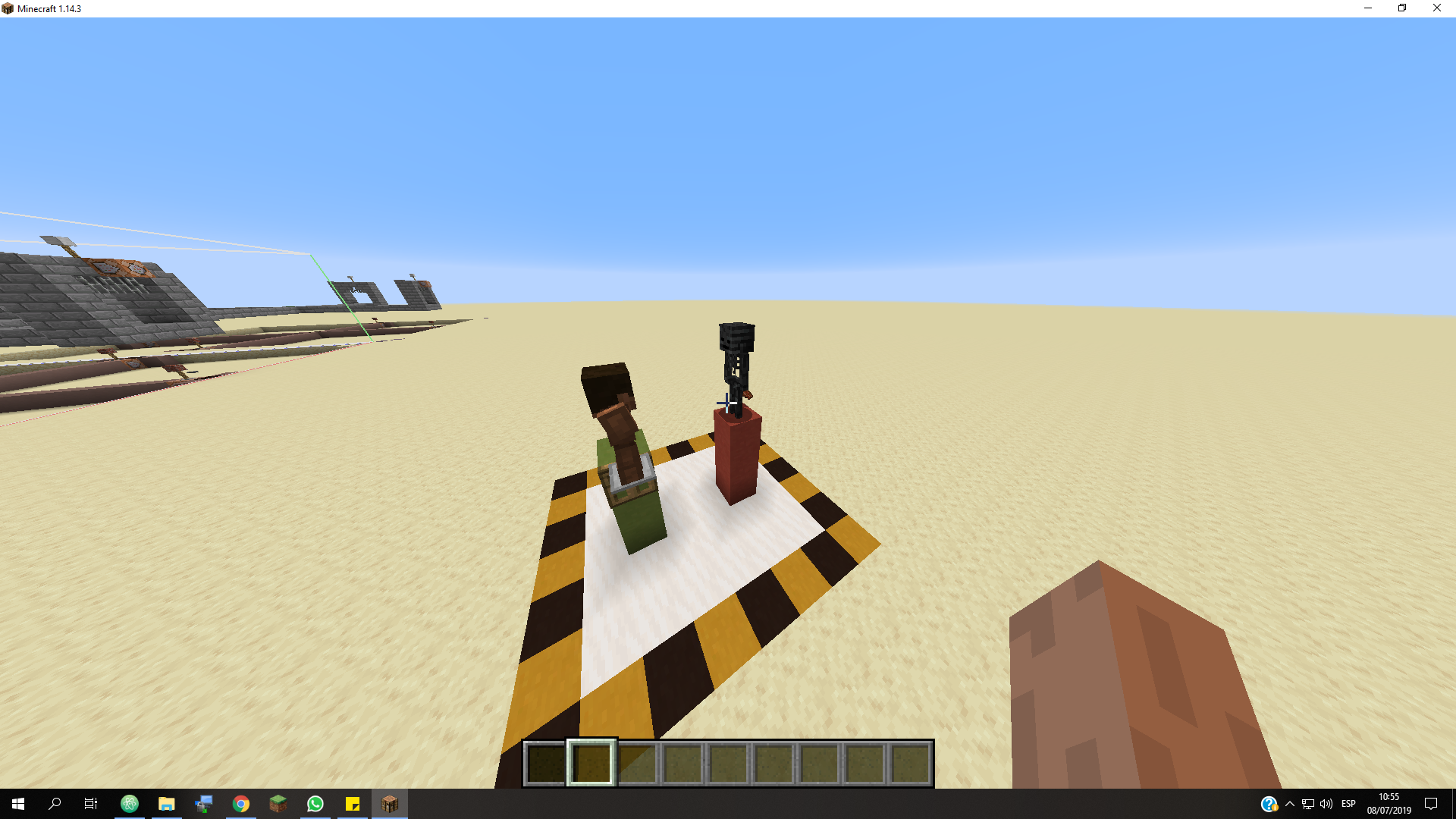
This "bug" involves aggressive mobs willingly jumping of blocks when the player shifts at the edge of a block.
Image 1 shows the normal condition. When the high is 3 or more and the player is standing on blocks. In this case, the mob doesn't walk of the edge.
But if the player shifts to the edge,the mob instantly jumps of the edge (only seems to happen when the pilar is between 3 and 12).
Image 2 shows that if the player does the same on top of a trapdoor, since the entity sees it as a full block (correct me if I'm wrong), doesn't jump.
I think that the behavior in the Image 1 is undesired and strange, and the Image 2 isfine.This "bug" involves aggressive mobs willingly jumping of blocks when the player shifts at the edge of a block.
Image 1 shows the normal condition. When the high is 3 or more and the player is standing on blocks. In this case, the mob doesn't walk of the edge.
But if the player shifts to the edge,the mob instantly jumps of the edge (only seems to happen when the pilar is between 3 and 12).
Image 2 shows that if the player does the same on top of a trapdoor, since the entity sees it as a full block (correct me if I'm wrong), doesn't jump.
This might be because the bock the player is standing is the air block, if you check the F3, the block coordinates indicate that.
I think that the behavior in the Image 1 is undesired and strange, and the Image 2 is fine.
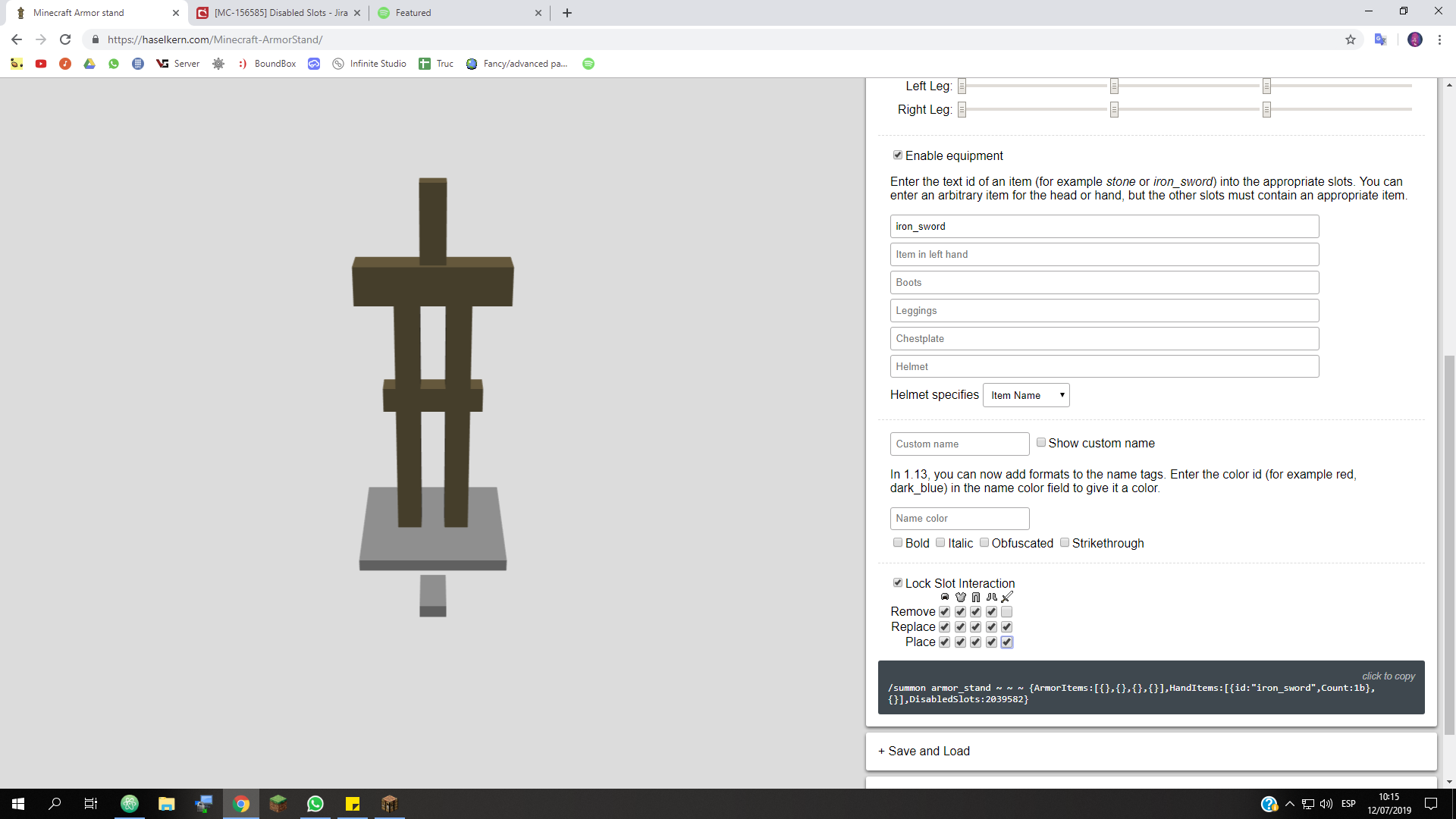
The when locking all the interactions except the remove item, doesn't work. You can't remove any items the armor stand has.
For example, this should only allow to remove the sword, but it doesn't:
/summon armor_stand ~ ~ ~ {HandItems:[{id:"iron_sword",Count:1b},{}],DisabledSlots:2039582}The when locking all the interactions except the remove item, doesn't work. You can't remove any items the armor stand has.
For example, this should only allow to remove the sword, but it doesn't:
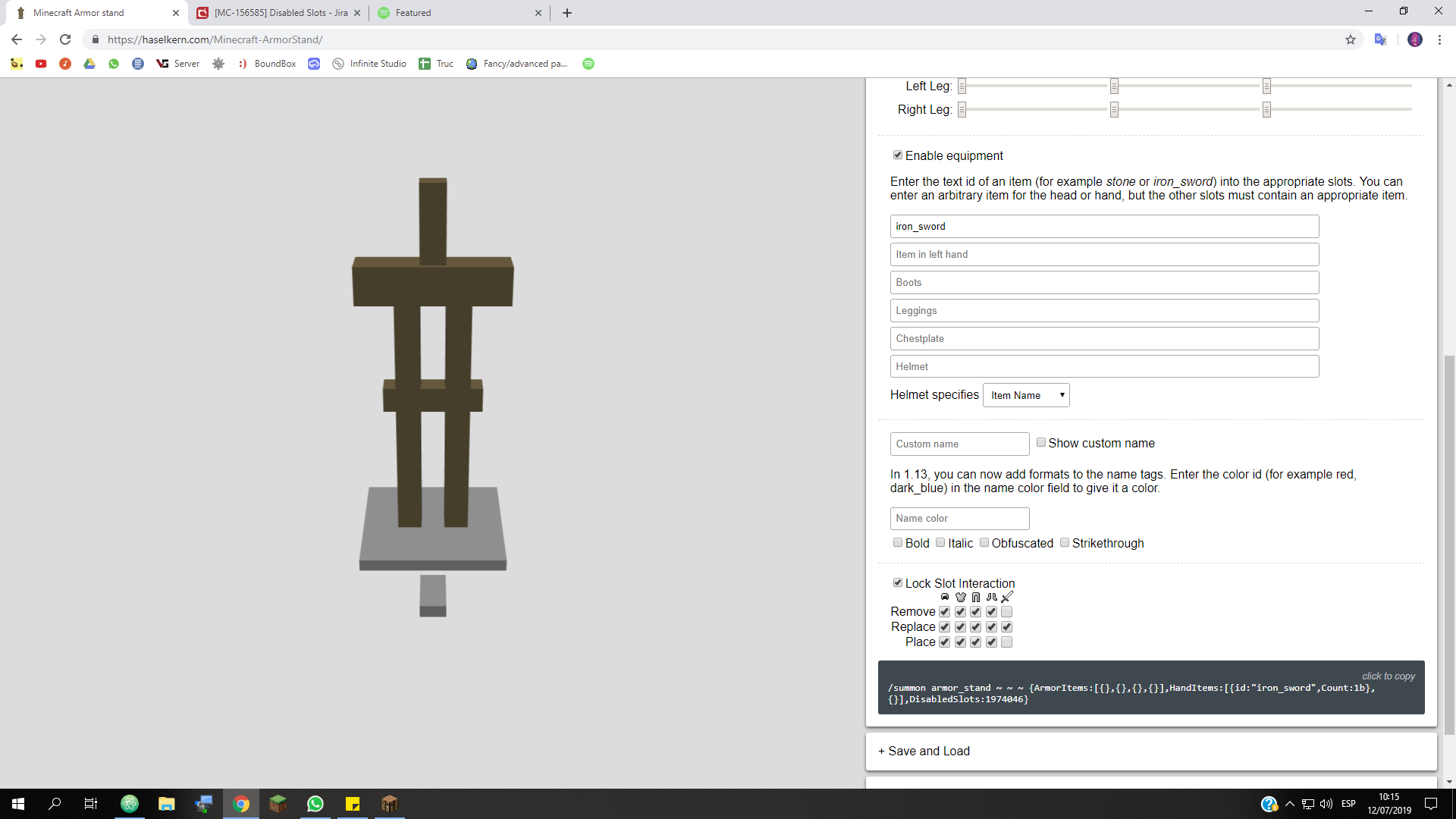
/summon armor_stand ~ ~ ~ {HandItems:[{id:"iron_sword",Count:1b},{}],DisabledSlots:2039582}It might be related with the replace option. Here the only disabled option ins the replace item from the hand, and still doesn't work:
/summon armor_stand ~ ~ ~ {HandItems:[{id:"iron_sword",Count:1b},{}],DisabledSlots:1974046}
Insta kill mob if instant damage or health set to 30 or more.
MC-10755Effects with amplifiers over 4/enchantments with level over max default value are not suppor
When editing any nbt data from a skeleton, their player pathfinding resets and they can't attack. This can be seen if doing:
data modify ...
in a loop.
I've tested with:{{}}Health, HurtTine,ArmorItems.When editing any nbt data from a skeleton, their player pathfinding resets and they can't attack. This can be seen if doing:
data modify ...in a loop.
I've tested with:Health, HurtTine,ArmorItems.I could only observed this with skeletons strangely.
launcher_log-1.txt
It's a Xbox one controller for PC. I think. And I'm trying to use it on a Nexus 7 2012 model.
Yes, but I found avideo explaining that some tablets the drivers weren't working well, and he showed the solution.
So I try it and now it's working.
Here's the video: https://www.youtube.com/watch?v=9czISrLGXNI&list=WL&index=3
1.1.0
When you are using a keyboard and a mouse, or you are using a controller, some keys don't work properly. So if you try to fix it by assigning manually the key to an action in the setting it doesn't work.
You can select one actions and when you type in the key nothing happens.
Plus there are some keys that don't work properly:
-shift for flying down.
-tab, for autocomplete a command.
-enter when typing in chat.
In this what happens is that when you are in chat with a keyboard, it's detected as if you where typing in the virtual one, but enter only works when you pres the back arrow once after typing the text.
Still happening in 1.1.0.1
I hope these problems get fixed. If they do, gameplay with peripherial will improve a lot.
I made another report where I still find some of the mentioned problems here and others,
MCPE-20741.I have the same problem with my Pixel C tablet.
I think that they should be organized like the Java version.
It would be nice to have an option to toggle it on.
It also would be nice to toggle java creative organization.
Still, it would be nice to be able to drag and drop.
Plus now when you select an item you can't see the item name or it's description. And that suchs a lot for tools and enchantements.
Still having it in 1.6 beta.
pls, fix this. it's still afecting 1.6.0.30
Not at all,. Thanks for the improvements.
1.6.0.30 also has this bug
Dupliacte of
MC-122063I have the same proble. The launcher worked just fine since now (08-jun-20 16:00). Also I can't log in the webpage with my acount.
Could it be that since I bought it with a microsoft acount something is wrong now?
I never had a problem until today. When I open the launcher it automatically logs in, and then closes. I do have an Xbox account and I do not have any other place with the account opened. One wierd thing is that in my xbox account it doesn't seem to apper there as an owned game.
Also the last wto lines of the log are:
[Error: 2020-06-08 16:28:57.3965650: MinecraftServicesApi.cpp(90)] Error while sending request to https://api.minecraftservices.com/authentication/login_with_xbox
[Error: 2020-06-08 16:28:57.3965958: MinecraftServicesApi.cpp(93)] https://api.minecraftservices.com/authentication/login_with_xbox responded with: Response code: 401 Response body: {
{{ "path" : "/authentication/login_with_xbox",}}
{{ "errorType" : "UnauthorizedOperationException",}}
{{ "error" : "UnauthorizedOperationException",}}
{{ "errorMessage" : "Unauthorized",}}
{{ "developerMessage" : "Unauthorized",}}
{{ "details" : { }}}
}
This is also happening to me in my custom map for 1.17.1 (I'm using data packs and structure blocks intensively).
Also, don't know if this is related or could be the cause of this problems but I'm having some light bugs and chunks sometimes seem to not load (and entities in those chunks get bugged)
UPDATE: I've found out why my map was getting stuck in the saving world screen. Basically, each tick I had a sign placed at 0 255 0 for doing some text manipulation for a custom HUD and then replaced with air.
If I entered the world with this part of the data pack off, the chunks generated fine and exiting the world was fast. But If I then activated that part of the data pack and reloaded it the chunks would no longer load and saving the world got stuck.
For fixing it I basically placed the sign at 0 1 0, closer to the player (because If I reloaded the data pack while being close to 0 255 0, the problem didn't happen)
I know my case might not be related at all, but it might be a lead for finding the problem.