 M
M
- Maxaxik
- maxaxik
- Europe/Stockholm
- Yes
- No
 Low
Low![[Mojang] Nathan Adams](../../../data/assets/gravatar/dinnerbone.png)
![[Mojang] Grum (Erik Broes)](../../../data/assets/gravatar/grum.png)
 Normal
![[Mojang] Bartosz Bok](../../../data/avatars/users/10122.svg)
![[Mojang] Gnembon](../../../data/avatars/users/93709.png)
 MC-135636
 MCPE-118627MCPE-178408










As mentioned in the description, the commands do not appear on ANY /help page.
Still present in 0.15.90.7
The command is in the issue description.
Still in 0.15.90.7
Can't place item in inventory slots while moving the cursosCan't place item in inventory slots while moving the cursor
With the always day option set the time locks at 5000-ish instead of 6000, so the sun isn't perfectly overhead when you look up.
With the always day option set the time locks at 5000 instead of 6000, so the sun isn't perfectly overhead when you look up.
To reproduce:
Create a world with the Always Day setting
Use /time query daytime to confirm the time is locked at 5000
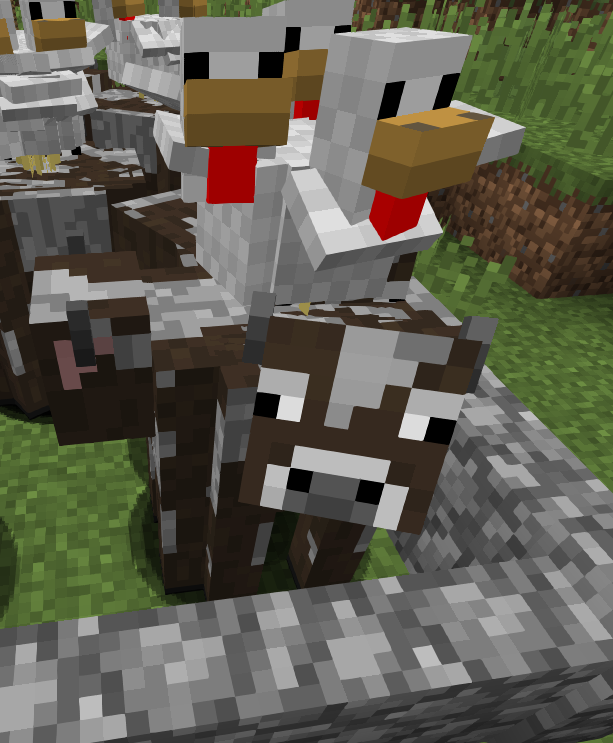
When summoning entities with a passenger entity then the root entities won't collide with other root entities, and the passengers won't collide with other passengers. Entities pass through one another.
I expected entities to push/collide with each other.EDIT: Noticed it's still in previous versions like 1.10.2 and 1.9.4, might be related to
MC-15202as in the fix for that one caused this.Reproduce with these commands:
/summon minecraft:chicken ~ ~-1 ~ {Passengers:[{id:"cow"}]}
/summon minecraft:cow ~ ~-1 ~ {Passengers:[{id:"chicken"}]}
When summoning entities with a passenger entity then the root entities won't collide with other root entities, and the passengers won't collide with other passengers. Entities pass through one another.
I expected entities to push/collide with each other.EDIT: Noticed it's still in previous versions like 1.10.2 and 1.9.4, might be related to
MC-15202as in the fix for that one caused this.
EDIT2: Checked to make sure and the issue happens since 14w27a, it's not in the previous snapshot 14w26c, so that would actually point directly at changes done to fixMC-15202Reproduce with these commands:
/summon minecraft:chicken ~ ~-1 ~ {Passengers:[{id:"cow"}]}
/summon minecraft:cow ~ ~-1 ~ {Passengers:[{id:"chicken"}]}
The bug
While flying around using WASD in creative mode the stat increases, but not if the player only moved by a small amount.
How to reproduce
- Create a scoreboard to track the stat /scoreboard objectives add Fly
stat.flyOneCm- Put it on the sidebar so you see what's happening
- Tap any of the WASD keys and notice it being stuck at 0, even with key presses longer than a tap
- Move just enough to have the score jump to a number, sometimes it increments by 24, 28 or other similar value. This happens during one tick.
The bug
While flying around using WASD in creative mode the stat increases, but not if the player only moved by a small amount.
How to reproduce
- Create a scoreboard to track the stat /scoreboard objectives add Fly minecraft.custom:minecraft.fly_one_cm
- Put it on the sidebar so you see what's happening
- Tap any of the WASD keys and notice it being stuck at 0, even with key presses longer than a tap
- Move just enough to have the score jump to a number, sometimes it increments by 24, 28 or other similar value. This happens during one tick.
stat.flyOneCm does not increment linearly when flying small distancesminecraft.fly_one_cm does not increment linearly when flying small distances
When
/gamerule dod }}is typed in chat and TAB is pressed then the third character, "D", is not changed to uppercase to match the actual gamerule, causing the resulting tab-completed command to be{{/gamerule dodaylightCyclewhich is invalid.
I would expect the tab autocompletion to change the "D" to uppercase.When /gamerule dod is typed in chat and TAB is pressed then the third character, "D", is not changed to uppercase to match the actual gamerule, causing the resulting tab-completed command to be /gamerule dodaylightCycle which is invalid.
I would expect the tab autocompletion to change the "D" to uppercase.
When /gamerule dod is typed in chat and TAB is pressed then the third character, "D", is not changed to uppercase to match the actual gamerule, causing the resulting tab-completed command to be /gamerule dodaylightCycle which is invalid.
I would expect the tab autocompletion to change the "D" to uppercase.This is also the case with other things such as player names.
Autocompletion doesn't change the case of characters typed before pressing tabTab completion doesn't change the case of characters typed before pressing tab
After renaming any item in an anvil the RepairCost tag appears in its tag tag. No matter if the item is a tool or an item with no Damage tag.
To reproduce:
1. Rename an item in an anvil
2. Drop it and check its NBT data using /entitydata @e [type=item,c=1] { } or /data get entity @e [type=item,limit=1,sort=nearest] and look at the tag:{}. Now it contains RepairCost:0, which doesn't change after renaming the item any amount of times.After renaming any item in an anvil the RepairCost tag appears in its tag tag. No matter if the item is a tool or an item with no Damage tag.
To reproduce:
1. Rename an item in an anvil
2. Drop it and check its NBT data using /entitydata @e [type=item,c=1] {} }} or {{/data get entity @e [type=item,limit=1,sort=nearest] and look at the tag:{}. Now it contains RepairCost:0, which doesn't change after renaming the item any amount of times.
After renaming any item in an anvil the RepairCost tag appears in its tag tag. No matter if the item is a tool or an item with no Damage tag.
To reproduce:
1. Rename an item in an anvil
2. Drop it and check its NBT data using /entitydata @e [type=item,c=1]{} }} or {{/data get entity @e [type=item,limit=1,sort=nearest] and look at the tag:{}. Now it contains RepairCost:0, which doesn't change after renaming the item any amount of times.After renaming any item in an anvil the RepairCost tag appears in its tag tag. No matter if the item is a tool or an item with no Damage tag.
To reproduce:
1. Rename an item in an anvil
2. Drop it and check its NBT data using /entitydata @e [type=item,c=1] { } or /data get entity @e [type=item,limit=1,sort=nearest] and look at the tag:{}. Now it contains RepairCost:0, which doesn't change after renaming the item any amount of times.
The bug
After renaming any item in an anvil the RepairCost tag appears in its tag tag. No matter if the item is a tool or an item with no Damage tag.
How to reproduce
- Rename an item in an anvil
- Drop it and check its NBT data using /entitydata @e[type=item,c=1] {} or /data get entity @e[type=item,limit=1,sort=nearest] and look at the tag:{}. Now it contains RepairCost:0, which doesn't change after renaming the item any amount of times.
The bug
After renaming any item in an anvil the RepairCost tag appears in its tag tag. No matter if the item is a tool or an item with no Damage tag.
How to reproduce
- Rename an item in an anvil
- Drop it and check its NBT data using /entitydata @e[type=item,c=1] {} or /data get entity @e[type=item,limit=1,sort=nearest] Item.tag and look at the tag:{}. Now it contains RepairCost:0, which doesn't change after renaming the item any amount of times.
The bug:
In some places commands require the selector to be able to target only one entity. When the selector doesn't include the square brackets (i.e @e) the message above the chat bar will not display. As opposed to when the selector has square brackets (i.e @e[]). The user should be notified regardless of there being square brackets or not.To reproduce:
1. Type in chat: /execute if score @s someScore = @e someScore
2. Notice no message displayed above the chat bar.
3. Type in chat: /execute if score @s someScore = @e[]
(with space after the selector)
4. Notice the message about only one entity allowed appear.
The bug:
In some places commands require the selector to be able to target only one entity. When the selector doesn't include the square brackets (i.e @e) the message above the chat bar will not display. As opposed to when the selector has square brackets (i.e @e[]). The user should be notified regardless of there being square brackets or not.To reproduce:
1. Type in chat: /execute if score @s someScore = @e someScore
2. Notice no message displayed above the chat bar.
3. Type in chat: /execute if score @s someScore = @e[]
(with space after the selector)
4. Notice the message about only one entity allowed appear.
To reproduce:
Sumon a stand
/summon minecraft:armor_stand ~ ~ ~ {Marker:1b}
Spawn particles at its eyes
/execute as @e[type=armor_stand] at @s anchored
feetrun particle minecraft:cloud ^ ^ ^Notice particles appearing at the stand's feet.
To reproduce:
Sumon a stand
{{/summon minecraft:armor_stand ~ ~ ~
{Marker:1b}}}
Spawn particles at its eyes
/execute as @e[type=armor_stand] at @s anchored eyes run particle minecraft:cloud ^ ^ ^
Notice particles appearing at the stand's feet.
The bug
Using execute store result to get the number of commands ran in a function always outputs 1 if ran inside of another function.
Setup
scoreboard objectives add my_objective dummy scoreboard objectives setdisplay sidebar my_objectiveUse attached datapack containing two functions:
my_function.mcfunction
say 1 say 2 say 3 say 4 say 5test.mcfunction
execute store result score player my_objective run function store:my_functionHow to reproduce
- Run the following command in chat, notice score gets set to 1
/function store:test
- Run the command from the function in chat or in a command block, notice score gets set to the amount of commands ran
/execute store result score player my_objective run function store:my_functionExpected output
I expected the execute store result to behave the same way inside of a function as it does in chat or in a command block.
Actual output
The store gets set to 1 if the execute store command is inside of a function regardless of the amount of commands ran.
The bug
Using execute store result to get the number of commands ran in a function always outputs 1 if ran inside of another function.
Setup
scoreboard objectives add my_objective dummy scoreboard objectives setdisplay sidebar my_objectiveUse attached datapack containing two functions:
my_function.mcfunction
say 1 say 2 say 3 say 4 say 5test.mcfunction
execute store result score player my_objective run function store:my_functionHow to reproduce
- Run the following command in chat, notice score gets set to 1
/function store:test
- Run the command from the function in chat or in a command block, notice score gets set to the amount of commands ran
/execute store result score player my_objective run function store:my_functionExpected output
I expected the execute store result to behave the same way inside of a function as it does in chat or in a command block.
Actual output
The store gets set to 1 if the execute store command is inside of a function regardless of the amount of commands ran.
The bug
Using execute store result to get the number of commands ran in a function always outputs 1 if ran inside of another function.
Setup
scoreboard objectives add my_objective dummy scoreboard objectives setdisplay sidebar my_objectiveUse attached datapack containing two functions:
my_function.mcfunction
say 1 say 2 say 3 say 4 say 5test.mcfunction
execute store result score player my_objective run function store:my_functionHow to reproduce
1. Run the following command in chat, notice score gets set to 1
/function store:test2. Run this command in chat or in a command block, notice score gets set to the amount of commands ran
/execute store result score player my_objective run function store:my_functionExpected output
I expected the execute store result to behave the same way inside of a function as it does in chat or in a command block.
Actual output
The store gets set to 1 if the execute store command is inside of a function regardless of the amount of commands ran.
The bug:
On a singleplayer world, when you ride an entity (minecart, boat, pig, horse, ...) and quit the world, the entity will lose all of its scores.
What I expected:
The entities should keep their scores.
How to reproduce:
1. Create a scoreboard objective: /scoreboard objectives add boat dummy
2. Set the score to display on the sidebar: /scoreboard objectives setdisplay sidebar boat
3. Obtain a boat, place it down, enter the boat.
4. Set a score for the boat: /scoreboard players set @e[type=boat,sort=nearest,limit=1] boat 1
5. Exit the world.
6. Enter the world again.
7. Notice the boat's score disappeared from the sidebar.Notes:
Entities riding other entities don't seem to be losing their scores.
Did not test the behavior in multiplayer.
The bug:
On a singleplayer world, when you ride an entity (minecart, boat, pig, horse, ...) and quit the world, the entity will lose all of its scores.
What I expected:
The entities should keep their scores.
How to reproduce:
1. Create a scoreboard objective: /scoreboard objectives add boat dummy
2. Set the score to display on the sidebar: /scoreboard objectives setdisplay sidebar boat
3. Obtain a boat, place it down, enter the boat.
4. Set a score for the boat: /scoreboard players set @e[type=boat,sort=nearest,limit=1] boat 1
5. Exit the world.
6. Enter the world again.
7. Notice the boat's score disappeared from the sidebar.Notes:
Entities riding other entities don't seem to be losing their scores.
Did not test the behavior in multiplayer.
/structue doesn't load entities if they were saved with "Remove Blocks" on and the entity would have loaded in a different chunk
When attempting to load a structure saved with Include Entities enabled, and Remove Blocks disabled, using the /structure command,
noentities are spawned. This isnotthe case if using a "Load" structure blockorif the structure was set tocontainblocks.What I expected to happen was:
The entities get summoned when using /structure load with a structure that had "Remove Blocks" set to true.What actually happened was:
No entities were spawned.Steps to reproduce:
1. Place down a structure block and set it to Save mode
2. Place an entity inside of the bounding box,armor stands are entities and won't move around
3. Set the toggles to Include Entities true, Remove Blocks true
4. Name and save the structure
5. Use /structure load mystructure:structure_name ~ ~ ~ to spawn the structure
→No entities appear
I can reproduce the issue in
a1.16.200 02dev version on PC, as well as 1.16.210.59Betaon mobile.When attempting to load a structure saved with Include Entities enabled, and Remove Blocks disabled, using the /structure command, entities aren't spawned if they would have appeared in a different chunk than one containing the position where the command was run. This is also the case if using a "Load" structure block. Though the issue does not happen if the structure was set to include blocks.
What I expected to happen was:
The entities get summoned when using /structure load with a structure that had "Remove Blocks" set to true.What actually happened was:
No entities were spawned.Steps to reproduce:
1. Place down a structure block and set it to Save mode
2. Place an entity inside of the bounding box (armor stands are entities and won't move around), make sure they're a few blocks away from the structure origin
3. Set the toggles to Include Entities true, Remove Blocks true
4. Name and save the structure
5. Use /structure load mystructure:structure_name ~ ~ ~ to spawn the structure nearby a chunk edge, so that the entity would spawn in a different chunk than where you run the command
→I can reproduce the issue in 1.18.2.03 (current stable) dev version on PC, as well as 1.18.10.26 Beta.
/structure doesn't load entitiesif they were saved with "Remove Blocks" on and the entity would have loaded in a different chunk/structure doesn't load entities across multiple chunks if the structure was saved with "Remove Blocks" on
When an item with the "minecraft:item_lock" component is given to a player in creative mode, they can replace it using the pickblock function (middle mouse button by default).
This doesn't feel consistent with how they are not able to move the item in any other way. It can't be dropped, moved or replaced by clicking on it otherwise.Reproduction steps:
- Switch to creative mode /gamemode c
- Use this command to get an item locked in the first slot
{{{}/replaceitem entity @s slot.hotbar 0 wool 1 0 {"minecraft:item_lock":{"mode":"lock_in_slot"}
{}}}}- Use this command to fill your hotbar with other items, so pickblock is forced to try and replace the current slot /give @s diamond_shovel 8
- Scroll to the first slot and use pickblock on the ground
When an item with the "minecraft:item_lock" component is given to a player in creative mode, they can replace it using the pickblock function (middle mouse button by default).
This doesn't feel consistent with how they are not able to move the item in any other way. It can't be dropped, moved or replaced by clicking on it otherwise.Reproduction steps:
- Switch to creative mode /gamemode c
- Use this command to get an item locked in the first slot /replaceitem entity @s slot.hotbar 0 wool 1 0 {"minecraft:item_lock":
Unknown macro: {"mode"}}
- Use this command to fill your hotbar with other items, so pickblock is forced to try and replace the current slot /give @s diamond_shovel 8
- Scroll to the first slot and use pickblock on the ground
When an item with the "minecraft:item_lock" component is given to a player in creative mode, they can replace it using the pickblock function (middle mouse button by default).
This doesn't feel consistent with how they are not able to move the item in any other way. It can't be dropped, moved or replaced by clicking on it otherwise.Reproduction steps:
- Switch to creative mode /gamemode c
- Use this command to get an item locked in the first slot /replaceitem entity @s slot.hotbar 0 wool 1 0 {"minecraft:item_lock":
Unknown macro: {"mode"}}
Use this command to fill your hotbar with other items, so pickblock is forced to try and replace the current slot /give @s diamond_shovel 8- Scroll to the first slot and use pickblock on the ground
When an item with the "minecraft:item_lock" component is given to a player in creative mode, they can replace it using the pickblock function (middle mouse button by default).
This doesn't feel consistent with how they are not able to move the item in any other way. It can't be dropped, moved or replaced by clicking on it otherwise.Reproduction steps:
- Switch to creative mode /gamemode c
- Use this command to get an item locked in the first slot
/replaceitem entity @s slot.hotbar 0 wool 1 0 {"minecraft:item_lock":- Use this command to fill your hotbar with other items, so pickblock is forced to try and replace the current slot /give @s diamond_shovel 8
- Scroll to the first slot and use pickblock on the ground
When an item with the "minecraft:item_lock" component is given to a player in creative mode, they can replace it using the pickblock function (middle mouse button by default).
This doesn't feel consistent with how they are not able to move the item in any other way. It can't be dropped, moved or replaced by clicking on it otherwise.Reproduction steps:
- Switch to creative mode /gamemode c
- Use this command to get an item locked in the first slot
/replaceitem entity @s slot.hotbar 0 wool 1 0 {"minecraft:item_lock": {"mode":"lock_in_slot" }}- Use this command to fill your hotbar with other items, so pickblock is forced to try and replace the current slot /give @s diamond_shovel 8
- Scroll to the first slot and use pickblock on the ground
Block models seem to round the positions and scale of elements to 0.03 units, which makes it difficult to line up some custom geometry. If the change is less than that, elements will overlap and z-fight.
This is not the case for an entity using the same model.
Confirmed for 1.9-pre3 with both alex and steve models.
Can confirm, same thing happens. I'll mention that my nick is Maxaxik, I'm in a single player world and I'm not signed in to Xbox Live.
Setting time to 0 causes the message to display that the time has been set to 24000. Just another thing I noticed
I know what the summon command does. I wanted to summon an item entity, but that seems to be impossible.
I don't see why this issue was marked as "Working As Intended". Is it a feature that you can't summon item entities? If so, then why does "item" appear as one of the options when typing the summon command?
There's currently no NBT implemented in MCPE that's accesible in commands so there's no way to specify the item.
Thanks for reopening the issue.
Possibly duplicate of MC-89347
Possibly duplicate of
MC-89030Confirmed for 16w36a
Confirmed for 0.15.90.7
Still present in 0.15.90.7 setting the time to 30000 seems to do it.
Fixed in 0.15.90.7
Duplicates
MCPE-17073Confirmed for 16w38a
Confirmed for 16w39c
Still present in 16w39c
I also consider this to be a bug
In 0.15.90.8 "item" is gone from the summon list. Attempting to summon will result in an error message "Invalid command syntax"
Tried this in 16w42a, both gamemodes 1 and 2
In gamemode 2 it acts like an invisible item in the head slot, you can relog or put on a helmet to get the stone item.
In gamemode 1 it's acting up, relogging shows the item, but putting on a helmet makes it disappear.
Confirmed for 16w42a
The bug was that you could not summon an item entity even though it was listed as a summon-able one. I didn't notice the shadow myself and that's not what I reported.
Now you just can't summon items. I wouldn't mark it as "Fixed" since the feature just got removed. "Won't Fix" or "WAI" would be actually more fitting now.
Looks like
MC-5694Duplicate of
MC-44244Present in 1.11.2 and snapshot 17w06a
Still affects cases 1 and 3 mentioned in Marcono1234's comment from 28/Jul/15 . Translate feature works correctly, while displaying scores does not.
Confirmed for 1.11.2 and 17w06a
Confirmed for 1.12-pre7
This seems to be because the initial detect location doesn't respect executor's position, I'm guessing it's because the position is processed first?
Speculating because it works if you add another execute after it
/execute @a ~ ~ ~ execute @s ~ ~ ~ detect ~ ~-1 ~ sand 0 say hi
But if the second execute is missing it checks for the block underneath the command block (as stated in bug report), that's why I think the order might be different in Win10/PE (which I'd consider an issue).
This seems to also be the case for other movement stats, or at least stat.flyOneCm MC-111286
Although I haven't done much in-depth testing
Doesn't seem to need to be a lan world or server or need another datapack. After creating a world in 17w49b I just disabled the vanilla datapack and it started happening.
Yep it's still there
Can't reproduce in 1.2.8.0
You said "Spaces in commands no longer stop them from working" but this report says that if there's a space at the start they do not work. Instead the commands appear in chat as a message.
Affects 18w05a
This is still the case in 18w08b
I'd also suggest changing the example command, which now looks like: /give @a[distance=0..10 stone]
as it's not valid.
This is still the case in 18w11a
I also find it confusing that commands such as:
/execute as @a at @s anchored eyes positioned ^ ^ ^ positioned ^ ^ ^ run particle flame ^ ^ ^
stack the positions up, causing the particle to appear ~5 blocks above the player, instead of appearing at their eyes.
Affects 18w11a
Affects 18w11a
Can't reproduce in 1.2.13
Affects 18w20c
Affects 18w22c
Affects 1.13 pre-3
I can still reproduce entity collisions in pre-8. Arrows shot from dispensers seem to ignore an armor stand standing right in front of the block, much like on the latest screenshot added here. Fireballs and small_fireballs seem to behave similarly.
Affects 1.13
Affects 1.6.0
Affects 1.13.1
You're able to partially get around this if you set the loot table to "minecraft:empty" before removing the block
data merge block ~ ~ ~ {LootTable:"minecraft:empty"}
Isn't this a duplicate of MCPE-122681 ?
This is still an issue in the latest stable version and the latest beta. Further testing showed that this issue only arises when the entity would have been spawned in a different chunk than the one containing the structure's origin.
The report details and repro steps have been updated accordingly.
This is still an issue, better described in
MCPE-144870The command to check this would be /tp @s ~ ~ ~ facing ~ ~100 ~ rather than what's in this report too
This issue is present in 1.19.81
Despite the item having "minecraft:hand_equipped": true, the guest players see the item as if it was set to false.
This only occurs if Screen Animations are ON
It's not the issue described in
MC-262294since that one mentions a player that stopped sneaking. In this issue the sneak key is being held down.