 Nikolaus Stromberg
- NikoKun
- nikokun
- America/Chicago
- Yes
- No
 MC-249004


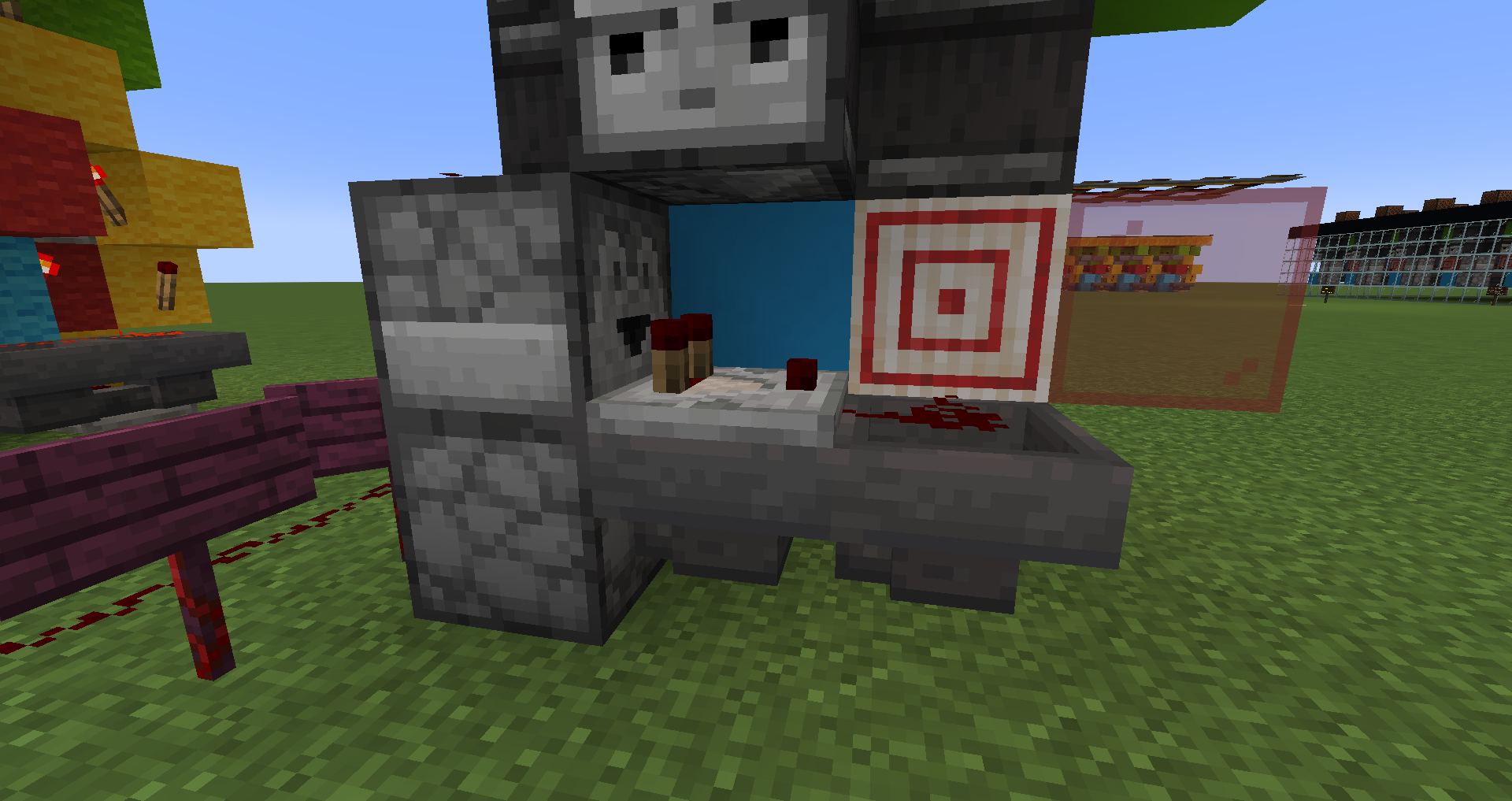

Depending on where I build it, the bottom dropper of a standard dropper/hopper t-flipflop randomly seems to be having issues receiving power from either the block right next to it, or from dust directly on top of the top dropper.
Normally, it works perfectly fine in most locations, but in certain spots, the exact same configuration refuses to work. When that situation occurs, the t-flipflop can turn itself off, but not back on again. If additional redstone wire is placed, to wrapped around to directly point at the lower-dropper, THEN it will work, but that shouldn't be necessary. And isn't for other copies of the same circuit.
I've attached a save file which shows the bug happening. The circuit configuration works perfectly for the large redstone Lights Out game on this map (after moving it's location a few times till it worked right), but when the individual game-tile's circuits are built in certain locations, they do not work. Player should spawn near a broken one, which is featured in the image I've also attached. The redstone dust on the grass in this image was added to troubleshoot this bug, breaking it and then toggling the circuit should show the bug in action.
You can also /clone the circuits to different locations, and see the bug happen half the time, tho you may need to replace some dust, as it sometimes falls off upon pasting. I'm not sure if the cardinal direction the circuit is facing matters, since it happens seemingly at random.. I also have an example of the bug on display near spawn on my vanilla server hosted at nikserver.ddns.net, which shows it also happens in multiplayer/vanilla java servers.
Depending on where I build it, the bottom dropper of a standard dropper/hopper t-flipflop randomly seems to be having issues receiving power from either the block right next to it, or from dust directly on top of the top dropper.
Normally, it works perfectly fine in most locations, but in certain spots, the exact same configuration refuses to work. When that situation occurs, the t-flipflop can turn itself off, but not back on again. If additional redstone wire is placed,
towrappedaround to directly point at the lower-dropper, THEN it will work, but that shouldn't be necessary. And isn't for other copies of the same circuit.I've attached a save file which shows the bug happening. The circuit configuration works perfectly for the large redstone Lights Out game on this map (after moving it's location a few times till it worked right), but when the individual game-tile's circuits are built in certain locations, they do not work. Player should spawn near a broken one, which is featured in the image I've also attached. The redstone dust on the grass in this image was added to troubleshoot this bug, breaking it and then toggling the circuit should show the bug in action.
You can also /clone the circuits to different locations, and see the bug happen half the time, tho you may need to replace some dust, as it sometimes falls off upon pasting. I'm not sure if the cardinal direction the circuit is facing matters, since it happens seemingly at random.. I also have an example of the bug on display near spawn on my vanilla server hosted at nikserver.ddns.net, which shows it also happens in multiplayer/vanilla java servers.
Depending on where I build it, the bottom dropper of a standard dropper/hopper t-flipflop randomly seems to be having issues receiving power from either the block right next to it, or from dust directly on top of the top dropper.
Normally, it works perfectly fine in most locations, but in certain spots, the exact same configuration refuses to work. When that situation occurs, the t-flipflop can turn itself off, but not back on again. If additional redstone wire is placed, wrapping around to directly point at the lower-dropper, THEN it will work, but that shouldn't be necessary. And isn't for other copies of the same circuit, built elsewhere.
I've attached a save file which shows the bug happening. The circuit configuration works perfectly for the large redstone Lights Out game on this map (after moving it's location a few times till it worked right), but when the individual game-tile's circuits are built in certain locations, they do not work. Player should spawn near a broken one, which is featured in the image I've also attached. The redstone dust on the grass in this image was added to troubleshoot this bug, breaking it and then toggling the circuit should show the bug in action.
You can also /clone the circuits to different locations, and see the bug happen half the time, tho you may need to replace some dust, as it sometimes falls off upon pasting. I'm not sure if the cardinal direction the circuit is facing matters, since it happens seemingly at random.. I also have an example of the bug on display near spawn on my vanilla server hosted at nikserver.ddns.net, which shows it also happens in multiplayer/vanilla java servers.
Droppernot beingpowered by block right next to it,in randomlocations..Dropper sometimes not powered by block right next to it, depending on location..
Droppers sometimes not powered by block right next to it, depending on location..
Dropperssometimes not powered by block right next to it, depending on location..
Depending on where I build it, the bottom dropper of a standard dropper/hopper t-flipflop randomly seems to be having issues receiving power from either the block right next to it, or from dust directly on top of the top dropper.
Normally, it works perfectly fine in most locations, but in certain spots, the exact same configuration refuses to work. When that situation occurs, the t-flipflop can turn itself off, but not back on again. If additional redstone wire is placed, wrapping around to directly point at the lower-dropper, THEN it will work, but that shouldn't be necessary. And isn't for other copies of the same circuit, built elsewhere.
I've attached a save file which shows the bug happening. The circuit configuration works perfectly for the large redstone Lights Out game on this map (after moving it's location a few times till it worked right), but when the individual game-tile's circuits are built in certain locations, they do not work. Player should spawn near a broken one, which is featured in the image I've also attached. The redstone dust on the grass in this image was added to troubleshoot this bug, breaking it and then toggling the circuit should show the bug in action.
You can also /clone the circuits to different locations, and see the bug happen half the time, tho you may need to replace some dust, as it sometimes falls off upon pasting. I'm not sure if the cardinal direction the circuit is facing matters, since it happens seemingly at random.. I also have an example of the bug on display near spawn on my vanilla server hosted at nikserver.ddns.net, which shows it also happens in multiplayer/vanilla java servers.
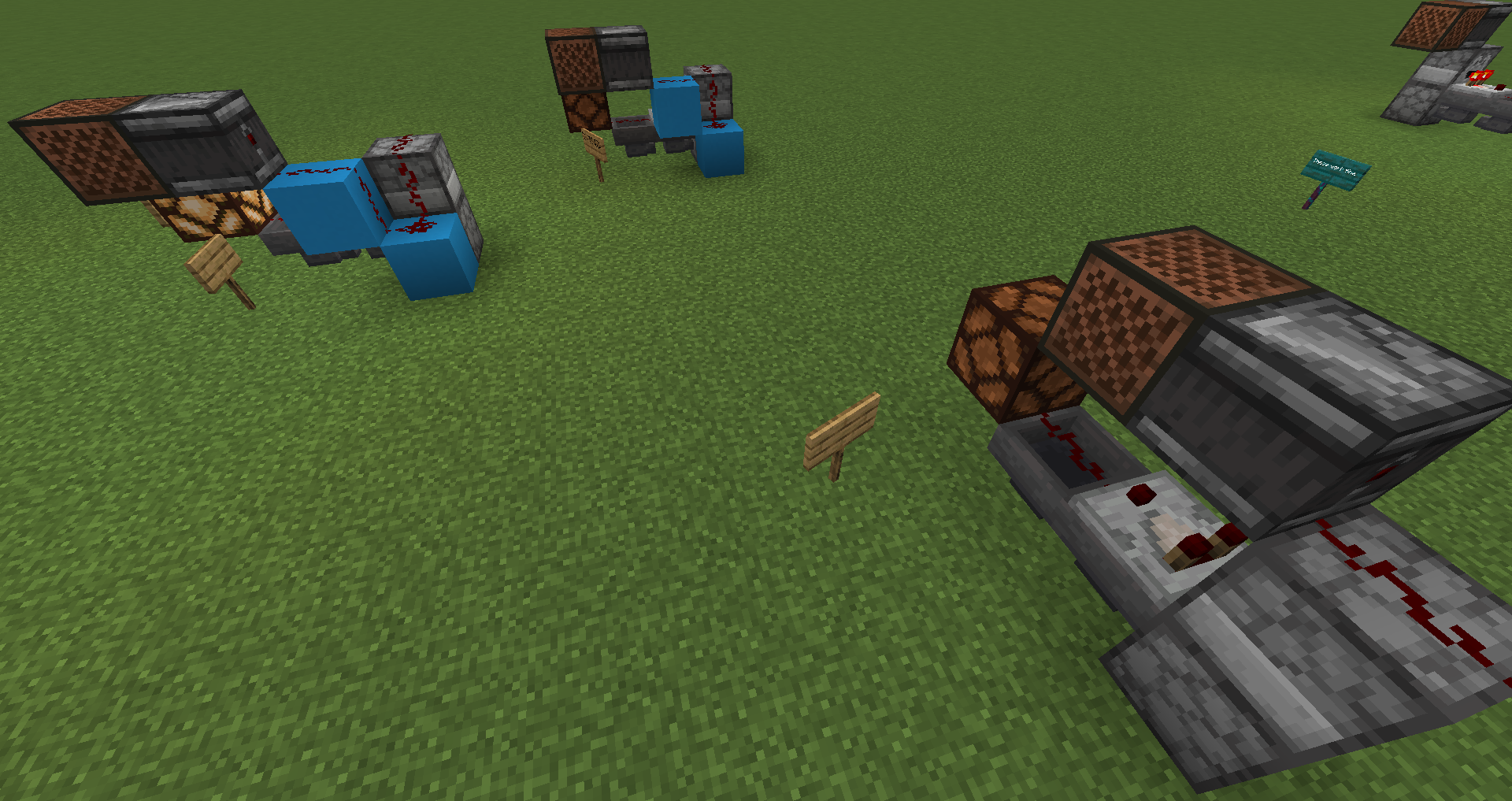
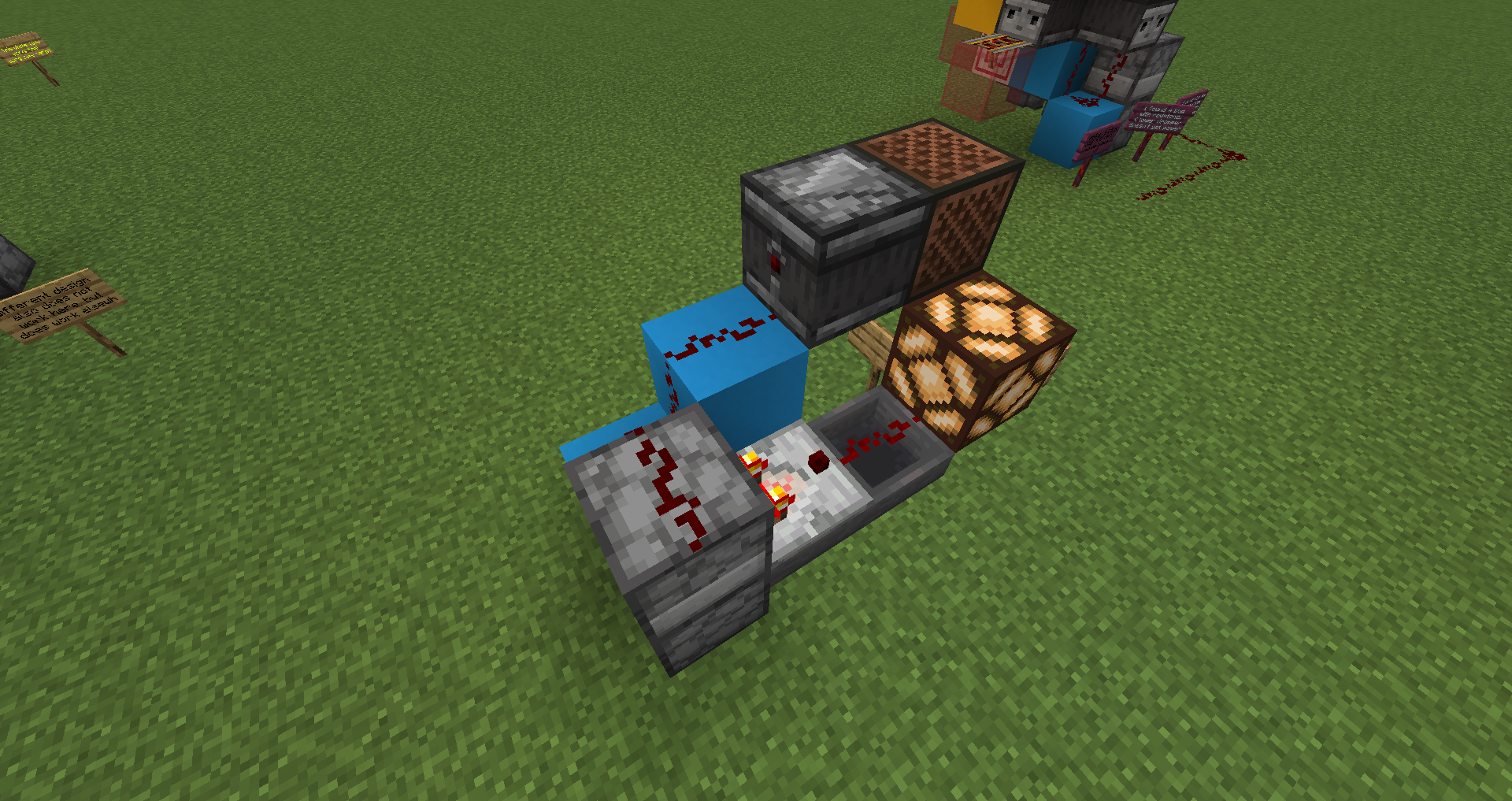
Added a couple better examples to the save file, as well as a couple more screenshots, which show the various ways to make it, the ones with lights on work, the others don't..
Depending on where I build it, the bottom dropper of a standard dropper/hopper t-flipflop randomly seems to be having issues receiving power from either the block right next to it, or from dust directly on top of the top dropper.
Normally, it works perfectly fine in most locations, but in certain spots, the exact same configuration refuses to work. When that situation occurs, the t-flipflop can turn itself off, but not back on again. If additional redstone wire is placed, wrapping around to directly point at the lower-dropper, THEN it will work, but that shouldn't be necessary. And isn't for other copies of the same circuit, built elsewhere.
I've attached a save file which shows the bug happening. The circuit configuration works perfectly for the large redstone Lights Out game on this map (after moving it's location a few times till it worked right), but when the individual game-tile's circuits are built in certain locations, they do not work. Player should spawn near a broken one, which is featured in the image I've also attached. The redstone dust on the grass in this image was added to troubleshoot this bug, breaking it and then toggling the circuit should show the bug in action.
You can also /clone the circuits to different locations, and see the bug happen half the time, tho you may need to replace some dust, as it sometimes falls off upon pasting. I'm not sure if the cardinal direction the circuit is facing matters, since it happens seemingly at random.. I also have an example of the bug on display near spawn on my vanilla server hosted at nikserver.ddns.net, which shows it also happens in multiplayer/vanilla java servers.
Added a couple better examples to the save file, as well as a couple more screenshots, which show the various ways to make it, the ones with lights on work, the others don't.. But there are examples built of each design working/not-working, only difference being where they were built.
RedstoneDropperBug.zip
No, please give this more consideration than that! How can this be marked as "resolved as working as intended"?? It works in some locations, but not others? That means it's a bug, doesn't it?
The Issue you linked,
MC-108IS not a bug, and that IS how it is intended to work. That is why that issue was closed. However, I believe this issue I have found IS a bug.
I can confirm that this is happening in 14w03b.
Regardless of which Mipmap level is used, there is no change in visual quality, it does not seem to be functioning at all. Still the same grainy/staticy textures. Not sure if it's Mipmapping, or anisotropic filtering, or both. But something is clearly not working.
Also confirming this issue. Using 14w03b, mipmap has no effect, regardless of which level it's set to. At least on grass, if not other block textures as well.
Just tried snapshot 14w04a, and this bug seems to have been improved. However NOW, Anisotropic Filtering is causing some odd rendering glitches, on any setting above 2 (2 seems to be working fine, or maybe not at all, hard to tell). At setting 4 or above, dark curved lines appear at extreme angles towards the horizon, mostly easily noticeable on a grass flat map. And when set to 16, white render glitches start to appear at extreme angles near the horizon in the NW and SE directions.
Just tried snapshot 14w04a, and this bug seems to have been improved. However NOW, Anisotropic Filtering is causing some odd rendering glitches, on any setting above 2 (2 seems to be working fine, or maybe not at all, hard to tell). At setting 4 or above, dark curved lines appear at extreme angles towards the horizon, mostly easily noticeable on a grass flat map. And when set to 16, white render glitches start to appear at extreme angles near the horizon in the NW and SE directions.
I'm still seeing this bug even now after the 1.2 update.. Hope it gets fixed eventually, it makes piston doors and other piston-moving contraptions look sloppy, graphically/immersion wise.
Edit: On PC as well.
Yup, I'm also seeing this issue on the 1.2.1 update on Windows 10..
It's EXTREMELY rapid, and it doesn't just effect doors! It also seems to happen with Torch placement if your moving, I keep placing tons of touches every time I try to place one.
Yeah, I'm seeing this on Win10 too.. Really ugly/excessive edge shadows along block edges, and torches don't seem to be lighting properly because of that..
I also agree.. I'd been waiting for the 1.2 update to play survival again.. But now it's difficult to place torches or close doors in emergencies..
Standing-still while doing things as "work-around" is not an acceptable solution, because this game has LOTS of panic moments when your surviving.
It's almost impossible to place/pickup a bucket of water without making a mess because you can't stand still when water is pushing you around.
This issue is VERY game-breaking and SHOULD be the next thing they fix! (This and the lighting bug.) They're going to need a 1.2.2 asap just to fix some of these horrible bugs..
Maybe, I'll have to check into that one further. But that could be, ya. At least this is another example of how it negatively impacts redstone contraptions, if it is the same bug..
Edit: Ya, it's likely related. Since I also just found
MC-10174which was also tied to the same issue, and resolved as a duplicate.Thank you for the help!