 Phoenix TF
- redpcat
- JIRAUSER466805
- America/New_York
- Yes
- No
 MCPE-84901
 MC-197856
 MCL-14959
 MCD-4720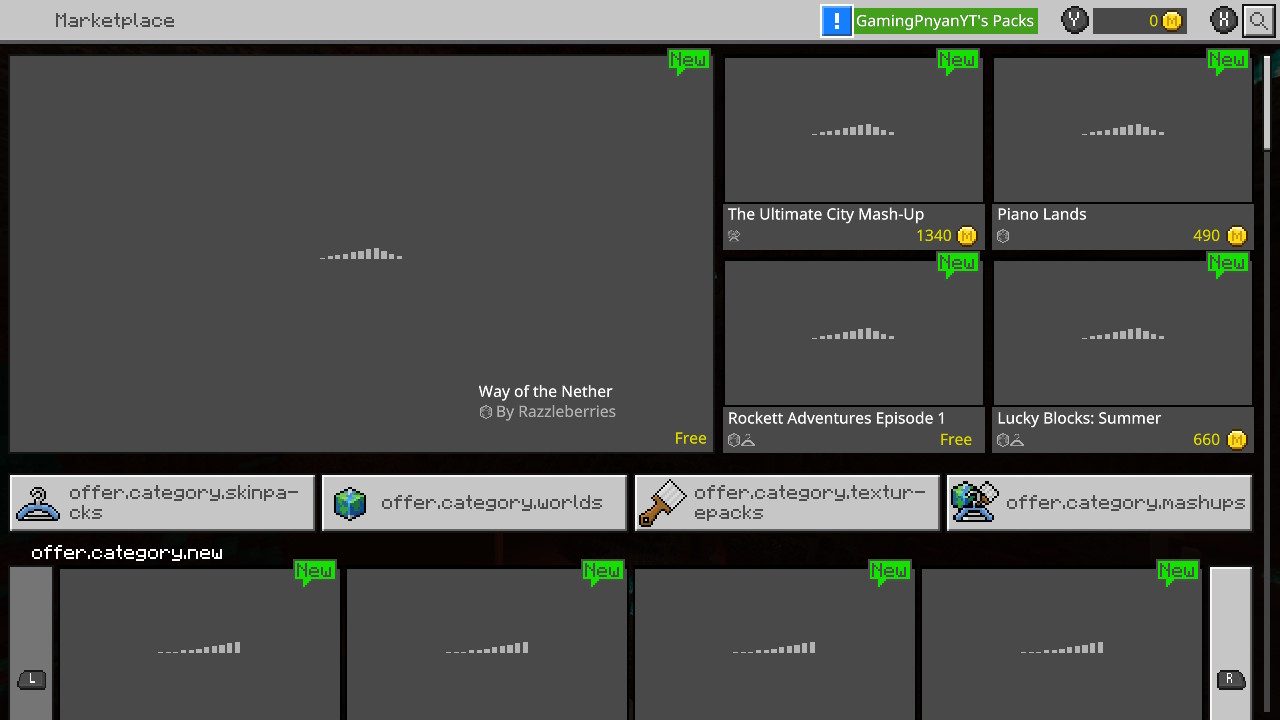


When I opened the marketplace, every category name was offer.category.skinpacks or something like that. It also affects recently viewed stuff as store.pdp.title.recentlyViewed and more.
Proof is shown in the image.
Steps to Reproduce:
1. Open Minecraft (Bedrock codebase)
2. Open Marketplace/Store
Expected Results:
It should show the category names.
Actual Result:
It shows offer.category.skinpacks and stuff like that.
When I opened the marketplace, every category name was offer.category.skinpacks or something like that. It also affects recently viewed stuff as store.pdp.title.recentlyViewed and more.
Proof is shown in the image.
Steps to Reproduce:
1. Open Minecraft (Bedrock codebase)
2. Open Marketplace/Store
Expected Results:
It should show the category names.
Actual Result:
It shows offer.category.skinpacks and stuff like that.
Update:
1.16.1 still has the bug.
When I opened the marketplace, every category name was offer.category.skinpacks or something like that. It also affects recently viewed stuff as store.pdp.title.recentlyViewed and more.
Proof is shown in the image.
Steps to Reproduce:
1. Open Minecraft (Bedrock codebase)
2. Open Marketplace/Store
Expected Results:
It should show the category names.
Actual Result:
It shows offer.category.skinpacks and stuff like that.
Update:
1.16.100 still has the bug.
When I opened the marketplace, every category name was offer.category.skinpacks or something like that. It also affects recently viewed stuff as store.pdp.title.recentlyViewed and more.
Proof is shown in the image.
Steps to Reproduce:
1. Open Minecraft (Bedrock codebase)
2. Open Marketplace/Store
Expected Results:
It should show the category names.
Actual Result:
It shows offer.category.skinpacks and stuff like that.
Update:
1.16.100 still has the bug.
Update 2:
Looks like it has been affected by a glitch that was patched during 1.16.101+
When I opened the marketplace, every category name was offer.category.skinpacks or something like that. It also affects recently viewed stuff as store.pdp.title.recentlyViewed and more.
Proof is shown in the image.
Steps to Reproduce:
1. Open Minecraft (Bedrock codebase)
2. Open Marketplace/Store
Expected Results:
It should show the category names.
Actual Result:
It shows offer.category.skinpacks and stuff like that.
Update:
1.16.100 still has the bug.
Update 2:
Looks like it has been affected by a glitch that was patched during 1.16.101+ and it has been found on android
Category bug "offer.category.[categoryname]" is happening instead of [Category Name]Glitched Marketplace buttons and text showing some of the code (ORIGINAL ISSUE)
When I opened the marketplace, every category name was offer.category.skinpacks or something like that. It also affects recently viewed stuff as store.pdp.title.recentlyViewed and more.
Proof is shown in the image.
Steps to Reproduce:
1. Open Minecraft (Bedrock codebase)
2. Open Marketplace/Store
Expected Results:
It should show the category names.
Actual Result:
It shows offer.category.skinpacks and stuff like that.
Update:
1.16.100 still has the bug.
Update 2:
Looks like it has been affected by a glitch (Block and Sound lag) that was patched during 1.16.101+ and it has been found on android
When I opened the marketplace, every category name was offer.category.skinpacks or something like that. It also affects recently viewed stuff as store.pdp.title.recentlyViewed and more.
Proof is shown in the image.
Steps to Reproduce:
1. Open Minecraft (Bedrock codebase)
2. Open Marketplace/Store
Expected Results:
It should show the category names.
Actual Result:
It shows offer.category.skinpacks and stuff like that.
Update:
1.16.100 still has the bug.
Update 2:
Looks like it has been affected by a glitch (Block and Sound lag) that was patched during 1.16.101+ and it has been found on android
Update 3:
It has been found on 1.16.210 also.
When I opened the marketplace, every category name was offer.category.skinpacks or something like that. It also affects recently viewed stuff as store.pdp.title.recentlyViewed and more.
Proof is shown in the image.
Steps to Reproduce:
1. Open Minecraft (Bedrock codebase)
2. Open Marketplace/Store
Expected Results:
It should show the category names.
Actual Result:
It shows offer.category.skinpacks and stuff like that.
Update:
1.16.100 still has the bug.
Update 2:
Looks like it has been affected by a glitch (Block and Sound lag) that was patched during 1.16.101+ and it has been found on android
Update 3:
It has been found on 1.16.210 also.
Update 4:
Confirmed on iOS.
Switch- Glitched Marketplace buttons and text showing some of the codeMultiple - Glitched Marketplace buttons and text showing some of the code
Nintendo Switch WorkaroundThere's a workaround on Switch
1. Archive Minecraft
2. Reinstall Minecraft
3. Log back into Xbox LiveWhen I opened the marketplace, every category name was offer.category.skinpacks or something like that. It also affects recently viewed stuff as store.pdp.title.recentlyViewed and more.
Proof is shown in the image.
Steps to Reproduce:
1. Open Minecraft (Bedrock codebase)
2. Open Marketplace/Store
Expected Results:
It should show the category names.
Actual Result:
It shows offer.category.skinpacks and stuff like that.
Update:
1.16.100 still has the bug.
Update 2:
Looks like it has been affected by a glitch (Block and Sound lag) that was patched during 1.16.101+ and it has been found on android
Update 3:
It has been found on 1.16.210 also.
Update 4:
Confirmed on iOS.
When I opened the marketplace, every category name was offer.category.skinpacks or something like that. It also affects recently viewed stuff as store.pdp.title.recentlyViewed and more.
Proof is shown in the image.
Steps to Reproduce:
1. Open Minecraft (Bedrock codebase)
2. Open Marketplace/Store
Update: You can no longer open the store or edit your character as of 1.18.30! I am currently watching if the issue for
MC-154120fixes this issue.Expected Results:
It should show the category names.
Actual Result:
It shows offer.category.skinpacks and stuff like that.
Update:
1.16.100 still has the bug.
Update 2:
Looks like it has been affected by a glitch (Block and Sound lag) that was patched during 1.16.101+ and it has been found on android
Update 3:
It has been found on 1.16.210 also.
Update 4:
Confirmed on iOS.
When I opened the marketplace, every category name was offer.category.skinpacks or something like that. It also affects recently viewed stuff as store.pdp.title.recentlyViewed and more.
Proof is shown in the image.
Steps to Reproduce:
1. Open Minecraft (Bedrock codebase)
2. Open Marketplace/Store
Update: You can no longer open the store or edit your character as of 1.18.30! I am currently watching if the issue for
MCPE-154120fixes this issue.Expected Results:
It should show the category names.
Actual Result:
It shows offer.category.skinpacks and stuff like that.
Update:
1.16.100 still has the bug.
Update 2:
Looks like it has been affected by a glitch (Block and Sound lag) that was patched during 1.16.101+ and it has been found on android
Update 3:
It has been found on 1.16.210 also.
Update 4:
Confirmed on iOS.
When I opened the marketplace, every category name was offer.category.skinpacks or something like that. It also affects recently viewed stuff as store.pdp.title.recentlyViewed and more.
Proof is shown in the image.
Steps to Reproduce:
1. Open Minecraft (Bedrock codebase)
2. Open Marketplace/Store
Update: You can no longer open the store or edit your character as of 1.18.30! I am currently watching if the issue for
MCPE-154120fixes this issue.Expected Results:
It should show the category names.
Actual Result:
It shows offer.category.skinpacks and stuff like that.
Update:
1.16.100 still has the bug.
Update 2:
Looks like it has been affected by a glitch (Block and Sound lag) that was patched during 1.16.101+ and it has been found on android
Update 3:
It has been found on 1.16.210 also.
Update 4:
Confirmed on iOS.
Update 6:
Still broken, and is now affecting the Achievements Screen.
When I load into a world/server that my friend is in where they have shaders enabled on their own world, Whenever I load it on my switch. The game crashes. It will probably do the same if I did it on my XBOX test alt. I saw this. Please fix!!! (No, this isn't RTX but they have different shaders.)
How to do it.
1. Get your friend/family member or use your Phone or Computer or Tablet
2. Add the shaders you have to World Textures.
3. Open Minecraft on the Nintendo Switch
4. Go to your friend's/family member's/Your worldExpected Result
The world loads
Actual Result
The game crashes on switch.
When I load into a world/server that my friend is in where they have shaders enabled on their own world, Whenever I load it on my switch. The game crashes. It will probably do the same if I did it on my XBOX test alt. I saw this. Please fix!!! (No, this isn't RTX but they have different shaders.)
How to do it.
1. Get your friend/family member or use your Phone or Computer or Tablet
2. Add the shaders you have to World Textures.
3. Open Minecraft on the Nintendo Switch
4. Go to your friend's/family member's/Your worldExpected Result
The world loads
Actual Result
The game crashes on switch.
Update:
I've tried it on my tablet and switch using low-end shaders and it still crashed.
![[Mod] OcelotOnesie](../../../data/avatars/users/43220.png)
Phoenix TF: Please do not post off-topic comments on tickets. Consider this a warning.
![[Helper] osfanbuff63](../../../data/avatars/users/94394.png)
Phoenix TF Please do not use panels in the description, those will be used by helpers and moderators when applicable.
I'm also having the same problem on Nintendo Switch.
same on 1.14.60
same on 1.14.60
The lag and crashing stopped today.
I think it's also on other devices.
Can confirm that it's the oppsite way around in Bedrock, possibly Java.
I was the first one to report this lol.
I'm using English (US)
I had to archive and reinstall it to fix it.
I think it's attended to be in there. I attacked the wandering trader and it used a Potion of Invisibility.
It has been running smooth for me on the Nintendo Switch.
I've had the same problem on Mineplex, InPvP, and Lifeboat. Cubecraft, The Hive, and Galaxite acts fine. and It's on the Switch version.
A mesma coisa aconteceu comigo no lançador principal. (Usando Google Tradutor)
This has been happening in 1.16.21 Hotfix recently.
It's still happening in 1.16.21 nintendo and mojang!!!
Same problem, but on Switch it says: "Can't Connect to the Minecraft Dungeons service. please try again."
No. It'll save to the NINTENDO SWITCH ONLINE CLOUD. If you don't have Nintendo Switch Online, it won't save
Same prob.
I hope it gets patched by 1.17 to fix that annoying bug.
Same problem since the nether update's full release.
I did it without the use of an elytra once.
Relates to MCPE-84901 which is the first report of the bug.
So, this has been found on Android and Switch so far. If found on iOS, Windows 10, Xbox, and/or PlayStation i'll update the description
Ok. Somebody close this! I was dumb to realize there was a hole in my border!
So, it hasn't been giving the glitch for me since 1.16.220
Confirmed in 1.17.2. Temp fix: Reinstall Minecraft
man i hate the bot
Bot keeps changing it back to Nintendo Switch when I put down multiple.
Updated the title and platform again...
Ok, so um it seems like the bug has been fixed as of 1.18 coming out in December and well, now this can be closed as resolved now
Can confirm the same problem, I'm gonna also try reinstalling.
Ok don't close the thing as this maybe related to
MCPE-154120.As of 1.18.30, I found that this also relates to
MCPE-154120as it seems to have a online related issue on switch where you can't open up the marketplace and that the character creator has grayed out buttons.I tried reinstalling (since I don't have NSO right now, it's unsafe to delete fully) and it didn't work.