![[Helper] osfanbuff63](../../../data/avatars/users/94394.png) [Helper] osfanbuff63
[Helper] osfanbuff63
- osfanbuff63
- JIRAUSER572534
- America/New_York
- Yes
- No
 MCPE-120092
 REALMS-7495
![[Mojang] CornerHard](../../../data/avatars/users/10122.svg)
 MCL-17803
 MC-245584





Do you want a video of this?
Glitching into blocks when jumping in two block high spaces
When I jump in two block high spaces, I glitch into the block above my head and start taking suffocation damage! *Only tested with at least two blocks above my head
When I jump in two block high spaces, I glitch into the block above my head and start taking suffocation damage!
(I am not part of the beta so I cannot test it there)
Sometimes, when I place blocks in creative mode, they disappear! (I am not part of the beta so please tell me in the comments below if it is not fixed/fixed in the betas)
Edit: I am now giving more price details into my problem. This happened to me on a mega spruce tree, on spruce leaf blocks. I think I was placing lanterns. This also happened on a 200mb world, which might have something to do with it.
Steps To Reproduce:
1. Place down a mega spruce tree (4 saplings in a square, bone meal)
2. Attempt to place a block on a leaf blockExpected Results:
The block will place.Observed Results:
The block sometimes won't place.Please let me know in the comments if this is not enough.
Sometimes, when I place blocks in creative mode, they disappear! (I am not part of the beta so please tell me in the comments below if it is not fixed/fixed in the betas)
Edit: I am now giving more pr
icedetails into my problem. This happened to me on a mega spruce tree, on spruce leaf blocks. I think I was placing lanterns. This also happened on a 200mb world, which might have something to do with it.Steps To Reproduce:
1. Place down a mega spruce tree (4 saplings in a square, bone meal)
2. Attempt to place a block on a leaf blockExpected Results:
The block will place.Observed Results:
The block sometimes won't place.Please let me know in the comments if this is not enough.
Sometimes, when I place blocks in creative mode, they disappear! (I am not part of the beta so please tell me in the comments below if it is not fixed/fixed in the betas)
Edit: I am now giving more precisedetails into my problem. This happened to me on a mega spruce tree, on spruce leaf blocks. I think I was placing lanterns. This also happened on a 200mb world, which might have something to do with it.
Steps To Reproduce:
1. Place down a mega spruce tree (4 saplings in a square, bone meal)
2. Attempt to place a block on a leaf blockExpected Results:
The block will place.Observed Results:
The block sometimes won't place.Please let me know in the comments if this is not enough.
Sometimes, when I place blocks in creative mode, they disappear! (I am not part of the beta so please tell me in the comments below if it is not fixed/fixed in the betas)
Edit: I am now giving more precise details into my problem. This happened to me on a mega spruce tree, on spruce leaf blocks. I think I was placing lanterns. This also happened on a 200mb world, which might have something to do with it.
Steps To Reproduce:
1. Place down a mega spruce tree (4 saplings in a square, bone meal)
2. Attempt to place a block on a leaf blockExpected Results:
The block will place.Observed Results:
The block sometimes won't place.Please let me know in the comments if this is not enough.
Sometimes, when I place blocks in creative mode, they disappear! (I am not part of the beta so please tell me in the comments below if it is not fixed/fixed in the betas)
Edit: I am now giving more precise details into my problem. This happened to me on a mega spruce tree, on spruce leaf blocks. I think I was placing lanterns. This also happened on a 200mb world, which might have something to do with it.
Steps To Reproduce:
1. Place down a mega spruce tree (4 saplings in a square, bone meal recommended)
2. Attempt to place a block on a leaf blockExpected Results:
The block will place.Observed Results:
The block sometimes won't place.Please let me know in the comments if this is not enough.
Sometimes, when I place blocks in creative mode, they disappear! (I am not part of the beta so please tell me in the comments below if it is not fixed/fixed in the betas)
Edit: I am now giving more precise details into my problem. This happened to me on a mega spruce tree, on spruce leaf blocks. I think I was placing lanterns. This also happened on a 200mb world, which might have something to do with it.
Steps To Reproduce:
1. Place down a mega spruce tree (4 saplings in a square, bone meal recommended)
2. Attempt to place a block on a leaf blockExpected Results:
The block will place.Observed Results:
The block sometimes won't place.Please let me know in the comments if this is not enough.
The Bug:
Sometimes, when I place blocks in creative mode, they disappear!Edit: I am now giving more precise details into my problem. This happened to me on a mega spruce tree, on spruce leaf blocks. I think I was placing lanterns. This also happened on a 200mb world, which might have something to do with it.
Steps To Reproduce:
1. Place down a mega spruce tree (4 saplings in a square, bone meal recommended)
2. Attempt to place a block on a leaf blockExpected Results:
The block will place.Observed Results:
The block sometimes won't place.Please let me know in the comments if this is not enough.
The Bug:
Sometimes, when I place blocks in creative mode, they disappear!Edit: I am now giving more precise details into my problem. This happened to me on a mega spruce tree, specifically on spruce leaf blocks. I think I was placing lanterns. This also happened on a 200mb world, which might have something to do with it.
Steps To Reproduce:
1. Place down a mega spruce tree (4 saplings in a square, bone meal recommended)
2. Attempt to place a block on a leaf blockExpected Results:
The block will place.Observed Results:
The block sometimes won't place.Please let me know in the comments if this is not enough.
Here's a screenshot of the problem happening to me:
The bug
One can make it so that the player's hand displays instead of the item that is selected on the hotbar.
How to reproduce:
- Take one of any edible/drinkable item.
- Continuously press the "Use/Place block" key.
- After you've eaten/drank the item, switch to another item in your hotbar using the number keys (1-9) while still holding down the "Use/Place block" key.
-> You've selected an item in your hotbar but you're not holding it in your main hand
How to Reproduce on Touch Screen: (from [~osfanjoshua])
- Take one of any item
- Tap on the hotbar and elsewhere on the screen at the same time
The
bugOne can make it so that the player's hand displays instead of the item that is selected on the hotbar.
How to
reproduce:
- Take one of any edible/drinkable item.
- Continuously press the "Use/Place block" key.
- After you've eaten/drank the item, switch to another item in your hotbar using the number keys (1-9) while still holding down the "Use/Place block" key.
-> You've selected an item in your hotbar but you're not holding it in your main hand
How to Reproduce on Touch Screen: (from [~osfanjoshua])
- Take one of any item
- Tap on the hotbar and elsewhere on the screen at the same time
The Bug
One can make it so that the player's hand displays instead of the item that is selected on the hotbar.
How to Reproduce:
- Take one of any edible/drinkable item.
- Continuously press the "Use/Place block" key.
- After you've eaten/drank the item, switch to another item in your hotbar using the number keys (1-9) while still holding down the "Use/Place block" key.
-> You've selected an item in your hotbar but you're not holding it in your main hand
How to Reproduce on Touch Screen: (from [~osfanjoshua])
- Take one of any item
- Tap on the hotbar and elsewhere on the screen at the same time
-> You've selected an item in your hotbar but it is actually showing an empty hand
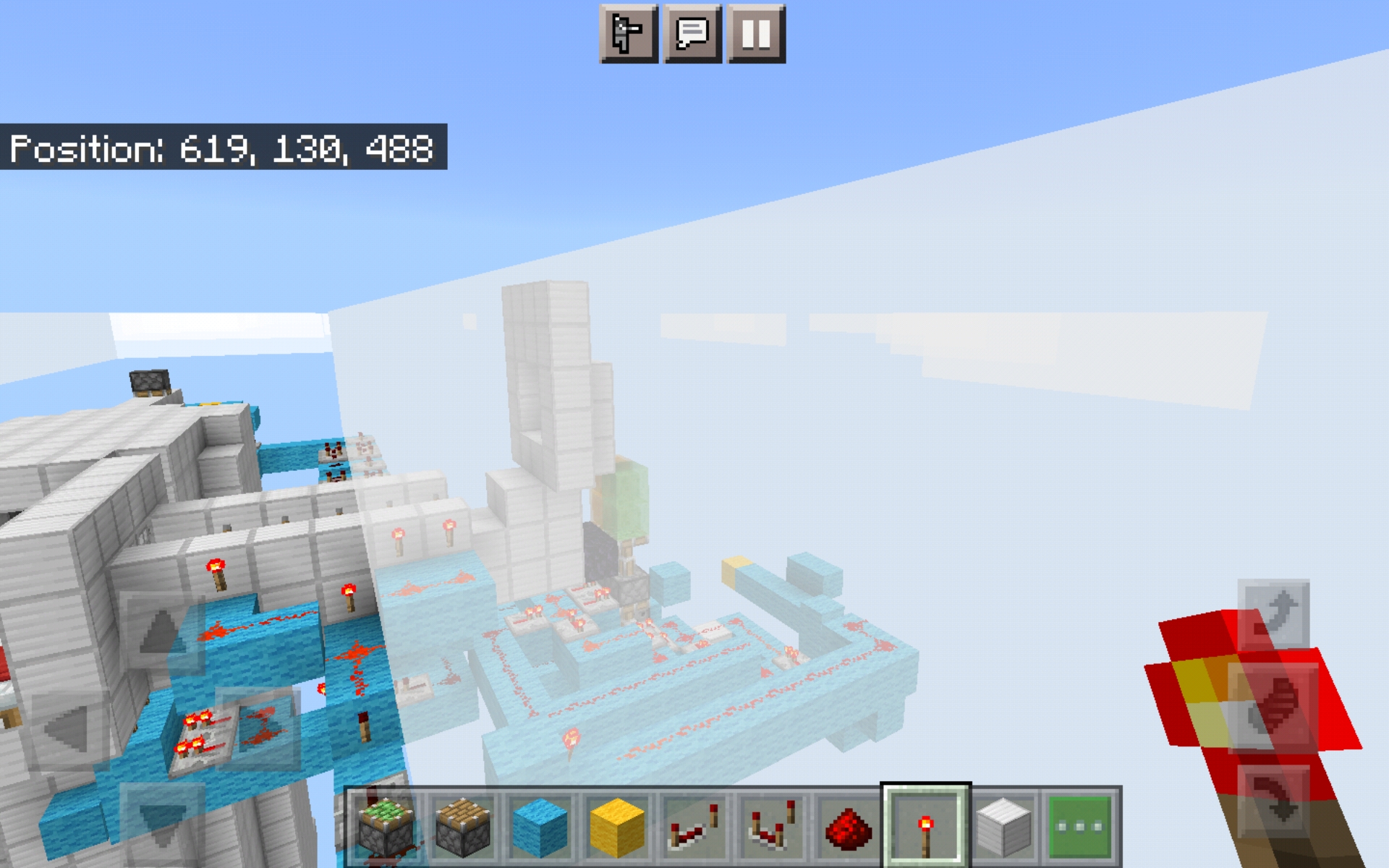
I cannot see slime blocks and honey blocks through clouds. This only applies to slime blocks and honey blocks, not other blocks (as shown in the screenshot). I was in Creative at the time but this could apply to other gamemodes.
Steps to Reproduce:
1. Make your way up to a place where you can are at the same levels as the clouds
2. Place down slime blocks/honey blocks
3. Look through the cloud. The slime blocks/honey blocks will not appear.Observed Results:
The slime blocks and honey blocks do not show through the cloudExpected Results:
The slime blocks and honey blocks show through the cloud as normal
I cannot see slime blocks and honey blocks through clouds. This only applies to slime blocks and honey blocks, not other blocks (as shown in the screenshot). I was in Creative at the time but this could apply to other gamemodes.
Steps to Reproduce:
1. Make your way up to a place where you can are at the same levelsas the clouds
2. Place down slime blocks/honey blocks
3. Look through the cloud. The slime blocks/honey blocks will not appear.Observed Results:
The slime blocks and honey blocks do not show through the cloudExpected Results:
The slime blocks and honey blocks show through the cloud as normalI cannot see slime blocks and honey blocks through clouds. This only applies to slime blocks and honey blocks, not other blocks (as shown in the screenshot). I was in Creative at the time but this could apply to other gamemodes.
Steps to Reproduce:
1. Make your way up to a place where you can are at the same level(s) as the clouds
2. Place down slime blocks/honey blocks
3. Look through the cloud. The slime blocks/honey blocks will not appear.Observed Results:
The slime blocks and honey blocks do not show through the cloudExpected Results:
The slime blocks and honey blocks show through the cloud as normal
Sometimes our villagers will emit anger
particles and change their trades without us breaking their workstations!
Steps to Reproduce:
1. Somehow obtain a villager (/summon villager, spawn egg, etc.)
2. Trade with said villager
3. Wait. It might emit particles (the angry ones) and change their trades, but not professions.Expected Results:
The villagers never change their trades once traded with.Observed Results:
The villagers eventually change their trades without any player input.This has happened in one specific world with players on many different platforms, including Windows 10, Android, and iOS.
Sometimes our villagers will emit anger
Steps to Reproduce:
1. Somehow obtain a villager (/summon villager, spawn egg, etc.)
2. Trade with said villager
3. Wait. It might emit particles (the angry ones) and change their trades, but not professions.Expected Results:
The villagers never change their trades once traded with.Observed Results:
The villagers eventually change their trades without any player input.This has happened in one specific world with players on many different platforms, including Windows 10, Android, and iOS.
Edit: This has happened, in addition to that one specific world, on a realm as well.
Sometimes our villagers will emit anger
Steps to Reproduce:
1. Somehow obtain a villager (/summon villager, spawn egg, etc.)
2. Trade with said villager
3. Wait. It might emit particles (the angry ones) and change their trades, but not professions.Expected Results:
The villagers never change their trades or levels once traded with.Observed Results:
The villagers eventually change their trades and reset levels without any player input.This has happened in one specific world with players on many different platforms, including Windows 10, Android, and iOS.
Edit: This has happened, in addition to that one specific world, on a realm as well.
Sometimes our villagers will emit anger
Steps to Reproduce:
1. Somehow obtain a villager (/summon villager, spawn egg, etc.)
2. Trade with said villager
3. Wait. It might emit particles (the angry ones) and change their trades, but not professions.Expected Results:
The villagers never change their trades or levels once traded with.Observed Results:
The villagers eventually change their trades and reset levels without any player input.This has happened in one specific world with players on many different platforms, including Windows 10, Android, and iOS.
Edit: This has happened, in addition to that one specific world, on a realm as well.
Sometimes our villagers will emit anger
Steps to Reproduce:
1. Somehow obtain a villager (/summon villager, spawn egg, etc.)
2. Trade with said villager
3. Wait. It might emit particles (the angry ones) and change their trades, but not professions.Expected Results:
The villagers never change their trades or levels once traded with.Observed Results:
The villagers eventually change their trades and reset levels without any player input.This has happened in one specific world with players on many different platforms, including Windows 10, Android, and iOS.
Edit: This has happened, in addition to that one specific world, on a realm as well.
Edit 2: I may have found the cause of the issue. I think when our villagers don't sleep, they reset their trades and levels. Hopefully that helps!
Sometimes our villagers will emit anger
Steps to Reproduce:
1. Somehow obtain a villager (/summon villager, spawn egg, etc.)
2. Trade with said villager
3. Wait. It might emit particles (the angry ones) and change their trades, but not professions.Expected Results:
The villagers never change their trades or levels once traded with.Observed Results:
The villagers eventually change their trades and reset levels without any player input.This has happened in one specific world with players on many different platforms, including Windows 10, Android, and iOS.
Edit: This has happened, in addition to that one specific world, on a realm as well.
Edit 2: I may have found the cause of the issue. I think when our villagers don't sleep, they can reset their trades and levels but sometimes they don't. Hopefully that helps!
Related Tickets: MCPE-119736 since that bug seems to trigger this one.
Sometimes our villagers will emit anger
Steps to Reproduce:
1. Somehow obtain a villager (/summon villager, spawn egg, etc.)
2. Trade with said villager
3. Wait. It might emit particles (the angry ones) and change their trades, but not professions.Expected Results:
The villagers never change their trades or levels once traded with.Observed Results:
The villagers eventually change their trades and reset levels without any player input.This has happened in one specific world with players on many different platforms, including Windows 10, Android, and iOS.
Edit: This has happened, in addition to that one specific world, on a realm as well.
Edit 2: I may have found the cause of the issue. I think when our villagers don't sleep, they can reset their trades and levels but sometimes they don't. Hopefully that helps!
Related Tickets: MCPE-119736 since that bug seems to trigger this one.
Sometimes our villagers will emit anger
Steps to Reproduce:
1. Somehow obtain a villager (/summon villager, spawn egg, etc.)
2. Trade with said villager
3. Wait. It might emit particles (the angry ones) and change their trades, but not professions.Expected Results:
The villagers never change their trades or levels once traded with.Observed Results:
The villagers eventually change their trades and reset levels without any player input.This has happened in one specific world with players on many different platforms, including Windows 10, Android, and iOS.
Edit: This has happened, in addition to that one specific world, on a realm as well.
Edit 2: I may have found the cause of the issue. I think when our villagers don't sleep, they can reset their trades and levels but sometimes they don't. Hopefully that helps!
Related Tickets: MCPE-119736 since that bug seems to trigger this one.
Sometimes our villagers will emit anger particles and change their trades and reset their level back to Level 1 without us breaking their workstations!
Steps to Reproduce:
1. Somehow obtain a villager (/summon villager, spawn egg, etc.)
2. Trade with said villager
3. Wait. It might emit particles (the angry ones) and change their trades, but not professions.Expected Results:
The villagers never change their trades or levels once traded with.Observed Results:
The villagers eventually change their trades and reset levels without any player input.This has happened in one specific world with players on many different platforms, including Windows 10, Android, and iOS.
Edit: This has happened, in addition to that one specific world, on a realm as well.
Edit 2: I may have found the cause of the issue. I think when our villagers don't sleep, they can reset their trades and levels but sometimes they don't. Hopefully that helps!
Can someone mark this as confirmed?
Related Tickets:
MCPE-119736since that bug seems to trigger this one.Sometimes our villagers will emit anger particles and change their trades and reset their level back to Level 1 without us breaking their workstations!
Steps to Reproduce:
1. Somehow obtain a villager (/summon villager, spawn egg, etc.)
2. Trade with said villager
3. Wait. It might emit particles (the angry ones) and change their trades, but not professions.Expected Results:
The villagers never change their trades or levels once traded with.Observed Results:
The villagers eventually change their trades and reset levels without any player input.This has happened in one specific world with players on many different platforms, including Windows 10, Android, and iOS.
Edit: This has happened, in addition to that one specific world, on a realm as well.
Edit 2: I may have found the cause of the issue. I think when our villagers don't sleep, they can reset their trades and levels but sometimes they don't. Hopefully that helps!
Summary: Sometimes our villagers will emit anger particles and change their trades and reset their level back to Level 1 without us breaking their workstations!
Steps to Reproduce:
1. Somehow obtain a villager (/summon villager, spawn egg, etc.)
2. Trade with said villager
3. Wait. It might emit particles (the angry ones) and change their trades, but not professions.Expected Results:
The villagers never change their trades or levels once traded with.Observed Results:
The villagers eventually change their trades and reset levels without any player input.This has happened in one specific world with players on many different platforms, including Windows 10, Android, and iOS.
Edit: This has happened, in addition to that one specific world, on a realm as well.
Edit 2: I may have found the cause of the issue. I think when our villagers don't sleep, they can reset their trades and levels but sometimes they don't. Hopefully that helps!
Summary:
You cannot place down weeping vines! I have tried in both Creative and Survival modes with random tick speed 0.Steps to Reproduce:
1. Grab some weeping vines
2. Attempt to place it downObserved Results:
You cannot place down weeping vines.Expected Results:
You can place down weeping vines.
Summary:
You cannot place down weeping vines! I have tried in both Creative and Survival modes with random tick speed 0.Steps to Reproduce:
1. Grab some weeping vines
2. Attempt to place it downObserved Results:
You cannot place down weeping vines.Expected Results:
You can place down weeping vines.Note: Related to MCPE-112420
Screenshot_20210130-202842_Minecraft.jpg
Affects 1.16.201
Does it ever load without highlighting a block?
@Mineliver Ok. I see your point
Everytime someone sends me an invite to their world, not realms, I do not receive the invite. No notification. I tried messing with my XBL settings to no prevail. When I send invites, they receive. This has been happening since 1.13.1? I just want to be able to receive an invite again. I do not know if it is replicable as it happened out of the blue.
Reported on Windows 10, Switch and mobile
Steps To Reproduce: (Two devices and two Microsoft accounts required, referred to as 1 and 2)
1. Open a world on 1 (for best results, set it to Invite Only)
2. Pause the world and invite 2Observed Results:
The invitation does not arrive at 2's device, and so, 2 cannot join 1's worldExpected Results:
The invitation does arrive, and so, 2 cannot join.Affected Platforms (keep updated):
- Android
- Switch
- Windows 10
- iOS
Everytime someone sends me an invite to their world, not realms, I do not receive the invite. No notification. I tried messing with my XBL settings to no prevail. When I send invites, they receive. This has been happening since 1.13.1? I just want to be able to receive an invite again. I do not know if it is replicable as it happened out of the blue.Reported on Windows 10, Switch and mobile
Steps To Reproduce: (Two devices and two Microsoft accounts required, referred to as 1 and 2)
1. Open a world on 1 (for best results, set it to Invite Only)
2. Pause the world and invite 2Observed Results:
The invitation does not arrive at 2's device, and so, 2 cannot join 1's worldExpected Results:
The invitation does arrive, and so, 2 cannot join.Affected Platforms (keep updated):
- Android
- Switch
- Windows 10
- iOS
Everytime someone sends me an invite to their world, not realms, I do not receive the invite. No notification. I tried messing with my XBL settings to no prevail. When I send invites, they receive. This has been happening since 1.13.1? I just want to be able to receive an invite again. I do not know if it is replicable as it happened out of the blue.Reported on Windows 10, Switch and mobile
Steps To Reproduce: (Two devices and two Microsoft accounts required, referred to as 1 and 2)
1. Open a world on 1 (for best results, set it to Invite Only)
2. Pause the world and invite 2Observed Results:
The invitation does not arrive at 2's device, and so, 2 cannot join 1's worldExpected Results:
The invitation does arrive, and so, 2 cannot join.Affected Platforms (keep updated):
- Android
- Switch
- Windows 10
- iOS
Original Description:
Everytime someone sends me an invite to their world, not realms, I do not receive the invite. No notification. I tried messing with my XBL settings to no prevail. When I send invites, they receive. This has been happening since 1.13.1? I just want to be able to receive an invite again. I do not know if it is replicable as it happened out of the blue.Reported on Windows 10, Switch and mobile
Summary:
I am unable to receive invitations.Steps To Reproduce: (Two devices and two Microsoft accounts required, referred to as 1 and 2)
1. Open a world on 1 (for best results, set it to Invite Only)
2. Pause the world and invite 2Observed Results:
The invitation does not arrive at 2's device, and so, 2 cannot join 1's worldExpected Results:
The invitation does arrive, and so, 2 cannot join.Affected Platforms (keep updated):
- Android
- Switch
- Windows 10
- iOS
Original Description:
Everytime someone sends me an invite to their world, not realms, I do not receive the invite. No notification. I tried messing with my XBL settings to no prevail. When I send invites, they receive. This has been happening since 1.13.1? I just want to be able to receive an invite again. I do not know if it is replicable as it happened out of the blue.Reported on Windows 10, Switch and mobile
Summary:
I am unable to receive invitations.Steps To Reproduce: (Two devices and two Microsoft accounts required, referred to as 1 and 2)
1. Open a world on 1 (for best results, set it to Invite Only)
2. Pause the world and invite 2Observed Results:
The invitation does not arrive at 2's device, and so, 2 cannot join 1's worldExpected Results:
The invitation does arrive, and so, 2 cannot join.Affected Platforms (keep updated):
- Android
- Switch
- Windows 10
- iOS
Original Description:
Everytime someone sends me an invite to their world, not realms, I do not receive the invite. No notification. I tried messing with my XBL settings to no prevail. When I send invites, they receive. This has been happening since 1.13.1? I just want to be able to receive an invite again. I do not know if it is replicable as it happened out of the blue.Reported on Windows 10, Switch and mobile
Summary:
I am unable to receive invitations.Steps To Reproduce: (Two devices and two Microsoft accounts required, referred to as 1 and 2)
1. Open a world on 1(for best results,set it to Invite Only)
2. Pause the world and invite 2Observed Results:
The invitation does not arrive at 2's device, and so, 2 cannot join 1's worldExpected Results:
The invitation does arrive, and so, 2 cannot join.Affected Platforms (keep updated):
- Android
- Switch
- Windows 10
- iOS
Original Description:
Everytime someone sends me an invite to their world, not realms, I do not receive the invite. No notification. I tried messing with my XBL settings to no prevail. When I send invites, they receive. This has been happening since 1.13.1? I just want to be able to receive an invite again. I do not know if it is replicable as it happened out of the blue.Reported on Windows 10, Switch and mobile
Summary:
I am unable to receive invitations.Steps To Reproduce: (Two devices and two Microsoft accounts required, referred to as 1 and 2)
1. Open a world on 1 and set it to "Invite Only"
2. Pause the world and invite 2Observed Results:
The invitation does not arrive at 2's device, and so, 2 cannot join 1's worldExpected Results:
The invitation does arrive, and so, 2 cannot join.Affected Platforms (keep updated):
- Android
- Switch
- Windows 10
- iOS
Original Description:
Everytime someone sends me an invite to their world, not realms, I do not receive the invite. No notification. I tried messing with my XBL settings to no prevail. When I send invites, they receive. This has been happening since 1.13.1? I just want to be able to receive an invite again. I do not know if it is replicable as it happened out of the blue.Reported on Windows 10, Switch and mobile
Summary:
I am unable to receive invitations.Steps To Reproduce: (Two devices and two Microsoft accounts required, referred to as 1 and 2)
1. Open a world on 1 and set it to "Invite Only"
2. Pause the world and invite 2Observed Results:
The invitation does not arrive at 2's device, and so, 2 cannot join 1's worldExpected Results:
The invitation does arrive, and so, 2 cannotjoin.Affected Platforms (keep updated):
- Android
- Switch
- Windows 10
- iOS
Original Description:
Everytime someone sends me an invite to their world, not realms, I do not receive the invite. No notification. I tried messing with my XBL settings to no prevail. When I send invites, they receive. This has been happening since 1.13.1? I just want to be able to receive an invite again. I do not know if it is replicable as it happened out of the blue.Reported on Windows 10, Switch and mobile
Summary:
I am unable to receive invitations.Steps To Reproduce: (Two devices and two Microsoft accounts required, referred to as 1 and 2)
1. Open a world on 1 and set it to "Invite Only"
2. Pause the world and invite 2Observed Results:
The invitation does not arrive at 2's device, and so, 2 cannot join 1's worldExpected Results:
The invitation does arrive, and so, 2 can join.Affected Platforms (keep updated):
- Android
- Switch
- Windows 10
- iOS
Original Description:
Everytime someone sends me an invite to their world, not realms, I do not receive the invite. No notification. I tried messing with my XBL settings to no prevail. When I send invites, they receive. This has been happening since 1.13.1? I just want to be able to receive an invite again. I do not know if it is replicable as it happened out of the blue.Reported on Windows 10, Switch and mobile
Summary:
I am unable to receive invitations.Steps To Reproduce: (Two devices and two Microsoft accounts required, referred to as 1 and 2)
1. Open a world on 1 and set it to "Invite Only"
2. Pause the world and invite 2Observed Results:
The invitation does not arrive at 2's device, and so, 2 cannot join 1's worldExpected Results:
The invitation does arrive, and so, 2 can join.Affected Platforms (keep updated):
- Android
- Switch
- Windows 10
- iOS
- Xbox One
Original Description:
Everytime someone sends me an invite to their world, not realms, I do not receive the invite. No notification. I tried messing with my XBL settings to no prevail. When I send invites, they receive. This has been happening since 1.13.1? I just want to be able to receive an invite again. I do not know if it is replicable as it happened out of the blue.Reported on Windows 10, Switch and mobile
Summary:
I am unable to receive invitations.Steps To Reproduce: (Two devices and two Microsoft accounts required, referred to as 1 and 2)
1. Open a world on 1 and set it to "Invite Only"
2. Pause the world and invite 2Observed Results:
The invitation does not arrive at 2's device, and so, 2 cannot join 1's worldExpected Results:
The invitation does arrive, and so, 2 can join.Affected Platforms (keep updated):
- Android
- Switch
- Windows 10
- iOS
- Xbox One
Original Description:
Everytime someone sends me an invite to their world, not realms, I do not receive the invite. No notification. I tried messing with my XBL settings to no prevail. When I send invites, they receive. This has been happening since 1.13.1? I just want to be able to receive an invite again. I do not know if it is replicable as it happened out of the blue.Reported on Windows 10, Switch and mobile
NotePlease, everybody, if you have this problem, vote for this issue instead of leaving a new comment saying "I am also having this issue", etc. Votes tells Mojang this bug affects a lot of people, so it gets fixed faster. Repetitive comments do not do that!
Summary:
I am unable to receive invitations.Steps To Reproduce: (Two devices and two Microsoft accounts required, referred to as 1 and 2)
1. Open a world on 1 and set it to "Invite Only"
2. Pause the world and invite 2Observed Results:
The invitation does not arrive at 2's device, and so, 2 cannot join 1's worldExpected Results:
The invitation does arrive, and so, 2 can join.Affected Platforms (keep updated):
- Android
- Switch
- Windows 10
- Xbox One
Original Description:
Everytime someone sends me an invite to their world, not realms, I do not receive the invite. No notification. I tried messing with my XBL settings to no prevail. When I send invites, they receive. This has been happening since 1.13.1? I just want to be able to receive an invite again. I do not know if it is replicable as it happened out of the blue.Reported on Windows 10, Switch and mobile
Duplicate of [
MCPE-102231|https://bugs.mojang.com/browse/MCPE-102231
We often have 5 people online at once on our realm and it has never happened to us. Our realm, however, is fairly new. Could world size be a part of it? I own our realm
Xbox One X, game loaded on external USB3 SSD, wired network connection
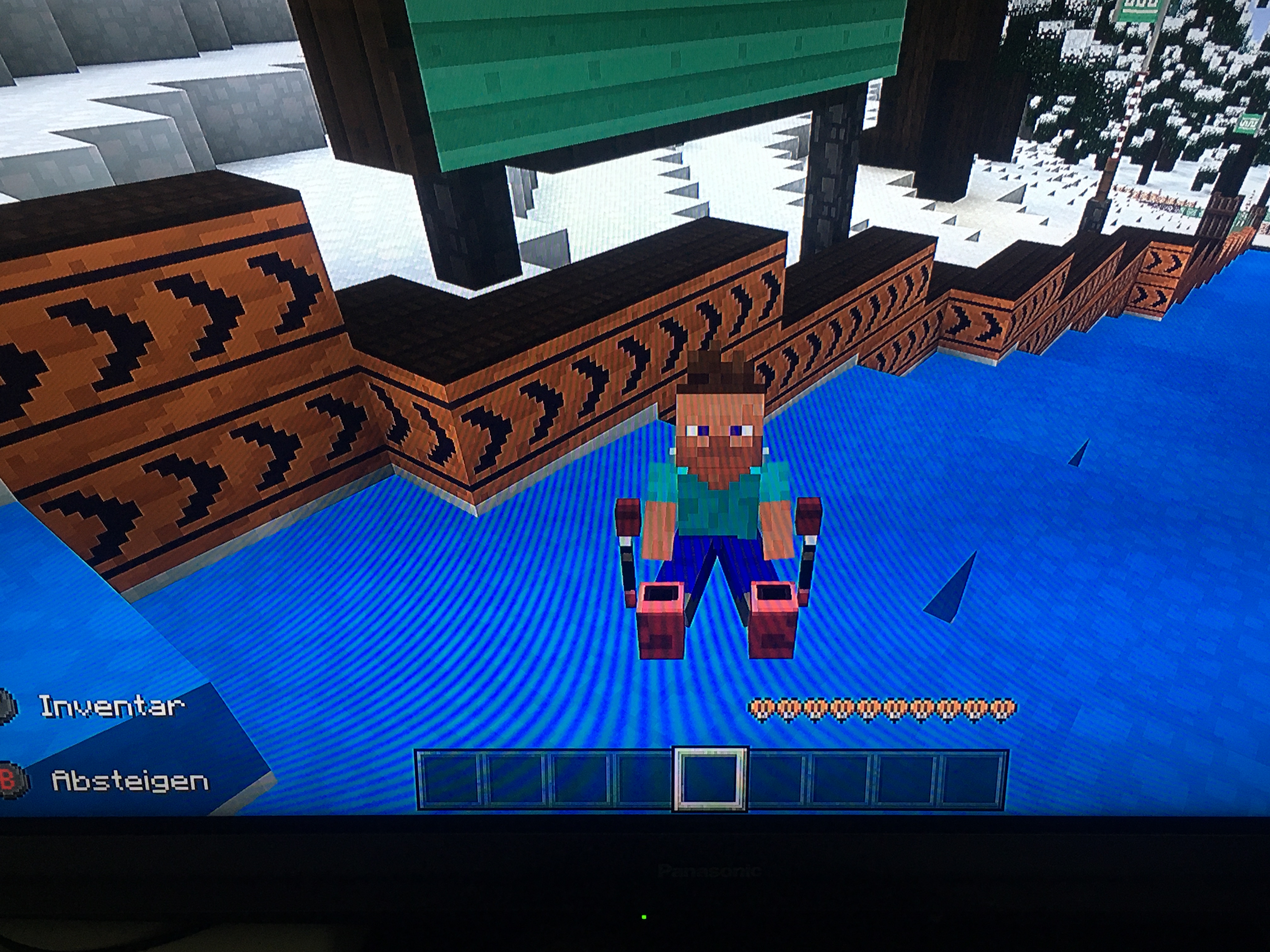
I was trying to create a new skin and it always made it Alex, when it should have been Steve. I have not tested this on other platforms.
Steps to Reproduce:
1. Create a new skinObserved Results:
The skin base is always Alex, never SteveExpected Results:
The skin base should be Steve.Screenshots/Videos Attached: Yes
I was trying to create a new skin and it always made it Alex, when it should have been Steve. I have not tested this on other platforms.
Steps to Reproduce:
1. Create a new skinObserved Results:
The skin base is always Alex, never SteveExpected Results:
The skin base should be Steve.Screenshots/Videos Attached: Yes, here https://drive.google.com/file/d/1j2_c-dESj7hX0M_QP8nOwFtMLkSxUVo4/view?usp=drivesdk
I was trying to create a new skin and it always made it Alex, when it should have been Steve. I have not tested this on other platforms.
Steps to Reproduce:
1. Create a new skinObserved Results:
The skin base is always Alex, never SteveExpected Results:
The skin base should be Steve.Screenshots/Videos Attached: Yes, here https://drive.google.com/file/d/1j2_c-dESj7hX0M_QP8nOwFtMLkSxUVo4/view?usp=drivesdk
Notes: After testing, it seems that the character will be the other character if you have a skin of the first character (i.e. if you have a Steve skin, you will always have Alex).
Creating new skins in the Character Creator always makes the base Alex, never Steve
This seems to be an issue again according to a duplicate report.
Android 10
Android 10, Samsung Galaxy Tab A (2019)
A
ndroid 10, Samsung Galaxy Tab A (2019)All Minecraft Bedrock platforms on 1.16.210
All Minecraft Bedrock platforms on 1.16.210
All Minecraft Bedrock platforms on 1.16.210
All Minecraft Bedrock platforms on 1.16.210 or above
All Minecraft Bedrock Realms platforms on 1.16.210 or above
NotePlease, everybody, if you have this problem, vote for this issue instead of leaving a new comment saying "I am also having this issue", etc. Votes tells Mojang this bug affects a lot of people, so it gets fixed faster. Repetitive comments do not do that!
The Bug:
I cannot post on the feed (Xbox Live club) of my realm!Steps to Reproduce:
1. Go into the Realm
2. Hit the pause button and take a screenshot (camera button)
3. Attempt to post said screenshot on the Realm Feed (should pop up automatically after taking screenshot)Observed Results:
The screenshot will not post.Expected Results:
The screenshot should post.Notes: This only started happening in 1.16.210 (Bedrock). Before that (in 1.16.201) I could post normally.
NoticePlease, everybody, if you have this problem, vote for this issue instead of leaving a new comment saying "I am also having this issue", etc. Votes tells Mojang this bug affects a lot of people, so it gets fixed faster. Repetitive comments do not do that!
The Bug:
I cannot post on the feed (Xbox Live club) of my realm!Steps to Reproduce:
1. Go into the Realm
2. Hit the pause button and take a screenshot (camera button)
3. Attempt to post said screenshot on the Realm Feed (should pop up automatically after taking screenshot)Observed Results:
The screenshot will not post.Expected Results:
The screenshot should post.Notes: This only started happening in 1.16.210 (Bedrock). Before that (in 1.16.201) I could post normally.
Duplicate of MCPE-120365
Duplicate of
MCPE-121218
Duplicate of MCPE-120365
Duplicate of
MCPE-36790
Do you have any gamerules that have been changed?
This report is invalid, since it is a feature request. Please report feedback at the [Feedback website|eedback.minecraft.net/hc/en-us]
This report is invalid, as it is a feature request. All feedback is tracked at [Feedback website|feedback.minecraft.net/hc/en-us]
Summary:
I died when I teleported.Steps to Reproduce:
1. Teleport yourself to coordinatesObserved Results:
I died when I teleported.Expected Results:
I would not die when I teleported.Notes: This is a partial repost of
MCPE-105490. None of the linked reports there were helpful.
Summary:
I diedwhen I teleported.Steps to Reproduce:
1. Teleport yourself to coordinatesObserved Results:
I died when I teleported.Expected Results:
I would not die when I teleported.Notes: This is a partial repost of
MCPE-105490. None of the linked reports there were helpful.Summary:
I die/take fall damage when I teleported.Steps to Reproduce:
1. Teleport yourself to coordinatesObserved Results:
I died when I teleported.Expected Results:
I would not die when I teleported.Notes: This is a partial repost of
MCPE-105490. None of the linked reports there were helpful.
Dying/taking fall damage while teleporting
Summary:
I die/take fall damage when I teleported.Steps to Reproduce:
1. Teleport yourself to coordinatesObserved Results:
I diedwhen I teleported.Expected Results:
I would not die when I teleported.Notes: This is a partial repost of
MCPE-105490. None of the linked reports there were helpful.Summary:
I die/take fall damage when I teleported.Steps to Reproduce:
1. Teleport yourself to coordinatesObserved Results:
I die or take fall damage when I teleported.Expected Results:
I would not die or take fall damage when I teleported.Notes: This is a partial repost of
MCPE-105490. None of the linked reports there were helpful.
Summary:
I die/take fall damage when I teleported.Steps to Reproduce:
1. Teleport yourself to coordinatesObserved Results:
I die or take fall damage when I teleported.Expected Results:
I would not die or take fall damage when I teleported.Notes: This is a partial repost of
MCPE-105490. None of the linked reports there were helpful.This does work with both command blocks and direct /tp command.
What is your device? If it doesn't have much RAM, that could cause it.
Duplicate of
MCPE-21240
Duplicate of MCPE-36190
Duplicate of
MCPE-39439
Duplicate of
MCPE-112420?
As stated on
MCPE-115000, this can cause that bug, and so is related.
This happens in our realm in 1.16.210.
Duplicate of MCPE-36190
Are you on PlayStation?
Gillian B That is a different bug. Please report it separately but please search first before reporting, as I think it has probably been reported before.
Duplicate of
MCPE-111640
Works As Intended.
This is not a bug. You made that.
We don't accept bugs related to external servers here. Please contact server staff/the owner.
Noel McAvoy I reported that issue as
MCPE-122780.
A partial duplicate of
MCPE-120092.
Can you attach a screenshot?
How long is your building
Any sign I type with this (which I use as Forwards) makes it a blank sign.
/\
Do you have any texture packs enabled?
This is in another language. Bug tracker reports are only accepted in English. You can recreate the report and use an online translator, if it helps.
Do you get an error message?
Do you get an error message?
Duplicate of
MCPE-121718
Fire in furnace stays on when fuel runs out.

Fire in furnace stays on when fuel runs out.
Flat area of grass
Mid 2010 Macbook, 1.16.5
Can you provide a video?
Soul Torches Glowing Red In Minecraft RTXSoul Torch point light is incorrectly coloured
You are constantly logging into your account. Nothing happens. Internet connection is good, reinstalling the game - did not help
You are constantly logging into your account. Nothing happens. Internet connection is good, reinstalling the game - did not help
In certain generation cases, amethyst geodes can cause water to have neighboring air blocks, but not flow into them.
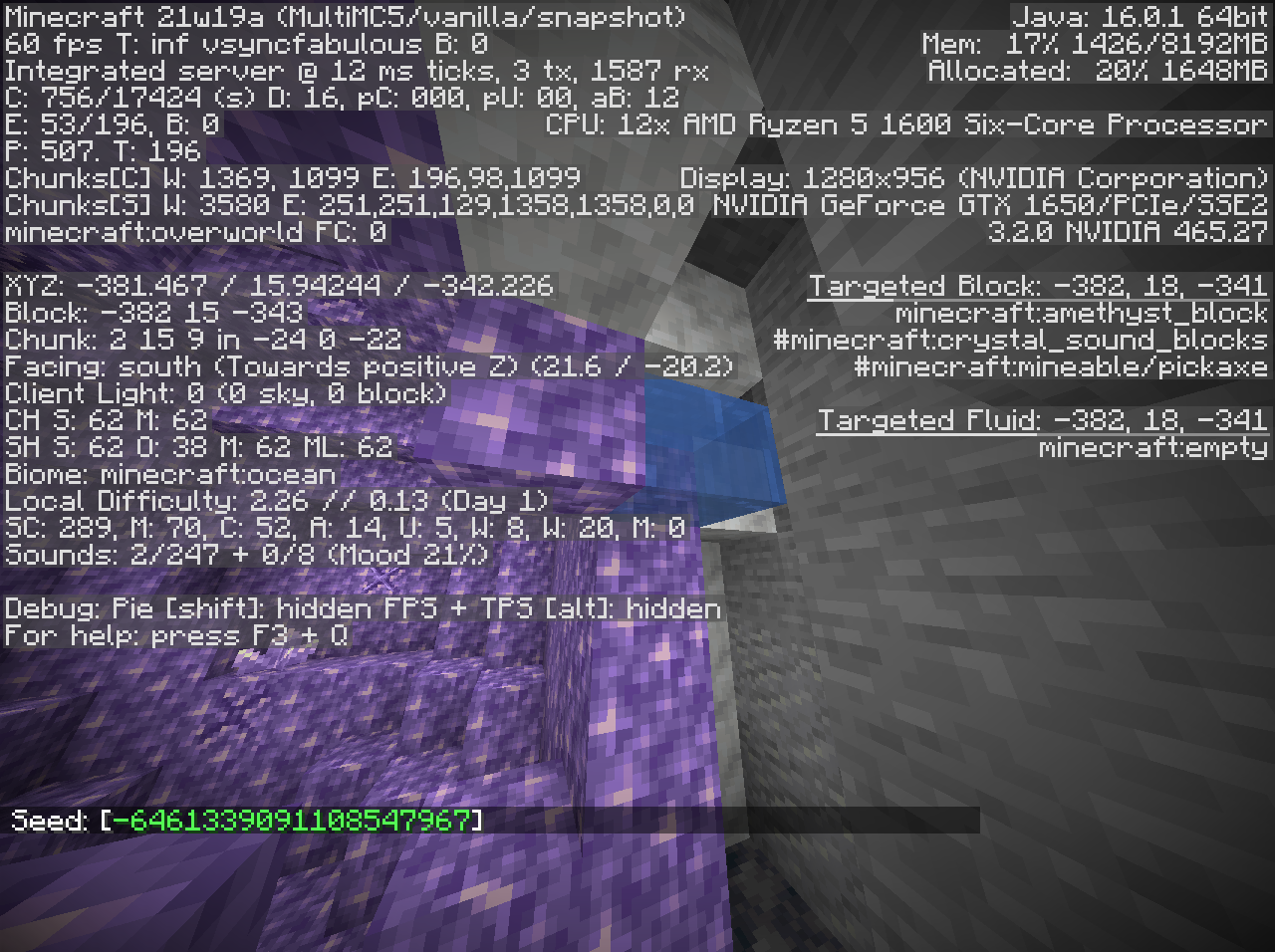
In certain generation cases, amethyst geodes can cause water to have neighboring air blocks, but not flow into them.
Summary:
If the first thing you shoot with a bow is an End Crystal, you will not be granted the "Take Aim" advancement.Steps to Reproduce:
1./advancement revoke @p only minecraft:adventure/shoot_arrow2. Place an End Crystal (on obsidian or bedrock)
3. Take a bow and shoot the End CrystalObserved Results:
You are not granted the advancement Take Aim when you hit an End Crystal.Expected Results:
You are granted the advancement Take Aim when you hit an End Crystal.
If an End Crystal is the first thing you shoot with a bow and arrow, you will not get the "Take Aim" advancement. It will be given the first time you hit another entity.
I feel due to the wording of Take Aim's advancement, that an End Crystal should count for the completion of the advancement.
Summary:
If the first thing you shoot with a bow is an End Crystal, you will not be granted the "Take Aim" advancement.Steps to Reproduce:
1./advancement revoke @p only minecraft:adventure/shoot_arrow2. Place an End Crystal (on obsidian or bedrock)
3. Take a bow and shoot the End CrystalObserved Results:
You are not granted the advancement Take Aim when you hit an End Crystal.Expected Results:
You are granted the advancement Take Aim when you hit an End Crystal.
If an End Crystal is the first thing you shoot with a bow and arrow, you will not get the "Take Aim" advancement. It will be given the first time you hit another entity.
I feel due to the wording of Take Aim's advancement, that an End Crystal should count for the completion of the advancement.
Summary:
If the first thing you shoot with a bow is an End Crystal, you will not be granted the "Take Aim" advancement.Steps to Reproduce:
1./advancement revoke @p only minecraft:adventure/shoot_arrow2. Place an End Crystal (on obsidian or bedrock)
3. Take a bow and shoot the End CrystalObserved Results:
You are not granted the advancement Take Aim when you hit an End Crystal.Expected Results:
You are granted the advancement Take Aim when you hit an End Crystal.
Original Description
If an End Crystal is the first thing you shoot with a bow and arrow, you will not get the "Take Aim" advancement. It will be given the first time you hit another entity.
I feel due to the wording of Take Aim's advancement, that an End Crystal should count for the completion of the advancement.
Summary:
If the first thing you shoot with a bow is an End Crystal, you will not be granted the "Take Aim" advancement.Steps to Reproduce:
1./advancement revoke @p only minecraft:adventure/shoot_arrow2. Place an End Crystal (on obsidian or bedrock)
3. Take a bow and shoot the End CrystalObserved Results:
You are not granted the advancement Take Aim when you hit an End Crystal.Expected Results:
You are granted the advancement Take Aim when you hit an End Crystal.Screenshots/Videos Attached: Yes, here: https://drive.google.com/file/d/1tC9eUVEOqXKIpw4UMDMnn_szCZq9iOMb/view?usp=sharing
Original Description
If an End Crystal is the first thing you shoot with a bow and arrow, you will not get the "Take Aim" advancement. It will be given the first time you hit another entity.
I feel due to the wording of Take Aim's advancement, that an End Crystal should count for the completion of the advancement.
Summary:
If the first thing you shoot with a bow is one of the following, you will not be granted the "Take Aim" advancement:
- End Crystal
- Minecart
- Boat
- Item frame
- Painting
- Armor stand
- Leash Knot
Steps to Reproduce:
- Place
an End Crystal (on obsidian or bedrock)- Take a bow and shoot the
End CrystalObserved Results:
You are not granted the advancement Take Aim when you hitan End Crystal.Expected Results:
You are granted the advancement Take Aim when you hitan End Crystal.Screenshots/Videos Attached: Yes
, here:https://drive.google.com/file/d/1tC9eUVEOqXKIpw4UMDMnn_szCZq9iOMb/view?usp=sharing
Original Description
If an End Crystal is the first thing you shoot with a bow and arrow, you will not get the "Take Aim" advancement. It will be given the first time you hit another entity.
I feel due to the wording of Take Aim's advancement, that an End Crystal should count for the completion of the advancement.
Summary:
If the first thing you shoot with a bow is one of the following, you will not be granted the "Take Aim" advancement:
- End Crystal
- Minecart
- Boat
- Item frame
- Painting
- Armor stand
- Leash Knot
Steps to Reproduce:
- Place one of the entities mentioned above
- Take a bow and shoot the entity
Observed Results:
You are not granted the advancement Take Aim when you hit certain entities.Expected Results:
You are granted the advancement Take Aim when you hit those entities.Screenshots/Videos Attached: Yes.
Original Description
If an End Crystal is the first thing you shoot with a bow and arrow, you will not get the "Take Aim" advancement. It will be given the first time you hit another entity.
I feel due to the wording of Take Aim's advancement, that an End Crystal should count for the completion of the advancement.
Summary:
If the first thing you shoot with a bow is one of the following, you will not be granted the "Take Aim" advancement:
- End Crystal
- Minecart
- Boat
- Item frame
- Painting
- Armor stand
- Leash Knot
Steps to Reproduce:
- Place one of the entities mentioned above
- Take a bow and shoot the entity
Observed Results:
You are not granted the advancement Take Aim when you hit certain entities.Expected Results:
You are granted the advancement Take Aim when you hit those entities.Screenshots/Videos Attached: Yes.
Original Description
If an End Crystal is the first thing you shoot with a bow and arrow, you will not get the "Take Aim" advancement. It will be given the first time you hit another entity.
I feel due to the wording of Take Aim's advancement, that an End Crystal should count for the completion of the advancement.
Summary:
If the first thing you shoot with a bow is one of the following, you will not be granted the "Take Aim" advancement:
- End Crystal
- Minecart
- Boat
- Item frame
- Painting
- Armor stand
- Leash Knot
Steps to Reproduce:
- Place one of the entities mentioned above
- Take a bow and shoot the entity
Observed Results:
You are not granted the advancement Take Aim when you hit certain entities.Expected Results:
You are granted the advancement Take Aim when you hit those entities.Screenshots/Videos Attached: MC-225355.mp4

Original Description
If an End Crystal is the first thing you shoot with a bow and arrow, you will not get the "Take Aim" advancement. It will be given the first time you hit another entity.
I feel due to the wording of Take Aim's advancement, that an End Crystal should count for the completion of the advancement.
Summary:
If the first thing you shoot with a bow is one of the following entities, you will not be granted the "Take Aim" advancement:
- End Crystal
- Minecart
- Boat
- Item frame
- Painting
- Armor stand
- Leash Knot
Steps to Reproduce:
- Place one of the entities mentioned above
- Take a bow and shoot the entity
Observed Results:
You are not granted the advancement Take Aim when you hit certain entities.Expected Results:
You are granted the advancement Take Aim when you hit those entities.Screenshots/Videos Attached: MC-225355.mp4
Original Description
If an End Crystal is the first thing you shoot with a bow and arrow, you will not get the "Take Aim" advancement. It will be given the first time you hit another entity.
I feel due to the wording of Take Aim's advancement, that an End Crystal should count for the completion of the advancement.
Minecraft PE v1.17.0.56 bugBaby Zombie does not hold sword well
Minecraft PE v1.17.0.56 bugSkins corrupted
Powder snow placed above farmland or dirt paths does not convert the farmland into dirt
The Bug:
Powder snow placed above farmland does not convert the farmland into dirt.
Steps to Reproduce:
- Place some farmland near water
.(This is to prevent the farmland from naturally converting into dirt).- Place some powder snow above it.
→Notice how the farmland does not convert to dirt, despite powder snow being placed above it.
Information:
This could be intentional.
The Bug:
Powder snow placed above farmland or dirt paths does not convert the farmland into dirt.
Steps to Reproduce:
- Place some farmland near water (This is to prevent the farmland from naturally converting into dirt) or some dirt paths.
- Place some powder snow above it.
→Information:
This could be intentional.
Powder snow placed above farmland or dirt paths does not convert the farmlandinto dirtPowder snow placed above farmland or dirt paths does not convert it into dirt
Sometimes if I load a world, a message appears saying there was a problem when loading this world. It doesn't re-open when closing the message and clicking it again. After closing and re-opening the game, I clicked on the world again and it loaded it, but reset everything to the way it was when it was first created.
Also, that 1.16.230 update was supposed to release on May 4th, and it's still not here, so what happened?
The bug
When several entities call a function within another function, the selected order of entities is in reverse order. Selectors should have consistent sorting—that is, from nearest to furthest.
Steps to reproduce:
- Open the provided world, stand near one of the sets of stairs, and run /function sort_entities.
- Observe the results. The chat will print the following: a regular /tellraw message listing the three entities by name; each entity will call a function that prints their own name in chat; and each entity will print their name in chat without calling a function.
The expected behavior is all three should sort the entities the same way, but the "With function:" line prints the entities in reverse order.(Note that this problem does not occur if the same command within the "sort_entities" function is called directly in chat.)
/execute @e[type=bug:sample_entity] ~ ~ ~ function print_nameIf the list of entities was 1, 2, and 3, the results should print this:
The bug
When several entities call a function within another function, the selected order of entities is in reverse order. Selectors should have consistent sorting—that is, from nearest to furthest.
Steps to reproduce:
- Open the provided world, stand near one of the sets of stairs, and run /function sort_entities.
- Observe the results. The chat will print the following: a regular /tellraw message listing the three entities by name; each entity will call a function that prints their own name in chat; and each entity will print their name in chat without calling a function.
The expected behavior is all three should sort the entities the same way, but the "With function:" line prints the entities in reverse order.(Note that this problem does not occur if the same command within the "sort_entities" function is called directly in chat.)
/execute @e[type=bug:sample_entity] ~ ~ ~ function print_nameIf the list of entities was 1, 2, and 3, the results should print this:

I'm designing a TNT cannon but I keep finding that the TNT destroys the blocks even in water.
In the original video 8 TNT are dropped simultaneously, and aligned so they appear to be fully submerged in the water.
I tried this test in older versions (1.12.2, 1.14.4, 1.15.2) and the same happens.
This only seems to happen with 3 or more TNT, and when the water block in which the TNT explodes is one block deep (though it can sometimes happen with deeper water) and bordered on at least one side by one of a certain group of blocks (see below). It is not consistent so sometimes no blocks are destroyed.
The group of blocks that cause this issue seems to be those which require a support block but are not destroyed by water, such as: Pressure plates, Signs, Scaffolding; but not (I haven't a clue why) Bells, Lanterns
I'm using vanilla singleplayer creative.

Thank you for your report!
We're tracking this issue inMC-2071, so this ticket is being resolved and linked as a duplicate.If you would like to add a vote and any extra information to the main ticket it would be appreciated.
If you haven't already, you might like to make use of the search feature to see if the issue has already been mentioned.
Quick Links:
📓 Bug Tracker Guidelines – 💬 Community Support – 📧 Mojang Support
📓 Project Summary – ✍️ Feedback and Suggestions – 📖 Game Wiki
I don't really know how to explain this but In my world the sun just turned into a map.
Additional information from
MC-225726:
The moon was going down, and I looked at the rising sun. It looked like a skin file, and it was the texture file for a pillager. I did not have any texture packs, mods, shaders, or any such things loaded. It was vanilla Minecraft. In a different world the sun looked like a map. It might have something to do with the fact that I was in a raid, when the sun looked like a pillager. Also When the sun looked like a map the map looked like the sun. The pillagers were also solid black, though the crossbows showed up. When I pressed F3+T to reload resource packs it went back to normal.
In minecraft, when I am killed or I die my respawn point is in a weird darkness. It takes a few minutes to fix and is really annoying as there is very little visibility, (though the light level is still at 11) it is really annoying when I am playing competetive minecraft.
Steps To Reproduce :
1. Create a new survival world on bedrock Nintendo switch.
2. Join another player on splitscreen.
3. Build a basic house with literally just a torch and bed.
4. Set your respawn point.
5. Walk in any direction for 100 blocks.
6. Ask the other player to kill you.Expected Results :
When you respawn you will not see any darkness and can play normally.Observed Results :
When the other player kills me I respawn in my house but it is completely dark. Though the torch is still burning.
When using §k in chat does not show correctly with the Noto Sans font
Additional information from Skaijie
Steps to reproduce
- Change font to Noto Sans
- Type something like §kpoggerino and hit send
→Font should either obfuscate correctly, else render without formatting if technically impossible.
When using §k in chat does not show correctly with the Noto Sans font
Additional information from Skaijie
Steps to reproduce
- Change font to Noto Sans (by changing the font to Noto Sans in chat by hitting the settings button and changing your font there using the dropdown.
- Type something like §kpoggerino and hit send
→Font should either obfuscate correctly, else render without formatting if technically impossible.
When using §k in chat does not show correctly with the Noto Sans font
Additional information from Skaijie
Steps to reproduce
- Change font to Noto Sans (by changing the font to Noto Sans in chat by hitting the settings button and changing your font there using the dropdown under "Font").
- Type something like §kpoggerino and hit send
→Font should either obfuscate correctly, else render without formatting if technically impossible.
What's happening.
When playing on a new seed or exploring never seen chunks grass, flowers genenerates on sand near bodies of water (e.g. Lakes, oceans, puddles, e.t.c.).
Backstory:
When I was playing on a new seed that I had created I was walking next to a lake and wondering how I got seeds and flowers in my inventory, then I saw in the distance that grass was generating on the sand and after a while popping of into seeds.
Steps to Reproduce:
1. Walk into never been explored chunks near lakes or bodies of water.
2. See grass generating on the sand.
3. Wait a while (5 minutes).
4. Grass breaks, and seed pops out.Seed from Skaijie
Seed: 826991526
Coordinates: /tp @s 47 63 32 -90 45
How to reproduce:
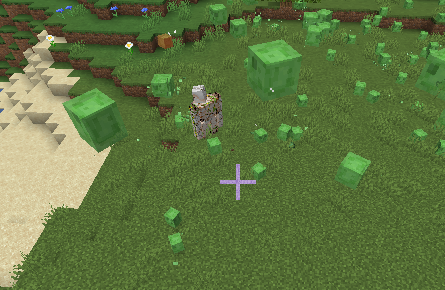
- load into 21w20a
- summon irongolem
- spawn slimes around it
How to reproduce:
- load into 21w20a
- summon irongolem
- spawn slimes around it
![[Mod] Jarl-Penguin](../../../data/avatars/users/92849.png)
The Bug
One can make it so that the player's hand displays instead of the item that is selected on the hotbar.
How to Reproduce:
- Take one of any edible/drinkable item.
- Continuously press the "Use/Place block" key.
- After you've eaten/drank the item, switch to another item in your hotbar using the number keys (1-9) while still holding down the "Use/Place block" key.
-> You've selected an item in your hotbar but you're not holding it in your main hand
How to Reproduce on Touch Screen: (from [Helper] osfanbuff63)
- Take one of any item
- Tap on the hotbar and elsewhere on the screen at the same time
-> You've selected an item in your hotbar but it is actually showing an empty hand

Improved description by [Helper] osfanbuff63
The Bug:
When you die in the Nether (or End), the minecraft:changed_dimension advancement trigger does not trigger.
Steps to Reproduce:
- Download the data pack from the attachments (the .zip file)
- Create a new world with cheats on and run `/execute in minecraft:the_nether run tp ~ ~ ~` Note: You may need to teleport around a bit depending on your spawn
- Run `/execute in minecraft:overworld run tp ~ ~ ~` and notice the advancement triggered. (You will see a message in chat saying `You've changed dimension to Overworld!`
- Run the command from step 2, but afterwards this time kill yourself in some way.
- Notice the advancement did not trigger this time.
Expected Behavior:
The advancement would trigger as you spawned back in the Overworld.
Actual Behavior:
The advancement does not trigger.
Original Description:
As in the title. I was trying diffrent things with advancement trigger minecraft:changed_dimension and noticed it doesnt trigger when player gets teleported to spawn-point after death.
I've created example datapack with simple advancement checking for dimension change from The Nether to Overwold. Which rewards function foo:bar which simply displays message in chat saying "You've changed dimension to Overworld!" and revokes said advancement.
First test was teleporting from The Nether to Overworld using:
// execute in minecraft:overworld run teleport @p ~ ~ ~
Which worked as expected and triggered the advancement.
Upon dying however, when player got teleported to his orginal spawn-point set in Overworld the trigger didn't fire.
In attachments I provide the dim_change.json advancement and reward function foo.mcfunction files.

Updated Description by [Helper] osfanbuff63
Summary: If you place a scaffolding tower at coordinates x=0, y, z=0, the block at y=0 will act like a solid block.
Steps To Reproduce:
- Create a scaffolding tower at x=0, z=0
- Go down or up the scaffolding tower
Observed Results:
You will not be able to go through the scaffolding at y=0 like normal.
Expected Results:
You will be able to go through the scaffolding at y=0 like normal.
Screenshots/Videos Attached: Yes, 2021-12-15 16-49-48.mp4
Original Description:
0,0,0 acts like a solid block. I can't walk thru it and if i fall on it with nothing there i take damage. You cant place things on it but scaffolding is not affected by gravity when placed on 0,0,0
I had run into a wall with elytra in the world but not recently. Other people in the world also were having this issue who had not run into a wall with elytra. I had also not encountered this issue
Just tested it: I just get stuck in the block above my head when I jump and it does suffocate me even if there is an air block above the block
I have an Android tablet (Samsung Galaxy Tab A 2017) in 1.16.200 and everything is still laggy especially when flying with elytra
Having this same issue, on a Android (Samsung Galaxy Tab A 2017)
Yes I did swim/fly/change my hitbox before experiencing this bug
Fall damage was off in the world so I didn't actually take damage from flying into a wall but that might not matter
Can someone close this?
I have experienced this bug but I think that incorrect hitboxes happens with another, similar bug. My reasoning is that I had other people in my world who had never even equipped an elytra, much less run into a wall with one, and were still experiencing the bug! They have also not died while swimming in a one block high space.
Anyone have any thoughts on what else could be causing these incorrect hitboxes? It would be much appreciated!
I don't personally think that I was too close to the blocks but I could have been
Gavin Forstrom I didn't count the number of blocks but I think I was 1-2 blocks away when I encountered the bug
I could see lag spike but could also see it as a bug but I don't know 100%
Pretty sure I have 2GB of RAM and am experiencing this, whether it is a bug or it is lag spikes
Related to
MCPE-112420I would thinkI have had this issue too!
I also can't receive invites on an Samsung Android tablet but friends on iOS can...
I definitely agree! It seems like zombified villages are much more common than regular villages!
Can confirm! I have never seen that splash and I have seen every other splash at least twice!
@Jonathan Hanzel I think it could be
Here is a screenshot of this issue happening to me on a Samsung Galaxy Tab A 2019 using touch controls! This also happened without me eating/drinking.
Edit: It seems to happen randomly but I can reproduce it.
@Skaijie yes I would say it is definitely related to
MCPE-37581Does this relate to
MCPE-109925?This is a duplicate of MCPE-36190
Can confirm in 1.16.201! This happens a lot to my friend on iOS and occasionally to me on Android!
This is a duplicate of MCPE-36190 (I am not a moderator however)
This is a duplicate of
MCPE-105892(I am not a moderator though)This is a duplicate of MCPE-36190 (I am not a moderator though)
Ok. I see your point
Is this possibly a duplicate of MCPE-36190? I am not a moderator however
Could this possibly be a duplicate of
MCPE-109925? I am not a moderator howeverI think this is a duplicate of
MCPE-58759I have been having this issue since 1.16.100 came out with cows and sheep, but just recently in 1.16.201 hopper minecarts have been disappearing when we unload the chunk that our supersmelter is in, and in 1.16.200 and 1.16.201 villagers had been disappearing in one world but in a different one villagers have not disappeared at all!
Can confirm (on Android as well) in the 1.16.201 hotfix!
Can confirm in 1.16.201! This should be of high importance since it is so annoying having to spam to craft bulk!
I think this is a duplicate of MCPE-36190 (I am not a moderator however)
Unable to reproduce in 1.16.201 with bedrock but have not tested other blocks
Duplicate of MCPE-36190
Can confirm!
This is a duplicate of
MCPE-101087Maybe related to
MCPE-105892?Can confirm on 1.16.201!
Duplicate of
MCPE-103568Do you have visitor permissions? To check this, open the pause menu and tap the icon next to your username.
@Dropcraft this thread is for the founder's cape disappearing. Please create a new report for the pan cape.
Is this related to
MCPE-105892?Duplicate of
MCPE-112987?I think this is because the minecart chest is crashing into unloaded chunks
Related to
MCPE-21416?Can confirm on Android!
This is a duplicate of
MCPE-101087Did this happen after running into a wall with elytra?
This is under the incorrect project. This should be under the REALMS project.
This is a duplicate of
MCPE-105892This is a duplicate of MCPE-36190
Can confirm on Android in 1.16.201!
This is a duplicate of MCPE-21416
I was unable to reproduce this in 1.16.201 on Android with a tamed dog and then killing it. Could you do some more testing with that scenario?
This is a duplicate of MCPE-36190 and/or
MCPE-58759Can confirm on Android in the 1.16.201 hotfix!
I was unable to reproduce on 1.16.201 on Android.
@Wither Slayer 5000 this is definitely not fixed. I was having this problem today in 1.16.201.
I am having this issue in 1.16.201 hot fix on Android
I have encountered this issue!
Were you at one point in the beta?
This is a duplicate ofMCPE-36190
I think this is a duplicate of MCPE-36190
Can confirm on Android in 1.16.201!
Can confirm on Android in 1.16.201! I have also attached another screenshot of this happening to me.
This is a duplicate of
MCPE-102530Have you installed the free music pack from the Marketplace?
Can confirm on Android!
But Chara yes I agree!
This is a duplicate of MCPE-36190
Can confirm on Android! I am also attaching screenshots of this bug for you!

Can you provide a video/screenshot of this? (Preferably a video if possible)
Affects 1.16.201! I have also attached a screenshot of a dyed wolf!
@Odysseus Kirikopoulos or maybe 1.16.210
This happens on other platforms as well (specifically Android!)
I don't want this bug to be fixed. It's such a cool one!
This is a duplicate of MCPE-36190
I was unable to reproduce this in 1.16.201. Maybe this is a beta only bug?
Is a screenshot/video available?
I was unable to reproduce this bug in 1.16.201 (the same version as you). Could you try it out again and maybe try to record a video of it happening?
Is the gamerule Mob Griefing turned off in your Realm world's settings?
Thanks! I am now able to reproduce this (as well on Android). I think the first time I was doing something wrong.
Can confirm in 1.16.201 on Android!
I was unable to reproduce this bug in the latest non-beta version (1.16.201) Maybe this is a beta-only bug so far?
Can confirm on Android in 1.16.201 (same as you!)
Did you use /locate fortress? That might get you there
Related to
MCPE-115000?Can confirm in 1.16.201 on Android! But I think this is only for the beetroots, not pumpkins and melons. I think the pumpkin and melon sounds are intended to be the wood breaking sounds.
This also happens when placing beetroot seeds, not just breaking them!
I think this is a duplicate of MCPE-36190.
Duplicate of MCPE-36190?
Duplicate of
MCPE-109925What gamemode were you in when it happened?
When and where in Minecraft were you when you took these screenshots?
Can confirm on 1.16.201!
Were you in peaceful difficulty?
SNAKESLIGHT I agree, there should be a slider for this but that is a feature request (say that at feedback.minecraft.net).
This specific issue should be resolved as Works As Intended since I think this is intended.
And MythicFunk I did read the description; I still think this is Works As Intended since Minecraft Bedrock (MCPE previously) was not originally meant for click based platforms, they just added it which meant it couldn't be the same controls and meant major revamping was needed to provide support for that.
Can someone resolve this ticket?
Duplicate of
MCPE-109925Would a video of this be available?
Duplicate of MCPE-36190
Can confirm on 1.16.201 using Android!
What was the seed you were using for the screenshot? (Find it under your settings in your world)
Can confirm on Android in the 1.16.201 hotfix!
Thank you!
Duplicate of
MCPE-109925Related to
MCPE-112420?This issue did not happen to me in my new realm that was created 2 days ago on 1.16.201; the realm feed works fine! Mine was created on iOS.
EVGENSYPERPRO I don't think so, that one is about breaking them, this one is about placing them
OcelotOnesie I can try
Here you go!
Oh. I didn't know that. This can be resolved as Works As Intended
What is your random tick speed? And how long did you wait?
T. Gemarino James I agree, I thought this was a feature added in 1.16.200
I was unable to reproduce this in 1.16.201 hotfix. I am also attaching a video (Blocks breaking correctly). Can you check that video and see if I was doing anything wrong?
Also, if you play with other people, do they see your cape?
Can confirm on Android!
Can confirm in 1.16.201 hotfix on Android! I have also attached a screenshot that shows that the hit box of the bed shows as the hit box of a slab... that could be a separate issue though
I can also break the bed without crashing the game.
Affects 1.16.201 on Android
Can confirm. Another video attached as well!
This is invalid. Please only put one bug report in each ticket.
Have you tried to add them through the Xbox app/website?
Do you have visitor permissions?
EVEGENSYPERPRO Those are totally unrelated bugs.
I think this is a feedback request.
Duplicate of MCPE-110049
Duplicate of
MCPE-116221Mojang accounts have never been a thing in Bedrock. Is this meant to be on the Java Edition tracker?
Duplicate of MCPE-36190
Are you taking any measures to prevent them from despawning?
Can confirm on 1.16.201, but only on Android!
You can use a realm to download it on iOS, Android, or Windows 10 and then upload the world file from there. You cannot directly upload it from the PS4, you have to use a realm.
If the world size is too big, upload it to a file sharing site (Google Drive, etc.) and then share the link here.
I feel like this is a Won't Fix since the MCPE version of this bug (MCPE-13798) was resolved that way so I would assume the Java Edition version (this one) would go the same way.
In mine on Android, it changed from "Profile" to "Character". So kind of can confirm....
Can confirm on Android! This also happens in Creative with the spawn egg!
Aubrey Martinez I think they won't since they officially discontinued Legacy Console Edition and PS4 Edition was part of that.
Can confirm on Android in 1.16.201! This also happens when you summon in villagers using /summon.
Duplicate of MCPE-51345
Does it ever load without highlighting a block?
You sure you are in 1.16.201? They fixed this bug then.
Duplicate of
MCPE-107211I think this is not a bug since the seeds are the only things without fortune you might get multiple of on wheat and beetroot crops. I think, instead, this is Works As Intended.
Possibly a duplicate of
MCPE-33270?Try uploading the video as an unlisted video on YouTube and then put the link here
This is actully duplicate of
MCPE-52937Were you in peaceful? This has happened to me there
Duplicate of MCPE-51263, which is resolved as works as intended.
It looks like you are using a modded display. Are you using any resource pack(s) and, if so, does disabling them fix the problem?
This might be intended because some of the splashes are very weird and misspelled intentionally.
Can confirm on Android!
This issue was confirmed for 1.16.100 and fixed in 1.16.200. Can you please attach a screenshot/video of this happening in the latest beta/1.16.201 hotfix?
[Mod] GoldenHelmet That's happened to me. However, the original report was unrelated to redstone.
I will attempt to take a video for you guys.
This is invalid, as this is an suggestion. Please let us know there at feedback.minecraft.net.
It looks like you are using resource packs. Is that correct and, if so, does disabling them fix the problem?
Can confirm in 1.16.201!
Also happens in survival mode sometimes, especially when breaking light sources (torches, etc.)
Related to
MCPE-112420based on duplicates?Are you repeatedly hitting the use button (tapping on the screen on mobile, right clicking on Windows 10, etc.)? If so, this might be you picking it back up.
And if not, can you take a video?
Can confirm on Android but this might be works as intended
I think this is a feature in Java that just hasn't been added to Bedrock yet.
Can anyone in beta reproduce this in 1.16.210.59?
Is your world size high in mb?
To check that on a realm, I think the easiest way to do it is to export the world and see it in singleplayer. I know this works on Android so hopefully it works on Xbox.
This just happened to me. As Kate C says, the farmers hold out an emerald as they recognize you have pumpkin, but they don't want it for trading.
This happened on a realm on Android.
Since beta is not currently available for PS4, the version should be changed to the latest full version (1.16.201 Hotfix).
Duplicate of MCPE-89347
Can confirm, at least for the over 2304 items.
The easiest way is to "watch" it and then emails will be sent to your linked email.
There might be other ways but that is the way I use!
Yes, the Affects Version (s) is incorrect since beta isn't available for PlayStation. This should be changed to the latest full version (1.16.201 Hotfix).
This is multiple different bug reports. Please separate your report into multiple different reports, e.g. "We can't connect to realms right now" or "Your friends are not playing Minecraft right now when they are." Please, however, search before creating the separate reports, as it is very likely that they have been reported.
This should be marked as resolved as Invalid, because of what I mentioned above.
Did this happen after running into a wall with elytra?
Possible duplicate of
MCPE-109925?The only way from Nintendo Switch is to upload it to a Realm and then download that on Android, iOS or Windows 10.
From there:
And then after that you can take the file and upload it here. If it is too big, upload to a file sharing site (Google Drive, etc.) and share the link here instead of directly uploading it.
Duplicate of MCPE-36190
I had this issue for a while, but it was fixed for me when the new achievements screen came out in 1.16.100, it was fixed!
1.16.210.60?
The reason I ask is because I am not part of beta, so I need others to test it who are in beta.
Please don't duplicate your own reports (
MCPE-118366)Did you forget to have books in your inventory?
This did just happen to me. To me, it was relatively unplayable until later, when the lag mostly subsided. 5 people were online last night and we had lag issues we had never had with 6 online. I cannot confirm lag when flying with elytra, since I did that with 5 people on without lag.
Duplicate of
MCPE-109925Can confirm!
According to
MCPE-118509, there is a seed. The seed is 231605782 but I don't know the coordinates.Duplicate of MCPE-36190 and/or
MCPE-58759Duplicate of
MCPE-101087Unable to reproduce on Android. I have attached a video (here) showing me mining without Haste 2 with both Efficiency 5 and unenchanted diamond pickaxes and then with Haste 2 with both. There is a noticeable difference in the video.
I would not like this to be fixed. This is so useful in early game to get diamonds!
Duplicate of MCPE-36190
Can anyone in beta reproduce this in 1.16.210.61? I suspect so since nothing like it was in the changelog but could someone check?
Duplicate of
MCPE-21416?Did you purchase the ink sacs from a wandering trader?
If you did select both buttons, could you attach a video of this happening to you?
Duplicate of
MCPE-101087Duplicate of
MCPE-58759Duplicate of MCPE-36190
That one is resolved as Invalid because it was in an incorrect language. This one is, because of that, NOT a duplicate of that bug.
Duplicate of
MCPE-103568